iOS Devices

See All Stories

The devices that run the world’s most advanced mobile operating system

Check out our top stories on iOS Devices:

iOS devices refer to any of Apple’s hardware that runs the iOS mobile operating system which include iPhones, iPads, and iPods. Historically, Apple releases a new iOS version once a year, the current version is iOS 10. Here is the complete list of iOS 10 compatible devices.

What is Apple's "Joint Venture"?

Site default logo image

Today, Patently Apple details a new Trademark that Apple is pursuing called ‘Joint Venture’.  At first glance, it would seem that Apple is prepping a Apple-Small Business relationship concept where it helps with IT repair, training and services, likely for a fee.  The trademark has also been filed in China and contains the following verbiage:

A International Class 035: Retail store services featuring computers, computer software, computer peripherals, and consumer electronic devices, and demonstration of products relating thereto.

International Class 037: Maintenance, installation and repair of computer hardware, computer peripherals, computer networks, and consumer electronic devices; information, advisory and consultancy services relating to all the aforesaid.

International Class 041: Education and training services, namely, personal instruction and conducting classes, workshops, conferences and seminars in the field of computers, computer software, computer peripherals, online services, information technology, internet website design, video products and consumer electronics; arranging of exhibitions, seminars and conferences; arranging professional workshop and training courses; providing on-line publications in the nature of newsletters in the field of computers, computer software, computer peripherals, online services, information technology, internet website design, video products and consumer electronics.

International Class 042: Technical support and consulting services pertaining to computer hardware, computer peripherals, computer software and consumer electronics; troubleshooting and computer diagnostic services for computer hardware, computer peripherals, computer software and consumer electronic devices; consulting services in the field of selection, implementation and use of computer hardware and software systems for others.

If so, this would be a big deal.  As of now it is just a trademarked concept.

Tablet screen mystery solved: Send in the Clones

Site default logo image

Remember that monster iPhone-lookin’ glassware that MacObserver found a few weeks before the tablet launch? At the time, there was some speculation that it was the glass for the iPad.

Well it did belong somewhere, just not within light years of an Apple product.  In fact, China was already cloning the iPhone/iPad before it was released  Engadget today shows us:

And the back:

It runs Windows 7 on Netbook-type hardware.  That means it can also be made into a Hackintosh.

iPad's A4 is built on an ARM Cortex A8 processor, not A9 multi-core?

Site default logo image

Jon Stokes at Ars has an interesting take on the iPad’s A4 processor.  He says it doesn’t have ARM’s next-generation Cortex A9 design which supports multicore processors.  Instead, he contends that it is a single-core ARM Cortex A8 design which is along the same lines as the current iPhone 3GS, iPod touch as well as the Palm Pre, Droid, etc.

As I watched the videos and read the reports of the iPad in action at the launch event, I was thoroughly convinced that the device was built on the out-of-order Cortex A9, possibly even a dual-core version. But it turns out that the the A4 is a 1GHz custom SoC with a single Cortex A8 core and a PowerVR SGX GPU. The fact that A4 uses a single A8 core hasn’t been made public, but I’ve heard from multiple sources who are certain for different reasons that this is indeed the case. (I wish I could be more specific, but I can’t.)

Stokes speculates that Apple’s performance gains are likely the results of the chopping off I/O and camera components from the design (other companies get these generic chips with everything in them).  He contends that the reason Apple hasn’t released any information on the A4 is because there is no “wow” factor to it. (10 hours of video on a bright 10-inch notwithstanding)

NVIDIA was the first to announce a high production ARM Cortex A9 based processor which should be getting put inside the Boxee Box from Dlink soon.

High end drive update options for your MacBook/Pro

Site default logo image

Apple stocks its MacBook/Pros with a solid array of hard drives that appeal to most Mac users.  But Apple has also made it beyond easy to upgrade your stock drives with something much better.  Below, we’ll list a few of the options you have.

First, consider if you want a traditional hard disk or a Solid State Disk.  Traditional disk drives are much cheaper but are more prone to fail and are usually slower.  Solid State Disks are much more expensive (often  but are also faster and more reliable because they have no moving parts. 

Let’s talk Hard Disk Drives (HDDs) first.

Unibody MacBook Pros can take notebook hard drives up to 12.5mm thick.  Older MacBook Pros usually top out at 9mm thick with a few exceptions (17″).  That’s important because the high end Motebook hard drives are often 12.5 mm thick.  For instance,


In a perfect world, you could boot your OS, prefs and applications from a small solid state disk drive and put your media on a traditional drive.

Steve Jobs rocks a 3.1.2 OS iPhone

Site default logo image

So Mike from Macsoda wrote us saying he got a response from Steve Jobs to his email wondering about the future of Final Cut Pro (40 Final Cut Pro developers were recently let go).  Typically brief, Steve Jobs said:

No worries. FCP is alive and well.

But we weren’t just going to take his word that the email was from Jobs.  We asked for the header information from the email as well  —  which was sent to us. 

The email looks legit as it originates from an internal Apple 17.x.x.x IP address.  But then we noticed something kind of funny.  Steve Jobs’ iPhone is listed as iPhone Mail (7D11) which means he’s on 3.1.2.  That’s not even the current version of the iPhone OS (3.1.3 – 7E18), let alone the 4.0Beta we’re were hoping to see.

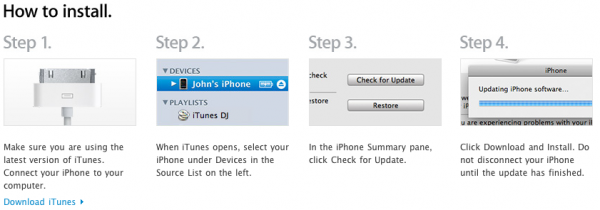
Anyway, if you are out there Mr. Jobs…you can keep your iPhone current by connecting it to iTunes and then running an update.

Associated Press announces paid iPad subscription service

Site default logo image

Today, the Associated Press announced that they will be offering a paid subscription to their content for their readers with iPads, though the service may start out as a free app.  We’re not quite sure how this will differentiate itself from the free AP feeds that are already available on the Internet and wonder what the incentive would be to pay for a special AP app.

This will be one of the first moves for the news agency’s new AP Gateway division.

“AP Gateway will serve as the launching pad for new products and services from AP and other interested news publishers.”

The new applications for delivering content immediately will be available throughout the ecosystem of recently announced mobile reading devices such as the iPad. It has not been said yet how much this service would cost or if Apple will be taking its standard 30% cut of the profits. Currently the Associated Press offers a free push notification-based application on the iPhone App Store.

via MacObserver.


Parallels releases Server 4.0 for Mac Bare Metal Edition

Site default logo image

Parallels today announced an addition to their MacOSX Server virtualization lineup. Parallels Server 4.0 for Mac Bare Metal Edition allows you to run virtual machines on your XServe or Mac Pro without installing OSX Server on the machine first.  Older versions of Parallels Server for Mac ran on top of OSX.

The elimination of OS X as the primary OS cuts un-needed overhead, giving administrators the ability to add more virtual machines, including MacOSX Server.

More information here including a downloadable trial. 

Parallels Server 4.0 for Mac Bare Metal Edition is the first Parallels solution that can be installed and used on bare Apple hardware. Simple to install and simple to administer, Parallels Server 4.0 for Mac Bare Metal Edition is a cost-effective, fully supported server virtualization solution that is certified to run on bare Apple Xserve.

Simplicity. Savings. Scale.

With Parallels Server 4.0 for Mac Bare Metal Edition you can

Palm Pre gets Adobe Flash update today?

Site default logo image

Following yesterday’s bad news, Palm today announced that their Pre devices would receive a WebOS 1.4 update today, which includes Adobe’s Flash 10 player. The change log notes that “full Flash 10 support will require an Adobe plug-in which will be available shortly from the Palm App catalog”.  It will be interesting to see how well Flash works on the Pre and how well recieved it is by its owners.  

If we have any Pre owners reading, we’d like to know how/if Hulu performs on the Pre.

Steve jobs reportedly told Wall St. Journal execs that the inclusion of Flash on the iPad would take the battery from 10 hours to 1.5 so the battery toll on the Pre will be closely watched.

The Sprint page has since been taken down but not before Boy Genius could paste it into a post.  

The upcoming Apple vs. Flash battle

Site default logo image

The Wall St. Journal this morning had a short synopsis of Adobe Chief Executive Shantanu Narayen’s talk at the Goldman Sachs technology conference this week.  That’s the same conference where Tim Cook spoke yesterday.

He spoke on his view of why the iPad wasn’t equipped to play Flash:

Narayen said Apple’s decision likely had everything to do with its business model as it tries to keep a proprietary, closed system so everything goes through its iTunes store, and has nothing to do with the Flash technology. He said about 85 of the top 100 Web sites in the world use Flash, and 75% of the video on the Web today is in Flash, including Google Inc.’s (GOOG) YouTube, News Corp.’s (NWS) Hulu and broadcasters such as ABC and Fox.

Earlier this month, Jobs reportedly told Wall Street Journal execs that if the iPad used Flash the battery life would go from 10 hours to 1.5 (has Apple been testing this?).  

But is it all about technology?  Perhaps Adobe’s CEO is partially right.  Even if Flash ran efficiently on the iPad and weren’t full of security holes, Apple might balk at having other ways to get applications on the iPhone.  Certainly, Flash/AIR developers would rather write applications once and do updates online rather than have to reprogram their Apps to work natively on the iPhone.  Those apps would run on Android devices and any other devices that run Flash.  

The first mobile devices with Flash won’t run well.  Batteries will drain fast, they will crash a lot and they won’t be capable of performing anywhere as well as native applications.

Over the next year, however, things will change.  Flash will become more efficient

Opera 10.50 for Mac brings HTML5 video support, Multitouch gestures, crazy speed

Site default logo image

Update: Whoa! Opera just beat stock Safari in its own Webkit Javascript benchmarking tests.

Frankly, we mostly use Opera for its in-line (legal!) Torrent downloading ability, but it is always good to hear that they are working on features like those announced today. This version of Opera is supposed to use its new Javascript engine that it calls the fastest in the world. We’ve benchmarked it with Sunspider on a 13″ MacBook Pro here.

Headlining the list are HTML5<video> support and multi-touch gestures. The full list of updates below:

  • Stabilization Improvements: You will find that this build is much more stable than the pre-alpha build.
  • More polished user interface: The whole UI is more polished now. We’re still not done yet, and expect more polishes and improvements in the builds to come.
  • Opera Unite: Opera Unite now works with this release. You can browse through and download unite apps through the Unite Apps Repository.
  • HTML5 <video>: This beta now supports the html5 <video> tag.
  • Widgets as standlone apps: We’ve already talked about widgets as standalone apps, but this functionality was till now, only available in windows builds. Now even in this build of 10.50 beta for mac, you can use widgets as standalone apps.
  • New Developer Tools Menu: You can go to ‘View->Developer Tools’ Menu to access common and usefull tools for developers, such as Opera Dragonfly, cache information, the error console, the source code of the page, and more.

Download Opera 10.50 Beta for Mac

Opera via Geekword

Free floating windows demonstrated on the iPad

Site default logo image

One of the more interesting things we’ve seen in this version (3.2 beta 3) of the iPad is the Accessibility Inspector in the settings.   When you activate this a little black window with a rainbow title bar shows up that you can drag around for a second before it disappears and never shows up again. 

This shows that there is some kind of free floating window support in the iPad OS even if we haven’t seen it demonstrated yet.  As an “Accessibility Inspector” this may be a system utility that stays open as you flip through applications.  So far though, it disappears after a few seconds and crashes the Sim after being moved around.

Update: Woops: this has been there since 3.0

Below you can see what happens when it is dragged around the display.


It crashes the sim.

Thanks to reader Stephen for the heads up!

Apple fixes Aperture 3

Site default logo image

According to the Loop, Apple has updated its new Aperture 3 application which among other things fixes that pesky memory leak chronicled earlier this month.  Other fixes (there are many):


  • Upgrading libraries from earlier versions of Aperture
  • Importing libraries from iPhoto
  • Importing photos directly from a camera
  • Memory usage when processing heavily-retouched photos
  • Face recognition processing
  • Adding undetected faces using the Add Missing Face button
  • Printing pages containing multiple images
  • Printing photos and contact sheets with borders and metadata
  • Editing photos using an external editor
  • Display of images with Definition and Straighten adjustments applied
  • Zooming photos in the Viewer and in the Loupe using keyboard shortcuts
  • Accessing Aperture libraries on a network volume Selecting and moving pins on the Places map
  • Adding and editing custom locations using the Manage My Places window
  • Switching between masters when working with RAW+JPEG pairs.


This update is recommended for all users of Aperture 3.