Author

Avatar for 9to5 Staff

9to5 Staff

Apple mildly updates MacBook – blames iPhone for being behind the rest of the industry….

Site default logo image

Today Apple released its new MacBooks upon the World. Beyond the faster processors and more memory, nothing else is new. Kind of a letdown when every other Laptop manufacturer in the world has released Santa Rosa Laptops.

Blame the iPhone?

Hit up Apple’s website for the details.

http://www.apple.com/macbook/macbook.html

Apple today updated its MacBook consumer notebooks with faster Intel Core 2 Duo processors, 1GB of memory and larger hard drives in every model.

The new line of MacBooks remain just one-inch thin and feature built-in 802.11n wireless networking for up to five times the performance and twice the range of 802.11g. Every MacBook also includes a built-in iSight video camera for on-the-go video conferencing, Apple’s MagSafe Power Adapter that safely disconnects when under strain, and iLife ’06, Apple’s award-winning suite of digital lifestyle applications.

“The MacBook is a huge hit with customers, and is one of the reasons that Mac sales are growing three times faster than PC sales,” said Philip Schiller, Apple’s senior vice president of Worldwide Product Marketing. “The new MacBook is faster, has even more memory and storage, and is an ideal notebook for customers’ growing library of digital music, photos and movies.”

Featuring a 13-inch glossy widescreen display, the one-inch thin MacBook comes in three models: white 2.0 GHz and 2.16 GHz MacBook models, and a black 2.16 GHz MacBook model. The MacBook includes a built-in iSight video camera for video chatting on-the-go with friends or family using iChat AV, recording a video podcast or iMovie using iLife ’06, or taking fun snapshots with Photo Booth. Designed for the mobile lifestyle, the MacBook includes Apple’s MagSafe Power Adapter that magnetically connects the power cord to the MacBook and safely disconnects when under strain, and the latest generation of 802.11n wireless networking for up to five times the performance and twice the range of 802.11g.

The MacBook comes with iLife ’06, the next generation of Apple’s award-winning suite of digital lifestyle applications featuring iPhoto, iMovie HD, iDVD, GarageBand and iWeb. The MacBook also comes with the latest release of the world’s most advanced operating system, Mac OS X version 10.4.9 Tiger, including Safari, Mail, iCal, iChat AV, Front Row and Photo Booth.

Pricing & Availability

The new MacBook is available immediately through the Apple Store, Apple’s retail stores and Apple Authorized Resellers.

The 2.0 GHz, 13-inch white MacBook, for a suggested retail price of $1,099 (US), includes:

13.3-inch glossy widescreen 1280 x 800 display;
2.0 GHz Intel Core 2 Duo processor;
667 MHz front-side bus;
1GB of 667 MHz DDR2 SDRAM, expandable to 2GB;
80GB Serial ATA hard drive running at 5400 rpm, with Sudden Motion Sensor;
a slot-load Combo (DVD-ROM/CD-RW) optical drive;
Intel Graphics Media Accelerator 950;
Mini-DVI out (adapters for DVI, VGA and Composite/S-Video sold separately);
built-in iSight video camera;
Gigabit Ethernet port;
built-in AirPort Extreme 802.11n wireless networking and Bluetooth 2.0+EDR;
two USB 2.0 ports and one FireWire 400 port;
one audio line in and one audio line out port, each supporting both optical digital and analog;
Scrolling TrackPad;
the infrared Apple Remote; and
60 Watt MagSafe Power Adapter.

The 2.16 GHz, 13-inch white MacBook, for a suggested retail price of $1,299 (US), includes:

13.3-inch glossy widescreen 1280 x 800 display;
2.16 GHz Intel Core 2 Duo processor;
667 MHz front-side bus;
1GB of 667 MHz DDR2 SDRAM, expandable to 2GB;
120GB Serial ATA hard drive running at 5400 rpm, with Sudden Motion Sensor;
a slot-load 8x SuperDrive with double-layer support (DVD+R DL/DVD +/- RW/CD-RW) optical drive;
Intel Graphics Media Accelerator 950;
Mini-DVI out (adapters for DVI, VGA and Composite/S-Video sold separately);
built-in iSight video camera;
Gigabit Ethernet port;
built-in AirPort Extreme 802.11n wireless networking and Bluetooth 2.0+EDR;
two USB 2.0 ports and one FireWire 400 port;
one audio line in and one audio line out port, each supporting both optical digital and analog;
Scrolling TrackPad;
the infrared Apple Remote; and
60 Watt MagSafe Power Adapter.

The 2.16 GHz, 13-inch black MacBook, for a suggested retail price of $1,499 (US), includes:

13.3-inch glossy widescreen 1280 x 800 display;
2.16 GHz Intel Core 2 Duo processor;
667 MHz front-side bus;
1GB of 667 MHz DDR2 SDRAM, expandable to 2GB;
160GB Serial ATA hard drive running at 5400 rpm, with Sudden Motion Sensor;
a slot-load 8x SuperDrive with double-layer support (DVD+R DL/DVD +/- RW/CD-RW) optical drive;
Intel Graphics Media Accelerator 950;
Mini-DVI out (adapters for DVI, VGA and Composite/S-Video sold separately);
built-in iSight video camera;
Gigabit Ethernet port;
built-in AirPort Extreme wireless networking and Bluetooth 2.0+EDR;
two USB 2.0 ports and one FireWire 400 port;
one audio line in and one audio line out port, each supporting both optical digital and analog;
Scrolling TrackPad;
the infrared Apple Remote; and
60 Watt MagSafe Power Adapter.

Additional build-to-order options for the MacBook include the ability to upgrade to 120GB or 160GB (5400 rpm) or a 200GB (4200 rpm) hard drive, up to 2GB DDR2 SDRAM, Apple USB Modem, Apple Mini-DVI to DVI adapter, Apple Mini-DVI to VGA adapter, Apple MagSafe Airline Adapter and the AppleCare Protection Plan. Additional build-to-order options also include pre-installed copies of iWork ’06, Logic Express 7, Final Cut Express HD 3.5 and Aperture 1.5.

iPhone for Business? It's All About the Browser Platform

Site default logo image

business phone of the futureLately there’s been a lot of discussion in the blogosphere and beyond about whether or not the iPhone is a viable business tool. Most people cite Apple’s closed development environment, lack of strong application support and virtually non-existent enterprise legacy tools as reasons the iPhone will flop in Business – just ask impartial pundit Steve Ballmer..I am here to tell you it will be successful – perhaps only in isolated industries and for reasons that aren’t really being discussed in detail.


First, let’s talk about some of the business needs of smartphone users in a roundabout order of importance.

  1. Phone – it IS a iPhone afterall
  2. Email – currently the most popular means of business communications
  3. Address/Phone Book – a contact database
  4. SMS – quick and dirty way to contact another mobile phone user
  5. VoiceMail – a (up until now unweildy) database of voice messages
  6. Chat client – a meeans of "instant" messaging that is rapidly increasing in popularity
  7. WEB BROWSER – by far the most underpowered and underappreciated part of a mobile phone which is the lifeblood of the desktop machine
  8. Calendar, maps, spreadheets, document reader etc.

All of these things are important and all of them can be done to a greater or lessor extent on most business-focused PDA phones.

In the business domain, the mobile web browser is the key to the future of business apps. It is a becoming platform onto itself. One thing that Steve Jobs made abundantly clear at MacWorld was that the iPhone would include a FULL browser. Symbian/Linux platform’s best browser is Opera Mini – which isn’t that bad but by no means a full browser. Windows Mobile’s browser isn’t bad either but is again, well short of IE7. Additionally, the iPhone browser has a lot of zooming and panning tricks that make it more usable on the relatively small screen. In this crucial area, give the advantage to the iPhone.

Why is the browser crucial? Because most new business applications are being built around it. AJAX and other browser technology innovations over the past few years have turned the browser into a platform unto itself. Sure a lot of legacy applications still require browserless, platform specific, client applications. But those days are numbered.

Its not just the isolated applications that are moving to the browser. All of the stalwart office applications are also moving to the web. With Google Office, Soho Office and even web versions of Microsoft Office applications, the browser is truly the new business platform.

Perfect? No
The iPhone is not without its business-use flaws. It doesn’t natively sync up with Exchange – and Microsoft will most likely do everything in its power to try to keep it that way. It does have the capability to hook up to IMAP email, LDAP address book and WebDav for calendaring – which with a bit of tweaking will work well for Exchange-based companies. Microsoft SharePoint can also be browsed from the web interface but to what extent? Time (and your apps developers) will tell. A newly annointed relationship with Cisco on all things iPhone should also let your iPhone into the VPN. When and how are still unknowns. And of course, don’t forget the arduous task of getting your conservative IT department to accept the idea of an Apple phone, let alone Apple computer loose in the ofice.

Also the first generation iPhone isn’t the raw specs winner by any stretch – those belong to the Windows Mobile Phones coming from Toshiba (

  • EDGE wireless is SLOW by todays standards. Wifi will help but one can only wonder why Apple has forsaken the HSDPA/UTMS component and when the update will occur. As many have pointed out, battery life is a factor as the EDGE chips are much more efficient.
  • Also, the 4-8Gb limit on storage is an absolute killer. At a time when you can buy an 8Gb SD card for under $80 one has to wonder why the storage limit is so low. Hopefully Apple, like they have in the past, up their standards before launch. This underpromising thing is definitely a new trend to watch. I’d even settle for a micro/mini/SD card slot.
  • The hefty pricetag is a definite disadvantage. With somewhat comparable gear like Motorola Q’s going for almost free with a service plan, its going to require some justification to spend the equivalent of a budget laptop on something the size of a Hershy Bar. However something that you spend 1/2 your day on should justify the premium that this lovely piece of hardware demands.
  • The Konqueror-based Safari Web browser has its limitations. It doesn’t work fully or sometimes at all on some web applications (Yahoo mail, Google Apps, Microsoft anything) – though support is building and the browser continues to improve.

We can’t measure all metrics.
There are two other things that can’t be intrinsically measured that will give the iPhone a distinct advantage.

1. Usability. Apple’s legendary reputation for making painful tasks easy and intrinsic will totally transform the mobile phone industry. Until now the big players have been Microsoft Windows Mobile, Symbian, and Linux. They all have had their successes but the last 10% of usability that Apple is always able to squeeze out (which always requires 90% of the work) will be the differentiator. Apple did the same in the Computer industry until Microsoft caught up. Apple has learned from this and patented every minute detail of the iPhone which will make copying much more difficult. (Not that it won’t happen.)

The 2 seconds here and 5 seconds there that the iPhone saves quickly add up. So, too, does the amount of frustration that people have with their phones. This will be a big word of mouth selling point.

2. Business Bling, Baby. Everyone knows that this is THE phone to have. There is no question. It’s about Brand and everything the Apple iPhone stands for. Apple has spent the last few years building up its brand across all channels and is reaping the rewards like not other company in the industry. As much as the enterprise IT guys will read off better specs for the new Windows Mobile device, nobody wants to hear about the m600 – G900 – chocojack. I can hear the CEO now "I don’t give a F$ck! just make the iphone work on our systems!" Of course just like the fecal matter rolls down hill so does the corporate equipment. Oh, and sales? Show up to a meeting with an important client with last years phone? Might as well wear parachute pants as well.

Oh, and did I mention this thing is neat? Apple has the ability to turn adults back into kids at the toy store. How? I am not sure. But I need an iPhone like I needed that Atari 2600 and can’t wait for Christmas to come this June!

Santa Rosa Chips Making MacBook Pro Design More Interesting

Site default logo image

Santa rosa platform

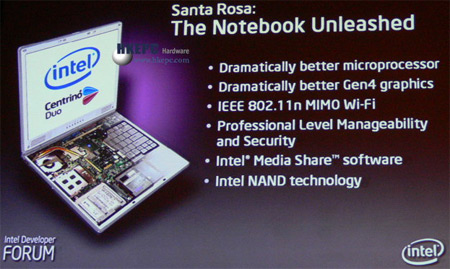
Intel’s Santa Rosa chips aren’t anything revolutionary. They utilize slightly higher clock rates, a faster front side bus (from 667 to 800Mhz) and more power saving features to underclock the FSB during CPU downtime.

But there is some fun stuff which we should see, oh, around mid-June:

  • Support for 802.11N (Much faster/robust Wifi)
  • Support for DDR2 800 RAM
  • Support for flash hard drives (also known as NAND drives)

digg_url = ‘https://9to5mac.com/Intel-Santa-Rosa-Hitting+MacBooks-itablets-in-June’;

All of this just adds fuel to the fire that a new round of laptops (and Tablets?) will be dropping at Apple’s WWDC 2007.  If Sony can pull off the UX-90 with last years Centrino processors, imagine what Apple can and will do with one that runs cooler, faster and smarter.

Sony ux 90

Sun and Apple Forging Alliance

Site default logo image

Sun

The relationship between Sun and Apple hasn’t been this hot since the merger talks were going on in the early 90’s.  With yesterday’s announcement of JavaFX taking on Microsoft’s Silverlight and Adobe Flex Platforms, it can only get hotter.  The three major trends that are gathering momentum:


ZFS is gaining a lot of steam and support in the Macintosh community spurred by Apple’s inclusion of Disk Utility.app support in pre-release versions of Leopard.  The next generation disk file system would allow Apple to take a considerable lead from Microsoft and its next generation WinFS file system which has been delayed time and time again.  Macs might not be booting from it come Leopard but they will be able to read and write to it (unless Apple kills it from the Leopard Betas). For a fantastic presentation on the basics of ZFS from Sun’s Opensolaris group, head here.

Open Office is getting some much needed porting help from Sun. Open Office, or Star Office as Sun calls its proprietary version, currently has an X11 interface for Mac which is foreign to the vast majority of Macintosh Users. Currently a project called NeoOffice exists with a native/non-X11 front end of Open Office but Sun’s forray is likely to be a much bigger and widely supported platform – especially in the coveted Higher Education space. We already know Sun and Google are working together on Open Office and the prospect of Apple and Google working together is not far-fetched.

Sun j2ee environment macintoshThe growing support for the J2EE development world on Macintosh is always a good thing.  The Macintosh is a natural fit for JAVA development because of its UNIX underpinnings and rapidly expanding userbase.  Additionally, with Sun’s headfirst dive into easy, open source, platform agnostic development environments (read: JavaFX) they’ll need all of the help they can garner. Just ask Eclipse.

Perhaps we can start firing up those merger talks again because Sun and Apple are two very like minded companies and cultures with very complimentary product and service offerings – and don’t forget about the common enemy to the North. Although, in this merger, I don’t think Sun will be the one doing the buying…

New MacBook Pro Line Hitting at or before WWDC 2007?

Site default logo image

WWDC

The Rumormill is abuzz with news about the LED screens that will be making their way into Apple’s new MacBooks and their power savings. With a technology switch like this, expect Apple to be able to make long awaited design changes to the Pro line of Macbooks. Also, we’ve heard about bottom loading optical media bays (can we finally be done with optical yet?!) Not to mention Apple’s pledge to be greener and concluding statement: “We are also beginning to explore the overall carbon ‘footprint’ of our products, and may have some interesting data and issues to share later this year.” Oh Steve, why must you tease us? read on…

You know what else is green? Solid state drives. Apple will use them, no doubt at some point – afterall they need to play catch up with Samsung, Sony and company. But here’s the kicker: They will also use traditional hard drives for storing media like music, videos and photos. There is no way Apple is going to sell you a product with only 20 Gigs of space for media. The boot drive will be a 16-32GB fast (seek time – not necessarily large data flow), efficient solid state.

On a related note, no one seems to be mentioning the Embedded Mac OS platform that is being used in the MacTV and iPhone – it’s the biggest news of the year and it’s hardly getting any coverage! Perhaps an iTablet device could be released alongside the new iPhone and laptops filling the subcompact niche. It would make sense for this device to run an embedded version of the Mac OS. Windows tablets running full XP and Vista have been notoriously clunky.

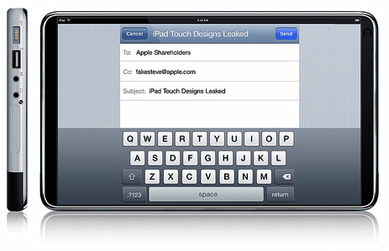
Imagine, if you will, a 12″ iTablet that is nothing more than a beefed up (not thicker) iPhone with Cingular HSDPA, Wifi, 32GB of Ram, 12 hour battery, etc. It can be done, so why not?

Edit: also note the Santa Rosa Processors which add more fuel to the 7 alarm fire…

Apple's Final Cut Server Built Off of Proximity Group's Artbox Enterprise

Site default logo image

Proximity group

Today’s announcement of Final Cut Pro Server wasn’t a surprise to insiders who followed Apple’s purchase of Sydney-based Proximity Group last year.  Their major product, Artbox, is (was) a cross platform asset management and workflow solution that was used by many news organizations around the world.  We’re very excited to see what apple does with it. 

More info about the purchase last December

From Proximity’s Website:

Artbox enterprise is a media asset management software package designed for broadcast, cable and post production companies to improve sharing of media and to streamline creative production workflow.

artbox enterprise not only includes all the features of artbox workgroup, but also offers powerful additional features such as multiple artbox connectivity, newsroom integration, workflow management & broadcast device integration.

+ screenshots
+ walkthrough (flash)
+ product brochure (pdf)
+ product whitepaper (pdf)
+ tutorial (quicktime)
+ tutorial (windows media)
+ looking for support?

Bundle Components
artbox enterprise server software
Five simultaneous users (PC, Mac or Linux)
Connectivity to five broadcast quality editing, play out or storage systems
artbox to artbox connectivity
Available Add-on Components
Newsroom Integration module
Workflow Management module
Archive Integration module
Additional users
Additional device connectivity

Key Features
A single searchable media catalog with thumbnails, proxies and metadata of video and stills content that can be shared across multiple users and locations.
Extensive format support, including graphics and video file formats like TIFF, TARGA, VPB, Pinnacle, Chyron RGBA, GIF, PNG, DPX, Photoshop, Still Sequences, MPEG-1, MPEG-2, MPEG4, IMX, DV25, DVCPro, DVCPro HD, HDV, H264, AVI, GXF, LXF, MXF, QuickTime, Media100, Avid Meridian, and more.
Workflow tool that allows users to create new projects, take requests from external requesters (producers, journalists etc), add requests for media (video, graphics, script, audio), track progress of requests, deliver finished content and group all related media assets.
Newsroom integration that allows producers and journalists to access the media catalog from within iNews or ENPS.
artbox to artbox connectivity allows sharing of content across an Enterprise or group of stations.
Project level integration with Apple Final Cut Pro & drag and drop of content between artbox and other third party creation, editing and character generation tools.
Cuts only editing & annotation on browse proxies.
Integration with archival systems to move less frequently used media to cheaper storage.
Drag and drop of media between artbox and desktop/panel applications.
Artbox Image option: provides customers all the functionality of artbox enterprise, except for clip support. Especially useful for customers interested in news graphics workflow.
For more information, contact the Proximity Sales Team:

Click Here to contact Proximity sales by Email.

phone: +1 (646) 452 5820

Interested in reselling artbox?
Click Here for reseller information.

Benefits
Save time in creative production with the power to search, locate, transfer and transcode content across multiple graphics creation, editing and playout systems and formats from one application.
Automatic cataloging removes the need to manually import assets and saves time.
Reduce Production costs by reusing and effectively managing media.
Faster collaboration and approval process on projects using the artbox project and notification capabilities.
Ease the project management burden through use of configurable workflow tools to track jobs, requests and media.
Reduce costs by removing the need for tape based transfer and by using reliable but economical platforms.
Streamline newsroom workflow for broadcasters by tight integration with MOS compliant newsroom systems and third party templating/CG systems such as Chyron Lyric, Vizrt and Pinnacle Deko.
Deliver finished content fast and secure via web to customers and end users.
Protect your media using artbox flexible permissions mode.

Flat Panel ipods?

Site default logo image

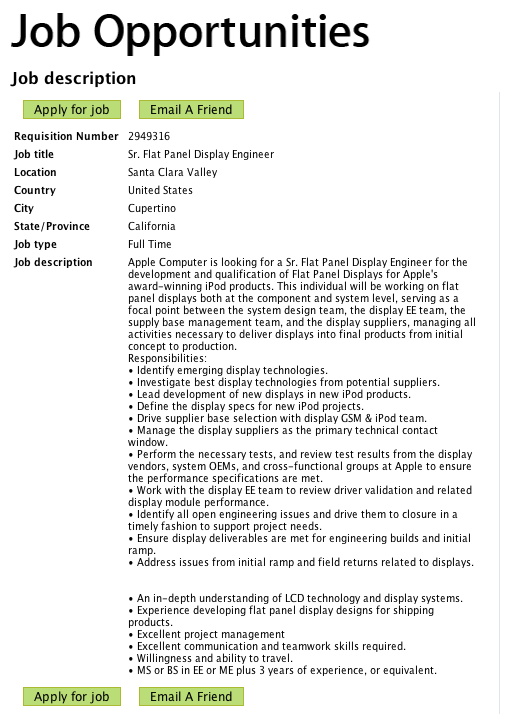
Here’s an interesting post on the Apple Job boards (below) It looks like the ipod team is hiring a flat panel engineer for ipods? I know that the iphone screen and the current generation of ipod screens are technically “flat panels” but aren’t usually called as such. Also, nothing in the advertisement mentions “micro-screens” which ipods and the iphone currently posses.

As these could be high res screens like Sony’s eReader line, a very interesting development! More likely though, there will be a Mac Tablet-type of machine that will be based of of the Macintosh Embedded platform that is the brains behind the MacTV and iphone.

read on…

I’ll take a 10 inch ipod for the train ride to work please!

MacUpdate Selling Out to the Man?

Site default logo image

MacUpdate has always been, not only a great location to search for Mac software, but also a great community to find software reviews and to pit products against each other. Because of their Mac-only approach, I often put them ahead of Versiontracker in investigating software. That is why I was disheartened when I read that the were looking to sell.. Perhaps they are just looking to get valued for additional funding ..there is a lot of chatter going on in that community with the 200 free MacWorld tickets they are providing…

From the posting:

Online business appraiser (w/possible acquisition background)

Company: MacUpdate
Location: Anywhere

Description
MacUpdate is the most popular Macintosh-only software website on the Internet. It’s been organically growing since 1996. It’s essentially one of two websites that control most of the Macintosh software updates. We’re looking for a qualified organization or person that has experience in appraising online businesses. You should have experience valuing both smaller and multi-million dollar online communities. A track record of previous valuations is very important. Experience working with VC capital funding and business acquisition is important. Having a network of investors and companies looking to make acquisitions is a bonus. Physical location is not important.

To apply
Email: macupdate@macupdate.com with the subject “37sig MU Appraisal”

Welcome to 9to5Mac.com

Site default logo image

Hello everyone and welcome to the 9to5Mac Community.  A bunch of my Mac Administrator/Manager friends were talking and wondered why there wasn’t a proper community of Mac Managers out there.  There are the Apple and mac-mgrs.org mailing lists but we wanted something more interactive and 2.0.

There are websites that cover the same categories, like MacEnterprise and AFP548.com  and such but they aren’t updated too often and are frankly in lack of creativity and community.  

So here we are.

The ojective of this site is to be a destination for people like ourselves.  We will have a calendar of Mac Events,  Mac tips, discussion forums, news, reviews, tips, job boards, etc. etc.  We will also have fun stuff that is off topic but will sae that for the engadgets of the world if possible.

While we will allow some relevant advertising to pay for hosting and site upkeep, we will try to keep it at a minimum so that we can focus on our community.

That being said…wander around a bit and enjoy.  We hope you will become a member!


– admin

World Wide Developers Conference

Site default logo image

Save the Date for WWDC07

This June, the center of the Mac universe will be at Moscone West in downtown San Francisco, as developers and IT professionals from around the globe come together for the Apple Worldwide Developers Conference. Don’t miss this opportunity to connect with Apple engineers, get a firsthand look at the latest technology, and spend a week getting the kind of inspiration you won’t find anywhere else.


Turn the next big thing from Apple into the next big thing from you


At WWDC, you’ll work hands-on with the latest developer tools, learn best practices for choosing and using the latest APIs and make the most of the new technologies, cutting-edge graphics capabilities, and enhanced features in Mac OS X Leopard. The session tracks at WWDC are designed to show you how to harness these features to create awesome user interfaces, improve the performance of your application, and create the ultimate customer experience on the road to developing your killer Leopard application.

Tap into the best engineering resources at Apple

Work side-by-side with Apple engineers responsible for the powerful features in Mac OS X. With unparalleled access to Apple engineers you’ll forge new connections, resolve code-level issues, and refine your long term development plans.


http://developer.apple.com/wwdc/

About 9 to 5 Mac

Site default logo image


9to5Mac.com is a daily Apple news site.  We cover everything about Apple Inc. and the personalities that surround the industry.  We dig deep for information about the famously secretive Cupertino-based company.  


Our authors are award winning journalists and technology workers working around the globe to bring up to the minute Apple news.


Seth Weintraub 9to5macSeth Weintraub – Publisher/Editor.  Neal Award winning (Week of Leopard, Best Blog>500,000 viewers) writer for Computerworld and contributor to other IDG publications including Macworld and InfoWorld.  Contributor to the Telegraph, CMSWire and various other publications, journals and research papers.  Email: seth@9to5mac.com


Jonny Evans –  Head of European Desk. Jonny is a published writer and blogger with extensive experience in the Mac and music industries. 



Cleve Nettles – Hong Kong/Taiwan Desk.  Beat reporter working with Asian manufacturers.  Scoop-meister extraodinaire. Email: Cleve@9to5mac.com



Quincy Pince-Nez – Paris-based freelance writer and IT consultant with the FIA

 Fan of French food and French women, not in that order. Email: quincy@9to5mac.com


Chauncey Dupree – Silicon Valley based freelance scribe and IT consultant.

Email: chauncey@9to5mac.com


 Jonathan Curtin – Design, Audio, and Multimedia expertHomebrewer.

Email: jonathan@9to5mac.com


For Advertisers:

Please contact // <a href=”http://www.backbeatmedia.com/agencies/requestquote.php” mce_href=”http://www.backbeatmedia.com/agencies/requestquote.php”>BackBeat Media</a> for more information regarding advertising on 9 to 5 Mac.

About 9 to 5 Mac

Site default logo image

We are a loosely assorted group of Mac Managers and Macintosh Business enthusiasts throughout the world (San Francisco, New York, Paris, London and Hong Kong) that try to keep each other (and you) apprised of many of the things going on in the Apple Enterprise Community. If you feel you could add anything to the site, we’d love to hear from you!


Upgrading to Mac OS X 10.4 Tiger: Visual QuickProject Guide

Site default logo image

For many users, it’s not working with a new operating system that’s intimidating, it’s all that needs to be done before, during, and after the upgrade that has them running scared. That’s why best-selling author Tom Negrino has devoted an entire guide to just that topic. Rather than cover every last feature and function of Apple’s newest OS, Tom focuses on just the need-to-know essentials that will ensure a smooth transition to Mac OS X Tiger. In short order, readers will learn how to prepare for the upgrade, how to back up their data, what’s entailed in the actual upgrade, and how to reinstall software. Once Tiger is safely installed, Tom provides a quick overview of what’s changed before showing readers how to customize their systems and use three of Tiger’s key features: Spotlight search, Automator (for streamlining repetitive tasks), and Dashboard (the control panel for Tiger’s nifty new widget mini-apps). And for readers who want to know more about what’s new in this system upgrade, the book provides a handy overview of the top ten new additions to Mac OS X Tiger.

Riding the Tiger

Site default logo image

Most books about information technology are very technical and their message dates quickly. Riding the Tiger is the one book that a business manager ought to read to keep up with computers – it presents timeless advice on technology usage.

Riding the Tiger will show you how to make information management more effective in your organization and how to prevent your organization from spending too much money on information technology. It provides a framework for planning your use of information technology that is appropriate for any manager in any organization.

Riding the Tiger is every business manager’s manual for understanding how to harness the power of the tiger. From what you do as a manager, to how to make your business objectives drive your information management strategy, to managing or becoming involved in a project, this book will help business managers make a difference when information technology projects are proposed to them or when they are initiating projects with suppliers.

Mac OS X Tiger in a Snap (Sams Teach Yourself)

Site default logo image

A computer is a big investment, but the time you spend to learn your way around it shouldn’t be. Mac OS X Tiger In a Snap is designed specifically for you and the millions of other people who don’t have the time to devote to learning the Mac operating system inside and out before you begin using it. The modular format of Mac OS X Tiger In a Snap lets you zero in on the information you need and then get back to work. You will learn how to:

  • Work with “home office” applications
  • Network your Mac
  • Communicate with iChat
  • Work with the iLife applications
  • Customize Mac OS X
  • Update system software
  • Perform rescue operations

With expert tips and tricks interspersed throughout the tasks, Mac OS X Tiger In a Snap will help you quickly get up to speed with your Mac.

Dashboard Widgets for Mac OS X Tiger (Visual QuickStart Guide)

Site default logo image

Just as a car’s dashboard serves as its control center, Mac OS X Tiger’s dashboard puts you in charge of the info you access from your computer and across the Web. Accessible via a click of a button, Dashboard is home to cool, new JavaScript-based mini apps called Widgets, which can grab info from the Web and provide instant access to frequently used apps. While Tiger comes with a bunch of Widgets, one of the coolest things about them is that you can create and customize your own-and you don’t need to be programmers to do so! In this task-based guide, a JavaScript master shows you how to start creating all kinds of Dashboard Widgets-from calculators to stock tickers, contact lists, and more. After providing a quick intro to HTML, CSS, and JavaScript, author Dori Smith shows you how to create your first Widget (a calculator); make that Widget work across the Net (turning it into an international money converter); add QuickTime, Flash, and Java to Widgets; debug Widgets; and more.

Take Control of Tiger (Take Control)

Site default logo image

If Mac OS X Tiger has you bewildered, it’s time to regain the upper hand with Take Control of Tiger. Rather than have a single overworked author attempt to give you a brief overview of every imaginable topic, explaining none fully, Take Control assembled an all-star team, with each author dedicated to telling you everything you need to know about a particular subject. For each topic, you’ll find a concise introduction, detailed explanations, useful tips, and step-by-step instructions, all amply illustrated. Best of all, you can receive free updates to each of the titles in this collection!Aimed at readers just like yourself, who aren’t afraid to tinker around a bit to get the most out of their OS, this full-color volume shows you how to customize Mac OS X Tiger to fit your very specific needs. In the guide’s four major sections-“Upgrading to Tiger,” “Customizing Tiger,” “Users and Accounts in Tiger,” and Sharing Files in Tiger”-you’ll find all the technical help and troubleshooting tips you need to ensure a smooth and speedy upgrade without any corresponding loss in productivity. In short order you’ll learn how to create user accounts, take advantage of the new Spotlight search system, set up multiway video and audio conferences, and more.

How to Do Everything with Mac OS X Tiger (How to Do Everything)

Site default logo image

Experience the excitement of Apple’s revolutionary new release with help from this hands-on guide. How to Do Everything with Mac OS X Tiger explains all the features. Learn to use the Finder to easily navigate files, folders, and applications, set up and manage user accounts, access the Internet, and print and fax documents. Digital entertainment features such as iPhoto, iMovie, and iTunes are also covered, as are easy methods for networking and security. A special two-color section called “Writers and Their Macs” profiles famous writers such as Arthur Golden (Memoirs of a Geisha) and screenwriter Mike Rich (Finding Forrester) who discuss how their Macs are integral to their creativity.

Designer's Guide to Mac OS X Tiger

Site default logo image

You held off on moving to Mac OS X until your bread-and-butter applications made the jump, and now you’re thinking of moving up to Tiger. This book is especially geared toward designers who’ve become comfortable working under Mac OS X and are ready now to make the Tiger transition. Designer and prepress pro Jeff Gamet focuses on the Mac OS X Tiger features that matter most to illustrators, designers, and other graphic professionals. He explains not only how things work in Mac OS X Tiger, but how Tiger enables users to work efficiently and effectively. In chapters devoted to fonts, printing, PDF, color management, networking, the Mac’s built-in design tools, and much more, readers will learn how to:

* Solve the nitty-gritty issues designers confront daily
* Improve production workflow and avoid common problems
* Optimize, maintain, and secure your network, whether you work in a complex office environment or a small graphics studio

Mac OS X Tiger: The No Nonsense Guide! (No Nonsense Guide! series)

Site default logo image
A visual reference to learning the latest release of Mac OS X, this guide is geared to both new and experienced Mac users. The basics of managing files, organizing and running programs, playing video, listening to music, and using other multimedia are covered, and each step-by-step instruction is accompanied by a screen capture showing exactly where to click to accomplish a task. For users upgrading to the latest version of OS X, instructions are provided for using the many new and improved features, and for those new to Mac OS, this book can be used as a complete introduction.

MAC OS X TIGER in easy steps (in easy step series)

Site default logo image

With OS X Tiger in easy steps, you’ll be able to unleash this versatile program and have it up and running in no time. In clear, accessible language, this full-color primer introduces you to UNIX and the OS X environment; guides you through its installation; and teaches you the rudiments of security and shutting down. With these basics down, this graphic guide opens the gateway to innovative Tiger elements, including the Dock, the Finder, Safari, and the completely new Mail application. The book’s simple instruction will help you master all the iLife applications, including iPhoto, iTunes, IMovie, IDVD, and even GarageBand!

Unix for Mac OS X 10.4 Tiger: Visual QuickPro Guide (2nd Edition) (Visual QuickPro Guide)

Site default logo image

As Unix spreads its tentacles across users’ desktops, more and more Mac users are starting to pop the hood and learn about the operating system that’s at the root of it all. And there’s no better way to conquer that fear than by consulting this Visual QuickPro Guide. Matisse Enzer, who wrote the first edition of this book, Unix for Mac OS X: Visual QuickPro Guide has completely updated this guide to reflect all that’s new in Tiger’s version of Unix. Readers will learn everything they need to know to make sense of the commands and technical jargon surrounding Unix. In the process they’ll find out about useful utilities, editing and printing files, security, and more–all through simple, step-by-step instructions that break the learning process into manageable chunks. Throughout, users will find plenty of the tips and visual references that have become the hallmark of Peachpit’s popular Visual QuickPro Guides. Unix for Mac OS X 10.4: Visual QuickPro Guide is perfect for any Mac user interested in learning about the Unix operating system.