
iOS Devices

See All Stories

The devices that run the world’s most advanced mobile operating system

Check out our top stories on iOS Devices:

iOS devices refer to any of Apple’s hardware that runs the iOS mobile operating system which include iPhones, iPads, and iPods. Historically, Apple releases a new iOS version once a year, the current version is iOS 10. Here is the complete list of iOS 10 compatible devices.

AT&T jacks Early Termination Fee for would-be defectors

Site default logo image

Plan on bailing to Android on Verizon like Fake Steve Jobs?  That’s going to cost you nearly double on new plans compared to current costs because AT&T is changing its Early Termination Fees (ETF) from $175 to $325.

They also come ahead of the expected June launch of a new iteration of the Apple Inc. (AAPL) iPhone, which could potentially yield millions of subscribers signing up for fresh two-year commitments.  The iPhone is AT&T’s biggest wireless growth driver; however, the company’s contract as Apple’s sole U.S. partner is expected to end over the next year. The loss of exclusivity could enable iPhone customers–particularly those frustrated by the carrier’s network issues–to go to rivals, specifically Verizon Wireless, although high early termination fees could serve as a deterrent.  An AT&T spokesman, however, said the timing of the move wasn’t related to any device.

We’re not saying it is definitely going to happen, but if the iPhone were going to Verizon in September, this is exactly what AT&T would do (as opposed to fixing their network).

Also, $325 is what Verizon charges for their ETF.

Google takes on iTunes with Android music sales

Site default logo image

Google has moved to against Apple in yet another space — this time announcing a music downloads service via its Android Market.

Music will be made available for sale and download via the new Music section of the market, accessible using Android 2.2-powered devices, which for now includes handsets and in future will include tablet devices.

Details are sketchy, TechCrunch informs, but essentially its a Web-based transaction system which automatically downloads your song purchases to your device.

Google didn’t say when this capability would come to the Android operating system.

The company also introduced a new software package. Google recently acquired Simplify Media, who have developed software which will let you sync DRM-free purchases from iTunes into your Android device.

With Google now moving to compete with Cupertino at almost every point, it

GoogleTV to compete with AppleTV

Site default logo image

Google announced GoogleTV at their I/O event today.  Truthfully, it looks like a pretty strong product.  It is a shame that Apple basically has let its own AppleTV product languish for so long.  Hopefully this announcement lights a big fat bonfire under Apple’s TV hobby.

[youtube=http://www.youtube.com/watch?v=diTpeYoqAhc&w=640&h=385]

Sports Illustrated HTML mag impresses

Site default logo image

One of the more impressive demonstrations at Google I/O yesterday was the digital edition of Sports Illustrated done completely in HTML5.  The benefits of HTML5 are clear here.  Instead of building an iPad app, an Android app, a desktop app, etc, developers build it once and users can view it anywhere.  It can be cached for offline viewing as well.

[youtube=http://www.youtube.com/watch?v=U3j7mM_JBNw&w=700&h=400]

More iPhone 4 Goodies: iPod and iPad camera flash, 10.7, more

Site default logo image

Besides AT&T tethering and some groovy background images, the iPhone 4 Beta 4 update does have exciting information to share with us.  We are pretty sure the iPhone 4 is going to have a LED Flash, no surprise there:

But maybe some other devices are going to have cameras with a Flash?  iPad?  iPod touch?  it wasn’t immediately apparent from any of the recent prototypes, but there it is, in the iPhoneOS 4 code:

Yep.  iPad with camera Flash.  

Regardless of having a LED Flash, the iPod touch will certainly will have a camera:

And one last one.  We haven’t seen much mention of Mac OS 10.7 until now.  It makes its first appearance in the AVMediaFormat files below.

If Apple is putting 10.7 code into iPhone 4, it means that 10.7 is planned to be released at some point in iPhone OS 4’s lifetime, which starts in June and extends until June 2011.

Thanks AL!

iPod touch with a camera shows up…guess where?

Site default logo image

Vietnam’s Tinhte has yet another scoop. This time they’ve found a prototype iPod touch with a 2 megapixel camera.  We have to believe this is what Apple will release this Fall at their iPod event, if not (hopefully) sooner.

Similar images of prototype iPod touches w/camera materialized before last years iPod event and one even showed up on eBay last month.

[youtube=http://www.youtube.com/watch?v=CSLqIkBv81s&w=700&h=400]

Close-up stills below:

via Engadget

Eric Schmidt: Google and Apple's relationship is 'complicated'

Site default logo image

On the eve of the Google I/O summit, Google’s CEO talked to Reuters about Google’s relationship with Apple, specifically as it related to iAds and Admob.

Some points:

  • Google has been at a disadvantage because the FTC investigation has left  Admob in hiatus while other ad networks (iAds) heats up.
  • Google is prepared to fight the U.S. government “very hard” if regulators block the search leader’s acquisition of mobile advertising firm AdMob.  “We’re likely to fight very hard,” he said. “It’s a very strategic acquisition for Google.”.
  • Apple blocking Adobe’s Flash also is being looked at by the FTC
  • Schmidt said Apple’s changes in terms of services “discriminatory against other partners.”  Apple doesn’t let other advertising networks access the same data that Apple has access to, so advertisers can’t target or get analytics from their ads.
  •  He insisted that he and Apple CEO Steve Jobs remain good friends and that the two companies will remain both rivals and collaborators in different business areas.  “The relationship will continue to be complicated,” he said.

MobileMe Beta FAQ posted, invites handed out

Site default logo image


image via Macworld

Apple has posted a MobileMe Beta FAQ. According to a few readers, the beta is now live for those who initially signed up.  FAQ and signup below:


What is the MobileMe Mail beta?

The MobileMe Mail beta is a preview of the new version of the mail web application. MobileMe Mail beta includes a completely new interface with a new widescreen view, improved performance, and powerful new features that make it easier to use than ever. Using the beta is completely voluntary and you can leave it at any time.

What features are new?

  • Widescreen and compact views
  • Rules to keep your email organized everywhere
  • Single-click archiving
  • Message formatting toolbar
  • Improved performance
  • Increased security with SSL

More information about new features is available here.

How do I request an invitation to the beta?

To join the MobileMe Mail beta, log in to http://www.me.com/mail. In the lower-left corner, click the “Request an invitation” link.

If you do not see the link then you already have requested an invitation. You will receive an email notification when you have been added to the beta and can start using it.

I received an invitation. How do I join the beta?

If you received an invitation, then you have already been added to the beta and you don’t need to take any further action. Simply sign into me.com to begin using the MobileMe Mail beta.

Note: You will receive an email notification when you have been added to the beta and can start using it.

What languages are supported?

The MobileMe Mail beta is currently available in English.

What browsers are supporting the beta?

Safari 4 (Mac and PC), Firefox 3.6 (Mac and PC), and Internet Explorer 8 (PC) are fully supported.

Do  I need to change any settings in Mac OS X Mail, or on my iPhone, iPad, or iPod touch?

You don’t have to change any of your current settings on any of your devices. Your MobileMe Mail account will continue to work as expected in Mac OS X Mail, and on your iPhone, iPad, or iPod touch. For help setting up your MobileMe account on your iPhone, iPad, or iPod touch, visit the MobileMe Setup instructions. 

Are there changes to how push email works on my iPhone, iPad, or iPod touch?

No. New messages are pushed to your iPhone, iPad, or iPod touch automatically, and you’re notified when they arrive.

If I have a Family Pack account and my account is enrolled in the beta, will anything change for the other accounts set up on my Family Pack subscription?

Only the user of the MobileMe account requesting the invitation will participate in the beta. Other Family Member accounts will be unaffected unless individual users also request to join the beta. 

I already have rules in Mac OS X Mail; will they work in the beta?

Yes, but the rules you set up during the MobileMe Mail beta will be applied as messages come in to MobileMe, so they may override any rules you’ve set up in Mac OS X Mail. To avoid duplicate rules:

  • Create rules at me.com, and leave your Mac OS X Mail rules in place.  
  • Then disable the duplicate rules on your Mac for a few days. Make sure you’re happy with the results. 
  • When you’re sure you’re happy with your rules at me.com, then delete your rules on your Mac.

I’d like to stop using the beta, what do I need to do? 

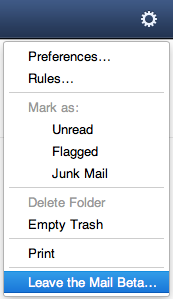
You may stop using the MobileMe Mail beta at any time during the beta. To leave, select “Leave the Mail Beta” from the action (gear) menu while logged in to MobileMe Mail.

I left the beta and now I want back in. Can I re-join the beta?

If you were already invited to the beta, you can re-join by signing in at https://beta.me.com/join/mail.

How do I report issues and give feedback during the beta?

First, please check the MobileMe Mail Beta Known Issues article to see if the issue you’ve encountered has already been reported. If it hasn’t or if you just want to send us your feedback about the beta, click the Feedback link in the lower-leff corner of the MobileMe beta window. We unfortunately cannot respond individually to feedback or issues reported.

If you would just like to opt out of the beta, select the action (gear) menu in the upper-right corner of the MobileMe Mail beta and choose “Leave the Mail Beta.”

Note: One-on-one Support is not available for the MobileMe Mail beta.
 

Are there keyboard shortcuts to use in the MobileMe Mail Beta? 

The following keyboard shortcuts are available:

Action Mac PC
Print ?P Ctrl+P
Undo ?Z Ctrl+Z
Redo ??Z Ctrl+Shift+Z
Open selected message in new window Return Return
Scroll in selected message until bottom of message, then select next message Space Space
Delete selected message or folder ? Backspace
Select All Messages ?A Ctrl+A
Compose new message ??N Ctrl+Shift+N
Reply ??R Ctrl+Shift+R
Toggle between reply/reply all in Reply window ??R Ctrl+Shift+R
Save Draft ?S Ctrl+S
Increase font size when composing a message ?= Ctrl+=
Decrease font size when composing a message ?- Ctrl+-
Bold ?B Ctrl+B
Italic ?I Ctrl+I
Underline ?U Ctrl+U
Indent items in a list Tab Tab
Outdent items in a list Shift+Tab Shift+Tab


