

9to5Mac is brought to you by CleanMyMac: Tidy up your Mac and iPhone today! Try 7 days free and use our code 9TO5MAC15 for 15% off. Also check out CleanMyPhone for your iPhone!
macOS Tahoe 26 represents one of the more dramatic changes we’ve seen to the look and feel of the Mac operating system in recent years.
There’s new functionality too, of course, and Apple thinks the blend of the two will greatly enhance the experience of Mac users …
The company says its aim was to make the machine feel vibrant and fresh, without any loss of familiarity.
Reimagined with Liquid Glass, macOS Tahoe is at once fresh and familiar. Apps bring more focus to your content. You can personalize your Mac like never before. And everything just flows into place.
Liquid Glass is of course the core design element now seen across iPhone, iPad, and Mac. Apple wants to make it easier to use multiple devices by harmonizing the look and feel of each.
From Camera and Photos to Safari and FaceTime, your go-to apps feel fresh and expressive. And moving across apps and devices feels more harmonious than ever.
The Mac also gets a key iPhone feature, Live Activities.
The menu bar now features the Live Activities from your iPhone. And when you click one, the app opens in iPhone Mirroring so you can take action.
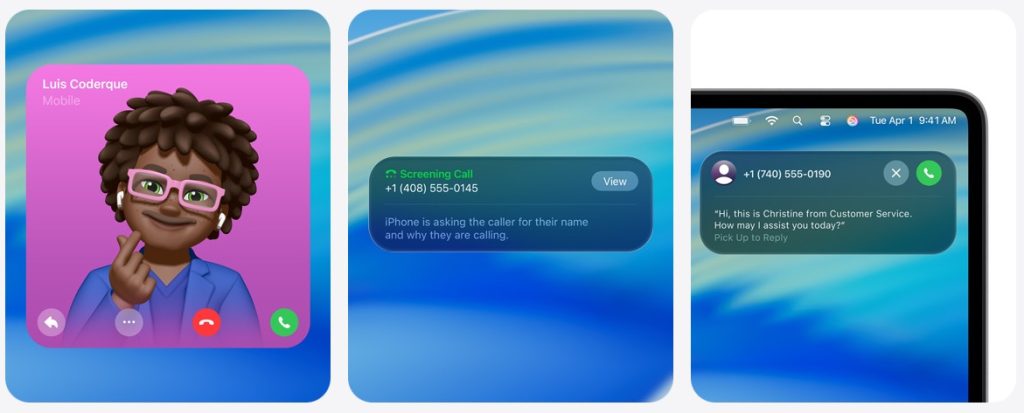
Also borrowed from the iPhone is a new Phone app for Mac – complete with the new features mirrored from iOS 26.
Manage unwanted calls. For unknown numbers, Call Screening finds out who’s calling and why. Once the caller shares their name and the reason for their call, your phone rings and you can decide if you want to pick up.
Stay productive while on hold. Hold Assist keeps your spot in line while you wait for a live agent and notifies you when they’re ready.
The new Spotlight features make this popular shortcut way more powerful.
Spotlight lets you take hundreds of actions without lifting your hands off the keyboard. And new quick keys help you perform actions even faster. You can now keep all your apps and most accessed files within easy reach, including intelligent suggestions based on your routines.
We may not yet have the long-awaited new Siri, but Apple highlights several new AI features.
Now you can run shortcuts automatically — at a specific time of day or when you take specific actions, like saving a file to a particular folder or connecting to a display.
Live Translation. Automatically translate texts in Messages, display live translated captions in FaceTime, and get spoken translations for calls in the Phone app.
AI features in Shortcuts. Intelligent actions in Shortcuts can summarize text, create images, or tap directly into Apple Intelligence models to provide responses that feed into your shortcut.
Personal emoji. Mix emoji and descriptions to make something brand-new. In Image Playground, discover additional ChatGPT styles. And have even more control when making images inspired by family and friends using Genmoji and Image Playground.6
Top comment by Angel
The design isn't fully implemented everywhere: some elements like selection indicators are not concentric and are too squarish, some liquid glass elements have too much shadow and look heavy (this only happens in some apps, in other app they're well implemented and look REALLY nice), headers aren't uniform and way too opaque. But man, what is implemented well is gorgeous. The app icons look so vibrant and bright in light mode, so elegant and glassy in dark mode (the glassy vibe is way more prominent in dark mode). There are new animation in the control center that are elegant but really short and unintrusive, there are more physics in the whole UI (like how the widget's pannel now has acceletation instead of being fullly linear), opening and closing apps has an animation that's very short and subtle but adds a touch of fluidity and elegance. Controls are brighter and more fuzzy, liquid glass elements take in light from the wallpaper and other UI elemets around and behind it, the physics are gorgeous and makes the UI feel pristine and vibrant, to the point I keep my laptop's brightness a little lower now because the UI is so much more vibrant and alive, it's like candy.
Some third party apps still use the Sequoia UI and man, the difference is night and day. Sequoia is so... Gray and dead by comparison, like sure it's subtler and some people may prefer a more unintrusive platform, but I'm loving the eye candy that Tahoe is, sometimes I just stop and just... Want to lick the UI.
Which are the features you’re most looking forward to? Please share your thoughts in the comments.
9to5Mac is brought to you by CleanMyMac: Tidy up your Mac and iPhone today! Try 7 days free and use our code 9TO5MAC15 for 15% off. Also check out CleanMyPhone for your iPhone!
Images: Apple


FTC: We use income earning auto affiliate links. More.


Comments