
Apple’s Wallet app has a lot of new features coming in iOS 26, including one that’s easy to miss: a toggle that lets you disable an annoying and controversial type of push notifications.
Promotional Wallet notifications from Apple can be turned off in iOS 26
Apple Wallet is a critical app for a lot of iPhone users. It’s home to Apple Pay cards, and many of us use it for boarding passes, concert or theater tickets, ID cards, transit, and more.
Apple’s goal with Wallet is clearly to eventually replace your physical wallet—which sounds great.
But it also makes the thought of advertising via Wallet push notifications all the more controversial.
Apple learned this earlier this summer, when it sent an unwanted Wallet notification to a large number of iPhone users. The subject? A ticket offer for F1 The Movie.
Many took to social media to complain about being advertised to via a Wallet notification. The whole backlash even entered meme territory, like with this printout for a physical wallet.
At the time, iOS offered no way to disable such notifications without turning off Wallet notifications altogether.
For such a critical utility in many of our lives, turning off all Wallet notifications didn’t seem a good idea.
But in iOS 26, Apple has the fix.
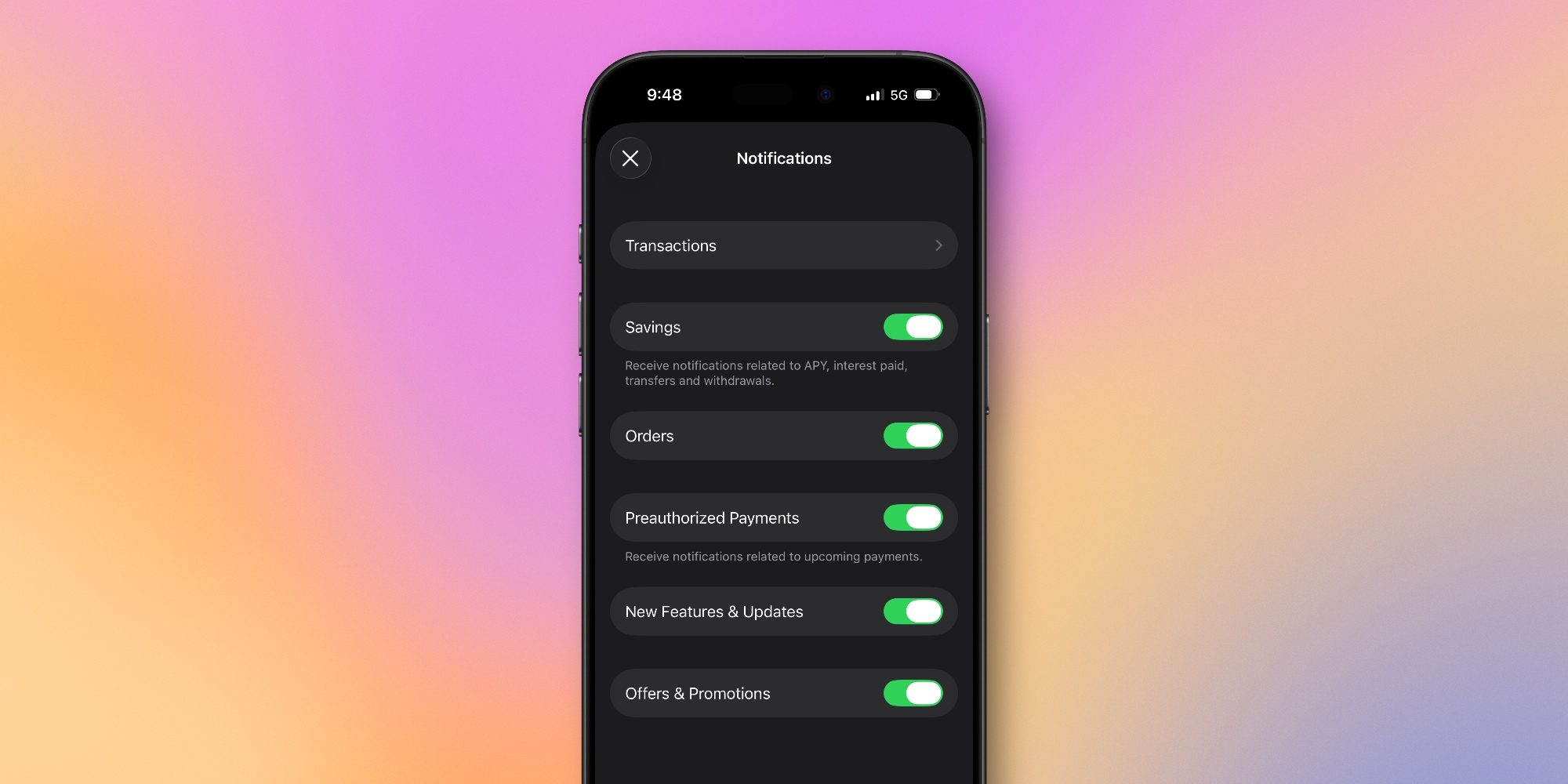
In the notifications menu inside Wallet, there’s a new toggle: Offers & Promotions.
Top comment by Blurft
It’s on by default, but you can disable it to prevent any future unwanted advertising from the app.
It should be noted that Apple defaults to these advertising notifications being opt out, despite their own App Review Guidelines (4.5.4) stating "Push Notifications should not be used for promotions or direct marketing purposes unless customers have explicitly opted in to receive them via consent language displayed in your app’s UI" (emphasis added).
Of course, Apple's own first-party apps distributed via iOS update are conveniently exempt from App Store guidelines...
Just another example of Apple treating their first-party apps and services differently than third-party apps and services.
It’s on by default, but you can disable it to prevent any future unwanted advertising from the app.
Should such a toggle even be necessary in the first place? Probably not, or at least not with its current behavior of being on by default.
But after you update to iOS 26, you can ensure no future promotional notifications get sent from your digital wallet app.
Do you plan to disable Wallet notifications for ‘Offers & Promotions’ in iOS 26? Let us know in the comments.
Best iPhone accessories
- AirPods Pro 2 (now only $199, down from $249)
- MagSafe Car Mount for iPhone
- HomeKit smart plug 4-pack
- 10-year AirTag battery case 2-pack
- 100W USB-C fast charging power adapter


FTC: We use income earning auto affiliate links. More.



Comments