

There’s a new AirTag in town, but you might not know it based on the official product name. Fortunately, there’s a way to distinguish between old and new AirTags just by looking.
While we like the term AirTag 2 for absolute clarity, Apple uses “the new AirTag” and “AirTag (2nd Generation)” in places where it doesn’t just say AirTag.
If you’re unsure which generation AirTag you’re working with, however, you can check the etchings along the back.
Apple features the rear of the hardware prominently on the front of product packaging, and you can look directly at the back of the AirTag if it is out of its packaging.
If it’s an AirTag 1, the back will say: AirTag / Designed by Apple in California / Assembled in China / Bluetooth LE / Ultra Wideband.
If it’s an AirTag 2, the back will say: AirTag / FIND MY / NFC / BLUETOOTH LE / ULTRA WIDEBAND / IP67 / APPLE INC.
If it’s ALL CAPS, it’s NEW. If it’s not, then it’s old.

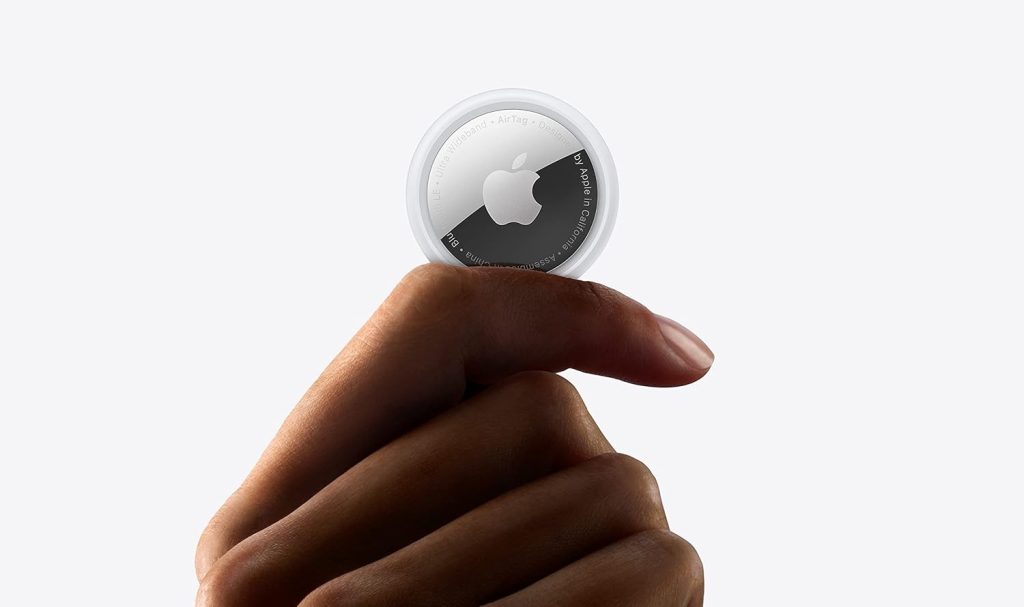
If you’re shopping for an AirTag and want to be sure you’re buying the latest model, check the etching to be certain. If you’re fine with the first-gen version, just make sure you’re paying less than the $29 retail price for the new model.
Do more with your Apple products
AirPods 5 | Apple’s newest wireless headphones
Apple AirTag 2 | Add Find My tracking to keys, bags, bikes, more
AirPods Pro 3 | Apple’s best wireless headphones


FTC: We use income earning auto affiliate links. More.



Comments