
Mactracker has long been a terrific Mac app for keeping track of pretty much every Apple hardware and software release ever. Exactly how long? 25 years, in fact.
To help celebrate the big anniversary, Mactracker for iPhone and iPad has a big new release out this week that includes useful new features.
Mactracker 5 for iOS brings Compare tool, My Models feature, and UI improvements
The new Mactracker 5 update is the latest version of the reference app for iPhone and iPad.
“Mactracker 5 introduces Compare to highlight differences between devices, My Models to track details about your Apple collection, plus UI and performance improvements,” developer Ian Page announced this week.
The new Compare tool on iPhone and iPad looks especially useful.
It works a lot like the hardware comparison feature on Apple’s website, except you can do things like compare iPhone 17 Pro Max to the original iPhone in Mactracker.
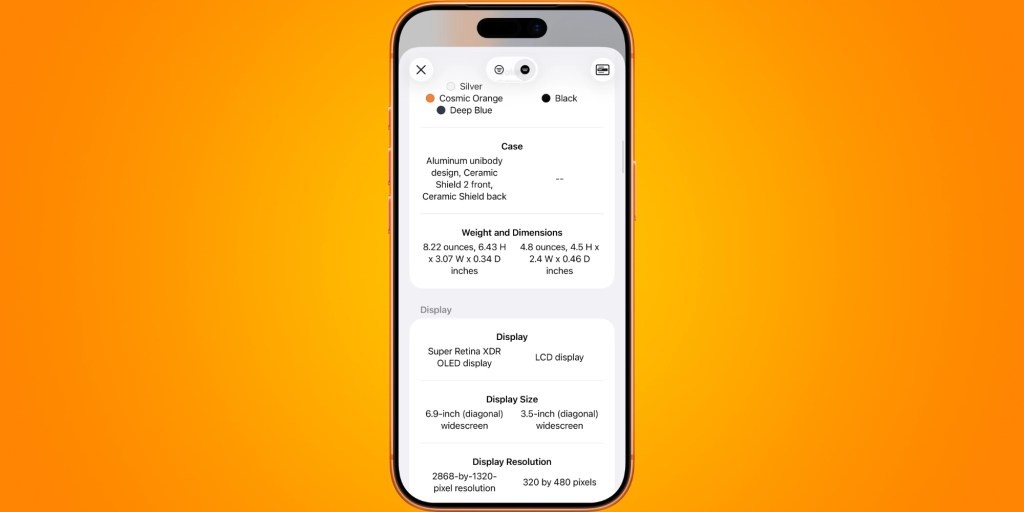
Here are the full release notes for Mactracker 5:
- Adds iPhone Air MagSafe Battery
- Adds Compare feature to highlight differences between models
- Adds “My Models” functionality to track details about your Apple collection
- Adds support for iCloud Drive to sync “My Models” between all your devices
- Adds Summary to view insights on your “My Models” collection
- Adds option to record the physical condition of entries in “My Models”
- Numerous user interface and performance improvements
- Startup Chimes will now play in Silent Mode
- Adds details on latest OS releases
- Other minor changes and additions
You can download Mactracker 5 for iPhone and iPad for free from the App Store. Mactracker for Mac is also available for free, either as a direct download or through the Mac App Store.
Learn more about Mactracker, including ways to support the app, here.
Do more with your Apple products
AirPods 5 | Apple’s newest wireless headphones
Apple AirTag 2 | Add Find My tracking to keys, bags, bikes, more
AirPods Pro 3 | Apple’s best wireless headphones


FTC: We use income earning auto affiliate links. More.


Comments