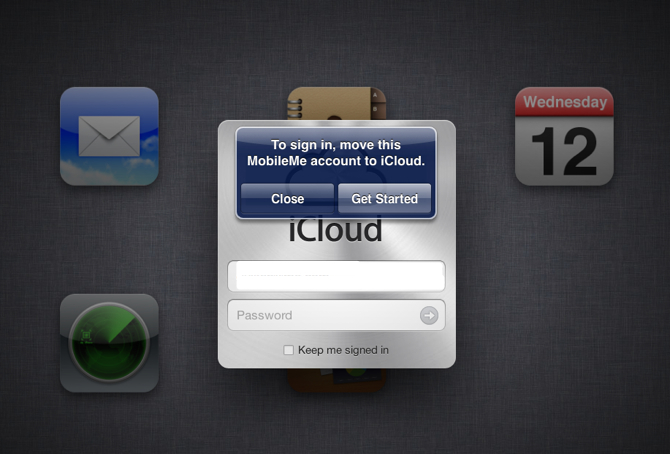
Earlier today, Apple enabled everyone to sign up for a free iCloud account. As it released iOS 5 and Mac OS X Lion 10.7.2 updates, the gadget maker has also made it possible for paid MobileMe customers to upgrade their accounts to iCloud. This requires that you first update your computers and devices to 10.7.2 and iOS 5. According to Apple’s iCloud transition page, folks who had an active MobileMe account as of June 6, 2011 will see their service extended through June 30, 2012 at no additional charge.
Not all MobileMe services will survive the transition. Mail, Contacts, Calendar, Bookmarks, Find My iPhone and Back to My Mac are all available in iCloud, but Gallery, iDisk and iWeb publishing are goners. More precisely, after the June 30, 2012 cut off time, the MobileMe service will no longer be available so you won’t be able to access your files on iDisk, albums in Galleries and web sites published to iWeb. However, MobileMe users can continue using Gallery, iDisk and iWeb publishing at me.com following the iCloud transition and through June 30, 2012.
You should also note that a bunch of Mac OS X data types will cease to sync with Apple’s servers after you make the transition to iCloud. This includes: Mail Accounts, Mail Rules, Dashboard Widgets, Dock Items, Keychain, Signature and Smart Mailboxes and Mac OS X Preferences. Apple has also published handy iCloud online help resources here.
The update bonanza continues… Apple has just issued an updated iPhoto application to go with your latest iOS 5 firmware and the just released Lion 10.7.2 software update. iPhoto 9.2, which brings compatibility with iCloud and its Photo Stream feature as well as a number of other improvements and fixes. iPhoto 9.2 enables compatibility with iCloud and iOS 5 features, including Photo Stream that automatically imports all photos taken on your iOS 5 devices with the Photo Stream feature turned on. The 376MB download requires OS X Lion. The software is available via Software Update in Mac OS X or via the Mac App Store at this link. Don’t panic if you don’t see it yet, these things take a while to propagate. Full release notes after the break.
Following both the major iOS 5 release and the Mac OS X Lion 10.7.2 update, Apple has just issued Lion Recovery update. Release notes accompanying the 452MB download only mention “improvements to Lion Recovery and addresses an issue with Find My Mac when using a firmware password.”
Great news from Cupertino, California: The wait is finally over. After nearly four months of extensive public testing, bug squashing, teeth gnashing and under-the-hood tweaking, Apple today released the final consumer version of iOS 5, a major and most ambitious upgrade to its mobile operating system yet.
Note: iOS 5 may not be available for some users yet as usually these things take a while to propagate thoughout all regional iTunes stores. iOS 5 is compatible with iPhone 3GS, iPhone 4 and iPhone 4S, third- and fourth-generation iPod touch, as well as both iPad 1 and iPad 2. However, some features are resource-intensive and thus only available on recent devices. Note that Siri, an intelligent personal assistant users can converse with, remains exclusive to iPhone 4S for the time being.
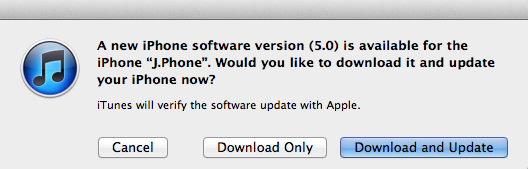
Preceding the iOS 5 roll out, Apple earlier this morning posted Find My Friends and AirPort Utility apps, enabled iCloud accounts for everyone, flipped the switch on the Newsstand Store and rolled out music re-downloading service dubbed iTunes in the Cloud in the U.K., Canada, Australia and other international markets. The iOS 5 software is available as a free firmware update in desktop iTunes. Just connect your device to a Mac or PC and follow the onscreen instructions in iTunes.
Due to iOS 5 installation being a major brain transplant, you’re strongly recommended to back up all your devices in iTunes before proceeding. In addition, you should copy your device backups and keep them safe, per instructions after the break. Also worth mentioning, the iTunes Terms and Conditions have been updated this morning, related to iTunes Match terms and collection of certain information from your iTunes library. The iTunes Match service is due for public consumption end of October. It is also rumored to go worldwide should Apple secure necessary licenses from record labels.
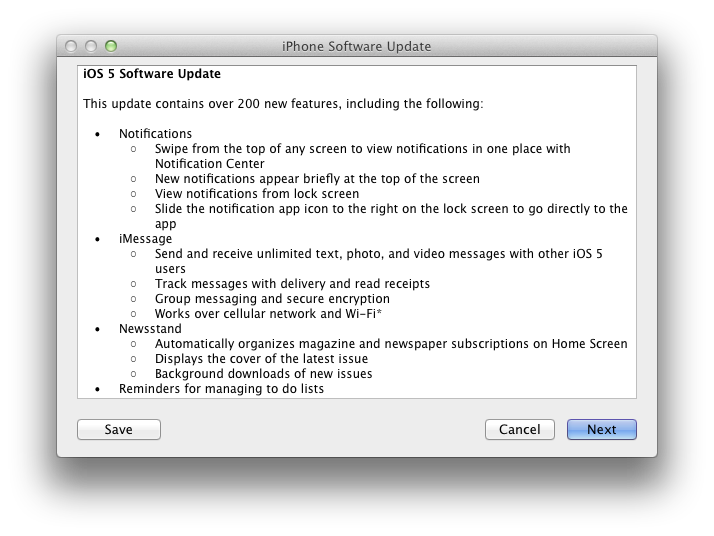
Now, onto iOS 5. As you know, iOS 5 has over 200 new features plus a handful of biggies.
Take iMessage, Apple’s proprietary messaging protocol for instant messaging with other iOS 5 devices free of charge. iMessage bypasses carrier’s costly text or MMS messages (requires data connection though) and delights with the typing indicator, read receipts and the ability to exchange photos, videos, contacts or locations. For a more in-depth overview, check out 9to5Mac’s exhaustive iMessage guide.
Another big feature is the Notification Center which brings all those annoying notifications from app into a tidy panel accessed with a pull-down gesture. Twitter integration and support for other social accounts make sharing in iOS 5 more secure and uniform across apps. Other noteworthy goodies include wireless device sync with your computer or iCloud, all-new Reminders and Newsstand apps, new Camera features and a whole bunch of other improvements and little tweaks evident throughout the system. If you’re interested in everything iOS 5 has to offer, TiPb has a monster walkthrough.
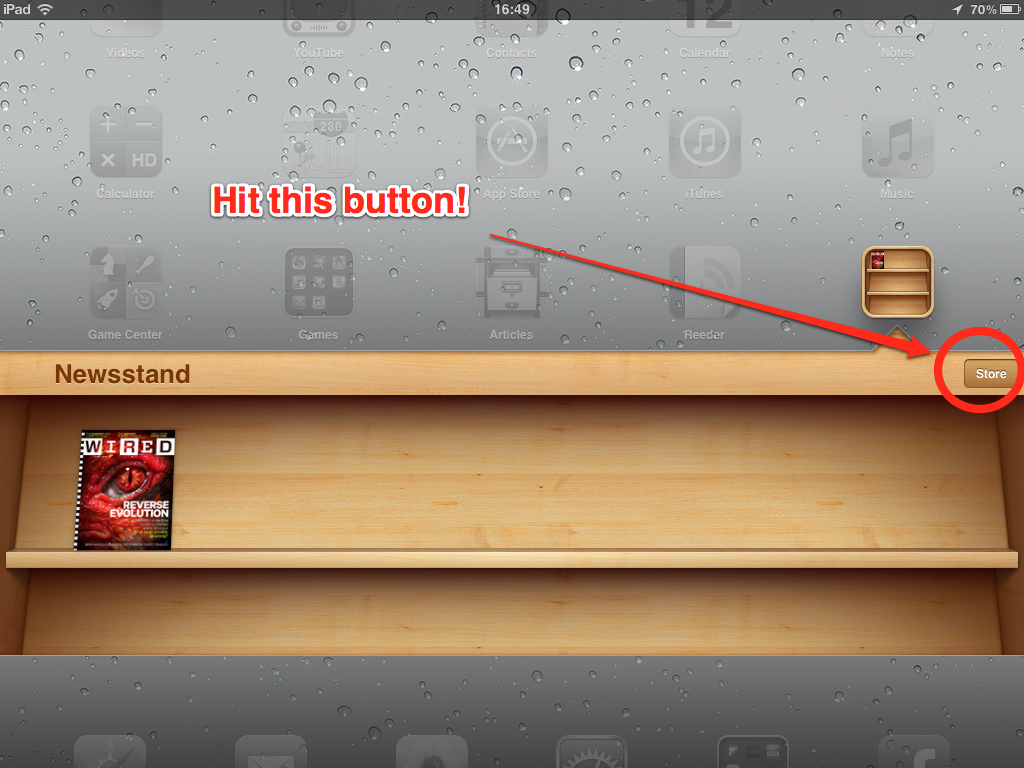
A dedicated Store button has begun appearing in the Newsstand app to some iPad owners with iOS 5 GM installed. Clicking the button brings up a new iTunes section listing all digital magazines that have been updated for Newsstand. This is a built-in store in much the same way the iBookstore is integrated right within the app. You can filter the list by Featured or Release Date. The initial selection included about 120 digital publications optimized for Newsstand at press time. Apple yesterday began populating the iOS 5 Newsstand app with first digital magazines.
Newsstand is a special folder on your iOS 5 device sporting a nice-looking wooden shelf that keeps all your digital publications in one place. Note that publishers are required to update their digital publications with Newsstand functionality. Otherwise, “old” digital publications will still populate your home screen and your iPad won’t be able to automatically download new issues for you.
After updating your digital publications using the App Store mobile client or desktop iTunes, your device will automatically move the icons of compatible publications inside the Newsstand folder. There have been some questions about how Newsstand functions, including why can’t one simply drag a publication’s app icon into the Newsstand folder. More info and two iPhone screenshots after the break…
Right on the heels of releasing the free Find My Friends app just moments ago, Apple has also issued the long-rumored AirPort Utility app which lets you manage your AirPort Extreme, AirPort Express and Time Capsule base station right on your iOS device. In fact, the app comes with some pretty advanced features letting you effectively manage your networks and base stations, akin to its desktop sibling. The software is provided as a universal binary which supports both iPhone/iPod touch and the iPad’s bigger canvas.
You will no doubt love a nice graphical overview showing your wireless network and the attached base station. You can also get a better look by pinch-zooming, which works only on iPad. To get the underlying network information, simply tap an object. You can also perform a firmware update on your base station using this utility. To download the app, access Settings on your iOS device, go to your WiFi setting, tap the little blue arrow next to the currently active network and then hit the Manage This Network button at the bottom of the sheet.
Alternatively, use this link to download the AirPort Utility app right from the App Store. Note that the program requires iOS 5, expected later today. From release notes accompanying the 4.5MB download:
Use AirPort Utility to manage your Wi-Fi network and AirPort base stations, including AirPort Express, AirPort Extreme, and TimeCapsule – right from your iPad, iPhone, ir iPod touch. See a graphical overview of your Wi-Fi network and devices. Change base station and network settings, or manage advanced features such as security modes, wireless channels, and more. AirPort Utility works with all Apple 802.11n Wi-Fi base stations, including AirPort Express, AirPort Extreme, and Time Capsule.
We’ve included four nice-looking screenies and the official features list right below the fold.
UPDATE: Here, a direct link to download the Find My Friends app from the App Store.
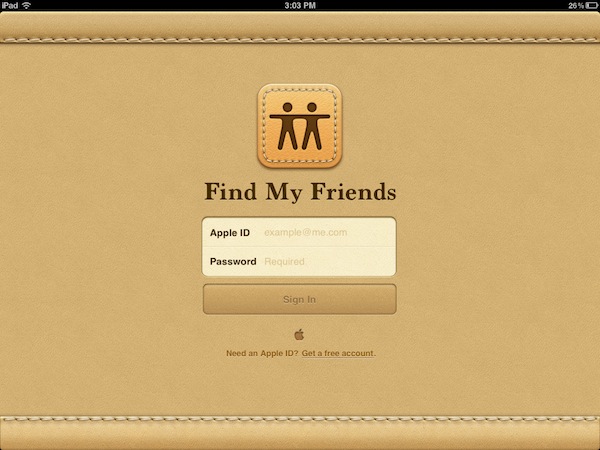
Apple has just released the Find My Friends app which lets you locate your contacts on a world map, share your own location with them, manage your temporary sharing settings and other features worried parents will admittedly deem enticing. The program is downloaded by visiting the iCloud.com site on your iOS device. There’s no need to log in, just visit that URL and you should be presented with an option to download the Find My Friends and Find My iPhone apps. Simply hit the Install Find My Friends button which will drop you right onto the App Store landing page.
From iTunes release notes:
Find My Friends allows you to easily location your friends and family from your iPhone, iPad, or iPod touch. Install this free app on your iOS 5 device and sign in with the Apple ID you use with iCloud. Adding a friend is easy – just send a request to see their location. Once your friend accepts using the Find My Friends app, you will then be able to see that friend’s location on a map. You can also choose to share your location for a limited period of time with a group of friends. Use Find My Friends to keep track of your traveling companions when you’re on a vacation. Or to see if the kids are home from school. Or to find the friends you’re meeting for dinner.
The app is provided as a universal download weighing in at 10.4MB and supporting both iPhone/iPod touch and iPad. It requires iOS 5 or later (due later today) and a free iCloud account. Apple today launched iCloud for everyone so feel free to head over to iCloud.com to create yours or use your existing Apple ID with iCloud. Go past the break for more pretty shots and the official list of features. Apple also has a special page up dedicated to Find My Friends.
Contradicting the sense of disappointment which settled in immediately following the iPhone 4S launch (largely stemming from the unchanged exterior design), Apple’s fifth-generation iPhone is by all accounts off to a great start. Positive early reviews and one million pre-orders in the first 24 hours – the most for any new product that Apple has ever launched – can’t be wrong. Meanwhile, sources from Apple’s supply chain in an Asia report have encouraging news. DIGITIMES, a Taiwanese daily newspaper for semiconductor, electronics, computer and communications industries, reported this morning that Pegatron, Apple’s #2 contract manufacturer tasked with producing one in seven iPhone 4S units, has landed orders for a cool fifteen million units of iPhone 4S with holiday quarter shipments in the 2.5 million units range.
As Pegatron accounts for about 15 percent of all iPhone 4S orders, this would indicate shipments of seventeen million iPhone 4S units for the Christmas quarter. The story is based on a report by the Chinese-language Commercial Times and corroborates a similar rumor from July. Apple has reshuffled its supply chain a bit for its handset and is understood to have commissioned long-time partner Foxconn and Asustek spin-off Pegatron to produce iPhone 4S (more on the economics of Apple’s supply chain here). Pegatron is also aiming to land orders for the iPad 3, DIGITIMES has it, and is looking to assemble Ultrabooks for Lenovo and Asustek because they can now produce premium metal chassis. Speaking of iPad, another DIGITIMES article asserted Apple had shifted orders from long-time battery supplier Simplo to Dynapack over defective iPad 2 battery packs causing leakage problems:
Today is the big day when the millions of owners of iOS devices get to update to the latest and greatest version of Apple’s mobile operating system, the iOS 5. If history is anything to go by, the iOS 5 update should appear in iTunes around 10 a.m. Pacific Time, as did the iOS 3 and 4 firmware updates. Laying the groundwork for the much-anticipated software update, the company yesterday issued iTunes 10.5, the App Store published a bunch of iOS 5 app updates while digital magazines began populating the Newsstand app.
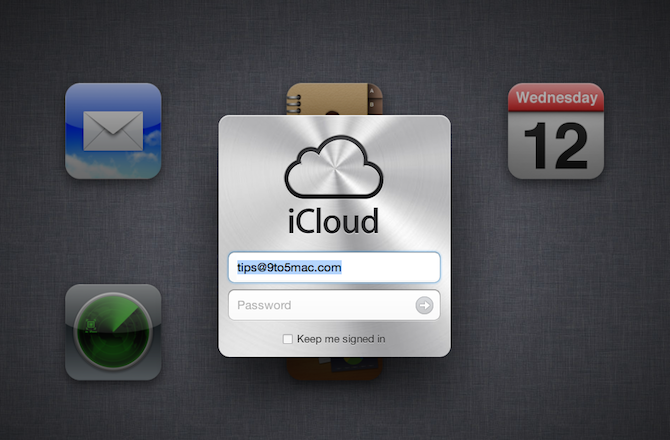
iCloud, Apple’s free of charge online services suite to go along with iOS 5, has gone live for the general public, too. You can sign up for iCloud at icloud.com using your Apple ID credentials (check out the subtle iCloud logo animation when opening the site, very nice). iCloud gives you five gigabytes of free storage (paid upgrades are available), but content purchases on the iTunes Store don’t count against your quota. As you know, an Apple ID is a user name you can use for just about everything you do with Apple, which includes shopping the iTunes Store, logging in to iChat or MobileMe, buying products from the Apple Online Store and now it lets you access iCloud to store your content.
As you can see in the screenshot above, iCloud has lost the beta flag. In addition to the iCloud cheat sheet for Apple employees 9to5Macposted yesterday, users can now access a dedicated help site at http://help.apple.com/icloud. Available topics include iCloud basics, Mail, Contacts, Calendar, Photo Stream, Find My iPhone, and Documents in the Cloud overview. Recommended browser for accessing iCloud are Apple’s Safari 5 for Mac or Windows, Mozilla’s Firefox 5 for Mac or Windows, Microsoft’s Internet Explorer 8 on Windows and Google’s Chrome 12 on Mac or Windows. Go past the fold for more observations.
The United States Patent & Trademark Office (USPTO) on Tuesday granted a new Apple patent related to advanced text-to-speech features that may or may not be fully realized in future mobile devices and computers or brought to the company’s existing lineup via a software update. Apple first filed for this patent back in February of 2006, almost a year before the original iPhone announcement. This suggests the company sought to improve the quality of machine-generated speech on its devices well ahead of this month’s introduction of Siri, whose text-to-speech and speech-to-text interfaces are outlined in Apple’s patent applications from 2009 and 2011. Even though Mac OS X has had text-to-speech capabilities for years, the quality of machine-generated voice and pronunciation wouldn’t improve notably until Lion was let out of the cage this summer. Lion’s high-quality text-to-speech led watchers to suspect that Apple licensed Nuance technology. Speaking to Patently Apple’s Jack Purcher via email, he told me “in time we’ll figure out (or not) as to why Apple felt that they had to go to Nuance to get the job done, but it does indicate that they just don’t have what it takes alone to have a viable solution for the iPhone”.
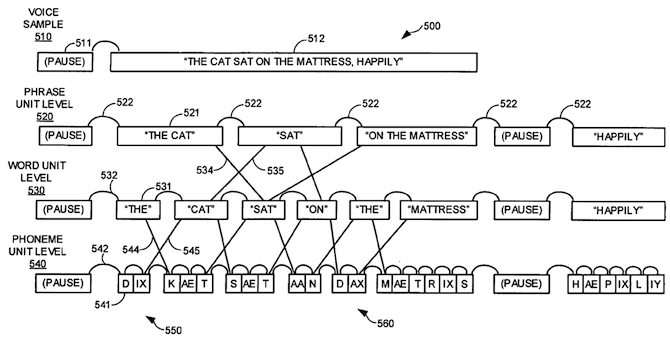
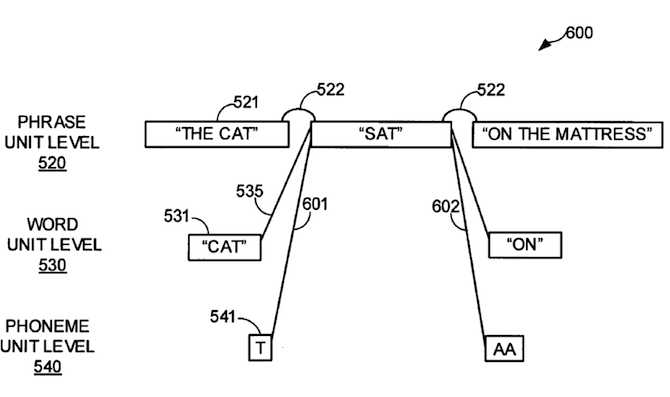
This month’s introduction of the iPhone 4S and its personal assistant Siri – with text-to-speech as one of its components – is another indication of a possible licensing of Nuance technology for a wide-scale roll out across Apple’s entire lineup. The new patent is entitled “Multi-unit approach to text-to-speech synthesis” and describes the process of matching units of a received input string to a library of audio segments that include metadata such as articulation relationships between phrases and words. Noting that speech from conventional text-to-speech applications typically sounds artificial or machine-like when compared to human speech, Apple claims that its invention provides more human sounding speech. Plus, it also supports a client-server architecture, a perfect fit for iCloud.
As Siri co-founder Norman Winarsky exclusively told 9to5Mac, Siri’s modular architecture allows Apple to replace Nuance’s text-to-speech component with any other speech synthesis technology – including, eventually, its own. Given Apple’s reluctance to use technologies it doesn’t own, it’s fair to speculate they’re at least researching a potential Nuance replacement for future iOS and Mac OS X releases. It wouldn’t be unheard of. Remember, Apple booted the Skyhook location-gathering service in April 2010, replacing it with its own crowd-sourced solution that would later spark the iPhone location tracking scandal. What else is there to be excited about Apple’s patent?
As has been the case with every new iPhone, the arrival of iPhone 4S marked re-shuffling on the supply chain end as some parts makers fell out of favor with Apple’s management and new ones surfaced to pledge allegiance to the Cupertino, California consumer electronics powerhouse. Partnering with Apple is good business for far-flung suppliers, most of whom are based in Taiwan and China. It’s also a one-of-a-kind privilege to work with the world’s leading technology company notorious for pushing the envelope with advanced manufacturing techniques that have not been tried before. The winners and losers, call it what you will, here’s an overview of the enabling vendors helping Apple manufacture iPhone 4S in the millions.
As you know by now, the handset is being assembled by Taiwan-based contract manufacturers Pegatron (an Asustek spin-off) and Hon Hai Precision Industry. The latter – also known under the Western moniker Foxconn – will be churning out iPhone 4 units this year, to be joined by Pegatron in 2012. Pegatron is reportedly tasked with building approximately one in seven iPhone 4S units. Tapping the economies of scale and long-term supply contracts, Apple is able to build iPhone 4S cheaper than its competitors while preserving traditionally high margins which are the envy of the industry.
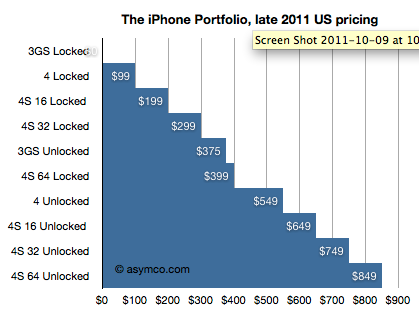
Deutsche Bank analyst Chris Whitmore estimated in a note to clients Monday the iPhone 4S bill of materials in the $170-$220 range, depending on capacity. The figure translates to manufacturing margins between 71 and 73 percent, roughly in line with manufacturing margins for the previous-generation iPhone 4. Note that bill of materials excludes other costs associated with assembly, packaging, distribution, sales, marketing, licensing, research and development and more. As for sales potential and profitability, Asymco’s Horace Dediu praised the current iPhone family price matrix, seen right below.
The current iPhone family price matrix, courtesy of Asymco.
The analyst observed that “there is now an iPhone for every budget”, ranging from the free of charge iPhone 3GS to the $99 8GB iPhone 4 to the 16GB/32GB/64GB iPhone 4S costing $199/$299/$399 and all the way up to the unlocked 64GB iPhone 4S priced at $849. Estimating the price of a contract-free, unlocked iPhone 4S ($649/$749/$849 for the 16GB/32GB/64GB version), Dediu concludes it is “very nearly the price that operators themselves pay (excluding any volume discount)”. No surprises here, folks, the iPhone 4S remains a money-making machine. In fact, it’s more profitable than 4G Droids.
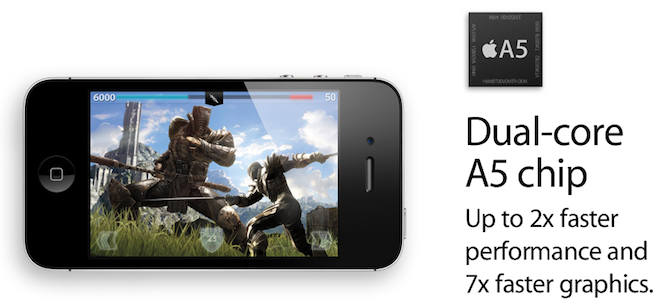
While dudes over at iPhoneItaliahave taken a peek under the iPhone 4S’s hood, a thorough X-ray and teardown analysis by Chipworks and iFixit is needed to understand how Apple engineered the product. Early benchmarks confirm that iPhone 4S is twice as fast with seven times faster graphics, indicating a clock frequency of 800MHz (versus 1GHz in iPad 2). Meanwhile, UBS Research put together a list of potential key suppliers of components for the iPhone 4S (seen after the break).
Corning Glass, TPK Holdings and Wintek are being listed as touch screen suppliers. DIGITIMESthinks Apple shifted its touch panel orders among suppliers “due to a product flaw found at Wintek’s panels”. As a result, TPK Holdings’ September revenues spiked 53.7 sequentially and 139.7 percent annually while Wintek’s revenues declined 18.4 monthly and 4.5 percent annually “as Apple rejected a batch of defective touch panels for iPhone 4S”.
Sony supplies Apple with the eight-megapixel CMOS sensor for iPhone 4S, while Largan Precision is being credited with all-new optics.
Providers of the iPhone 4S’s improved camera system include CMOS supplier Sony (confirming a 9to5Macreport from April), camera modules from Sharp and LG Innotek and all-new optics with five lens instead of four, courtesy of Largan Precision and Genius Electronic Optical. It’s also possible that OmniVision joined Sony as a backup CMOS sensor supplier as they announced a thin 1080p camera sensor back in May. Most notably, however, Samsung has remained the manufacturer of Apple’s custom-designed A5 chip, arguably the iPhone’s most important hardware component…
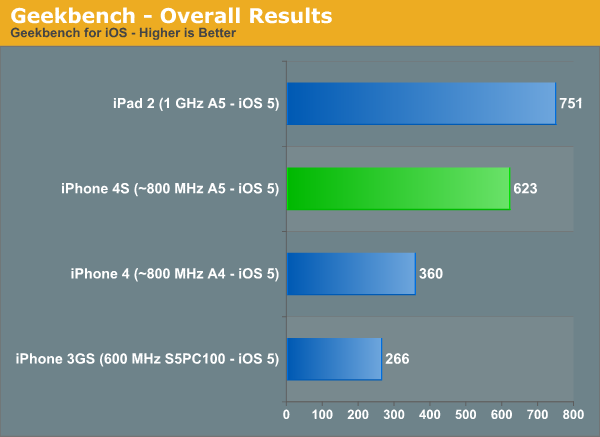
The first SunSpider and BrowserMark benchmarks 9to5Mactold you about yesterday confirmed the iPhone 4S as being “twice as fast”, per Apple’s tagline. Today, AnandTechpublished a more thorough analysis based on Javascript, CPU and GPU benchmarks of Apple’s latest handset. Thanks to the dual-core A5 chip first outed with iPad 2 this Spring, Javascript performance on iPhone 4S “finally catches up to Tegra 2 based Honeycomb devices, while general CPU performance is significantly higher than the iPhone 4” – about 68 percent, to be precise.
More importantly, Geekbench results (seen below) tell us that iPad 2 is clocked around “25 percent higher than the iPhone 4S”. Overall, the Apple-designed dual-core A5 chip inside iPhone 4S is estimated to run at 800MHz versus iPad 2’s 1GHz A5 processor. This isn’t entirely unexpected due to the battery concerns and the handset’s much smaller 5.25 Whr battery. Furthermore, Apple says iPhone 4S has “up to seven times faster graphics” versus the advertised “nine times faster graphics” on the iPad 2 – another proof that the two device’s graphics processing units are not clocked equally.
As we predicted, Imagination Technologies’ PowerVR SGX543 graphics units ticking inside the iPhone 4S is also significantly speedier compared to the ARM-based Mali-400 GPU found in the Samsung-designed 1.2GHz Exynos 4210 processor (they recently announced the improved 4212 chip) used in the Galaxy S II smartphone. By all accounts, the iPhone 4S has the fastest graphics in a smartphone yet. Anand Lal Shimpi and Brian Klug explain:
Update: It is live, we’ve taken a walkthrough below.
According toThe Verge (formerly known as This is my next), the elusive Facebook for iPad app is about to go live “momentarily” on the App Store. The iPhone app will also get updated, the publication has it, with bookmarks to apps, a new Requests dialog that will display app notifications, and support for Facebook Credits for in-app payments. VentureBeatquoted Facebook engineer Leon Dubinsky as describing the software on the Facebook blog, but no such post had gone live at press time. While the social networking giant has yet to formally announce the program, they already have a dedicated URL up and running at facebook.com/mobile/ipad.
The page invites users to download the free Facebook for iPad app here. That URL actually leads to the existing iPhone app, which indicates that both the new iPad app and the existing iPhone client have been merged into a universal binary. The official list of features doesn’t disappoint: You can chat on the iPad’s beautiful 9.7-inch canvas, browse and flip through your friends’ photos, as well as play games and watch high-definition movies in full screen mode.
What’s best, it supports AirPlay technology so you can easily and wirelessly beam your videos and snaps to that big telly in your living room through the Apple TV set-top box, which is also up for an update with 1080p video output via the A5 chip. At post time, the US App Store still had the iPhone app hosted at the URL, but it shouldn’t take too long before changes propagate throughout regional App Stores. Go past the break for release notes, more screenies and a hands on video.
Dr. Dre, the hip-hop mogul, is adamant to make a name for himself in the consumer electronics business. He obviously has a pretty ambitious goal as he pictures himself up there, next to Apple. He’s already in the phone business, will have its first cell phone coming out soon on the Verizon Wireless network and is also involved in Chrysler. According toGlobalGrind, which caught up with Dre yesterday at the launch of the book and art instillation CULO by Mazzucco, he wants to “take over everything with a speaker”. Of Apple, he said:
I am not nervous about anything. I am trying to be number 2 to Apple, and number 2 to Apple is not a bad position to be in.
Laugh all you will, but Dre ain’t pulling any of this out of thin air. The man co-founded Beats Electronics in 2006, an electronics company, with Interscope Geffen A&M Records CEO Jimmy Iovine. The company is renowned for the Beats by Dr. Dre headphones, but they also sell celebrity-endorsed lines by Lady Gaga, Diddy, and Justin Bieber. The two partners recently sold a 51 percent stake in the company to HTC for a cool $300 million. Not bad for a gangsta rap artist turned businessman, don’t you think? Expand Expanding Close
As Apple announced this morning one million iPhone 4S pre-orders in just 24 hours and some customers began receiving shipping notifications, someone out there already has the handset in their hands and they have a video to prove it (viaMacRumors). The interesting bit is the Siri section in Settings which lets you choose between activating Siri by holding down the home button or simply raising your handset to your ear, which 9to5Macindicated back in August. This feature isn’t simply activated via the iPhone’s proximity sensor sensing your ear (like the Google app for iOS), but also taps motion sensors for accuracy as well. Other Siri options in the Settings interface include language choices (English, French and German at launch, Apple promised more to come at a later stage), Voice Feedback, My Info and enabling/disabling Siri system-wide. According to early benchmarks, Apple wasn’t lying describing iPhone 4S as “twice as fast”. The handset scores 2222.1 milliseconds in the SunSpider benchmark and 89567 in the BrowserMark benchmark. This compares to a BrowserMark score of 44856 on an iPhone 4 with iOS 5.
The App Store has no shortage of music-creation apps that let you play virtual instruments, beginning with Apple’s excellent GarageBand for iPad which supports Mac projects and AirPlay technology. But if you really want to impress your friends, here’s a $2 download that taps iPad 2’s built-in FaceTime camera and clever programming to actually track the movement of your hands and reproduce guitar sounds as if you were playing the strings for real.
You can pick among several guitars, use effect pedals and even fret chords with your left hand. It’s the closest thing to the air guitar gimmickry – heck, it’s even better than the real thing. We’ve seen creative uses of iPad 2’s front-facing camera before, but nothing like the GhostGuitar app. Here’s to the hoping that developers will focus more on developing Kinect-like apps for Apple’s tablet.
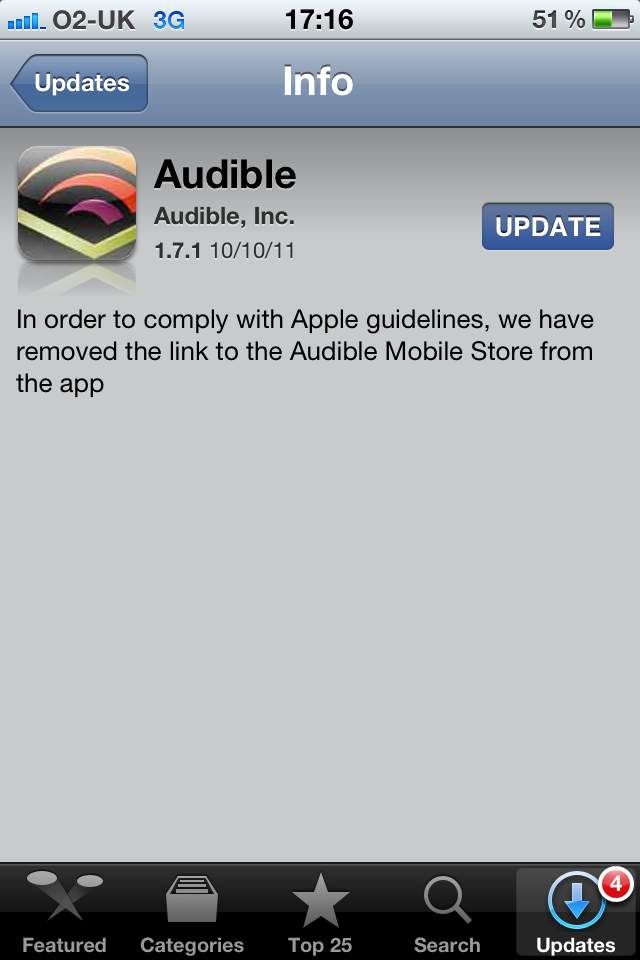
The store button in the Audible app (left) and the new version acknowledging the removal of the button to comply with Apple’s rules (right).
UPDATE: [Monday, October 10, 2011 at 12:40am ET]: Well, that sure was quick. A new version of the Audible app has just gone live on the App Store, without the link to Audible’s Mobile Store from the app. The development actually means someone at Apple’s App Store team messed up. We’re still bewildered how anyone could have missed the big orange button.
Back this summer, Apple instituted a change to the App Store rules which prohibited in-app links leading to external content stores. The controversial move forced the makers of programs such as WSJ, Kobo and Google Books to remove the offending store links, which essentially meant demanding users needed to find out about web stores on their own. People had been especially concerned about Amazon, even after the online retailer released an elegant workaround solution, a web-based application entitled Kindle Cloud Reader. And now, ZDNetdiscovers an interesting anomaly in the App Store: the updated Audible app proudly sports a button which yanks you out of the app right to their store on the web.
It could be a slip up by the App Store review team, but how could that be possible with such a large and prominently placed button? Oddly enough, release notes fail to acknowledge the addition of the button, but surely Apple’s testers actually run and test apps rather than approve them based on their iTunes description. What’s interesting about this is that Audible is an Amazon property. Perhaps this signals a store-wide change to the App Store rules. And if so, could this change be due to Amazon’s $199 seven-inch Kindle Fire tablet?
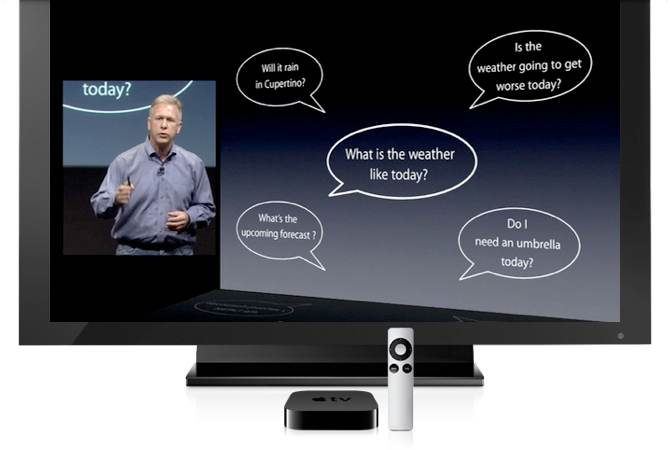
Siri, an intelligent voice-controlled personal assistant which debuted with the iPhone 4S, could come to your big screen television via Apple’s set-top box. The evidence is inconclusive at this point, but clues exist pointing in this direction. For starters, Cross Research analyst Shannon Cross speculated about Siri on the Apple TV in her note to clients last week, observing (via Fortune’s Apple 2.0 blog):
One interesting application of the Siri technology would be with Apple TV (either the existing device or actual TV’s that Apple may launch). We think this would solve the industry’s difficulties with remote controls… We think it would be very compelling to own a TV or a device that could quickly answer the request, “I want to watch the Yankees/Red Sox game,” by changing the TV channel without requiring the user to look at a guide or use a remote control, or even specifying HD or standard definition feeds, since you would want the HD channel if available. Or, you could instruct the device to record all new episodes of a show, without leaving the program you are currently watching. Finally, since you are online, a Siri enabled TV could answer whether your iPhone or computer has received a new message, and let you respond accordingly.
I know what you’re thinking… Analysts, they also predicted flying cars, right? But if Apple were to bring the Siri functionality into their set top-box, they would need to issue a hardware refresh because the current-generation Apple TV powered by the A4 processor lacks oomph to run Siri. As 9to5Macdiscovered on Friday, the Apple TV 3,1 reference in the iOS file system indicates a major hardware refresh for the device. While references to devices that have never come to fruition had previously appeared in the iOS code, this one comes from a file that Apple uses to activate unreleased devices in testing. If Apple is testing a new Apple TV with the A5 chip, it would indicate full HD 1080P video playback and – although this is a stretch – the possibility of voice-controlled input powered by Siri. Think telling your Apple TV to search for movies from 2010 starring Tom Cruise, play four stars-rated songs by Bob Dylan, serve up weather information, compare stocks, rate an episode of a TV show you’re watching, asking “who directed this movie” and so forth. And while we’re at it…
Apple’s Covent Garden store in London has been robbed early this morning local time. Just like in the movies, a gang consisting of seven thieves on mopeds has raided the prominent retail spot in an attempt to steal iOS devices and Mac notebooks. The smash and grab, perThe Next Web, was first reported by Rob Shoesmith who described hearing “a load of motorbikes” around 1:15am. According to The Metropolitan Police, the thieves stole iPads and “other similar devices”, adding in a statement:
It is believed there were around 7 moped riders / motorcyclists involved, most if not all with a pillion passenger. All persons were in full face crash helmets. Shortly afterwards Islington police saw a moped and followed and attempted to stop it, but it was lost.
An abandoned moped was found in the vicinity of Wyclif Court, St John Street EC1. Officers subsequently apprehended two individuals inside the block of flats, carrying Apple gear in bags. Apple opened the Covent Garden Store August 7 last year and recently used the outlet to live-stream the October 4 event to U.K. journalists. Criminals are increasingly targeting Apple stores for hot gear that commands high prices on the street. It’s not just individuals or small groups, mind you…
TigerDirect.com via eBay Daily has the Cisco Linksys 802.11 Wireless router for $18.99 with free shipping. That’s the lowest price we’ve ever seen for a Cisco/Linksys 802.11n router, refurbished or otherwise. This router also has 4-auto-switching 10/100 Ethernet ports.
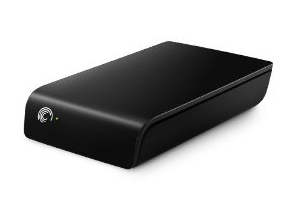
Amazon offers the Seagate Expansion 3TB USB 3.0 External Hard Drive, model no. STAY3000102, for $119.99 with free shipping ($0.04/GB). That’s the lowest price we could find on this or any 3.5″ hard drive which runs at 7200 rpm.
Best Buy has begun advertising their comprehensive iPhone 4S pre-ordering program which includes black and white iPhone 4S model in 16/32/64 GB flavors and with service agreements from Verizon Wireless, AT&T and Sprint (carrier plan breakdowns here). You can pre-order the handset over at the Best Buy site today. Expect deliveries to be made next Friday, October 14. The retailer is sweetening the deal with the Phone Trade-in program allowing you to sell Best Buy your used device in good condition and claim up to a $300 gift card, which can be redeemed against an iPhone 4S purchase as well.
The iPhone 4S is also offered for pre-order via the online Apple store, in addition to the Verizon Wireless, Sprint and AT&T online and brick-and-mortar stores. AT&T’s online pre-ordering system experienced some hiccups this morning, but those issues appear to have been sorted out at post time. Apple, too, will buy your used iPhone 4 for up to $200 and you can fetch some really attractive prices over at eBay and Gazelle. Other popular choices include Craigslist, NextWorth and SellYourMac.com.
If you’re in the market for an iPhone, you might also find this AT&T pricing grid handy, included right after the break.
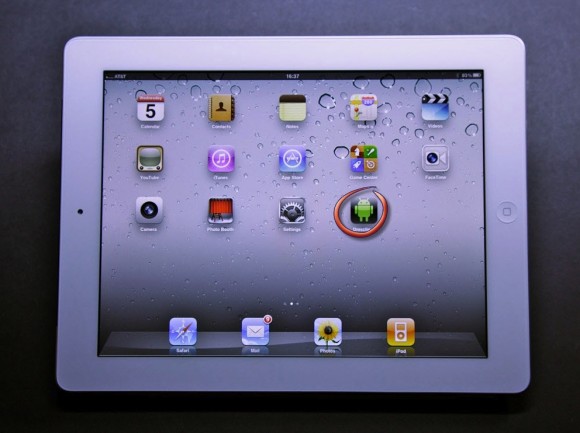
Android apps running on your iPad? Alien Dalvik makes it possible.
In case you’re not familiar with Alien Dalvik, it’s a port of the Dalvik virtual machine, which is the software layer in Google’s Android operating system responsible for executing Android apps. According toSlashGear, the Myriad Group (the brains behind the Alien Dalvik project) announced support for Apple’s iPad in Alien Dalvik version 2.0.
As a result, the unimaginable (even unholy) becomes possible: You’ll be able to download, install and run Android software on your Apple-branded tablet. Alien Dalvik wraps each Android app file in its own virtual machine so it kinda feels as if you were running a native iPad app. The Myriad Group explains:
From a user perspective, Alien Dalvik 2.0 is completely transparent and installed without user disruption. Users simply enjoy the same rich Android ecosystem they have become accustomed to via mobile on other key screens, such as playing Angry Birds on HDTV. This all while gaining faster access to a wider range of apps, thus encouraging a higher frequency of downloads and increased ARPU.
We assume performance isn’t comparable to the experience of running native iOS apps on an iPad 2 and we’re surely expecting some hiccups and likely compatibility issues. With that in mind, this development begs the question: Why would you want to run Android apps on your iPad?
Apple’s iOS software boss Scott Forstall said at Monday’s iPhone 4S introduction that about 140,000 out of the 500,000 apps available on the App Store have been specifically created with iPad in mind. Android apps also aren’t as pretty or delightful as their iOS counterparts. But the fact that most are either free or ad-supported should mean something so we expect some folks will give Alien Dalvik a try. Stay tuned as the team promised to show off Alien Dalvik 2.0 running third-party Android apps on iPad 2 at CTIA 2011 next week. Expand Expanding Close
Joining a long list of partners, closest friends, rivals, media outlets and fans who paid tribute to Steve Jobs – each in their own unique way – comedians Stephen Colbert and John Stewart both honored Apple’s co-founder, former CEO and chairman.
Colbert has extensively talked about, joked about and used Apple products on The Colbert Report, an American satirical late night television program that airs Monday through Thursday on Comedy Central. The video above features a montage of the Apple products late Jobs gave to Colbert, with the comedian’s personal gratitude to Jobs for everything he did.
John Stewart did one, too, seen right below.
[vodpod id=Video.15518955&w=650&h=535&fv=]
Perhaps most dramatic, in the video below, Colbert breaks from character and says goodnight by paying a silent, touching tribute with his iPhone. Expand Expanding Close