Apps

See All Stories

Learn about the latest news for iOS, Mac, Apple Watch, and Apple TV apps

Apps for iOS, macOS, tvOS, and watchOS power our modern world. 9to5Mac will update you on the latest news, review, and updates for all types of apps. “There’s an App for that”.

The term came became part of our vocabulary when Steve Jobs announced The App Store as part of the iPhone 2.0 software update in 2008.

Over the years, the term has become as common as kleenex for describing applications on all of our devices. Apple’s platforms have apps for just about anything from finance, banking, sports, social media, podcasting, music, and more. We have a guide for helping you discover the best ones as well. Apps are now on everything from our TV, to our smartphones, on our laptops, and all the way down to our wrists.

As new ones are released or existing ones have major updates, the team here at 9to5Mac will bring you the latest news and reviews. If you want to follow along with video footage, be sure to follow 9to5Mac on YouTube. Scroll down below our latest updates on all things relating to applications on iPhone, iPad, Mac, Apple TV, and Apple Watch.

OS X Lion kills Front Row… here’s how to get it back!

As we first reported back in February, OS X Lion brings many new innovations but loses others like Front Row. Front Row, for those unfamiliar, is a full screen media interface for the Mac. Front Row made its debut a couple of major OS X releases back and essentially mirrors the initial Apple TV interface – in its Snow Leopard implementation. Since the news broke that the software is missing from Lion, reader Ralph Perdomo put together a little application to bring back the functionality.

Ralph figured out that he could take the Snow Leopard Front Row files and then compile it into a runnable application for OS X Lion. For those interested he took these files:

We have tried out the application and the tweak works. You do have to restart, though. Keep in mind this is very at your own risk. Since this is so easy, maybe Apple will slap Front Row into the Mac App Store and charge $4.99? Probably.


Expand
Expanding
Close

Apple Retail has 3 Lion install images and a possible dedicated Lion Caching Server

Site default logo image

As we get close to the Lion launch, several tipsters have provided more information regarding the Apple retail overnight and  days after.  Tonight, Apple retail will hold an overnight from approximately 11pm – 7 am to give the retail staff enough time to update the stores visual elements with new marketing materials and re-image all display Macs with Lion.

As previously reported, our tipsters say most stores have recently received an external LaCie hard drive containing Lion installs, but we have received new information that the drives contain 3 different install images for Lion; Normal, Pro, and Joint Venture. 

JointVenture is an enterprise membership program to support businesses running Macs and iDevices.  It is believed that each of these installs will include unique software titles, and some of which could be new.

Furthermore we’ve heard rumblings that some stores will be receiving maxed out Mac Pro towers to be used as Lion distribution caching centers (speculation here).  Some believe that these stations would allow customers to purchase Lion (3.5GB) from the Mac App store and download it directly from the store server in minutes rather than hours it takes over a normal broadband connection.

MacOS X Server and internal builds of Time Capsule allow for Software Update Caching, so this is certainly something within Apple’s capabilities.  Also, Apple told Computerworld that users could come into the store to download Lion last month.

This would also be a huge help to customers who do not have access to a broadband Internet connection or users who want to walk through the install process with an Apple employee during a personal training session.  It would obviously also save Apple some internet bandwidth which at 3.5GB per user adds up.


Expand
Expanding
Close

BBEdit gets monster upgrade

Site default logo image

We’re big fans of BBEdit over here (and its free counterpart TextWrangler) so today’s update is exciting news. I built 9to5mac a few years ago using BBEdit (on Drupal!) and the software has just gotten better and better (though 9to5mac has since been ported to WordPress.com).

How much is updated today?  Just have a look at the release notes if you’ve got some time to kill.

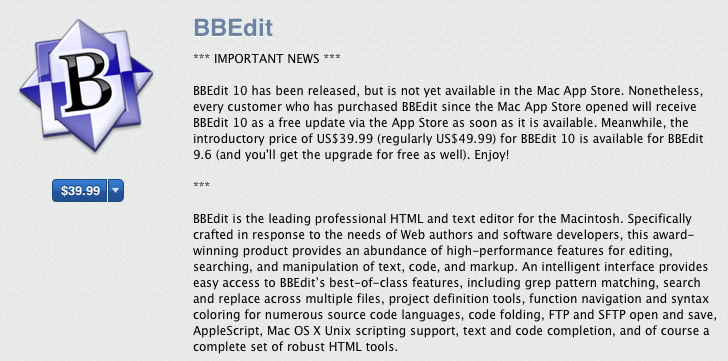
It isn’t upgraded in the App Store just yet but Bare Bones says that any BBEdit purchase since the App Store opened will get a free upgrade.  Get it here until October 20, 2011 for $40.  Full info below:


Expand
Expanding
Close

Student? You can now rent Kindle Textbooks

Site default logo image

Great news for students from Amazon today. You can now save up to 80 percent off the list price of the print textbook by renting Kindle Textbooks on the Kindle or Kindle-compliant devices such as Windows and OS X PCs, iPads, iPhones and BlackBerry, Android and Windows Phone 7 devices. “Tens of thousands of textbooks” are available for rent across those platforms, reads an Amazon page promoting the deal. You can choose a rental length between 30 and 360 days and extend your rental for as little as one day. What’s best, regardless of your chosen rental period, Amazon will charge you only for the exact time you need a book. From Amazon:

Kindle Textbook Rental is a flexible and affordable way to read textbooks. You can rent for the minimum length, typically 30 days, and save up to 80% off the print list price. If you find you need your textbook longer, you can extend your rental by as little as 1 day as many times as you want and just pay for the added days.

You can tell whether  a Kindle edition is available for rent in the Textbooks Store section of the Kindle app or from the search bar. The ability to rent textbooks in fair terms is good for students, but it ain’t like they were going to keep them anyway.


Expand
Expanding
Close

Skype for iPad, Google+ for iPhone: Is there a competitor logjam?

Site default logo image

You must be quite puzzled with the no-show for native Skype and Facebook apps, in addition to Google+ for iPhone. Indeed, Google as long as three weeks ago said a native Google+ app had been sent to Apple for review. Skype created a confusion by posting a teaser video some 25 days ago, soon removed by the company and re-uploaded by RazorianFly. The clip demonstrates what appears to be Skype video calling running natively on an iPad. As of today, neither program is to be found on the App Store, creating valid suspicious that Apple has been intentionally delaying those particular submissions for competitive reasons – and we know from Steve Jobs public remarks that Apple approves 95 percent of the apps within seven days. Skype is in the process of being acquired by Microsoft and they recently announced video calling integration with Facebook.

9to5Mac reached out to Google seeking clarification about Google+ for iPhone. A spokesperson responded that the search giant has “nothing further to add on our end about the Google+ iPhone app”. The spokesperson added the software is “still coming soon”. Asked if Skype for iPad was still in the process of being reviewed by Apple and whether the company anticipated a launch soon, a Skype representative would only say that “the current version of Skype for iPhone works on the iPad”. They also removed the broken link, telling 9to5Mac it led to the existing Skype for iPhone app even though the URL had the “ipad-for-skype” part in it. Also, as you can see in the above screenshot, the Skype homepage lists “iPad” as one of the platform choices under the Get Skype link. Apple did not respond to our email inquiries about the state of Skype for iPad and Google+ for iPhone apps.


Expand
Expanding
Close

OS X Lion ready applications begin appearing on the Mac App Store

Site default logo image

WordCrasher on the Mac App Store

Ahead of Mac OS X’s Lion’s official launch, Apple has begun approving apps that take advantage of the next-generation operating system into their Mac App Store. The move, first noted by OS X Daily, comes just days after Apple opened the door to developers to submit their Lion apps for inclusion on the App Store. Apple, of course, recommends that these apps are first tested against the Golden Master version of the operating system. In WordCrasher’s case, the app takes advantage of Lion’s full screen apps feature and resume.


Expand
Expanding
Close

Google launches Photovine social sharing app for iOS

Site default logo image

In anticipation of a launch of the Photovine service which was announced Tuesday, Google has just released a free invite-only Photovine for iOS app on the App Store and posted the cutesy teaser (see below) on the official Photovine page. Beginning today, people can request an invite on the site, which is needed to take advantage of an iOS app. You’re advised to hurry up because invitations for Google’s recently launched products have been  in high demand (Google+, anyone?). By the way, don’t you find it weird they would feature an iPhone 4 app on both the website and in the video clip rather than a Nexus S?

For those uninitiated, Photovine is Google’s attempt at social photo sharing that takes clues from Flickr, Facebook photos, Picasa and other services. “Photovine is a fun way to learn more about your friends, meet new people and share your world like never before”, says the official blurb. You begin creating a vine by taking a photo and creating a new caption.  Other people will see your vine and join in by adding their own photo, showing their own take on the caption. Google explains:

A vine is like a constantly growing family of photos connected through a common caption created by you, your friends, and people all over the world. Some examples of vines could be: “What Weekends Are Made Of”, “Secret Stuffed Animal”, “Party People”, or, “Love of My Life”. As people add photos to vines, they tell their own stories about the moments, images, and ideas that define our lives in a way that’s social, creative, and fun.

Release notes from iTunes after the break

[youtube=http://www.youtube.com/watch?v=-MPIZKPhfDY]


Expand
Expanding
Close

Apple continues work on native panoramic camera functionality in iOS 5

Site default logo image

Last month, we documented code within iOS 5 which contained references to some new panoramic camera functionality for iOS devices.

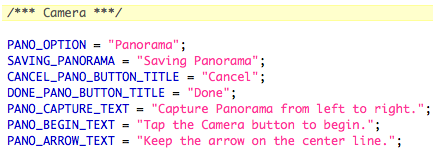
The latest build of iOS shows that Apple continues to do work on this functionality.  They’ve added a few more strings which weren’t in the earlier Beta:

Here’s what happens when you jailbreak and enable panoramic

[youtube=http://www.youtube.com/watch?v=CqAJa2GzYvg&start=32]

More than a few third party apps already do panoramic camera capturing on Apple’s iOS. One example is below:


Expand
Expanding
Close

Nuance announces free Siri-like Dragon Go iOS application

Site default logo image

[youtube http://www.youtube.com/watch?v=0O84rNwH_50]

Nuance has announced a new iPhone application called Dragon Go, which is basically search software that works hand-in-hand with the company’s phenomenal voice recognition technology. The concept is quite similar to Siri, which Apple owns, and all voice-searches connect to services like OpenTable and Fandango. The concept is pretty neat, and hopefully this is a taste of what we’ll be seeing in the eventual fruition of Apple’s rumored partnership with Nuance and purchase of Siri. According to All Things D the application is free and is now available.


Expand
Expanding
Close

Developers: Volume B2B purchasing coming to the App Store

Site default logo image

Developers wishing to sell apps to business in volume for discounted rates now will be able to according to an email just sent to developers. Apple upgraded its Paid Applications Agreement today which allows for a new type of pricing.

For instance, a hospital could buy a medical app for its 2000 employees in one big swoop rather than hitting the buy button 2000 times.   
Expand
Expanding
Close

Apple shifts international App Store (Mac + iOS) pricing to balance with the U.S. Dollar

Site default logo image

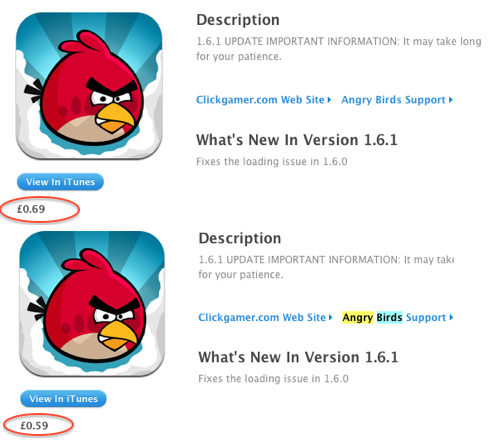
Price change in the UK

Amid their goal to even out prices internationally with those in the United States, Apple has raised prices (and lowered!) for applications across the international App Store. Of note for the UK, a 99 cent application (U.S.) now costs £0.69 up from the £0.59 of yesterday. Additionally, apps which were £1.19 are now £1.49. These changes are also international with a slight price drop in Switzerland and in Japan. Apps in Japan now start at 85 Yen versus the 115 Yen of yesterday. Let us know the changes you spot in other countries. It looks like changes are in effect in the UK, Mexico, Japan, Switzerland, and Australia. Here are some examples:

From reader Pump in Switzerland:

Final Cut Pro 329.- Swiss Francs
NEW: 300.-

Compressor 55.- Swiss Francs
NEW: 48.-

iPhoto: 17.- Swiss Francs
NEW: 15.-

Reeder: 11.- Swiss Francs
NEW: 10.-

From Dean and David G. in Australia

Aperture – was $99 and is now $84.99

From a reader in Mexico:

Same thing in Mexico, from US store 99¢ apps went from $10 MXN to $12 MXN


Expand
Expanding
Close

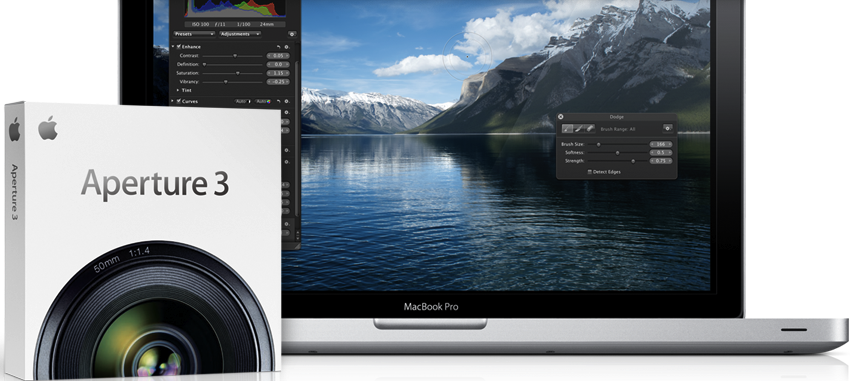
Aperture 3.1.3 released with minor enhancements and bug fixes (update: native full screen in Lion)

Site default logo image

Apple has released an update to its professional photo-editing and management software, Aperture, that includes both bug fixes and some minor enhancements. These bug fixes cover stability and performance while the minor enhancements include a new gestures toggle, improved image cropping, photo uploading, and loading slideshows in the background.

This update supports general compatibility issues, and also addresses overall stability and performance. Minor issues addressed include the following:

  • Improves reliability and performance when syncing web-published albums
  • Slideshow exports are now handled as a background operation
  • Crop tool now correctly supports use of gestures to define crop size
  • Gesture support can now be enabled or disabled in Preferences
  • Fixes an issue that could cause a blank sheet to display when placing a book or print order
  • Published MobileMe, Facebook and Flickr albums now appear in a Web section in the Projects Inspector
  • Shift-clicking snapshots on the Faces corkboard now allows you to make contiguous selections
  • Metadata presets are now correctly applied to imported audio files
  • Fixes an issue that could cause Aperture to quit unexpectedly when trimming audio in full screen mode
  • Resolves various issues when adding names to Faces using accented, Japanese, Korean or Simplified Chinese characters
  • Improves stability when browsing video clips
  • Addresses reliability of library repair and rebuild

The full change log is pasted after the break.

Update: Aperture goes full screen now with the native Lion full screen button.

Thanks, Hayati!


Expand
Expanding
Close

AOL gets into the music game, launches PLAY for iPhone

Site default logo image


Image via Techcrunch

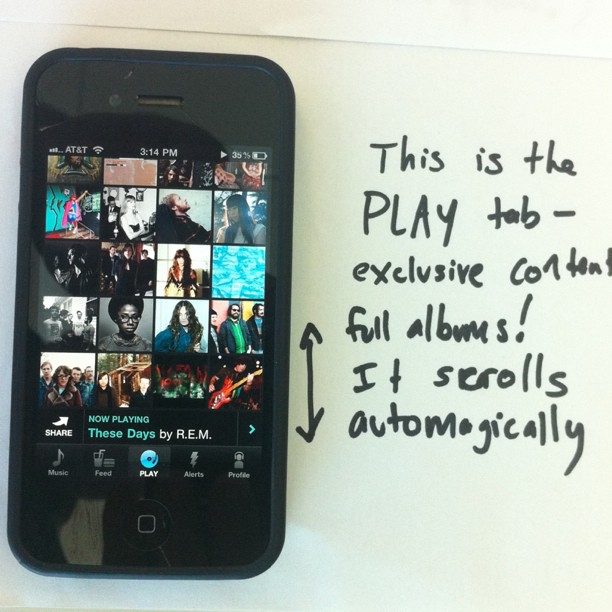
AOL has launched PLAY for iPhone, a new social experience for music as something perhaps a bit more rewarding than Apple’s Ping. The app taps right into your music hosted on the iPhone, accesses radio stations, shares music with friends and followers, and much more. PLAY has been available on Android for a couple of months, but now hits iPhone. Think Instagram — for music.

The PLAY music player is pretty straight-forward, and doesn’t veer much from Apple’s Music app. While listening to a song in the player you can click the share button, allowing you to post the song recommendation to the PLAY feed, Twitter, and Facebook. In the Feed users can play music that their friends have shared and then quickly buy it on iTunes. Lastly, the PLAY section of the app offers song recommendations, or what they call “MP3 of the Day”. We don’t see users switching to this app just to play music, but we can see the sharing features being a draw.

The app seems pretty cool overall, but who knows if there will be a community behind it. Go download the app to find out.

via TechCrunch
Expand
Expanding
Close

Apple TV to gain bluetooth keyboard support in iOS 5; opens the door to apps?

Site default logo image

[youtube http://www.youtube.com/watch?v=RIvaRD-Ugis]

Apple TV 2G bluetooth keyboard support via jailbreak

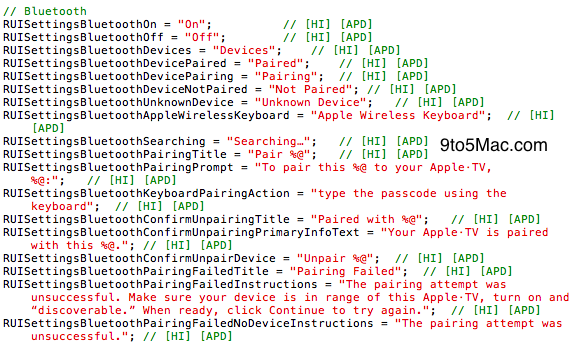
Just like Apple has done in some of its mobile devices (namely early generations of the iPod touch), Apple has included hidden bluetooth support in their second-generation Apple TV. Bluetooth support is not present within the Apple TV operating system (iOS), but Apple’s next major operating system, iOS 5, will turn on this bluetooth support. Apple is positioning this bluetooth support mainly for keyboards, but perhaps the bluetooth Apple TV will be able to connect to bluetooth iPads, iPhones, and iPod touches.

Users will be able to activate the device’s built-in bluetooth support via the standard settings menu. A standard pairing menu will then appear and users will need to connect with a provided passcode. Pretty standard stuff as far as bluetooth device setups go. The interesting and compelling part about these SDK findings is that Apple is opening the door for bluetooth, in general, in their $99 set-top-box. Additionally, this new bluetooth and wireless keyboard support opens up the door for the next-generation of Apple TV services. (Thanks, Sonny Dickson!).

Application and App Store support:


Expand
Expanding
Close

Three Danes re-imagine good ol’ email with Persona

Site default logo image

Remember Google Wave, the search giant’s ill-fated attempt at re-imagining good ol’ email communication? The service was famously pulled due to lack of interest, but that didn’t stop others from figuring out better ways to handle email. This right here could be the solution we’ve been yearning for. Marco Triverio, an interaction designer at the Copenhagen Institute of Interaction Design, teamed up with his colleagues Ali Seçkin Karayol and Harsha Vardhan on a project dubbed Persona.

In a nutshell, Persona is their take on reinventing an email client that is “both Personal and has personality”, as the tagline says. Be that as it may, Persona has definitely gotten us excited with its focus on simplicity and on the human touch. Per description on their Vimeo page:

Persona is an email client that was designed to change the perception and experience of sending and receiving emails by focusing on People, the Conversations between them and the Knowledge shared in emails today. This is a reaction to the paradigm of emails presented in spread-sheets seen with most email clients, where a focus on presenting data prevails over the need for a personal touch.


Expand
Expanding
Close

Developers can now submit Mac App Store apps for OS X Lion

Site default logo image

Apple has opened the door today for developers to submit OS X Lion applications for inclusion on the Mac App Store. These applications should be tested against the Golden Master seeds of both OS X Lion and Xcode 4.1. Mac OS X Lion is expected to ship later this week alongside new MacBook Airs and Mac Pros.

OS X Lion, the eighth major release of the world’s most advanced operating system, will soon be available to millions of Mac users around the world. Submit your Lion apps for review now so they can be on the Mac App Store when Lion ships this month. Be sure to build, test, and compile your apps using Mac OS X Lion GM Seed and Xcode 4.1 for Lion GM seed prior to uploading your binary to iTunes Connect.


Expand
Expanding
Close

Swype on iOS? Only if you are jailbroken

Site default logo image

[youtube=http://www.youtube.com/watch?v=Op4t3h10vMU]

iPhone Download Blog posts a nice video of Swype on Jailbroken iOS

Swype is a keyboard system for touch mobile devices that enables users to type faster in some instances because it doesn’t require as much ‘tapping’. Apple has shown little interest in putting Swype on iOS devices however.

That’s where the jailbreaking community comes in.  Andrew Liu (@WyndWarrior) is working on porting Swype to iOS. With the recent Jailbreakme.com, making it incredibly easy to jailbreak your phone, many others will try it (remember it is in beta).

If you are the adventurous type:


Expand
Expanding
Close

Apple issues App Store stats: 425,000 apps, 15B downloads, $3.6B revenue

Site default logo image

Apple this morning announced that its venerable App Store has hit fifteen billion downloads, matching the number of song downloads on the iTunes Store as of last month. The company re-iterated that it has paid developers over $2.5 billion cumulatively since the App Store’s inception. This is after Apple’s standard 30 percent cut, meaning total App Store revenue before the break-down is almost $3.6 billion in aggregate.

Apple also said it sold over two hundred million iOS devices (iPhones, iPod touches and iPads). Unfortunately, the company wouldn’t say how many of those are devices in active use. The number of apps on the App Store has swelled to 425,000 items, of which a hundred thousand are native iPad apps – but we already figured out the iPad App Store. The App Store now operates in ninety countries worldwide, Apple notes. The company quoted its marketing honcho in a statement:

In just three years, the revolutionary App Store has grown to become the most exciting and successful software marketplace the world has ever seen. Thank you to all of our amazing developers who have filled it with over 425,000 of the coolest apps and to our over 200 million iOS users for surpassing 15 billion downloads. 

Apple in May actually approved 500,000 apps in total, but the store contains less apps because of withdrawals, replacements and so forth. Google confirmed at their developer conference in May that Android Market is approaching the 200,000 apps mark, having topped four and a half billion downloads since the store launched on October 22, 2008. Check out a one-minute clip showing off the App Store wall Apple installed at last year’s WWDC which depicts software downloads in real-time.

[youtube=http://www.youtube.com/watch?v=yfCxVE3A84E]

Expand
Expanding
Close

JailBreakMe 3.0 browser-based jailbreak arrives for iOS 4.3.3 (iPad 2 included!)

Site default logo image

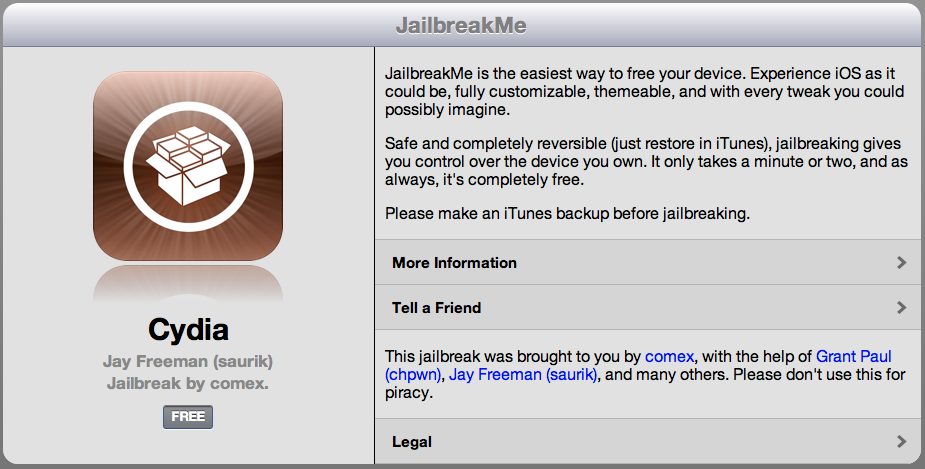
The infamous browser-based jailbreak service, JailbreakMe.com has officially returned in its full glory. The jailbreak, which was leaked this past weekend, promises to hack any iOS 4.3.3 (iPad 2 included!) device with the touch of a button in iOS Safari. Head to www.jailbreakme.com to try it out. As with all methods of jailbreaking, you are at your own risk.

Thanks, Kris and Sonny!

Update: Video, courtesy of iPhone Download Blog, of the jailbreak process is after the break; check it!


Expand
Expanding
Close

Facebook’s upcoming Spartan project detailed

Site default logo image

Facebook is having an event tomorrow which many believe is a Skype tie in, which could lead to a Skype iPad app or a Facebook iPad app, or both! in one?!  That’s well and good, but  TechCrunch takes a look at some of the upcoming features of a bigger project that might also receive a mention tomorrow: Project Spartan.

It seems a bit sensationalized, but it comes off like this: Sometime in late July (soon!), Facebook will reveal a HTML5 platform with automatic Facebook logins using a new set of APIs which make a great iOS/Android social gaming platform.  Facebook has a few developers signed up already, Zynga is probably one of them.

Notes one developer:

Facebook wants a cut of the Apple’s mobile app market, that’s been clear this entire time. Perhaps it’s not war against Apple — maybe Apple is just going to ‘gift’ Facebook the share of their market (the HTML5 share) in exchange an alliance being formed whereby Apple get’s some exclusive access to Facebook’s 600 million-plus users and thereby cutting out Google (exclusive to some degree, Facebook is too open for it to be fully exclusive). In this theory, it’s not Facebook Spartans vs. Apple, it’s Facebook/Apple Spartans Vs Google.

The Spartans have been told to code specifically for the iOS flavors of Safari — both iPhone and iPad.

So, it sounds like Facebook is going to build a nice HTML5 platform (like Chrome) for social gaming. Hopefully one of the games is 300.

Bing for iPad obsoletes iOS copy and paste with Lasso

Site default logo image

Well, not quite obsolete but sure enough Microsoft is issuing a challenge to Apple’s trademark gesturing with a new search shortcut called Lasso. Instead of holding your finger on a block of text in order to bring up the loupe and painstakingly dragging little blue dots to select the beginning and end of your selection, the Lasso tool has you draw freely around text on web pages, which triggers a quick search from that selection.

Bing group program manager Tony Chor says the Apple method requires up to nine steps versus simply drawing an arbitrary shape in the case of the updated Bing for iPad app, which hits the App Store later today. From the usability point of view, Microsoft’s Lasso beats the Safari search box anytime, especially the tedious process of copying and pasting a text selection,  if you ask us…

via CNET
[vodpod id=Video.12364937&w=425&h=350&fv=player.v%3D5ac23e96-2489-4466-8433-d56ab7a83cdc%26amp%3BconfigCsid%3DMSNVideo%26amp%3BconfigName%3Dsyndicationplayer%26amp%3Bmkt%3Den-us%26amp%3Bbrand%3Dmsn%2Bvideo]

Expand
Expanding
Close

FAA jumps into the future, approves iPad as electronic flight bag

Site default logo image


First Officer Kelly Caglia with an iPad in a Boeing 777. Credit: The New York Times

The Federal Aviation Administration has certified Apple’s iPad for use in pilot cabins. Pilots won’t be playing Angry Birds: The approval paves the way to replacing some forty pounds worth of dead trees in pilot bags with shiny apps. Printed manuals, safety checklists, logbooks, navigation charts, weather information, airport diagrams – iPad will obsolete all of this paperwork with elegant apps, a true paperless cockpit, reports The New York Times:

The Federal Aviation Administration has authorized a handful of commercial and charter carriers to use the tablet computer as a so-called electronic flight bag. Private pilots, too, are now carrying iPads, which support hundreds of general aviation apps that simplify preflight planning and assist with in-flight operations.

We take it the FAA approval means iPad has been cleared as a device that doesn’t interfere with airplane electronics. Battery life? The iPad has a ten-hour rated battery so pilots should be able to use the device on long flights without hooking it to a power socket in the cabin. Steve Jobs kinda thought about that. He remarked at the iPad unveiling on January 27 of last year how Apple’s engineers had been able to achieve ten hours of battery life, illustrating that “I can take a flight from San Francisco to Tokyo and watch video the whole way”. If it’s good enough for US Marine Corps and Singaporean enlistees, it should do the trick for commercial airliners.


Expand
Expanding
Close

IM+ Video expected on iPhone within ten days

Site default logo image


Pictured above: CrispApp’ free phone app that lets you call your Facebook friends for free

Hot on the heels of Shape Services’ acquisition of Hong Kong-based CrispApp, the news on the street is that a brand new video calling application is due on App Store withing the next ten days, reports technology blog TechCrunch. Called IM+ Video, the app should leverage CrispApp’s proprietary video technology to enable the fourth major video calling choice, in addition to iOS versions of multi-platform apps Skype and Fring, as well as Apple’s own FaceTime technology bundled since iOS 4.

Exclusive – SHAPE Services, the company behind the immensely popular, cross-platform IM+ messaging applications (and then some), has agreed to acquire CrispApp, the Hong Kong based developer of the fone app for iOS. Financial terms of the deal were not disclosed, but we’ve poked around and learned that the purchase price was approximately $200,000.

There’s a catch however…


Expand
Expanding
Close