9to5Mac Reviews
All the products that the 9to5Mac team has reviewed.

All the products that the 9to5Mac team has reviewed.
All the products that the 9to5Mac team has reviewed.
All the products that the 9to5Mac team has reviewed.



We’ve been testing out a prototype version of the Hive Dock for iPhone for the last few days and here’s our review and overview of the product. For those unfamiliar, the Hive Dock is a dock for the iPhone 4 that provides the phone with clearer audio output and uses a magnifying plate to provide a 4X zoom for anything your iPhone displays on its screen. The product is actually pretty slick for movie watchers and the audio actually does sound crisper than iPhone 4 audio without the dock.
The iPhone can sit in either portrait or landscape and is incredibly easy to place in the Hive Dock. You just drop your iPhone 4 into the fitting slot with the device’s speaker in the speaker placement portion of the slot. The home button is always open when the iPhone is in landscape orientation and there is an opening in the Hive Dock if you want to use the device in portrait mode. The Hive Dock is not only for movie watchers, but does wonders for those who want to type without squinting. Using an iPhone text editor, the Hive Dock, and a wireless keyboard is a great expierience.
The magnification portion actually works great and is perfect for movies, games, web browsing, and really anything else you would use your iPhone for. One of the great parts about the dock is that it enhances your audio and iPhone screen without any electricity. The dock itself is also very light – so it’s very easy to carry and travel with. The iPhone is also still easy to use when in the dock, just wrap your hands around the magnification plate. Another plus for portablity is that the magnification lens actually can be stored in the bottom of the Hive Dock. The Hive Dock we tested is a prototype unit and the actually unit will be thinner and feature feet on the bottom for rotation. If you have any questions we’ll answer them in the comments.
You can support and pre-order the Hive Dock through Kickstarter.

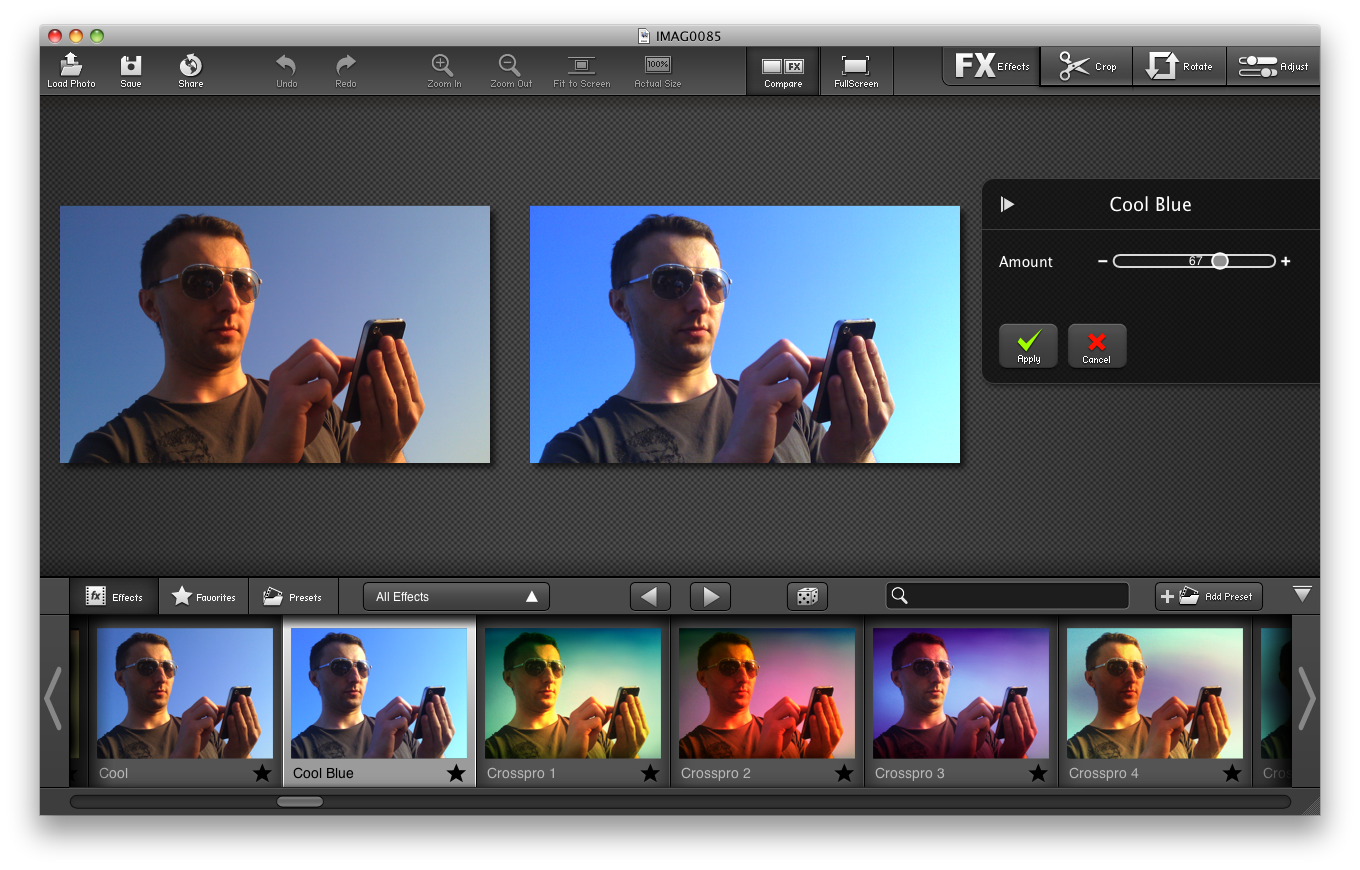
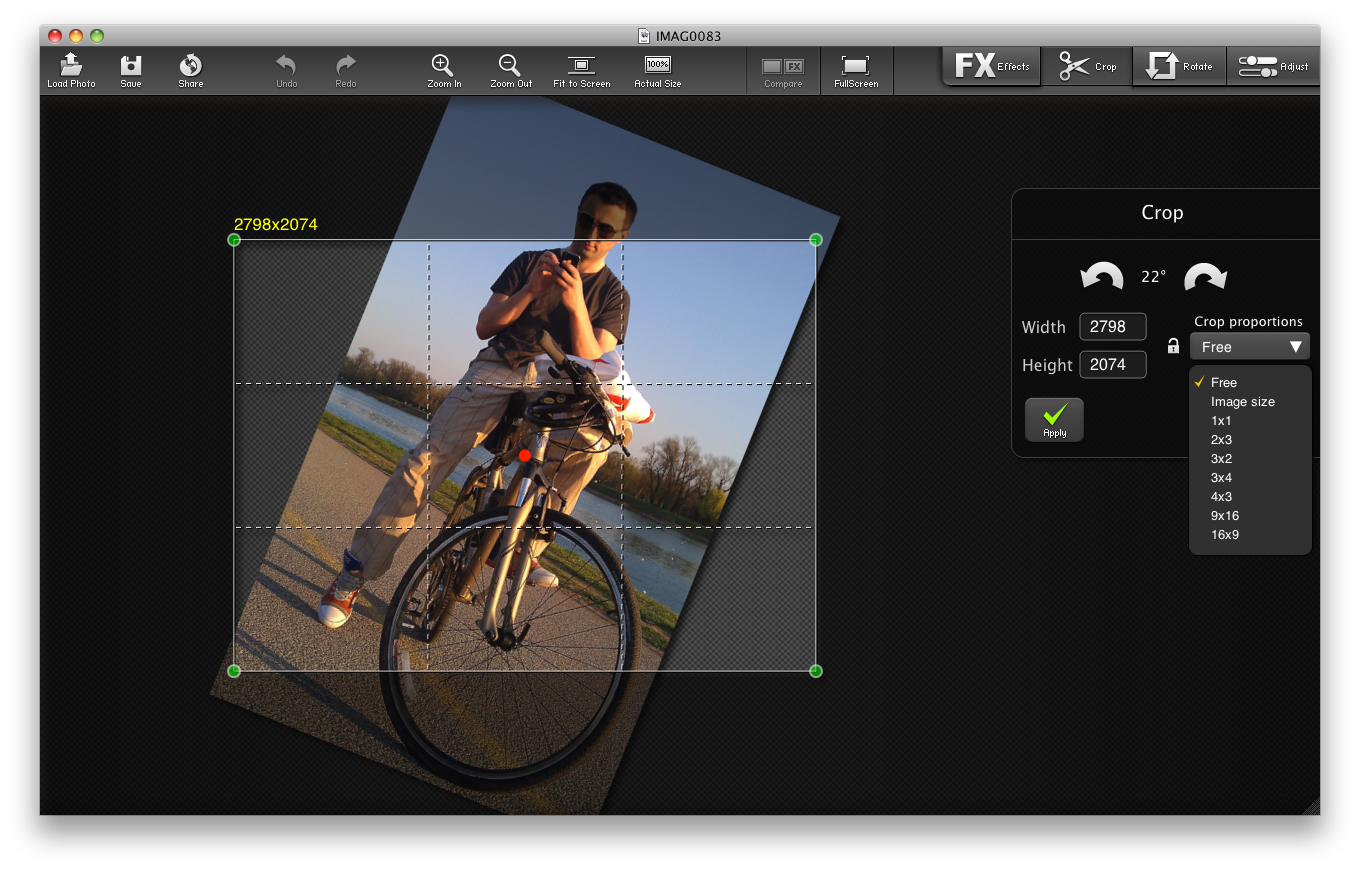
Ever since I reviewed MacPhun’s FX Photo Studio for iOS, its insane amount of superior effects, the eye-catching interface taking full advantage of iPad’s canvas and the overall polish have been a revelation. Suffice to say that I walked away wanting that photo editing experience on my Mac. The opportunity is clearly there: Excluding big-name suites and a few established programs from indies, quality yet affordable photo editing programs are few and far between on the Mac. That being said, I set out to review FX Photo Studio on an aging 2.4GHz unibody Mac mini with 2GB RAM running Snow Leopard.
We’ve been testing out Otterbox’s Reflex Series case for the iPhone 4 for the past few weeks and it’s a fantastic offering for anyone who wants great iPhone protection in a slim and light package. The Reflex is a slider case that comes with two parts: put your iPhone 4 in the bottom piece and then slide on the top piece. The case leaves room for all iPhone 4 access points including the volume rocker, silent/ringer switch, earphone jack, dock connector, speaker, and microphone. The case is made of very tough plastic, but is thin and light enough to fit in your pocket, bag, purse, etc…
The game that knocked Angry Birds and Tiny Wings off of the top slots in the App Store games chart.
What is this with the App Store and bird-themed games, huh? First Angry Birds sat atop the App Store games charts, then Tiny Wings came along and now we have Air Penguing, a Gamevil-branded feather-themed time killer. It’s currently #1 paid app in the App Store games category in the US, Germany, Austria, Hungary and Russia. I just bought it and played it for like half an hour. Here are my initial impressions…
We’ve been testing out Twelve South’s Magic Trackpad + Apple wireless keyboard unifier for some time now and in short: it’s awesome. The Magic Wand works as advertised and is incrediblity simple to set up and start using. Simply slide your wireless keyboard and magic trackpad into the aluminum bar, push in the piece of supplied rubber to keep both input devices in place, and you’re set.
Many users of the wireless keyboard and trackpad with their Mac desktops have long noticed that the trackpad tends to slide far from the keyboard. In my experience it is just plain annoying. Twelve South’s Magic Trackpad works to defeat the issue and does in a fairly-inexpensive and intuitive manner. The product also works for anyone as you can slide the trackpad or keyboard into any side of bar, so it’s perfect whether you are right or left handed…

I remember spec’ing out an Apple XRAID a few years ago which I filled with 14 400GB hard drives. At the time, it was the biggest and fastest volume I’d ever built. After putting those drives in RAID 5, I had around 2.4TBs per side. If memory serves me correctly, that rig cost around $15,000.
That was then.
This week, Western Digital sent us 6TB in its latest MyBook Studio Edition II for review. It retails for about $549. Obviously, this isn’t a professional rig like XRAIDs and the like, but if you want hard drive that is:
…this external drive may be what you are after. Read on for the details.
We’re getting this question a lot so I thought I’d put together a really quick HowTo guide.
0. HomeSharing is the new feature in iOS 4.3/iTunes 10.2 that allows you to watch videos on your computer with your iOS devices. Download and install iOS 4.3 on your iOS device and iTunes 10.2 on your Mac if you haven’t already. Make sure your iOS device and your Mac are on the same Wifi network.
1. In iTunes 10.2.1, go to Advanced and click on “Turn on Home Sharing”
Then put in your iTunes Creds (Apple ID)…
Expand
Expanding
Close
The Fujitsu ScanSnap S1100 is one of the smallest scanners on the market. It is small enough to fit in most bags and is just large enough to fit a normal piece of paper. Read on for the full review.
COMPUTERWORLD: Super-fast and really easy to navigate, the Mac App Store is going to generate huge wads of cash for everyone involved, Apple and its partners — but I do worry that app navigation and developer access to the Mac platform may suffer.
Over the past few weeks I have been testing out Exogear’s Exolife battery case for the iPhone 4 and I have to say it’s not like any battery case you’ve used with your iPhone before. That’s because it is the thinnest and lightest offering on the market. The Exolife hardly adds any weight or thickness to your iPhone 4 so it’s like you’re using a regular case- but you get a battery with it too.
The case itself is made from durable polycarbonate and does a good job of protecting the bottom, top, back, and sides of your iPhone 4. The case is two pieces: a back piece with the battery system and a piece that goes around the iPhone 4’s stainless steel antenna band. This holds the two pieces together in addition to providing protection to the antenna band. Click read more for the full review:
http://s.wsj.net/media/swf/microPlayer.swf
In his best and worst products of 2010 post today, Walt Mossberg declared Apple’s iPad as the number one product of 2010. The iPad is not the only Apple product on the top three list with the iPhone 4 tying at number 3 with the Samsung Galaxy S phone series. 4G networks are number two on the list and the top three worst products (in order) are the Dell Streak, Google TV, and TiVo Premiere.
Taking Walt’s top spot this year was none other than Apple’s iPad. For a 1.0 product, the iPad was amazing. With the new iOS 4.2 operating system and its huge selection of apps, the iPad continues to stay ahead of the competition.
Many iPad keyboard cases have hit the market in recent weeks and we finally got our hands on ZAGG’s ZAGGMate iPad keyboard case for review… and it’s awesome. The ZAGGMate is an iPad keyboard accessory at heart but doubles as a case. The case aspect of the ZAGGMate is not fantastic but the keyboard part may just be the best third-party implementation we’ve seen. Check out our review after the break:
I’ve been using the Energizer Qi wireless induction charger for iPhone for the past few weeks and think it might deserve a place in our household. The concept is pretty straightforward. You put a protective jacket over the iPhone which also serves as a receptor for the induction charge. Instead of plugging in a 30-pin adapter to your iPhone every time you want to charge it, you just plot it down on its Qi-spot.
[youtube=http://www.youtube.com/watch?v=jubhpnxK8wc&w=640&h=385]
I should also note that touching the charger points with fingers (even with metal rings) is safe. The Energizer Qi retails at Amazon and Target for $89 and should be hitting stores in about 2 weeks. The rubberized case for the iPhone is an additional $35.
Competitors include the poorly rated Powermat and the Duracell MyGrid which also scores low.
Expand
Expanding
Close
Otterbox’s Impact Series case for iPhone 4 is a fantastic and versatile case offering. It is not as strong as the Defender Series case but it does the job much better than many iPhone 4 cases. The case itself is made from relativity tough silicon yet is still slim. Although it’s slim it’s built well enough to protect your iPhone 4 from drops, nicks, knocks, and scratches.
The side volume buttons are completely covered, there is a hole for the silent/ringer switch, there is an opening for both the iPhone 4 camera and LED flash, as well as an opening for the ear piece. There is an opening on the back of the case so that shiny Apple logo is always in prime view and the home button is completely covered…
Apple adapter foreground, Kanex in the back.
If you are an Apple customer who’ve had a 30-inch display since the time Apple announced they’d be going from DVI adapters to Mini DisplayPort, you’ve probably gone through the wringer like me.
Display flicker Issues with Apple’s adapter
That link is to the timeline up until last year. I’m not alone, here are two Apple Discussions threads with thousands of people with similar problems:
http://discussions.apple.com/thread.jspa?messageID=8680802
http://discussions.apple.com/thread.jspa?messageID=8674416
Amazon too
Now Apple’s product, after three firmware updates over two years and significant user outrage, mostly works, but I still have a problem pictured above often when I return to my Dell and HP monitors after sleep. By clicking input on my monitor and shutting it off and on a few times, it snaps back into shape. But that is a pain especially since I can hook up my DVI MacBook Pro without issue (and it works fine on my Unibody running Windows in Bootcamp!) What to do? Kanex to the rescue…
Expand
Expanding
Close
We’ve spent the past month with the Hitachi G-Drive Mobile ($128) which is an attractive Firewire/USB portable hard drive that will look great next to your Unibody MacBook Pro. But are the aesthetics worth the price?
The popular media player, VLC, made its way to the iPad just a few weeks ago, and the company behind the application, Applidium, has just submitted a version for the iPhone. Here’s our exclusive hands-on of VLC Media Player for iPhone:
[youtube=http://www.youtube.com/watch?v=r0k-ZAicEek&w=640&h=385]
Oh, and as you see in the video we had a really hard time playing a 720p video on an iPhone 4.
Tim Gideon over at PC Mag has done a great video walkthrough and review of the new Apple TV. Check it out:
[youtube=http://www.youtube.com/watch?v=4WCqDZxZ8MA&w=640&h=385]
They also posted a great Apple TV unboxing slideshow, check it out. And a great full written review!
Wow. So MacSpeech is no more. First MacSpeech ditched their own speech recognition engine for the market and technology leader Nuance in 2008. Then, Nuance bought the Macintosh speech recognition program earlier this year, and the ‘MacSpeech’ brand was up in the air. Now it is officially Dragon Dictate 2 for Mac. (MacSpeech Scribe still exists)
Nevermind the name. The product is solid. I’ve been playing with the new Nuance Dragon Dictate 2 for Mac which uses the same best-in-class speech recognition engine as Dictate 11 for PC, and have to say this is a more than worthy upgrade.
The biggest difference for me, straight out of the box, is that you don’t have to use a USB/Bluetooth microphone. I was able to set the program up to use my MacBook Pro’s built in mic. At a normal distance it is able to recognize my voice in a quiet room. If there is any kind of noise in your work environment or you need better accuracy, use a USB or Bluetooth headset. A cheap but functional USB headset is supplied with the boxed version but you’ll be much happier with a $20 Plantronics from Amazon.
The accuracy with a headset seems at least as good as the previous version and probably better. I usually go a few paragraphs between missed words, and that is often the result of my mumbling or using a word that no dictionary would recognize. There is a 20 minute training program at the beginning but you’ll be impressed at the results even if you don’t spend the time training (I imported my profile from a previous version).
Another nice thing about this version is that it allows multiple microphone profiles per user. I use the built in Mac mic in my office but a Logitech headset when I’m out and about. I could add one of those in ear Bluetooth headsets if I wanted to look like a douche…but I’ll pass.
One other interesting new feature I’ve been playing with is the ‘mouse movements’ via speech. You can actually move your mouse around the screen with voice commands (see directions below).
Overall, a great product gets even better. Let’s hope they get to name parity with the PC version next time around.
Dragon Dictate 2 for Mac is available for $199 retail package or $179 for software download only and $49 for an upgrade from MacSpeech 1.x.
Aidacase’s iPad case seems like a dream. It’s a full on folio-style iPad case that flips open to reveal an external full-sized physical keyboard. This keyboard connects to the iPad via bluetooth, charges through USB and delivers a whopping 45 hours of battery life. That’s 4.5 times longer than your average daily iPad battery life. As a case, the “keycase” functions like a champ. Simply lock it into place using the magnetic latch and you’re good to go.
The keyboard is made from silicon so its durable and includes the USB charging cable. To remove the hassle, the keyboard works seamlessly with iOS to reconnect instantly whenever you want to type. The case ships in 1-2 business days and is available for $30 off at Amazon for just $99.
A neat little jailbreak-only tweak has been released today and that is the ability to have a home page in Safari for iOS. The tweak is incredibly simple to setup, and developer, Will Strafach, gets huge props for that. You simply hit the “+” on either an iPad, iPhone, or iPod touch and click the “Set as Home” button. This is the same menu used to make home screen shortcuts and to email and bookmark sites.
If you like having a home page on your Mac or PC computer this is a great installion for you. Personally, it does not make much sense for my iPhone, but I find it incredibly handy on the iPad as it is more computer-like. The tweak, “Home Page in Safari,” is available now for $0.99 on the Cydia store for all iOS devices. If you are having installing troubles (server issues) just try back later.
The new iPods will be arriving in stores tomorrow and many will be getting them in the mail over the next few days as well. Fittingly, Apple has lifted the embargo on reviews and they’ve come flooding in.
Engadget weighs the pros and cons of the new Touch:
As we noted last week, the iPod touch doesn’t get the same IPS display as the iPhone (above). It doesn’t have a GPS or a good still camera either. But that’s about the only bad things you can say about these things which for many will be fantastic portable devices. It gains A4 processor, Retina display, front and back cameras, gyroscope, and vibrate. They continue to have the same price-points (Apple sold a previous generation 8GB version for $199 before)
I personally would have traded a few millimeters of thickness for even a two or three megapixel still camera and GPS. The screen angle differences in the real world won’t matter that much. On the Flip side, cameras add a whole new dimension to these devices and gaming with the new screen, processor, Gyros and A4 chip is going to be on a whole other level.
The Nano review, because it is an entirely new form factor, is a bit more interesting…
If you’re like Jobs you’d say “who wants a stylus?” If you’re not Apple’s CEO, then you may want to check out Just Mobile’s Alupen. It’s crafted from premium, long-lasting alu-min-ium (Ive style) and looks awesome. It’s as tall as your iPhone, and slightly thicker than ye olde’ number 2 pencil.
The stylus works great as a… stylus (didya guess?) and if you were thinking about getting a stylus for your iPad, iPhone, or iPod touch, it has never been a better time now that the Alupen has met light. You can get your own for like 20 bucks at Just Mobile’s online store. And hey… we just might give a few of these away sometime, we just might.
A few weeks back we reviewed Speck’s PixelSkin for the iPhone 4, and much of that review still stands strong for the PixelSkin HD. Right of the bat, the PixelSkin HD is my go-to case as it offers great protection, usability, portability and design. The PixelSkin HD is thinner then the standard PixelSkin yet the protection it offers is very similar. Your iPhone 4 is protected at all corners with this touch-silicon case.
The volume rocker is protected by the case, yet is still fully functional. The silent/ringer switch is accessible and won’t be affected by drops and knocks. The same goes for the top noise-suppressing microphone and the earphone jack. The sleep/wake button is fully protected like the volume rocker and the 30 pin dock connector is fully usable with any cable. The iPhone ear-piece and front facing camera are fully open so you won’t run into any communication issues.
The back camera and LED flash are also open and you should not experience any of those LED flash issues that some other cases create. In terms of camera/LED flash and screen protection, this case does a great job without covering those functions. The case extends higher than the screen, camera, and LED flash to when hit, dropped, or knocked into, it won’t be affected. This ensures that screen shattering and camera breakage are less likely to occur.
Speck’s PixelSkin HD is a fantastic case and is surely one of the best on the market. It has a great design and offers fantastic protection for your iPhone 4. It also does this at a great price and the lowest we found for you is just around $22 and you can get that here.
We would also like to thank Speck for sponsoring our iPad case of your choice giveaway on Twitter. The contest ends at 10 PM EST. tonight and all you need to do is follow @9to5mac and RT this tweet. We also would like to congratulate reader, Noah D. on winning yesterday and we can’t wait to find out who wins tonight and tomorrow night!