Tips and Tricks

See All Stories

Magsafe adapters are also bad, replacements free.

Site default logo image

It is almost like August is almost over and Apple’s legal team wants to head out on vacation so they are clearing their docket of lawsuits out.  In line with yesterday’s announcement that Apple would be replacing iPod Nanos with bad batteries, it looks like if you have a frayed MagSafe power adapter, you can go pick yourself up a new one.  You didn’t throw away that broken Magsafe adapter did you?  From Apple’s website:

…Whether your product is in or out-of-warranty, you can take your adapter (you don’t need to take the computer) to an Apple-Authorized Service Provider or Apple Retail Store for evaluation and replacement if necessary. You may be eligible for a replacement adapter free of charge. Make a reservation at the Genius Bar before visiting your local Apple Retail Store. To make a reservation, go to http://www.apple.com/retail/geniusbar/.

Absurd deal on HP Color Laser Printer Copier Fax

Site default logo image

We aren’t making any money off of this but we know a lot of you out there have Small/Home Offices and might want a hookup on an incredible deal.  We just bought ourselves a new HP Color LaserJet CM1312nfi MFP for $300 (plus $55 for tax and shipping).  It does just about everything most fullsize (and price) Color Laser Copiers do but on a smaller physical scale.   It even has SD card slot that you can scan directly to.  Snap!

Don’t believe us?  Check out the review at PC Mag.  Or Computershopper:

Photo quality was at the high end of what I expect from a laser printer. A close look shows dithering, as with graphics, but most of the photos could pass for true photo quality at arm’s length. I wouldn’t hesitate to use the CM1312 for output like client newsletters with photos or for marketing materials on glossy laser paper (although you’ll have to change the driver from its default settings to get the best-looking output).


The CM1312nfi even does a credible job of printing what HP calls business-quality photos on HP’s 4-by-6 laser photo paper. I’d call them near photo quality, despite their coming out of the printer with a significant curl on my tests. By whatever name, they’re good enough for uses like photos on postcards for business mailings, or for, say, a real estate office to print photos of houses for prospective buyers.

The one place where I wish HP hadn’t cut back is paper handling. The CM1312nfi’s capacity is limited to 150 sheets, with no duplexing and no upgrade options. If between printing, faxing, and copying, you output more than about 30 pages per day, you may find yourself adding paper often enough for it to become annoying. On the other hand, the low capacity is appropriate for the light-duty printing typical of a small office, home office, or personal AIO, so it’s not a killer flaw, by any means. And even with this economy measure, for the moment at least, the HP Color LaserJet CM1312nfi MFP delivers far more AIO for the price than any of its competitors.


3G iPhone Tether over Wifi

Site default logo image

We showed you how to do this before and yes it is much nicer with 3G speeds.  Tether your your laptop (and others if you wish) through the iPhone’s 3G connection.  Nate Tru has the details on his blog.

Basic steps as follows
– Jailbreak your iPhone 3G
– Install 3Proxy and Terminal
– Create an ad-hoc Wi-fi network using your laptop
– Join the network with your iPhone
– Find the iPhone’s IP address

– Open Terminal and run the proxy program
– Open Safari on your iPhone and open a web page
– Configure your browser to use the proxy

3G iPhone take apart video

Site default logo image

If you can excuse the rampant advertising (hey, they got to make a living right?) here’s a pretty good instructional video on how to take apart the iPhone 3G without destroying it.  Possible uses include instaling another battery, a new color of back panel or solder on some more Flash storage.  Good luck with that!

Temporary fix for iTunes iPhone authorisation blues?

Site default logo image

 We’ve been sent this fix by reader, Will, we haven’t tested it. If you are in iLimbo, you may want to try this to get things moving again.

"I called Apple and here are the steps to leave recovery mode:

  1. Disconnect phone from computer
  2. Hold down the power button & turn phone off
  3. Wait around an hour
  4. Press the home button, & plug in cable to computer ( don’t let go of home button) When itunes comes up & says it finds a phone in discovery mode, then release the button 

I tried this and it did what it was meant to, offering me the option to restore; however, I didn’t go the whole way and restore it as I want to keep the v2 software till the problem is sorted. However, it may be that someone has a bricked phone and wants to at least make it useable again."

And a second potential fix – please, please people – we don’t know if these work for sure:

  • Do not unplug the phone from the computer or close iTunes.
  • Keep clicking on the iPhone tab on the panel on the left of the iTunes screen.
  • Wait for the error message to pop up.
  • ‘OK’ out of it then click on any other tab in the panel – music, iTunes store, whatever.
  • Then click on the iPhone tab again.
  • Repeat ad nauseum.
  • Sooner rather than later, it *will* complete the process, reload everything and get working again.

Finally a solution to iPhone-home speaker noise.

Site default logo image

Remember how much we hated the iPhone and its incessant GSM noise on our unshielded speakers?  Some dude says he’s solved all of our problems with some ingenuity and a can of Red Bull.  Anyone want to test it out?

From the site:

Parts you will need to complete the project.

1. iPhone (of course)

2. iPhone Dock

3. Red Bull. Drink it first. Sugar-free is better in taste and less sticky for the remainder of the project. But if you like regular better that’s fine in either case just rinse the can out well before starting.

4. Double stick tape. I used carpet tape for superior thickness to strength ratio.

Tools you will find helpful. 1. •VERY sharp scissors. Don’t use scissors that you care too much about as you’ll be using them to cut the Red Bull can. 2. •A carpenter knife. (Optional. I find better control. If your not a pro knife user don’t use this method. i am not responsible for injury or death as of this disclaimer) 3. •A metal straight edge of some kind. (optional) 4. •Patience.

Quick Directions. I may or may not post images if build another one. 1. •Cut top and bottom off the Red Bull can. This can be rough. You can clean it up later with a scissors or straight edge. 2. •Un-curl the can by gently forming it in the opposite direction. I did this by placing rolling it the opposite way on the edge of the desk in half-inch sections. Be patient and gentle. 3. •Lay the can across the the back of the dock and mark the cuts for trimming then cut down the can and notch spot for the dock connector and AV Output. 4. •Using a scissors (or optional knife) cut out your can as you marked it. 5. •Gently bend and shape your final shield to hold the radius of the back of the dock. 6. •Place the double stick tape across the bottom and adhere it to your dock. That’s it. Done.

Congratulations of your new iPhone Red Bull anti-interference shield.

CCTV, Get Out Clause and iMovie

Site default logo image

 What’s a band to do if it hasn’t got the cash to make its own music video and lives in a country with extremely high levels of CCTV? Well, Get Out Clause used state CCTV cameras and their rights to access information to create this clip, (full story, do read on).

[youtube http://www.youtube.com/watch?v=98u1HuqS7Nk&hl=en]

I think this is such an ingenious plan that it’s rather fantastic and want to let you know about it. The UK has one of the highest concentrations of CCTV in the world (fact), and new band Get Out Clause needed to make a point, promote themselves and make a video (in that order)…

Here’s what they did:

Unable to afford to make their own music video the band set up and performed their music in front of 80 of the 1,300 CCTV cameras used by British state security – one camera was even on a bus…

Now comes the good part: the band used the UK Data Protection Act – that’s the UK equivalent of US reader’s access to information laws – to request all the footage the state collected of them…

It gets better: the band then took all the clips of them performing in front of those CCTV cameras, spliced it all together in iMovie or something, and created their very own music video.

Thanks to David Atkin at Parliament Hill.


AT&T giving free Wi-Fi to iPhone customers

Site default logo image

As predicted in February, US iPhone subscribers are now getting free Wi-Fi Access at AT&T hotspots around the country including Barnes and Noble and Starbucks.  This correlates to the plans offered in the UK by O2 and Tmobile in Germany. 

Apparantly it isn’t terribly hard to spoof the iPhone interface and get your laptop on free WiFi either – as a Macrumors forum poster shows us.  No announcement from AT&T or Apple has been made but expect one shortly.

Apple updates iMacs with faster processor, graphics

Site default logo image

Apple today upgraded its iMac selection to include faster (and more efficient) Penryn (or Montevina QX9770!?) processors – topping out at over 3 GHz.  The iMacs can be configured with much burlier graphics cards (NVIDIA GeForce 8800 GS) as well.  Unsurprisingly, Apple didn’t include Blu Ray as an option…perhaps next time?

“The iMac’s gorgeous aluminum and glass all-in-one design has been an incredible hit with our customers and is just one of the reasons Mac sales are growing three and a half times faster than PC sales,” said Philip Schiller, Apple’s senior vice president of Worldwide Product Marketing. “With the latest Intel processors, a faster new graphics option and more memory, customers now have even more reasons to love the iMac.”

Also Apple touts the new iMac’s green credentials:

The iMac furthers Apple’s commitment to environmental progress with highly recyclable and durable materials including scratch-resistant glass and professional grade aluminum. Every model in the iMac line is rated EPEAT Silver and the power-efficient iMac also meets the stringent Energy Star 4.0 requirements for power consumption. Customers who purchase any qualifying Apple computer can recycle their old PC or Mac® for free via the Apple Recycling Program.

The new iMacs are on sale immediately and start at $1200 in the US.

20", 2.4GHz, 1GB RAM, 250GB Hard Drive, ATI Radeon HD 2400 XT 128MB. $1199
20", 2.6GHz, 2GB RAM, 320GB Hard Drive, ATI Radeon HD 2600 PRO 256MB, $1499
24", 2.8GHz, 2GB RAM, 320GB Hard Drive, ATI Radeon HD 2600 PRO 256MB, $1799
24", 3.06GHz, 2GB RAM, 500GB Hard Drive, NVIDIA GeForce 8800 GS 512MB, $2199

miShare iPod sharing kit

Site default logo image

OK, we all know how to hack into an iPod and download its contents off of it – you know in case you lose your computer or something?  It also isn’t to hard to just copy tracks off of your computer to give to your friends – just legal stuff obviously.  But what if you just want to mainline that music from on iPod to another?  miShare has your back with their new little gizmo.  Now how about video sharing?


Updates for the older Mac

Site default logo image

 It’s a little-known fact that Apple maintains a library of software updates for older (pre-January ’98) Macs, Newton and Apple II machines.

The company hosts a huge library of downloads for these veteran machines, naturally warning that "all the software here is considered obsolete and may do harm if improperly installed. Please use extreme caution." 

All Apple software released since January 1998 remains available, but that’s found within the AppleCare Knowledge Base.

What this means is that if you have a veteran Mac and hope to squeeze a little more out of it you can at least easily locate the relevant updates, and while that’s well known in parts of the Mac community we thought it worth noting today for those of us who weren’t aware of the fact, but may suddenly have need for the software.

Oh, there’s a caveat: software that’s no longer available may be listed on Apple’s page, and the list reflects US releases only. " For software for other languages follow the same architecture format according to the language of your Macintosh Operating System."

Apple’s archive software page is here.


Windows iTunes users being asked to install Safari by Software Update

Site default logo image

Windows users who have Apple’s Software Update installed are getting notices that there is a new version of Safari available for upgrade – even if they never installed Safari in the first place.  Safari 3.1 for Windows is Apple’s first Safari version not to carry the Beta moniker.

There are definitely two schools of thought on this one – we are NOT taking sides. 

The first is that Apple is using its market leading position in music jukebox software to push its browser – like Microsoft used its market leading position in operating systems to push IE a few years back.  While effective, it isn’t really fair to the Firefoxes and Operas of the world who don’t have that leverage to fall back on.  It is also a bit misleading to say it is a "software update" when it was never installed in the first place.  If you were using Microsoft Office on Mac and an update came up saying "Update your Internet Explorer (which you don’t have on your machine) for Mac to 5.2.3".  Would you be happy?

The other school of thought is that Apple isn’t forcing this on anyone.  There is simply a Apple (not iTunes) software update that is letting Windows users know that there is a web browser available for them, should they want it.  Google does this in one way or another with its Macintosh applications.  So does Adobe. No harm, no foul?

Vote!


Apple updates Time Machine and Airport – Now working together!

Site default logo image

Apple has now filled what was a gaping hole in their Time Machine backup ecosystem.  You can now use Airport connected HFS+ Formatted USB hard drives to backup your Leopard computers.  Apple had promised this feature long ago and then pulled the advertising for the "Airport Disk Time Machine Backups" and hasn’t able to deliver during the first two releases of Leopard.  This might have been more difficult than originally planned (though our Flux Capacitor has helped many). 

Apple has now released Airport and Time Machine updates that now allow you to see Airport connected USB drives and back up to them like Time Capsule drives.

It isn’t known whether Apple waited to sell a few Time Capsules before releasing this fix or the company genuinely didn’t have all of the pieces together.  Anyway.  Download and backup to your heart’s content. 

iPhone SDK torrent on the Internet

Site default logo image

We don’t condone torrenting stuff or bypassing Apple’s $99-$199 charge for developing iPhone applications but thought it would be prudent to report that the iPhone SDK is now floating around the torrent sites.  The DMG file weighs in at 2.1 GB and is the real deal we can confirm.

If you actually are successful in developing an application with this, you will be forced to pay Apple the normal price before they publish the application on their site, one must assume.

Click for more


The SDK is only for Apple Leopard users running XCode.


MacBook Air gets discounted at Amazon $1744

Site default logo image

Amazon discounted the MacBook Air to $1744 (after $50 rebate) today.  The MacBook Air has been in Amazon’s Best selling electronics page since its release (it currently is at #17) so the markdown is obviously not because of slow sales.  It is the lowest price we could find anywhere.

Amazon is also offering large discounts on the last generation Apple MacBooks ($919 after $75 rebate) and Macbook Pros ($1544 after $150 rebate).  Since the latest changes were fairly minimal (in fact the older model Prros have MORE L2 Cache 4Mb vs 3Mb), it might be a good time to pick up a very slightly outdated machine at a very significant discount.  Rebates end March 11.

In other Amazon news, Time Capsule in both $299 500Gb  and 1Tb $499 models is now shipping.


Amazon rocking iPhone and iPod Touch optimized site

Site default logo image

Amazon has built an iPod/iPhone optimized site for the hordes of people who have been buying ipod touches on their site.  It isn’t overly functional but it works nicely.  The product scrolling is very cool as well.

You also have the ability to use the traditional browser experience to do your shopping inside the iPhone/iPod.

Amazon detects your browser type and adjusts the browser window accordingly.  They are also offering a generic mobile browser version of their site with considerably less functionality.

To get there, simply point your iPod/iPhone browser to http://www.amazon.com


iPhone bands?

Site default logo image

The idea of a band based on iPhones and Gameboys has probably come up often with all of the latest musical instruments available on hacked iPhones.  We are huge fans of iAno and guitar.app.  Gizmodo found an interesting little "iBand".  While the idea is good, the implementation leaves more than a little bit to be desired.  If you want to see how far this technology can go – check out LEMUR – the League of Musical Urban Robots.  Urban :P

Safari 3.1 will be FAST!

Site default logo image

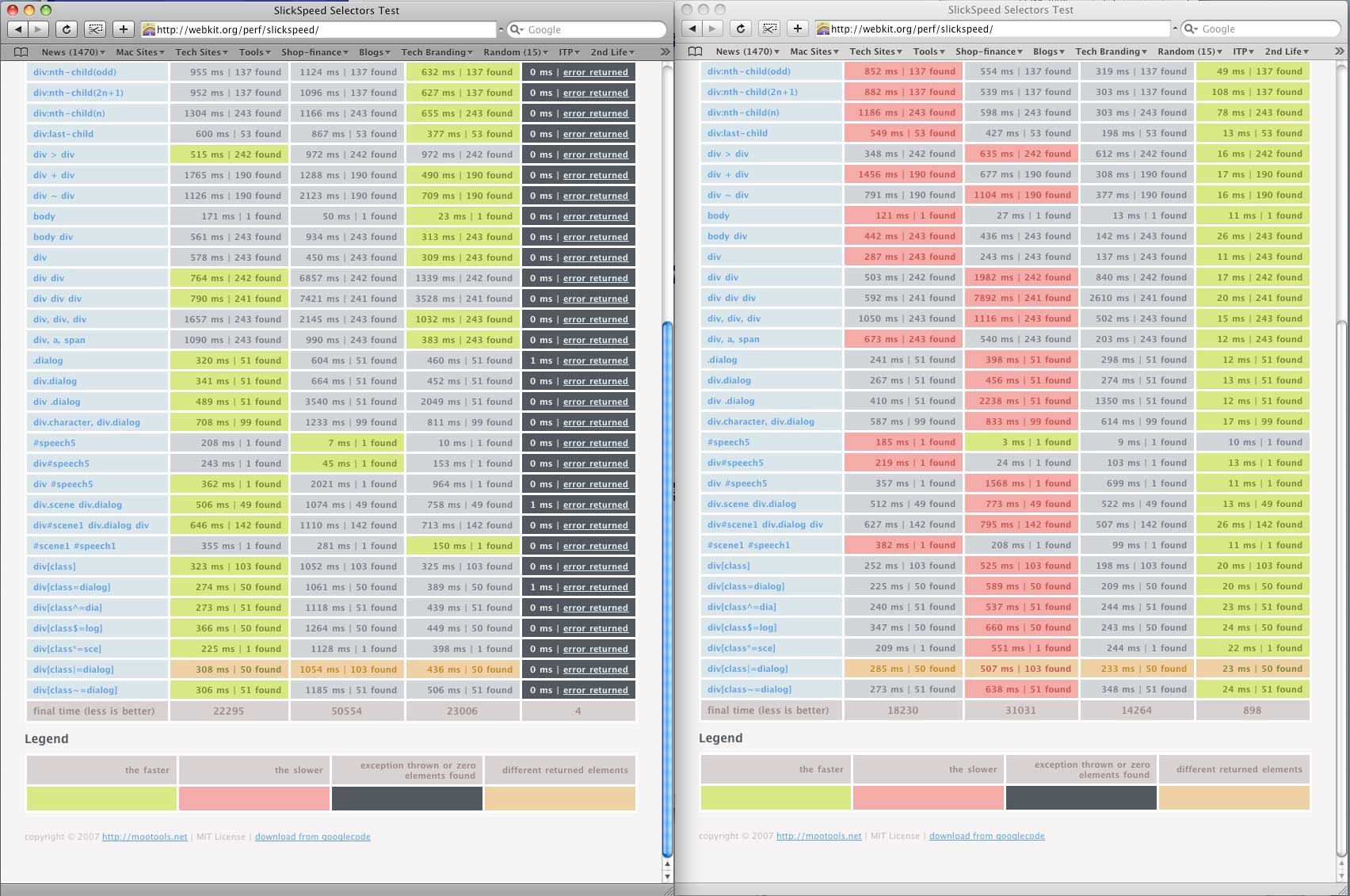
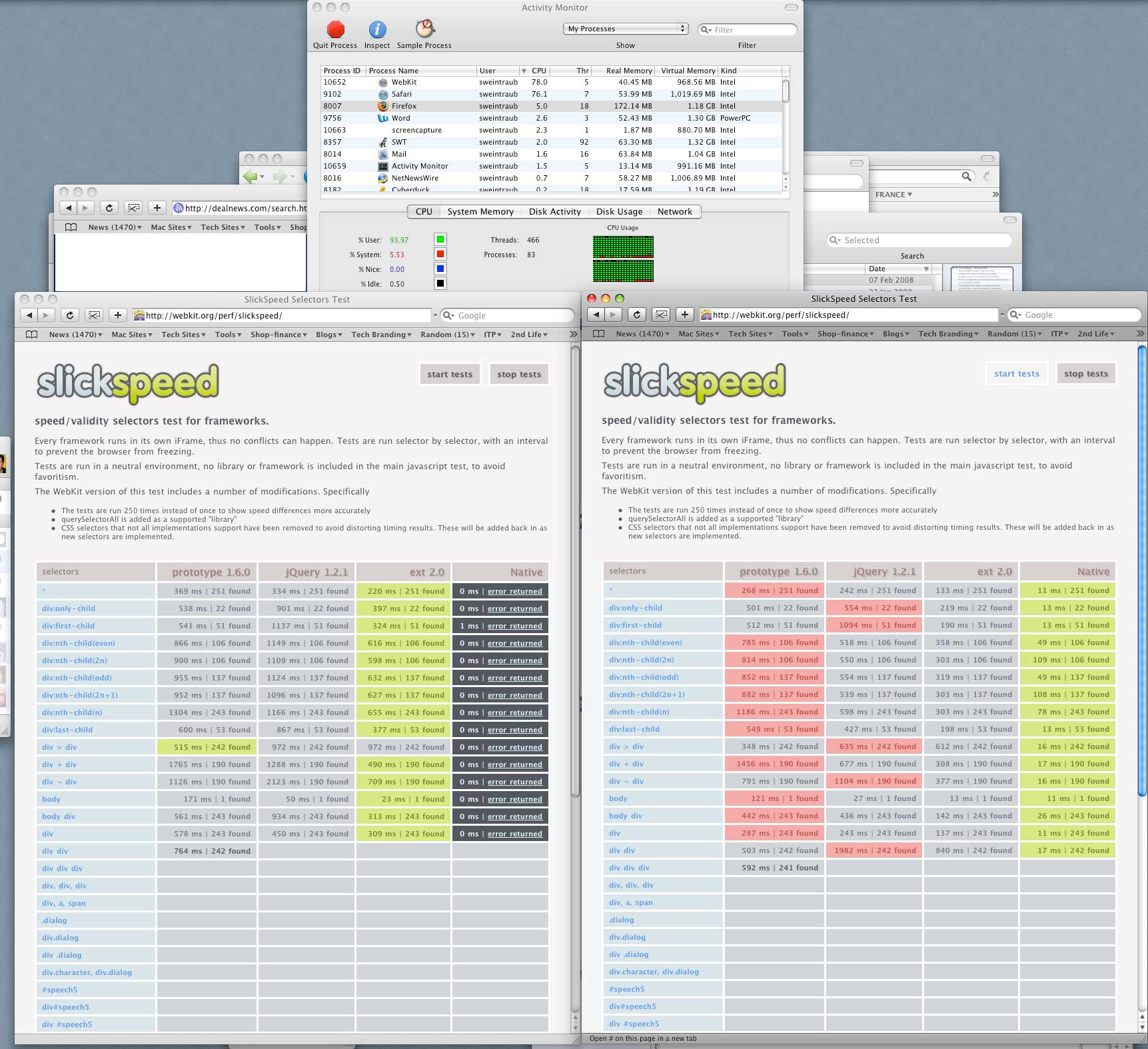
I just spent a few hours running tests on the latest version of WebKit for Computerworld.

Conclusion?

The upcoming builds of WebKit/Safari are really realy fast.  The unoptimized WebKit is often twice as fast as the current standard Safari in page load times.  And Safari is supposed to be the fastest desktop browser out there!? 

According to the WebKit surfin’ Safari blog, the speed increases are largely due to Javascript handling improvements.

Whenever the new WebKit code gets pushed into Safari (soon?), you’ll notice these significant speed increases and possibly even more after the code is optimized.  Download the latest WebKit here, compiled for both Mac and even PC to get a preview or check the article for more results.

Oh and Firefox users (like myself) should also see similar speed  improvements in coming versions.

Interview: XBox Media Center hits the Macintosh scene

Site default logo image

The XBox Media Center (XBMC) project was started as an alternative OS for the original modded XBoxes in 2002.  It has since grown into one of the most functional media center applications out there.
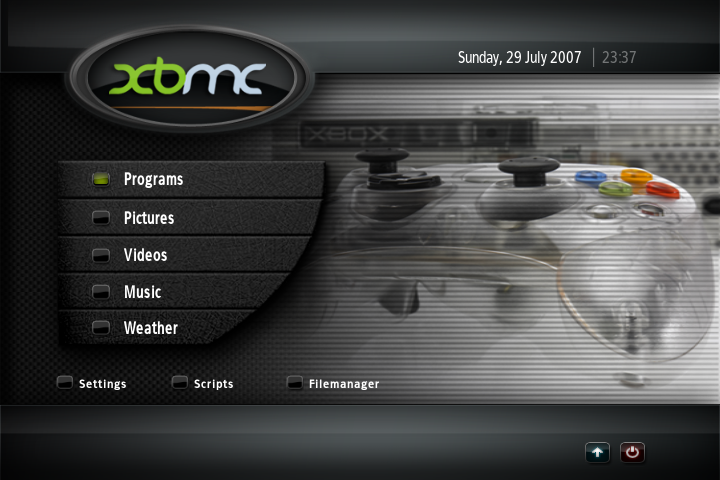
Last year it was ported to Linux and it was reborn as one of the best media centers for the platform, doing many things that Front Row/AppleTV and Windows Media center can’t do. 

Recently a team of programmers led by Elan Feingold decided that maybe an OSX version might have a market..as he puts it, "it seems like it’s a

9to5Mac: That sounds like a lot of amazing stuff. What functionality are you working on now?

Elan: We don’t support DLL loading on OS X yet (or linux, that i know of), but we CAN. Note that the Xbox version of XBMC supported Windows codecs through DLL loading for "closed" formats like RealAudio, WMV etc. We can use and enhance the existing DLL loading code which comes from MPlayer. We are also working on full support for the Apple Remote and other popular remotes out there like the wireless XBox 360 controller, etc. We also want to get Python working as soon as possible. As more people join the project, more interesting things get picked up.

9to5Mac: Speaking of other devices, do you have any plans to port XBMC to the AppleTV?

Elan: Unless Apple opens up a SDK for the AppleTV, it is very unlikely that our core group will do so. We are all huge fans of Apple and are trying to stay on their good side. We’ve talked to a lot of people lately who say they went and picked up a Mac Mini for the sole purpose of running the XBMC. Hopefully we are putting some money into Apple’s coffers for developing such a great operating system and hardware combination.

9to5Mac: (plays devil’s advocate) Why not just put XBMC on a cheap ShuttlePC with Linux and let it be the sole application? XBMC would appear to be almost everything you need in a mediacenter PC.

Elan: I happen to think OS X is a much better platform for XBMC than Linux. It’s got great OpenGL support and in the long term, desktop Linux (in my opinion) just hasn’t stuck. People who love Unix are moving to OS X. My grandmother is moving to OS X…and what better looking HTPC is there than the Mac Mini?
Oh, and Linux probably has more OpenGL driver issues. Ultimately, though, as compared to the original Xbox version, I think there is use for an OS. For example, you can install some headless bittorrent client, ssh into it, or put whatever you want there to work along side XBMC. Those little boxes that just turn on and run a media center as firmware are ultimately limiting.

9to5Mac: You mentioned BitTorrent. Are there plans to include other media-centric applications like a Vuze, Sling Client, Joost, or EyeTV support?

Elan: I think there are some interesting things going on with Bittorrent in the field right now. I am focussed on Mac support so I can’t say specifically what is coming up. Those other applications are great reasons why you want a full OS underneath the media center. Again, it is an open platform, if you want to build it in, you are welcomed to – a bit of Python code later and you’ve got it.

9to5Mac: That brings us to the XBMC team itself, how have you found the team, the code, and the atmosphere?

Elan: It was highly intriguing to be brought into their inner circle. The XBMC code is top-notch, compared to lots of other open source products i’ve worked with. It’s well written by smart people who know what they’re doing…and "pike", the project manager boss-man does a really nice job of managing the project – something that’s lacking with lots of other open source projects.

9to5Mac: Cool, that really comes through in the buzz around the project and the quality of the product. One last thing. The name. It seems like it would be a big turnoff for Mac-heads and even Linux people. You’ve moved pretty far away from the XBox, any chance we’ll see a catchier name in the future?

Elan: There has been talk around the water cooler. Nothing yet to report on that.

9to5Mac: Thanks for your time Elan! We’ll let you get back to work. Or you can eat breakfast while we go to sleep…

If you wish your Mac could do a lot more and/or want an alternative to Apple’s iTunes/AppleTV/Front Row, check it out: Download

Although, it is only version 0.1, you can already see the awesome potential that this system has. 

From the site:

XBMC Project Background 


OS X Port Background 


  • Goal: To provide the best media platform for the best computing platform. While XBMC has been the platform of choice for hardcore mediaphiles for many years, the fragile, underpowered, and discontinued (!) Xbox platform running unsanctioned code is driving the desire for new and more open platform support. The power and media-friendly nature of OS X combined with the powerful, attractive and affordable Apple hardware that is available make XBMC on OS X a truly perfect match. The current crop of commercial and open source media center options for personal use are either simply too difficult to use, lacking critical features, completely proprietary and closed, or simply too immature to be attractive for today’s living room and personal media enjoyment.
  • The port is initially focused on core XBMC functionality, including rich video, music and photo support. The port is currently targeting only Leopard on Intel hardware
  • The port will eventually add features that OS X users have come to expect from quality Mac applications, such as support for auto-updates, Growl integration, the Apple Remote, and many other features under consideration.
  • 12 December 2007: OS X Port first announced.
  • 4 February 2008: First drag and drop DMG package available with core features in a mostly working state (v.1).


Community Interest  


  • Official XBMC OS X User+Dev Forums: 50,000+ views since 12/12/2007
  • Official OS X XBMC Port homepage: 20,000 page views since 1/16/2008, now averaging around 2,000 vs


Current Status (Working features)


  • Working sitings on current (Intel) Mac Mini, iMac, Mac Pro, MacBook Pro (X3100 graphics hardware DOESN’T play video).
  • Audio
    • MP3
    • OGG
    • AAC
    • FLAC
    • MPC
    • Project M support for audio visualization
    • Playlists
  • Videos
    • Playing (AC3/DTS digital passthrough is supported, analog downmixing is not working)
    • Full-screen support (XBMC with 1080P support that just works!)
  • Photos
    • Viewing, browsing, slideshows
  • XBMC Core App
    • Full
      UI working
      (minus on-screen keyboard weirdness)
    • Networking
    • Full-screen
    • Video thumbnails, IMDB, AllMusic lookups


Next Milestones


  • Port of Python scripting support
  • Add official OS X port remote control options/support
  • AC3/DTS mixdown support
  • Port of XBMC Virtual File System features (SMB, FTP, UPNP, etc.) 


Contact Info


Battling iPhone

Site default logo image

Edit: This is the first in a series of four articles on Battling iPhone’s GSM Buzz. A solution to this issue is described in the fourth installment.

I wanted to share this experience with the  9to5Mac readers, because I thought that many of you might be in a similar situation. Like many happy new iPhone owners this summer, I immediately set up my iPhone dock on my desk and plugged it into my Mac. I’d had a GSM phone before, so I was well aware of GSM buzz. My old T-Mobile/Nokia rig would drive my crappy Logitech speakers nuts in the seconds before I would receive a call. It was never much of an issue, though, because unlike the iPhone, I charged the Nokia phone in the other room, away from the computer speakers.

As you know, the iPhone is different. Syncing and charging require docking the thing, and so the GSM buzz in the speakers is a fact of life when I’m working at my desk. And it seems to occur more often than it did with my old phone (probably something to do with it being docked to a firewire cable, which could be a conduit for the radio signal).

I got annoyed enough with the buzz-buzz-buzz of my Logitechs that I started to look into  properly-shielded speakers. I’ve now learned that the shielding is mostly to guard your display from speaker interference, and has less to do with protecting the speakers from GSM buzz. Here are a few articles that I found helpful in explaining the situation:

http://advice.cio.com/al_sacco/why_your_blackberry_causes_speakers_to_buzz
http://www.smartdevicecentral.com/article/that+crazy+gsm+buzz/199379_1.aspx
http://discussions.apple.com/thread.jspa?messageID=6249909

And many people claim to have solved the problem with artfully-placed tinfoil:

http://www.macosxhints.com/article.php?story=20071231014727222
http://gizmodo.com/gadgets/how-to/aluminum-foil-stops-iphone-car-tape-adapter-buzz-285002.php

I find this absurd. I didn’t spend $399 on an iPhone just to have to wrap it in tin foil. In the car, I’ve taken to just using my old iPod for audio, which seems like a good way for it to spend its retirement. But at home, I need a real fix.

I decided that $100 would be a reasonable amount of money to spend on a solution. That gives you a clue about the level of annoyance that GSM buzz causes. The most probable culprit was the $15 pair of  Logitech speakers I bought when my circa 1991 speakers, originally purchased for my first mini-CD player, finally died (RIP).

I started reading about speakers in this range. I knew I wanted a 2.0 setup because I didn’t want the clutter of a subwoofer or satellite speakers in my office. I already have a 5.1 system in my living room. Narrowing it down, the choices appeared to be:

•    Bose Companion 2 Series II multimedia speaker system
•    Klipsch Groove PM20 2.0 Speaker System- Black

I had found some complaints about GSM buzz in the Bose product, and I was about to pull the trigger on the Klipsch ones, when I started to read reviews of the M-Audio Studio Pro 3. Amazon had them on sale for $89.28, and the reviews of the sound were very favorable. My thought was that a low-end pro-audio monitor would have better fundamental construction and shielding than a high-end consumer 2.0 computer speaker. I also read a bunch of audiophile hate about Bose in general, which lead me to believe that they use their high margins for marketing rather than on research as they’d like you to believe. The Klipsch pair had some favorable comments specifically about a lack of GSM buzz, so I was conflicted, but I rolled the dice on the M-Audio product because it is housed in a “custom tuned wood cabinet” and the Klipsch is just plastic.

I was very pleased to get my “Super Saver” shipment a full 5 days before Amazon projected, and I installed the set last night. It came with a .125” plug for my G5 tower’s audio card that splits into two RCA connectors on the right hand speaker/amplifier unit. Then there’s another .125” connector to the left speaker, and a simple, brickless power plug for the amp. It also came with little wedges that angle the speakers upward, which I deployed immediately because I have another M-Audio product, the M-Audio Keystation 61es Keyboard, and the wedge prevents the back of the keyboard from muffling the sound. Oh, the sound.

Glorious, rich midtones. I never appreciated midtones in a speaker until I got these. I heard detail in the music I’ve never heard on headphones or my 5.1 system. The bass is clear and not muddy, but audiophiles will want a sub (they always do). I also noticed that the high-frequency sound did not appear as painfully loud as with headphones, possibly because they are so well-balanced with the midrange.

I played a couple of whole albums in a row on itunes and various other single songs I was very familiar with, so I would know if I heard any interference, and I started calling my iPhone with my home phone. I called myself with the iPhone in the dock and directly on top of the speakers. No interference. I docked and undocked the iPhone several times. No interference. I used the iPhone to call my 5.8ghz cordless phone (also on the desk next to a speaker). No interference. Then I just did some work with itunes on and the iPhone docked. I enjoyed the sound and heard not a peep of interference. I was very pleased with myself.

Later that evening, as is my wont, I did one last check of the e-mail before bed, and also to admire my new purchase. The speakers were on, but the music was off, and the iPhone was docked. Suddenly, I had about 3 seconds of “bp-bp-bp-bp-bp-bp-bzzzzz” –The dreaded GSM buzz had finally dropped in for a visit. I winced in disappointment. It was quieter on these speakers, and only happened once last night (as opposed to the logitechs, which would dependably buzz every time I docked the iPhone and in pretty regular 5-minute intervals) so I think I’ll spare myself the trouble of repacking the speakers and shipping them back to Amazon. The sound is so good, that I think I can put up with a fainter, less chronic kind of GSM Buzz. But I still have my receipt, so we’ll see in the next few days. I can’t help but wonder how this article would have ended up if I’d chosen the Klipsch speakers, though.

My next course of action will be to investigate the Ferrite beads supposedly available at Radioshack, and see if they help at all. I was able to find one product on their website that looks promising, though I’m not holding my breath:
http://www.radioshack.com/product/index.jsp?productId=2103222

If anyone has a solution to this problem that does not involve tin foil, please post in the comments.