
Apple has just released iOS 26.3 beta 3 for public beta testers. Here’s what’s new in the latest beta.
‘Limit precise location’ setting is new in iOS 26.3 beta 3
Yesterday after a two-week gap between betas, Apple shipped iOS 26.3 beta 3 to developers.
Today, that same exact software build has been released for public beta users. So we already know what to expect from today’s update.
iOS 26.3 continues to be very light on new features and changes overall. However, there are two changes worth noting in beta 3.
Apple has a new ‘Limit precise location’ setting that could ultimately prove a big gain for user privacy. For now though, the feature is limited to a small subset of iPhone models and carriers.
Here are the details, per Apple:
Cellular networks can determine your location based on which cell towers your device connects to. The limit precise location setting enhances your location privacy by reducing the precision of location data available to cellular networks.
With this setting turned on, some information made available to cellular networks is limited. As a result, they might be able to determine only a less precise location — for example, the neighborhood where your device is located, rather than a more precise location (such as a street address). The setting doesn’t impact signal quality or user experience.
As of iOS 26.3, only iPhones with a C1 or C1X modem can use ‘limit precise location.’ That means you’ll need an iPhone Air or iPhone 16e. Fortunately, rumors say the iPhone 18 line will grow that list.
Similarly, support from carriers is currently very limited, but likely to expand later.
Share sheet gets small update in iOS 26.3
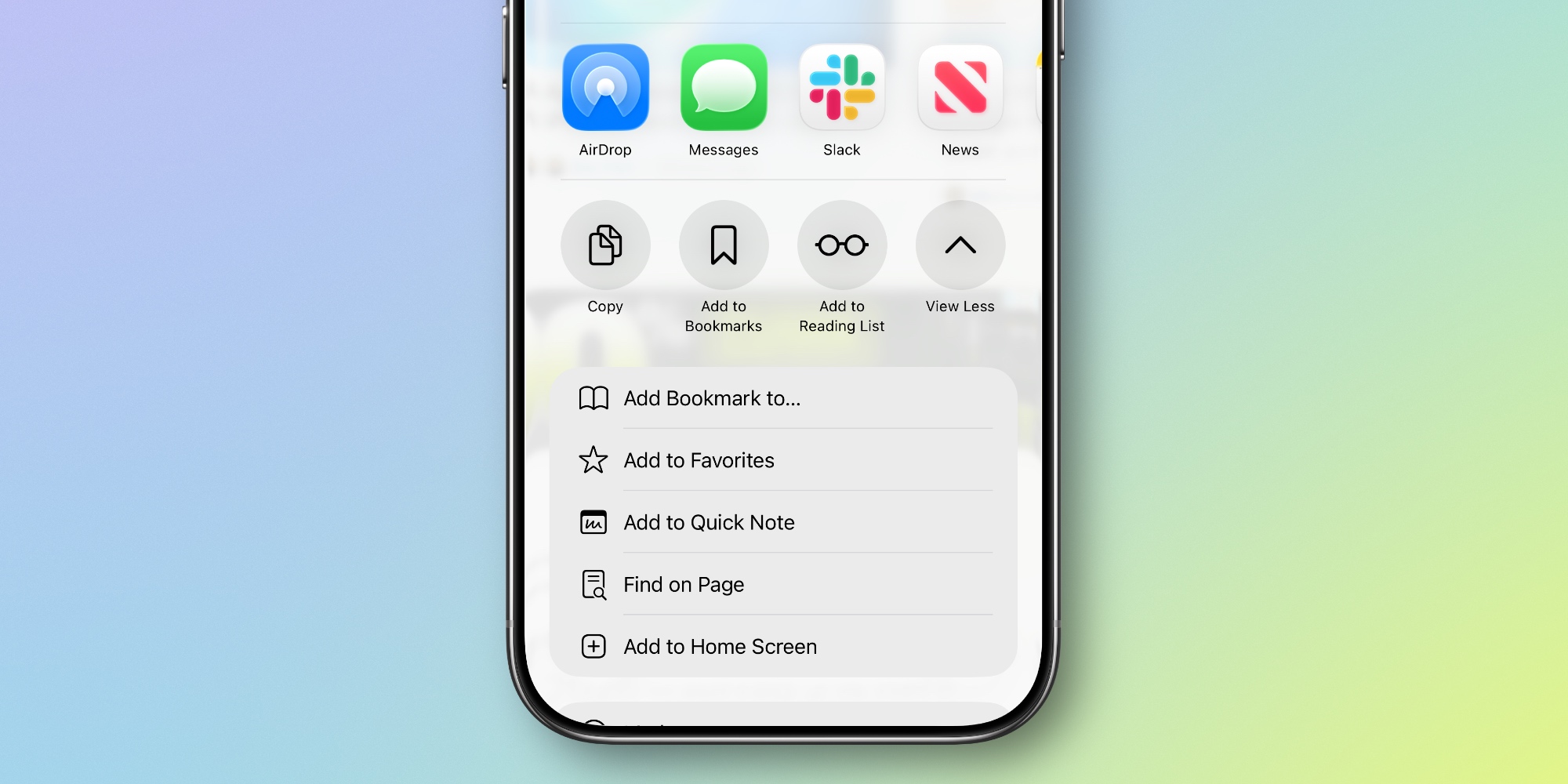
Beyond the ‘limit precise location’ setting, iOS 26.3 also makes a small change to a key UI element: the share sheet.
In previous betas and iOS 26.2, the bottom share sheet row had a ‘More’ option in its fourth slot. When you hit ‘More,’ the list of available actions would expand—and ‘More’ was replaced by a previously hidden action.
In beta 3, this button now reads ‘View More’ and uses a down-facing arrow. When you tap it, it simply changes to ‘View Less’ and the arrow changes directions. The fourth action that used to appear has now moved to the top of the list of revealed actions.
It’s not a major change, but I’ve found it a clear improvement. Turning the ‘More’ button into a hidden action always felt odd to me.
How has iOS 26.3 been running for you? Let us know in the comments.
Best iPhone accessories
- AirPods Pro 3 (now only $199, down from $249)
- 10-year AirTag battery case 2-pack
- MagSafe Car Mount for iPhone
- HomeKit Garage Door Opener
- 100W USB-C fast charging power adapter


FTC: We use income earning auto affiliate links. More.



Comments