
One of the core Apple Intelligence features to date has been Visual Intelligence. It started off in a rather limited capacity through Camera Control, but with iOS 26, the company expanded it to screenshots. I’ve found those capabilities very useful thus far, and I’d love to see Apple take it even further.
With iOS 26, Apple Intelligence offers three new Visual Intelligence features for screenshots: the ability to quickly create Calendar events, the ability to search for similar images (useful for shopping), and the ability to ask ChatGPT questions about your screenshot.
I’ve loved the ability to quickly create Calendar events with Visual Intelligence, and it’s certainly made me a more avid user of the Calendar app on my iPhone.
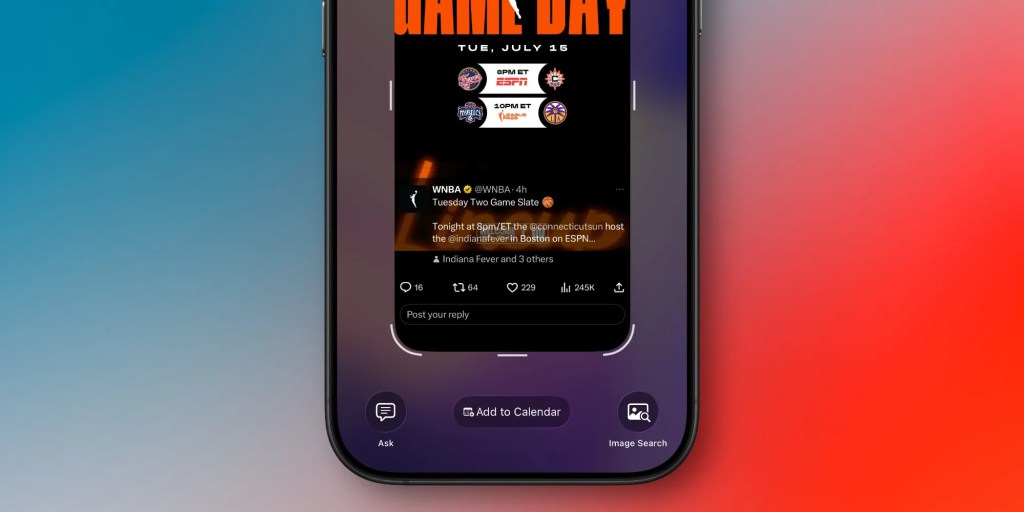
In my opinion, Apple could take these capabilities a step further in iOS 27, by adding Reminders to Visual Intelligence.
Reminders integration
There’s loads of potential for Reminders in Visual Intelligence. At least personally, I’d love to have the ability to quickly screenshot something and then turn said thing into a Reminder.
If I’m researching something, it’d be nice to be able to quickly take a screenshot and turn it into a Reminder to come back to later. Think of it as a universal bookmarking tool of sorts.
Sometimes, people will also text me asking them to remind me of things. (I’m not sure why some people pretend I’m a human reminder, but that’s besides the point.) If you could quickly screenshot said text conversation and turn that snippet into a reminder, that could also be immensely helpful.
I’m sure such a feature would require much more advanced analysis than the calendar feature does, since figuring out what someone is actually requesting a reminder for is a lot more complicated than just finding a date/time and title.
I do think this capability has a lot of potential, though. It could even work nicely with Visual Intelligence in Camera Control, where you could take a photo of something and generate a reminder from it.
My favorite Apple accessory recommendations:
- Anker MagSafe/Qi2 Ultra-Slim Battery Pack
- AirPods Pro 3 (2x ANC vs AirPods Pro 2!)
- Anker Nano 45W Fast Charger with Smart Display
- Anker 3-in-1 Prime 25W MagSafe Charging Stand
- Logitech MX Master 4 Mouse for Mac
- Satechi OntheGo 7-in-1 USB-C hub
Follow Michael: X/Twitter, Bluesky, Instagram


FTC: We use income earning auto affiliate links. More.





Comments