

Carrot Weather is one of the most robust and versatile weather apps for iPhone, and it’s getting even better. With a new update today, Carrot Weather is adding support for The Weather Channel as a data source, plus new discussions from the National Weather Service and a new dynamic interface.
One of my favorite features of Carrot Weather is the ability to switch between multiple different data sources. Now, The Weather Channel is joining the array of data source options. You can also now view data from Weather Underground personal weather stations for hyper-local observations.
Carrot Weather’s interface is just as versatile as its array of data sources. The interface is modular and lets you pick and choose different metrics and cards to display. With today’s update, Carrot Weather is launching a new “Sky” layout.
The “Sky” layout shows dynamic weather visuals of your current conditions. The same style can also be applied to other layouts in Carrot Weather as well. Based on screenshots, this looks a lot like the dynamic Apple Weather interface.
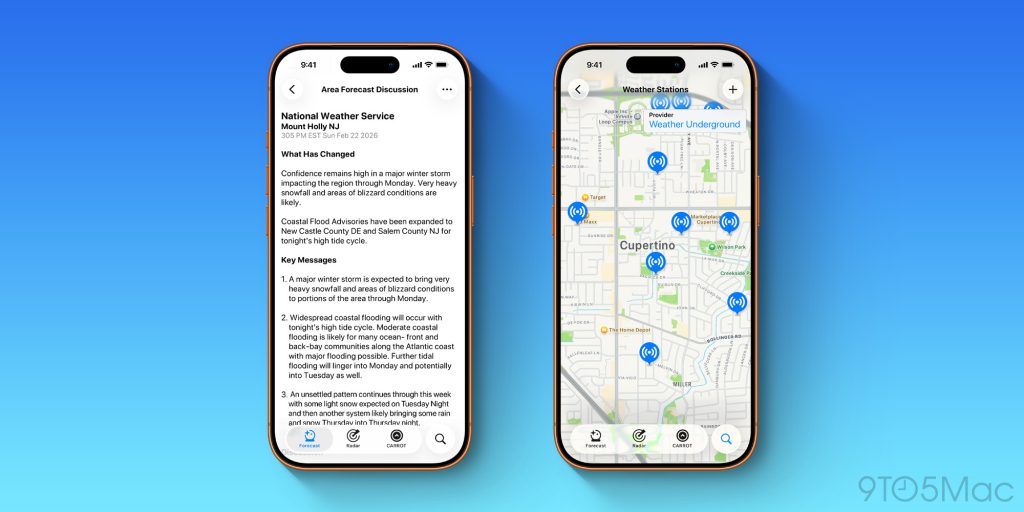
Other updates for Carrot Weather today include custom backgrounds on Apple Watch and integration with Area Forecast Discussions from the National Weather Service.
Here are the full release notes for today’s Carrot Weather update:
- New Data Source: Get forecasts from The Weather Channel.
- More Weather Stations: Fetch observations from nearby Weather Underground stations.
- Realistic Weather Effects: Experience realistic weather effects with the all-new Sky layout. The Sky style can also be used in existing layouts – just customize the Current Observations.
- Area Forecast Discussions: Read forecast analysis from local NWS meteorologists. Available via the menu button in the top right corner.
- Watch App Backgrounds: Customize the background in the Apple Watch app. In CARROT’s iPhone app, go to Settings, then Apple Watch, then Main App to select your background.
Carrot Weather is available on the App Store for iPhone, iPad, Mac, Apple Watch, and Apple Vision Pro.
My favorite iPhone accessories:
- Anker Nano USB-C wall charger with built-in screen
- CardPointers: Maximize credit card rewards (exclusively save 30%)
- Charge all your Apple gear at the same time
- Bring wireless CarPlay to any car
- USB-C cable that shows how fast you’re charging
Follow Chance: Threads, Bluesky, Instagram, and Mastodon.


FTC: We use income earning auto affiliate links. More.



Comments