
OpenAI has released a new way to interact with its Codex app from your smartphone. An update to ChatGPT’s mobile app brings remote access to Codex for Mac to the iPhone, iPad, and Android.
Codex mobile access lives inside the ChatGPT app
While Codex is a standalone app on the Mac, OpenAI is putting remote access features inside the ChatGPT mobile app.
“Codex is now in the ChatGPT mobile app so you can stay in the loop from anywhere while Codex gets work done across your laptops, devboxes, or remote environments,” OpenAI announced today.
OpenAI points to uses around approving Codex tasks and starting new prompts for the system from your phone while you’re away from your computer.
As agents take on longer-running work, a new rhythm for collaboration is emerging. To keep work moving, you need to be able to easily answer a question, review what Codex found, change direction, approve what comes next, or add a new idea.
“Codex in the ChatGPT mobile app is a fully-featured mobile experience for getting work done with Codex,” says the company.
“When you connect to any of your machines where Codex is running (whether that’s your laptop, a dedicated Mac mini, or a managed remote environment), the app loads the live state from that environment so you can work fluidly across active threads, approvals, plugins, and project context.”
Here’s how the setup process looks on the Mac app:
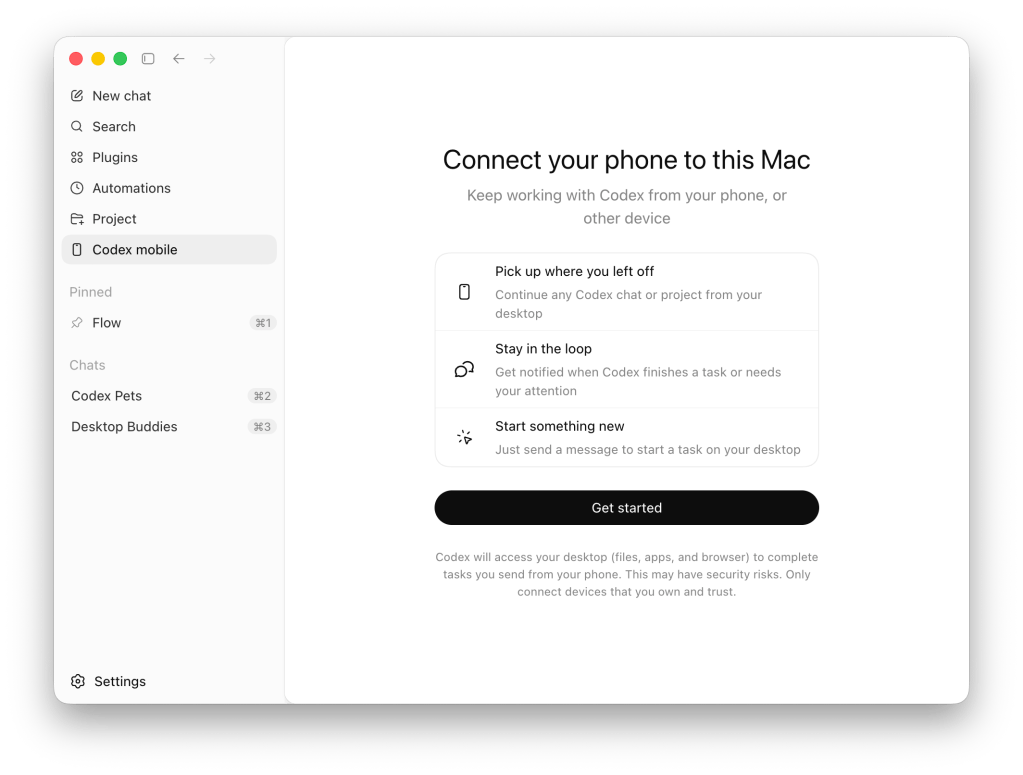
After getting started, Codex for Mac presents a QR code that you scan from either the iPhone, iPad, or Android version of ChatGPT.
OpenAI says ChatGPT’s new Codex features offer more than remote control
OpenAI describes its Codex tools inside ChatGPT’s mobile app as more than basic remote control.
This is more than the ability to remotely control a single task or dispatch new tasks to your computer. From your phone, you can work across all of your threads, review outputs, approve commands, change models, or start something new. Your files, credentials, permissions, and local setup stay on the machine where Codex is operating, while updates flow back to your phone in real time, including screenshots, terminal output, diffs, test results, and approvals.
Codex remote access through the ChatGPT mobile app is available now. The latest version of Codex for Mac and ChatGPT for iOS and Android is required to get started.
OpenAI says support for remotely controlling Codex for Windows will follow.
You can learn more about the new update here.
Last month, Codex on the Mac gained the ability to use apps on your computer without taking over the cursor. This means you can use Codex to run tasks on your Mac without giving up the ability to use your machine at the same time.
In addition to enhancing the Codex desktop app, OpenAI recently introduced a subscription designed for Codex users. OpenAI also released GPT-5.5, upgrading the capabilities of ChatGPT and Codex, alongside Images 2 for image generation.
Codex only arrived on the Mac in February after starting out as a command line interface tool.
Do more with your Apple products
AirPods 5 | Apple’s newest wireless headphones
Apple AirTag 2 | Add Find My tracking to keys, bags, bikes, more
AirPods Pro 3 | Apple’s best wireless headphones


FTC: We use income earning auto affiliate links. More.




Comments