
iOS 27 brings new features to almost all of Apple’s apps, including Messages, Apple Music, Wallet, and more. Apple’s Find My app has its own share of changes in iOS 27. Here’s everything new.
iOS 27: What’s new for Find My?
Apple touts three changes to Find My in iOS 27:
- More flexible sharing options
- UI enhancements
- Apple Watch updates
First, more flexible sharing options in Find My give you more control over when and for how long you share your location with others. “Share your location for a custom duration or until a set date and time,” Apple says. You can also now “pause sharing with people individually, whenever you want.”
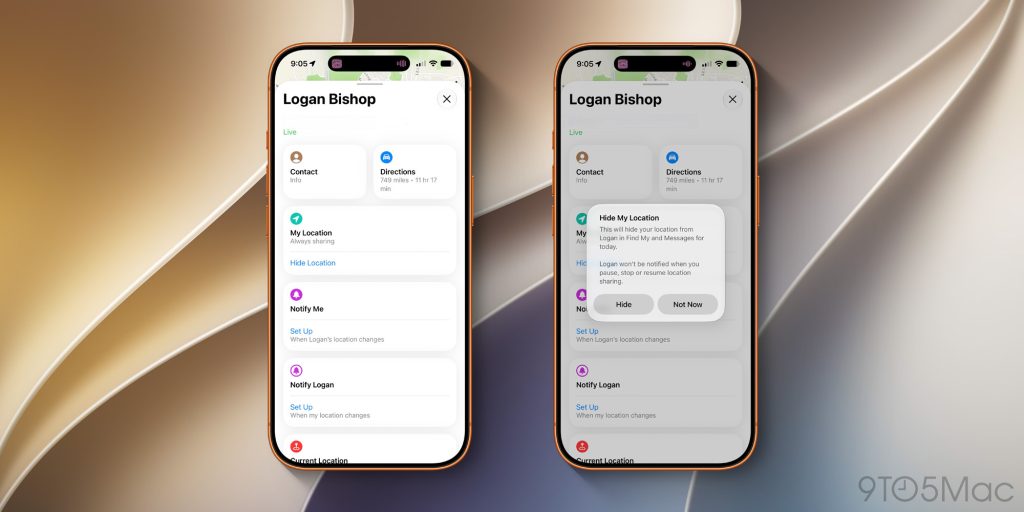
One of the bigger changes here is that you can now hide your location from a specific person without sending them any notification or alert. The other person won’t be notified when you pause, stop, or resume sharing your location with them.
Previously, you could turn off your location in the Find My app altogether, which wouldn’t send a notification. This, however, hid your location from everyone. In iOS 27, you can disable your location for specific people.
To manage this, you’ll see a new “Hide Location” toggle on each person’s card in the Find My app. If you pause sharing your location with someone, they will see a “No Location Found” message in their Find My app.
Design changes
As for the UI enhancements, Find My in iOS 27 has been refreshed with a new Liquid Glass interface. The app largely missed out on Liquid Glass in iOS 26, but this year it has a new tab bar design that matches Apple’s other apps.
The Find My interface now also shows more specific location information on the app’s main page. This means you don’t have to tap on each person to view exactly what street they’re on at any given moment.
There is also new iconography in the Find My app in iOS 27. The “Items” tab, for example, is now denoted by a new AirTag-style icon.
Apple Watch updates
Finally, for cellular Apple Watch users, sharing your location will automatically use your Apple Watch when you’re away from your iPhone or iPad.
Also on Apple Watch, there’s a redesigned, unified Find My app that integrates people, items, and devices into one interface.
Have you noticed any other changes in the Find My app? What do you think of Apple’s updates in iOS 27? Let us know down in the comments.
Chance’s favorites:
- Twelve South Airfly Drive: Bring wireless CarPlay to any car
- AirPods Pro 3: $199 (Reg. $249)
- Logitech MX Master 4
- Belkin 3-in-1 MagSafe Charger
- Beats Woven USB-C Charging Cables
- Twelve South Butterfly 2-in-1 Charger
Follow Chance: Threads, Bluesky, Instagram, and Mastodon.


FTC: We use income earning auto affiliate links. More.



Comments