Mark is an award-winning journalist who worked at 9to5Mac for over six years. He covers Apple and other topics related to the consumer technology industry.
Apple’s newly launched MacBook Pro lineup brought some new impressive additions such as greater battery life, new HD graphics, and faster i5 and i7 Intel processors. One feature that you may have missed is an updated feature set on the glass multitouch trackpads. Apple has added inertial scrolling to their new lineup. This means you can now scroll with two fingers like you do with one finger on an iPad or Magic Mouse.
Inertial scrolling is great if you love how scrolling works on your iProducts and is something new MacBook Pro buyers will get. We don’t want you users with older machines to feel left out, so today we are letting you know about “Smart Scroll.” This Mac app mimics inertial scrolling and gives you some more options for your glass trackpad.
Apple has just recently updated their iPad Guided Tours page to display new tours for Maps and the App Store. Apple also went ahead and published these new videos to their YouTube Channel. We wonder why it took Apple this long to post tours for these essential iPad Apps. Maybe they were waiting for a more populated iPad App Store before showing it off on video.
We never saw this coming… actually working, but from this video, Android seems like it’s a go by the jailbreak community. It’s obviously in an early Alpha stage as demonstrated in the video, but hopefully we will be able to land our anxious hands on it soon.
Denver police have released surveillance video showing the widely-reported iPad theft in which robbers seriously damaged the finger of the victim while ripping him off.
The attack took place on Monday when Jordan collected the iPad from a Denver Apple Store for a co-worker. He was leaving the mall with the bag wrapped around his hand when the thief struck, seizing the bag with such force victim, Bill Jordan, saw his finger seriously torn.
“I saw just a bone, all the skin and tendons and everything were off,” Jordan told CBS affiliate KCNC.
“The film shows them walking right behind me down the stairs as I was going out the store,” Jordan explained.
Metro Denver Crimestoppers is offering a $2,000 reward for information leading the capture and conviction of the suspects.
We’re not exactly sure where The Flash Blog stands as a mouthpiece of Adobe corporate (official vs. unofficial), but they’ve certainly let their feelings be known without any sugar coating or corporate speak. Lee Brimelow, the author is a Platform Evangelist at Adobe focusing on the Flash, Flex, and AIR developer communities.
What is clear is that Apple has timed this purposely to hurt sales of CS5. This has nothing to do whatsoever with bringing the Flash player to Apple
Steve Wozniak was seen tonight at the Valley Fair Mall in line, getting ready to camp for his iPad. Camp? in a fricken mall? GREAT IDEA WOZ! Looks like there will be no shortage of media attention at this Apple Store. As you can see Woz decided to bring some 2 dollar bills. Maybe this is all he has left after buying an iPhone 3GS in Black and White, as well as buying all the Segways he can get his hands on. Maybe the 2 represents the number he used to be in the company. Whatever it is, it’s sure great to see one of the biggest geeks alive waiting in line for his iPad like everyone else.
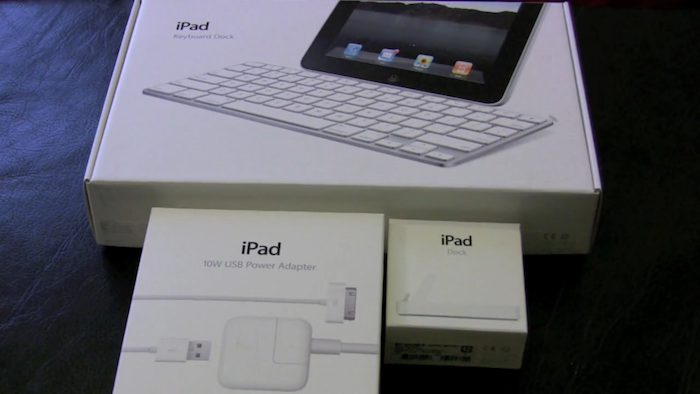
For those packaging buffs out there (You know who you are!) here’s what the packaging of the iPad Keyboard Dock, Regular Dock, and 10W Power Cable look like.
Today Apple released an update to iTunes which brings complete support for the iPad. Unless you have been on Pluto the last 3 months, you would know the iPad comes out this upcoming weekend. This update is out right on time and allows iPad syncing, and brings Books control. Also, you now have more control over Genius playlists.
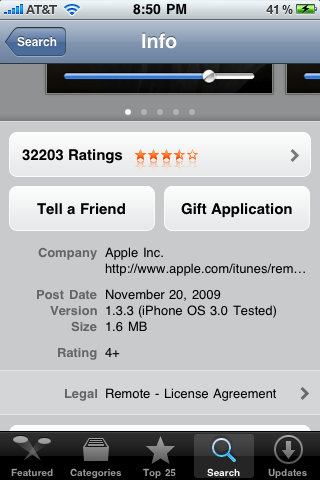
As reported earlier, Apple released the final Golden Master seed of the iPad 3.2 SDK. This allows developers to build their apps to run on the iPad via the App Store starting April 3rd. Now Apple has uploaded 2 interesting files to their download servers. The actual firmware installed on the iPad and the iPad’s legal documentation.
What the new firmware holds is yet to be determined, but the legal documents shed light on a lot of new information. First, all iPad software updates including major ones will be free of charge. Second, Apple informally announced the availability of iPad/iPhone OS 4.0.
From Apple in Document:
Apple will provide you any iPad OS software updates that it may release from time to time, up to and including the next major iPad OS software release following the version of iPad OS software that originally shipped from Apple on your iPad, for free. For example, if your iPad originally shipped with iPad 3.x software, Apple would provide you with any iPad OS software updates it might release up to and including the iPad 4.x software release. Such updates and releases may not necessarily include all of the new software features that Apple releases for newer iPad models.
We’ve discovered a very handy an undocumented tip today in the iPad simulator which allows developers to take screenshots for their iTunes metadata. Simply follow these steps and you will be good to go.
1) Launch your app and get it running on the simulator.
2) Click edit in the menu bar and while selected, press the option key.
3) Things brings up the ‘copy screen’ toggle. Click that.
4) Now simply paste the screen where you can and save it for upload.
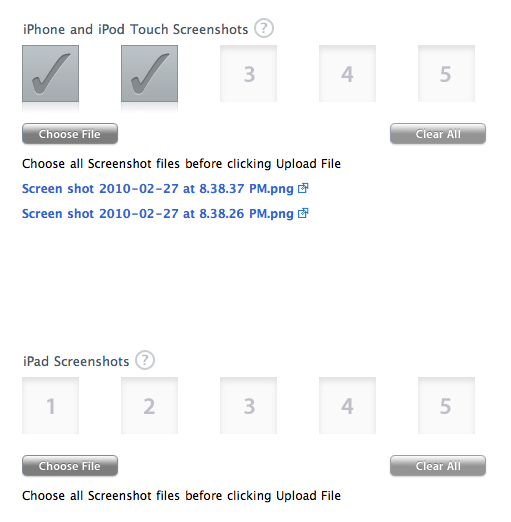
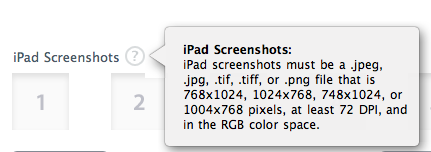
We’ve managed to get some screenshots of the updated iTunes Connect interface for submitting iPad applications for those who might be interested. Have a look:
Apple today announced developers can begin submitted their applications for review to the iPad App Store. According to Apple this is a Grand Opening special for developers. Developers have until March 27 at 5 P.M. Pacific time to get their apps in. Only app submitted before then will be apart of the grand opening. This gives developers 8 days to get their apps available on opening day.
From Apple:
iPad will begin shipping soon and your opportunity to be part of the grand opening of the iPad App Store starts today. Submit your iPad app now for an initial review by the App Review Team and receive feedback on its readiness for the grand opening.
Today, Apple has released the anticipated iPad camera kit to the online store. Ever since Apple launched iPad pre-orders people have been wondering where the kit is. Today, the kit is no longer missing in action as available for $PRICE PUT HERE. Here’s the link to the store page.