Author

Avatar for Seth Weintraub

Seth Weintraub

Founder, Publisher and Editorial Director of the 9to5/Electrek/DroneDJ sites.

Seth Weintraub is an award-winning journalist and blogger who won back to back Neal Awards during his three plus years  covering Apple and Google at IDG’s Computerworld from 20072010.  Weintraub next covered all things Google for Fortune Magazine from 2010-2011 amassing a thick rolodex of Google contacts and love for Silicon Valley tech culture.

It turns out that his hobby 9to5Mac blog was always his favorite and in 2011 he went full time adding his Fortune Google followers to 9to5Google and adding the style and commerce component 9to5Toys gear and deals site. In 2013, Weintraub bought one of the Tesla’s first Model S EVs off the assembly line and so began his love affair with the Electric Vehicle and green energy which in 2014 turned into electrek.

In 2018, DroneDJ was born to cover the burgeoning world of drones and UAV’s led by China’s DJI.

From 1997-2007, Weintraub was a Global IT director and Web Developer for a number of companies with stints at multimedia and branding agencies in Paris, Los Angeles, New York, Sydney, Hong Kong, Madrid and London before becoming a publisher/blogger.

Seth received a bachelors degree in Industrial and Systems Engineering from the University of Southern California with a minor in Multimedia and Creative Technology in 1997. In 2004, he received a Masters from NYU’s Tisch School of the Art’s ITP program.

Hobbies: Weintraub is a licensed single engine private pilot, certified open water scuba diver and spent over a year traveling to 60 cities in 23 countries. Whatever free time exists is now guaranteed to his lovely wife and two amazing sons.

More at About.me. BI 2014 profile.

Tips: seth@9to5mac.com, or llsethj on Wickr/Skype or link at top of page.

Digitimes throws us the daily tease

Site default logo image

What would a day be like without a vague Digitimes post stating that new Apple iPhone parts are moving around Asia?  Today it is flash chips.  Apple just bought 100 million 8Gb (not GB) NAND flash chips which is causing some shortages in the market.   Didn’t Apple and Samsung have some sort of deal on flash?

Apple has reportedly placed orders for 100 million 8Gb NAND flash chips mostly with Samsung Electronics, which is likely to cause a supply shortage, according to sources at downstream suppliers. Nokia and Sony recently also began building their NAND flash inventories, further tightening supply, the sources added.

As Toshiba, Hynix Semiconductor, Intel and Micron Technology have allocated less chip supplies to the Asia market since early April, downstream memory suppliers are striving to grab more NAND flash chips to meet substantial volumes of short lead-time orders from device makers, the sources indicated.

Supply is expected to remain tight until at least the end of May, the sources said.

Plex gets Netflix integration (with Silverlight)

Site default logo image

Plex, everyone’s favorite mediacenter for Macintosh, just got a little more awesome today with a new Netflix application that looks perhaps better that the Roku box that Netflix itself sells.  The Netflix App can be downloaded for free from the Plex store but does require the Silverlight plugin (Netflix requires this, not Plex).  Make sure you have the latest version of Plex running before installing this one.

Great work on this one guys!  (more pix below)

untitled.png

untitled.png
untitled.png

Toys Deal: 4GB RAM for Pre-DisplayPort Macs for $25

Site default logo image

From the Toys Section:

Once again, Amazon.com offers the OCZ 4GB PC2-6400 DDR2-800 SO-DIMM Dual Channel Notebook Memory Kit with two 2GB SO-DIMMs, model no. OCZ2M8004GK, for $39.90. This $15 mail-in rebate drops it to $24.90. With free shipping, that ties last month’s mention as the lowest total price we could find.  Why not max out your Mac for for a few bucks.

This RAM will work in Pre-DisplayPort MacBooks, MacBook Pros, Minis and iMacs.  Make sure to check your device before purchasing.

iPhone 3,1 parts now shipping…

Site default logo image

As we begin the slow decent into the June iPhone release, more and more parts news is coming out of Asia.  Today, Digitimes is reporting, in some awfully unspecific terms, that:

Taiwan-based handset component suppliers have begun shipping components and parts for the new iPhone that Apple is likely to launch in June, the Chinese-language Commercial Times has quoted sources at component suppliers as indicating.

Shipments of the old and new iPhones could top 2-3 million units, respectively, a quarter after Apple launches the new models, the paper quoted component suppliers as saying.

Yep.  Hard to pull anything good from there.  But just thought you’d like to know.


Toys: Seagate 1TB Drive is $79 at Amazon today only

Site default logo image

From the Toys section:

Today only, Amazon.com offers the OEM Seagate Barracuda 1TB Serial ATA 3.0Gb/s Internal Hard Drive, model no. ST31000333AS, for $79.99 with free shipping ($0.08/GB). That’s $10 under our mention from last week and the lowest total price we’ve seen. This drive features a 32MB cache and runs at 7200 rpm.

http://rcm.amazon.com/e/cm?t=thepartim-20&o=1&p=8&l=as1&asins=B001NGOIJO&md=10FE9736YVPPT7A0FBG2&fc1=000000&IS2=1&lt1=_blank&m=amazon&lc1=0000FF&bc1=000000&bg1=FFFFFF&f=ifr

Elan sues Apple over multitouch rights

Site default logo image

We had trouble staying awake during law classes in college, and reading lawsuit articles kind of puts us in that same place.  This one seems to be a big deal though, at least in the world of multi-touch, something that Apple is heavily vested in.  The NYTimes is reporting that a Tiawanese firn, Elan, is suing Apple over some of its Multi-Touch IP:

“We couldn’t find a common viewpoint with Apple, so we decided we had to take action,” he said, adding that the companies had been in licensing talks for about two years.

The lawsuit alleges that Apple products including its MacBook computer, iPhone and iPod Touch use technology that infringes on two of Elan’s “multi-touch” patents, the company said in a statement.

It was not immediately clear what damages or remedial action Elan was seeking in the suit. In January, Apple reported stronger than expected fourth-quarter earnings of $1.61 billion, in part due to robust iPhone, MacBook and iPod sales. The company said it sold 4.4 million iPhones that quarter, nearly double the amount sold in the year-ago quarter.

Ironically, Elan makes the touchpads for the EeePCs, something which is conventionally thought to have followed Apple into the multi-touch arena.  The firm has Chinese language press release which looks like a retort to the media inquiries.  OK, nap time.


New Google Mail expereince for iPhone (and Android)

Site default logo image

From the Gmail Blog: We hear that Google is offering some new offline support for Gmail on the iPhone?  We’re not sure if this uses the current Safari or new Safari or if the offline support is just for Android which uses Chrome.  Lots of other good stuff to rumage through below.

Today we’re introducing a major revision to Gmail for mobile that takes advantage of the latest browser technology available on iPhone and Android devices. We’ve updated the user interface, made it faster to open messages, allowed for batch actions (like archiving multiple messages at once), and added some basic offline support redesigned the Gmail for mobile client app last October, we’ve gone back to the drawing board and redesigned Gmail for the mobile browser to overcome some of these limitations. We made performance more consistent, regardless of connection type, and laid the foundation for future improvements.  


Now, when you go to gmail.com from your iPhone or Android browser, archiving email is quicker because it doesn’t require a response from a remote server. Instead, we cache mail on the device itself (using
database storage on the iPhone and a device-local mobile Gears database on Android-powered phones). Actions like archiving or starring messages are first applied to this cache and then sent to Gmail servers in the background whenever a network connection is available. You only have to wait for a response from the server when you’re requesting an uncached message or list of messages. As a result, you can start-up Gmail even if you’re on a slow connection. You can even compose mail and open recently read messages while offline.

We made extensive use of other browser functions too: for example, the floaty bar that lets you archive, delete or apply more actions is animated via CSS transformations and controlled in part with touch events (when you scroll the screen, it follows you).


The HTML5 canvas tag is used to render the progress spinner without the overhead of downloading animated GIFs to the device. Now that we’ve developed a framework for the new Gmail for mobile, we’re planning a whole lot more: faster performance, improved offline operation, new functionality, and interface enhancements that take advantage of the unique properties of smartphones.

To try this new version of Gmail for mobile, just go to gmail.com from your mobile browser. It’s currently available on any Android-powered devices or iPhone OS 2.2.1 or higher. For now, the new version is available in English only. We’ll be rolling this version out to everyone over the course of the day, so if you don’t see the updated user interface yet (you’ll know you have it when you see that floaty bar), check back soon. For easy access, we recommend creating a homescreen link.

iPhone Video Recording screenshot found

Site default logo image

Macrumors is posting the screenshot of what appears to be iPhone 3.0’s video recording interface.  It looks pretty basic but indicates that it will be part of the Camera.app. 

The video recording is not presently functional in iPhone 3.0 beta, and the interface is not accessible by default. Only when configuration files were modified telling the firmware that a Video Camera was present will this interface appear.

Other interesting capabilities found in the configuration files include "auto-focus camera", "magnetometer" (digital compass), and "Voice Control".

The "pooh your pants" feature in all of this is the "auto-focus camera".  That implies that the camera on some of the new iPod, iPhone, etc. devices is going to be more point and click worthy – perhaps that 5 Megapixel jobbie we’ve heard so much about.

Combined with the GPS, the Magnometer could be used to build 3D worlds in a future iPhoto type of application.  The application would know the location and direction of the photos shot.  Photosynth, watch out.

We also like the idea of voice control in a camera: Being able to say "Snap!" and having it take a picture instead of you rather than doing the rusty trombone reach around..

Jailbreakers and other smartphone users: Yes we know we’ve had video recording/5 megapixel cameras  for 300 years.


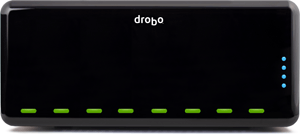
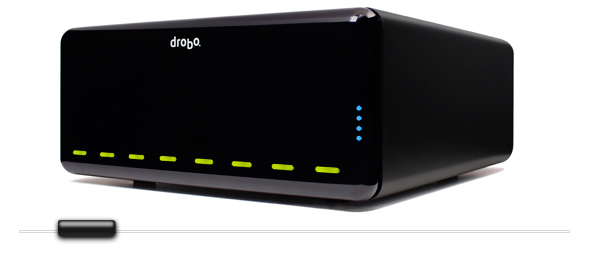
New DroboPro packs eight storage bays

Site default logo image

Some people love them (easy to configure RAID storage).  Other people hate them (speed, reliability issues).  Either way, Drobo is bringing multi-drive network attached storage to the masses.  We’ve covered Drobo and Droboshare and DroboApps before

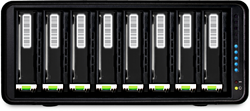
Today, Drobo is announcing their newest product, DroboPro.  It basically doubles the amount of drive bays to eight and puts a reasonable $1300 price tag on the setup.  It has the Droboshare networking built-in over iSCSI 1Gb Ethernet.  You can also use Firewire 800 or Hi speed USB.  DroboApps should also work on this setup.  This will hit the sweet spot of many small busineeses and high end home setups.  We’ll have to get some reviews before we’re sold on it, however.

Technically you could load this thing up with 2TB drives and have 16TB of storage (though much less with RAID, obviously).  More info below. (Drobo’s site is slow for some reason at the moment)


Introducing DroboPro.
Download the DroboPro Datasheet <!–
DroboPro Images
–>
DroboPro 360 Degree View        

Introducing DroboPro <!–

DroboPro.

Storage That Manages Itself

DroboPro
–> Introducing DroboPro, the first business class storage array that manages itself. Engineered to be both simple and scalable, the revolutionary BeyondRAID™ technology incorporated into DroboPro frees businesses of making the difficult and confining choices commonly associated with storage management. Why trade simplicity for safety, or stability for expandability? DroboPro delivers both enterprise-level data safety and unprecedented expandability, featuring single and dual disk redundancy combined with instant capacity expansion. Once you experience DroboPro, you just might forget the differences between all eleven traditional RAID levels. If you do, don’t panic. You’re experiencing the peace of mind that comes with every Drobo® product.

*Learn more about Drobo’s revolutionary technology

Up to 8 Disks of Instant Expansion to 16TB and Beyond
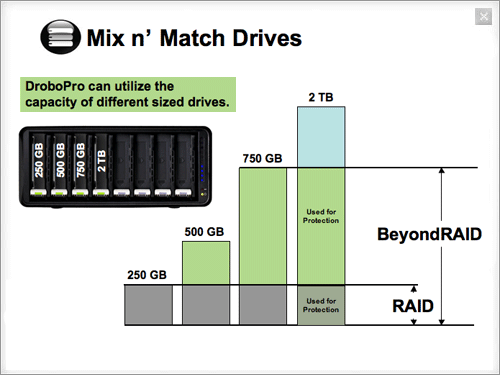
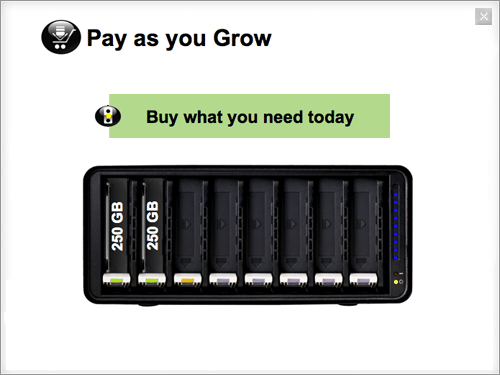
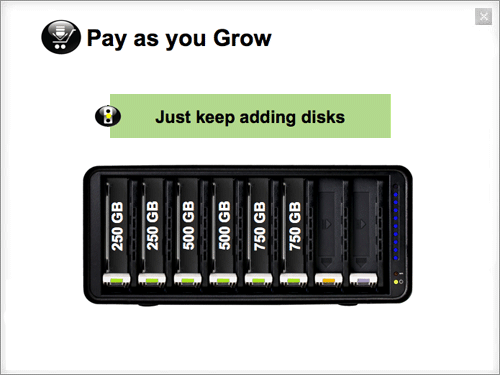
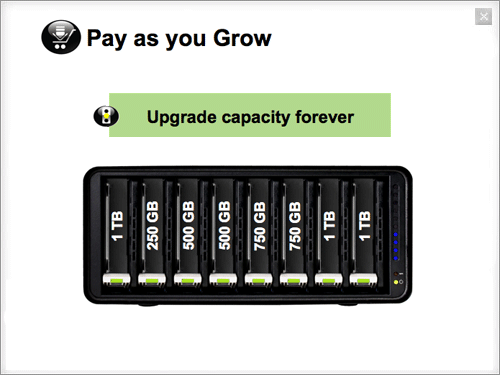
Grow your storage in line with your data capacity needs with minimal effort. To add capacity, simply insert a new hard disk or replace your smallest disk with a larger one, even when all eight disk bays are full. Unlike traditional RAID systems, the BeyondRAID technology found in DroboPro enables you to mix n’ match disk brands, capacities and speeds. This allows continuous expansion as disk capacities grow. With DroboPro expansion is automatic, instantaneous and access to data is always maintained.

No Headache Dual Disk Redundancy
Enable the Dual Disk Redundancy option to protect against the simultaneous failure of up to two hard disks. It’s all done with a single click, without ever losing access to your data. Running out of space? You can even switch back to single disk redundancy with a click. For instance, unlike moving between RAID 5 and RAID 6, there’s no need to reformat or migrate data off of the array, potentially saving you hours or days.

Triple Interface Featuring iSCSI
iSCSI, FireWire and USBAttach DroboPro directly to the server or workstation that requires storage or to a shared server or workstation on your network that can provide access to multiple clients. Interface options include:

  • iSCSI (utilizes Gigabit Ethernet)
  • FireWire 800
  • Hi-Speed USB 2.0

Unfamiliar with iSCSI? It’s a high performance protocol that has become extremely popular with businesses, but it can often be complex to manage. DroboPro changes that by introducing zero click iSCSI connection establishment for both Windows and OS X.

*Learn more about DroboPro and iSCSI

The Virtues of Smart Volumes
Create new volumes in seconds and manage up to 16 x 16TB volumes over time with ease. The innovative and timesaving Smart Volume management technology integrated into DroboPro allows volumes to pull storage from the common pool of disks rather than a specific physical disk allocation. The labor of resizing and migrating volumes is replaced with the simplicity of intelligent engineering.

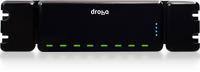
Rack Mount Ready, Desktop Quiet
Drobo in Rack Mount DroboPro is equally at home in a rack mount environment as it is on your desktop. Dual smart fans automatically manage their speeds to optimize both cooling and operating noise. (DroboPro Rack Mount sold separately.)

Additional Features

DroboPro Showcase

360° View

<!––>


Case Studies

Wayne Titus, President, AMDG

The data that we use is extremely critical. To make sure that that data is maintained, kept confidential, and that we don’t have it at any risk of loss is extremely important.

AMDG provides wealth advisory services to philanthropic and socially responsible minded families in the Detroit Metro area. Wayne Titus, AMDG’s president, sets a high standard for maintaining the integrity and confidentiality of the financial data that his firm manages on behalf of its clients. Read more

Rob Miller, owner of IT consulting firm F1 Technologies

A client had a couple of external USB drives that they were storing their data on. They had more than one backup, but they had them both in the same location and their office got flooded. They lost both of their drives.

After many requests from worried clients, Miller started offering customized off-site backup as a service, using Drobo as the storage device. Read more

John Grow, Commercial Photographer

Before he became a commercial photographer, SLP Photography’s John Grow designed disk drive systems for Seagate and Maxtor, so he knew that he needed backup for every hard drive in his company. Eventually, he ended up with five external hard drives, and had problems keeping track of what photos were on which drive. The solution he came up with? Drobo. Read more


Additional Resources

<!–  –>DroboPro FAQs
<!–  –>DroboPro Datasheet <!––>
DroboPro and iSCSI
Migrating your data from Drobo to DroboPro
DroboPro Overview On-Demand Webinar
DroboPro Guided Tour On-Demand Webinar
<!––>

DroboPro: RAID without Regrets
 
  BeyondRAID Technology
  File System and Operation System Agnostic
  Mixed Drive Capacity Utilization
  Redundantly Safe
  Proprotional Rebuild Times
  Self-Managing
  Thin Provisioning
  Self-Healing
  Smart Volumes
  Storage Virtualization
  Drive Reordering

BeyondRAID™ Technology
Every Drobo product comes with the revolutionary BeyondRAID storage technology — the next generation of redundant disk protection. BeyondRAID will not only keep your data safe, but also will increase uptime and availability. BeyondRAID technology offers several improvements over traditional RAID-based storage systems, including the flexibility to replace failed disks, increase capacity and with a single click switch between single and dual disk redundancy all without costly downtime.

Key features of BeyondRAID include:
  Data protection against two simultaneous hard disk failures
  Instant capacity expansion without downtime
  Self-management
  Automatic healing

File System and Operating System Agnostic
DroboPro and its underlying BeyondRAID technology currently support the Windows, Mac and Linux&sup1; platforms, with file system support for NTFS, HFS Plus, EXT3 and FAT32. Since DroboPro is a block level system, it easily adapts to almost any environment.

Mixed Drive Capacity Utilization
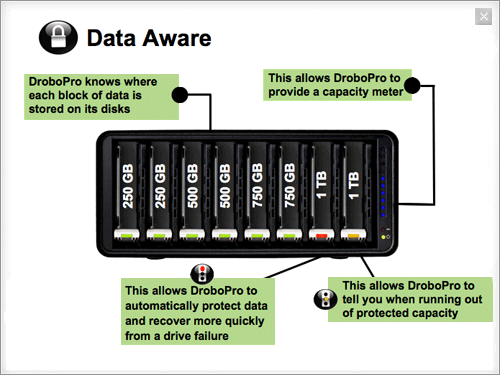
Grow storage in line with data capacity needs with minimal effort. To add capacity, customers can simply insert a new hard disk or replace the smallest disk with a larger one, even when all eight disk bays are full. Unlike traditional RAID systems, the BeyondRAID technology enables IT managers to efficiently mix n’ match disk brands, capacities and speeds. This allows for continuous expansion as disk capacities grow. Now, expansion is automatic, instantaneous and access to data is always maintained.

To find out exactly how much free capacity you’ll have with your choice of disk capacities, try out our interactive Capacity Calculator.

Redundantly Safe
Utilizing dual disk redundancy, DroboPro’s BeyondRAID technology can ensure your data is safe even if up to two disks fail simultaneously—all without a moment of downtime. You can even switch between single and dual disk redundancy with a click. You’ll feel safer knowing that if disks do fail, DroboPro automatically enters a state of self-healing wherein it relays out your data across the remaining healthy disks and sectors.

Proportional Rebuild Times
The time it takes DroboPro to rebuild data after a drive failure or removal is proportional to the amount of data stored in the pool—meaning the less capacity that is used, even on a 2TB disk, the shorter your rebuild times will be. This is superior to traditional RAID, which lacks proportional rebuild times, and is forced relay out every bit even if it does not contain user data.

Since DroboPro is “Data Aware”, it tracks where data is on each disk, so it can differentiate between used and unused portions of disk. This expedites rebuild times and reduces your risk of losing data to an additional disk failure. In short, your data is safer on a Drobo.

Self-Healing
When DroboPro detects a "bad" hard disk, it proactively advises you with a series of warnings ranging from a blinking red LED on its front panel, to pop-up alerts in Drobo Dashboard, to email alerts. What DroboPro does next is exceptional. Entering a self-healing mode where it repairs around the bad sector or disk, DroboPro will work until it returns to the safest state possible. If DroboPro has sufficient time and free capacity (indicated by all lights returning to a solid green state), it can even withstand additional hard disk failures — that’s the power of self-healing.

Smart Volumes™
Create new volumes in seconds and manage up to 16 x 16TB volumes over time with ease. The innovative and timesaving Smart Volume management technology integrated into DroboPro allows volumes to pull storage from the common pool of disks rather than a specific physical disk allocation. The labor of resizing and migrating volumes is replaced with the simplicity of intelligent engineering. And increasing the available pool of storage on DroboPro is as simple adding or upsizing drives.&sup2;

Storage Virtualization
BeyondRAID was designed from the ground up to allow the storage capacity of the array to expand and contract. BeyondRAID makes this a simple process by utilizing a technology called “virtualization.” Virtualization provides a layer of abstraction between the data requested by the file system and the physical location of that data on the disk drives. A given piece of data can be located on any drive, and on any physical location on that drive. This is what makes adding a drive to a Drobo so simple. The new drive just provides additional places to store data.

Virtualization is what enables BeyondRAID to effortlessly change the data arrangement on the drives, for example, changing data stored as a mirror into data stored as parity stripe, say, without interrupting the user access to data. Virtualization completely decouples the physical space available in the array from the space reported to the operating system. This is how BeyondRAID is able to remove the need to manually expand/contract the file system as more space becomes available or is removed.

Thin Provisioning
Thin Provisioning is a technical term that describes how the BeyondRAID technology communicates with your operating system. BeyondRAID communicates with your OS about how much disk space you have, up to 16TB per volume (this varies with older operating and file systems). Specifying a larger amount of storage than is physically available allows you to grow into the volume without having to reformat or migrate your data in order to add capacity. BeyondRAID automatically also reclaims space as you delete files.

Self-Managing
DroboPro is storage that manages itself. There are no complex configuration screens, DIP switches, confounding choices, web consoles or other complications that prevent so many other storage devices from working out of the box.

Drive Reordering
One long-standing requirement inherent in traditional RAID-based systems was that if for some reason you needed to remove the drives, you’d have to replace the drives in the exact same order. When you remove your disks from DroboPro, you can put them back in any order you like.

&sup1; Linux support in Beta
&sup2; The creation of multiple Smart Volumes will be supported through Drobo Dashboard v1.5.0.


DroboPro Product Specifications

Disk Interface
     Eight-bay capacity
     3.5" SATA I or SATA II hard disk drives
     No carriers required
     Mix and match capacities, disk brands and speeds

Capacity
Continuously upgradeable with larger and faster drives. Use our interactive tool to estimate your storage in various configurations.

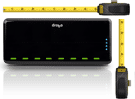
DroboPro Size

  Width Height Length
Inches 12.17 5.46 14.1
mm 309.1 138.7 358.1

 Weight: 16lbs 3ozs (without hard drives or packaging)
 3U for a standard 19" rack


Host Interface

iSCSI (utilizes Gigabit Ethernet)
FireWire 800
High Speed USB 2.0

Accoustics
Normal operation: 30.4 dB


Box Contents
DroboPro
6′ USB 2.0 cable
6′ FireWire 800 cable
6′ Ethernet cable
User Guide and Quick Start Instructions
Resource CD includes:
      Drobo Dashboard application
      Help files
      Electronic Documentation

Certification: Emissions
FCC Part 15 Class B and Safety: UL, cUL

Security
Kensington lock port
(lock not included)

Power Specifications

Idle system (standby, drives off): 13 watts
Typical idle system – idle, drive spin down mode (eight drives): 25 watts
Typical busy system (eight drives): 82 watts

Operating System Support
Windows 2008 Server
Windows 2003 Server
Windows XP (Service Pack 3)
Windows Vista (Service Pack 1)
Mac OS X 10.4.11 and greater
Mac OS X Server 10.4.11 or greater
(Mac OS X 10.5.6 or greater recommended for optimal iSCSI performance and reliability)
Linux using EXT3&sup3;

File System Options
Windows: NTFS
Mac OS X: HFS+
Cross-Platform: FAT32
Linux: EXT3

Warranty
Two (2) year warranty or as provided by local law.


1 iSCSI support for Windows XP Server and Vista utilizes the Microsoft Windows iSCSI Initiator; for OS X Drobo Dashboard is required as OS X does not have an integrated iSCSI initiator. Drobo Dashboard includes iSCSI initiators for Windows and OS X free of charge and enables zero click iSCSI connection establishment.

2 Acoustics tests performed 1m from the front of DroboPro with eight 1TB Western Digital GreenPower™ drives during a file copy to DroboPro. DroboPro has a smart, multi-speed fan system governed by internal temperature sensors that operate the fan at optimal speeds. The fan is programmed to minimize noise, but never at the expense of disk integrity. The fan will switch to higher speeds if necessary in hot operating environments or during strenuous usage to keep the temperature within the drive manufacturer’s specifications.

3 Linux support currently in Beta.


Google Voice comes to iPhone

Site default logo image

Wow…Skype was just the begining, more big telephony apps are making their way to the iPhone platform.  Google Voice is the reincarnation of Grand Central, which acts as a switch for your phones allows free US SMS, voicemail transcription and many other features.  Theoretically you could use even Google Voice and Skype together on an iPod touch.    We’ll be the first to let you know when it hits the app store.

Update: Just FYI, this app isn’t made by Google but uses just uses the Google Voice service.

2TB Time Capsule coming soon?

Site default logo image

An Engadget reader spotted a Clubmac advertisement (clever publicity stunt?) with a 2TB Time Capsule on it.  Apple, of course, just updated the radios on their Time Capsules so that they could broadcast at two different speeds/frequencies at the same time.  Would another update at this time make any sense?

At first, we’d think no.  But 2TB drives are just hitting the market.  Perhaps this was later than Apple had planned and they made the decision to go ahead without the updated drives until they became available in quanity.    Also, Apple could just add a new super-uber-extreme version at 2TB and make everyone happy by lowering the prices of the other ones.  

Everyone except people who just bought a Time Capsule.


Would you buy an iPod 3G?

Site default logo image

With the release of Skype for iPhone and iPod, the traditional voice connection on the mobile phone is becoming less and less important.  What if Apple made an iPod Touch that had a 3G radio (+3 megapixel camera).  It would connect to the Internet over 3G using a month to month data-only plan from either Tmobile or AT&T at $40-$60/month.    Would you buy a 32GB version for $499?

Oh, and we found the following string in Apple’s iTunes.  It is probably a typo or something (it has been there awhile).

iTunes 8.1.1 hits the streets with 70mb update.

Site default logo image

Like the old Ragu ad, we have to ask, "What’s in there?!!?"  Usually iTunes point point updates are 10-15 mb each, this one is many times that.  Apple lists some of the updates (snappieness™!) but we’re sure we’ll find out some others.  Thankfully, this update doesn’t require a restart.  Can we get confirmation of speed improvements out there?

iTunes 8.1 is now faster and more responsive. You will enjoy noticeable improvements when working with large libraries, browsing the iTunes Store, preparing to sync with iPod or iPhone, and optimizing photos for syncing.

In addition, iTunes 8.1 provides many other improvements and bug fixes, including:

• Supports syncing with iPod shuffle (3rd generation).
• Allows friends to request songs for iTunes DJ.
• Adds Genius sidebar for your Movies and TV Shows.
• Improves performance when downloading iTunes Plus songs.
• Provides AutoFill for manually managed iPods.
• Allows CDs to be imported at the same sound quality as iTunes Plus.
• Includes many accessibility improvements.
• Allows iTunes U and the iTunes Store to be disabled separately using Parental Controls.

iTunes 8.1.1 adds support for renting HD movies and provides a number of bug fixes, including addressing issues with VoiceOver and syncing with iPhone or iPod touch.

Could/Would Apple swoop in and pick up Sun?

Site default logo image

Just a thought here – we realize this is pretty much not going to happen – but would there be any interest at all in Sun from Apple?  Bill Joy said the two companies almost merged three times in the 90s (when Jobs wasn’t running the show). IBM just walked away from the table on a $7 billion dollar buyout opportunity.  They wouldn’t take the $9.40 a share offer.

Apple has a few bucks laying around.

We know Apple never buys big companies and prefers to develop from the inside rather than purchasing its technology knowledge.  But its hard not to speculate that there might be some interest in a $7 billion Sun Microsystems pickup after IBM walked away.  There are three technologies that Apple could be  interested in, as well as getting a roster of enterprise clients (does Apple even want that?):

  • ZFS the File System that Apple is widely expected to use in its mainstream OS
  • Open Office Another Office Suite to go with iWork
  • Java On OS X.  Little interest for the iPhone

What else could Apple gain from a Sun pickup?  The most obvious answer is the human capital.  They have amazing Unix people, some processor people and even some nice facilities around the Valley.  Any thoughts out there?

We are giving 1 in 10,000 odds.  Any takers?

Update: Just to clarifyx10, we don’t think Apple should buy Sun, we were just throwing out the possibility for discussion.


More iPhone 3.0 fun..Tethering, A2DP, Skype with Bluetooth headsets

Site default logo image

We’re getting in some new reports of the functionality of the new iPhone 3.0 operating system.  The latest update has improved the performance and reliability of Apple’s new features.  Internet tethering (screenshot of iPhone when tethering shown below) has become more reliable over USB and some people have even had some luck over Bluetooth.

The fun doesn’t stop there.  Our tipsters got the A2DP Bluetooth working which, unlike the older, crappier Bluetooth, works across all applications.  iPod in Stereo?  Yep.  Pandora Radio?  Affirmative.  How about Skype?  Yes!  And it sounds great.

In fact, just to push this thing to the limit, they were able to do Skype on a stereo Bluetooth headset while on 3G, while tethered to a laptop!  Screenies below.


There was only one downer.  The regular AT&T phone on the iPhone wouldn’t do stereo with the A2DP headphones.  For some reason, it only made a mono connection to the Bluetooth headset.  Skype definitely wins this round.

People don't want crap. No matter how bad the economy is

Site default logo image

From today’s Newsweek:

…the ugly attacks from Mac fanboys are exactly what Microsoft was hoping to provoke, says David Webster, general manager for brand marketing at Microsoft [The genius behind the pointless/expensive Seinfeld ads and the Mojave project that tanked]. He says the idea was to turn Apple’s "I’m a Mac" campaign to Microsoft’s advantage. "We associate real people with being PCs, [but then Apple] ends up looking pretty mean-spirited, the way they go after customers," he says. "It’s clear that’s who they are insulting." At the same time he can’t resist taking a crack at the preciousness of some Mac users. "Not everyone wants a machine that’s been washed with unicorn tears," he says.

We’re not sure any of the attacks were on the customers, they were more pointed towards the quality of the machines and Microsoft’s tact of removing any mention of its actual product, Windows Vista, from the conversation.

And when it comes down to it: yes there are people with $400 budgets who need a laptop.  And, yes, there are some really solid ones out there that run Linux and XP.  I currently use and love my EEEPC 1000HE which does just that

Apple doesn’t make a (new) machine for this large segment of society (yet?), which is unfortunate.  But for people who have enough money to spend, why pretend that the $1500 machine that G bought matches up with a $1500 MacBook, even without the train wreck that is Microsoft Vista.  It simply doesn’t, and that is misleading.  Apple owns more than 2/3rds of the over-$1000 consumer PC market.  Microsoft is the underdog here.  Macs are "the rest of us". 

Are some Apple ads misleading?  Sure!  The one where the Mac makes fun of PC for spending money on ads…in an Apple ad comes to mind.  Did the blogosphere blow up over that one?  Yup, just like it is supposed to.

David Webster’s past genius:

Microsoft pulled Seinfeld? That news made headlines everywhere from the Wall Street Journal to the Manhattan gossip website Gawker. And that could be the point.

"We’re sort of a student of fame making," Alex Bogusky, cochairman of Microsoft’s ad agency, Crispin Porter & Bogusky, once told me. It’s possible the student has officially become the teacher.

Microsoft had featured comedian Jerry Seinfeld in its first new ads with Crispin, which were aimed toward making the brand more humorous and human. The effort created quite a buzz—much of it, admittedly, negative, puzzled, or outright hostile. But buzz it was, which was the point, says David Webster, Microsoft’s general manager of brand and marketing strategy.

He also came up with the name Azure for Microsoft’s cloud computing initiative amongst other things.

Toys: Brother HL-2140 Personal Laser Printer $70 (65% off)

Site default logo image

From the Toys section: Today only, Amazon has the Brother HL-2140 Personal Laser Printer for $70.  That’s 65% off of list price with free shipping.  The miniscule printer gets 4.5 star reviews by Amazon’s customers and is currently in stock.

Amazon.com Product Description
Ideal for both home and office use, the affordable Brother HL-2140 Personal Laser Printer features a space-saving, ergonomic design that won’t take up valuable workspace, and prints up to 23 pages per minute at a high-quality resolution. This efficient, hi-performance printer will give your work and personal documents a polished finish colleagues and friends are sure to envy.

.caption { font-family: Verdana, Helvetica neue, Arial, serif; font-size: 10px; font-weight: bold; font-style: italic; } ul.indent { list-style: inside disc; text-indent: 20px; } table.callout { font-family: Verdana, Helvetica, Arial, serif; margin: 10px; width: 250; } td.callout { height: 100 percent; background: #9DC4D8 url(http://images.amazon.com/images/G/01/electronics/detail-page/callout-bg.png) repeat-x; border-left: 1px solid #999999; border-right: 1px solid #999999; padding: 10px; width: 250px; } ul.callout { list-style: inside disc; text-indent: -12px; font-size: 12px; line-height: 1.5em; } h5.callout { text-align: center; }

The Brother HL-2140 Personal Laser Printer offers:

  • Fast, 23 pages-per-minute performance.
  • High-quality (2400 x 600 resolution) prints.
  • Space-saving design.

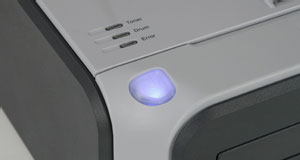
The HL-2140 is simple to operate with clearly labeled buttons.

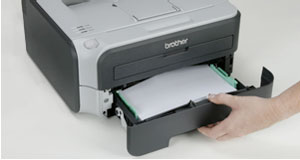
The paper tray has a capacity of 250 sheets.

Versatile and Professional
This monochrome laser printer not only warms up in less than 10 seconds and prints up to 23 pages per minute to give you near-instant access to important reports, documents, and annual family letters when you need them, it also includes a manual bypass feeder for professional printing on envelopes and letterhead. The high-quality resolution (up to 2400 x 600 dpi) of this black-and-white laser printer will give you professional results with each job while saving you printing costs. The printer also includes 8 MB of memory, and a 250-sheet capacity tray that can conveniently accommodate both standard and legal paper.

Ergonomic and Energy Efficient
The Brother HL-2140 14.5-by-14.2-by-6.7-inch design is compact enough to free up valuable work space on your desk or shelf. The unit’s efficient design also features a toner save mode for extended toner life as well as a sleep mode. Easy to set up and a breeze to use, this printer is compatible with both Mac and Windows operating systems, and includes an animated user-friendly tutorial to help answer common support and maintenance questions.

Environmentally Friendly Design
For added peace of mind, this machine is Energy Star compliant, which means it helps save the environment while saving you money. (Energy Star is a joint program of the U.S. Environmental Protection Agency and the U.S. Department of Energy promoting energy efficiency).

This personal laser printer is backed by a one-year limited manufacturer’s warranty.

What’s in the Box
HL-2140 laser printer, starter toner cartridge, DR360 drum unit and instruction kit.

Product Description
The HL-2140 is an affordable, monochrome laser printer. Perfect for home or home office use, it features fast printing at up to 23ppm, HQ resolution (up to 2400 x 600 dpi) for high-quality output, and a Toner Save mode to extend toner life. In addition, the printer¿s space-saving design will maximize your desk or shelf space. The HL-2140 provides flexible paper handling via an enclosed 250-sheet capacity tray and a manual by-pass slot for printing envelopes and letterhead. It also offers 8MB of memory standard along with compatibility for both Windows and Mac, and a one year limited warranty.

Product Description
Perfect for home or home office use, the HL-2140 is an affordable, monochrome laser printer. It features fast printing at up to 23 pages per minute, high-quality output, flexible paper handling via an enclosed 250-sheet capacity tray and a manual by-pass slot for printing envelopes and letterhead. In addition, the printer’s space-saving design will help maximize your desk or shelf space. Paper Handling Input capacity – Up to 250 sheets input Tray Single-sheet manual bypass Multi-purpose Tray Output Paper Capacity – Up to 100 sheets GDI Emulation Supported Paper Sizes – Letter, Legal, Executive, A4, A5, A6, B5, B6, Folio, Envelopes (COM 10, DL, C5, Monarch) Supported Media Type – Plain, Bond, Labels, and Transparency Supported Media Weight – Main Tray 16 to 28 pounds; Multi-purpose Tray 16 to 43 pounds Recommended monthly volume – 250 to 2,000 pages Supported operating systems – Windows Vista/XP/XP Pro x64/2000/ Server 2003/2003 x64, Mac OS X 10.2.4 or greater and Linux Red Hat, Mandrake, SuSE, Debian System Requirements – CD-ROM or DVD-ROM drive, USB port and USB cable Approximate Unit Dimensions – 14.5(W) x 14.2(D) x 6.7(H) Approximate Unit Weight – 15.0 pounds