Tips and Tricks

See All Stories

Snow Leopard bug threatens user data, reports claim

Site default logo image

Warning, warning: The latest Snow Leopard bug seems to threaten all your data, and it seems back-up has become essential, while Apple explores if the bug is just an isolated outbreak or a more serious matter.

There’s been a series of complaints across the last month of incidents in which users start their Macs up as normal only to find they’ve logged in as ‘Guests’ on their machine – with all the files and data held on their Mac in their own user account seemingly deleted.

A series of posts on Apple’s Discussion forums presently describe the problem. Here’s one description taken from these: “A day before the crash there was no Guest account folder in the /Users directory. Just prior to the crash a Guest account folder appeared in the /Users directory on my start-up disk (not the partition my home folder is stored on). Post crash that Guest folder has disappeared again.”

Seems the Guest account is created by default.

We’re still sifting through this information, but here’s a link to a Cnet report which may offer some kind of salvation. How to restore Lost home folder after logging in as guest in Snow Leopard. (Good old Cnet, this report was published last month, but we hadn’t heard about it or the problem, so we figured many of you may also benefit from knowing about it.)

The problem isn’t noted as patched within Apple’s most recent )S X 10.6.1 update.

Links to the relevant Discussion threads we’ve tracked down so far..

Discussion One
Discussion Two
Discussion Three

If anyone out there knows more on this, or can suggest any way to deal with lost data, or avoid it, share it with the rest of the community in comments.
 

Adobe publishes video sneak peek at future Photoshop

Site default logo image

Adobe has this afternoon posted a video detailing some of the new features it is developing for Photoshop.

Hosted by the company’s Photoshop genius, Russell Brown, the video is available online now – the only catch is, it’s only presently accessible through Facebook. (Adobe should do the world a favour and shove it up on YouTube, we think).

The video shows a selection of features as demonstrated at Photoshop World. These include a new warp tool, Painter-style brushes – which aim to emulate the features found in Corel’s flagship Painter product, and much more.

A new Warping technology is also pretty interesting. Basically this means that by locking down certain parts of an image an image editor can alter other parts without altering the overall subject. The illustration shows what can be done with a man’s arms, which can be moved around the subject’s body….

While the company isn’t claiming these features will be found in future version, Photoshop CS5, or any future version, Adobe is presenting the video as a taste of what kind of work it is conducting inside its labs.

Meanwhile, it is interesting to reflect that the current iteration of Photoshop (CS4) is currently available at over $100 discount through Amazon, $586.49 rather than the $699 list price.

And if you’re a Photoshop user then we think it’s pretty possible you may be interested in today’s stunning deal for a Canon large format printer, also from Amazon – $499 rather than the c.$1,600 list price. We think it’s a great deal.

Via: British Journal of Photography.

Kill-A-Watt Electricity Usage Monitor – $50+free ship

Site default logo image

For the next four hours, Amazon has the Kill-a-watt electicity usage monitor for $50+ free ship.


Product Features

  • Graphic timer reads energy consumption by the kilowatt-hour
  • Calculates electricity expenses by the day, week, month, or year
  • Can turn appliances on and off; 96 programmable on/off settings per day
  • Built-in surge protector guards against voltage spikes; monitors 2 tasks at a time
  • Measures approximately 5 by 3 by 2 inches

Amazon.com Product Description
Empowers You to Save Hundreds on Electric Bills and More
Are your electric bills costing you a fortune? Cut costs and take control of your electrical appliances with the Kill A Watt® Graphic Timer.

This advanced timer has the ability to monitor 2 tasks at once. First, it serves as a catalyst to turn your household appliances on and off as it simultaneously monitors its energy consumption so you can have total control of your electricity usage even when you are not at home. With up to 96 different programmable power on/off event settings per day, and 7 different combinations for the different days of the week, makes this device the smartest, and easiest to use, timer out there.

Not only is it a thrifty device, but the Kill A Watt GT 4480 is also the perfect tool to ward off would-be thieves by turning on and off a connected lamp at random times, giving your empty home the appearance of being occupied. The Kill A Watt function helps you save money and protects your appliances. Now, you can save energy by using lights and electronics only when you need them. The built in surge protector also guards your appliance from voltage spikes. With the simple press of a button, you can read the consumption by the kilowatt-hour and calculate electricity expenses by the day, week, month, or year.

The Kill A Watt Graphic Timer is a 3-in-1 product. It is a Graphic Timer with a Power Meter built-in that serves as a Surge Protector. It presents the information to you in a simple, easy-to-understand format.

Easy to Use, with Many Practical Applications
 
Large LCD display counts consumption by the kilowatt-hour
This is one of the most sophisticated timers on the market and yet is very easy to understand. It’s a digital version of a straightforward mechanical timer with a visual interface. It is easy to program the quarter-hour ON/OFF periods for 7 days and 24 hours as you would program traditional mechanical timers. Unlike other timers, the Graphic Timer is not limited to one day of programming–the unit allows unique programs for each of the 7 days of the week. Measurements and programming are stored in memory and retained during power outages. A backup battery allows armchair programming before you even plug it in.

This fully loaded surge protector doesn’t just guard your electrical devices from voltage spikes. It also provides protection against over current, over voltage, and under voltage delivering clean safe power to your expensive equipment. When the voltage presented at the wall outlet is over or under the normal voltage range, the unit will switch to Abnormal Voltage mode shutting off the power at the outlet. Similarly when the current load presented by the connected appliance exceeds the maximum current (15A), the unit will switch to Over Current mode and the power will be switched off to the outlet. The GT also helps prolong the lifespan of your appliances by gently applying start-up power via its Zero power crossing spike-free switch.

The power meter once connected to your appliance will assess how efficient they really are. The Large LCD display will count consumption by the Kilowatt-hour, same as your local utility. You can track minute-by-minute changes in electric consumption as major appliances are turned on and off. It lets you track the amount of electricity that your household uses in real time. It helps you reduce your energy consumption and decrease your monthly bills while helping the environment. Also check the quality of your power by monitoring line voltage. The unit displays the total cumulative appliance power consumption in Kilowatt Hours (KWH). The unit will display KWH from 0.01 KWH to 9999 KWH.

Examples of the Different Uses of the Kill A Watt Graphic Timer
 
Test your energy usage, set up a 7-day timer, and more

You can plug your entertainment center’s power strip into the GT and program it to turn off when you are not home to avoid any standby power from flat-panel TVs and cable boxes that suck up huge amounts of electricity even when not in use. If you need to use a connected product, the conveniently located on/off control allows a temporary override without changing the timer settings. You can go back to the timer mode very easily by hitting the Auto button. This neat feature allows you to use power only when needed, and gives you total control of your appliances. According to the Lawrence Berkeley National Laboratory a surprisingly large number of electrical products–TVs to microwave ovens to air conditioners–cannot be switched off completely without being unplugged. These products draw power 24 hours a day, often without the knowledge of the consumer. We call this power consumption "standby power."

Use the Kill A Watt as a 7-day timer with up to 96 on/off cycles per day. You can conveniently program your Christmas lights to go on/off in a wide variety of programming options set differently for each day of the week. i.e. stay on longer in the weekends or go on earlier on Wednesdays.

Plug your lamp into the unit and use it as a security guard. It wards off would-be thieves by turning a connected lamp on and off at random times, giving your empty home the appearance of being occupied.

Test for Yourself and Observe the Results

Put the GT to the test and see how you can save money on your electricity bill. Program the GT and plug your entertainment center’s power strip but keep the timer function off. Measure one week’s cumulative power consumption in KWHs and retain the information in your records. Now turn on the timer function the following week, which will eliminate any standby power that will otherwise be used by the appliances in your entertainment center. Compare the 2-week records and see how many KWHs you have saved. Multiply the KWHs saved by the rate your utility provider charges for electricity and it will give you the total money saved that week by using the Kill A Watt Graphic Timer.

Technical Specifications
Accuracy: +/- 0.2%
Input Power: 115 volts AC, 60 Hz
Max Current: 15 amps
Max Voltage: 125 volts
Max Power: 1875 VA
Dimensions: 5.1 inches long x 1.6 inches thick x 2.4 inches wide
Approvals: ETL (c), ETL (us)
Origin: China
Manufacturer Warranty: 1 Year

Product Description
A smart addition to any home, this unique timer allows for total control over electricity usage, even when out of town on business or away on vacation. The handy gadget reads energy consumption by the kilowatt-hour and calculates electricity expenses by the day, week, month, or year. It can also be used to turn household appliances on and off, with seven different combinations for each day of the week and up to 96 programmable on/off settings per day. Connect it to a lamp with random on/off times to make an empty house look occupied, or attach it to valuable appliances–its built-in surge protector guards against voltage spikes. The graphic timer can monitor two tasks at once and measures approximately 5 by 3 by 2 inches.

FASB approves accounting changes that will allow Apple to realize revenue sooner

Site default logo image

Call your broker!  The FASB has changed its accounting rules this morning, allowing Apple to realize the revenue from its iPhones and AppleTV devices at purchase rather than slowly over two years.  It also allows Apple to stop charging nominal fees for iPod Touch software updates – when it doesn’t necessarily want to.  AAPL is up almost 4 points on the day.

Apple Inc. is expected to be one of the major beneficiaries of the change, since it would dramatically change how the company reports revenues from its iPhone [and AppleTV]. Currently, Apple recognizes iPhone revenue over a two-year period, and said recently that overall revenues and earnings in its latest quarter would have been much higher if it didn’t have to defer revenues for the iPhone and its Apple TV product. An Apple spokesman couldn’t immediately be reached for comment.


How to get TimeMachine working again…

Site default logo image

If you’ve been having problems with an AirPort Extreme-connected hard drive and Apple’s Time Machine feature, you’re not alone – turns out a lot of us have been afflicted by the bug.

What takes place: You connect your drive, set it up using AirPort Utility and begin to save those valuable Time Machine files for back-up, recovery and data protection. It all goes swimmingly, and then you install AirPort 7.4.2…and a few hours later, your drive stops working. You can’t even access them using the Finder until you reboot your AirPort Extreme. And then, it only lasts a few hours and you must reboot all over again. Annoying…

MacOSXHints has figured out a fix, of sorts, suggesting afflicted users revert to AirPort 7.4.1. To roll back to that version you must run AirPort Utility, click on the Summary tab (in Manual set-up) and click on the word, ‘version’, there you get to choose the software version to install, as MacOSXHints informs.

Handy hint, which also underlines the likelihood of a new version of AirPort soon(ish).

Preview: Garmin Edge 500

Site default logo image

We at 9to5Mac like the cycling. And we love cycling gear. Here’s a little ditty on a forthcoming product that we think will be a hit.

On this blogger’s second century ride of the season, I noticed the groan-inducing "low battery" icon on my near-antique Polar S710 cyclecomputer/HRM–I now have to send it to Polar for a battery and chest strap replacement. The Polar product has always been a bit of a disappointment to me. It has an unintuitive interface, is prone to interference, and is infamously inaccurate. Since the S710 is eight years old already, I thought I’d take a look at what else is available, and see if the time was right for an upgrade.

I had already considered going without a cycle computer in favor of using the B.iCycle or iMapMyRide apps for the iPhone. When the 3.0 SDK came out I had visions of mounting my iPhone to my handlebar and purchasing external speed, cadence and HRM units that would communicate via bluetooth with one of these apps. Unfortunately, the apps haven’t attained that level of maturity yet, though developers of B.iCycle have assured me that they are "eager to improve it with the support for external hardware." On the Long Island Harbors Century this summer, I tested B.iCycle, and it sapped my iPhone 3GS battery completely by mile 56. There were also accuracy problems, since speed is calculated by GPS. And forget about cadence or heart rate. So, I decided to look elsewhere.

A few of my cyclebuddies have Garmin Edge units. Their 605 and 705 products even offer turn-by-turn directions, which is pretty cool, except for the fact that the units are 2" wide by 4.3" tall and weigh 3.7 ounces, which isn’t terribly heavy in principle, but is still about twice as large and heavy as anything else out there, and is kind of horsey (and not aero, if you care about that) when mounted on your stem or bar. Garmin Slipstream star Christian Van De Velde had the same complaint, and Garmin worked with him and the rest of the team to develop the new Edge 500.

The Edge 500 (with HRM bundle) shares many of the top-of-the-line 705’s features, such as GPS, wireless HRM cadence and speed, Garmin Training Center software (which unlike the Polar offering, IS Mac-compatible, though there are some hiccups with SL that will hopefully be resolved soon), and ANT+ power meter compatibility. The Edge 500 also adds heart rate based calorie computation, which the 705 doesn’t have, and has an extra 3 hours of battery life (up to 18 hours). But the Edge 500 has no maps, turn-by-turn directions, routes or waypoints, and no microSD slot, which brings the unit down in size to 1.9" x 2.7" and 2 oz in weight. There has also been some sniping on cycling forums about the mysterious omission of some 705 features that have nothing to do with mapping, like training against a virtual partner, custom workouts, pace alerts, interval training, and unit-to-unit data transfer. Perhaps some of these will roll out in future firmware updates, along with SL bug fixes in the Garmin software.

On balance, I think the Garmin Edge has the mix of form and features to make it the best cyclecomputer on the market when it comes out in December. The sacrifice of mapping and directions for size is actually a good call for many cyclists who train and race on established routes. They are still able to analyze their route and performance post-ride on Garmin Connect, the online community of Edge users. Touring cyclists will probably want the mapping features of the 605 and 705, and probably don’t mind the additional bulk on their bikes. Per Van De Velde’s advice, the Edge 500 is a more durable unit and has a sturdier mount than the 605 and 705, which will be welcome news for mountain bikers and anyone who has lost their $550 Edge 705 in a crash…

…which brings us to price. Garmin’s own press release boasts that "the Edge 500 streamlines your cycling statistics for a fraction of the cost of comparable head units" and lists the MSRP as $249.99 for the base unit and $349.99 when bundled with HRM and cadence sensors. However, if you click over to Garmin’s Edge 500 product page, you’ll find an MSRP of $274.99/$399.99.

I called Garmin Product Support to ask about the disparity, and a very friendly representative named Vern informed me that the MSRP was subject to change between now and the product release. I can only imagine the controversy that such pre-launch MSRP fluctuations would foment in an Apple gadget, but so far, there has been very little noise about this in the cycle forums. Amazon’s Edge 500 page features the unit with the HRM and cadence, and their list is $367.48, but you can pre-order now for just $342.99 with free shipping, which is $7 off the original MSRP from the press release.

New Seagate FreeAgent Theater is a solid AppleTV competitor

Site default logo image

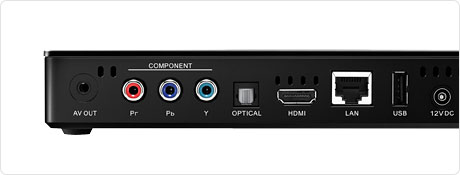
Seagate sent us their new $150 FreeAgent Theater+ HD to review yesterday and we haven’t really put the remote down since.  The device picks up a bit from where AppleTV leaves off in terms of format compatibility.  Is the interface as polished as AppleTV? Of course not.  But it plays just about every media type (movies, photos and music) from your network shares, not just Apple’s preferred file types.   It will even play 1080P videos with Dolby sound over Gigabit Ethernet without skipping.

Seagate tells us they are working on additional content from premium content vendors such as Netflix and the hardware/software solution here is an in-house development, not pulled from 3rd party technology.  We asked about Hulu, they said we have no announcements at this time.  Updates to the platform come via software update from the Internet.  It is definitely wandering into the Plex or Boxee space.

This is an interesting product because Seagate is a hard drive company first and foremost but they don’t require you to buy another drive for this thing beyond what you already have (but it is tempting).  Seagate’s own drives do fit neatly inside the dock bay but it also has USB ports on the front and back to play from USB sticks or plug-in hard drives.  Obviously, network shares and NAS drives might be the best way to share video, however.

The device is an upgrade from the previous FreeAgent Theater which lacked Ethernet, HDMI, or the ability to read Mac HFS formatted volumes. (which we got a review unit for and could do nothing with it, it was essentially useless).  This version is quite th opposite.  You don’t even need to buy a hard drive with this one, it will stream what you already have. 
We’ll put up some videos soon.  You can pre-order the device now from Amazon.

 Press Release Below:

Seagate FreeAgent Theater+™ (Plus), the next generation of the company’s home theater solution, offers customer a rich user experience and simple way to enjoy digital media on their TV Seagate (NASDAQ: STX), the worldwide leader in hard disk drives and storage solutions, today unveiled its new FreeAgent Theater+™ [Plus] HD media player, the next generation home theater solution designed to instantly and easily connect your digital media library to your home entertainment system.

The FreeAgent Theater+ HD media player leverages a docking system unique to Seagate FreeAgent Go™ portable drives and accessories, providing a quick and easy way to connect your external hard drive to your television or home entertainment center. After loading the drive with your favorite movies, videos, music and pictures from the home PC, simply slide it into the FreeAgent Theater+ dock to get instant access to your digital media library. With the FreeAgent Theater+ player, you can just sit back, relax, point, click and enjoy as digitally captured memories and your favorite movies come to life in 1080p HD video, DTS™ 2.0 + Digital Out, or Dolby Digital technology. The interface is easily navigated with the included remote control, and you can choose from video, photos or music with the up/down arrows on the remote to make your selection.

The Seagate FreeAgent Theater+ HD media player includes two additional USB ports for connecting other USB attached storage devices. Also incorporated into FreeAgent Theater+ is an Ethernet port for network connectivity, which allows access to digital media through your home network. Seagate intends to launch a USB Wireless Adapter in October to enable this same access with 802.11n wireless connectivity to a home network. Enjoy it all, with the included new and improved remote control, from the comfort of your couch.

“There is so much media that is now being captured and created through various methods and stored on the PC, yet the computer is not the ideal way to enjoy these photos and videos,” said Terry Cunningham, senior vice president, Seagate Branded Solutions. “The FreeAgent Theater provides the easiest way to view and enjoy video and photos on your HDTV. Simply load up a Seagate FreeAgent Go™ hard drive and drop it into the FreeAgent Theater+ HD media player dock. It’s a behavior we’ve all been familiar with for years with VHS and DVDs, but now with digital HD enjoyment.”

The new FreeAgent Theater+™ HD media player solution includes:

HDMI with 1080p HD video playback for high-definition content viewing
Dolby® Digital and DTS™ 2.0 + Digital Out audio support surround sound where available.
Unique docking system eliminates fumbling with cables and connections
Ethernet connection for accessing shared content on your network or streaming of content from the Internet
The optional wireless connectivity feature, expected to be available in October, will allow you to access stored content on any networked computer in the home at your fingertips
Two additional USB ports and one front-mounted port for digital cameras and additional storage devices
Simple sync software for PC and Mac® computers
Intuitive user interface with DVD-style navigation
Support for Windows® XP, Windows Vista®, Windows® 7, and Mac OS® X operating systems, as well as NTFS, FAT, FAT32, HFS+ file support
Component video and Composite video support
Optical S/PDIF audio and Stereo RCA sound options
The software included with FreeAgent Theater+ HD media player is a rich media-specific synchronization application that enables the automatic transfer and organization of all photo, music, video and movie files stored on your computer.

Technical Specifications
The Seagate FreeAgent Theater+ HD media player now supports even more Audio/Video and sound formats including MPEG-1, MPEG-2 (VOB/ISO), MPEG-4 (DivX® /Xvid formats), DivX HD, Xvid HD, AVI, MOV, MKV, RMVB, AVC HD, H.264, WMV9, VC-1, M2TS, TS/TP/M2T, JPEG files up to 20 megapixels, BMP, GIF, PNG and TIFF. Audio formats supported include 5.1 channel surround sound, where available, and popular digital audio formats including: AAC, MP3, Dolby Digital, DTS, ASF, FLAC, WMA, LPCM, ADPCM, WAV and OGG. The FreeAgent Theater+ player also offers support for SAMI (smi), SRT and SUB subtitles. To download and transfer content to a Seagate FreeAgent Go portable drive using a Windows XP, Windows Vista or Windows 7 operated PC, a 256MB RAM and an available USB port is required. Mac computer users must be running Mac OS X 10.4.11 or 10.5.6 or later and have an available USB port. FreeAgent Theater connects to any TV with composite, component video or HDMI connection and stereo, optical S/PDIF or HDMI audio connection

Pricing and Availability
The Seagate FreeAgent Theater+ HD media player is available immediately via Seagate.com and other online retailers. It comes as a stand-alone unit for use with any USB storage device for a manufacturer’s suggested retail price (MSRP) of $149.99, or bundled with a 500GB FreeAgent Go drive for a manufacturer’s suggested retail price (MSRP) of $289.99. The FreeAgent Theater+ Wireless Adapter is expected to be available in October as a separate accessory through Seagate.com for $69.99.


Build a stylish iPod dock from a piece of cardpaper

Site default logo image

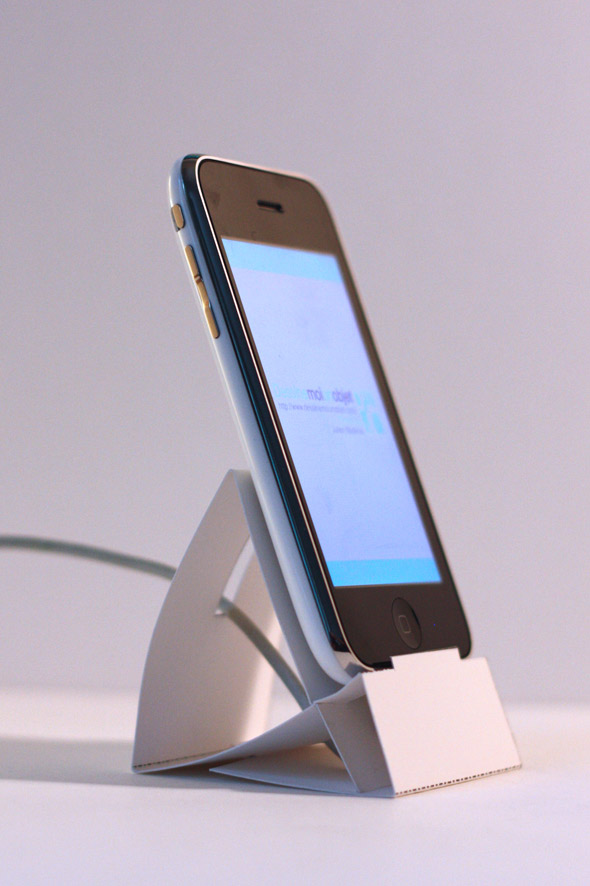
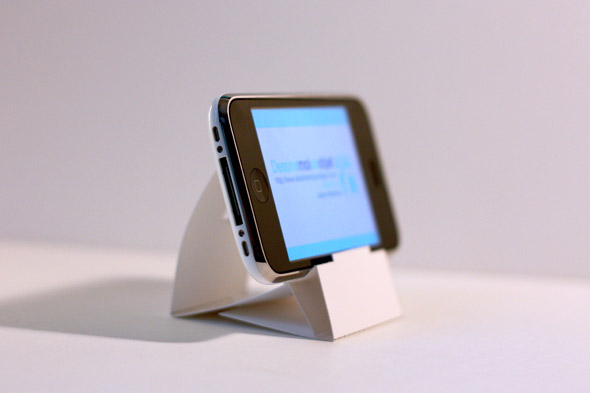
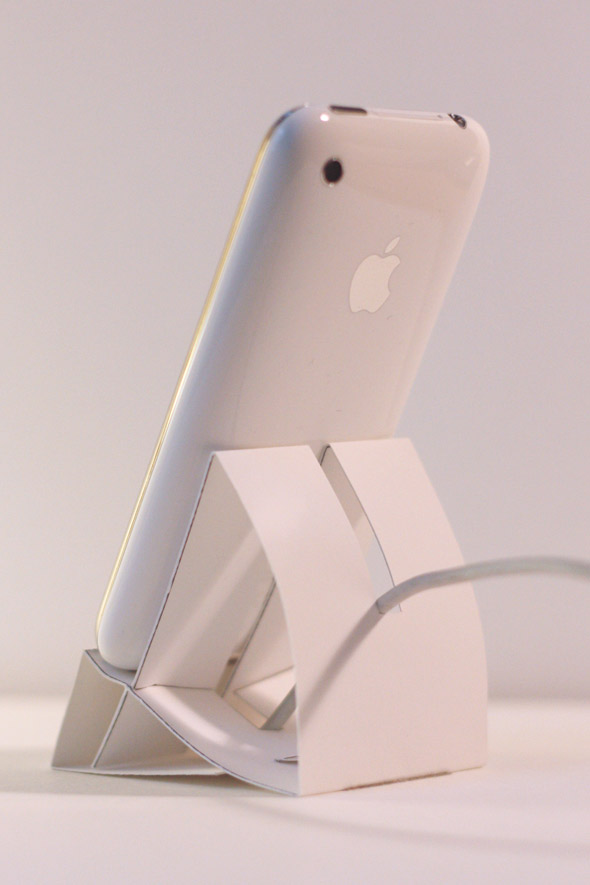
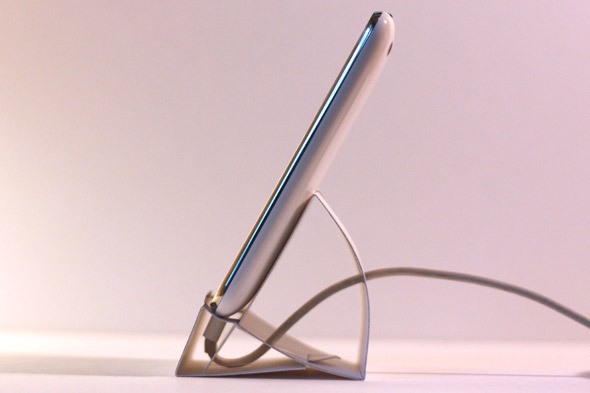
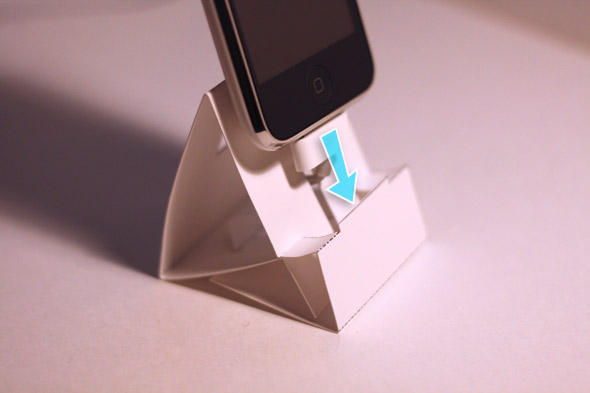
Dessine Moi Un Objet has a nice little howto on building an iPod touch or iPhone dock out of a piece of cardpaper. Apple’s first generation iPhones came with a dock, however subsequent models lost the dock and it became an accessory.  Download the template hereVideo below.


http://vimeo.com/moogaloop.swf?clip_id=6559478&server=vimeo.com&show_title=1&show_byline=1&show_portrait=0&color=2dd2ff&fullscreen=1

Original soundtrack by Florent Paris from Hors Sujet

Apple applies stealth Aperture Snow Leopard "tax"

Site default logo image

Apple has applied a quiet “Snow Leopard Tax” against professional photographers using earlier versions of popular pro software package, Aperture.

Digital imaging professionals who rushed to upgrade to the new OS have been distressed when they attempt to open their essential photogs tool, as Apple’s big cat is not prepared to support versions of Aperture earlier than 2.1.4.

An Apple tech support document published in the early hours of this morning confirms the news, warning: “When you attempt to open Aperture 1.5.6 on a computer running Mac OS X v10.6 Snow Leopard, the following alert appears: "You can’t use this version of the Application Aperture with this version of Mac OS X."”

Apple then helpfully informs users that the problem “is expected as Aperture 2.1.4 is required for Snow Leopard compatibility.”

Apple has made the Aperture 2.1.4 update available for download by users upgrading to Snow Leopard. The software was introduced near the ship date for Snow Leopard, August 27.

To be fair, Apple released Aperture 2.0 almost 18 months ago. An upgrade from a previous version to the current, supported version, costs c.$100.
 

iTunes 9 audio, streaming problems claimed

Site default logo image

Initial problems with use of iTunes 9 are beginning to emerge, now the software has emerged from internal testing into a wider user base.

The first problem is described within a series of posts on Apple’s discussions forum, where customers claim some loss in audio clarity once iTunes 9 is installed.

As described, users complain that bass-heavy audio played back through the software is muddy or muffled, a problem they have not experienced before. Others complain at loss of clarity and detail when playing existing music files.

However, some customers are denying this, saying music playback has markedly improved.

The second problem appears more common. Customers are complaining that iTunes 9 appears to suffer from intermittent drops when streaming music to AirTunes using an Airport Express or an Apple TV.

That problem isn’t consistent, not everyone is complaining of it, but it has been reported and experienced by at least one user at 9to5Mac. It appeared first in the days following installation of iTunes 9, and doesn’t appear to relate to the strength or otherwise of a user’s WiFi connection.

Some claim the problem emerged on upgrading to Snow Leopard, but we’ve seen situations in which these dropped connections are occurring on systems not running that OS.

Some report success in fixing this issue by simply selecting ‘multiple speakers’ in iTunes, in which music is pumped out of the Mac’s speakers as well as via iTunes. A year-old Apple tech note describes other potential approaches to solve this problem.

All of this appears to imply that for better or worse, iTunes 9 has changed the AirTunes sound output.

Facebook dev builds Mac desktop client, creative industry productivity to wane

Site default logo image

Facebook is the new crack, we all know this. The typical pattern is that you begin messing with it in a small way, and then slowly find yourself using it for all manner of social interaction, becoming ever more obsessed…

Fact is users spent a billion hours on the service in June, new research says. So be thankful, Mac users, that  a Facebook dev’s developing a desktop Mac client so you can keep an eye on your friend feed pretty much all the time…should be great for productivity.

“According to Nielsen, the average Facebook visitor spent more than 4.5 hours on Facebook in June. That’s over an hour more than the average Yahoo user spent using Yahoo. Facebook says it has 200 million active users. That means users spent more than a billion hours clicking around the site in June,” reports Business Insider.

In order to promote the Facebook obsession, developers there are now building a Mac app that offers Desktop Notifications. This inhabits the menu bar at the top of your screen and lets you access your News Feed, recent Wall Posts, and messages. And it’s available now for download, though the company is warning that this is just a protoype. So don’t blame us if it goes wrong.

And for those Facebook users who like to send a minute-by-minute biography of themselves, the application features a universal hotkey for sending out a new status updates.

We predict a lot of missed meetings and deadlines in the months ahead.

You’ll find the client here.

(Note: The page describing the app has since been update to specifically state Facebook are not developing this app, it’s an independent dev. Only just found out).

EFI MacBook Pro drive problems prevail

Site default logo image

If you own a Unibody MacBook Pro and plan to upgrade the internal hard drive of the machine, then Apple’s Discussion Forums are warning of a serious issue which could affect you, a faithful 9to5mac commenter has reported.

The problem first surfaced in June this year, and continues to vex users today, if the 1,067 posts across 72-pages describing the situation are to be believed.

Apple introduced its EFI Firmware 1.7 update in June. The company’s tech note states this: “Addresses an issue reported by a small number of customers using drives based on the SATA 3Gbps specification with the June 2009 MacBook Pro.  While this update allows drives to use transfer rates greater than 1.5Gbps, Apple has not qualified or offered these drives for Mac notebooks and their use is unsupported.”

While most Mac users have reported no problems subsequent to installing the firmward update, others installing SATA II drives have experienced inexplicable crashes, system freezes and a variety of other problems. Some report that the system fails to recognise the newly-installed third-party hard drive when attempting to install Mac OS X.

Apple tech support have clearly been alerted to this issue, with Genius Bar operatives using tools to reinstall a previous firmware version, which has been described as fixing the problem. Another solution which some have claimed success with is to run an archive-and-install of  Mac OS X 10.5.8, but even here some customers report the problem returning later on.

We’re interested in finding out if any more of our readers have been affected by this problem, and if they have found any successful way in which to mend their Mac in such cases.

Install a 750GB portable hard drive in your MacBook/Pro for only $170

Site default logo image

We reported earlier today that Toshiba was shipping the biggest portable drives that would fit in MacBooks at 640GB.  A few readers wrote in telling us that the 750GB drives from Western Digital are actually shipping and in stores now – and even though they are thicker, they fit in most MacBooks.  We were skeptical.

However, today MDN points to a service called MyService that will install one of these 750GB beasts into your MacBook/Pro for $375.  They are Apple Authorized so the install doesn’t void your warranty and they’ll transfer your data for free.  Most importantly, they verify that these 12.5mm, 750GB drives actually fit in Unibody MacBook/Pros:

These drives are slightly higher than standard 2.5" drives but fit perfectly in all Unibody MacBook Pros, the 13" MacBook Unibody and the 17" (Silver Keyboard) MacBook Pro.

$375 a pretty steep price for squeezing an extra 250GB into your Unibody MacBook/Pro, however.  

Never fear cheap bastards!  We had a look at Amazon and the exact same 750GB laptop hard drive is shipping with a USB enclosure and selling for only $169.  That’s way less than half the price and you get a USB enclosure to put your old hard in after you perform the transplant.   You can then put your puny 500GB hard drive in the USB enclosure. You’ll need to take the drive out of the USB enclosure and install it in your MacBook yourself but there is an easy installation video below

Who is going to be the first with a 750GB MacBook Pro? 

Another Snow Leopard Tip: Option-Click Sound menu and get input/output options

Site default logo image

David Pogue tweets (update: MacOSXHints had it yesterday) a pretty cool little tip for those of you who’ve upgraded to Snow Leopard: <Option-clicking> on the sound menu item at the top of the screen allows you to quickly change your sound input and output options.  Before, you’d have to go into System Preferences and Sound and check options from there.  This is especially good when getting a Skype call or other other sound emergancy.  See menu to the right —->

As you probably already know, option clicking the battery menu item gives you your battery condition and option clicking on the Time Machine menu item shows you other Time Machine disks.  Option Clicking on the Bluetooth menu gives you access to the PacketLogger and Bluetooth Browser.

Snow Leopard is still on sale at Amazon for $25.


How to use Twitter to control your remote Mac

Site default logo image

Twitter may suffer from hack attacks and have no clear ‘monetisation’ strategy just yet, despite its huge user base, but Mac users now have an all-new thing they can do with their Twitter account – remote control of their Mac

Ever wanted to get a quick and dirty picture of your office taken by your Mac when you’re not at home to help with pet care and security and so on? Or perhaps you’ve gone away and forgot to shut down your computer? Well, TweetMyMac (the cousin of TweetMyPC) has landed and the beta can do some of these things.

You use TweetMyMac to send commands to your Mac over the web, from a remote computer or a mobile phone.

Install the app and connect it to your Twitter account (worth setting up a special private account for this) and you can send your Mac commands via Twitter. The utility checks your tweets, and if one containing a command is detected it will put that action into effect.

There’s numerous useful commands you can send, including Shutdown and Sleep. You can also get the Mac to take a screenshot of what apps are running on it at the time, with the image then uploaded to TwitPic.

We think the iSight command’s the best one, just send the command and your Mac will take a picture of what/who is in front of it using the built-in iSight camera. That image is also uploaded to TwitPic (quite handy if someone’s made off with your Mac, potentially – perhaps Apple should extend its Find My iPhone feature to help find lost/stolen Macs also?)

The software’s in beta right now, but we felt it suitably interesting for inclusion here, given the Twitter meme that’s burning up our digital planet right now.

Permissions problem in 10.5.8 is patched by Snow Leopard…

Site default logo image

We’ve just come across what appears an interesting report, which describes problems and a solution for fixing permissions in Snow Leopard and Leopard.

The report comes out of Macworld via Network World, and describes situations in which users upgrading to Mac OS X 10.5.8 have faced problems fixing permissions on their start-up drive using Disk Utility.

There’s a rich stream of user comments on this over across at Apple’s very own Discussions forums.

Ted Landau has described a fix for afflicted users, which also includes news of a little-known Knowledge Base article detailing permission error messages you can happily ignore.

Otherwise the recommended repair is to download the Mac OS X 10.5.8 Combo Update and reinstall the update twice–without selecting to repair permissions in between.

Landau also found that upgrading to Snow Leopard seems to address the permissions problems he was facing.

Twitter user Pedro10 installs retail version of Snow Leopard build 10A432

Site default logo image

Contrary to some far-fetched reports from last week, it looks like the retail version of Snow Leopard will be 10A432 – the one which has been circulating on the torrents for awhile now.   A Twitter and Tumblr user named Pedro10 has posted more retail packaging and installation reports including the build number 10A432.  More picts below.

Pedro10 via Applesfera via MacRumors

Parallels intros easy-peasy PC to Mac migration solution

Site default logo image

Parallels has introduced an all-in-one solution for Windows users seeing sense and making the switch to Mac, Parallels Desktop Switch to Mac Edition.

The software makes the move to Mac easy, helping PC users make the move without losing the applications and data they already have on their Windows systems. It also includes learning resources – including two hours of video tutorials – for new Mac OS X users.

Parallels Desktop Switch to Mac Edition includes Parallels Desktop 4.0 for Mac, so when a user has transferred their data they can boot up straight into Parallels Desktop to access their Windows apps and data, and learn the new platform in their own time.

Parallels has also developed a "plug and click" system that moves the entire PC (licensed operating system, applications, files and data) to the new Mac. This includes the Parallels High Speed USB Transfer Cable that connects the two machines and the Enhanced Parallels Transporter: simple, wizard-driven software that walks the user through the move in a few easy clicks.

"The growth in switching is partially due to the ease-of-use and cool capabilities of the Mac," said Serguei Beloussov, CEO of Parallels.

"However, users don’t want to lose the data they have accumulated and the applications they are already familiar with. Building on our proven track record of Mac innovation, we have addressed this concern and made learning the new operating system even simpler through interactive on-demand tutorials. These are combined with intelligent moving tools and our industry-leading Parallels Desktop for Mac, which offers the greatest performance and stability for running Windows seamlessly on Mac."

Parallels Desktop 4.0 Switch to Mac Edition is available from today at Apple stores, at Apple.com and through other preferred retail partners in English, German and French. It costs $99.99.

Snow Leopard GM not booting into 64-bit mode automatically, fix here

Site default logo image

For those of you running Snow Leopard on newer Macs, you might be disappointed to know that you are probably running in 32-bit mode.  I have a brand new MacBook Pro and am running 32-bit.  I’d wager that some of you are too.  The problem: no matter how burly the hardware you are running is, Apple automatically puts you into 32-bit mode (Except Xserves).  Let’s take a look at System Profiler:
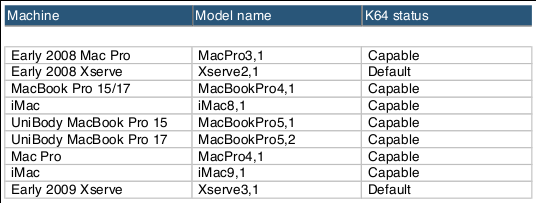
Would you like to see what it is like to run in the 64-bit world?  First make sure you have the right hardware for the job.  Apple will only let you run 64-bit if you have a 64-bit EFI (see below for workaround).  Here’s a list of kosher Macs from the Snow Leopard release notes:


Or, use the following command in Terminal.app to see what you’ve got:

ioreg -l -p IODeviceTree | grep firmware-abi 

To artificially force Snow Leopard to boot into 64-bit mode, hold down the 6 and 4 keys during a Shutdown/Restart (had freezing issues with a plain restart), After a slight delay, you’ll notice that in System Profiler, you are now running in 64-bit. 
 You can also use the NVRAM or the com.apple.Boot.plist file to more permanently boot into 64bit mode. Holding the ‘3’ and ‘2’ keys will boot Snow Leopard back into 32bit mode.

Note that it takes significantly longer to boot into 64-bit mode, especially the first time around than a 32-bit restart.  I’m not sure why this is or if it is just a one off.  Also, I wasn’t able to tether an iPhone when in 64-bit mode.  Otherwise things run fine and plenty fast.  Apple is most likely pushing people into 32-bit mode because drivers for printers, etc. haven’t been updated.  Xserves are, again, exempted.

If you have a 64-bit processor but 32-bit EFI (for instance, users of the first generation Mac Pros amazingly have only  32-bit EFI firmware), there is still hope for you.  From OSNews:

So, even if you have a 64bit processor, and you thought you were in the clear, Apple might not give you the option to go 64bit. However, in what probably rivals the Amazon Kindle 1984 thing in most ironic moment of 2009, the hackintosh community has come to the rescue. With netkas’ pcefiv10.1 bootloader, you can boot into 64bi Snow Leopard even on 32bit EFI Macs. So far, it’s not yet known if Apple will enable owners of machines with 32bit EFI to boot into a 64bit kernel in Snow Leopard-final; Apple might offer an EFI update, or remove the artificial limitation. The same applies to MacBooks; it might be that Apple is planning on using 64bit as a selling point to drive people to buy MacBook Pros instead of ordinary MacBooks..

 Obviously using the Hackintosh hack to trick your EFI firmware ventures into the "use at your own risk" territory.  That being said, have fun!

 Thanks to Greg for pointing this out originally.

Add the new Google Caffeine to your search arsenal

Site default logo image

If you are like us, you can’t wait to get your mitts on new technology.  Google Caffeine is Google’s wholly new search engine that is faster, bigger (more results) and more accurate.  Try it here:

http://www2.sandbox.google.com/

It also doesn’t yet have any advertising on it.  On the downside, it is in raw beta form so it could be taken offline or experience unforeseen outages.

That being said, why not put the most modern search technology in your search bar?  Kyle Hasegawa has built a little Firefox plugin that adds the Caffeine engine to your search options in Firefox.  You can also change your default search in Safari but it involves editing your Safari application.  Something which may not sit well with a lot of you.

Users of other browsers can feel free to chime in on how to put a little Caffeine in their search below in the comments.