Tips and Tricks

See All Stories

Is the 5-USB Mac Mini a fake?

Site default logo image

So, one of our readers, Dave – who happens to be an expert at PCB design, has spent some time looking at the Mac Mini image posted today and he believes it is a fake.  There have been many posts around the web on why.  We’ve put it all together for your consideration.

Firstly, the dispersion of artifacts isn’t consistant with an unedited image:

Also, within a given area that is unedited and consistent, a single macroblock type will be used.
If the macroblock type changes, it indicates editing of the image.  Like so:

But the most damning evidence comes from Dave himself, who noticed that the Mini DisplayPort and Mini DVI aren’t lined up with where the motherboard is.  While Apple could have lifted the ports, that kind of setup weakens the joints.  Would Apple risk this type of behavior on the back of a consumer level machine – on the monitor port, the one which will likely incur the biggest load?

Probably not.  They stick with the most conservative, reliable hardware designs following strict rules, which is most of what Unibody is about.  Fewer parts, more rigidity.

So, unless Apple has decided to use a mini-DVI and DisplayPort socket that break a steadfast rule of reliability in design, it’s a fake.

…Plus it is on a IKEA faux wood vinyl laminate floor.

20-inch Cinema Display EOL'd

Site default logo image

Apple today EOL’d the 20 inch cinema display.  Whether that means a new 20-inch ultra-shiny Mini DisplayPort LED w/camera version is on the way or not is anyone’s guess.  The new 24-inch has had its fans (quality+camera+MacBook power adapter) and critics (price+shine), but it certainly seem like it is the direction Apple is headed.  It also means a desktop product refresh in the coming month is more likely.  Update: Also, Apple has lowered its prices on refurbished iMacs.

It is a bit difficult to justify the high cost of Apple Displays currently.  For instance a similar Dell (With DVI not DisplayPort and TN vs. LED) including camera and superior resolution costs $279.  It actually looks pretty good and gets great reviews.  While we can pay a premium for Apple quality, the new displays cost MORE THAN THREE times the cost of a this Dell.  That is the kind of pricing difference that gives Apple a bad name.

Stream Netflix and Hulu into FrontRow using 'understudy'

Site default logo image

A new Google Code project dubbed understudy promises to deliver Hulu and Netflix right into your FrontRow interface.  We haven’t tried this yet (damn you work!) but will the second we get home.  Any takers out there?

Update: Hulu is working fantastically for us!  We have confirmation that Netflix works well, but you must be logged into your account in Safari (not Firefox).  Head to the comments for more details.

Description Understudy allows access to streaming video through the Front Row interface of Mac OS X. The user can subscribe to multiple feeds, and select a video to watch from them. Understudy currently supports Hulu and Netflix.

Understudy is stable, but is also a work in progress. Please feel free to report any problems on the issue tracker. If you would like to know about future releasees, please subscribe to the "Downloads" feed.

Understudy is not affiliated with any of the streaming video sites the plugin supports, and will only work in cases where those site would (typically this means you must live in the United States).

Toys: 1TB Western Digital External Drive for $95 (Updated)

Site default logo image

Another one from the Toys section:

Update – NewEgg just dropped their price to $95

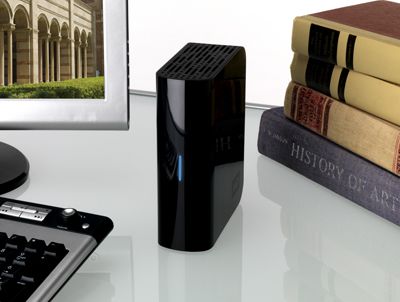
Target has the Western Digital My Book Essential Edition 1 TB USB 2.0 External Hard Drive WDH1U10000N for only $100. That about 1/3 off list price and the lowest total we could find for this 4 star-ranked hard drive.  It is currently the lowest price we could find by $5.00


If you are looking for portable storage, the Western Digital 500GB Pocket Drive, is still $104.99.

Also, for internal storage, Dell Home offers the Seagate Barracuda 7200.11 1.5TB Serial ATA 3.0Gb/s Internal Hard Drive, model no. ST31500341AS, for $165.99. Add coupon code "HNP1LLLS?ZKS48" to your cart to slice it to $105.99 with free shipping ($0.07/GB). That’s $14 under our mention from two weeks ago and the lowest total price we could find. It runs at 7200 rpm and features a 32MB cache and perpendicular recording. Deal ends February 18.


From the Manufacturer

Are you running out of hard drive capacity? Do you need to archive some important digital documents, photos, or music? The Western Digital WDH1U10000N My Book Essential Edition 2.0 1 TB external hard drive, which takes no more space than a paperback book, is the perfect solution. Collect two or more and they nest neatly together like volumes on a shelf.
My Book Essential Edition 2.0 is easy to set up and easy to use. Installation is a snap because you don’t really install this drive, you just plug it in and it’s ready to use. This external hard drive also turns itself on and off with your computer. It’s ideal for anyone who needs instant storage for their important files or a digital photo collection.
A USB 2.0 connection is available for convenience and compatibility among multiple computers. The drive is also PC and Mac compatible: You can use the My Book Essential Edition with both PCs running Windows 2000, Windows XP, or Windows Vista and Macs running OSX 10.4.8 or higher.

The My Book Essential Edition is backed by a 1-year limited warranty.

Table ShotWhat It Holds:

  • Up to 285,000 digital photos
  • Up to 250,000 songs (MP3)
  • Up to 25,000 songs (uncompressed CD quality)
  • Up to 76 hours of Digital Video (DV)
  • Up to 440 hours of DVD quality video
  • Up to 120 hours of HD video

One gigabyte (GB) = one billion bytes. One terabyte (TB) = one trillion bytes. Total accessible capacity varies depending on operating environment.
 

Product Features:

  • Easy to set up, easy to use – Installation is a snap because you don’t really install this drive, you just plug it in and it’s ready to use.
  • USB 2.0 interface – A simple connection that offers convenience and compatibility among multiple computers.
  • Fits right in – Takes no more space than a paperback book. Collect two or more and they nest neatly together like volumes on a shelf.
  • Smart and energy efficient – Turns itself on and off with your computer.
  • PC and Mac compatible – Works with both Windows® 2000/XP/Vista and Mac® OS X 10.4.8 or later


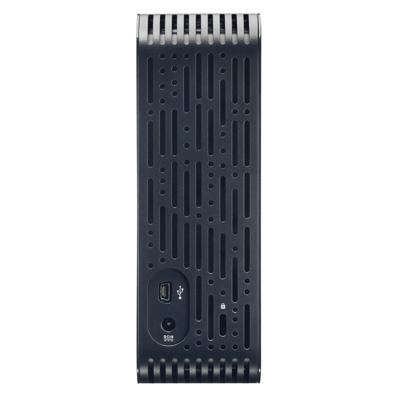
Rear ViewIdeal for

  • Instant storage
  • Easy to use
  • USB 2.0
  • Saving and organizing your digital photo collection

System Requirements

  • Available USB port
  • Windows® 2000/XP/Vista™
  • Mac® OS X 10.4.8 or later

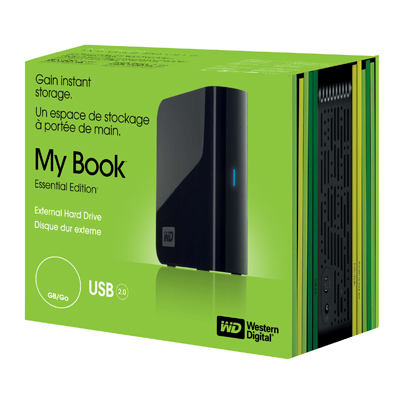
Box
Package Includes

  • External hard drive
  • USB cable
  • AC adapter
  • Quick Install Guide

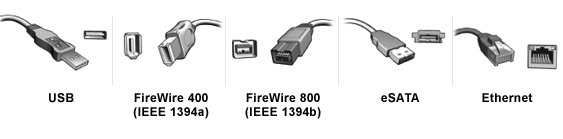
Which external drive interface is the right choice: USB, FireWire, eSATA, or Gigabit Ethernet? The right choice depends on compatibility with your computer and how you want to use your device. First, look at the connections on your computer.
interface
Note: For convenience and flexibility, choose a WD hard drive with both USB and FireWire interfaces
(available in dual and triple interface configurations) or with both USB and eSATA interfaces.

Product Description
This elegant external hard drive, reminiscent of a book, is the perfect storage solution. It takes no more space than a paperback book. Collect two or more and they nest neatly together like volumes on a shelf. Installation is a snap because you don’t really install this drive, you just plug it in and it’s ready to use. A USB 2.0 simple connection offers convenience and compatibility among multiple computers. Dimensions – Height 6.5 x Length 5.4 x Width 2.1 Weight – 2.5 Pounds

http://rcm.amazon.com/e/cm?t=thepartim-20&o=1&p=8&l=as1&asins=B000VZCEUI&md=10FE9736YVPPT7A0FBG2&fc1=000000&IS2=1&lt1=_blank&m=amazon&lc1=0000FF&bc1=000000&bg1=FFFFFF&f=ifr

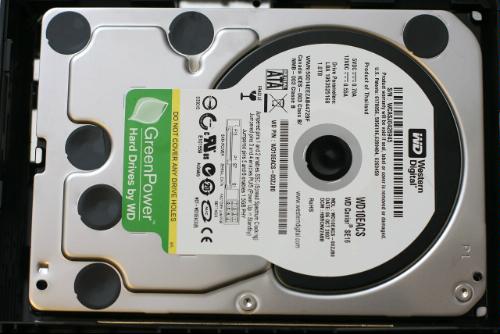
The Drive inside

Toys weekend deal: 500GB Pocket Drive, $104.99

Site default logo image

From the Toys section:

We talked this week about the 500 GB sweet spot in laptop hard drives.  Another good option has popped up.  J&R just marked down the Western Digital 500GB USB External WDME5000TN (Midnight Black) hard drive to $104.99(+$6 Shipping).   This is in retail box and is $45 off of list price and less than we could find anywhere else (J&R through Buy.com has it for the same price with more for shipping and tax).  Other colors are also available at higher prices.

While that is slightly more expensive than the internal drives we talked about earlier, it comes with an enclosure (which is easy to open and swap with your laptop’s internal drive).  It also features the Western Digital hard drive that gets higher ratings than either Seagate or Samsung at the same price we mentioned earlier without the enclosure.

Also, you can protect that portable 2.5 inch drive with a Case Logic portable hard drive case for another $10.

http://rcm.amazon.com/e/cm?t=thepartim-20&o=1&p=8&l=as1&asins=B001F9LY14&md=10FE9736YVPPT7A0FBG2&fc1=000000&IS2=1&lt1=_blank&m=amazon&lc1=0000FF&bc1=000000&bg1=FFFFFF&f=ifr

Technical Details

  • Box Contents – My Passport Essential 500GB Portable USB Hard Drive, USB 2.0 cable, Quick Install guide
  • 500GB Hard Drive Capacity
  • Installation is a snap because you don’t really install this drive; you just plug it in and it’s ready to use. There is no CD to install; the included software loads from the drive the first time you plug it in
  • Powered by the USB bus. No separate power supply is needed
  • This ultra-portable drive fits easily in your pocket or purse, weighs only a few ounces, and holds tons of valuable data


Product Description

Product Description
These elegant portable drives are simple to use, light and easy to carry, and require no power adapter — they are powered directly through the USB cable. Pack up your office files and take them home. Carry thousands of songs or pictures. Synchronize files between home and office and encrypt everything on the drive for added security. WD Sync synchronization and encryption software lets you take your critical data with you. Plug My Passport into any PC, edit files, read e-mail, and view photos. Then sync all of your changes back to your home or office computer. Your data is protected with 128-bit encryption (Windows only). Perfect for the business traveler who needs to transfer large amounts of data from laptop to clients or just daily backups in case of accidents from mishandled luggage to coffee spills. Also comes in handy if you’re worried about laptop theft and someone else having access to your important data, you can store it on this portable encrypted drive instead. For all those precious pictures, videos, music and data files, this external hard drive is a must have. WD Sync synchronization and encryption software lets you save your critical data and take it with you. Plug your drive into any PC, edit files, read e-mail, and view photos. Then sync all of your changes back to your home or office computer (Windows only) Search your drive, manage your photos, and simplify Web searches with included Google software (Windows only) Up to 480Mb/sec Bus Transfer Rate with USB 2.0 System Requirements – Windows 2000/XP/Vista, Mac OS X (10.1.5 or later), Available USB port Approximate Unit Dimensions – 0.59 (H) x 4.96 (L) x 3.14 (W) Approximate Unit Weight – 0.23lb

if (typeof jQuery != ‘undefined’) {
jQuery(‘#productDescription’).lazyLoad({ overlayImg: ‘http://9to5mac.com/wp-content/uploads/sites/6/2008/12/transparent-pixel._v42752373_.gif’, forceGeneralImages: true, triggerSeparately: true });
}
<style type="text/css"> img.select-this-item { display: none !important; } input.no-js-checkbox { display: inline; } div#cart-wrapper { display: none; } .alt .accessory-item { height: 225px; } </style>


How easy is Jailbreaking an iPhone? It is Ashton Kutcher easy.

Site default logo image

Update: Um, so you, us and Ashton are criminals it appears.

We’re veering away from our technology coverage slightly today to illustrate a point. Jailbreaking your iPhone is pretty damn easy. And no it won’t void your warranty (just got back from the Apple Store replacing my jailbroken phone with broken volume control). It is so easy that That 70’s Show star Ashton Kutcher rolls with a jailbroken iPhone to make videos of Paparazzi. 

http://qik.com/swfs/qikPlayer4.swf

For a look on the other side of the camera click here. Shame on you for saying that jailbreaking is too difficult!

OK, paprazzi make us a little sick, no more of this for awhile. Via Engadget


Apple updates Java, OSX Security

Site default logo image

Hit that Software Update to get a comprehensive security updates and some new Java goodness.

Security Update 2009-001

  • AFP Server

    CVE-ID: CVE-2009-0142

    Available for: Mac OS X v10.5.6, Mac OS X Server v10.5.6

    Impact: A user with the ability to connect to AFP Server may be a able to trigger a denial of service

    Description: A race condition in AFP Server may lead to an infinite loop. Enumerating files on an AFP server may lead to a denial of service. This update addresses the issue through improved file enumeration logic. This issue only affects systems running Mac OS X v10.5.6.

  • Apple Pixlet Video

    CVE-ID: CVE-2009-0009

    Available for: Mac OS X v10.4.11, Mac OS X Server v10.4.11, Mac OS X v10.5.6, Mac OS X Server v10.5.6

    Impact: Opening a maliciously crafted movie file may lead to an unexpected application termination or arbitrary code execution

    Description: A memory corruption issue exist in the handling of movie files using the Pixlet codec. Opening a maliciously crafted movie file may lead to an unexpected application termination or arbitrary code execution. This update addresses the issue through improved bounds checking. Credit: Apple.

  • CarbonCore

    CVE-ID: CVE-2009-0020

    Available for: Mac OS X v10.4.11, Mac OS X Server v10.4.11, Mac OS X v10.5.6, Mac OS X Server v10.5.6

    Impact: Opening a file with a maliciously crafted resource fork may lead to an unexpected application termination or arbitrary code execution

    Description: A memory corruption issue exists in Resource Manager’s handling of resource forks. Opening a file with a maliciously crafted resource fork may lead to an unexpected application termination or arbitrary code execution. This update addresses the issue through improved validation of resource forks. Credit: Apple.

  • CFNetwork

    Available for: Mac OS X v10.5.6, Mac OS X Server v10.5.6

    Impact: Restores proper operation of cookies with null expiration times

    Description: This update addresses a non-security regression introduced in Mac OS X 10.5.6. Cookies may not be properly set if a web site attempts to set a session cookie by supplying a null value in the "expires" field, rather than omitting the field. This update addresses the issue by ignoring the "expires" field if it has a null value.

  • CFNetwork

    Available for: Mac OS X v10.5.6, Mac OS X Server v10.5.6

    Impact: Restores proper operation of session cookies across applications

    Description: This update addresses a non-security regression introduced in Mac OS X 10.5.6. CFNetwork may not save cookies to disk if multiple open applications attempt to set session cookies. This update addresses the issue by ensuring that each application stores its session cookies separately.

  • Certificate Assistant

    CVE-ID: CVE-2009-0011

    Available for: Mac OS X v10.5.6, Mac OS X Server v10.5.6

    Impact: A local user may manipulate files with the privileges of another user running Certificate Assistant

    Description: An insecure file operation exists in Certificate Assistant’s handling of temporary files. This could allow a local user to overwrite files with the privileges of another user who is running Certificate Assistant. This update addresses the issue through improved handling of temporary files. This issue does not affect systems prior to Mac OS X v10.5. Credit: Apple.

  • ClamAV

    CVE-ID: CVE-2008-5050, CVE-2008-5314

    Available for: Mac OS X Server v10.4.11, Mac OS X Server v10.5.6

    Impact: Multiple vulnerabilities in ClamAV 0.94

    Description: Multiple vulnerabilities exist in ClamAV 0.94, the most serious of which may lead to arbitrary code execution. This update addresses the issues by updating ClamAV to version 0.94.2. ClamAV is distributed only with Mac OS X Server systems. Further information is available via the ClamAV website at http://www.clamav.net/

  • CoreText

    CVE-ID: CVE-2009-0012

    Available for: Mac OS X v10.5.6, Mac OS X Server v10.5.6

    Impact: Viewing maliciously crafted Unicode content may lead to an unexpected application termination or arbitrary code execution

    Description: A heap buffer overflow may occur when processing Unicode strings in CoreText. Using CoreText to handle maliciously crafted Unicode strings, such as when viewing a maliciously crafted web page, may result in an unexpected application termination or arbitrary code execution. This update addresses the issue through improved bounds checking. This issue does not affect systems prior to Mac OS X v10.5. Credit to Rosyna of Unsanity for reporting this issue.

  • CUPS

    CVE-ID: CVE-2008-5183

    Available for: Mac OS X v10.5.6, Mac OS X Server v10.5.6

    Impact: Visiting a maliciously crafted website may lead to an unexpected application termination

    Description: Exceeding the maximum number of RSS subscriptions results in a null pointer dereference in the CUPS web interface. This may lead to an unexpected application termination when visiting a maliciously crafted website. In order to trigger this issue, valid user credentials must either be known by the attacker or cached in the user’s web browser. CUPS will be automatically restarted after this issue is triggered. This update addresses the issue by properly handling the number of RSS subscriptions. This issue does not affect systems prior to Mac OS X v10.5.

  • DS Tools

    CVE-ID: CVE-2009-0013

    Available for: Mac OS X v10.4.11, Mac OS X Server v10.4.11, Mac OS X v10.5.6, Mac OS X Server v10.5.6

    Impact: Passwords supplied to dscl are exposed to other local users

    Description: The dscl command-line tool required that passwords be passed to it in its arguments, potentially exposing the passwords to other local users. Passwords exposed include those for users and administrators. This update makes the password parameter optional, and dscl will prompt for the password if needed. Credit: Apple.

  • fetchmail

    CVE-ID: CVE-2007-4565, CVE-2008-2711

    Available for: Mac OS X v10.4.11, Mac OS X Server v10.4.11, Mac OS X v10.5.6, Mac OS X Server v10.5.6

    Impact: Multiple vulnerabilities in fetchmail 6.3.8

    Description: Multiple vulnerabilities exist in fetchmail 6.3.8, the most serious of which may lead to a denial of service. This update addresses the issues by updating to version 6.3.9. Further information is available via the fetchmail web site at http://fetchmail.berlios.de/

  • Folder Manager

    CVE-ID: CVE-2009-0014

    Available for: Mac OS X v10.5.6, Mac OS X Server v10.5.6

    Impact: Other local users may access the Downloads folder

    Description: A default permissions issue exists in Folder Manager. When a user deletes their Downloads folder and Folder Manager recreates it, the folder is created with read permissions for everyone. This update addresses the issue by having Folder Manager limit permissions so that the folder is accessible only to the user. This issue only affects applications using Folder Manager. This issue does not affect systems prior to Mac OS X v10.5. Credit to Graham Perrin of CENTRIM, University of Brighton for reporting this issue.

  • FSEvents

    CVE-ID: CVE-2009-0015

    Available for: Mac OS X v10.5.6, Mac OS X Server v10.5.6

    Impact: Using the FSEvents framework, a local user may be able to see filesystem activity that would otherwise not be available

    Description: A credential management issue exists in fseventsd. By using the FSEvents framework, a local user may be able to see filesystem activity that would otherwise not be available. This includes the name of a directory which the user would not otherwise be able to see, and the detection of activity in the directory at a given time. This update addresses the issue through improved credential validation in fseventsd. This issue does not affect systems prior to Mac OS X v10.5. Credit to Mark Dalrymple for reporting this issue.

  • Network Time

    Available for: Mac OS X v10.4.11, Mac OS X Server v10.4.11, Mac OS X v10.5.6, Mac OS X Server v10.5.6

    Impact: The Network Time service configuration has been updated

    Description: As a proactive security measure, this update changes the default configuration for the Network Time service. System time and version information will no longer be available in the default ntpd configuration. On Mac OS X v10.4.11 systems, the new configuration takes effect after a system restart when Network Time service is enabled.

  • perl

    CVE-ID: CVE-2008-1927

    Available for: Mac OS X v10.4.11, Mac OS X Server v10.4.11, Mac OS X v10.5.6, Mac OS X Server v10.5.6

    Impact: Using regular expressions containing UTF-8 characters may lead to an unexpected application termination or arbitrary code execution

    Description: A memory corruption issue exists in the handling of certain UTF-8 characters in regular expressions. Parsing maliciously crafted regular expressions may lead to an unexpected application termination or arbitrary code execution. This update addresses the issue by performing additional validation of regular expressions.

  • Printing

    CVE-ID: CVE-2009-0017

    Available for: Mac OS X v10.4.11, Mac OS X Server v10.4.11, Mac OS X v10.5.6, Mac OS X Server v10.5.6

    Impact: A local user may obtain system privileges

    Description: An error handling issue exists in csregprinter, which may result in a heap buffer overflow. This may allow a local user to obtain system privileges. This update addresses the issue through improved error handling. Credit to Lars Haulin for reporting this issue.

  • python

    CVE-ID: CVE-2008-1679, CVE-2008-1721, CVE-2008-1887, CVE-2008-2315, CVE-2008-2316, CVE-2008-3142, CVE-2008-3144, CVE-2008-4864, CVE-2007-4965, CVE-2008-5031

    Available for: Mac OS X v10.4.11, Mac OS X Server v10.4.11, Mac OS X v10.5.6, Mac OS X Server v10.5.6

    Impact: Multiple vulnerabilities in python

    Description: Multiple vulnerabilities exist in python, the most serious of which may lead to arbitrary code execution. This update addresses the issues by applying patches from the python project.

  • Remote Apple Events

    CVE-ID: CVE-2009-0018

    Available for: Mac OS X v10.4.11, Mac OS X Server v10.4.11, Mac OS X v10.5.6, Mac OS X Server v10.5.6

    Impact: Sending Remote Apple events may lead to the disclosure of sensitive information

    Description: An uninitialized buffer issue exists in the Remote Apple Events server, which may lead to disclosure of memory contents to network clients. This update addresses the issue through proper memory initialization. Credit: Apple.

  • Remote Apple Events

    CVE-ID: CVE-2009-0019

    Available for: Mac OS X v10.4.11, Mac OS X Server v10.4.11, Mac OS X v10.5.6, Mac OS X Server v10.5.6

    Impact: Enabling Remote Apple Events may lead to an unexpected application termination or the disclosure of sensitive information

    Description: An out-of-bounds memory access exits in Remote Apple Events. Enabling Remote Apple Events may lead to an unexpected application termination or the disclosure of sensitive information to network clients. This update addresses the issue through improved bounds checking. Credit: Apple.

  • Safari RSS

    CVE-ID: CVE-2009-0137

    Available for: Mac OS X v10.4.11, Mac OS X Server v10.4.11, Mac OS X v10.5.6, Mac OS X Server v10.5.6

    Impact: Accessing a maliciously crafted feed: URL may lead to arbitrary code execution

    Description: Multiple input validation issues exist in Safari’s handling of feed: URLs. The issues allow execution of arbitrary JavaScript in the local security zone. This update addresses the issues through improved handling of embedded JavaScript within feed: URLs. Credit to Clint Ruoho of Laconic Security, Billy Rios of Microsoft, and Brian Mastenbrook for reporting these issues.

  • servermgrd

    CVE-ID: CVE-2009-0138

    Available for: Mac OS X v10.5.6, Mac OS X Server v10.5.6

    Impact: Remote attackers may be able to access Server Manager without valid credentials

    Description: An issue in Server Manager’s validation of authentication credentials could allow a remote attacker to alter the system configuration. This update addresses the issue through additional validation of authentication credentials. This issue does not affect systems prior to Mac OS X v10.5. Credit: Apple.

  • SMB

    CVE-ID: CVE-2009-0139

    Available for: Mac OS X v10.5.6, Mac OS X Server v10.5.6

    Impact: Connecting to a maliciously crafted SMB file system may lead to an unexpected system shutdown or arbitrary code execution with system privileges

    Description: An integer overflow in SMB File System may result in a heap buffer overflow. Connecting to a maliciously crafted SMB file system may lead to an unexpected system shutdown or arbitrary code execution with system privileges. This update addresses the issue through improved bounds checking. This issue does not affect systems prior to Mac OS X v10.5. Credit: Apple.

  • SMB

    CVE-ID: CVE-2009-0140

    Available for: Mac OS X v10.4.11, Mac OS X Server v10.4.11, Mac OS X v10.5.6, Mac OS X Server v10.5.6

    Impact: Connecting to a maliciously crafted SMB file server may lead to an unexpected system shutdown

    Description: A memory exhaustion issue exists in the SMB File System’s handling of file system names. Connecting to a maliciously crafted SMB file server may lead to an unexpected system shutdown. This update addresses the issue by limiting the amount of memory allocated by the client for file system names. Credit: Apple.

  • SquirrelMail

    CVE-ID: CVE-2008-2379, CVE-2008-3663

    Available for: Mac OS X Server v10.4.11, Mac OS X Server v10.5.6

    Impact: Multiple vulnerabilities in SquirrelMail

    Description: SquirrelMail is updated to version 1.4.17 to address several vulnerabilities, the most serious of which is a cross-site scripting issue. Further information is available via the SquirrelMail web site at http://www.SquirrelMail.org/

  • X11

    CVE-ID: CVE-2008-1377, CVE-2008-1379, CVE-2008-2360, CVE-2008-2361, CVE-2008-2362

    Available for: Mac OS X v10.4.11, Mac OS X Server v10.4.11, Mac OS X v10.5.6, Mac OS X Server v10.5.6

    Impact: Multiple vulnerabilities in X11 server

    Description: Multiple vulnerabilities exist in X11 server. The most serious of these may lead to arbitrary code execution with the privileges of the user running the X11 server, if the attacker can authenticate to the X11 server. This update addresses the issues by applying the updated X.Org patches. Further information is available via the X.Org website at http://www.x.org/wiki/Development/Security

  • X11

    CVE-ID: CVE-2006-1861, CVE-2006-3467, CVE-2007-1351, CVE-2008-1806, CVE-2008-1807, CVE-2008-1808

    Available for: Mac OS X v10.4.11, Mac OS X Server v10.4.11

    Impact: Multiple vulnerabilities in FreeType v2.1.4

    Description: Multiple vulnerabilities exist in FreeType v2.1.4, the most serious of which may lead to arbitrary code execution when processing a maliciously crafted font. This update addresses the issues by incorporating the security fixes from version 2.3.6 of FreeType. Further information is available via the FreeType site at http://www.freetype.org/ The issues are already addressed in systems running Mac OS X v10.5.6.

  • X11

    CVE-ID: CVE-2007-1351, CVE-2007-1352, CVE-2007-1667

    Available for: Mac OS X v10.4.11, Mac OS X Server v10.4.11

    Impact: Multiple vulnerabilities in LibX11

    Description: Multiple vulnerabilities exist in LibX11, the most serious of which may lead to arbitrary code execution when processing a maliciously crafted font. This update addresses the issues by applying the updated X.Org patches. Further information is available via the X.Org website at http://www.x.org/wiki/Development/Security These issues do not affect systems running Mac OS X v10.5 or later.

  • XTerm

    CVE-ID: CVE-2009-0141

    Available for: Mac OS X v10.4.11, Mac OS X Server v10.4.11, Mac OS X v10.5.6, Mac OS X Server v10.5.6

    Impact: A local user may send information directly to another user’s Xterm

    Description: A permissions issue exists in Xterm. When used with luit, Xterm creates tty devices accessible by everyone. This update addresses the issue by having Xterm limit the permissions so tty devices are accessible only by the user.


More bad news for iLife '09 on PowerPC G4: iPhoto transitions missing

Site default logo image

According to a recently unearthed Apple Knowledge Base Article, you PowerPCers out there aren’t getting the full iPhoto ’09 love when it comes to transitions effects.  G4 users only get Ken Burns and Classic.  G5 users get Classic, Ken Burns, Scrapbook, Sliding Panels.  Intel owners get the whole nine.

The number of slideshow themes available in iPhoto ’09 depends on your Mac’s processor and, in some cases, available vRAM:

  • Intel-based Mac computers, PowerPC G5 with more than 64MB of vRAM: All iPhoto ’09 slideshow themes are available, as in the image below.

  • PowerPC G5 with less than 64MB of vRAM: Only Classic, Ken Burns, Scrapbook, Sliding Panels are availabe.

  • PowerPC G4: Classic and Ken Burns are available.


via ARS

Amazon gets the ASUS Eee PC 1000HE 10-Inch Netbook

Site default logo image

From 9to5mac.com/Toys: Amazon is one of the first vendors to have (pre-order) the new  $374 Eee PC 1000HE 10-Inch Netbook.  This new product from ASUS contains Intel’s next generation 1.66GHz N280 Atom processor running a much faster front side bus speed of 667MHz.  This means you can watch video without the jerkiness – even some hi-def.  While it tests significantly faster than previous Netooks, the biggest change in this model is the 6 cell, high density battery pack which allows the EEE to run for a whopping 9.5 hours (your mileage will of course vary).

ASUS also upped the Wireless to N and it has a 160GB Hard Drive, 3 USB ports (on both sides), Bluetooth and a spring-loaded Plug-and-Play MMC/SDHC/Memory Stick/MS-Pro flash card slot is also provided to let you easily access your digital photos and videos and expand your system storage.  They also upped the video camera resolution to 1.3 Megapixels.  It has a 1024 x 600 pixel, 10 inch screen with VGA out for external monitor and 10GB of free online storage from EEE.

The best part? Amazon has it $25 off with free shipping.  Oh, and while it comes with XP Home (blech – could I exchange for 2GB of RAM and Linux?) it makes a great Hackintosh until Apple releases theirs this summer (guessing here).  It comes in black or blue (don’t you miss the black MacBook option?)

Technical Details

  • XP-Preloaded with 160G large H.D.D. Intel Atom 280 Processor (1.66 GHz, FSB: 667MHz)
  • ASUS Super Hybrid Engine and 6 cell high density battery pack allow for longer battery lifespan of up to 9.5 hours. Super Hybrid Engine offers a choice of performance and power consumption modes for easy adjustments according to various needs
  • High Speed Connectivity Anywhere with Wi-Fi 802.11n. Eee Connect for an easy way to connect two or more users through a remote desktop feature for easy troubleshooting.
  • Exclusive 10GB Eee Storage with easy accessibility anywhere online
  • Free 1 YR Warranty (6 month for battery, 30 day ZBD Guaranteed)

  See more technical details


Product Details

  • Product Dimensions: 10.5 x 7.5 x 1.1 inches ; 3.2 pounds
  • Shipping Weight: 4.8 pounds (View shipping rates and policies)
  • Shipping: Currently, item can be shipped only within the U.S.
  • Note: Gift-wrapping is not available for this item.
  • ASIN: B001QTXL82
  • Item model number: EPC1000HE-BLK005X
  • Amazon.com Sales Rank: #2 in Computers & PC Hardware 


  • Date first available at Amazon.com: February 2, 2009


Product Description

Amazon.com Product Description
Be at the forefront of technology and enjoy all the benefits with Eee PC 1000HE. The first netbook to have the Intel Atom N280 processor, the Eee PC 1000HE is energy efficient. Its incredible 9.5-hour battery life*—thanks to ASUS’ exclusive energy-saving Super Hybrid Engine and denser battery cells—will allow you to bring internet and multimedia with you out and about, all day long. Furthermore, its 10-inch display, 3.2 pound lightweight chassis, flush fitting battery pack and a large ergonomic chiclet keyboard will allow you to work or travel in absolute comfort for hours on end. Its generous 160 GB of in-built storage—along with an additional 10 GB of Eee Online Storage—will enable you to store, share and access your important data anytime, anywhere.

Large LED Backlit Screen and Chiclet-style Keyboard for Comfortable Use

A brilliant 10-inch LED backlit widescreen display makes reading documents and viewing multimedia files more comfortable. This latest generation of LED backlit technology allows for ultra-thin, ultra-bright and energy-efficient display allowing outstanding portability and versatility. 1024 x 600 resolution allows you to view a single page without often needing to scroll left or right. The chiclet-style keyboard is 92% the size of generic notebooks—making it more comfortable to type for less fatigue during prolonged use. Also included is a wide touchpad for friendly usage with a widescreen display.


Super Hybrid Engine for Extended Battery Life
Super Hybrid Engine provides you with more power per charge; up to 9.5 hours* of unplugged use when you are out and about. Super Hybrid Engine also manages your power consumption, providing you with optimal power depending on your current usage needs.


Powered by the Latest Intel Atom N280 Processor
The ASUS Eee PC
1000HE is powered by the Intel Atom processor. Built with the world’s smallest transistors, the Atom N280 processor uses only 2.5 watts of power – less than 1/10 of the power consumption of ordinary desktop processors – offering a long battery life. This small size processor also packs a big punch. The N280 featured in the Eee PC 1000HE has 667MHz front-side-bus providing higher performance than the older N270. It also has the Intel Hyper-Threading Technology which includes high performance-per-watt efficiency and increased system responsiveness in multi-tasking environments.

Large Data Capacity with Hybrid Storage
Eee PC 1000HE is equipped with a 160 GB internal hard disk drive to give you a large amount of data capacity for convenience. It also comes with an exclusive 10 GB of file-encrypted online Eee Storage that allows you to store, share and access documents and multimedia easily on the move.

 
Flexible Connectivity with Eee PC 1000HE
Eee PC 1000HE comes with WiFi 802.11 b/g/n network connectivity for ultimate wireless accessibility and mobility. Also included is Bluetooth V2.0 for flexibility and convenience with your Bluetooth devices. Eee PC 1000HE features 3 x USB 2.0 ports, 1 x VGA port, 2 x Audio input/output ports, 1 x RJ-45 port, Kensington Lock port. A spring-loaded Plug-and-Play MMC/SDHC/Memory Stick/MS-Pro flash card slot is also provided to let you easily access your digital photos and videos and expand your system storage.

 
Windows XP and 1.3MP Webcam to Help You with Your Multimedia Needs

Eee PC 1000HE comes pre-loaded with Microsoft Windows XP Home and Microsoft Works to help you access content easier. Built in 1.3 Megapixel webcam allows you to easily connect with family members and share memorable experiences. Zero Bright Dot Guarantee and 1 Year Warranty from ASUS All Eee PC’s come with ASUS’s Zero Bright Dot Guarantee and 1 year of Eee PC warranty. If the purchaser discovers one bright dot within 30 days of purchase, ASUS will replace the panel without cost to the purchaser.

What’s in the Box
The Eee PC packaging comes with an ASUS Eee PC 1000HE, AC adapter, and printed operating instructions. It’s backed by a 1-year warranty on parts and labor.

More About the Intel Atom Processor

As Intel’s smallest and lowest power processor&sup2;, the Intel Atom processor enables the latest Mobile Internet Devices (MIDs), and another new category of devices for the internet called netbooks and nettops. Newly designed from the ground up, 45nm Intel Atom processors pack an astounding 47 million transistors on a single chip measuring less than 26mm, making them Intel’s smallest and lowest power processors.&sup1; All this while delivering the power and performance you need for full Internet capabilities.

  • Get a new range of power-efficient devices with excellent performance enabled by all new hafnium-infused 45nm high-k silicon technology
  • Increase energy efficiency in smaller more compact designs with a thermal design power specification ranging from less than 1W to 2.5 watts for mobile devices
  • Extend battery life in select devices with an incredibly low idle and average power allowing the device to stay powered on while also conserving energy

  Based on an entirely new microarchitecture, the Intel Atom processor was developed specifically for targeted performance and low power while maintaining   full Intel Core microarchitecture instruction set compatibility. Intel Atom processors also feature multiple threads for better performance and increased system responsiveness.


Product Description
The Eee PC 1000HE by Asus comes in Fine Ebony style that has a much longer battery life than previous models, up to 9 hours with the help of the new Intel N280 processor and Asus Super Hybrid Engine battery technology. The Eee PC has a sturdy LED backlit display with a high-resolution screen. At 1024 x 600 pixels, images are clear and sharp, making it more comfortable on the eyes reading and editing documents. Typing has also gotten easier with the new chicklet keyboard, which gives you wide keys that are spread out to help prevent mistyping. On the top of this screen is the 1.3 Megapixel Webcamera that works synchronously with the 802.11N wireless to provide web conferencing anywhere, anytime for easier web communications and increased work efficiency. To complete the wireless package you also get Bluetooth that allows you to easily connect wireless with Bluetooth headsets or mouse for added comfort and use. Store all your favorite music, video and personal files on the 160GB hard drive and when you need additional space or some way to backup, you can do it with the additional 10GB Eee Online storage. Preinstalled on the Eee PC to provide you a familiar interface is Microsoft’s Windows XP Home, Windows Live Messenger and Works for numerous office applications, that allows anyone to learn, work and play. With all of these features the Asus Eee PC makes for a fantastic purchase as a well-equipped second notebook or a Web access tool, so beat the crowds, and get yours today before they sell out! 10 LCD WSVGA (1024 x 600) LED Backlight Display Intel UMA Graphics Card 1.3 Megapixel Webcamera and Digital Array Microphone WiFi 802.11b/g/n Wireless Bluetooth 10/100Mbps LAN Stereo Speakers Memory Card Slot – MultiMedia Card (MMC), Secure Digital (SD) Card, SDHC Connections – 3 x USB, VGA, Headphone, Microphone, RJ-45 (LAN) Approximate Unit Dimensions – 10.47 (W) x 7.53 (D) x 1.12 ~ 1.50 (H) Approximat

See all Product Description


Samsung SyncMaster U70 is a really great idea – not for Mac yet

Site default logo image

So you’ve probably heard of Samsung’s line of USB bus monitors. It is a pretty cool technology without much of an application (slow, overpriced monitors at regular sizes) – until now. The SyncMaster U70 is a small, photo frame styled display that plugs directly into the USB port of the computer.  No other wires necessary, it is also powered through USB.  The SyncMaster U70 is just 7-inches, running at 800 x 480 resolution. 

Need a little extra monitor space off of your laptop to watch a movie while you work?  Boom!  When can us Mac users has one?  You can pick one up for €99  (about $127 US) not in the US.

Mas

Run iMovie '09 on a PowerPC G4…slowly

Site default logo image

From OSXHints comes a very interesting patch for those of you rolling with G4s.  This one allows you to (slowly) run iMovie ’09 on your elder hardware.

To patch iMovie ’09 so that it will run on a PowerPC G4, Control-click on iMovie and pick Show Package Contents from the pop-up menu. In the new window that appears, navigate into Contents » MacOS. Now you’ll need a hex editor such as the free HexEdit; once you have that, edit the file iMovie in the MacOS folder.

Use the File » Go To Address function in HexEdit to go to the following addresses, and replace each existing entry at those addresses (7C 08 02 A6) with 4E 80 00 20. The addresses are 15fb9c, 15fc7c, and 15fe00.

What you’re doing here is replacing the PowerPC instruction for mflr r0, which basically initializes the stack for the called function, with blr, which essentially causes the called function to always return, voiding the purpose of the function. So when the function is the PowerPC check, you’ve essentially patched your way around it.

When done, save the file and quit HexEdit, and iMovie ’09 should launch on your G4.

Timelapse app is another great iPhone idea

Site default logo image

TUAW points us to another great iPhone app called TimeLapse ($.99 iTunes Link) that uses your iPhone camera to take a picture every few second and stores them in your iPhoto library.  Then yo ucan put it all together in a movie making application like Quicktime or iMovie.  Nice work!  More videos below.

http://vimeo.com/moogaloop.swf?clip_id=2932665&server=vimeo.com&show_title=1&show_byline=1&show_portrait=0&color=&fullscreen=1

From the developer:

TimeLapse is an iPhone app that automates the operation of the iPhone’s camera to help create time lapse photo sequences. TimeLapse stores the photos in the iPhone photo library so you can easily download them to your computer and create a movie using applications such as Apple QuickTime Pro, Windows Movie Maker or ffmpeg.  TimeLapse is flexible enough to be used for time lapse photography, as a single shot delay timer and even as an ad-hoc surveillance camera (finally catch the person at work who keeps taking your lunch!)

3TB Gigabit NAS for $360 – 9to5mac Toys

Site default logo image

Today’s 9to5mac.com/Toys deal is a two parter.  First:

Amazon.com offers the D-Link 2-Bay External Network Storage Enclosure, model no. DNS-321, for $130.20. This $30 mail-in rebate cuts it to $100.20. With free shipping, that’s $12 under our December mention and the lowest total price we could find by $20. (A mail-in rebate made it a buck less in September, since expired.) This Gigabit Ethernet NAS enclosure can hold two Serial ATA hard drives of any capacity and supports RAID 1, 0, and JBOD. Rebate expires February 28.

Then continue shopping at Amazon for the $129 1.5 TB (with updated firmware) Seagate Barracuda 7200RPM Hard drive.  You’ll need two.

Put them together easily at home.  We recommend JBOD (Just a Bunch of Disks – spanning) because if one drive fails, you’ll still have the data on the other – and the speed of RAID 0 won’t help because of other bottlenecks in the system.  But don’t worry, the system is plenty fast to play HD Movies to numerous computers/set top boxes at the same time.  It is also an FTP server and iTunes music server built-in.

For those with irreplaceable data, of course mirroring is your best bet but cuts the capacity in half.  Remember, this is a low cost way to have tons of data avaialble to you at home.  It is by no means a corporate data solution.

http://rcm.amazon.com/e/cm?t=thepartim-20&o=1&p=8&l=as1&asins=B00066IJPQ&md=10FE9736YVPPT7A0FBG2&fc1=000000&IS2=1&lt1=_blank&m=amazon&lc1=0000FF&bc1=000000&bg1=FFFFFF&f=ifr

http://rcm.amazon.com/e/cm?t=thepartim-20&o=1&p=8&l=as1&asins=B0019OZ3OO&md=10FE9736YVPPT7A0FBG2&fc1=000000&IS2=1&lt1=_blank&m=amazon&lc1=0000FF&bc1=000000&bg1=FFFFFF&f=ifr

Product Description
The D-Link 2-Bay Network Storage Enclosure – DNS-321 – is the perfect way to store, share, and safeguard your documents, music, videos, and photos. With the D-Link tool-less installation, easily insert up to two (3.5") SATA drives without any tools or attaching any cables. Additionally, the built-in UPnP AV media server enables streaming of digital content to compatible network media players (such as those found in the D-Link MediaLounge product line) as well as popular media player applications used in computers.
With the included feature-rich Memeo software, you can create schedules and rules including real-time full or incremental backups. The Web-based configuration software allows users to establish storage quotas for specific users and groups. The DNS-321 can automatically back up your data regardless of the Operating System (OS) of your computer (Windows, Mac, or Linux). The DNS-321 also features a built-in FTP server to access files through the Internet. With its sleek design and quiet cooling fans, the DNS-321 can be easily placed on your desk at home or in the office. Utilizing SATA hard drives and gigabit connectivity, the 2-Bay Network Storage Enclosure (DNS-321) is a high performance, cost-effective solution for your home or small office data storage needs.

Google Earth 5 Beta available for download

Site default logo image

We’ll let Google do the talking on this oneDownload here

New! in Earth 5.0 (beta) :


  • See global changes with decades of historic imagery If you’ve ever wondered how your neighborhood has changed throughout time, Google Earth now gives you access to the past. With a simple click, check out suburban sprawl, melting ice caps, coastal erosion, and more.
  • Dive beneath the surface of the ocean In the new ocean layer, you can plunge all the way to the floor of the sea, view exclusive content from partners like BBC and National Geographic, and explore 3D shipwrecks like the Titanic. Track and share your paths with others
  • Take placemarks a step further and record a free-form tour in Google Earth. Simply turn on the touring feature, press record, and see the world. You can even add a soundtrack or narration to personalize the journey.

Friday Deal: Canon PowerShot SD770IS 10MP Digital Camera with 3x Optical Image Stabilized Zoom $159

Site default logo image

From 9to5mac.com/toys (feed), comes Amazon’s Friday sale of the week:  Canon’s highly-rated PowerShot SD770IS 10MP Digital Camera with 3x Optical Image Stabilized Zoom comes in at $159.99.  That’s $15 less than the nearest competitor (usually priced over $200) and the lowest price we’ve ever seen.

Take it up a notch (or 3) with the new Canon G10 at almost $100 off list and tied with the lowest price we’ve ever seen at $404.

.

Add Transcend’s 16 GB SDHC SD Class 6 Flash Memory Card TS16GSDHC6E [Amazon Frustration-Free Packaging] for $24.47 and/or Apple’s iLife with iPhoto for a new low price of $74.49

SD770IS Manufacturer Description:

Instantly recognizable, the classic "Box & Circle" ELPH design lives on in the PowerShot SD770 IS Digital ELPH. This sleek, slim head-turner is the perfect everyday camera. High-end specifications include 10.0-megapixel resolution and a 3x optical zoom lens. Spectacular images are easy to create thanks to advanced Canon technologies like Face Detection and Motion Detection Technologies that eliminate blur.

PowerShot SD770IS Highlights

1x zoom/3x zoom

3x optical zoom and Optical Image Stabilizer The PowerShot SD770 IS Digital ELPH’s 3x optical zoom is a clear winner when it comes to getting up close and personal. And Canon’s invaluable Optical Image Stabilizer reduces the blur of camera movement, even in tricky low light situations.

2.5-inch PureColor LCD II screen for bright, accurate color The PowerShot SD770 IS Digital ELPH gives you a large 2.5-inch LCD screen for excellent control when framing your shots. Canon’s PureColor LCD II offers more spectacular color, resolution and contrast even when viewed at an angle (compared to PureColor LCD). The screen is highly durable and easy to see in any light with a scratch-resistant, anti-reflective coating. It also features Night Display for easy viewing in low light — a perfect feature for gathering friends and family around to see your images.

Motion Detection Technology automatically detects subject movement and optimizes exposure control Life doesn’t stand still for picture-taking. That’s why Canon included its advanced Motion Detection Technology in the PowerShot SD770 IS Digital ELPH. This sophisticated feature works in the background to instantly evaluate how fast your subject is moving. Then it automatically selects and sets the optimal exposure and ISO settings to keep everything looking sharp and clear. When you need higher ISOs for action-stopping shutter speeds, Motion Detection Technology provides it. But when no movement is detected, it allows lower ISOs for excellent color and detail. So whether you’re shooting a bride walking down the aisle, a ballet recital or even a child’s soccer game, you can relax and shoot with confidence knowing you’ve got the picture you intended.

With Canon’s Face Detection WB (right), skin tones are not affected by overall lighting

Improved Face Detection Technology sets the focus, exposure, flash and white balance automatically Canon’s powerful Face Detection Technology delivers even better results with the new SD770 IS Digital ELPH. The Face Detection Technology continues to recognize faces in a scene, and concentrate exposure (daylight or flash) and focus upon them. But the SD770 IS Digital ELPH adds more: Face Detection WB means the camera concentrates upon faces when calculating white balance for the best possible skin tones. Face Select and Track lets the SD770 IS Digital ELPH user highlight one face among several in a scene, and the camera concentrates on that person, even as they move around the scene. Face Detection Technology is a powerful contributing factor in Canon’s new Motion Detection Technology.

DIGIC III Image Processor for superior image quality and improved functionality With DIGIC III, your images boast superior quality, the camera operates at top efficiency and battery life is enhanced. What’s more, DIGIC III enables Canon’s Face Detection Technology and Red-eye Correction to give you better, more true-to-life people shots. Simply press the Shutter Button halfway down, and the camera automatically pinpoints the faces in the scene and chooses the ideal focus point. The camera controls exposure settings and flash to keep every face looking bright and natural. Red-eye Correction can be handled in-camera, in two ways. The entirely new Red-eye Correction during shooting uses the Face Detection Technology to recognize and remove red-eye from flash images as they’re taken, before the file is written to the memory card. It’s also possible to correct red-eye during image playback, using simple settings in the SD770 IS Digital ELPH’s menu.

iSAPS Technology is an entirely original scene-recognition technology developed for digital cameras by Canon. Using an internal database of thousands of different photos, iSAPS works with the fast DIGIC III Image Processor to improve focus speed and accuracy, as well as exposure and white balance.

Red-eye Correction provides three options for removing red-eye from subjects in flash pictures.
1) The new Red-eye Correction during shooting actually identifies and corrects red-eye in human subjects as pictures are taken.
2) The SD770 IS Digital ELPH can be set to automatically detect and correct red-eye during image playback.
3) The user can manually locate any red eyes in a scene during image playback on the LCD screen, and command the camera to remove them.

Print/Share Button for easy direct printing and downloading The PowerShot SD770 IS Digital ELPH’s Print/Share button makes direct printing easier than ever. Simply connect the SD770 IS Digital ELPH to a Canon PIXMA photo printer or SELPHY compact photo printer or any PictBridge compatible photo printer, press the lighted Print/Share button and print! Also use the Print/Share button to transfer images to a computer (Windows and Macintosh).

Print your own ID photos in 28 different sizes or use the Movie Print function to output multiple stills from a recorded movie on a single sheet with a Canon SELPHY compact photo printer.

Product Description

This camera has features including a 10.0 Megapixel, 1/2.3-inch CCD, DIGIC III Image Processor, 3x optical zoom lens with a shift-type optical Image Stabilizer (IS) system and 2.5-inch LCD monitor with wide viewing angle. It uses new compact, high capacity Battery Pack NB-6L to shoot up to approx. 300 images (based on the CIPA standard when the LCD monitor is on), and SD memory cards, SDHC memory cards, MultiMediaCards, MMCplus cards and HC MMCplus cards for the recording media. Images are utilized with a direct print compatible printer, computer and TV via Hi-Speed USB.


Apple takes down NVIDIA Update… why?

Site default logo image

Apple today took down last week’s NVIDIA firmware update for MacBook/Pro/Air.  The update didn’t fix the issues with the Dual Link DVI adapter on 30 inch displays, and furthermore, we’ve received word that some users with 15-inch Unibody MacBook Pros have reported speaker popping since installing the update.  We’ve also heard that external displays are flickering or not working at all.  While we’ve felt no such pain, there was obviously enough out there for Apple to pull the update.  Apple, uncharacteristically,  has issued no statement..

(image from Giz)


Is iDVD EOL'd?

Site default logo image

As far as we can tell, Apple hasn’t done a thing to iDVD ’09 to differentiate it from iDVD ’08.  Not even a few fresh templates.   In fact, they left the ‘iDVD’ off of the side of the box, like it didn’t exist anymore.  Is it EOL’d?

We know Apple doesn’t care much for the bag o’ hurt that is Blu Ray disks.  In fact, a DVD player doesn’t even grace the AppleTV or MacBook Air.  Optical is definitely on the decline in Cupertino.  

As a side note, Apple had also removed iTunes from the iLife package as of iLife ’08.

iPhoto '09 Places is great IF you have a geotagging camera

Site default logo image

Let’s face it.  The geotagging feature is great on iPhoto ’09 but there are only a few cameras out there that currently have geotagging built in.  Obviously the iPhone does, and for most of us that is it.  While good for a camera phone, iPhone images aren’t fantastic.  Some of you might have theGPS-enabled Nikon’s Coolpix P6000 13.5MP Digital Camera which is the camera that Apple showed off during the iPhoto demonstration.  Most of us don’t have geotagging for great photos.  But there is a pretty cool little workaround. 

Eye-Fi Explore SD cards ($100), which have a built in Wifi card, use their wireless capabilities to geotag pictures.  While it isn’t quite as accurate as a real GPS (or even Cell tower GPS), it is still accurate enough to get the point across.  It triangulates based on nearby Wifi hotspots that are in a national database with geographic coordinates.  This is very similar to the technology that the iPod Touch uses to find itself in the Maps application.  If you aren’t in a Wifi’s range when the picture is snapped, it will point to the area where the next wifi point is triangulated.  (more below)

Using the Eye-fi Explore obviously could cut down on your usable amount of storage space (2GB) and also probably uses your battery significantly faster, but having a geotagging function is probably worth it for most.  You’ll also need a camera that takes SD Cards.  Cameras that take CF Cards, SonyMemory Sticks, xD cards or any other type of media unfortunately won’t be able to take advantage of this technology.

Manufacturer Product Description
A Wireless Memory Card? Yes, there really is Wi-Fi inside that tiny little card. It’s going to change the way you take, save and share photos.

It makes your camera a Wi-Fi camera. Upload your photos automatically.

Photos shouldn’t be trapped in your camera. Set them free effortlessly and wirelessly. The Eye-Fi Card is a wireless SD memory card for your digital camera. It stores pictures like a standard SD memory card, but also uses your Wi-Fi network to automatically upload images from inside your camera to your PC or Mac. No cables, no cradles, no fuss. It also neatly organizes your photo uploads by date in the folder you choose.

Key Features

  • Unlimited Geotagging
  • Wi-Fi Hotspot Access for 1 year
  • Unlimited WebShare Service
  • Wireless Uploads to Computer
  • 2 GB of storage

Eye-Fi Explore is for those who tag or organize, for those who blog or share in real-time, for those who need to upload here, there or somewhere else, and all the rest who are simply passionate about managing, sharing and saving their memories.
It uploads photos wirelessly to your computer and to the web, of course. But, Eye-Fi Explore also automatically adds geographic location labels to your photos and allows you to upload from more than 10,000 Wi-Fi hotspots across the nation. Your memories will be easier to search and more fun to share with geo tags, and you’ll be able to upload them on the go.

How it works

Geotagging

With Geotagging, your photos will be automatically labeled, or tagged, to show where they were taken. Today, tags make searching for photos easier and make sharing them more meaningful, but it’s a time-consuming and manual process. With Eye-Fi’s Geotagging Service, you won’t have to spend your time entering the info. It’s done for you when you upload your photo.

Using its built-in Wi-Fi, the Eye-Fi Card locates any surrounding Wi-Fi networks as you take pictures. Then, the Eye-Fi Service translates that data into geographic location and adds the information to each picture (in the EXIF data) as it is delivered to the web or your computer. It’s as easy as that. You snap the shot and the photo shows up labeled with the city and state in which it was taken.

The coverage area is expanding all the time, as new Wi-Fi access points appear and as the location of those wireless networks are mapped and added to the system. Today, in North America, about 70 percent of the populated areas have been mapped. In Europe, the top 50 metropolitan areas are covered, along with 70 percent of the populated areas in Germany, France and the UK. Coverage is expanding in Western Europe as well as several areas of Asia, including Japan, Korea, Taiwan and other countries.

Certain online photo sites already support geotagging and even have visualization tools that let you map your memories. Check out Flickr, Picasa and SmugMug to see what geotagging can do. Many desktop photo management programs also make good use of geotags as well, including Adobe’s Photoshop Elements 6 (PC only), Google’s Picasa (PC only), Ovolabs Geophoto (mac only) and Microsoft’s Pro Photo Tools (PC only).

Eye-Fi Explore includes unlimited Geotagging.

HotSpot Access

With Hotspot Access, you’ll be able to upload from more than 10,000 Wayport Wi-Fi hotspots across the US just as easily as at home. You don’t need to have your laptop with you or even have an account with the hotspot provider. Your photos will be delivered to your photo-sharing website and to your computer, even if it’s thousands of miles away.

To make this possible and easy, Eye-Fi has worked directly with hotspot provider Wayport. Wayport offers Wi-Fi access at thousands of locations, including most McDonald’s restaurants, major hotels, airports, and other locales. To see a map of all the locations in the US, click here.

An Eye-Fi Card with Hotspot Access already includes access to Wayport hotspots. Simply walk into a Wayport location and turn on your camera. Your Eye-Fi Card will recognize the network, connect to it and start uploading your photos while you have a burger or wait for your flight.

If you want to be informed about your uploads, you can choose to receive status updates from Eye-Fi as either email or SMS messages. We’ll let you know when you’ve connected to a supported hotspot network and are uploading and we’ll let you know when your upload is finished. And, like all Eye-Fi uploads, if you leave the location before your upload is finished, it will pick up right where it left off the next time you’re in a supported location.

Eye-Fi Explore includes 1 year of Wayport Hotspot Access. Eye-Fi Explore users will be able to renew Hotspot Access for $19 per year after the first year.

WebShare

With WebShare, your photos can be automatically uploaded to your favorite photo sharing, printing, blogging or social networking website. No wasted time sitting in front of your computer. No fussing with upload software. No delay in sharing your new memories with friends and family.

Choose from among more than 20 of the most popular websites and some up-and-comers too. You can upload images privately and

control if and when they are viewable by others. Many sites even let you edit your photo albums online. And, you can change your preferred upload site at any time.

You can even upload to the Web when your computer is turned off. The Eye-Fi Share and The Eye-Fi Explore will upload your photos directly to the Eye-Fi Service through your home Wi-Fi network. We’ll deliver them to your photo site and then deliver them to your computer the next time you turn it on. The Eye-Fi Service is secure and encrypted, so your data and photos are safe and private.

Eye-Fi Share and Eye-Fi Explore include unlimited WebShare service. Upload and share all you want.

Product Description

For those who tag or organize, who blog or share in real-time, who need to upload here, there, or somewhere else; and for all the rest who are simply passionate about managing, sharing, and saving their memories: there is now the Eye-Fi Explore Wireless SD card. It uploads photos wirelessly to your computer and to the web, of course. But, Eye-Fi Explore also automatically adds geographic location labels to your photos and allows you to upload from more than 10,000 Wi-Fi hotspots across the nation. Your memories will be easier to search and more fun to share with geo tags, and you’ll be able to upload them while on the go.

http://rcm.amazon.com/e/cm?t=thepartim-20&o=1&p=8&l=as1&asins=B001ACXHXE&md=10FE9736YVPPT7A0FBG2&fc1=000000&IS2=1&lt1=_blank&m=amazon&lc1=0000FF&bc1=000000&bg1=FFFFFF&f=ifr

We are just starting to get reports in on iLife '09…

Site default logo image

iWeb has some interesting new widgets (see picture below) but not a total overhaul.  iDVD not much changed (EOL’d?).  iMovie has a slick (marble?) new overhaul and has totally redesigned from the ground up.  iPhoto is as cool as advertised.  And then there is GarageBand…What new things have you found?

GarageBand

iWeb widgets including Adsense!

iMovie is totally different.

Fix the Hinge! Users complaining of a loose hinge on Unibody MacBook Pros

Site default logo image

You know how this works.  A group of people who have purchased Unibody MacBook Pros likes the rigidity of the old MacBook Pro hinges vs. the new one.  So of course they started a petition and got it dugg to get attention put on the matter.  It isn’t clear what exactly Apple could do at this point except tighten some screws or use less lubricant.  But we do know everyone will have an opinion on both sides of this matter.

Dare we ask?  Opinions?

Deal from 9to5mac/Toys: 16GB USB stick, $25

Site default logo image

From 9to5mac.com/Toys: Amazon today has the 16GB Kingston Data Traveller model no. DT100/16GB, for $25.07 with free shipping ($1.57/GB). That’s tied with last week’s mention and the lowest total price we could find by $5.

Product Description
You’ve trusted Kingston’s DataTraveler with your most important files. Now Kingston proudly introduces the sleek and capless DataTraveler 100. It holds all your documents in an affordable, convenient device and helps budget-conscious users break storage barriers, allowing them to easily store and move large files in a device no bigger than a pocketknife. DataTraveler 100 was built with simplicity in mind, allowing you to focus on your data. The USB connector is safely housed inside the sleek case, so you don’t have to worry about losing a cap. DataTraveler 100 is available, with 16GB capacity, offers you plenty of room to hold just about any document, from term papers to digital images, spreadsheets, music or other important data files. Backed by a five-year warranty and Kingston’s legendary service and support, DataTraveler 100 is a reliable, inexpensive solution for carrying digital files with you anywhere you go.

http://rcm.amazon.com/e/cm?t=thepartim-20&o=1&p=8&l=as1&asins=B001CINSFS&md=10FE9736YVPPT7A0FBG2&fc1=000000&IS2=1&lt1=_blank&m=amazon&lc1=0000FF&bc1=000000&bg1=FFFFFF&f=ifr

iLife '09 shipping, at Best Buy?

Site default logo image

For those of you wanting to pick up iLife ’09 at the earliest possible second, your wait might soon be over.  Readers in several forums including Macrumors are saying that they are getting notices that iLife is on the way.  Of note, Best Buy also says it is released today – January 25th.  We had previously received word that iLife had gone Golden Master last week.  Apple’s PR says the 27th.

The Apple Store also has added the "Add to cart" button (below) which replaces the "Pre-order".


No word yet from Amazon


Weekend Deal: Samsung Touch of Color 46" 120Hz 1080p Widescreen LCD HD Television

Site default logo image

From 9to5mac.com/Toys, comes a pretty solid deal on a some very high end Samsung HDTVs:

Amazon.com offers the Samsung 46" 1080p Widescreen LCD HD Television, model no. LN-46A550, for $1,049.94 with free shipping. That’s $50 under our mention three days ago and the lowest total price we’ve ever seen for this HDTV. Plus, Amazon adds a free $200 NFLShop Gift Certificate via this mail-in rebate. Features include a 1920×1080 (1080p) native resolution, ATSC (HD), NTSC, and QAM tuners, 30,000:1 dynamic contrast ratio, 5ms response time, 500 cd/m&sup2; brightness, three HDMI inputs, and VGA, component, and other video inputs. Deal ends January 31.

On the higher end:

Today only, Amazon.com offers the Samsung Touch of Color 46" 120Hz 1080p Widescreen LCD HD Television, model no. LN-46A630, for $1,299.98 with free shipping. Plus, get a free $200 NFLShop gift card via this mail-in rebate. That’s $36 under last week’s mention and the best deal we’ve ever seen for this TV. The bezel of this TV is edged in the color Red. The flat panel features a native resolution of 1920×1080 (1080p), 120Hz refresh rate, 40,000:1 dynamic contrast ratio, 4ms response time, ATSC (HD), NTSC, and QAM tuners, three HDMI inputs, and VGA, component, and other video inputs.


http://rcm.amazon.com/e/cm?t=thepartim-20&o=1&p=8&l=as1&asins=B001CE5LNY&md=10FE9736YVPPT7A0FBG2&fc1=000000&IS2=1&lt1=_blank&m=amazon&lc1=0000FF&bc1=000000&bg1=FFFFFF&f=ifr

http://rcm.amazon.com/e/cm?t=thepartim-20&o=1&p=8&l=as1&asins=B0014175E8&md=10FE9736YVPPT7A0FBG2&fc1=000000&IS2=1&lt1=_blank&m=amazon&lc1=0000FF&bc1=000000&bg1=FFFFFF&f=ifr