
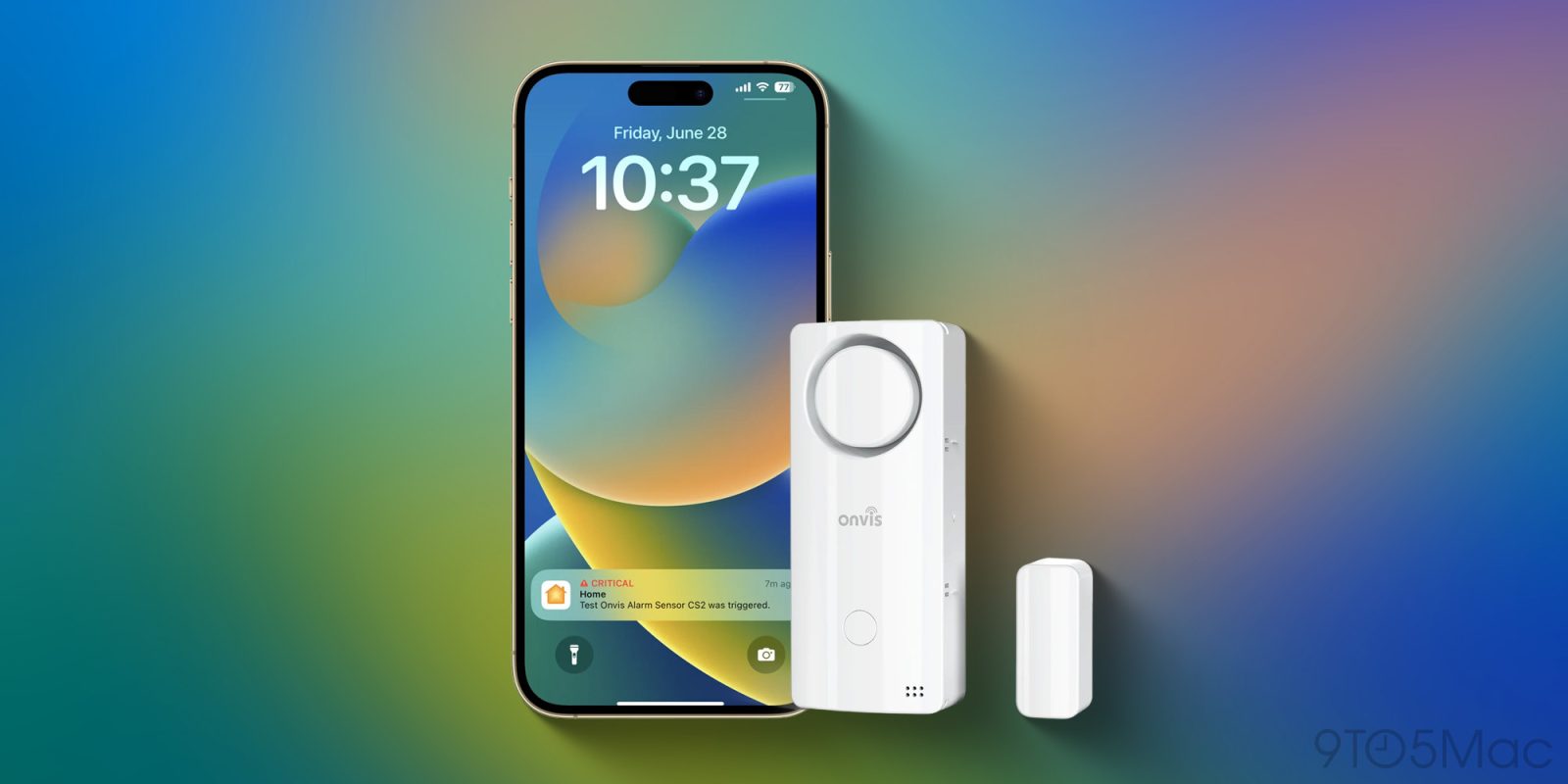
When automating your smart home, much of the attention centers on cameras and lights, but I believe HomeKit door sensors are arguably among the most critical devices to add to your setup. I’ve written about Onvis before, but the Smart Security Alarm Contact Sensor (CS2) takes the concept of a simple door sensor and turns it into a lot more. It supports Thread, but the really cool add-on here is a 120dB siren built right into the sensor. Let’s take a look at the Onvis CS2.
HomeKit Weekly is a series focused on smart home accessories, automation tips and tricks, and everything to do with Apple’s smart home framework.
More than just open and shut
Most HomeKit door sensors do one thing: tell you if a door is open or closed. The Onvis CS2 aims to be a “4-in-1” device. It handles open/close, but it also acts as a thermometer and hygrometer. However, the security bonus feature is 120dAlarm. Unlike standard sensors that silently send a push notification to your phone (which you might miss if you’re sleeping or driving), this sensor screams at you. It has different security modes (Stay, Away, Night, and Off) that let you decide when it should be silent and when it should make noise.
You might be wondering why you need an alarm on the door itself if you get alerts on your iPhone and Apple Watch. There are a few use cases where this is a game-changer:
- Pool Safety: If you have a pool, you know the worry of a child wandering out the back door unnoticed. With the OnvisCS2, you can set it to chime or alarm immediately when that door opens, alerting you instantly, even if you don’t have your iPhone near you.
- Deterrence: If someone kicks in a door at 3:00 AM, a notification to your Apple Watch isn’t enough. A 120dB siren is loud enough to wake you up and, hopefully, scare off the intruder before they make it past the door.
- Cabinets: You can place this on a medicine or liquor cabinet or a pantry door and set a chime to know if the kids are getting into things they shouldn’t be.
Installation process of the Onvis CS2
Installing the Onvis CS2 is just as simple as their previous models, with a few extra options for the alarm features.
- Power it up: The device runs on AAA batteries, which I can appreciate because I always have plenty of them.
- Scan the HomeKit code: Since the Onvis CS2 runs over Thread, open the Apple Home app, tap “Add Accessory,” and scan the code on the device. Because it uses Thread, it’s incredibly fast and reliable.
- Configure the settings: Once it’s added to your Apple Home setup, you’ll see the contact sensor, temperature sensor, and humidity sensor in the main view. To configure the specific alarm sounds and volume, you will want to use the Onvis iPhone app to fine-tune the decibel level and delay times to get out
Apple Home automations
Because the CS2 exposes so much data to Apple Home, your automation options are really nice. Since it tracks temperature and humidity, you can create an automation to turn on a ceiling fan or adjust your thermostat if the room gets too hot or humid.
You can also tie the alarm state to your HomeKit scenes. For example, when you run your “Night” scene, you can have the Onvis CS2 automatically arm itself to “Night” mode. If the door opens while everyone is sleeping, the siren goes off. Your “Morning” scene can disarm it so you can let the dog out without waking up everyone in the home.
Wrap up on Onvis CS2
The Onvis CS2 is a fantastic upgrade over the standard Apple Home contact sensor. Adding temperature, humidity, and a 120dB siren to a single battery-powered device solves multiple problems at once. Whether you are trying to keep kids safe or want to be alerted if someone comes in, the audible alert gives you a layer of peace of mind that a silent push alert simply cannot match.
With Thread support, it reacts instantly, and it runs on standard AAA batteries. It’s an easy recommendation for any HomeKit user.
You can pick up the Onvis CS2 from Amazon or directly from Onvis.


FTC: We use income earning auto affiliate links. More.



Comments