
Welcome to Indie App Spotlight. This is a weekly 9to5Mac series where we showcase the latest apps in the indie app world. If you’re a developer and would like your app featured, get in contact.
iPhone cameras have come a long way over the years, but if you find yourself yearning for more of a classy, filmic look versus the computational photography of today, Kiosk 27 might be a fun fit for you.
Highlights
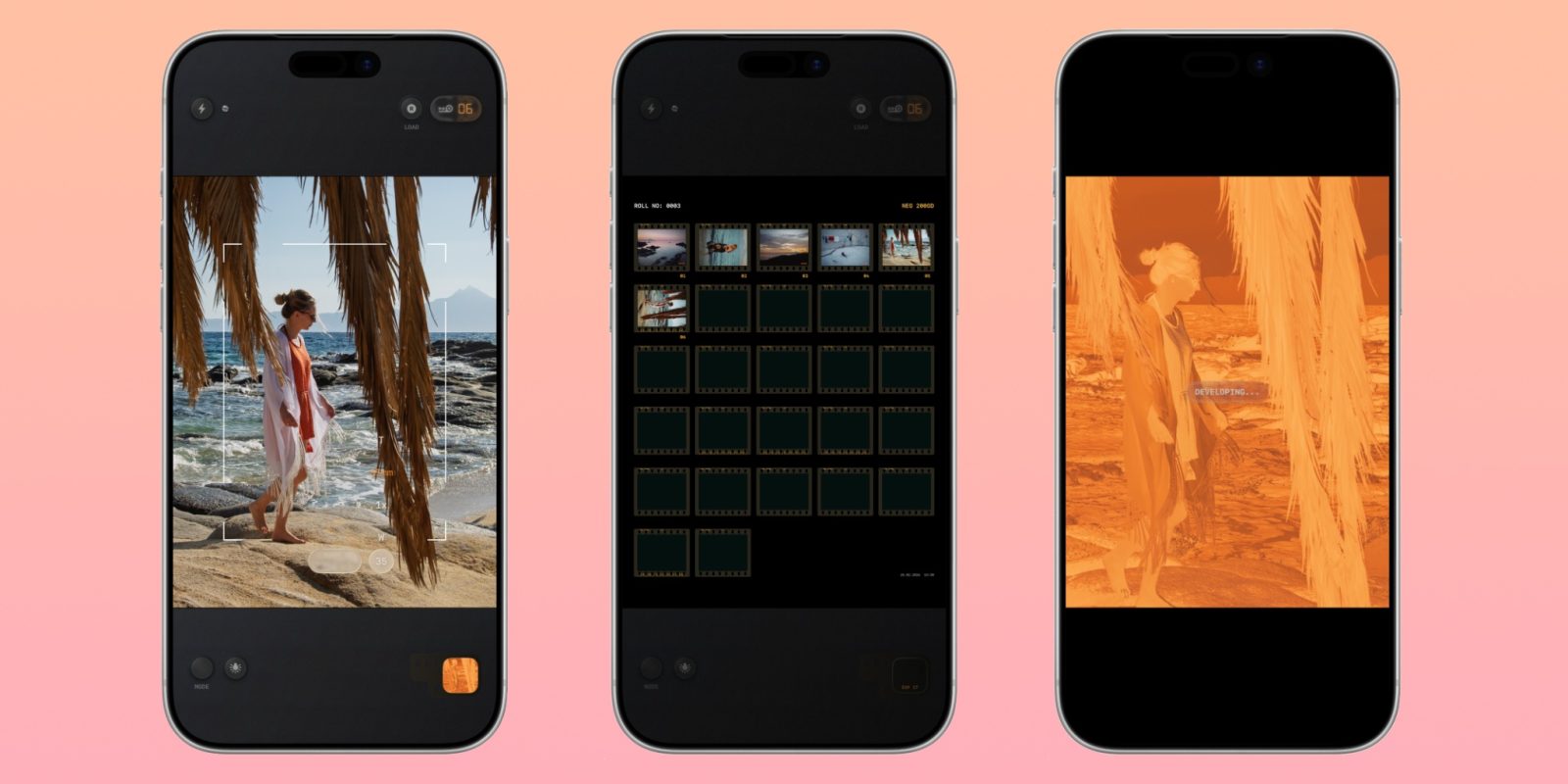
First and foremost, Kiosk 27 uses sensor-RAW processing. It isn’t just a filter slapped on top of your normal camera output. This gives it a very real feeling look. The developer has 20+ years of experience in analog photography, adding to the realism of it all.
It also offers all of the features you’d expect in a camera app, like a timer, flash, and focus lock. Above that, there’s some things to enhance the film experience, including a date stamp, mist effect, and the ability to adjust the look of your film – down to the grain and bloom.
Just as you would experience with film, the app shoots a negative photo first, then it renders into a positive on-device. Also like film, you have a limited film reel – with 27 shots. Obviously, its all still digital, so you can go beyond that, but its a nice limitation that keeps you mindful of your shooting. I personally love this level of focus – and its part of why I like shooting film in the first place.
Top comment by RDLink
I shot on C-41 process film and slide film 45 years ago, so I appreciate the nostalgia of this. Not in any way trying to dump on the app, because if it's something one finds cool and interesting they should definitely go for it.
It's just ironically amusing to me that in 2026 someone is using digital programming to simulate the analog film experience.
Lastly, Kiosk 27 also offers a home screen widget so you can keep track of your current roll. In my testing, I truly love how the photos look, so you should give it a try! Frankly, the only thing I’d like to see is Camera Control support – at least for launching the app.
Download the app
Kiosk 27 is available on the App Store for $12.99. There’s no ads, in app purchases, or subscriptions once you buy it – it’s just a one time purchase. You’ll need an iPhone running iOS 18.6 or later.
My favorite Apple accessory recommendations:
- Anker Ultra-Slim MagSafe Battery Pack
- AirPods Pro 3 (2x ANC vs AirPods Pro 2!)
- Anker Nano 45W Fast Charger with Smart Display
- Anker Prime 3-in-1 25W Compact MagSafe Charger
- Logitech MX Master 4 Mouse for Mac
- AirTag 2 4-pack (50% improved Precision Finding!)
- Belkin MagSafe 3-in-1 Charging Stand for iPhone
- MOFT MagSafe Kickstand Wallet for iPhone
Follow Michael: X/Twitter, Bluesky, Instagram


FTC: We use income earning auto affiliate links. More.




Comments