Mark is an award-winning journalist who worked at 9to5Mac for over six years. He covers Apple and other topics related to the consumer technology industry.
Following a preview in 2010, Adobe has finally released a pre-release version of their ‘Wallaby’ Flash-to-HTML5 file conversion software. The software is easy for developers to use and allows developers to drag and drop their Flash content into an Adobe Air application that will then convert it to HTML5 code.
The new code can then be completely edited in programs like Adobe Dreamweaver or manually by hand in text editing software. This new application from Adobe is a huge deal and developers can now easily convert their Flash websites and web applications for use on non-Flash devices like the iPhone, iPod touch, and iPad.
It is important to remember that Adobe makes its money on selling developer tools and not on selling Flash plug-ins.
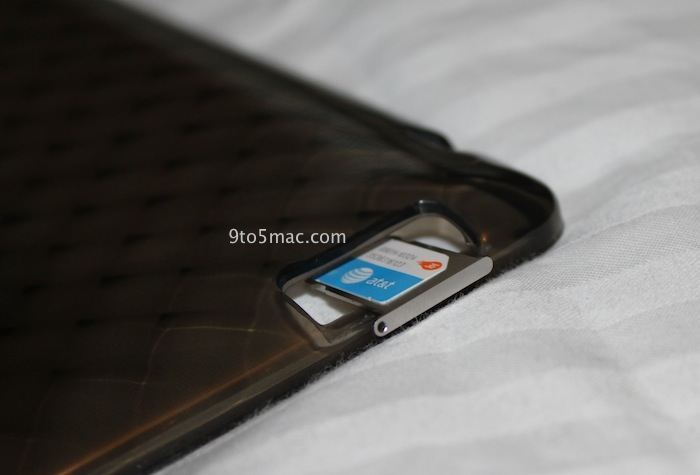
Since the iPad 2’s launch on March 2nd many have wondered whether or not the 3G GSM model would be unlocked and many have also wondered where the SIM card slot is.
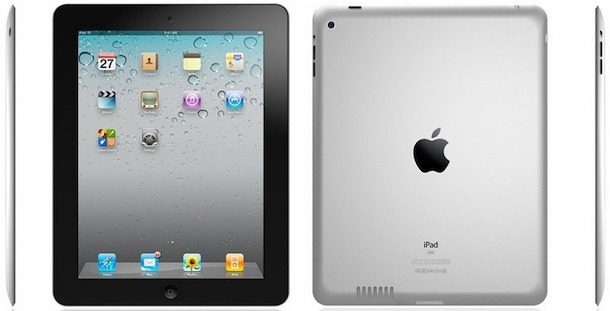
Due to the iPad 2’s very thin design many have figured it would be difficult for Apple to actually place the SIM card slot on the device’s side. According to people familiar with the iPad 2 the SIM card slot is on the top-left of the device.
The interesting part about this news is that early iPad 2 cases featured a “mystery port” on the left side of the device. This also shows why some cases had this port and others did not.
Additionally, the GSM version of the iPad 2 will be unlocked in most markets. No word on which markets will have unlocked versions, but we will most likely know the answer to that for the U.S. on March 11th and internationally in late March.
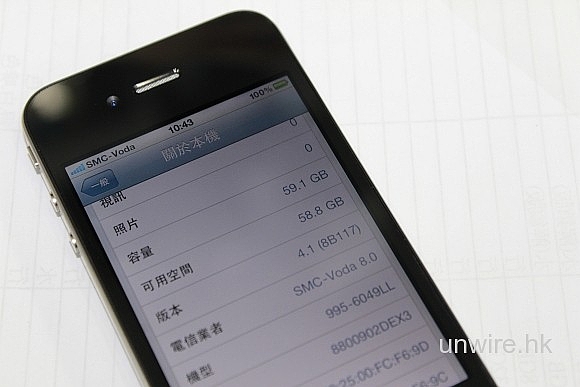
M.I.C. Gadget points to some apparent iPhone 4 prototypes on the chinese “grey market” with 64 GB storage capacities. The images could technically be easily faked but the “XX” on the back of the device’s do help represent the units as potential Apple prototypes.
This suspicious 64GB model has started selling in Sin Tak, the greatest grey market in Hong Kong, and the sellers claimed that these are engineered models and available in small quantity. Interestingly, the back of the phone states iPhone XXGB! That reminds us the leaked prototype last year, the one Gizmodo bought it. It also states the Model no. as XXXXX, and the FCC ID as BCG-XXXXXX. On the screen, you can see is indeed a 64GB capacity and the model is 995-6049LL. And the phone is not locked!
If real and not hacked, this 64 GB iPhone 4 most likely represents a storage capacity that Apple decided to abandon for their 4th generation iPhone rather than an upcoming model. On the other hand, Apple released an out of the ordinary 16 GB original iPhone in February 2008 after the initial June 2007 4 GB and 8GB iPhone launches.
Now that the iPad 2 has been announced, following several rumors and predictions, we thought it would be a great idea to compile a prediction roundup into three categories: what came true, what could still be coming up, and what didn’t happen.
According to Bloomberg, Apple is currently in negotiations with major music labels regarding some major enhancements they are planning to bring to iTunes by mid-2011. These enhancements are said to focus around an “unlimited” download approach (with help from Lala?) so users can instantly re-download lost or damaged music titles.
The potential changes, that Apple is working on with Universal Music Group, Sony Music Entertainment, Warner Music Group Corp., and EMI Group Ltd, would also allows users to re-download songs, on the same Apple ID account, on multiple devices.
Currently, iTunes users need to repurchase music if they want to wirelessly download the songs to other iOS devices. Users could also of course sync via iTunes on their Mac or PC to work around these download charges.
A deal would provide iTunes customers with a permanent backup of music purchases if the originals are damaged or lost, said the people. The service also would allow downloads to iPad, iPod and iPhone devices linked to the same iTunes account, they said. The move would be a step closer to universal access to content centrally stored on the Internet.
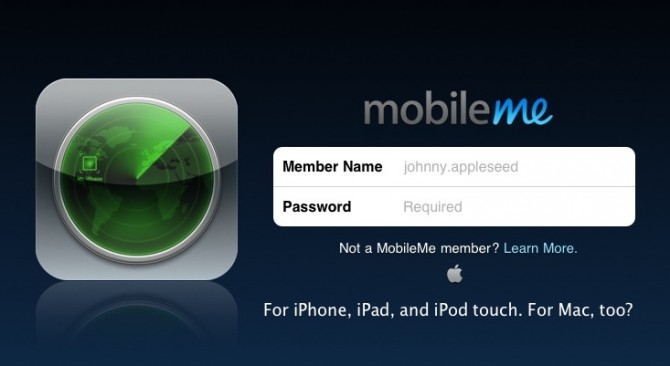
Under one plan for MobileMe, the service that now costs at least $99 a year would become free. Users could store photos, contacts, e-mail and other content on Apple’s servers, one person said. The content would be accessible through any wireless connection.
Apple and the involved music groups declined to comment. (Thanks Spencer for the Image!)
Twitter has just used some of its magic potion to lay the ban hammer allover the @CEOSteveJobs parody Twitter account. Last time we checked this account had over 400,000 followers (boom, revolutionary) and now that equals 400,000 not getting the content they signed up for. Chances of the suspension being removed? No idea.
According to The Street‘s Scott Moritz (who doesn’t give a source for his info), although initial lines for the Verizon iPhone 4 appeared to be mild, Verizon and Apple still managed to clear a million units during the opening weekend.
Verizon’s Apple iPhone sales, while deceptively slow, still managed to fly past the 1 million-sold milepost.
TheStreet and Moritz in particular don’t have a stellar track record and we’ve inquired to both Verizon and Moritz for details. (old video above)
Imagine the look on our faces when these pictures of a white second-generation iPad part landed in our inbox. Yes folks, it looks like the new iPad could come in white. That seems strange since Apple could not pull off an iPhone 4 with a white front, but I’m sure they figured out a way. Also, one of the reasons for the black frame that surrounds most of Apple’s displays is that it presents the image better visually. However, this image above, seems to refute all of that.
The piece that we have (from Shenzhen City), thanks to the folks at the iFixYouri iPhone repair shop, is the “digitizer” sometimes known as the the thick bezel.
If you look closely at the back of the part, below, you will see the camera hole, which happens to fit perfectly with the iPad 2 screen protectors from our friends in Asia. This is in addition to the ambient light sensor found on the top of the first-generation iPad. We don’t know whether or not the new iPad will also come in a black finish but, we’ll surely know all come March 2nd. The iPad 2 is expected to be thinner, faster, sport cameras, and work on both GSM and CDMA networks. Expand Expanding Close
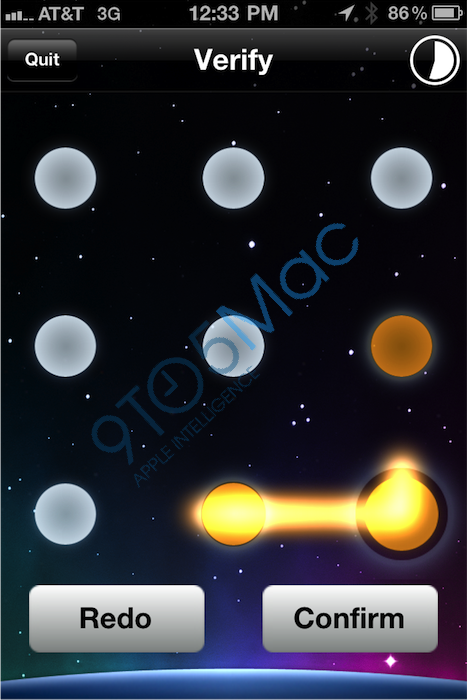
Apple has been working on a new gesture-based lock screen for iOS devices that works similarly to Android’s “dots” lock screen feature. The user sets up a pattern and needs to input that same pattern in, instead of a password or a four number code. Apple has already deployed this new lock screen internally for use in the employee ‘Apple Connect’ application for iOS devices.
There is no word on whether or not this new lock screen will make its way to iOS devices for users. We were told, though, that Apple will be pushing this lock screen down to some of their internal applications in the future. For example the applications retail-store employees use.
Apple is even planning on bringing this down to their new mobile payment system business, on the EasyPay machines. The lock screen looks just like Android’s lock screen, which Google probably has patents on, so this might never see the fingers of consumers. Three more screenshots of the system are after the break.
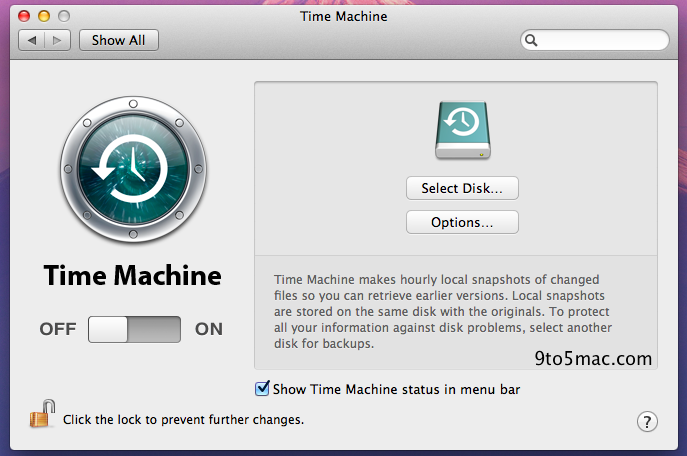
Apple has really touched every aspect of of the operating system for the Lion update and we’ve discovered a major new feature for Time Machine: ‘Local Snapshots’. Local Snapshots allows you to use the helpful Time Machine backup feature without an external hard drive and instead makes a local snapshot of all file changes. Your Mac will take these local snapshots every hour and store them on your Mac’s internal hard disk.
Apple warns that Time Machine should really be used with an external hard drive, as its true purpose is to protect your files when your local disk malfunctions. This local snapshots feature is important if you lose a file while on the go, and we presume it works hand-in-hand with the new “Versions” feature in Lion, which allows you to view the evolution of your documents.
If you go for a certain time without being connected to your external hard drive, once you connect your computer will copy all of the local snapshots as backups onto that external drive. (Thanks, Netzhuffle)
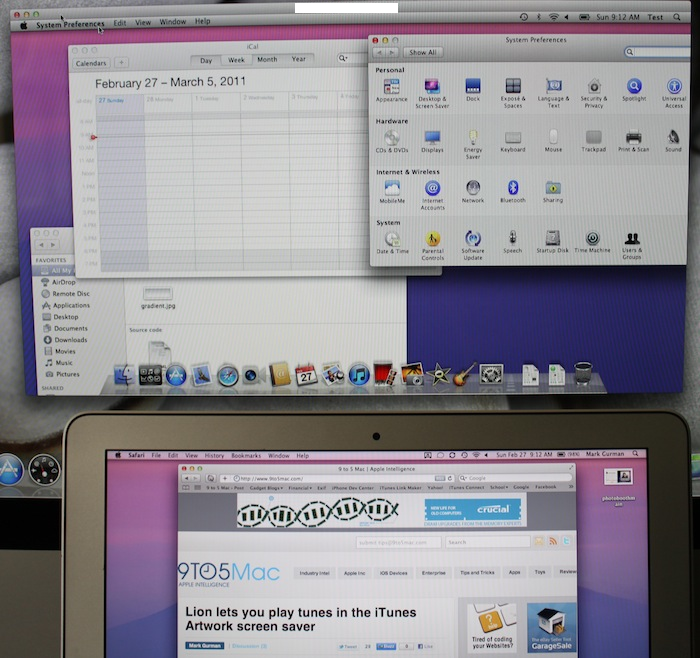
iMac screen sharing with MacBook Air on a different account
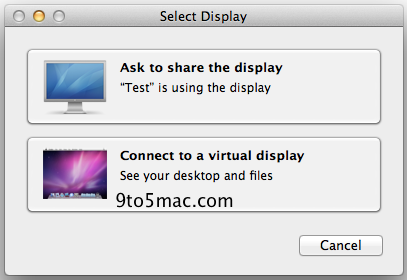
Yesterday we told you that the popular Back to my Mac feature might go free with 10.7 Lion and we also told you the service received a few tweaks in Lion. Well today, we have discovered a brand-new feature, which we’re calling multi-user remote computing, that allows you to remotely login to any account on another Mac. This best way to explain this is through an example.
You’re on your couch with your MacBook but the presentation file you need is on the home iMac, which someone else is using with their own account. With Snow Leopard, you would only be able to screen share onto that iMac and have access to the other person’s screen, not your account with the presentation file. Now with 10.7 Lion, when you login through the Finder, you are given an option to either view the screen of the other person’s account or access your own account to grab the file.
The best part is that the other person’s account stays untouched and you are accessing your account all in the background, remotely. The other person using the iMac never even needs to know that you grabbed a file off the computer. They won’t be interrupted at all and now now you have your file. If you have MobileMe this can even work completely remotely from anywhere in the world with the Back to my Mac service.
It truly seems like Apple is taking their strides at remote computing to the next level with Lion and it appears they are doing a great job thus far. These remote screen sharing enhancements in Lion seem to be truly beneficial to anyone with multiple Macs, and just makes the whole computing experience more efficient. Lets hope this all comes free this summer. This also reminds us of rumors about the iPhone 5 being remote computing on steroids. (Thanks, Bernard)
Peter Hajas, the creator of MobileNotifier, created a video for us of his new update. In short MobileNotifier is how we think iOS notifications should have been implemented. It’s obviously jailbreak-only and you can grab it from Cydia at this repo: http://phajas.xen.prgmr.com/repo
It seems that Apple has tweaked just about every corner of the operating system for Mac OS X 10.7 Lion even down to the screensavers.That’s right, screensavers. On the popular ‘iTunes Artwork’ one that pulls all your music album art from iTunes, you can now actually hover over an album cover and the song will start playing. Music on your screen saver. In Lion. Magical. Revolutionary. We think ‘Mac Dre’ is an appropriate artist for the screenshot. Thanks, Wayfarer87
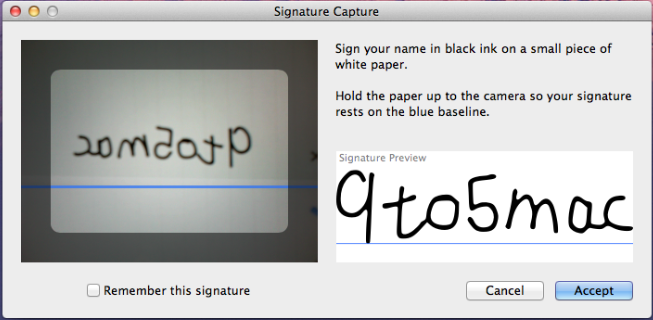
This new feature in Mac OS X 10.7, discovered by reader Mime454, really wows us. It’s called ‘Signature Capture’ and it allows you to write your signature with a black pen on a piece of paper, hold it up to your Mac’s built-in camera, and place it on a document in Preview. The feature works as advertised and is very seamless.
The image capture is also very quick and mostly accurate. We got decent-to-good results in all of ours tests and the best advice we have is to write very clearly. Following Apple’s instruction to use black pen is also a must. Using a blue pen, for example, gave us washed out results. We see this coming in handy a lot, especially in PDFs, and hopefully Apple makes it a framework that other companies can integrate into their applications.
The feature will surely make its way across the Mac ecosystem, hopefully very soon in the rumored in iWork ’11, and hopefully Microsoft manages to work with Apple in implementing it into the Microsoft Office productivity suite. Do you think you will find this useful? We have a video now after the break. (Thanks Mime454 for the video, Sonny for the image)
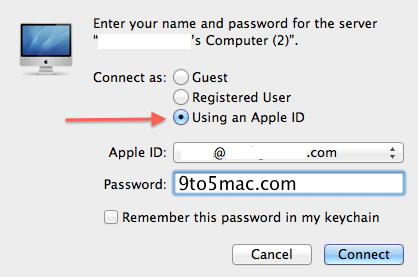
Apple has long had a feature in MobileMe called Back to my Mac, which allows you to remotely access all your internet-connected computers’ files. Additionally, you could ever screenshare with your own computers over the internet. This feature has been very handy for me as a MobileMe user but what about Mac users who aren’t. Back to my Mac seems like the kind of feature that should have been integrated for everyone in Mac OS X from the beginning. Well now with Lion, it appears that Apple, too, has had the realization.
In Snow Leopard, MobileMe users’ other Macs will appear in the Finder’s left panel with options to ‘connect as’ (access files) or screenshare. MobileMe members simply need to put it their other computer’s login information and Apple takes care of the rest. In 10.7 Lion a new option has appeared and that is to login to remote computers with your Apple ID. The option is specifically your Apple ID (which anyone can get for free) and not your MobileMe credentials.
To us this means that anyone with an Apple ID should be able to access their remote computers with Back to my Mac. Apple has already begun the process of implementing free MobileMe features, starting with Find my iPhone (by way of an Apple ID), and Back to my Mac going free makes complete sense. What if Apple creates a standalone application to allow users to remotely login to their computer from any other Mac?
Maybe, in the future, users will always login to their Macs with their Apple ID versus a stationary username and password. This would be just like the cloud-focused Google ChromeOS notebook. Apple even allows users attach their Apple ID credentials to their user account in system preferences.
We have also been told that Back to my Mac has received a few tweaks in its Lion implementation such as easier access to AirPort disks and servers. Perhaps this will all show up in the new, free, cloudier, MobileMe. (Thanks, anonymous)
Apple has been really thinking about their content creation strategy in Mac OS X and has lead the industry with applications like Garageband and iMovie. With 10.7 Lion Apple has moved to some new consumer content creation and that is podcasts. Apple has long had two application called ‘Podcast Producer’ and ‘Podcast Capture’ which work together to allow people to create podcasts and share them.
Unfortunately, these applications have been exclusive to Apple’s Mac OS X Server platform and were created with a “pro” mindset. Sort of like Final Cut Pro being the “pro” version of iMovie. Now, in Mac OS X 10.7 Lion, Apple will introduce a new application called ‘Podcast Publisher’ and it’s the consumer version of ‘Podcast Producer‘.
Podcast Publisher allows users to create as many shows as they want and within each show they can have episodes. Podcast Publisher lets you capture video and/or audio for your show, and you can even record your Mac’s screen in realtime if you want to demo something. You can even do some quick iOS-like editing of your clips (“trimming”) and the whole feel of the application is very user-friendly.
Once your podcast episode is complete you can export it as a file to your desktop, iTunes, or an e-mail. You can also easily send it to your Podcast library’s server or remote workflow. We think Podcast Producer is something a lot of people will use, as Apple’s is yet to implement a true podcast creation tool in Mac OS X for use by anyone.
Check out a screenshot walkthrough after the break in addition to Apple’s explanation of the application. (Thanks, anonymous)
It looks like Apple decided to drop support for their full-screen Mac media center application, Front Row. Front Row is just like the old Apple TV software and presents all your media in a full screen view. Whether that be videos, photos, songs, or movie trailers, it’s there. According to the developer preview of Lion, that won’t be the case in Apple’s next-generation Mac operating system launching this Summer.
We don’t know why Apple made the change and with the new full-screen application functionality, hopefully Apple is working on a cool, new implementation with the built-in iTunes application. Perhaps Apple will also use the change to promote their latest $99 Apple TV, which has the same functionality as Front Row, but much more, too. Front Row is still an application in Snow Leopard, Leopard, and some Tiger machines. Thanks, Mike T.
Keep in mind this is a preview/beta so Apple could bring this back before the actual release. Hopefully the new Front Row is cloudier.
Mac OS X 10.6 Snow Leopard was the writing on the wall for Apple to completely drop PowerPC support. Snow Leopard was the first Mac operating system to not work on PowerPC machines, yet it still ran PowerPC software through Rosetta. Even more, Rosetta was an optional download in Snow Leopard. Now in 10.7 Lion, Rosetta has vanished and Apple’s operating system launching this Summer will not support software built for PowerPC Macs.
This change will surely upset some longtime Mac users, but through our research it seems that many modern, supported Mac applications have been rebuilt to work on Intel machines. Also, every app on the new Mac App Store will work seamlessly with 10.7 Lion as they are all compiled, by default, for the Intel computing architecture. Users on Mac OS X 10.7 Lion who attempt to run a PowerPC application will get the alert shown above. Thanks, anonymous
Did you think Apple was done announcing the new features coming in Mac OS X 10.7 Lion? Did you think Apple was done bringing features from iOS to the Mac? Well, they’re not, and here’s a big one that might be coming this Summer with Lion: Find my Mac.
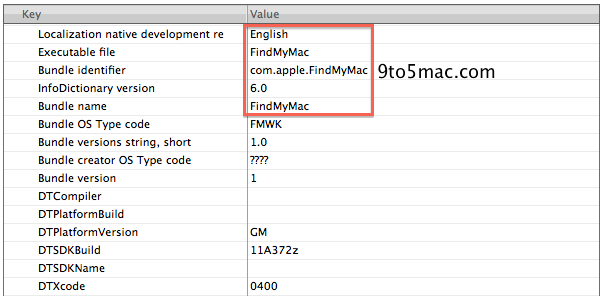
Just as you can imagine this is probably a Mac implementation of the very popular iOS feature to locate, restore, and lock your iPhone, iPad, and iPod touch. The details are scarce at this point, but we have found references to a Find my Mac service deep down in the 10.7 file system. The actual system files don’t tell us much besides the name, but they do share this Lion build number: 11A372z.
That build number appears to be an internal seed, meaning Apple has been playing around with this Find my Mac feature internally, but swiped it from the developer preview. If it means anything, Apple didn’t actually announce Find my iPhone until WWDC 2009, but it was found in the iOS 3 beta file system a few months earlier.
In terms of these Find my Mac files being for a difference service, we can’t imagine Apple making another service, not related to the iOS service, as this would cause user confusion, something Apple is completely against.
We speculate that this Find my Mac service will be integrated into the free MobileMe, like Find my iPhone, and the Find my iPhone application for iOS devices will be updated to support Macs. Macs will be able to locate other Macs with the online version of the tracking system through Me.com.
Macs don’t have GPS systems built-in so they will have to rely on WiFi connectivity like WiFi-only iPads, and iPod touches. Find my iPhone has a restore function for iOS devices, but we are not so sure that feature will make its way to the Mac in its current iOS implementation.
Restoring a Mac completely will most likely take much longer than an over-the-air iOS restore. Perhaps Apple will implement some super-fast encryption system that can only be unlocked by the user when it’s returned. We could not locate references to Find my Mac in 10.6.6 Snow Leopard, and this guy might need a new name.
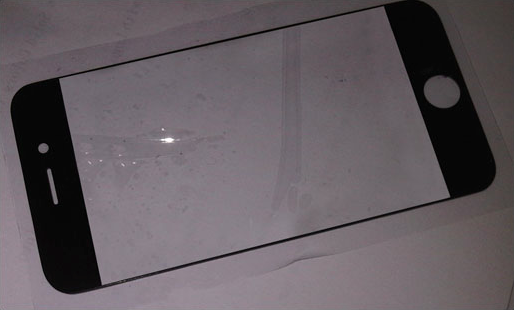
A purported image of an iPhone 5 part has appeared on a Chinese reseller of Apple parts’ website. Specifically, this part may be the digitizer panel for the fifth generation iPhone’s touch screen. The part’s design appears to be similar to that of the one found on the current iPhone 4, and past iPhone models, but the screen cutout of the panel appears to be much larger. No measurements for this cutout have been posted, but the cutout could be for a four-inch display, and this matches up with reports from Apple’s production lines in Asia.
Apple is said to be working on a “completely re-designed” iPhone for debut in Summer 2011 with a four-inch display to take on the larger screens found on some of the latest smartphones running Google’s Android operating system. Apple’s next generation iPhone is said to cost less and might feature a new integrated SIM card to be easily configurable on any supported carrier. The iPhone 5 may also carry an upgraded A4 processor, already dubbed the A5 chip, in addition to a new Gobi WWAN chip already found in the Verizon iPhone, designed to work on both CDMA and GSM networks.
The purported iPhone digitizer (above) also appears to have a thinner bezel on all sides: right, left, top, and bottom. This matches up well with a well-sourced report claiming that the next smartphone from Apple will feature an edge-to-edge display. This would allow Apple to increase the display’s size, while keeping the actual device’s size the same or even smaller. Information about this rumored display’s resolution is yet to surface, but one concept pegs the rumored 4 inch display to stay “Retina” with the new bottom portion being a stationary control switch bar for iOS multitasking.
We have been testing out AirDrop since we got our hands on Mac OS X 10.7 Lion and it is one of the most helpful features in the new Mac operating system launching this summer. AirDrop allows you to wirelessly and simply transfer files between nearby Macs, running Lion, and actually does not require users to be on the same WiFi network.
You just have to be nearby and your Mac must have recent WiFi hardware. Chances are though, that if your Mac is capable of running 10.7, you have modern WiFi technology.
We find AirDrop to be very helpful already, but it goes beyond the average consumer. AirDrop is perfect for those with more than one Mac, people working on documents together in an office, and if you need to quickly turn assignments into a teacher in school, all the students can simply just drag the document onto the classroom Mac.
The possibilities seem almost endless at this point. In our use of AirDrop, the performance has been normally up to par with our expectations. It does hang from time to time when you are setting up an initial transfer, but rarely. Apple will also likely fix any remaining issues in upcoming builds, and of course in the final release.
To initiate an AirDrop the involved users simply need to open the AirDrop panel, in Finder, on all their Macs, wait for the Macs to popup on the screen, drag the files you want to transfer, and click confirm. In our tests, transfers have been fairly quick and it’s a lot more efficient than our old methods of emailing or transfering files via USB flash drives. Be sure to watch our walkthrough video above.
Engadget has retracted its earlier report claiming that Apple’s second generation iPad will include an SD card reader and a “super-high resolution” display, and is now backing up much of what we have heard about the iPad 2 already. Engadget‘s sources claim that the new iPad will feature the same display as the first generation model (screen size and resolution) and will be mostly a tech spec update. The new specs are said to include a brand-new, faster processor called the A5 in addition to a RAM upgrade to match the 512 MB found in Apple’s flagship smartphone (iPhone 4).
Engadget is also backing up the reports that the new iPad will rock cameras. Engadget does not seem too sure about the back camera, and seems to be going off the of purported physical mockups of the device, but they are certain about the front-facing camera for FaceTime calling and such. Engadget also touches upon the mystery behind the iPad 2’s unknown port found on our very own iPad 2 case at 9to5mac HQ and on our exclusive iPad 2 mold drawings from a few months back. They are not too sure about the purpose of this new port, or if it will even come in the final hardware, but it may have something to do with some last-minute engineering shifts.
On a final note, the report presents some hints at what else we might be seeing on March 2nd at the Yerba Buena Center in San Fransisco. They think we’ll be seeing a preview of iOS 5, which makes sense since Apple usually holds iOS developer previews in March/April, in addition to some talk about Apple and the cloud. The cloud point is still very vague at this time.
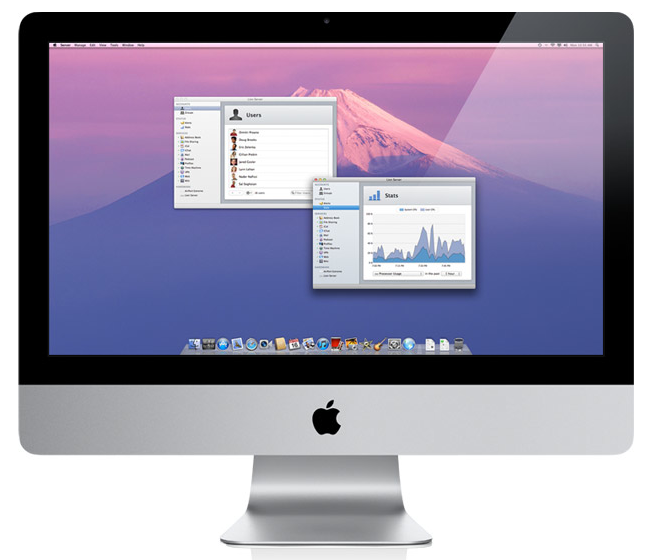
Apple has announced that Mac OS X Lion will have a server version and for the very first time, it’s actually integrated into the normal operating system. This just goes to show how Apple’s really wants to deploy the entire package, and not ship several versions of their operating system. Oh, and best part? Free.
Lion Server is now part of Mac OS X Lion. It’s easy to set up your Mac as a server and take advantage of the many services Lion Server has to offer. Here are just a few of the new features that make server deployment faster, easier, and more powerful than ever.
Profile Manager:
Lion Server guides you through configuring your Mac as a server. And it provides local and remote administration — for users and groups, push notifications, file sharing, calendaring, mail, contacts, chat, Time Machine, VPN, web, and wiki services — all in one place.