Author

Avatar for 9to5 Staff

9to5 Staff

Macintosh Tablet at WWDC? Steve Jobs, if you can hear me, I am asking nicely

Site default logo image

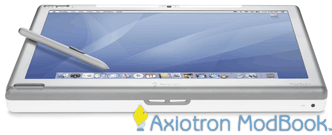
ModBook

Are you sick of rumors yet?  It’s a long shot, and as always, based mostly on speculation, but yes, the time is right for a tablet Mac. There has been absolutely nothing to lead us to believe that there will be a Tablet type Macintosh other than shear market desire (it worked with video iPods!)   A few more things to consider as we approach WWDC 2007:

  • The ModBook is set to start shipping.  The current Apple regime (read: Steve Jobs) doesn’t like other shops showing them up.  If you don’t believe me, ask Daystar, Motorola, PowerComputing, UMAX and company.  It’s hard to imagine Jonathan Ives/Jobs being even slightly OK with this.
  • Sony UX-90 series Palmtops have been really wowing customers and they are only getting smaller and faster and at the same time adding features.  Apple knows this market is exploding and will only cover the small sized end with the iphone
  • Apple and Cingular are becoming bestest friends.  That makes having a wireless plan that much less expensive and easy.  Also Europe and much of asia are on the same GSM/HSDPA track as Cingular
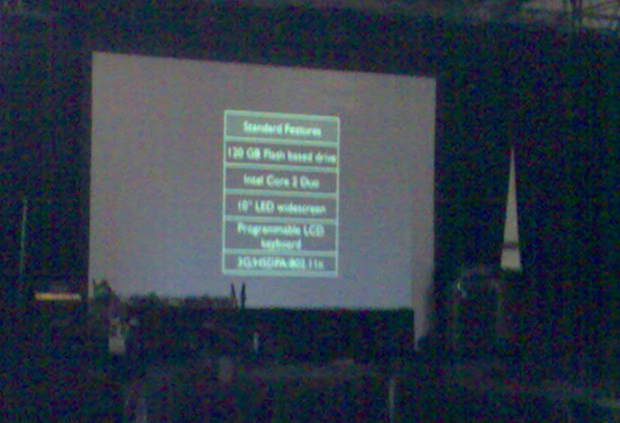
  • We aren’t the only ones thinking this:

tablet specs

What does ZFS mean for the Macintosh Platform?

Site default logo image

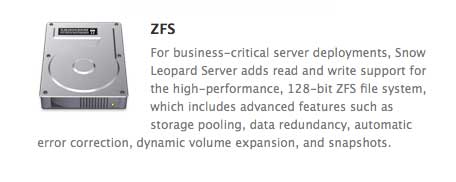
ZFS apple Sun’s CEO Jonathan Schwartz dropped a bombshell on the computer world this week when he announced that ZFS would be the filesystem that Leopard uses. Now the mac community is probably divided into two camps on this one:

  1. ZFS? sounds nice? Open source? good. Sun makes quality products. I’m not sure how this is going to affect me but if Apple chooses it, it must be good for me.
  2. Holy 5H1T! That is amazing! OMFG!  I mean I didn’t expect this for a few years.  Now gather thoughts…few questions…

So if you are in the first group let me please suggest some reading then you can come back once we are all on the same page:

http://en.wikipedia.org/wiki/ZFS

http://www.sun.com/2004-0914/feature/

Now that we are in the second group we need to discuss a few things:

Jonathn Schwartz said that “ZFS would be the filesystem for Leopard”.  This could mean a lot of things  Remember, Solaris was only able to boot from ZFS in 2006, 2 years after the format was built and is still not the default format.

  • It could be a file system that works in Leopard like FAT32 or This has already been demonstrated on Beta builds so not big news, however very exciting for the XRAID and XSAN crowd.  How Apple decides to implement it in Diskutil or another RAID type GUI application will also be interesting to see
  • It could be the Boot Partition which would make lots of fun things possible, like native Time Machine and really easy ways for users to add storage.  I think this would be a field day for Apple’s Marketing team.  Show adding 4 hard drives to a MAC and them showing up as one big volume, then showing the 4 drives on a PC.  Would even allow the mac mini pro.
  • Some crazy combination where the OS lies on a HFS+ partition (On solid state RAM Drive or traditional Hard Drive) and the rest of the store (Applications, Library, Users) Lies on the ZFS Partition.  this is obviously an interesting long shot.

Most likely, Jonatan Schwartz misspoke when he stated that it would be THE Disk format of Leopard will be ZFS and it will likely be A format that is supported, as you can already see in Leopard.  It is good news, however, that it is on Apple and Sun’s radar and it is only a matter of time before it can be put into production.

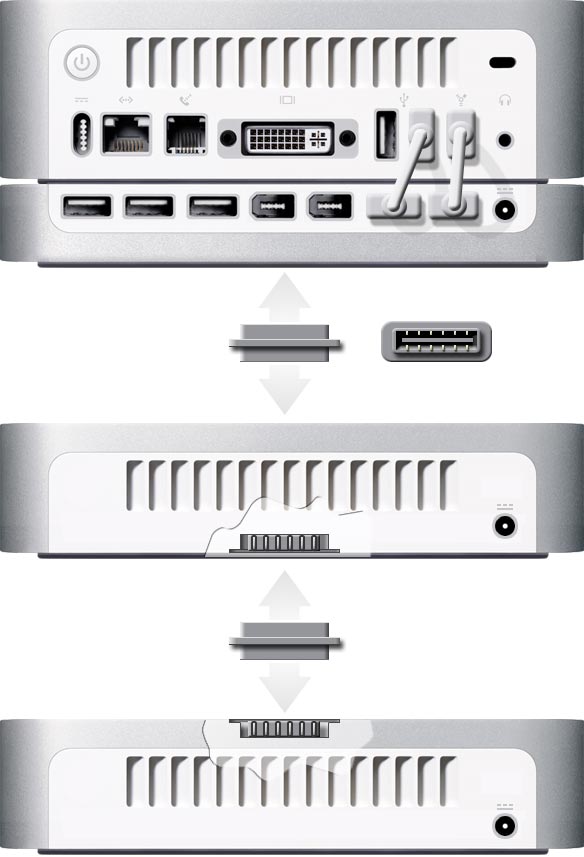
mac mini stacking

Now for the downside.  ZFS is a complicated file system.  One that is new and foreign to a lot of companies.  If you are running ZFS with a couple of hard drives on your Mac Pro, and you have a serious disk failure on one of the disks, you are unlikely to be able to whip out your Diskwarrior CD and solve the problem.  It took Diskwarrior a year to work on Intel Machines, how long will it take to catch up to a new file system – after 20 years of HFS and HFS+?

The idea (in theory at least) is that ZFS can be set up to miror drives or RAID drives and will do this transparantly to the average user.  Of course I’ll let someone else to be the first to roll this out to their users.

Another interesting area that the ZFS file system will allow the MAcintosh to create a sea change will be in the home theater arena.  Currently, when you run out of space (and with higher quality music, more megapixel cameras and HD videos coming out , you will) you have to add another hard drive to your machine.  This can range from plugging in an external USB Drive to going under the hood and installing some more SATA drives to your rig.  Then you have to format your drive and add it to the list.  Then you have to remeber which drive you put everything on…

What if…

You bought a Macintosh….let’s call it a Mac Mini Pro.  It boots from 32GB of Solid state RAM same basic formfactor as the current model – but with a SATA connector on the top.  Then there is a lego-like SATA stacking drive enclosure that apple sells.  When you want to add more space, you simply stack another drive on top of your mini.  When the new drive is detected, the Disk Utility asks if you would like to add that drive to the pool.   A click and some pinwheels with a progress bar and you have more storage.  Once its in the pool, you’ll have to “Eject it” to release it into the wild again.

Let’s see Windows do that!

More WWDC Speculation…YouTube on iPhone?

Site default logo image

Edit: Thanks to Gizmodo to pointing to our article. You guys know a good lead when you see it!

iphone meets youtubeObviously Apple and Google are the best of buds these days. There seems to be no end to the sharing that’s going on between them. With the torrent of rumors that are exploding all around the web and the announcements sure to come at WWDC, I have been wondering, “why no YouTube on the iPod/iPhone rumors?” I mean what two amazing technologies were ever better suited to each other? 

Youtube, which Cupertino announced will be on AppleTV, is in the process of turning their WHOLE video collection over to H.264 video.  Do you have any idea how many CPU cycles that is?  Probably enough to raise the temperature in San Francisco a few degrees.  All for the AppleTV?  I mean its just another hobby for Apple according to Steve Jobs and a bit of a flop according to retailers.

But we know Apple loves using Google’s APIs to make insanely great apps for their products.  Just look at that GMaps app on iPhone!

Well, what other Apple product plays small format H.264 videos pretty well?   

5G iPods and iPhones do.  

And there are more than a few of them running around.  What better way to monetize all those trillions of videos running around out there on YouTube and Google Video?  They’ll likely work out a subscription plan or a advertizing-based daily podcast that’s built into iTunes.  Oh wait!  Youtube is already built into iTunes…

EDIT: It looks like MacShrine is also reporting on this possibility but with some more specifics.

VMWare Fusion Beta 4, Parallels 3.0 Beta and BootCamp 1.03Beta all updated the Friday before WWDC?

Site default logo image

Parallels

Seems a bit strange doesn’t it? We know Bootcamp is going to morph into something cooler in Leopard at WWDC. I expect Apple announces the purchase of one of these companies or that Leopard will have its own Virtualization client. Maybe these guys are trying to get some last sales in before the bomb drops. It is too much of a coincidence that the 3 main Windows on Macintosh platforms are all changing RIGHT before WWDC!!!

Well then, what’s going on over at Crossover?

Apple Enters the top 10 list in Server Sales – Sells 1 mile high stack of XServes a year

Site default logo image

Xserve On the Surface, this is very interesting news.   Apple is in the Top 10 list of server sales – – –  woohoo!  I mean they weren’t there last quarter but they are there this quarter, right?  Top 10…that’s pretty hot?  Well….

I don’t think IBM, Dell, Sun and HP should be sweating over ol’ Apple just yet.  If you look at the numbers, Apple came in 10th place with 8700 Units sold.  That’s all you need to break into the top 10?!  I mean isn’t that about how many one of those crazy supercomputer setups that Virginia Tech (1100) and the Army (1500) built plus a couple of ad agencies and schools?  Expanded out over a year, that’s equivalent to 35,000 units or the equivalent of about 30 seconds of iPod sales…  Just for fun, lets do the math on that:

35000x1U/12 = 5100 feet.  So Apple sells a stack of Xserves 1 mile high.  Interesting.  (1U=1.75inches)

The good news is that it wouldn’t be too startling to see Apple climb even higher with Acer and Hitachi coming in 8th and 9th with 14,900 and 9,000 respectively.  A hardware refresh at WWDC likely won’t mean as much for Apple now that Leopard has been pushed back a quarter in shipping so Apple will likely fall off or stay put in the next quarter.  However, once the pent up demand for Leopard has been released, Apple could make a run for the 8 spot.

Something like a native virtualization package in Leopard Server (or how about Apple Enterprise marketing getting off their a55 and get the word out for once what great enterprise products exist) would push that figure even higher.  

Get Open Directory and Communigate Pro to Play Nicely

Site default logo image

AFP548 There is a helpful little PDF that has been released by AFP548 (get it? TCP Port 548 is Appletalk!), one of our favorite sites, on how to get Communigate Pro working with Apple’s native Open Directory. One would think this would be no trivial matter because Communigate relies on its own LDAP database out of the box. Throw Kerberos authentication into the mix and you’ve got a bit of a headache. Never fear though, Randy Saeks will sort you out.

Open Office for Mac Released

Site default logo image

OpenOffice

This is obviously huge news for people looking to rid themselves completely of Microsoft.  We noted in our previous post about Sun and Apple doing  lot of cooperatin’

This is a alpha release but the first one NOT to use the X11 environment with which most Macintosh users were not content .  Another free project that uses the OpenOffice.org system and a Java based front end system for Macintosh is called NeoOffice.   It has gained a lot of Mac fans but its detractors have issues with its speed, reliability and look and feel.  Let the competition begin!

I would not be surprised to see A LOT of development in this area – say right bout after Microsoft ships Office 2008 for Macintosh.

MacBooks Pro Double Motherboard RAM, Get New Processor, Video Card and Screen

Site default logo image

MacBookPro Apple today updated their MacBook Pro Line bringing them up to speed with the rest of the Santa Rosa – havin’ industry. The screens are also updated to LED displays and together with the new 45nm processor should keep those babies Photoshopin’ for much longer on much less juice. 

OH, AND 4GB of RAM max (up from 3GB previously! ) I was just going to ask, thank you very much. It looks like the onboard RAM has doubled. Now Virtual Machines like Parallels and VMWare will run much better.

Also, new video card, not bad. 

I would have really liked to have seen a new form factor but I’ll settle.

Click to check out the latest configurations

From Apple:

A 2.2GHz or 2.4GHz Intel Core 2 Duo. Next-generation 802.11n wireless. Gorgeous upgraded displays. Wickedly fast NVIDIA graphics. Now available in 15- and 17-inch models starting at just $1999. Start your engines.

The Anatomy of a Double Digg

Site default logo image

So I happened to be talking to a friend who works for Apple, who was also a bit drunk AND mad at his boss who had been giving him some shit. It turns out he was willing to spill some info about upcoming products and didn’t seem to mind too much who found out (managers of employees with privileged info, remember not to be dicks). So while he (yes, Steve Jobs I’ve narrowed your employee search in half) was willing to give me some juicy stuff on some upcoming events, little did I know my ISP wasn’t up for it. 

I’d like to add my thoughts on Apple’s secrecy at this time: I understand their need for secrecy when it comes to proprietary hardware and software designs, however a majority of their secrecy is to intentionally drum up buzz about their products. Rumor sites are simply a byproduct of that. 9to5mac is just a hobby for us and we like to cover more grounded stuff usually. I don’t think we released anything that is going to give Apple’s competitors any extra time in “Copying” their intelectual material – either hardware or software.

So we wrote up some quick prose on the subject and a few friends posted them to Digg. The first one went main page pretty quickly- as in only an hour or two – I guess Sunday night has a slow news releases to high user volume ratio.  Perhaps to our luck, Apple also ran its first iPhone commercials on 60 minutes right after we posted the 1st story to Digg.  I am assuming people saw the ads, ran to their computers and some of them, looking for info on the iPhone, hit my story.  It made the front page of Digg.  I then linked to the second story and put a digg button on it.

We have made the digg front page before and didn’t really notice much traffic – perhaps because it was a less interesting story.

I was getting about 500 users at the same time. This was late in the night in the US on a Sunday so not too bad on the server which I share with some other (unfortunate) users. Within a few hours BOTH of the stories had gone front page. I was seeing over 1000 concurrent users. 

Suddenly instead of getting the story, users were getting the Drupal DB error page.Digg drupal

Excellent, So I tried calling my service providor, Site5 and wasn’t able to get through.  I decided to email them.  They rebooted the server within a few minutes and things were going well again until morning.  I had enabled caching on the Drupal server and except for a small but noticable amount of sluggishnes, it seemed to be handling itself well.

That all changed however, when it turned 9am on the East Coast. My concurrent user count went to 1500 and the sight REALLY started to slow down.  Way to hit digg first thing when you get to work slackers (oh wait, I am writing this from work!)

I went into the admin control panel to try to turn on a more aggressive caching and throttle some lessor needed modules but it was too late.  Someone else had, rightfuly I might add, complained that the server was toasting and one of the Admins had diagnosed the problem as my account and turned it off.  I immediately emailed them saying if they let me back in, I could trim the traffic and CPU cycles dramatically.   Then I got an email.Site5 email

I immediately responded on how I could reduce traffic.  No response for over 6 hours from the guy who informed me that my account had been deactivated.  Had I lost some traffic?  Just a little.

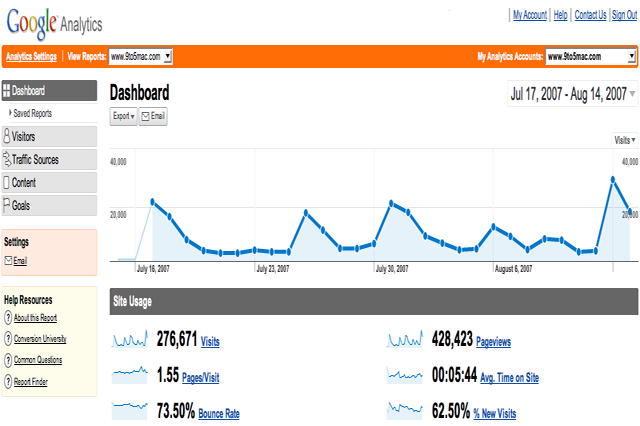
Google analytics

I figure I lost about 50,000-100,000 or so pageviews but I am on a pretty inexpensive service that had, until I got double-dugg, worked flawlessly.  We only use poorly placed Google ads so that would have probably amounted to like $10.

Anyway, I kept emailing throughout the day and finally, as you can see above, at 4 EST they turned my account back online.  They had additionally put some forwarders in my .htaccess files that would point the diggs to an error page.  I went in and switched them back.  Traffic was at a 100 concurrent user pace for the rest of the evening and continues to slowly drop off until this writing.

Conclusion:
Don’t get double-dugg.  More specifically, if you don’t have a serious dedicated bandwidth and server capacity, don’t test out your setup this way – that’s why Dugg Mirror exists.  Most typical ISPs on typical plans would have done the same thing I am sure.  Grid Servers like Media Temple (which I think are slower but have more capacity from another website I work on) would have probably have handled the load but ended up having a serious fee attached.    Also the “fame” brings some nastieness not just from the hordes of Digg Trolls (and man there are a lot of useless Diggers – mostly the front page variety) but also from some more famous bloggers (who happen to be right – I did pull an image from Google image which was theirs – I didn’t recognize it because it was hosted on Blogsmith their Blogging Service Provider.)

Engadget

(Don’t worry, its linked)

O'Reilly Hosting Great Tutorial on Open Directory

Site default logo image

O'Reilly

Dubbed “Discover the Power of Open DirectoryNoah Gift has indeed laid out a present for the Macintosh Administration community in the 1st of a three part series.

Even if you are old hat with the Open Directtory/Active Directory/LDAP/Kerberos game its always nice to see another expert’s take on the whole situation.  We’re looking forward to parts 2 and 3.  Don’t leave us hanging!

Brushed Metal iMacs Dropping at August 7th Event

Site default logo image

Brushed metal imac

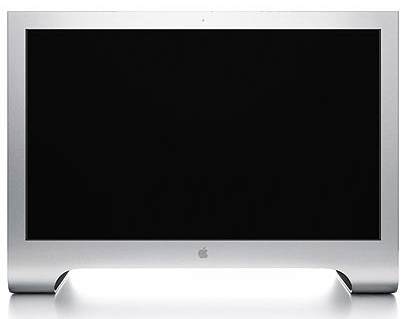
Edit: It looks like Apple is late to the game on this one. Expect this update to occur at the August 7th event. Apple is set to unleash a new iMac design that will utilize the company’s trademark “Brushed Metal” look. One inside source claimed that the new iMacs would utilize the Santa Rosa Chipset and could top out at a larger size than the current 24 inch display.  More likely however, the iMacs will continue to keep their 17, 20 and 24 inch sizes.  Additionally, the design will resemble the current Cinema Display more than the current iMacs with the extra hang below the screen minimized.

There is no word yet on whether or not Apple will return to its color iMac designs but hypothetically, they could end up with the same sort of surface as the current iPod Nano line. .

The new iMacs are set to be priced similar to the current lineup and will hit the shelves shortly after August 7th.

What else will get updated on August 7th?

Edit: obviously this picture is just a Mac Pro with a screen – the new iMacs will look nothing like this but look what we’ve found below! (its a joke – the images not the content- people)

Some VERY Interesting iPhone Developments

Site default logo image

iphone launch

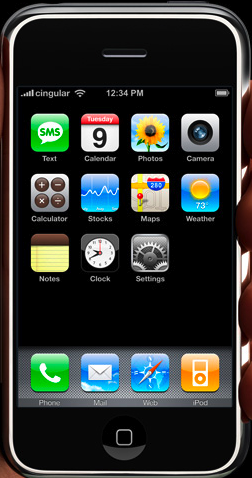
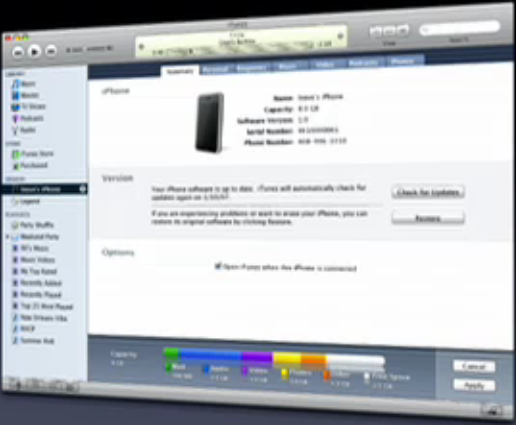
More info from around the proverbial “industry water cooler” has come out today on the iPhone. Some interesting tidbits are starting to put the puzzle pieces together on how the iPhone will operate with the Macintosh OS (and Windows). It appears, at least initially – and this is obviously subject to change – that the iPhone will interact with the Mac OS through iPhoto as well as iTunes but not show up on the desktop as a drive like iPods do.

iphone large

Also of note is that it appears that there no place for a SIM Card even though it was announced at MacWorld that it would be on top. There is no latch or place to change or swap it or anything else (battery) out. EDIT: Upon further inspection it appears that there is indeed a slot for a sim card but it is VERY well disguised) It’s just one solid piece of hardware. This is obviously bad news for people trying to move carriers or take these overseas. It seems that Apple is continuing with prioritizing simplicity over options mantra. It does make for a better looking and feeling product. Or is this just preproduction models?
Also, a two year commitment with AT&T is a requirement for purchase. There will be no OEMed versions. Aftermarket versions will be hard to find as the price of purchase will also include getting out of a 2 year contract.

Additionally, the latest builds of the iPhone embedded OS (Which have just recently been updated to 1.0 status) do not include iChat. Whether iChat makes it to the shipping devices or comes in later as a firmware upgrade remain to be seen. Obviously the lack of such an important application at launch will be a disappointment.

Aside from these relatively small issues the reviews we’ve been hearing are great. Especially noteworthy is the Safari browser which has tabbed browsing. Also making the rounds are a VPN client which would be very exciting for business users. There has even been some speculation that Office documents will be supported.

The biggest raves we are hearing are about the form of the phone which “..is just perfect. Small enough to fit in a suit pocket without messing up the lines, with an unbelievably large, bright, blemish-resistant screen.” Also of note is the vibration setting which we can now confirm that the iPhone does have.

As we approach Apple’s most important product launch – perhaps in history – on June 29th, we are seeing the iPhone finally becoming ready for the masses.

itunes interface

Also check out the new brushed metal iMacs

iStumbler – a Traveler's Best Friend

Site default logo image

iStumbler

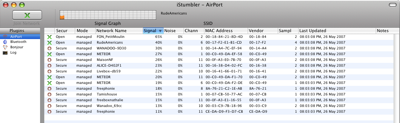
A great tool for finding wireless spots in public places like airports, cafes, parks etc is iStumbler.  It is very full featured – describing the signal strength in a 0-100% range which is very useful when deciding between which access point to choose. When my MacBook Pro is right next to my router, it shows 70% so I am wondering how to get a 95%?!

Also, it shows if the noise, the channel the network is using (1-11 or 1-13 in Europe/Asia) whether the network is managed or not among other things.  This is a godsend when I am out and about and need to get online really quickly.

iStumbler

I can’t say enough good things about this application. 

The only thing that comes close is Shareware called Wifind from Tasty Apps.

The problem I have with Wifind is that its shareware and that it doesn’t give as detailed descriptions about the wireless hotspots as iStumbler. Also, because its a plugin, I am worried that Apple will mess it up in a future release or worse yet incorporate it in their software and make my purchase worth nil! That being said, its right there in the menu and its much quicker than iStumbler to use. 

Another app for this kind of work is Kismac. It has got some stability issues but on the good side, it does let you decrypt WEP and WPA keys (if you have a few days to spare while it gathers packets). We don’t condone those sorts of things here however ;)

Finally, there is another application, which is free, that does most of what Wifind does (meaning you can save the $8). It is called Coconut-Flavour (love the Brits and their spellings) and can be downloaded here:
http://coconut-flavour.com/coconutwifi/

In the next few weeks we’ll see if these are really necessary when a feature complete Leopard comes out at WWDC.

Ars reviews Adobe Illustrator CS3

Site default logo image

Adobe illustrator I’ve been playing with Illustrator CS3 for awhile now and haven’t been terribly impressed with the changes. Obviously the application is much faster on Intel and seems relatively stable with fonts, etc (I haven’t had to wipe my prefs yet! * knocking on wood.)

 Also Flash integration is much better – though not as good as Freehand was :'(

Ars pretty much came to the same conclusion albeit 7 pages later. Obviously if you are buying Intel machines for designers, you need Universal Binary apps – no doubt.  The upgrade cost will pay for themselves in saved time in a few months.
Adobe, we are giving you a freebie but we also would like to see some more features and better, more simple user interface. Not that there is any competition left from Freehand to motivate you…

Maybe Processing will take off?

New Skype for Mac Released

Site default logo image

Not much to mention in this 2.6.0.137 update except that the features like better echo cancellation, editing of SkypeOut contact numbers, calls to Skype Prime providers etc. are now out of Beta. Here’s to Skype on Mac making a bit of progress towards the windows version…anything I am missing here?

Well, don’t just sit there – DOWNLOAD!

UPDATE! Version 2.6.0.140 for Mac has been released to fix some bluetooth problems

Flappy the Dolphin reviews the iPhone

Site default logo image

Hilarous
To plagiarize:

Like everyone, I got seriously geeked the moment I saw Steve Jobs introduce the Apple iPhone ($599, Cingular/AT&T only; HH)
at Macworld. It seemed to be what every gadget-obsessed dolphin is
looking for in a next-generation handheld: sleek, stylish, and multi-
functional. And what’s more, it had a delightful wallpaper with a
placid marine setting.

In the four months since its unveiling, I’ve been swimming back and
forth, just waiting for my chance to try it out. Then, out of the blue,
I was contacted last week and asked if I wanted to give it a test run.
Does a tuna taste delicious? When the Apple rep arrived, I was so
excited that I did a double backflip and splashed Bob.

The touch screen handled surprisingly well. I could easily toss the
phone into the air and bounce it off my nose to dial, so calling can be
fun. Let’s be honest, though: It may be called the iPhone, but no one I
know is interested in it just as a phone. It’s the widescreen video
iPod functionality that has the tech nerds excited.

Frankly, I was disappointed by the pedes- trian offerings by iTunes. I was looking for episodes of Flipper, or The New Adventures Of Flipper, or the movie version of Flipper, but I settled for the Mel Gibson action film Ransom.
I had to wonder if it was really worth my time and $10 to watch it on
such a small screen, where a lot of the nuance of Gibson’s performance
was lost. I suppose it’s better when you hook it up to your
large-screen TV, but that’s another connector and another $20.

When I was satisfied that it seemed to work well on dry land, I took
it straight to the bottom of the pool. After five seconds, the screen
went black and the device became unresponsive. I was so furious I leapt
out of the water and hurled the iPhone at the poor Apple rep, who made
a rather sheepish exit.

Once again, the aquatic mammal sector has been completely ignored by
the major cell phone manufacturers. Given their track record, I
shouldn’t be surprised.

Telephony for iPhone All But Assured

Site default logo image

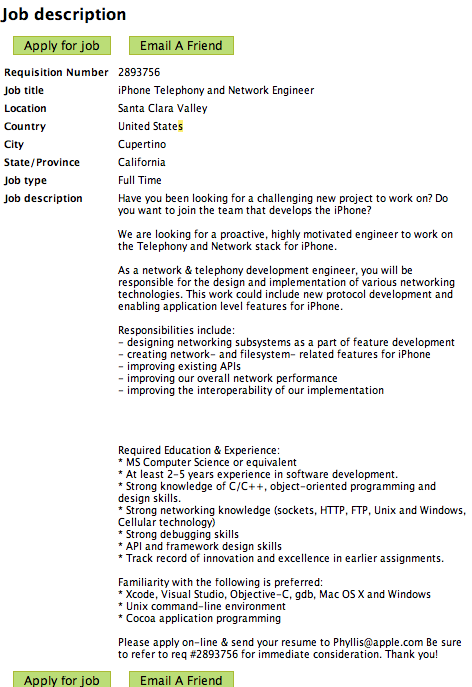
iphone telephony Apple let the cat out of the bag today posting a job advertisement for a iPhone Telephony and Network Engineer.

Oh really?  I didn’t know that the iPhone was going to have a Telephony component?!  Will it be through iChat?  Or perhaps our friends at Skype?  Or Apple’s new best buddy Google and the GTalk Jabber client?  All will soon be revealed.  If you are a Telephony Engineer and want to work at Apple, here’s the rest of the post:

Edit: There is the assumption that Telephony in this case refers to IP telephony and not just the broader used generic Telephony which includes most mobile calls. See Wikipedia for details:
http://en.wikipedia.org/wiki/Telephony

This may just be a huge over-reaction on our part….

    Have you been looking for a challenging new project to work on? Do you want to join the team that develops the iPhone?

    We are looking for a proactive, highly motivated engineer to work on the Telephony and Network stack for iPhone.

    As
    a network & telephony development engineer, you will be responsible
    for the design and implementation of various networking technologies.
    This work could include new protocol development and enabling
    application level features for iPhone.

    Responsibilities include:
    – designing networking subsystems as a part of feature development
    – creating network- and filesystem- related features for iPhone
    – improving existing APIs
    – improving our overall network performance
    – improving the interoperability of our implementation

    Required Education & Experience:
    * MS Computer Science or equivalent
    * At least 2-5 years experience in software development.
    * Strong knowledge of C/C++, object-oriented programming and design skills.
    * Strong networking knowledge (sockets, HTTP, FTP, Unix and Windows, Cellular technology)
    * Strong debugging skills
    * API and framework design skills
    * Track record of innovation and excellence in earlier assignments.

    Familiarity with the following is preferred:
    * Xcode, Visual Studio, Objective-C, gdb, Mac OS X and Windows
    * Unix command-line environment
    * Cocoa application programming

    Please
    apply on-line & send your resume to Phyllis@apple.com Be sure to
    refer to req #2893756 for immediate consideration. Thank you!

In case the job ad goes offline:

Microsoft Unleashes OOXML Converter

Site default logo image

Weighing in at a hefty 25Mb and still in super-beta-preview “we aren’t responsible if it throws your computer out the window into oncoming traffic” mode, Microsoft has announced a converter for their Office 2007 OOXML file format for us Mac Users.  Yes, this is good news – as opposed to no news.  

This however doesn’t delay the fears of Macintosh Office 2008 not being compatible with Windows Office 2007 (or any version for that matter) Macros – which Microsoft has already said it will not support in future Mac Versions.  So the question still remains, what is the point in upgrading to Office 2008?  Oh yeah.  Office 2004 runs like a dog on my Intel Macs and Powerpoint 2004 presentations take five seconds to transition.  Hurry up Sun with that Star Office Package!

In other Microsoft-Macintosh news, I noticed a new Favicon in the Microsoft URL today (Pictured at the left). It looks familiar but doesn’t exist anywhere else on the site – is this the new look of Microsoft for Mac? Maybe the Office 2008 Beta?

The Microsoft Statement included the below:

Microsoft Office Open XML File Format Converter for Mac 0.1b (Beta)

With the Office Open XML Converter, that you can convert Office Open XML files to a format that is compatible with Microsoft Office 2004 for Mac and Microsoft Office v. X for Mac. You can choose to convert and open one file, or convert a large number of files.

This version of the Office Open XML Converter can convert the following Office Open XML file formats:

* Word Document (*.docx)
* Word Macro-Enabled Document (*.docm)

These files are converted to Rich Text Format (RTF), which can be opened in Microsoft Word 2004 and Microsoft Word X.

The converter is a Beta release, and might be unable to convert all the data in Office Open XML files. After you convert a file, you should review the file carefully to make sure that it contains all of the information that you expect.

The following issues are known to exist in this Beta release:

* Macros and Visual Basic content are not included in the converted file.
* Charts and SmartArt graphics are converted to pictures.

The following issues might occur in this Beta release:

* Graphics and other objects in the document might appear with a different size.
* Color fills and shading in tables might not be preserved.
* Conversion might not succeed if the document contains a bibliography or citations.
* Conversion might not succeed if the document contains WordArt.
* Document layout and formatting might not be preserved.
* Some Unicode characters might not be preserved.
* Conversion might not succeed if the document contains very large pictures.
* Conversion might not succeed if you use an SMB network volume as the preferred destination for converted files.
* Picture bullets might not be preserved.
* Fonts might be substituted.

This Beta release expires on December 31, 2007.

System requirements

Important You must use Office 2004 11.3.4 or later, or Office v. X 10.1.9 or later to open converted documents. To verify that you have installed the Office 2004 11.3.4 update, select the Microsoft Component Plugin file in the Microsoft Office 2004/Office folder on your hard disk, and then on the File menu, click Get Info. To verify that you have installed the Office v. X 10.1.9 update, select the Microsoft Component Plugin file in the Microsoft Office X/Office folder on your hard disk, and then on the File menu, click Get Info.

Additionally, your computer must meet the following minimum requirements:

Operating system: Mac OS X 10.4.8 (Tiger) or a later version of Mac OS

Note To verify that your computer meets these minimum requirements, on the Apple menu, click About This Mac.

Installation instructions

To install this update

1. Print this page if you want to use it as a reference when you are offline.
2. Quit any applications that are running, including all Office applications, Microsoft Messenger, and Office Notifications, because they might interfere with installation.
3. Make sure that your computer meets the minimum system requirements listed previously.
4. In the preceding table, click the English (.dmg) link.
5. Follow the instructions on the screen to save the file to your hard disk.

If you are using Safari, the downloaded file is saved to the desktop unless you specified a different location in the Preferences dialog box of Safari. To check your preferences, on the Safari menu, click Preferences, and then click General.

If you are using Internet Explorer, the Download Manager saves the file to the desktop unless you specified a different folder in the Preferences dialog box of Internet Explorer. To check your preferences, on the Explorer menu, click Preferences, and then click Download Options in the left pane.

6. Double-click the file you downloaded in step 5 to place the Office Open XML Converter volume on your desktop, and then double-click the Office Open XML Converter volume to open it. This step might have been performed for you.
7. In the Office Open XML Converter volume window, double-click the Install Open XML Converter application to start the update process, and then follow the instructions on the screen.
8. If the installation finishes successfully, you can remove the update installer from your hard disk. To remove the update installer, first drag the Office Open XML Converter volume to the Trash, and then drag the file you downloaded to the Trash.

To remove this update

1. If the converter is running, quit the application.
2. On your hard disk, locate the converter application.
3. Drag the converter application to the Trash, and then empty the Trash.
4. To remove your existing converter application preferences, in /Users/username/Library/Preferences/Microsoft, delete the com.microsoft.OfficeConverter.plist file.
5. To remove all converter files from your computer, in /Library/Application Support/Microsoft, delete the Office Converter Support folder.

Additional information

Technical support is not available for this beta release, and we cannot accept product feedback at this time. For information about using the converter after you install it, on the Help menu, click Converter Help. For further information, read to the Software License Agreement that is displayed during installation.

Note Converter application updates will be available from Microsoft AutoUpdate, an application that can automatically keep your Microsoft software up to date. To use AutoUpdate, open the converter application, and then on the Help menu, click Check for Updates.
Last Updated: May 07, 2007

Europeans Get a Price reduction on MacBooks…Finally

Site default logo image

The Euro has been hard charging all year against the dollar but seems to be settling comfortably in the $1.35-$1.37 area – at least in the near term. This obviously puts Apple’s products at a much higher price point in continental Europe (and an absurdity point in the UK). Now I know that the included tax has a great deal with it as the/us Europeans are a bit more on the socialist side. Digression…

Anyway, the playing field is about to get a bit more even now that Apple has, along with yesterday’s upgrades, announced a price cut on MacBooks in Europe, the most popular line of Apple’s computers. They are sure to follow at the WWDC across the board to level the playing field across the board/pond.

Cheers Apple! Especially from all of us who cross the Atlantic having to mule Apple Equipment to our compatriots overseas. Not that I’ve have ever carried 3 iPods and 4 MacBook Pros oversaes in one trip…but I’ve heard stories.