iOS devices refer to any of Apple’s hardware that runs the iOS mobile operating system which include iPhones, iPads, and iPods. Historically, Apple releases a new iOS version once a year, the current version is iOS 10. Here is the complete list of iOS 10 compatible devices.
The iPhoneIslam, the people behind the Cydia tweak that have successfully enabled FaceTime on iPhone 3G, are back. Their upcoming Cydia tweak is said to enable cellular calling and texting on jailbroken iPad 3Gs. The privilege of turning your tablet into o huge phone will set you back twenty bucks. We’re guessing this nifty little program should tie nicely with Apple’s new iMessage feature in iOS 5, enabling both SMS and free iMessaging on iPads. The app is called PhoneIt-iPad and should hit the Cydia Store shortly.
A previously accurate Apple source has told 9to5Mac some interesting information regarding what 2011 holds for the iPhone and Apple’s popular FaceTime video chat service.
The next generation iPhone has reached the final testing stage (aka “AP” stage [Thanks, Chronic!]) and is now being carried around by high level Apple and carrier executives.
Although this has been assumed since the no-iPhone-at-WWDC-rumors broke, the current plan is for a September launch for the next-generation iPhone.
Apple and Verizon have yet to strike a deal regarding FaceTime over 3G for the Verizon network. Keep in mind that 3G and 4G aren’t the same thing. < Don’t read into that too much. Or maybe do.
Apple and Verizon are still working out kinks regarding support for iOS 5’s over-the-air updates, which we broke the news about, so carrier support may or may not be delayed past fall 2011.
While snooping around the iOS 5.0 SDK we located references to “N94” and “N93.” These are internal code names for two unreleased iPhone models. As we have already told you, the N94 is an iPhone 4 with an A5 dual-core processor and it is likely the device that a small group of elite iOS app developers got their hands on in late April. The N93 is likely a carrier variation of the N94.
We aren’t too sure what this variation could be, as the only time a model number varied based on a carrier in iPhone history was with the iPhone 4: GSM is N90 and CDMA is N92. Verizon already leaked that the next iPhone features a GSM+CDMA chip, so perhaps the N93 or N94 is the Sprint model we told you about – or T-Mobile.
Oh, and one final thing… according to the iOS SDK, and the same snooping we used to break the news that the iPad 2 will feature the same cameras as the fourth-generation iPod touch, it looks like the next-generation iPhone will keep the 5 megapixel sensor found on the iPhone 4. Many of us were expected a boost to 8 megapixels after Seth broke the news about Sony CEO’s comments on Sony making cameras for Apple. Perhaps Apple never updated the SDK files, though, or maybe the N94 and N93 are scrapped devices all together. Maybe Apple took the extra three months to whip up something totally new: not just an iPhone 4 with an A5 to boot.
P.S: We are expecting some more intelligence soon, so stay tuned!
Although it didn’t appear in Scott Forstall’s presentation and is yet to show up in iOS 5 SDK findings or in the actual developer beta release, references to Nuance integration have appeared in iOS 5’s internal preferences. ChronicWire has posted screenshots of the Nuance references from an internal build of iOS 5, including the one above (with help from Sonny Dickson). The Nuance integration, specifically, appears to be related to the voice-recognition company’s “dictation” software.
The closest thing so far to Nuance “Dictation” and iOS would be Nuance’s iOS application demonstrated in the video above. The application is called “Dragon Dictation” and essentially lets you touch the record button, say what you want to type, click to confirm, and what you said into the recording will be pasted into any field of your choice. Another preference references a microphone icon on the iOS keyboard. Perhaps you click this microphone to active:
The obvious built-into-iOS variant of this application function would be a small button within text fields (or on the keyboard). Tap to record; tap to confirm; text appears. We are not sure what “Nuance Long Endpoint” is but based on a quick look at the iOS application, it may be a feature that detects when you have stopped recording; based on a long pause at the end of your speech.
Although Apple has not said if iOS 5’s Notification Center widget section will have a public API for third-party widgets, developer WillFour20 has figured out a way to develop a simple widget as a proof of concept. This proof of concept demonstrates that even without proper tools provided by Apple in the SDK, making widgets for Notification Center is technically possible. As you can see in the image above, a space for the new widget was created and the programmed text, “hello world,” appears.
Known jailbreak developer Chronic informed 9to5Mac that all a developer needs to do is create a “custom view interface” and “compile it is a bulletinboard plugin.” Bulletinboard is Apple’s internal codename for the iOS 5 Notification Center. Hopefully Apple opens up the Notification Center to be a third-party home to widgets. The odd thing about iOS 5’s Notification Center is that the widget section is only compatible with the iPhone and iPod touch; hopefully Apple is dreaming up something similar for iPad customers. If any other developers do take a shot at this, let us know!
Who-ho, a Dubai carrier that sells the iPhone may have just kissed good-bye its chances of doing business with Apple. According toGulfNews.com, the United Arab Emirate’s wireless operator etisalat (yes, without capital “e”) has gone official today on a possible iPhone 5 launch. Here’s what their head of corporate communication said:
Yes, we are in talks with most smartphone manufacturers including Apple on the rollout of the 4G handset, iPhone 5 later this year. As the first telecom organisation to roll out the 4G network, LTE, in the Middle East, we have already started talking to them for the handsets and chipsets in them.”
Yeah, and analysts have promised us flying cars, too. Take this one with a healthy dose of skepticism. On the other hand, here we have a corporate communication chief of Apple’s valued carrier partner publicly hinting at a release time-frame of an upcoming Apple handset. Either he doesn’t have a clue what he’s talking about – in which case today will be his last day at job – or he’s just inadvertently confirmed September launch rumors .
Media framework strings in iOS SDK have added a new 1080p video export preset
In addition to the newly discovered ability to render 1080p videos on A4-powered devices by scaling down high-definition content on-the-fly, a tipster pointed out that the iOS 5 software development kit ups the maximum resolution for video exports from 720p all the way up to 1080p. The iOS 5 media framework now rocks a new video export option: A 1920-by-1080 full HD preset. Previously, programmers calling system APIs were only able to export video content in 720p. The change has been spotted in export preset strings of AVAsset, an abstract class of AV Foundation framework which has been around since iOS 4.
Programmers use the AVAsset class to work on a detailed level with timed media assets such as videos and sounds. It lets them examine, create, edit or reencode media files, get input streams from devices, manipulate video clips during realtime capture and playback and more. It is now clear that iOS 5 enables devices such as iPhone 4, iPad 1 and 2 and fourth-generation iPod touch (all powered by the A4 chip) are now able to both decode and encode 1080p content. This completes the picture and is another indication that the rumors of an eight-megapixel camera with 1080p video capture on iPhone 5 are likely true because there is no point in iOS 5 supporting 1080p video exports if users won’t be able to acquire full-HD content on their iPhone 5.
iOS 5 can render 1080p videos (try this out by emailing yourself a short 1080p clip) and third-party apps are no longer limited to exporting video files in 720p
Just as MuscleNerd informed the world that the iPhone-dev Team has successfully jailbroken a developer beta of iOS 5, the team two hours ago released an updated redsn0w beta tool that lets you put unsanctioned apps on your devices running a developer preview of iOS 5. Unlockers should avoid this jailbreak as they are very likely to lose their unlockable baseband if they try to install iOS 5, the team warned. Other useful things to know…
Liz Gannes writesfor All Things D that Apple’s social integration in iOS 5 includes much more than Twitter, which was formally announced during the WWDC 2011 keynote on Monday. Look no further than contact cards in a developer version of iOS 5, Gannes writes:
The contact information page in the iOS 5 address book has a field not just for Twitter, but also offers space to add friends’ handles on Facebook, Flickr, LinkedIn and Myspace. Alongside a person’s email address and phone number, an iOS user can also add links to their accounts around the Web. Then Apple auto-populates the URL for each of the services. Clicking on the account name opens up Safari to that person’s profile page.
In addition to four additional social networks, iOS 5 contact cards also include an option to add custom service by pasting a profile URL.
Yet another wonderful little feature of iOS 5: Now when you are sharing music (with your car audio for example) over Bluetooth, your iOS device transfers the album, track and artist data as well as the digital audio to the receiver for display
Audio equipment, like the Prius above, that can display this information now will. Excellent. Video below!
Whoa, Apple has reconsidered its stance on in-app subscriptions and has changed strict guidelines of its iOS developer agreement to allow in-app subscriptions outside the App Store. MacRumors spotted a crucial change in section 11.13 which previously required that content sold outside of the app be “also offered in the app using In-App Purchase at the same price or less than it is offered outside the app”. This requirement, which applied to both purchased content and subscriptions, is no longer in effect and has been entirely removed from section 11.13. Here’s the new wording:
Apps can read or play approved content (specifically magazines, newspapers, books, audio, music, and video) that is subscribed to or purchased outside of the app. Apple will not receive any portion of the revenues for approved content that is subscribed to or purchased outside of the app.
Put simply, prices no longer need to be identical outside the App Store, although publishers are still barred from providing links or buttons that lead to external pages where subscriptions are being offered. In all, that’s good news for the likes of Hulu, Amazon, Netflix, eBay and other companies which rely on content subscriptions. On the downside, it’s a little late for e-books publishers like BeamIt Down Software which closed down the shop, arguing it couldn’t sell books at a loss due to Apple’s 30 percent cut on iOS subscriptions. Anyway, Apple may have just dodged an anti-trust lawsuit.
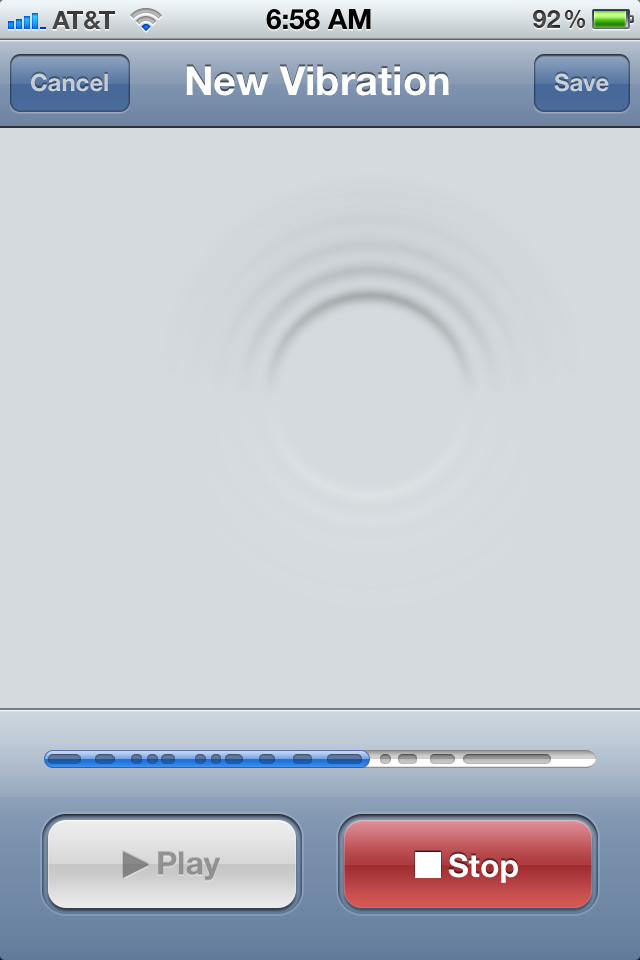
Custom vibrations in Settings (left) and the new interface to customize vibration patterns (right)
iOS 5 comes with a bunch of accessibility improvements, like the AssistiveTouch feature that lets you use your device with adaptive accessories and even create your own gestures. Another easily overlooked addition: Custom vibrations, on a per-contact basis, as pointed out by MacRumors. This is kinda cool, not just for the hearing impaired but for the rest of us as well. Example: If you’re in a meeting and your device is in silent mode, you can tell when your wife is calling based on a vibration pattern – how cool is that?
But why stop there? Combine custom vibrations with LED flash on incoming calls, ringtones, the iTunes Tone Store where you can buy custom alert sounds and deep Twitter integration which automatically adds Twitter user names and photos to your contact cards and suddenly iOS 5 looks pretty strong in the customization department. Here’s a quick guide to customizing vibrations for your contacts…
Now would be a bad time to be a developer of an iPhone panoramic camera app. It appears that Apple will be allowing users to take panoramic photos in the photo app, if the code we’ve discovered below proves to make it into the final iOS 5 release. We’re not sure if/how to make it work or if it makes panoramas stitching together photos or making a movie. IF you’ve figured out how to get it to work, were all ears.
The Mac/PC is no longer the hub of your digital world according to Steve Jobs and while the traditional computer was demoted to just a ‘device’, iOS devices did get some promotions at WWDC this week as well.
One notable addition is that you can set up an Apple Airport or Time Capsule from an iOS 5 device, like in the screenshots above.
Sources tell 9to5Mac that a version of the iPhone for Sprint’s network is currently in advanced testing. The physical design of this device is akin to the iPhone 4 of today, so this might be the iPhone 4S device with support for all carriers that we have been dreaming up and hearing whispers about. Apple is said to have ordered Sprint-compatible cell towers for use on their campus – for testing – in late 2010. Apple similarly tested the Verizon iPhone against Verizon cell towers on their campus months before the product’s release.
In addition to being actively tested in Apple’s “black labs,” the device is making the rounds amongst Sprint’s research and development department. Sources also say that talk of a 4G varient of the iPhone for Sprint is moving along, but the first generation Sprint iPhone that is currently in testing does not feature support for 4G bands. Last month, a job listing posted to Apple’s official jobs website revealed that Apple is looking to craft up a cellular engineering team in Kansas City. This city is home to the Royals, but also happens to be the home of Sprint headquarters. Sources did warn that depending on negotiations regarding 4G, the project may be pushed to late 2012. If the Sprint model is this fall’s model, it likely will not carry 4G compatible radios.
In addition to what our sources have told us, Talk Android reports that a Sprint iPhone is coming and that it will include dual-band support for T-Mobile (weird, right?). The report also claims that Verizon/AT&T and Sprint/T-Mobile will switch off annually as to who gets the new iPhone model. They also say that the Sprint vartient’s data plan will be spiked to $89 a month from $69 a month. To be clear, we have no reason to believe that Talk Android’s details are legitimate – all we know is that it’s in testing and Apple ordered the cell towers for testing in late 2010.
For those who need it, Apple is finally including custom gesture support to interact with adaptive accessories. We don’t have said accessories to test with, but the panel to create gestures can be found inside iOS 5’s accessibility pane. You open up the gesture section on an iPhone or iPad, draw, hit save, and done.
iOS devices like the iPhone and iPad have long missed out on 1080P HD video playback through their respective native video viewing applications. In iOS 5, Apple is looking to change all that as 1080P video now syncs to the iPad 2 and is playable in the full 1080P format. Prior to iOS 5, iTunes would not even sync video of the 1080P quality. According to first hand accounts, playback is very smooth and looks great. End users will be able to get their hands on this new feature in fall, when Apple officially delivers iOS 5 to customers.
MacRumorsdiscovered an interesting change in the App Store Review Guidelines, the one that puts DUI checkpoint apps out of their game on iOS devices. Here’s what section 22.8 of the updated App Store Review Guidelines now reads:
Apps which contain DUI checkpoints that are not published by law enforcement agencies, or encourage and enable drunk driving, will be rejected.
It doesn’t get any clearer than that. So, Apple has bent over backwards to make US Senators happy after all. Go figure. You may wanna hurry up and download those controversial apps that help avoid speed traps and speed cameras…
This is a pretty cool trick that works in the Camera app on iOS 5: Simply swipe your finger from left to right to bring the camera album roll up. Continue swiping from left to right to flip through your images. If you go too far, tap once to reveal the on-screen toolbar with image controls and hit Done to immediately return to your camera. Pretty neat. Thanks, Jared!
Because Emoji is now a standard international keyboard in iOS 5, you can easily add some mood to your iMessages and liven up any text entry with emoticons without having to download a bunch of apps from the App Store to access it
One of the little things appearing briefly in a slide during Apple’s keynote talk Monday was the Emoji keyboard in iOS 5. Originating from Japan, the emoji picture characters are standardized and many phones support them without requiring a Japanese operator (heck, even Gmail supports emojis). The Emoji keyboard is not new to the iPhone, but those who’ve used it in iOS 4 are painfully aware it has never been designed to work like a normal keyboard for the rest of us. You either had to use third-party Emoji apps from the App Store to access it or use emoticons via the clunky Japanese Romaji keyboard. Not anymore, Emoji is now a standard international keyboard accessible in any app. Here’s how it is enabled…
The awesomeness you see above is an iPhone 4 case dubbed the Opena. It is the result of the work by Melbourne, Australia-based industrial designer Chris Peters and Rob Ward, a former Toolmaker. The pitch?
The idea for The Opena came to us one afternoon when we were out having some beers. Some people have bottle openers on their keyrings, but many times you don’t always have your keys with you. But what is always with you? Your phone!
The injection-moulded case is machined from solid blocks of ABS plastic while the bottle opener part is stamped out of food-grade stainless steel. The final production-spec Opena case will have a fine satin textured surface finish. They are raising $15,000 on Kickstarter to complete the project – it’s costly due to the tooling and 3D CAD technology involved. You can secure yourself one the first Openas for just fifteen bucks. We just hope opening bottles with this thing won’t scratch or break the iPhone 4’s glass back.