9to5Mac Reviews
All the products that the 9to5Mac team has reviewed.

All the products that the 9to5Mac team has reviewed.
All the products that the 9to5Mac team has reviewed.
All the products that the 9to5Mac team has reviewed.



Most technologies have changed beyond all recognition in the last 10 to 20 years. Compare a smartphone from 10 years ago with the latest iPhone, and the difference is night and day. Laptops, TVs, cameras … pretty much any technology you can name has transformed almost beyond recognition. But there’s one technology whose pace of development seems truly glacial: batteries.
I’m not suggesting battery tech hasn’t improved at all, of course, but my smartphone 10 years ago got me through a typical day with a bit to spare, and my iPhone today does pretty much the same (albeit in a significantly smaller package). Those tiny fuel-cell batteries they keep promising us, with smartphone and laptop battery-life measured in weeks and not hours, seem as elusive as ever. Until that glorious day arrives, there will be times when our iPhone or iPad just isn’t going to have enough power to cope with an extra-long day, weekend camping trip, or similar.
There are a couple of different approaches to the problem. The first is a powered case. We previously reviewed the Morphies Juice and Air power sleeves. This is ideal when you know in advance that you’ll need the extra power and don’t mind a bit of extra bulk to achieve it. The second approach is an external battery pack you use to recharge your phone (and other USB-interfaced gadgets) when needed, or when you’re in one location for a while.
This is the approach taken by the Digital Treasures Powerflask, a cute-looking pack that can simultaneously charge an iPad and either one or two iPhones …
Expand
Expanding
Close



FastCompany today posted an in-depth look at the differences between Apple’s MapKit and Google’s recently launched Google Maps for iOS SDK from the perspective of developers. The lengthy piece gets insight from several iOS app developers with apps that rely on the SDKs and sheds some light on a few things that Apple is doing much better than Google despite a perception from users that Google Maps are superior:
“Google doesn’t currently charge for the Places API, but they do require a valid credit card for access–which gives you a quota of 100,000 daily requests. So you have to wonder if they plan to start charging sooner or later,” McKinlay explains. “That 100,000 limit perhaps sounds reasonable, but each user session can generate many requests–particularly when using the ‘autocomplete’ feature of Tube Tamer–and some types of requests count for 10 times the quota each, so it can get used up pretty quickly.”
While noting that Google wins out with location lookup services, 3D buildings, directions, geocoding, and better hybrid satellite imagery, the developers were also quick to point out downsides of the Google Maps SDK such as quotas for the Places API, an increased app size, and limitations with markers, gradient polylines, and overlays.
Developer of transportation app Tube Tamer, Bryce McKinlay, discussed some of the benefits of using Apple’s MapKit:
“Subjectively, the current version of the [Google] SDK does not perform as well as MapKit,” McKinlay says. “GMSMapView’s frame rate is capped at 30fps, which is lower than typical for iOS and results in a slight but noticeable ‘jitter’ effect when panning and zooming the map. Drawing of labels and POIs sometimes lags behind if you pan quickly, even on a fast device like the iPhone 5.”
“The fact that annotations in MapKit are UIViews also means that animation and other effects can be applied easily using Core Animation, which isn’t currently possible with the Google Maps SDK approach,” McKinlay says. He also points out that MapKit has some other handy features that Google’s SDK currently lacks, like “Follow user location” and “Follow with heading” modes. “MapKit provides a button that automatically moves the map to follow the user’s location, and rotates the map according to the compass heading. This is very helpful for pedestrian navigation. It is possible to implement this manually in Google’s SDK, but it adds extra development time/effort.”
It looks like some developers feel Google has some work to do with their Maps SDK for iOS. While Apple isn’t free of its own issues with MapKit, developers will definitely want to read Fast Company’s entire post before deciding which solution will be best for their app. The developers ultimately end up recommending MapKit over Google’s Maps SDK for the majority of developers.


Designers typically present and visualize their ideas by photographing and Photoshopping or by printing and constructing mock-ups using paper and glue. Both of these are often time-consuming and take designers away from their main focus—designing. LiveSurface is a unique new image library of more than 350 specially constructed image templates that contain 3D surfaces. The pre-built images dramatically shorten the time it takes to create realistic representations of a design idea.
Design can be a tough sell to clients who often don’t know what they want until they see it, and designers often work in the void of the Illustrator Artboard and wait to test their designs on real-world surfaces and materials until later in the design process.
Joshua Distler, Apple alum and creator of LiveSurface, gave us a demo of Context, LiveSurface’s next-generation design tool. Context, now in beta, is a Mac desktop application that integrates with Adobe Illustrator via a plug-in. The application works with Illustrator to allow designers to visualize and present their ideas with just a few clicks…
Expand
Expanding
Close
Apple’s Time Capsule network storage/wireless router is a fine device, but it often doesn’t offer all the flexibility people desire. For instance, my in-laws were after some of the functionality of a Time Capsule (back-up, fast wireless), but they also have a PC (along with a few Macs) and wanted DLNA storage for their Roku video player and some Cloud access to their files from both computers and iOS devices.
That’s where Netgear’s new Centria WNDR4700 comes in. Released last month and available in 2TB and $188 empty configurations, the Netgear Centria is a very nice looking Time Capsule replacement that can save a few bucks and add some missing capabilities. It comes with the same dual 802.11N radios and 4-port Gigabit Ethernet switch, but it adds two USB 3 ports compared to the Time Capsule’s single USB 2.0 port…
Setup isn’t Apple-easy, but it also isn’t hard. The hard drive comes formatted (if you get one without—formatting takes awhile and only goes up to 2TB internally at the moment). There is a setup ‘Genie’ that takes you through most of your wireless settings, including changing the passwords and setting up a Cloud account.
backside
Network Printing is one area where the Time Capsule handily beats the Centria. Netgear requires that you put a small utility on your PC/Mac client machines that must be active when you want to print, rather than printing to a typical print server-type configuration. The upside is that it makes printers AirPrint compatible.
Network speed is as good—if not better— than a recently tested Time Capsule, and I got a much better range unscientifically (out to the street in suburbia). Netgear also allows you to create separate networks for 5GHz and 2.4GHz and open and close guest networks at the same time.
A bonus feature is the easy SDCard backup. Inserting an SD card and pushing a button starts an automatic backup of the SD. Nice-to-have.
Time Machine updates over wireless and wired and both worked fine over about a week of testing. I haven’t had good luck with Time Machine backups in general, so I like to do manual backups every month or so.
The pitch
A small quibble: The fan/hard drive is significantly noisier than a Time Capsule—which is almost silent. Keep that in mind if this thing isn’t going to be living in a closet.
One area where the Centria beats Time Capsule is adding an external USB drive. The 10x USB 3 definitely shows up here and almost matches the internal drive when it comes to backup speed.
The Apps for both iOS and Android are rudimentary. You can download and play videos/pictures/audio from any Internet connection, but it isn’t nearly as robust as Synology’s DiskStation apps for instance. Here’s an iPad screenshot:
If you have PCs that you want to back up and share data, the Centria is definitely a bonus. It has automatic backups for PC users and better Windows-sharing options.
From a networking perspective, you have a lot more granular access to port forwarding and QoS than you have on a Time Capsule. Most people won’t find that important.
Wrap-up:
The Netgear Centria is a nice midrange wireless router/network attached-server option for Mac users and people in a mixed Mac/PC environment. The printing and setup complexity is easily outweighed by its much broader feature set. Things like faster USB 3 connections, SD Card access, easy hard drive upgrades, iOS app/printing, DLNA and Windows compatibility push it over the Time Capsule.
Me, personally? I still prefer the more complicated Synology Diskstation coupled with a DD-WRT compatible Cisco Linksys Gig router at my home, but it is hard to beat this as a simpler replacement.
The lowest price I can find for this is $186 Amazon without HD ($350 with). Note: If you buy a >2TB drive, you’ll need to format the drive outside of the box. The Centria can only format 2TB drives in its current configuration. Here’s a good Western Digital line and a good Seagate line, and both are tested to run on the Centria.
http://www.youtube.com/watch?feature=player_embedded&v=wGLVB9jol-A
http://www.youtube.com/watch?feature=player_embedded&v=zdXro-1Z83M

When I used to work an overnight shift at my old job, my coworkers and I had a habit of pulling out our phones and blasting music while we worked. I always thought it was a bit odd that my iPhone 5’s speaker was so much quieter than those of the low-end Android phones many of the other employees carried. It’s not something that happens often outside of that job, but sometimes I find that my phone is just too quiet.
There are a variety of cases on the market that purport to solves this problem without any additional speakers. Most of these just work by putting a small cupped piece of plastic behind the speaker to direct the sound toward the front of the phone. I’ve been summarily unimpressed with these cases.
When I saw the Ampjacket by Kubxlab, the distinct design caught my eye. Instead of a cupped piece of plastic, the Ampjacket redirects the audio from the iPhone’s to a two-way amplification chamber built into the back of the case. Could that be the key to finally getting improved volume out of the iPhone, or would it prove to be just another dud?
The Ampjacket is available for the iPhone 5, fifth-generation iPod touch, and iPad mini. The model reviewed here is specifically for the iPhone 5.
Slickwraps sent us some of their awesome MacBook Pro covers (starting at $20) this month to give a test drive on our Retina MacBook Pro. These are basically hi-tech ‘stickers’ that you apply to your Apple device. Application is easy and bubbles and warps are easy to smooth out. What you see above is the result of about one minute of application of the ‘carbon fiber skin’. If I had spent a little more time, I probably could have aligned things exactly. These things are made to exactly fit Apple’s devices. Note that the stickers don’t cover up any of Apple’s mics, speakers, I/O ports or even the fans on the underside, yet give the MacBook Pro an entirely new, distinctive look.
These covers keep dust and scratches from the Aluminum and glass. The ones you see above have been affixed without issue for over a week. If nothing else the material makes a great palm rest as well.
We also tried out the iPhone wraps (this one is Mahogany). Same story. Very easy to install. Looks great. Taking it off left no residue and it blocks scratches scuffs and dirt. You can even apply many more times because the panels retain their stickiness.
A video of the iPhone application, variety of colors and iPad covers follow:
Expand
Expanding
Close

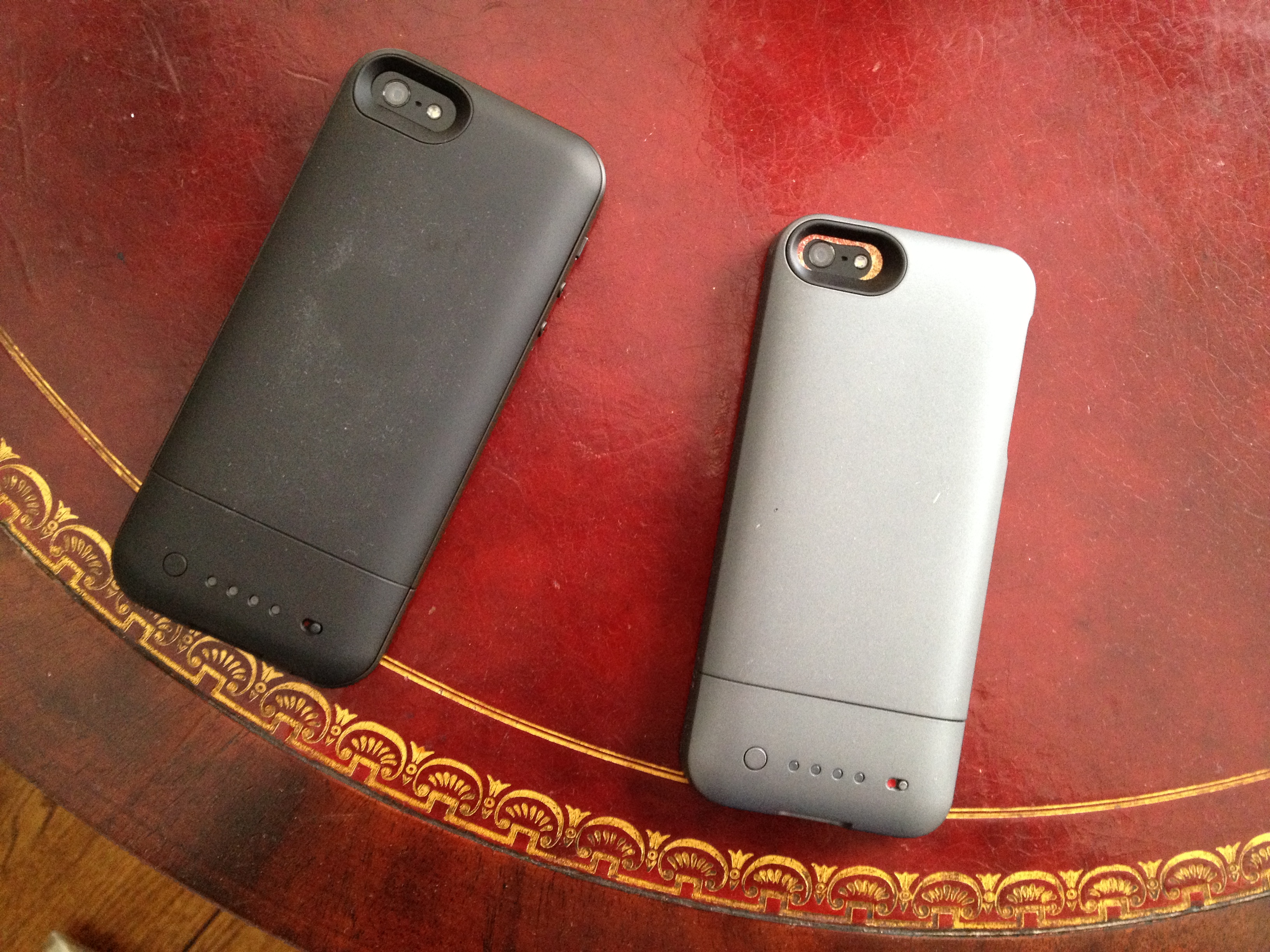
Over the past few weeks, Mophie has released two new battery cases for the iPhone 5: the Juice Pack Helium (above, right) and the Juice Pack Air (above, left). Both cases are similar in functionality, but both offer their own unique pros and cons. Read on after the break for our reviews.
For years, iOS users have wanted a proper way to save, open, and store files on their devices. While Apple has given us a partial solution with “Open In…” sheets, the folks at SonicoMobile have taken it upon themselves to go a step further. Today, they have launched a new app called Files that aims to be the missing “Finder for iOS.”
Of course, we’ve seen similar apps before. What is it that makes Files different from the rest? Keep reading to find out.

[youtube=http://www.youtube.com/watch?v=GXKindguPTI&start=20]
Leap, creators of the Mac and PC 3D motion-tracking device, announced this morning that it will begin shipping its Leap Motion on May 13. Last May, Leap announced it would open up pre-orders for the device for $69.99.
With today’s announcement, Leap raised the price of the controller $10 dollars; $79.99 is the new retail price. Leap also announced that starting today Best Buy would take pre-orders for the device with a May 19 delivery date…

A company called AnoStyle offers a unique method of anodization that permanently alters the color of an iPhone 5 or iPad mini, and it just became available internationally last week, so I decided to give it a whirl and turn my black iPhone into gold.
There isn’t much to report besides everything turned out great and I love the result. It feels and looks like my iPhone, only in gold. The only con to AnoStyle, at least for the gold color option, is that the text below “iPhone” on the back is now extremely faint. Other than that, I feel like I own a limited edition iPhone (dusts shoulder off), and at least four people have asked me how I managed to snag a gold iPhone.

There is clearly a huge, untapped interest in colorful iPhones. Numerous reports in recent months suggested Apple could soon introduce a new iPhone in colors other than black and white. The news isn’t really that surprising, as Apple already offers a line of aluminum iPod touches in multiple colors. From my experience in the last 24 hours, varied color options would certainly be a standout and attractive feature (especially if the company were to launch an “S” iPhone instead of a full refresh this year).
In the meantime, however, there is AnoStyle: it costs $249 for the iPhone 5 and $299 for the iPad mini. The steep price is a bit of a hurdle for some, but it’s still perfectly worth the money and a great way to customize an iOS device.
More information about the AnoStyle process, as well as information about the resale value and which companies still offer top dollar for iOS devices despite modification, is below.
There are a lot of places you can store your files these days. There’s the Documents folder on your Mac, of course, but there’s also Google Drive, Dropbox, Microsoft’s Skydrive and more. And, of course, everyone has their favorite storage service. Some people prefer one over the other, and it’s up to you to make sure you can keep them all straight.
Well, now you don’t have to. Doo is a brand new Mac app that aims to bring all of these services under one roof, and it does not disappoint. Keep reading to see how Doo can help you finally make sense of your cloud storage, and get a 9to5Mac-exclusive first look at the upcoming iPhone companion app.
Marware, one of the leading accessory makers for Apple’s mobile devices, has sent us two of their latest iPad mini cases for review. Both cases are unique in their own right, but both are built with versatility and quality materials. Check our reviews of both the Marware Axis and Marware MicroShell Folio cases for the iPad mini below.

We’re fans of Logitech’s Ultrathin Keyboard cover for the full-sized iPad, so when we heard that Logitech was launching a version of the Ultrathin keyboard for the iPad mini for $79, we were naturally excited. As we noted in our review of the full-sized model, the product kickstarts a transition from iPad-based content consumption to creation. With our love for the full-sized version, the “mini” Ultrathin Keyboard has a lot to live up to. Even with the iPad mini’s smaller display and overall footprint, does the Ultrathin Keyboard mini match the performance of its larger counterpart, and how does it fare against Zagg’s well reviewed iPad Mini keyboards? Find out in our complete review below.
Expand
Expanding
Close
ZAGG, an accessory maker that first received a lot of attention for its super-tough invisibleShield screen protector, these days also happens to be making some of the best iPad keyboards around. While ZAGG has big competition from the likes of Logitech and Belkin, its earlier folio and keyboard cover designs have been among our most recommended keyboards for iPad. ZAGG’s latest creations are not only its first dedicated to Apple’s smaller iPad mini, it’s also a new design for the company that helps set it aside from much of the competition.
The first thing that makes ZAGG’s iPad mini keyboards stand out is the company’s decision to sell two models: the ZAGGkeys Mini 7, and a slightly larger keyboard dubbed the Mini 9. ZAGG’s giving you the ability to get a keyboard only 10 percent smaller than a traditional Apple keyboard and built into a solid, good-looking iPad mini case, which something most of the other guys aren’t providing.
Unlike Logitech, Belkin, and others that have gone with the Microsoft Surface-style, magnetic, clip-on keyboard covers, the new Mini 7 and 9 go with a more traditional, folio case design.
First, a few things that are the same about the Mini 7 and Mini 9:
Expand
Expanding
Close
Calendars. Contacts. Maps. Emails. Text messages. Facebook. LinkedIn.
There are a lot of things you can do with the iPhone. Each of those things is scattered across the phone in it’s own separate app, however. Sure, there’s some integration of those services, but most of the time you’re going to have to switch apps to get from one function to the other. It’s easy to get annoyed or overwhelmed trying to manage your time while everyone up-to-date on the things that matter.
Tempo is a new app from SRI (the company that originally developed Siri) that aims to bring all of those functions together—at least as far as the concern your schedule—into a cohesive system for managing your life. But how well do all of these different services coexist in the same application?
[vimeo http://www.vimeo.com/58173643 w=700&h=394]
Note: Not all the animations in this video made it into the final product.
Cloudier is a great new CloudApp management client. While we’ve seen some of the design concepts in this app before, Cloudier adds new design features like a grid view for photos and a zip viewer for peeking inside file archives.
Cloudier boasts a much lighter interface than I’m used to in Cloud clients, and I actually like it a lot. Rather than focusing on fitting a ton of features into the app, the developers focused on fitting in only the features you’ll actually need and making them work beautifully. It’s fast, looks great, and does exactly what you need.
Cloudier is available now on the App Store for $2.99. If you’re looking for an app to manage your CloudApp files, I highly recommend it.

Welcome to 9to5Mac’s Smackdown series, where we compare the top hardware and software accessories for your Apple products.
When it comes to email on the iPhone, some users find the built-in Mail app lacking. Luckily, there are quite a few third-party clients available for your emailing needs. We’ll be running down all the major ones today, including those from the mail providers themselves and today’s big news Mailbox.app.
What you won’t find here are “apps” that simply give you the mobile web version of a mail service. If that’s what you want, you already have an app for that. If you want a native third-party email app for your iPhone, keep reading.
Welcome to 9to5Mac’s new Smackdown series, where we compare the top hardware and software accessories for your Apple products.
If you’re anything like me, you’re constantly on some form of social media or another. You’re not a self-proclaimed “social media guru” or some kind of “expert” on getting people to follow you, just someone who enjoys talking to interesting people online.
For most of us, our network of choice is Twitter. But, when it comes to using Twitter while on-the-go, there is a ton of different apps to choose from. To help make this decision easier (and save you a few bucks in the process), we compared five of the most popular Twitter clients available for the iPhone.
Everyone uses Twitter for something different. The features you want may not be the same features I want. Whether you’re a long time iPhone user or just stepped into the world of iOS for the first time over the holidays, we have an app for you. If you’re a Twitter power-user, we got you covered. If you just want to read your timeline and keep up with your friends, there’s something here for you, too.
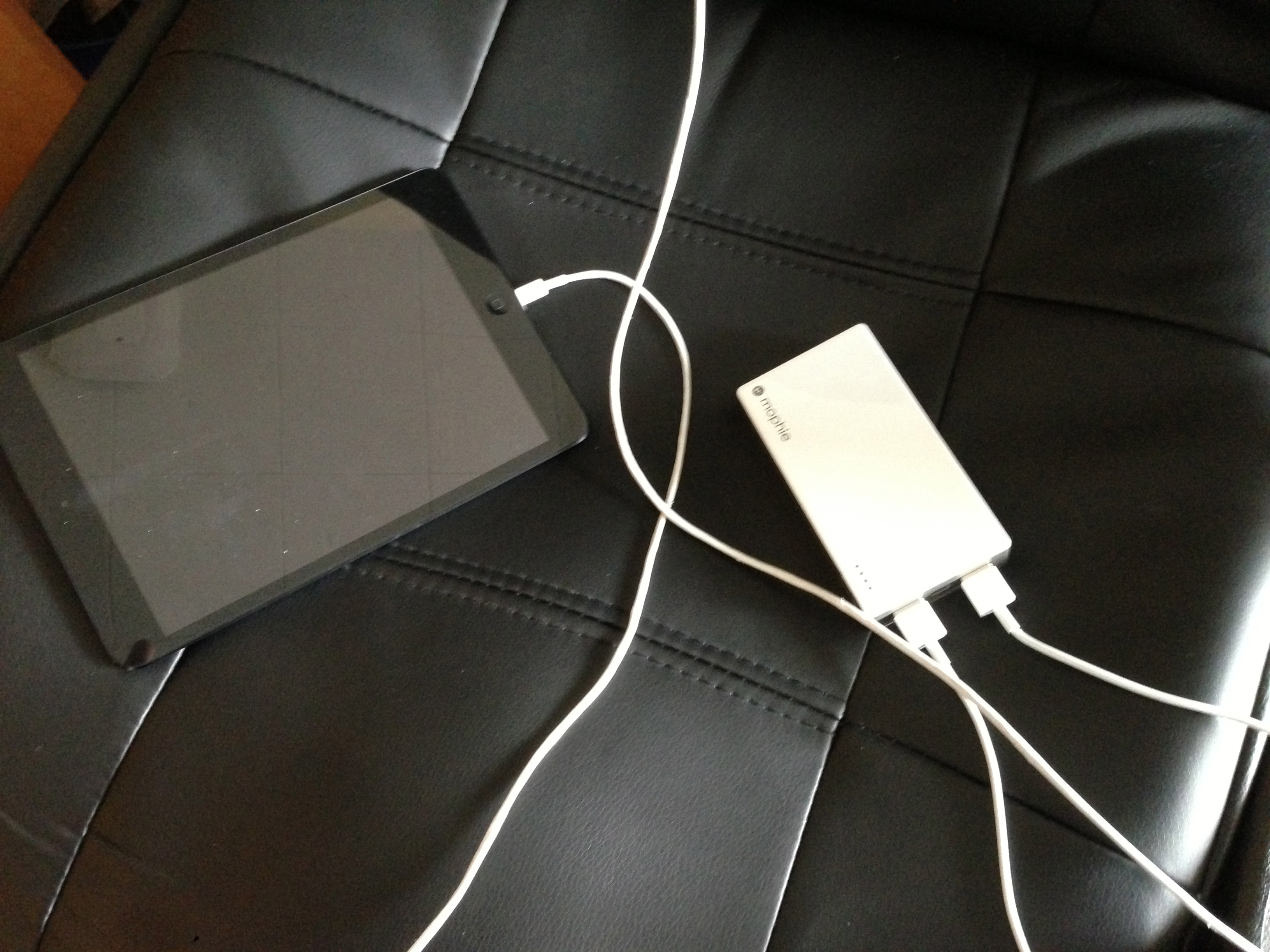
For the past few weeks, I have been using Mophie’s Powerstation Duo device charger, and it has been a tool that has already improved my technology-filled life. I’m constantly using my iOS devices, like an iPad and an iPhone, and I am hardly stationed in one place. I’m always on the move, and relying on the batteries of my mobile devices to last throughout the day is unrealistic. On my previous iPhone, I used to use a Mophie case with a built in battery pack, but since the iPhone 5 is yet to see a compatible Mophie case, a brand I trust for these types of accessories, I’ve been using the Duo. Read on for our full review:
When it comes to getting stuff done, I’m a bit lazy. I procrastinate a lot. I put off my homework, stuff around the house, and just about anything I need to do.
Clearly, I have a problem with procrastination. It’s not just that I want to put things off until the last second. It’s that I’m incredibly bad at scheduling and forget a lot of things.
Sometimes I create a to-do list in Reminders or put items on my iCloud calendar. Then, the night before those items are due, Reminders or Calendar finally shows an alert informing me that I have a very short period of time to actually do it. Of course, that means I end up moving the due date back, or just failing to accomplish whatever task is on the list. Essentially these strategies are useless to me.
Luckily, a new app called Finish seeks to solve this exact issue. The app was designed by two high school students frustrated with the way existing to-do list managers handled things.
So, did they pull it off? Did they finally design a to-do app that helps end procrastination? Keep reading to find out.
http://www.youtube.com/watch?v=2BtEfpR-vGw&feature=youtu.be
There were more than a few Bluetooth-enabled smart watches on display at CES this year. We were on-hand for the official press unveiling of the Pebble e-paper watch, which is expected to start shipping to over 80,000 backers later this month. We also spotted Martian Watches, CooKoo, I’mWatch, and a small handful of other watches designed to pair and work with your iPhone or other mobile devices. Many have seen the Pebble, up until now, as the frontrunner mainly due to the 10 million in funding it raised through Kickstarter. While rumor has it Apple is interested in creating a smart watch of its own, we will hear a lot more about smart watches in 2013 if CES is any indication. Over the past week and a half, I had the chance to put one of these smart watches to the test: the Bluetooth 4.0 “Passport” from Martian Watches.
A few things to note right off the bat: First, unlike the Pebble and I’m Watch, which integrate a larger display, the focus of Martian Watches is voice command. There is some debate whether a smart watch, one that the average iPhone user might use on a daily basis, should resemble an iPod nano-like touchscreen or a more traditional timepiece design. Martian Watches is going with the latter, but it integrates a small 96-by-16 pixel OLED display capable of displaying notifications and scrolling text for incoming messages and calls.
While Pebble and others hope to create an ecosystem of third-party apps that can run on small, touch-enabled displays, the name of the game is voice command for Martian Watches. That means, in the case of iPhone users, you’ll be able to activate and control Siri right from your wrist. It also means as Siri improves and adds more functionality, your Martian Watch does too. However, Martian packs some other non-Siri features that make it a true competitor to the other Bluetooth smart watches hitting the market…
http://www.youtube.com/watch?feature=player_embedded&v=v9AxkNFqm6I
We went hands-on with the new ENERGI Backpack from Tylt, a company with products we’ve enjoyed in the past, in the video above. There are many power bags on the market that include built-in batteries to recharge your mobile devices while on the go, but we were quite impressed with these new backpacks from Tylt. They are hitting the market for between $150 and $200 at the end of March. They include a 10,400-mAh-lithium ion battery with the ability to charge up to three devices at once and dedicated pockets for your iPad, iPhone, iPod, and MacBook.
[vimeo http://www.vimeo.com/52132178 w=700&h=393]
At some point, most of us are going to walk away from our computer while it’s turned on. Sometimes when that happens, family members, roommates, or even complete strangers will decide it’s OK to mess with your computer.
Keycard makes it easy to avoid that issue without having to put your machine to sleep and then wake it back up every time you walk away for a few minutes. By pairing it with your iPhone, iPod, or a host of other devices, your Mac can detect when you walk away and lock the screen, keeping others from being able to access your computer while you’re away.
So how well does it work? Check out the rest of the review after the break to find out.
California-based audio accessory maker NYNE is getting ready to show off its latest line of bluetooth speakers, docks, and home audio products at CES next week, but for the past month I’ve already had the chance to play with one of its latest creations- the NB-250 water-resistant Bluetooth speaker.
There is a ton of competition among Bluetooth speaker manufacturers, but a couple have been able to make their way to the top of the majority of recommendation lists, including our own. NYNE’s main competition in my eyes is Logitech and Jawbone, two well-known accessory makers with high-quality, sub $150 bluetooth speaker products on the market. After having hands on time with both the $140 Jambox from Jawbone and the $99 UE Boombox from Logitech, NYNE’s NB-250 does have a few things going for it. First is design…
Expand
Expanding
Close