Tips and Tricks

See All Stories

Garage Band 'Learn to play' for Intel Mac owners only

Site default logo image

Lost in all of the confusion of the iLife introduction (at least to us) is the little tidbit that Garage Band’s most exciting new feature "Learn to Play" will only work on Intel based Macs.  That isn’t all.  It must be a dual core or better (sorry older Minis).   Wow, those must be some serious lessons.  According to Apple:

GarageBand Learn to Play requires an Intel-based Mac with a dual-core processor or better.

Also, for good measure, if you want to take advantage of the AVCHD video in iMovie you must also be with-dual core Intel.

The baseline requirements for iLife in general are PowerPC G4 867MHz or faster with 512MB of RAM and 4GB of available Disk space.

Snow Leopard, the next major version of OSX, is widely believed to be an Intel only (ARM?) distribution as well.

You can buy iLife from Amazon, a 9to5mac affiliate, below.

iLife ’09 – $79
Family Pack – $99

Seagate selling 1.5TB Drive for $129

Site default logo image

From 9to5mac.com/toys (feed): If you are loading up on storage in 2009, you might want to head over to Amazon who have a Seagate 1.5TB 32MB SATA Bulk/OEM Hard Drive ST31500341AS for $129.  That is the lowest price we’ve ever seen for the largest capacity drive on the market.  The device gets an average of 4/5 stars from Amazon reviewers and ships for free. These prices don’t often last for more than 24 hours at Amazon.

Or you can has a 1TB Hitachi for $80 after $30 rebate.

For another $30-$40, throw in a SATA Drive docking station, or perhaps something a little more burly.


http://rcm.amazon.com/e/cm?t=thepartim-20&o=1&p=8&l=as1&asins=B00066IJPQ&md=10FE9736YVPPT7A0FBG2&fc1=000000&IS2=1&lt1=_blank&m=amazon&lc1=0000FF&bc1=000000&bg1=FFFFFF&f=ifr

Micromat starts to ship TechTool 5

Site default logo image

We almost let this one slip by.  Techtool, the Gold standard in Macintosh hardware diagnostics has finally started shipping their version 5 upgrade.

So what is new? (from MacUser)…

Beyond the new interface, you can now identify files that reside on bad blocks, you can see a trash history to help recover deleted files, you can check for specific types of file corruption, and set up an automatic monitoring system to watch the free space on your disk drives. A new interface when running all tests shows you all the queued up tests, and you can selectively disable those tests you don’t wish to run, even after you’ve started the (lengthy) process of running all the tests.

Micromat still lists Techtool 4 as current on their webpage but allows you a free update to version 5 if purchased in 2009.

Sunday Deal: Sanyo Xacti VPC-E2 Waterproof Digital Camcorder

Site default logo image

Deal of the week from 9to5mac.com/toys (feed)

Today only, Amazon.com offers the Sanyo Xacti VPC-E2 Waterproof Digital Camcorder in Blue for $149.99 (or white for $190) with free shipping. That’s $49 under our Black Friday mention and the lowest total price we’ve ever seen by a large margin. Features include a 5x optical zoom, rotating 2.5" LCD, digital image stabilizer, face detection, Secure Digital card slot (Also throw in a 16Gb Transcend SD Card for $30.), and USB 2.0 connectivity. 
 
The camera which can be used underwater (think of the children!) or above, retails for $400 but is usually seen around $200 and was recently seen at Buy.com for $190 and on Black Friday at $195.  The videos are 640×480 and can easily be exported to iPhone or iPod.  Note: It doesn’t go HiDef like Sanyo’s other non-waterproof camcorders.


Weekend Deals: EyeTV Hybrid 70% off at Amazon

Site default logo image

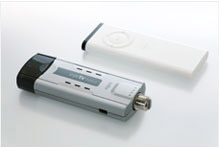
The deal of the week from 9to5mac.com/toys (feed) has to be the 1/2 off EyeTV Hybrid at Amazon.comEyeTV Hybrid allows you to watch both cable and over-the-air stations on your Mac.  With EyeTV’s award-winning software, you can Tivo directly onto your hard drive for playback later from the hard drive or from iPhones and iPods.

It lists for $230 and Amazon has it for $112.  Not inexpensive enough?  OK, J&R Computer offers the refurbished version for $69 (70% off).  Note: This is a year old product.  El Gato’s Store has this year’s for a special Macworld Price of $129.

From Amazon’s description:

Watch, Record, Edit, Enjoy
EyeTV Hybrid is powered by award-winning EyeTV 2 software:

  • Watch analog as well as free over-the-air digital TV on your Mac.
  • Browse EyeTV menus in Full Screen mode.
  • Record hours of your favorite TV shows directly on your hard drive and edit out unwanted content.
  • Find TV shows using the built-in program guide (USA only).
  • Export clips and entire episodes to your video-capable iPod.
  • Connect game consoles and enjoy virtually no latency game play.

It’s the ideal solution for someone who wants both an analog and digital TV solution for the Mac in one small USB stick.

Special Features

Two-In-One TV for Your Mac
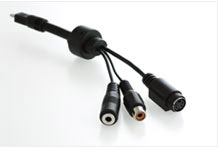
EyeTV Hybrid does the work of two EyeTV hardware products for the price of one. It delivers free over-the-air digital TV to your Mac via antenna, as well as analog TV via antenna and standard cable. In "Analog Mode", EyeTV Hybrid enables you to watch analog TV (NTSC) on your Mac via antenna and standard cable. EyeTV Hybrid also comes with a break-out cable for composite video and S-Video; use it to connect a set top box to receive premium channels, digital cable or satellite (in standard definition). Do you plan to use EyeTV Hybrid with a Dual PowerPC G5 or an Intel Core Duo processor? Then enjoy watching 720p or 1080i HDTV (MPEG-2) in addition to the other digital television standards.

  Made for the Mac
With its classic matte aluminum finish and surprisingly small size for such a versatile product, the EyeTV Hybrid is a perfect complement to the Mac. It features a USB 2.0 interface for the streaming of superior quality, uncompressed TV content to your Mac. It is USB powered and therefore requires no external power supply, and contains a full-size coaxial plug.
  Connect Game Consoles to Your Mac
Connect your game console and enjoy an excellent live play experience–EyeTV Hybrid’s uncompressed analog video signals appear on the screen with virtually no latency.
  Navigate with an Apple Remote
Tired of remote controls scattered around the living room? So are we. If your Mac came with an Apple Remote, you can use it to navigate EyeTV’s Full Screen Menu. The Full Screen Menu will certainly work with an EyeTV IR remote control as well.
  Superb Quality Digital TV Recordings
EyeTV Hybrid records digital TV in one quality setting, Lossless. The digital stream is recorded unaltered, and so you’re getting full quality digital content as encoded by the broadcaster. EyeTV supports multilingual programming and Dolby Digital sound. Analog TV can be recorded via EyeTV 2’s software encoder, and the quality depends on the Mac’s processor power.

Product Description
This El Gato EyeTV Hybrid Analog and Digital TV Tuner for Macintosh has been Factory-Refurbished to perform as new. It includes a 6 month warranty.

EyeTV Hybrid is a highly acclaimed TV tuner for the Mac. It’s ideal for anyone who wants the flexibility of a free over-the-air HDTV and analog solution together in one small USB stick. EyeTV Hybrid does the work of two EyeTV hardware products for the price of one. It delivers stunning quality free-to-air digital HDTV (ATSC) to your Mac as well as conventional analog TV via standard cable or antenna.
EyeTV Hybrid records digital TV in one quality setting, Lossless. The digital stream is recorded unaltered for full quality digital content as encoded by the broadcaster. EyeTV also supports closed captioning and Dolby Digital sound. With its classic matte aluminum finish and surprisingly small size for such a versatile product, the EyeTV Hybrid is a perfect complement to the Mac. It features a USB 2.0 interface for the streaming of superior quality, uncompressed TV content to your Mac. EyeTV Hybrid is USB powered and therefore requires no external power supply, and contains a full-size coaxial plug. Includes Software and Installation instructions

iLife '09 and iWork '09 hit Amazon

Site default logo image

9to5mac affiliate, Amazon and a few other retailers, are now carrying iLife and iWork at retail prices.  Amazon, however, offers free shipping and often doesn’t charge sales tax like the Apple Store.   If you want to get in on those amazing Faces and Places features of iPhoto, get clicking.  Links and prices below.

iLife ’09 $79
iLife ’09 Family Pack $99 (up to 5 licenses – screw you Brady Bunch!)

iWork ’09 $79
iWork ’09 Family Pack  $99

The Box Set – which includes iLife ’09, iWork ’09 and a Leopard license
Single License: $169
Family License: $229


Remember to check all of the Apple related deals at 9to5mac.com/toys (feed).


TechRestore will matte your Unibody MacBook for $199

Site default logo image

If there was ever any doubt that there is, in fact, a market for matte screen MacBooks of the 13 and 15 inch variety, Techrestore is validating.  For $199 (Apple’s $50 matte-grade doesn’t seem so steep now does it?) and a 24 hour turnaround time, they will replace your mirror screen with a matte screen.  No word yet what happens to the MacBook Logo – maybe they’ll laser etch your name in there for another Benny.

From their site:

Don’t like the shine? Think your MacBook Pro screen is like looking in a mirror? We can help!

This service is for the "Unibody" MacBook Pro systems with 15.4-inch screens that were released by Apple in late 2008. Only fully functional screens qualify for this replacement service. If your screen is defective and you need to schedule a repair, please click here.

What this service includes: Replacement of the super glossy, super shiny LCD screen on your MacBook Pro with a matte finish, non-glossy screen. We also remove the shiny glass cover on your MacBook Pro and replace it with a black bezel that surrounds the matte finish screen. The replacement screen will be brand new and include a 1-year TechRestore warranty. We will perform the service within 24-hours (M-F) of receipt of your Mac.

A Trusted Source with a Proven Track Record

Like you, thoughts of being without our Macs for an extended time period is downright scary. The good news is that we only need your Mac for 24-hours (Monday – Friday) to install a brand new LCD screen and with our nationwide overnight courier service, you’ll have your Mac back before you know it. In addition to the fast turnaround time, we provide you with our exclusive 1-year warranty on parts and labor.

Quick & Easy with no Surprises

Our flat-rate LCD screen replacement includes everything you need to get your trusty Mac back up and running as quickly as possible. Just add this item to your shopping cart and complete your order online, or call 1-888-64-Restore (888-647-3786) to schedule your repair via phone. Choose from our famous Overnight Door-to-Door pickup service, Local Drop-Off at any FedEx location near you or send your laptop to us on your own and get Free return shipping. During the repair process, you’ll be provided with email updates and you can check your repair status online at anytime.

Choose from four shipping options for your repair:

ship options


1. Door-to-Door Overnight Pickup for $99
2. Local FedEx Drop-Off with Overnight Delivery for $49
3. Self-Ship with Return Overnight Delivery for $29
4. Self-Ship with Return Ground (3-5 Day M-F) Delivery: Free

Three options include return Overnight shipping back to your location when your repair is completed. Click here for an illustrated view of your shipping options. The Free Ground return option is valid with any approved repair.

Customers outside the U.S., in Canada, Hawaii & Alaska select the Self-Ship shipping option below. An additional charge of $20 will be added to your order for return overnight shipping.

Don’t take our word for it – take a gander at what our customers have to say about our services.

More Questions? Give us a call at 1-888-64-Restore and speak to an actual human being or contact us via email.


Macworld new products…Toast, Skype, Picasa…

Site default logo image

9to5mac.com/toys is running down the Macworld Hardware and software releases today.  Some standouts:

Toast 10 was released at Macworld.  You can get it at the Roxio Store for $79 (after $20 mail in rebate).  Or Amazon has it for $85 with no rebate hassles.

  • Roxio Toast 10 Titanium is the easiest and fastest way to burn your music, video, photo and data files on to CD, DVD or Blu-ray Disc for both Mac and PC
  • Locate, convert and burn your favorite shows, music and data to CD, DVD and Blu-ray discs, or sync to your iPhone, iPod and other mobile devices
  • Save and convert video from many popular video sharing websites
  • Automatically capture and tag streaming audio from the Internet right into your iTunes library
  • Roxio Toast 10 Titanium is the essential complement to MacOS X and iLife for disc burning and much more

Picassa for Mac and Skype 2.8Beta are, of course, free.  We are waiting (OMG don’t deny us APPLE!) for Slingplayer on iPhone

On the hardware front, get a MacBook Air from Apple for $999.

Also, OWC Offers the Newer Technologies new Voyager Q (for quad interface) eSATA, /Firewire400-800/USB SATA Hard Drive Adapter (picture below).  If you only need a USB model, Amazon has the Thermaltake for $32 (60% off).

Need a 1.5TB SATA HArd Drive to go in there?  Amazon offers a Seagate for 140 plus $8 shipping.  Or get them both for $172 (see combination deals).  Not too shabby.

Show's over…notes on Macworld 2009

Site default logo image

Frankly we like to see a little more hardware at events but the 17 inch MacBook was pretty close to our description last week.  The $50 matte version should make people both happy and sad – as wil lthe internal long life battery.  We’d be lying if we said we didn’t want one…with 8Gb (will we be able to up our smaller MacBooks to 8Gb)?   No Mini or iMac however was rough.  We have a feeling they are coming.

iLife and iWork are both looking pretty exciting.   iWork.com is pretty close to what we envisaged.  There were lots of gray areas where we missed some stuff but we think we got the major gist of it across.  GarageBand learn-to-play is exactly what we had heard.  And the Magic hint?  Cool transitions in iWork.  They are Fun!

iTunes.  The end of the DRM era.  Now we don’t have to visit Amazon (but probably will continue for the dealz).  Amazon still beats Apple on price but iTunes is more convenient.

Apple Stock isn’t really reacting (update – whoops – it is tanking).

Overall however, we were left….wanting…although the Macrumorslive (best feed out there)  getting hacked was entertaining.  And obviously we have an Apple Mac hardware event coming up.

We’ll put up Apple’s videos as they become available.  What did you think?


Upgrade your MacBook Air to 128GB SSD for $389

Site default logo image

OK, OK.. so we aren’t exactly telling you to go put a cheap SSD in your high end MacBook Air…but well, we are just leaving it out there.  Poorly-branded Low Cost PATA SSDs from RunCore are now shipping in the following varieties:

The unashamedly named 1.8-inch Low Cost Zif PATA SSDs can be sealed in a corrugated box and shipped off to your place of residence for $69.99, $119.99, $199.99 or $389.99 depending on size (16/32/64/128GB, respectively).

This "low cost" upgrade promises to boost computer performance vs. the traditional 1.8” HDD by more than 400% with read/write speeds up to 75/40MB/sec.


Yeah, the speeds are good-not-great and the quality takes second fiddle to cost.  But someone said something about there being a recession on and why not choose the place where you store your important data to cut costs?

via Engadget

Apple updates Mail.app and MobileMe

Site default logo image

Apple today released some server side updates to the MobileMe platform as well as a 10.5.6 Mail.app fix.  The MobileMe Serverside updates include:

Contacts

  • Searching for contacts in a large address book (more than 1000 contacts) is faster and no longer results in a "slow script" browser alert message

  • Exported vCards with multi-line addresses or notes can now be imported into the Mac OS X Address Book

  • Adds keyboard shortcut to create a new contact

  • Additional formatting options for European phone numbers are now supported

Calendar

  • Adds sorting of To Do items by calendar or title

  • Long event titles now appear properly in Month view

Gallery

  • Updated "Tell a friend" email message

  • Resolves an issue related to setting a new album’s key photo

iDisk

  • Files and folder names that contain Japanese language characters now display properly on the web

Account

  • Hosting of iWeb pages can be configured for personal domains ending in ".eu", ".ax", ".tl", ".gw", ".kp", ".rs" or ".su"

  • Family Member accounts now display the accurate renewal/expiration date

  • Resolves an issue that prevented some members from using an activation key (MobileMe box) to renew a subscription

Login

  • "Keep me logged in for two weeks" checkbox now works reliably

On the Mail.app update, some users may experience issues with Mail after updating to 10.5.6.  If so, run Software Update and you should see the fix.  Otherwise, you can download it directly from Apple.

Buying a NetBook to run Leopard? Here's a compatibility list.

Site default logo image

Buying a Netbook to run MacOS for Christmas?  Here’s a list of compatibilities from Boingboing.  As we’ve stated before, the MSI Wind takes the crown for easiest hackintosh. (instructions).  More instructions below.

Oh and here’s Leopard running on the smallest full fledged PC, and OQO.

How To Guides:
Running Mac OS X on a Netbook: Guide, Tips, Tutorial, Walkthrough [Ditii]
Run Mac OS X on an Eee PC [Wired]
Installing OSX on Eee 1000h [Wikidot]
OS X For the Eee PC 901 and 1000H [Mac Eee]
Install OS X on the MSI Wind [Make]
Guide to Installing OS X on a Lenovo Ideapad s10 [Netbook Tech]
OSX on a Samsung NC10 [Wired]

10.5.6 here…snappieness

Site default logo image

10.5.6 is out, go grab it from Software update (377mb here!) or via the standalone installer.

Here are the details or check below.  It looks like there are many performance improvements in this one!  Yes, we are feeling the snappieness™, are you?

Summary

The Mac OS X 10.5.6 Update is recommended for Mac OS X 10.5 Leopard versions 10.5, 10.5.1, 10.5.2, 10.5.3, 10.5.4, and 10.5.5. It includes general operating system fixes that enhance the stability, compatibility and security of your Mac.

Installation recommendations

  • Back up your computer prior to installing any updates.
  • Quit any open applications before starting the installation.
  • Do not interrupt the installation process.
  • You may experience unexpected results if you have third-party system software modifications installed, or if you have modified the operating system through other means, or if you have moved Apple applications from their default locations (the /Applications or /Applications/Utilities folders). (This does not apply to normal application software installation.)

Installation options

Automatic Software Update

Choose Software Update from the Apple menu to automatically check for the latest Apple software.

Standalone installer

Apple Downloads offers a standalone installer that you can use instead, if you wish.

If issues occur during installation or if Software Update unexpectedly quits, please visit this article.

Products Affected

Mail, Mac OS X 10.5, iCal 3.x, MobileMe Sync, iChat, AirPort, Safari

What’s new in this update?


Address Book

  • Improves reliability of Address Book syncing with iPhone and other devices and applications.

AirPort

  • Improves the reliability of AirPort connections, including improvements when roaming in large wireless networks with an Intel-based Mac.

Client management

  • Improves reliability of synchronizing files on a portable home directory.
  • Fixes an issue in Mac OS X 10.5.4 and 10.5.5 in which managed users may not see printers that use the Generic PPD.
  • Client computers that use UUID-based ByHost preferences now respect managed Screen Saver settings.

iChat

  • Addresses an issue that could cause an encryption alert to appear in the chat window.
  • Setting your iChat status to "invisible" via AppleScript no longer logs you out of iChat.
  • Resolves an issue in which pasting text from a Microsoft Office document could insert an image rather than text.

Graphics

  • Includes general improvements to gaming performance.
  • Includes graphics improvements for iChat, Cover Flow, Aperture, and iTunes.
  • Includes fixes for possible graphics distortion issues with certain ATI graphics cards.

Mail

  • Includes overall performance and reliability fixes.
  • Improves Connection Doctor accuracy.
  • Fixes an issue that could cause messages identified as junk to remain in the inbox.
  • Fixes an issue that could cause Mail to append a character to the file extension of an attachment.
  • Addresses an issue that could prevent Mail from quitting.
  • Improves reliability when printing PDF attachments.

MobileMe

  • Contacts, calendars, and bookmarks on a Mac automatically sync within a minute of the change being made on the computer, another device, or the web at me.com.

Networking

  • Improves Apple File Service performance, especially when using a home directory hosted on an AFP server. Important: If you are using Mac OS X 10.5.6 (client) to connect to a Mac OS X Server 10.4-based server, it is strongly recommended that you update the server to Mac OS X Server version 10.4.11.
  • Improves the performance and reliability of TCP connections.
  • Improves reliability and performance for AT&T 3G cards.
  • Updates the ssh Terminal command for compatibility with more ssh servers.

Printing

  • Improves printing for the Adobe CS3 application suite.
  • Improves printing for USB-based Brother and Canon printers.

Parental Controls

  • Addresses an issue in which a parentally-controlled account could be unable to access the iTunes Store.
  • Includes general fixes for time limits.
  • Resolves an issue that prevented adding allowed websites from Safari via drag and drop.

Time Machine

  • Fixes issues that could cause Time Machine to state the backup volume could not be found.
  • Improves Time Machine reliability with Time Capsule.

Safari

  • Improves compatibility with web proxy servers.


General

  • Includes Mac OS X security improvements. See this website for more information.
  • Addresses inaccuracies with Calculator when the Mac OS X language is set to German or Swiss German.
  • Improves the performance and reliability of Chess.
  • Improves DVD Player performance and reliability.
  • Performance improvements for iCal are included.
  • Fixes an issue when running the New iCal Events Automator action as an applet.
  • Adds a Trackpad System Preference pane for portable Macs.
  • Improves compatibility with smart cards such as the U.S. Department of Defense Common Access Card.
  • Updates time zone data and Daylight Saving Time rules for several countries.


Putting Mac OSX on a Netbook

Site default logo image

Wired’s Gadget Lab has a tutorial on putting MacOSX on an MSI Wind Netbook.  We’re in luv with Leopard running on our 1GB RAM/8GB Flash HP Mini 1000($359).  With under 5GB used for the OS and applications, it gives us about 3Gb to play with.  We’re hoping to have an Apple product at Macworld, but until then, this will have to do.

http://c.brightcove.com/services/viewer/federated_f9/1813626064?isVid=1&publisherID=1564549380

Slingbox for Mac updated to 1.0.7

Site default logo image

Slingplayer for Mac version 1.0.7 is out – go get it.  New features include:

  • Improved video quality
  • Online Slingbox registration added; plus users can store their Slingbox ID online for easy access
  • Improved Slingbox Setup Assistant: New setup and configuration screens are streamlined and easier to use
  • Users can rapidly cycle between Fullscreen (4:3), Widescreen (16:9), Letterbox, Windowbox, Pillarbox modes
  • Show / Hide player controls with one-click toggle

The question on everyone’s minds is: When is the iPhone/iPod touch version coming out?

Polk Audio Sound bar 60% off – $399

Site default logo image

OK, here’s the deal of the week (year?) from 9to5mac.com/toysPolk Audio’s Sound bar is $600 off at Amazon for like the next 20 minutes or something.  We’ve had our eye on this for awhile and were considering paying the $1000 normal price.  Nope, $399  Merry Christmas!  (only in Titanium, black is still $1000 for some reason – take that Black Macbook!) (Thanks Marty!!)

From the Manufacturer:


SurroundBar® Series

Five Channels. One Speaker. Zero Clutter.

Select a model below:

The SurroundBar 360º DVD Theater is the best performing single-speaker surround sound theater system on the market.

Based on our highly acclaimed original SurroundBar, the SurroundBar 360° DVD Theater adds all the electronics needed along with patented* SDA® Surround Digital Technology, to deliver sensational surround sound.

SurroundBar 50 is the best performing passive all-in-one surround speaker requiring no rear speakers.

The new SurroundBar 50 is the larger version of SurroundBar featuring Polk’s exclusive SDA Surround Technology. SurroundBar 50 adds SDA Surround Technology to the front channels, plus cabinet porting and neodymium motor assemblies resulting in an even bigger, even more dynamic sound.

The original SurroundBar (42" Model) from Polk Audio is designed to complete your High Definition TV experience.

The SurroundBar the perfect match for flat-panel and shallow screen TVs, and fits seamlessly with 42" widescreen TVs. It works with virtually any surround sound receiver in any room to bring you the thrills of 5 channel surround sound from a single speaker.

Polk’s SDA® Surround Sound Technology

Here’s what sets SurroundBar speakers apart from the crowd: They do not depend on room acoustics or perfect placement to achieve the desired effect thanks to patented SDA Surround Technology.

SDA stands for Stereo Dimensional Array, a patented Polk Audio exclusive*. Matthew Polk describes SDA Surround Technology as "a mixture of acoustical engineering, psychoacoustic principles and a little magic." Read Matt Polk’s SDA Whitepaper for an even more in depth explanation on SDA Surround Technology.

Three models, thousands of uses.

There are three SurroundBar models to fit almost every application. Regardless of which SurroundBar you choose, be prepared to experience full-fledged 5-channel surround sound from one speaker. If you already have a receiver and DVD player, or have your heart set on one, there are two passive SurroundBar models to meet your needs. Both are available in either black or titanium. Just add a Digital Surround Receiver, a Subwoofer, your TV and you’re ready to go!

If you want an easy all-in-one integrated system, and don’t plan on using or don’t have an existing amplifier, SurroundBar 360º DVD Theater is an all-inclusive Home Theater system that includes a DVD player, AM/FM tuner with integrated amplifier, and universal remote control.

The SurroundBar 360° DVD Theater includes an amplifier and built-in DVD player with HDMI output for 1080p resolution to your high-definition TV.

Stunning Simplicity

Installation versatility is designed in. You can wall mount the SurroundBar right below your flat-panel TV. Or use the included cradle on a TV stand, a shelf or for set-top placement. You will experience all the thrills of surround sound…with none of the hassles of running rear speakers.

Look Ma, no rear wires!

Don’t hassle with running rear speaker wire all over the place, with the SurroundBar you don’t need rear speakers so there are no ugly wires lining your floors and walls.


Complete Your Home Theater with One Speaker

The Polk Audio SurroundBar is designed to complete your High Definition TV experience. It’s the perfect match for flat-panel and shallow screen TVs. And it works with any surround sound receiver in any room to bring you the thrills of 5 channel surround sound from a single speaker. The SurroundBar’s unobtrusive design and color-coded hookup configuration make it a welcome addition for anyone who wants the thrilling benefits of 5.1 surround sound and none of the hassles.


Patented SDA Surround Technology Delivers a Full Room of Sound

Get professional surround-sound from a single speaker bar, regardless of your room’s layout

Our patented SDA Surround technology means there’s no need to install rear speakers. SDA Surround creates a completely immersive 5 channel surround experience, as if there were dozens of speakers all around you, all from a single, 43-inch long cabinet. No rear speakers are required. This technology is based on fundamental research into the way our ears process sound and perceive the direction of sounds.

The SurroundBar works in any room; SDA Surround is not dependent on your room’s walls to produce the surround effect. It uses a patented combination of signal processing and acoustical geometry that complements the spacing between your ears to produce surround sound without the need for rear mounted speakers or special room characteristics.

Some other single speaker surround solutions bounce sound off of walls and require symmetrical rooms and un-cluttered side and rear walls to create a surround effect. Since the SurroundBar works directly with the hearing mechanism and requires no special room characteristics, it can deliver a room-filling 5 channel surround experience in nearly any location.

SDA Surround technology relies on a mixture of acoustical engineering, psychoacoustic principles and a little magic. The original SDA technology, developed in the early 1980’s, was a two-channel technology intended to overcome a fundamental problem of stereo reproduction. SDA Surround utilizes the same basic principles but expands the technology to allow for reproduction of surround sound without the need for rear speakers. This technology requires no reflecting surfaces or special speaker placement and can be connected to any surround sound receiver. It will work well in almost any room of any size or shape and will deliver a surround sound experience for almost all listener locations. Because of the psychoacoustic principles on which the technology is based, SDA Surround achieves exceptional continuity side-to-side and front-to-back so that sounds closely follow the action suggested on screen. It also delivers consistent soundstage depth, even directly to the sides, a quality only achieved by the best conventional hard wired systems. This quality makes SDA Surround seem more like having dozens of speakers around you providing smoother and more immersive surround sound.

Innovative Design with Simple Installation

Seven 3 ½" Dynamic Balance Drivers and three ¾" Dynamic Balance Dome Tweeters deliver clear, natural midrange, high frequencies and lifelike imaging. An aluminum-extruded enclosure eliminates cabinet resonance. The anti-diffraction grille and bezel help create open, spacious imaging. And it’s magnetically shielded, of course, for safe placement on or near TVs.

Installation versatility is designed in. You can wall mount the SurroundBar right below your flat-panel TV. Or use the included cradle on a TV stand, a shelf or for set-top placement. The Polk Audio SurroundBar is a welcome addition for anyone who wants all the thrills of surround sound…but none of the hassles or clutter.


Technical Specifications

  • Driver Complement: 9 x 3.5" composite cones
  • Magnet Structure: Neodymium drivers
  • Tweeters: 3 x 3/4" silk dome
  • Nominal Impedance: 8 ohms
  • Recommended Amplification: 150 watts/channel
  • Frequency Response: 80 Hz – 23 KHz
  • Efficiency: 90 dB
  • Bass Technology: Dual front ports
  • Dimensions (W x H x D): 51" x 4.5" x 5.1"
  • Weight: 15 lbs

    Product Description
    The Polk Audio SurroundBar 50 is 51" wide to offer an enveloping surround sound experience to anyone who wants better sound from their TV but does not want to install rear-mounted speakers. It delivers surround sound from a single, multi-driver loudspeaker located under or over the TV screen using SDA Surround technology. SDA Surround technology uses a patented combination of signal processing and acoustical geometry that complements the spacing between your ears to produce surround sound without the need for rear mounted speakers. It can deliver a room-filling surround experience in nearly any location in almost any type of room with no special room characteristics required. The SurroundBar 50 is sized to match the width of 50" Plasma and LCD TVs. In addition to using SDA Surround technology on the surround channels, the SurroundBar 50 adds SDA Surround image enhancing technology on the front Left & Right channels to further enhance the surround experience as well as produce a huge stereo sound field from a two-channel source. New drivers and crossover design along with a larger enclosure produce far better bass performance than the original SurroundBar. The aluminum enclosure houses nine mid/bass drivers with Neodymium magnets, three dome tweeters and a four-PC board crossover with over 60 components.


http://rcm.amazon.com/e/cm?t=thepartim-20&o=1&p=8&l=as1&asins=B000XT3LDG&md=10FE9736YVPPT7A0FBG2&fc1=000000&IS2=1&lt1=_blank&m=amazon&lc1=0000FF&bc1=000000&bg1=FFFFFF&f=ifr

Addonics USB to Ethernet Adapter

Site default logo image

Engadget points us to a great little tool that just came out of the gate.  Addonics NAS (network attached storage) adapter is a little block with Gigabit Ethernet in and USB out. This basically allows any and all of your USB HDD’s and USB Sticks a free (or $55 retail) ride on your network.  It has SMB and FTP so it works on Mac but AFP would be a bit better.   Maybe in a firmware update?

We’ll put it in the 9to5mac.com/toys as soon as it hits stores.

Great idea!

We’d love to see a wireless version too!

Best of 9to5mac.com Toys

Site default logo image

We’re seeing a strong growth in our 9to5mac.com/Toys section which means we are saving our readers some money on some exciting products from a number of vendors.  Here’s a collection of fun Apple related items from Amazon that you might have missed over the past few days.  These offers are still good:

http://rcm.amazon.com/e/cm?t=thepartim-20&o=1&p=8&l=as1&asins=B000ZPOPIS&md=10FE9736YVPPT7A0FBG2&fc1=000000&IS2=1&lt1=_blank&m=amazon&lc1=0000FF&bc1=FFFFFF&bg1=FFFFFF&f=ifr http://rcm.amazon.com/e/cm?t=thepartim-20&o=1&p=8&l=as1&asins=B000W9DO7U&md=10FE9736YVPPT7A0FBG2&fc1=000000&IS2=1&lt1=_blank&m=amazon&lc1=0000FF&bc1=FFFFFF&bg1=FFFFFF&f=ifr http://rcm.amazon.com/e/cm?t=thepartim-20&o=1&p=8&l=as1&asins=B001CBKJGG&md=10FE9736YVPPT7A0FBG2&fc1=000000&IS2=1&lt1=_blank&m=amazon&lc1=0000FF&bc1=FFFFFF&bg1=FFFFFF&f=ifr http://rcm.amazon.com/e/cm?t=thepartim-20&o=1&p=8&l=as1&asins=B0019HDAP0&md=10FE9736YVPPT7A0FBG2&fc1=000000&IS2=1&lt1=_blank&m=amazon&lc1=0000FF&bc1=FFFFFF&bg1=FFFFFF&f=ifr http://rcm.amazon.com/e/cm?t=thepartim-20&o=1&p=8&l=as1&asins=B000NWVAFO&md=10FE9736YVPPT7A0FBG2&fc1=000000&IS2=1&lt1=_blank&m=amazon&lc1=0000FF&bc1=FFFFFF&bg1=FFFFFF&f=ifr
http://rcm.amazon.com/e/cm?t=thepartim-20&o=1&p=8&l=as1&asins=B0015DNIKU&md=10FE9736YVPPT7A0FBG2&fc1=000000&IS2=1&lt1=_blank&m=amazon&lc1=0000FF&bc1=FFFFFF&bg1=FFFFFF&f=ifr http://rcm.amazon.com/e/cm?t=thepartim-20&o=1&p=8&l=as1&asins=B0016BCZWS&md=10FE9736YVPPT7A0FBG2&fc1=000000&IS2=1&lt1=_blank&m=amazon&lc1=0000FF&bc1=FFFFFF&bg1=FFFFFF&f=ifr http://rcm.amazon.com/e/cm?t=thepartim-20&o=1&p=8&l=as1&asins=B0013FJBX8&md=10FE9736YVPPT7A0FBG2&fc1=000000&IS2=1&lt1=_blank&m=amazon&lc1=0000FF&bc1=FFFFFF&bg1=FFFFFF&f=ifr http://rcm.amazon.com/e/cm?t=thepartim-20&o=1&p=8&l=as1&asins=B001D7REJ4&md=10FE9736YVPPT7A0FBG2&fc1=000000&IS2=1&lt1=_blank&m=amazon&lc1=0000FF&bc1=FFFFFF&bg1=FFFFFF&f=ifr http://rcm.amazon.com/e/cm?t=thepartim-20&o=1&p=8&l=as1&asins=B001F9LY14&md=10FE9736YVPPT7A0FBG2&fc1=000000&IS2=1&lt1=_blank&m=amazon&lc1=0000FF&bc1=FFFFFF&bg1=FFFFFF&f=ifr

Remember you can add/comments to Toys posts and steer your fellow reader in a better direction if need be.  If you have any good or bad experiences with these products, also, please feel free to comment.

To get 9to5mac.com/Toys in your feedreader, simply add this link:

http://9to5mac.com/toys/feed


Boxee gets Netflix. Apple warming up lawyers

Site default logo image

Built on the back of the XBMC/Plex.app’s GPL’d hard work, Boxee is now rattling Apple’s cage just a bit harder.  Today they announced support for Netflix download service on all platforms except AppleTV (still working on that one).  They also added some other content sources:

  • a new Hulu – looks more like hulu.com, enables you to login (so you can get your Hulu Queue), works faster, and playback should be greatly improved on Apple TV
  • a new YouTube – new look, as well as higher quality video playback. some of these YouTube clips look pretty good on your 46” LCD
  • a new CNN, Flickr, Picasa and Apple Movie Trailers – we’ve re-written all of these plug-ins to work faster and look better
  • Boston Globe’s The Big Picture – it’s a great photo-blog, which we really like, and thought could be pretty cool in a 10-foot experience. if you’ll like it we could bring much more of these type of services (let us know!)
  • integration with MTV Music – when you click on an album you’ll see a new option to let you watch music videos of the artist. check it out. MTV said they can give us higher quality videos, and we have a few more ideas for providing a great music video experience on boxee
  • theWB – on our quest to bring more TV content to boxee theWB is the latest addition. it means shows like Buffy, Babylon5, Firefly, One Tree Hill and The O.C. are now available on boxee

on the bug fixing/polish front:

  • support for skip forward, rewind in Hulu, CBS, etc. – this is a big one.. should work now. the code behind it is sooo ugly that yuvalt had to chew on anti-nausea tablets while writing it
  • improved streaming of podcast, trailers and youtube videos – we rewrote the buffering/caching mechanism. Skip and rewind within video streams is now much better
  • more boxee less crashee – it’s still alpha, and it will crash from time to time (we promise), but this version is supposed to be more stable. we are trying to weed out those nasty bugs – help us out by submitting bugs to support@boxee.tv or post in our forum
  • faster scanning of local/network media – your movies, tv shows and albums should be identified faster. if you have a huge music collection then you could still cook a 7-course dinner, wash the dishes and read a telephone book before it will be done, but it’s greatly improved..
  • new on-screen keyboard – as dave described when he reported the bug “typing a URL with our on-screen keyboard is a once in a lifetime experience. you do it once, and never want to do it again”. so we made it a bit better
  • faster loading of the movies/music screen in case you have hundreds or thousands of albums..
  • fixes and new look for to the lyrics and subtitles features – the new auto-scroll of the lyrics is arbitrary… but sometimes it works pretty well. fooled me the first time I tried it

Google Earth browser plugin now available for Safari and Firefox on Mac

Site default logo image

You’ll want to be getting this…

What is the Google Earth API?

The Google Earth Plug-in and its JavaScript API let you embed Google Earth, a true 3D digital globe, into your web pages. Using the API you can draw markers and lines, drape images over the terrain, add 3D models, or load KML files, allowing you to build sophisticated 3D map applications. If you have an existing Maps API site, you can 3D-enable your page with as little as one line of code.

New! The Earth Browser Plug-in is now available on Mac OS X (Intel and PowerPC).

Note: The Google Earth API and Maps API Terms of Service have been recently updated.

The Google Earth API is a free beta service, available for any web site that is free to consumers. Please see the terms of use for more information.