
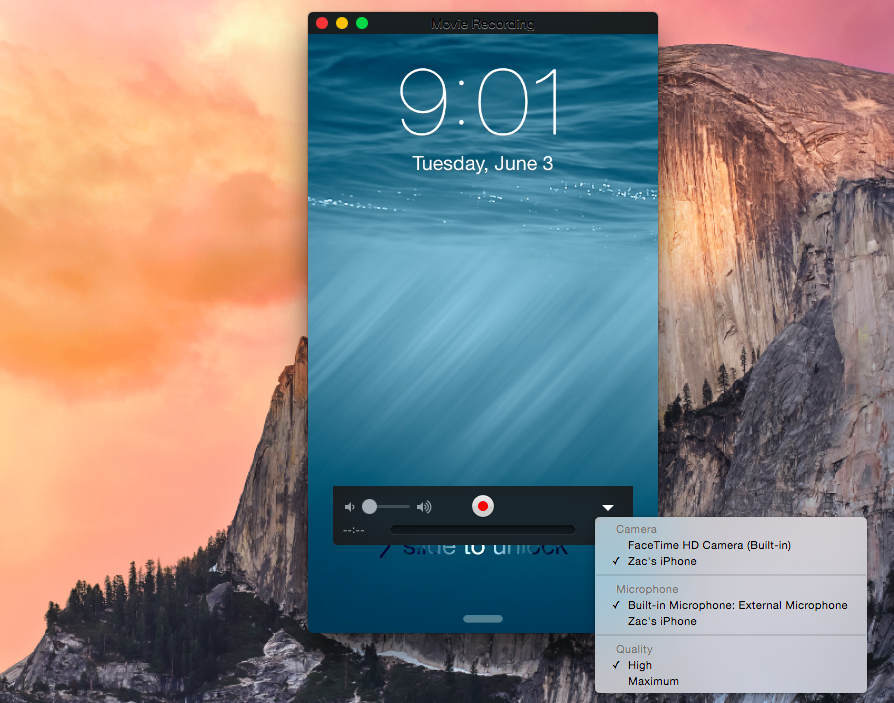
Apple has added a handy feature into OS X to easily capture the screen of an iPad or iPhone on the Mac itself. Apple positions the feature as a way to help developers quickly make app previews, which Apple introduced as part of iOS 8’s improvements to the App Store, but there is no reason why this couldn’t be used by others for different purposes.
When plugging an iPad or iPhone running iOS 8 into a Mac running OS X Yosemite via USB, the iOS device now shows up as a standard camera input. This means any video app can be used to record the screen of the iOS device without the need for additional hardware.
Although Apple is targeting the feature at developers in its documentation for making app previews, it is not limited to being a developer-only feature.
Up to now, developers have relied on hacky solutions to capture video of their apps. This generally involves recording an AirPlay Mirroring stream or using the Apple HDMI cable in combination with a dedicated capture device.
This new feature of OS X Yosemite dramatically simplifies the process, however. Aside from app previews, developers could also use the feature to make demo videos for their own websites. App reviewers could take advantage of the addition to more easily create video reviews, for example. Individuals may also use the feature to create gameplay videos and such, which are becoming increasingly popular on YouTube and other video sharing sites.
In testing, the recording is currently extremely laggy. It is reasonable to expect video quality will improve significantly as iOS 8 and OS X Yosemite approach public release.



FTC: We use income earning auto affiliate links. More.




Nice insight. Thanks. Also great for instructions on using Apps, as Apps are getting more complex.
iOS gamers will use it to record and share their gameplay :)
How do you launch it once your iDevice is connected?
Launch Quicktime and go to ‘File’ > ‘New Movie Recording’, then go to the arrow to the right of the record button and choose your device as the source.
it jsut has a black screen for me when i do that
fantastic,…..This is the best Apple revealing so far…
Any video on this working? Wondering about other uses and I can’t wrap my head around it.
“developers have relied on hacky solutions” – uhm, no, not really “hacky”. Reflector (reflectorapp.com) is a simple and fantastic app to capture an iOS screen on Mac or Windows. AirServer is another option.
pretty cool feature. Can’t wait to try it out.
Every feature that Apple did not talk about in their keynote is under NDA. Please so developers and Apple some respect and don’t abuse your “developer” membership.
AFAIK, devs on twitter have said the NDA’s have been abolished this year.
Those developers don’t have any clue what they are talking about!
Splashtop introduced mirroring360 app to airplay mirroring your iOS screen to PC/MAC….free trial available, and full version is only $6.99 (promotion right now). http://www.mirroring360.com
As capturing the mobile device screen becomes a commodity, the next challenge is to reduce the time and complexity of video creation. I’m on a team working to lower the bar by helping people structure their content as they capture it…instead of capturing loads of footage and then chopping it up to make something. If you’re interested in what we’re building, check out http://appshow.techsmith.com
This feature works fine now with the release versions of OS X Yosemite and iOS 8.1.
That is one marvelous job from apple. Integration between apple devices is the key feature from apple.
Works beautifully. Thanks for this.
a) Connect your iPhone using a USB cable
b) Open Quicktime and select – New Movie Recording
c) Select Camera – Your iPhone
d) Select Microphone – Your iPhone (for audio)
e) Start recording.
At the end of it, you get a nice video file.
At laaaaaaast we have this!