iOS devices refer to any of Apple’s hardware that runs the iOS mobile operating system which include iPhones, iPads, and iPods. Historically, Apple releases a new iOS version once a year, the current version is iOS 10. Here is the complete list of iOS 10 compatible devices.
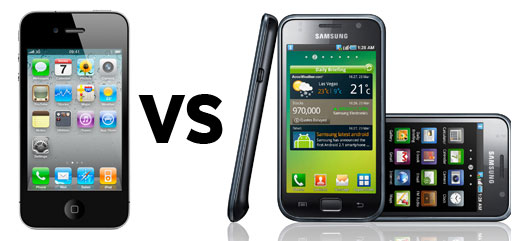
Samsung made waves last month seeking to ban sales of Apple’s mobile products with 3G capabilities in The Netherlands, meaning iPhones and 3G iPads. The Hague court was anything but impressed and today denied Samsung’s request. The news came as another blow to the South Korean consumer electronics conglomerate, right after the U.S. District Judge Lucy Koh yesterday ruled in a preliminary hearing that Samsung’s products infringe on Apple’s patents. According to a Reutersreport, the Dutch court also rejected Apple’s counterclaims in the case:
The Dutch court found that Samsung’s 3G patents were part of essential standards which should be open to license under FRAND and that the two companies should negotiate an agreement.
FRAND, an acronym for “fair, reasonable, and non-discriminatory terms” in patent law, assures no company takes unfair advantage in the marketplace by patenting widespread technologies that have become part of international standards. It exists to prevent patent holders from leveraging FRAND patents against rivals.
We told you a couple weeks back about Apple’s Reuse and Recycle program offering up to $200 in exchange for your iPhone 4. We also reported that the devices were going for even more on eBay and Gazelle. However, with today’s release of the iPhone 4S, it looks like those numbers are quickly starting to decrease.
Gazelle has dropped their estimate down from approximately $250 to less than $200 for a mint 32GB model on AT&T (approximately $170 for Verizon), and NextWorth is still offering up $215 ($162 on Verizon) for the same model in perfect condition, but any cracks or bad scratches will leave you with around $115. Apple’s program still provides a $200 estimate for the same model (estimate courtesy of PowerON), but we expect that price to follow suit with the other services shortly. Of course the 16GB model is going for a lot less, approximately $170 on Gazelle (AT&T), $135 on Verizon (even less on NextWorth). Expand Expanding Close
In addition to the Siri feature which has gotten a lot of air time, the iPhone 4S also boasts a redesigned camera system stemming from an eight-megapixel backlit CMOS sensor and all-new optics courtesy of the wider aperture and a fifth lens. In fact, the back camera is one of the prowess of Apple’s new handset, which went on sale today in the United States, United Kingdom, Australia, Canada, France, Germany and Japan. In addition to shooting full HD video at thirty frames per second, the camera supports the image stabilizing feature to reduce shaky footage often associated with phone cameras.
The difference compared to the iPhone 4 which lacks this feature is quite dramatic, as seen in the above clip. Also note the enhanced latitude (and disregard the flickering of neon lights, the video was captured in Europe). Avid photography fans who happen to capture clips on the go frequently will admittedly appreciate image stabilization and full HD video capture. Certainly some of them will upgrade to the iPhone 4S on the merits of these major improvements in the camera system alone, we imagine.
We stumbled across this video on YouTube… and Siri clearly should not yet be used by non-native speakers of the United States, United Kingdom, Australia, France, or Germany. As you can see in the video, the speaker is talking in English but with a foreign accent, and Siri does not understand one command. “Read dick”.
Update: Australian accent tested by Gizmodo AU below:
The iPhone 4S has sold out completely across AT&T, Verizon, and Sprint reportsBusinessweek. While you can still get your order in, delivery in AT&T’s case has been pushed back 3 -4 weeks. Shipping should be similar for Verizon and Sprint too, but they aren’t providing a time frame on their website.
Apple announced it had sold 1 million iPhone 4Ss across 100 world carriers in 24 hours in contrast with 600,000 across the five launch countries in 2010 with the iPhone 4.
Tomorrow the iPhone 4S goes on sale, and stores should have an extra stock of the iPhone 4S for those who haven’t pre-ordered yet. To get your hands on those, you’ll probably have to hop in line pretty early. Expand Expanding Close
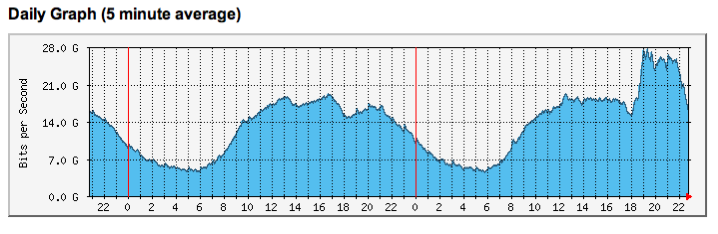
As many of you know, Apple’s servers took a hard hit yesterday as everyone began upgrading to iOS 5, downloading OS X 10.7.2, and the various other updates to apps yesterday. Some users were unable to actually activate iOS 5 for some time. This morning, however, everything seems to be in the clear in terms of upgrading to iOS 5, and won’t leave your device unusable, so it is all clear to download.
Was all of this really all Apple’s fault? Perhaps some ISPs are also to blame. As you can imagine, a sizable amount of people were downloading 400MB+ files, something that would cause a sizable spike in usage. Check out the graph from one ISP below.
There are a few reports out there that there are still issues with iCloud email not connecting to Apple’s servers. Let us know what you’re seeing in the comments. Apple’s Support page is telling us that some users are currently seeing Mail and Notes issues. Check it out after the break:
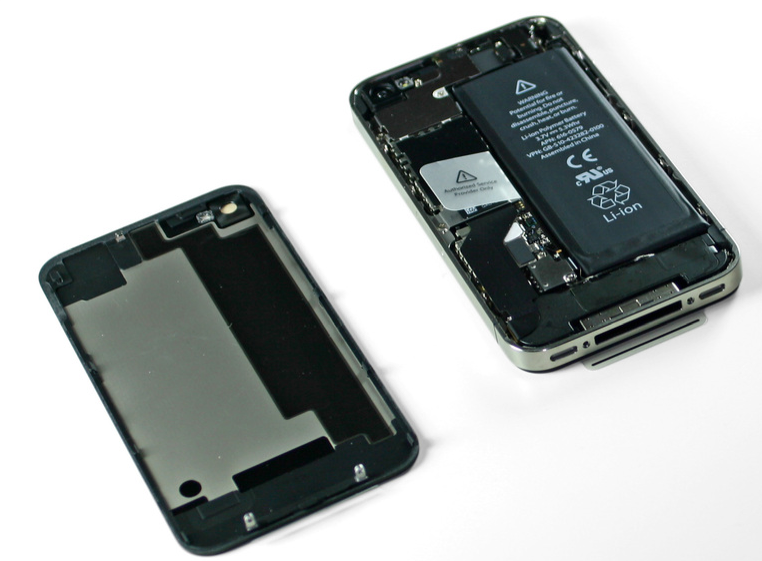
The extra .05W/hrs battery increases talk time by an hour but for some reason (likely additional background processes with notifications), standby time is reduced from 300 to 200 hrs
The A5 processor is rated at 1GHz (like iPad obv.) but is underclocked for battery saving purposes. That doesn’t mean an update (or hack) in the future could boost speed to iPad levels.
It looks like there really is only 512MB of RAM. AnandTech says:
The second confirmation iFixit’s teardown gives us is the size of the A5’s on-package memory: 512MB. A quick look at the image above yields the Samsung part number: K3PE4E400B-XGC1. Each highlighted E4 refers to a separate 2Gb LPDDR2 die. The A5 features a dual-channel LPDDR2 memory interface, thus requiring two 32-bit die to fully populate both channels. The final two characters in the part number (C1) refer to the DRAM’s clock period, in this case 2.5ns which indicates a 400MHz clock frequency (F=1/T). My assumption here is Samsung’s part number is actually referring to clock frequency and not data rate, implying there are a pair of LPDDR2-800 die in the PoP stack. It’s not entirely uncommon to run memory at speeds lower than they are rated for, a practice we’ve seen in graphics memory in particular for as long as I can remember, so I wouldn’t take this as proof that Apple is running at full LPDDR2-800 speeds.
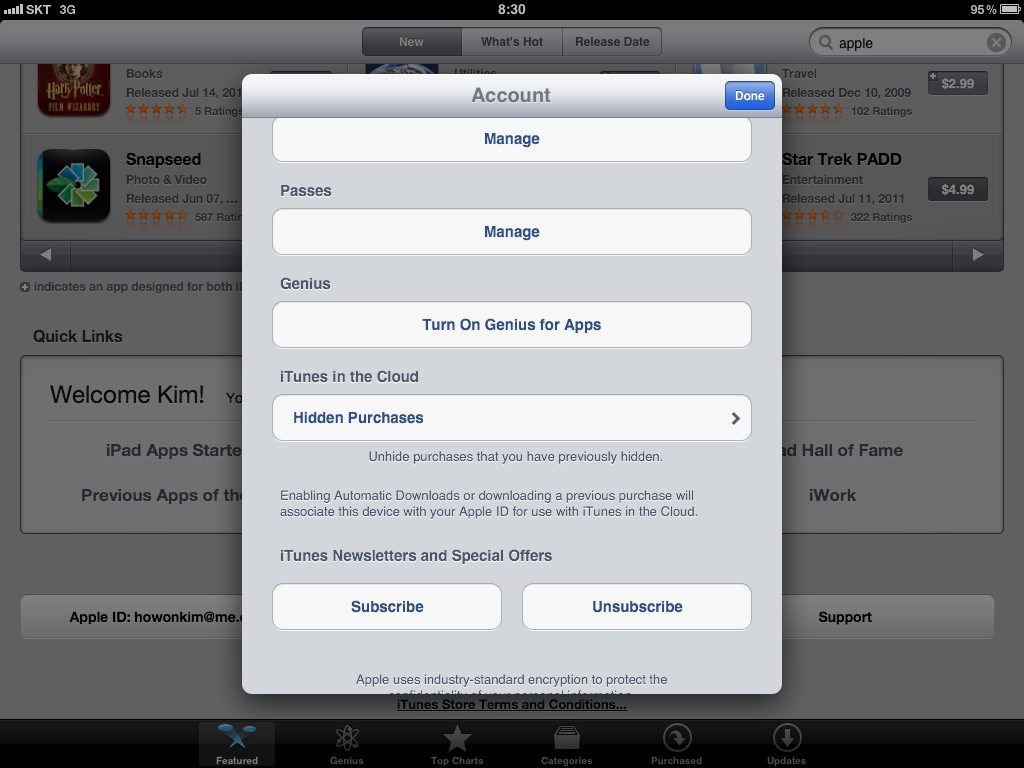
If you’re like me, you download too many apps each and every day, basically to try out and ultimately remove the vast majority of items after a couple runs. Unfortunately, each download is automatically added to your Purchased list, no exception – even if you never run the program. Wouldn’t it be nice if you could hide individual purchased items from view? Well, now you can and it’s real simple…
Reveal your hidden item in the iTunes in the Cloud section of your account settings.
In a well coordinated leak, both theLA Timesand WSJ are reporting Apple is currently in talks with Hollywood movie studios to secure rights to store and potentially stream content with iCloud as early as late 2011 or early next year.
“Representatives of the iPhone and iPad maker have been meeting with studios to finalize deals that would allow consumers to buy movies through iTunes and access them on any Apple device, according to knowledgeable people who requested anonymity because the discussions are private. The service is expected to launch in late 2011 or early 2012.”
The LA Times’ report even mentions the possibility of Apple opening up content from the studio-backed Ultraviolet streaming service to iOS apps. Perhaps a trade-off that allowed them to secure deals for iCloud?
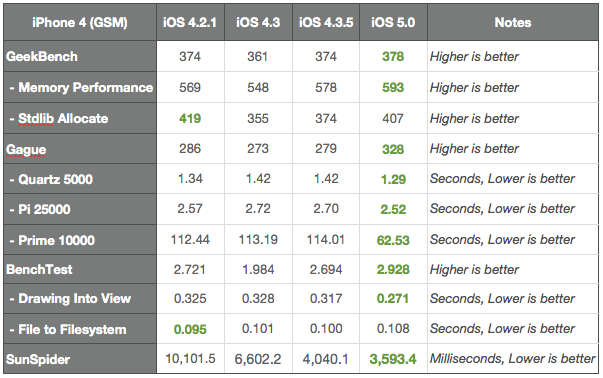
As indicated by the chart above, just released iOS 5 is showing many speed improvements over iOS 4. iOS 5 was faster in almost every category — as indicated by green — except for the first generation iPad. The chart was put together by GigaOM using GeekBench, Gague, BenchTest, and SunSpider, comparing many later versions of iOS 4 to iOS 5.
When iOS 4 was released last year, it didn’t show these types of speed improvements over iOS 3, and when updating the 3GS to iOS 4 it saw drastic speed issues and bugs. Speed improvements in iOS 4’s case were made update-to-update.
To much of their credit, Apple was able to roll these types of speed updates in one release for iOS 5. And in fact, speed will probably get better as Apple rolls out more updates. Now, how about those activations?
Curious to see how the iPad 2 compared? Check it out after the break:
Users on Apple’s help forums have begun reporting that they’re not able to activate iOS 5, noting that Apple’s activation servers are beginning to go down. Users are left with a 3200 error code, and unable to finish the activation. This isn’t a good situation by any means leaving users, in some cases, with almost bricked devices until Apple can get things back up to speed. Many users on the forums have reported that they’re able to get their devices activated after trying a few more times. You’ll recall Apple had similar outages during the iPhone 3G release.
It was undoubtedly a smart move by Apple to release the iPhone 4S two days after iOS 5. All of these activations of both iOS 5 and 4S together would have just been a mess. Also looking through the support forums you’ll find reports of OS X 10.7.2 and iCloud issues probably related to Apple’s overcrowded servers.
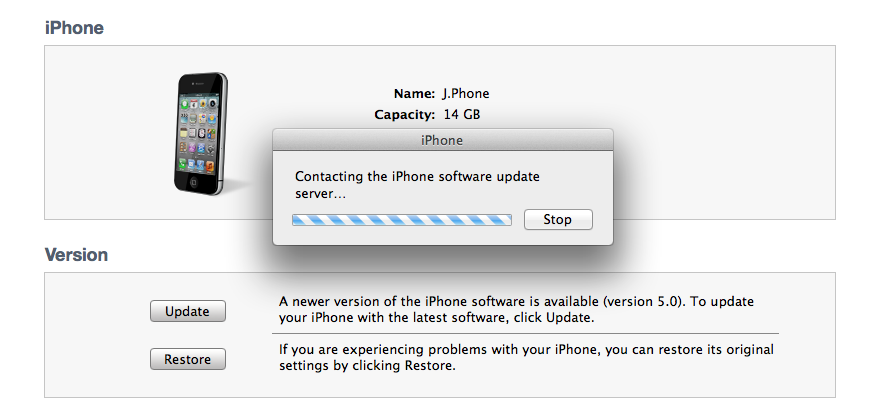
Update:GDGT has noted how to bypass this error by installing iOS 5 manually. Simply hold down option + click “Check for update” in iTunes, and navigate to the IPSW file. The links are after the break (directly from Apple):
With just about every other app getting the iOS 5 treatment, it isn’t that surprising that Apple just dropped the updated Xcode 4.2 in the Mac App Store with SDKs for iOS 5 and Mac OS X 10.7. You can also grab it from the Apple Developer site, if you prefer. Full release notes after the break.
Apple has also released, as promised, its brand new iOS app for mailing gorgeous cards, right from the palm of your hand. The Cards app, according to Apple:
The new Cards app from Apple lets you create and mail beautifully crafted cards personalized with your own text and photos — right from your iPhone or iPod touch. Take a quick snapshot and with a few taps and swipes, an elegant letterpress card is on its way to any address in the world. Each card is just $2.99 when sent within the U.S. and $4.99 when sent to or from anywhere else. And that includes postage.
The killer feature? If you mail your card within the United States, Apple will slap their own custom-designed stamp and use the United States Postal Service Intelligent Mail barcode to send you a notification the day the card is due to arrive – so you know when you’re about to make someone’s day. The Cards app is available free of charge from the App Store here. Our international readers may want to wait a bit until the program propagates throughout all regional iTunes Stores. Release notes after the break.
Along with updates to just about every other one of their apps, Apple has also just updated iMovie, Remote, and Find My iPhone for iOS 5.
Find My iPhone has been updated to version 1.3 with the ability to find your Mac, and the option to request a notification via email when a device is located and online.
iMovie is updated to version 1.2.2 which brings support for iOS 5, and enhanced support for videos imported from external cams. Remote version 2.2 brings only iOS 5 support and the typical “stability and performance improvements”. Expand Expanding Close
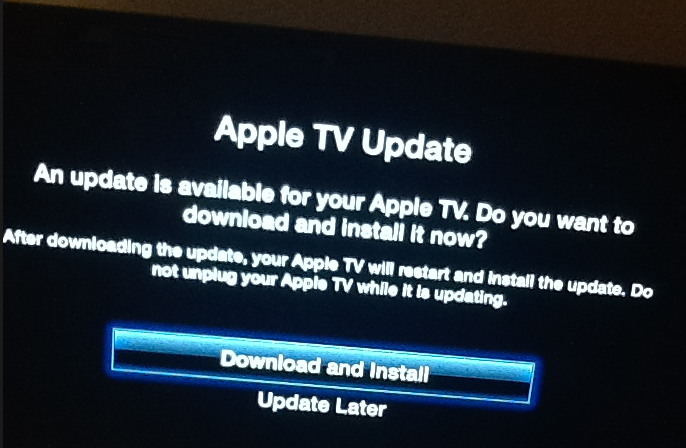
Along with everyone else in the iOS family, Apple TV got its own update today weighing in at 377MB. We’re seeing Trailers, Photo Stream, NHL, and WSJ Live as new features.
Great news from Cupertino, California: The wait is finally over. After nearly four months of extensive public testing, bug squashing, teeth gnashing and under-the-hood tweaking, Apple today released the final consumer version of iOS 5, a major and most ambitious upgrade to its mobile operating system yet.
Note: iOS 5 may not be available for some users yet as usually these things take a while to propagate thoughout all regional iTunes stores. iOS 5 is compatible with iPhone 3GS, iPhone 4 and iPhone 4S, third- and fourth-generation iPod touch, as well as both iPad 1 and iPad 2. However, some features are resource-intensive and thus only available on recent devices. Note that Siri, an intelligent personal assistant users can converse with, remains exclusive to iPhone 4S for the time being.
Preceding the iOS 5 roll out, Apple earlier this morning posted Find My Friends and AirPort Utility apps, enabled iCloud accounts for everyone, flipped the switch on the Newsstand Store and rolled out music re-downloading service dubbed iTunes in the Cloud in the U.K., Canada, Australia and other international markets. The iOS 5 software is available as a free firmware update in desktop iTunes. Just connect your device to a Mac or PC and follow the onscreen instructions in iTunes.
Due to iOS 5 installation being a major brain transplant, you’re strongly recommended to back up all your devices in iTunes before proceeding. In addition, you should copy your device backups and keep them safe, per instructions after the break. Also worth mentioning, the iTunes Terms and Conditions have been updated this morning, related to iTunes Match terms and collection of certain information from your iTunes library. The iTunes Match service is due for public consumption end of October. It is also rumored to go worldwide should Apple secure necessary licenses from record labels.
Now, onto iOS 5. As you know, iOS 5 has over 200 new features plus a handful of biggies.
Take iMessage, Apple’s proprietary messaging protocol for instant messaging with other iOS 5 devices free of charge. iMessage bypasses carrier’s costly text or MMS messages (requires data connection though) and delights with the typing indicator, read receipts and the ability to exchange photos, videos, contacts or locations. For a more in-depth overview, check out 9to5Mac’s exhaustive iMessage guide.
Another big feature is the Notification Center which brings all those annoying notifications from app into a tidy panel accessed with a pull-down gesture. Twitter integration and support for other social accounts make sharing in iOS 5 more secure and uniform across apps. Other noteworthy goodies include wireless device sync with your computer or iCloud, all-new Reminders and Newsstand apps, new Camera features and a whole bunch of other improvements and little tweaks evident throughout the system. If you’re interested in everything iOS 5 has to offer, TiPb has a monster walkthrough.
9to5Mac has confirmed that the iTunes in the Cloud portion of iCloud has started rolling out in Canada, and we’ve also received tips from the UK, France, Australia, Ireland, Spain, and elsewhere. Depending on your exact location, you should soon see the “Purchased” tab within the iTunes Store on your iOS device, as well a Music toggle under “Automatic Downloads” in the Store tab within Settings.app. We’re keeping our fingers crossed for Apple to broaden their iTunes Match licenses for international appeal as well. Expand Expanding Close
A dedicated Store button has begun appearing in the Newsstand app to some iPad owners with iOS 5 GM installed. Clicking the button brings up a new iTunes section listing all digital magazines that have been updated for Newsstand. This is a built-in store in much the same way the iBookstore is integrated right within the app. You can filter the list by Featured or Release Date. The initial selection included about 120 digital publications optimized for Newsstand at press time. Apple yesterday began populating the iOS 5 Newsstand app with first digital magazines.
Newsstand is a special folder on your iOS 5 device sporting a nice-looking wooden shelf that keeps all your digital publications in one place. Note that publishers are required to update their digital publications with Newsstand functionality. Otherwise, “old” digital publications will still populate your home screen and your iPad won’t be able to automatically download new issues for you.
After updating your digital publications using the App Store mobile client or desktop iTunes, your device will automatically move the icons of compatible publications inside the Newsstand folder. There have been some questions about how Newsstand functions, including why can’t one simply drag a publication’s app icon into the Newsstand folder. More info and two iPhone screenshots after the break…
Right on the heels of releasing the free Find My Friends app just moments ago, Apple has also issued the long-rumored AirPort Utility app which lets you manage your AirPort Extreme, AirPort Express and Time Capsule base station right on your iOS device. In fact, the app comes with some pretty advanced features letting you effectively manage your networks and base stations, akin to its desktop sibling. The software is provided as a universal binary which supports both iPhone/iPod touch and the iPad’s bigger canvas.
You will no doubt love a nice graphical overview showing your wireless network and the attached base station. You can also get a better look by pinch-zooming, which works only on iPad. To get the underlying network information, simply tap an object. You can also perform a firmware update on your base station using this utility. To download the app, access Settings on your iOS device, go to your WiFi setting, tap the little blue arrow next to the currently active network and then hit the Manage This Network button at the bottom of the sheet.
Alternatively, use this link to download the AirPort Utility app right from the App Store. Note that the program requires iOS 5, expected later today. From release notes accompanying the 4.5MB download:
Use AirPort Utility to manage your Wi-Fi network and AirPort base stations, including AirPort Express, AirPort Extreme, and TimeCapsule – right from your iPad, iPhone, ir iPod touch. See a graphical overview of your Wi-Fi network and devices. Change base station and network settings, or manage advanced features such as security modes, wireless channels, and more. AirPort Utility works with all Apple 802.11n Wi-Fi base stations, including AirPort Express, AirPort Extreme, and Time Capsule.
We’ve included four nice-looking screenies and the official features list right below the fold.
In order to get around the temporary sales injunction on their Galaxy S, S II, and Ace product lines in The Netherlands, Samsung today said (via Reuters) they’ve altered the devices to avoid infringing on Apple owned patents.
“We’ve fixed the technological problem and upgraded products to address the issue. They will be shortly available for sale,” Samsung spokesman James Chung said.
Originally Apple cited ten patents in the case, but a Dutch judge ultimately ruled the Galaxy devices breached only one Apple patent related to swiping through photos. Samsung will also be heading to court with Apple in Australia this Thursday for the official ruling regarding a potential ban on the Samsung Galaxy Tab 10.1. These are just two of the more than twenty smartphone, patent related cases in multiple countries between the two companies.
UPDATE: Here, a direct link to download the Find My Friends app from the App Store.
Apple has just released the Find My Friends app which lets you locate your contacts on a world map, share your own location with them, manage your temporary sharing settings and other features worried parents will admittedly deem enticing. The program is downloaded by visiting the iCloud.com site on your iOS device. There’s no need to log in, just visit that URL and you should be presented with an option to download the Find My Friends and Find My iPhone apps. Simply hit the Install Find My Friends button which will drop you right onto the App Store landing page.
From iTunes release notes:
Find My Friends allows you to easily location your friends and family from your iPhone, iPad, or iPod touch. Install this free app on your iOS 5 device and sign in with the Apple ID you use with iCloud. Adding a friend is easy – just send a request to see their location. Once your friend accepts using the Find My Friends app, you will then be able to see that friend’s location on a map. You can also choose to share your location for a limited period of time with a group of friends. Use Find My Friends to keep track of your traveling companions when you’re on a vacation. Or to see if the kids are home from school. Or to find the friends you’re meeting for dinner.
The app is provided as a universal download weighing in at 10.4MB and supporting both iPhone/iPod touch and iPad. It requires iOS 5 or later (due later today) and a free iCloud account. Apple today launched iCloud for everyone so feel free to head over to iCloud.com to create yours or use your existing Apple ID with iCloud. Go past the break for more pretty shots and the official list of features. Apple also has a special page up dedicated to Find My Friends.
Contradicting the sense of disappointment which settled in immediately following the iPhone 4S launch (largely stemming from the unchanged exterior design), Apple’s fifth-generation iPhone is by all accounts off to a great start. Positive early reviews and one million pre-orders in the first 24 hours – the most for any new product that Apple has ever launched – can’t be wrong. Meanwhile, sources from Apple’s supply chain in an Asia report have encouraging news. DIGITIMES, a Taiwanese daily newspaper for semiconductor, electronics, computer and communications industries, reported this morning that Pegatron, Apple’s #2 contract manufacturer tasked with producing one in seven iPhone 4S units, has landed orders for a cool fifteen million units of iPhone 4S with holiday quarter shipments in the 2.5 million units range.
As Pegatron accounts for about 15 percent of all iPhone 4S orders, this would indicate shipments of seventeen million iPhone 4S units for the Christmas quarter. The story is based on a report by the Chinese-language Commercial Times and corroborates a similar rumor from July. Apple has reshuffled its supply chain a bit for its handset and is understood to have commissioned long-time partner Foxconn and Asustek spin-off Pegatron to produce iPhone 4S (more on the economics of Apple’s supply chain here). Pegatron is also aiming to land orders for the iPad 3, DIGITIMES has it, and is looking to assemble Ultrabooks for Lenovo and Asustek because they can now produce premium metal chassis. Speaking of iPad, another DIGITIMES article asserted Apple had shifted orders from long-time battery supplier Simplo to Dynapack over defective iPad 2 battery packs causing leakage problems:
Owning up to its ‘Worldphone’ capabilities, Macworldgot the SIM unlock policies from Verizon and Sprint which may make the CDMA phone more attractive than one from AT&T that is SIM-locked.
But there’s a new wrinkle that potentially makes the international-roaming experience better on Sprint and Verizon iPhones than it is on AT&T. Sprint plans to sell the iPhone 4S with its micro-SIM slot unlocked; Verizon’s will be initially locked, but if you’ve been a customer in good standing for 60 days, you can call Verizon and ask for an “international unlock.” (A Verizon spokesperson told me that this is Verizon’s standard policy for all world phones—it’s just the first time it’s manifested itself on an iPhone.)
That’s interesting because for instance the Verizon Droid II Worldphone comes with a locked Vodafone (Verizon’s half parent company) SIM card. If you travel overseas you cannot exchange a local carrier’s SIM, you have to use Vodafone. Verizon may unlock these but it was my understanding that it was up to their discretion. Their policy might be two months old now but that could change on a whim (plus, what is “good standing” – seems shady).
AT&T of course won’t let you put in a local carrier’s SIM card and will charge you their high rates for roaming (though they’ve come down a bit over the past year).
When added to Sprint’s unlimited data plans, ol’ Yellow is looking pretty good, especially for those who travel internationally.
Update: Sprint refuted this claim to Ars Technica and says you will get a Sprint SIM and be charged Sprint Roaming charges, like AT&T.
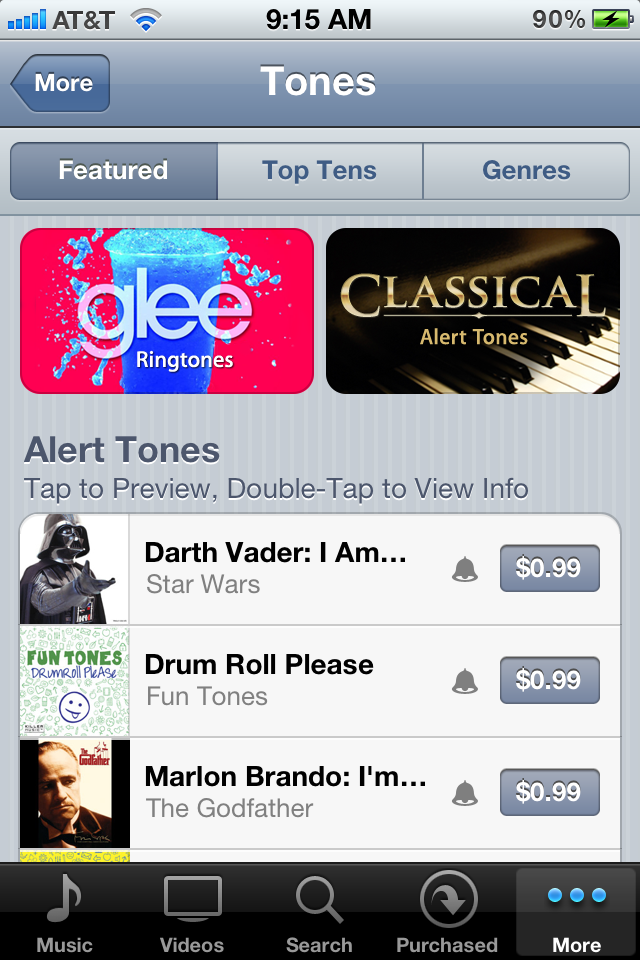
Apple has just released a new section in the iTunes Store that lets users buy text and alert tones. While the store has always featured ringtones, the alert tones feature is new and requested among many users. You can access this new store by going to Settings > Sounds > Buy More Tones. This was hinted at a few weeks ago.
Ringtones are listed for $1.29 and alert tones for $0.99.