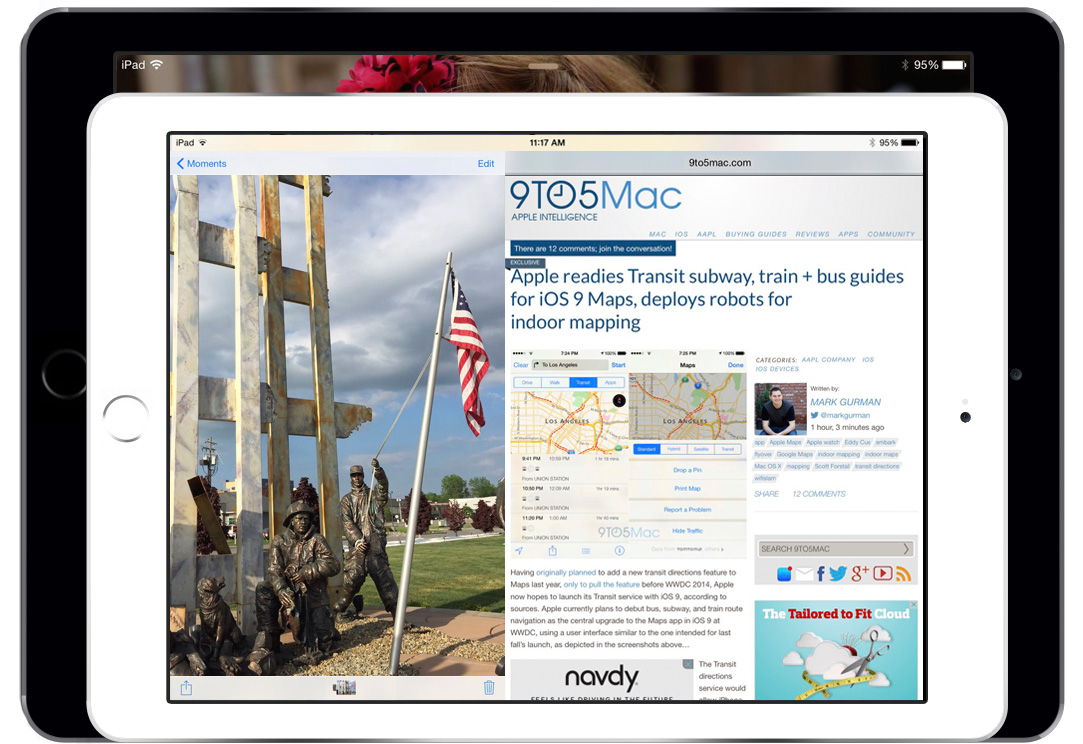
Facing slowing growth for the first time since the iPad’s 2010 debut, Apple is working on several significant software and hardware updates to reinvigorate the tablet over the next year. Apple is developing a dual-app viewing mode, 12-inch iPads codenamed “J98” and “J99,” as well as support for multi-user logins, according to sources briefed on the plans. First planned for debut last year, the split-screen applications feature for the iPad could be introduced as soon as June at Apple’s annual Worldwide Developers Conference, while multi-user login support and the 12-inch iPads will apparently arrive later…
Update: The glitch may be related with the latest versions of Find My Mac and iTunes, according to testing by The Mac Observer.
Since upgrading to OS X 10.9.3, some users are reporting that their /Users folder is now hidden. This means the folder is no longer visible when looking at the root of the hard drive in the Finder, which is inconvenient for Macs with multiple users installed.
With OS X Lion, Apple took the liberty to hide the Library folder from OS X users. However, it does not seem like hiding the /Users directory is an Apple design decision. Many users are still seeing this folder after updating and the behaviour is consistent. The most likely conclusion is that is simply a bug that slipped through to final release, despite Apple’s new beta testing program. If you are affected by this bug, you can find out how to make your /Users folder visible again after the break …
Much like the somewhat controversial face unlock feature built-in to Google’s Galaxy Nexus smartphone, a new patent application reveals Apple too is working on similar, but more advanced user detection solutions. As PatentlyApplepointed out, Apple noted these recognition systems could land in a future iPhone, iPad, iPod touch, or MacBook.
The basics of the patent entitled “Low Threshold Face Recognition,” is to allow a user to unlock a device—such an iPhone or iPad—using facial recognition. Apple’s solution could allow the device’s camera to recognize the user even when the device is in sleep mode. In other words, the device’s camera would remain active when sleeping, detect the user, and unlock the device without having to press the sleep/wake button. This could, in theory, allow a user to bypass the current Slide to Unlock feature.
Perhaps the most interesting aspect of the system would be the ability for the device’s settings to be customized depending on the user. For example, when detecting a specific user, iOS could set personalized wallpapers, notification settings, and custom configurations for apps. This would provide multiple user logins, allowing iOS users to easily share a device among family or coworkers.
Apple’s system would differ from other face recognition systems by ignoring face biometrics. As PatentlyApple explained, “The face recognition techniques are based on a simple, weighted difference map, rather than traditional (and computationally expensive) correlation matching.” Apple’s system could detect “high information portions” of a face such as the eyes, mouth, or the tip of a nose. In addition, an “orange-distance filter” could be applied to determine variations in skin tone and detect the “likely presence” of a user. This could detect the distance between the device and the user’s face, as well as the user’s “level of attentiveness.”
In 2010, before the iPad launch, The Wall Street Journal reported Apple was experimenting with the ability to recognize individual users with the device’s camera. Today’s patent was originally filed in 2009.