MacBook Pro: The biggest and baddest Mac laptops

See All Stories

Apple's premium laptop comes in 13- and 16-inch screen sizes. Each model includes 2-4 USB-C ports for charging, accessories, and data transfer. Higher-end models also include the Touch Bar.

2021 MacBook Pro

MacBook Pro has been the product name for Apple’s high-end laptop since early 2006 when the transition to Intel processors began. Now, that Pro naming has carried forth as Apple has moved to its own silicon. The latest fourth and fifth-generation Pro Apple notebooks bring dramatically more power with lower heat generation and better battery life thanks to the ARM-based Apple silicon. Keep reading for a brief history of the line and a breakdown of the current lineup.

MacBook Pro history

The first generation MacBook Pro followed in the style of the PowerBook G4 that came before it, but used Intel processors rather than PowerPC chips.

The second generation of the MacBook Pro was the first to really separate itself from the products before, with a unibody enclosure. The third-generation MacBook Pro introduced the retina display as well as MagSafe 2.

Perhaps the most controversial version of the MacBook Pro is the fourth generation. While the third generation received some backlash for the removal of ethernet and the optical drive, the fourth generation was a complete rethinking of the device peripherals. No more MagSafe, no more USB-A ports, and only the 13-inch model kept the function keys. Instead, this redesigned MacBook Pro opted for all Thunderbolt 3 ports and headphone jack. In place of function keys, the MacBook Pro gained an OLED Touch Bar. In late-2020, Apple introduced the M1 chip and updated the 13-inch MacBook Pro. The ARM-based processor brought down power consumption and increased performance.

In October of 2021, Apple introduced the fifth-generation MacBook Pro with not one but two updated versions of the M1 chip, the M1 Pro and M1 Max. The move walked back some of the decisions from the previous generation, adding back an HDMI Port, MagSafe charger, and SD card reader while removing the Touch Bar.

The 2020 13-Inch MacBook Pro

In late 2020, Apple introduced the 13-inch M1 MacBook Pro as the latest update to the fourth-generation MacBook. The MacBook features the same look as previous MacBooks, but like the MacBook Air and Mac Mini, switched to Apple silicon.

Apple’s M1 chip brought ARM architecture to the MacBook line, and this was the first MacBook without an Intel processor.

The M1 chip is a unified design with an 8-core CPU and an 8-core CPU. The processor integrated memory on board, limiting the device to either 8GB or 16GB of unified memory. The 13-inch M1 MacBook Pro is configurable with between 256GB and 2TB of storage and features a Magic Keyboard, rather than the problematic butterfly keyboard.

13-inch MacBook Pro specs

Base Configuration$1,299.00

  • Apple M1 chip with 8‑core CPU, 8‑core GPU, and 16‑core Neural Engine
  • 8GB unified memory
  • 256GB SSD storage
  • 13-inch Retina display with True Tone
  • Backlit Magic Keyboard – US English
  • Touch Bar and Touch ID
  • Two Thunderbolt / USB 4 ports

Max Configuration$2,299.00

  • Apple M1 chip with 8‑core CPU, 8‑core GPU, and 16‑core Neural Engine
  • 16GB unified memory
  • 2TB SSD storage
  • 13-inch Retina display with True Tone
  • Backlit Magic Keyboard – US English
  • Touch Bar and Touch ID
  • Two Thunderbolt / USB 4 ports

13-inch MacBook Pro pricing

The price for the 13-inch M1 MacBook Pro starts at $1,299. Upgrading this base configuration to 16GB of memory adds $200 to the price. Likewise, each step above 256GB of storage – 512GB, 1TB, and 2TB – will add $200 to the price. A fully specced out 13-inch MacBook Pro will run you $2,299.

You can configure your own 13-inch MacBook Pro on Apple’s website.

Current 14-inch and 16-inch MacBook Pro

In October 2021, Apple brought a brand new design to the MacBook Pro line. Apple increased the screen size on the 13-inch, making it a 14-inch, and shrunk the bezels on the 16-inch. This fifth-generation notebook addressed many complaints of the last generation. MagSafe returned, in the form of an improved MagSafe 3, while the MacBook also regained an HDMI port and an SD-card slot.

Also gone is the Touch Bar. Instead, the standard row of function keys return. The latest MacBooks also bring a ProMotion display that was first introduced on the iPad Pro, with a variable refresh rate and mini-LED backlight.

The 2021 MacBooks aren’t without a controversial feature, as while the display has been made larger there is now a large notch for the 1080P FaceTime camera. While FaceID would have been a nice addition in exchange for this small chunk of the screen, there are some reasons this is not totally practical.

14-inch MacBook Pro specs

Base Configuration$1,999.00

  • Apple M1 Pro with 8-core CPU, 14-core GPU, 16-core Neural Engine
  • 16GB unified memory
  • 512GB SSD storage
  • 67W USB-C Power Adapter
  • 14-inch Liquid Retina XDR display
  • Three Thunderbolt 4 ports, HDMI port, SDXC card slot, MagSafe 3 port
  • Backlit Magic Keyboard with Touch ID – US English

Maximum Configuration$5,899.00

  • Apple M1 Max with 10-core CPU, 32-core GPU, 16-core Neural Engine
  • 64GB unified memory
  • 8TB SSD storage
  • 96W USB-C Power Adapter
  • 14-inch Liquid Retina XDR display
  • Three Thunderbolt 4 ports, HDMI port, SDXC card slot, MagSafe 3 port
  • Backlit Magic Keyboard with Touch ID – US English

14-inch MacBook Pro pricing

The 14-inch MacBook Pro starts at $1,999. The base model includes 16GB of memory, 512GB of storage, and an M1 Pro processor with an 8-core CPU and 14-core GPU. There are multiple versions of the M1 Pro processor available, while jumping to an M1 Max processor will cost $500 more, and requires you to jump up to 32GB of memory – a $400 upgrade. Going with the M1 Max processor means you can configure up to the full 64GB of memory, an $800 upgrade.

You can configure up to 8TB of storage in the 2021 14-inch MacBook Pro. Upgrade costs are as follows:

  • 1TB SSD Storage – $200
  • 2TB SSD Storage – $600
  • 4TB SSD Storage – $1,200
  • 8TB SSD Storage – $2,400

You can configure your own 14-inch MacBook Pro on Apple’s website.

16-inch MacBook Pro specs

Base Configuration$2,499.00

  • Apple M1 Pro with 10-core CPU, 16-core GPU, 16-core Neural Engine
  • 16GB unified memory
  • 512GB SSD storage
  • 16-inch Liquid Retina XDR display
  • Three Thunderbolt 4 ports, HDMI port, SDXC card slot, MagSafe 3 port
  • 140W USB-C Power Adapter
  • Backlit Magic Keyboard with Touch ID – US English

Maximum Configuration$6,099.00

  • Apple M1 Max with 10-core CPU, 32-core GPU, 16-core Neural Engine
  • 64GB unified memory
  • 8TB SSD storage
  • 16-inch Liquid Retina XDR display
  • Three Thunderbolt 4 ports, HDMI port, SDXC card slot, MagSafe 3 port
  • 140W USB-C Power Adapter
  • Backlit Magic Keyboard with Touch ID – US English

16-inch MacBook Pro pricing

The 16-inch MacBook Pro starts at $2,499. There is only one M1 Pro processor available on the 16-inch MacBook, and that’s the highest version 10-core CPU, 16-core GPU version of the M1 Pro processor that is a $300 upgrade on the 14-inch MacBook Pro. Of course, you can also step up to the M1 Max processor with either a 24-core or 32-core GPU, a $200 and $400 upgrade respectively (which also requires the $400 upgrade to 32GB of memory). The memory and storage options are all the same as the 14-inch MacBook Pro.

You can configure your own 16-inch MacBook Pro on Apple’s website.

Differences between 13-inch,14-inch, and 16-inch models

The 2021 MacBook Pro lineup is a refreshing change. The return of ports and physical keys make the laptops more versatile, while additions like an XDR display and hardware acceleration for ProRes improves the experience but is harder to quantify for the average user.

13-inch14-inch16-inch
ProcessorM1M1 Pro / M1 MaxM1 Pro / M1 Max
Memory8GB / 16GB16GB / 32GB / 64GB16GB / 32GB / 64GB
Storage512GB, 1TB, 2TB512GB, 1TB, 2TB, 4TB, 8TB512GB, 1TB, 2TB, 4TB, 8TB
Screen2560×1600 pixels 3024×1964 pixels; ProMotion3456×2234 pixels; ProMotion
Weight3.0 pounds (1.4 kg)3.5 pounds (1.6 kg)M1 Pro: 4.7 pounds (2.1 kg)
M1 Max: 4.8 pounds (2.2 kg)
Size (Width x Depth)11.97 x 8.36 inches (30.41 x 21.24 cm)12.31 x 8.71 inches (31.26 x 22.12 cm)14.01 x 9.77 inches (35.57 x 24.81 cm)
Height0.61 inch (1.56 cm)0.61 inch (1.55 cm)0.66 inch (1.68 cm)
Base Price$1,299.00$1,999.00$2,499.00

The $1,999 starting price for Apple latest computer is a harder pill to swallow than the $1,300 13-inch Pro from last year. For an average user, the superb M1 MacBook Air will likely suffice (and that sub-$1,000 price is hard to pass up).

But the 2021 14-inch and 16-inch MacBook Pro are exactly what they need to be, a return to function-over-form that will truly meet the needs of professional users.

Site default logo image

Logitech reveals vlogger-geared 720p HD Wi-Fi Broadcaster webcam for Mac, iPhone, and iPad (Video)

[youtube=http://www.youtube.com/watch?v=Z6JCguygXW4&feature=player_embedded]

Logitech just announced its 720p HD Wi-Fi Broadcaster webcam that wirelessly transmits to any Mac, iPhone, or iPad from 50 feet away.

The webcam is specifically aimed toward “video professionals, bloggers and hobbyists,” as it allows instant live streaming with Ustream and gives users the ability to toggle between the device and their computer’s built-in camera for second-angle POV shooting.

Logitech further noted the webcam is compatible with most popular Mac video applications like QuickTime, PhotoBooth, iMovie, FinalCut Pro, FaceTime, iChat, Skype, etc. Oh, and it comes with a plastic carrying case that doubles as a stand.

Additional specs:

  • HD 720p video capture
  • 3x digital zoom and digital pan and tilt
  • Built-in mono mic / External mic jack
  • 2-hour battery life, depending on use and usage of illumination lamp.
  • Tripod ready H.264 video compression
  • Built-in illumination lamp

Broadcaster is now available for pre-order at just $199.99 in the United States and Europe.

Check it out: Logitech Broadcaster Wi-Fi Webcam

The full press release is below.


Expand
Expanding
Close

Why build a 13-inch Retina MacBook Pro and not a Retina MacBook Air?

Site default logo image

We were initially skeptical about reports of a 13-inch Retina MacBook Pro, but we are obviously believers now that we have received word from very reliable sources that they are due in just over a week. Why were we skeptical?

Apple already has an incredible form factor in the 13-inch MacBook Air. So, why not simply give it a Retina Display?
Expand
Expanding
Close

Site default logo image

Tip: Vertically mount the new AirPort Express (like the old one) with Apple AC wall plug

rageek has a nice little tip on how to vertically mount the new AirPort Express using just the AC wall plug from a MacBook Pro or other Apple product’s power cord. [via O’Grady’s power tweets.]

We do not recommend this:

[tweet https://twitter.com/brogollack/status/252784743442182145]

Site default logo image

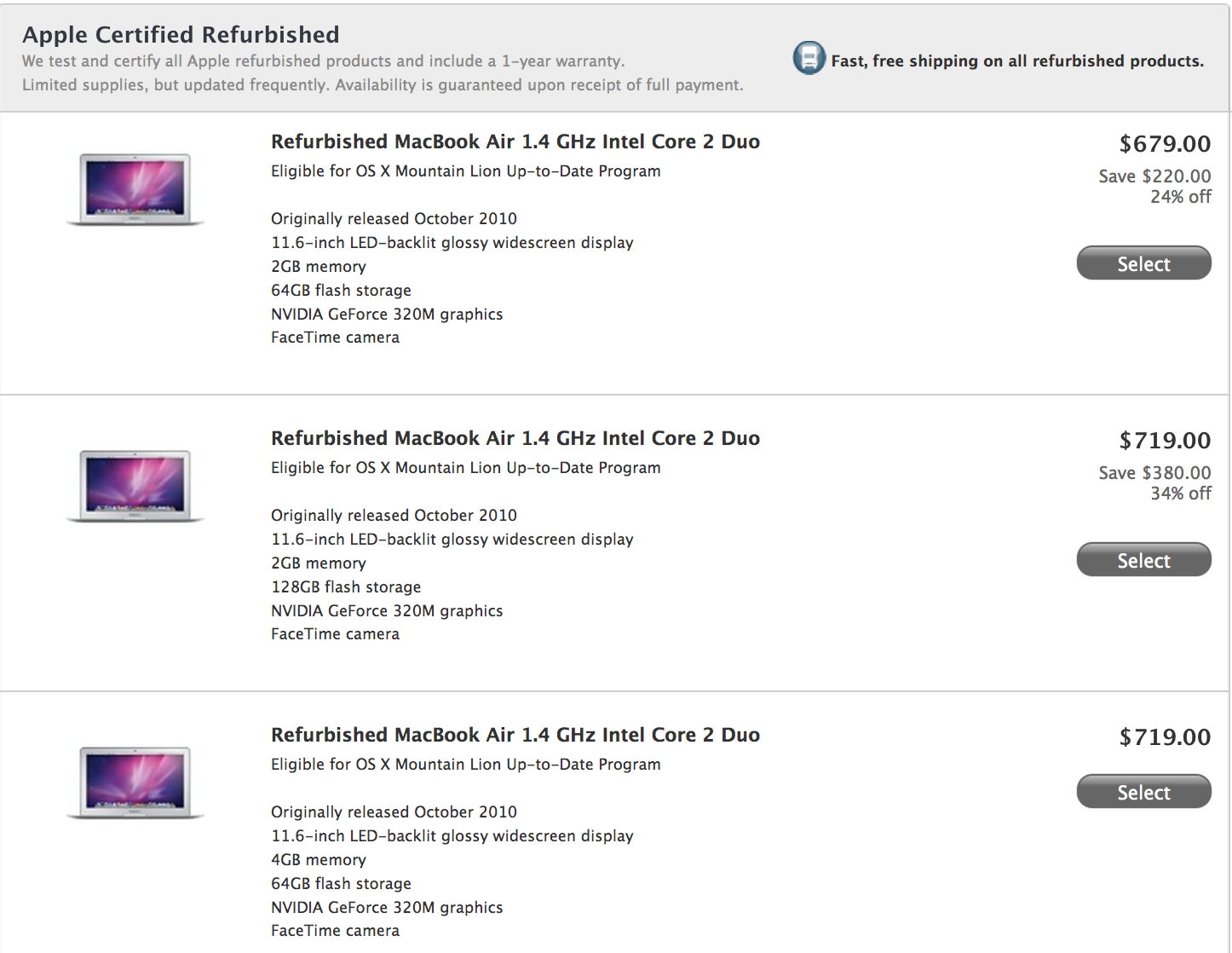
Price Drop: MacBook Airs at the Apple Store now start at $679

From 9to5Toys.com:

.

Apple quietly dropped the prices on refurbished MacBook Airs last night by up to $120. Notables above are 2010 releases of the 11.6″ MacBook Air model with options of 128GB SSD or 4GB of RAM. Apple refurbished items are virtually indistinguishable from new items and come with the same 1 year AppleCare warranty. All refurbished Macs purchased at Apple are also eligible for the OS X Mountain Lion Up-to-Date Program.

These typically run out of stock very quickly.

Update: All gone. You snooze, you lose.
Expand
Expanding
Close

Site default logo image

Labor Day deals: Apps, more

From 9to5Toys.com:

StackSocial has a bunch of excellent deals including a $79 solar iPhone case and MacLegion Bundle.

Best Buy offers the refurbished, last gen Apple AirPort Express 802.11n Wifi Base Station, model no. MB321LL/A, for $49.99 with free shipping.

Legend Micro via Buy.com offers the factory-refurbished Samsung SyncMaster 22″ 1080p LED-Backlit Widescreen LCD Monitor, model no. S22A300B, for $110with free shipping.

iOS App & Game Deals for Labor Day Weekend (Most EA Titles 99 cents)

Many iOS devs are slashing the prices on some of their hottest iOS titles to celebrate Labor Day Weekend.  These are some of the lowest prices we’ve seen for major iOS gaming titles. Use the direct download links below to cash in on the savings before they disappear.

iPhone

Madden 2012, regular $2.99 now only 99 cents
Fight Night Champion, regular $4.99 now only 99 cents
The Sims 3, regular $6.99 now only 99 cents
Risk, regular $2.99 now only 99 cents
Battlefield Bad Company 2, regular $2.99 now only 99 cents
The Sims Medieval, regular $2.99 now only 99 cents
Dead Space, regular $6.99 now only 99 cents
FIFA 2012, regular $6.49 now only 99 cents
Hipstamatic for iOS is currently on sale for only 99 cents, it retails for $1.99.

iPad

NBA Jam, regular $4.99 now only 99 cents
Tiger Woods PGA 2012, regular $4.99 now only 99 cents
Ultimate Mortal Kombat 3, regular $4.99 now only 99 cents
Scrabble, regular $9.99 now only 99 cents
Command and Conquer Red Alert, regular $4.99 now only 99 cents
Flight Control HD, regular $4.99 now only 99 cents
Mirrors Edge, regular $9.99 now only 99 cents
Sim City Deluxe, regular $6.99 now only 99 cents
Risk, regular $6.99 now only 99 cents
Shift 2 Unleashed, regular $4.99 now only 99 cents
Battleship HD, regular $4.99 now only 99 cents
Fifa Soccer 2012, regular $9.99, now only 99 cents
Need for Speed Hot Pursuit HD, regular $9.99 now only 99 cents
Dead Space, regular $9.99, now only 99 cents
Battlefield Bad Company 2 HD, regular $9.99 now only 99 cents
Madden 2012, regular $6.99 now only 99 cents
Real Racing 2 HD, regular $6.99, now only 99 cents
Monopoly, regular $9.99 now only 99 cents
NBA Jam, regular $4.99, now only 99 cents
Tetris, regular $2.99, now only 99 cents

Universal

Modern Combat 3: Fallen Nation, regular $6.99 now only 99 cents
Max Payne Mobile, regular $2.99 now only 99 cents
Mass Effect Infiltrator, regular $4.99, now only 99 cents
Burnout Crash, regular $4.99 now only 99 cents

Enhanced by Zemanta

LaCie announces re-engineered USB 3.0 products for new MacBooks including ruggedized USB stick

Site default logo image

[youtube=http://www.youtube.com/watch?v=ZC2YUZPxFOE]

LaCie introduced the RuggedKey this week. It is an IP-54 water and dust resistant USB 3.0 key that provides speeds up to 150 MB/s and a bumper that offers protection from “heat, cold, and 100-meter drops.” The RuggedKey is now available in Apple stores or from the company directly starting at $40 for 16 GB, but LaCie also announced today that it updated its entire USB 3.0 portfolio with optimizations specifically for Apple’s latest lineup of MacBooks. LaCie said it re-engineered its USB 3.0 products for Lion and Mountain Lion by taking advantage of USB-attached SCSI Protocol support in Ivy Bridge Macs:

Thanks to UAS (USB Attached SCSI Protocol), people with the latest Macbook Air, Macbook Pro and Macbook Pro with Retina Display will experience maximum USB 3.0 performance… Everything from cables and USB keys, to professional RAID storage solutions have been re-engineered for advanced performances. LaCie’s recently announced RuggedKey achieves top speeds up to 150MB/s in 32GB of flash memory – making it one of the fastest USB keys on the market. LaCie’s popular Rugged Triple, and Porsche Design P’9223 and P’9233 have also been optimized for Mac and are available in Apple retail.

On top of Apple stores, the redesigned lineup of LaCie USB 3.0 products is available through LaCie stores. The company’s full press release is below:

Expand
Expanding
Close

Quick Review: Tweetbot for Mac finally arrives in public alpha, download now!

We reported late last month that Tweetbot for Mac, a desktop version of the popular third-party iOS Twitter client, would likely come soon after the company’s graphic designer, Mark Jardine, tweeted an image of the client running on a MacBook. Today, Tweetbot developers decided to make things official with the release of a public alpha, and we recently got a chance to play around with it. (Blog post here.)

The Tweetbot alpha, which at this point runs on 10.7+ and 10.8 Mountain Lion, has a lot going for it despite warnings of “Bugs! Lots of them.” According to Tapbots, the main goal of the alpha was to replicate the core functionality of the iOS client. Like tapping a tweet in the iPad app, hovering over a tweet in the Mac client provides you with the same Reply, Retweet, Favorite, Share, and Actions button to get access to details, conversations, retweets, and etc.

In addition, like the iPad app, you will find a button to quickly switch lists in the upper right, while a Lists button on the left sidebar will let you manage and edit your lists within the app. The app also bakes in the familiar “Mute Filters” for your main timeline. However, only the ability to mute “Clients” appears to be an option now—with the option for muting keywords greyed out. You will also get Twitter, bit.ly, CloudApp, and Droplr URL shortening options, and all the same image and video-uploading options as on iOS, including: CloudApp, Droplr, img.ly, Lockerz, Mobypicture, Pikchur, Posterous, Twitgoo, TwitPic/TwitVid, and yfrog. Syncing options only feature Tweet Marker currently (iCloud coming soon), while all the Read Later services are present such as bitly, Instapaper, Pinboard, Pocket, and Readability.

We have had a lot to say about the Twitter experience on the new Retina MacBook Pros. The official Twitter for Mac app is unfortunately not Retina-ready and almost unusable on the new Retina displays. Fortunately, we have a Retina update to Twitterific to tie us over, but the Alpha Tweetbot release today is also built for the new Retina display. We have no complaints. It looks great, but Tapbots said further improvements are coming…


Expand
Expanding
Close

Retina MacBook Pros selling on eBay for $1700 premium over retail due to scarcity

Site default logo image

The new 15.4-inch MacBook Pro with Retina display is either out of stock, coming soon, on pre-order, or experiencing delayed shipping on almost every retail website, but it appears one seller is offering the latest Cupertino notebook on eBay—for roughly $1,700 more than Apple’s asking price.

Check it out: Apple MacBook Pro 15.4-inch MC975LL/A (June, 2012) with Retina Display

The above eBay deal comes with same day, free shipping and includes insurance (if this is even considered a deal). Another eBay listing offers the base model MacBook Pro for $3,199 USD, but another $95.80 USD is required for USPS priority shipping from Canada.

It is probably safe to say these puppies are in high demand, as evident by the exorbitant price markups.

Expand
Expanding
Close

Giant Retina MacBook Pro window display goes up at Apple Store

Site default logo image

Apple has created oversized window displays in the past following its latest product launches, including the iPhone 4S, and we snapped some photos today of the new Retina MacBook Pro signage.


Expand
Expanding
Close

New MacBook Pro’s Retina display reviewed and benchmarked

Site default logo image

After posting initial benchmark data yesterday for the new Retina MacBook Pro’s SSD and USB 3.0, AnandTech published a longer analysis today about the notebook’s display. The report first took a closer look at the new resolution preferences for Retina MBP users and described the advantages of the different scaling options displayed in the gallery above:

Retina Display MBP owners now get a slider under OS X’s Display Preferences that allow you to specify desktop resolutions other than 1440 x 900. At 1440 x 900 you don’t get any increase in usable desktop resolution compared to a standard 15-inch MacBook Pro, but everything is ridiculously crisp… Even at the non-integer scaled 1680 x 1050 setting, the Retina Display looks a lot better than last year’s high-res panel. It looks like Apple actually renders the screen at twice the selected resolution before scaling it to fit the 2880 x 1800 panel (in other words, at 1920 x 1200 Apple is rendering everything at 3840 x 2400 (!) before scaling… Everything just looks better.

As illustrated in the images above showing benchmark data, the review found greatly improved viewing angles, black levels, and contrast when compared to the previous generation high-res MacBook Pro model. AnandTech then looked at Apple’s claims that the new MacBook Pro display reduces glare by 75 percent from previous generations:


Expand
Expanding
Close

Site default logo image

Andy Hertzfeld: The only thing that’s still high-end about [Mac Pro] is the bloated price

[tweet https://twitter.com/9to5mac/status/212275242318561281]

Update: MacRumors received a tip from a reader who claimed Apple’s CEO Tim Cook responded to his email to confirm new Mac Pros are coming next year. We received a tip last year detailing a similar email exchange between a Pro customer and the late chief Steve Jobs. Cook’s response to the reader is below:

Our pro customers are really important to us…don’t worry as we’re working on something really great for later next year.

We were not too shocked when Apple quietly updated its Mac Pro lineup following its WWDC keynote yesterday. We had previously revealed the spec-bumped Mac Pros, but many were skeptical Apple would release such a minor refresh for the product that otherwise had not received an update in two years.

Was it really an upgrade, or did Intel simply run out of the older CPUs? USB 2 and no Thunderbolt seem like a bad joke to high-end Mac Pro users.

Not surprisingly, many are calling out Apple for its decision to not release a major refresh to the Mac Pros. Perhaps most notably is former Apple engineer and current Google employee Andy Hertzfeld. In a Google+ post, Hertzfeld congratulated Apple on its new Retina MacBook, while expressing disappointment in the new Mac Pros:

The next generation MacBook Pro announced today at WWDC looks fantastic. I ordered one immediately and can’t wait to start using it. Unfortunately, the euphoria was negated by my deep disappointment with the meagre, lame update that was silently bequeathed to the Mac Pro today… The specs for the “new” Mac Pro had hardly changed, except for a tiny, inconsequential processor clock bump. Still no Thunderbolt, still no USB 3.0, no SATA III or RAM speed improvements – it seems like it’s stuck in time in 2010. The only thing that’s still high-end about it is the bloated price… Even though I’m well aware that Apple’s future lies increasingly with mobile iOS-based devices, it still makes no sense to drop the ball on your high end desktop Mac so thoroughly, and to utterly disappoint your most loyal customers like yours truly.

As for complete refreshes for the iMac and Mac Pro lineups, David Pogue for the New York Times claimed an Apple executive confirmed they are in development and likely set for a 2013 release:

Many Apple observers also wonder if Apple thinks that desktop computers are dead, since not a word was said about the iMac and Mac Pro. An executive did assure me, however, that new models and new designs are under way, probably for release in 2013

New MacBook Pro with Retina display shipping in ‘2-3 weeks’ [Video + Photos]

Site default logo image

[youtube=http://www.youtube.com/watch?v=zQaN8IC_rSY&feature=youtu.be]

Update: Apple’s website is now listing the Retina MacBook Pros as available in “3-4 weeks”.

Apple’s updated MacBook Pro with Retina display made a huge splash at yesterday’s opening keynote for the Worldwide Developers Conference, but droves of Mac-lovers will have to wait a few weeks before they can get their eager paws on one of these divine notebooks.

Senior Vice President of Worldwide Marketing Phil Schiller noted the super-high resolution MacBook Pro would ship immediately while on stage at WWDC, but those taking a peak at Apple’s online store today will find a “2-3 weeks” shipping notice listed under the 15-inch Retina-optimized computers

The delay in shipping is likely due to high demand, but CNET pondered the alternative reasons:

It’s not immediately clear if the delay is due to miscommunication, a shipping snag, or simply that the first batch has sold out. In previous Apple launches, the company has promised a particular shipping time, only to find that the first group of units sell out, forcing it to modify the timetable for future orders.

Expand
Expanding
Close

Site default logo image

Benchmarks for SSDs and USB 3.0 performance in new MacBooks

Even before Apple’s unveiling of the all-new Retina MacBook Pros, refreshed previous-generation MacBook Pros, and MacBook Air lineups today, we knew most of Apple’s new Macs would receive performance improvements courtesy of new SSDs and USB 3.0. We are now getting our first look at benchmark data for the two new features—thanks to a Retina MacBook review unit benchmarked by AnandTech.

As for SSDs, we told you before that the new MacBook family would probably receive Samsung’s speedy 830 series. AnandTech’s report seems to narrow down the 830 series as the most likely scenario noting his review unit appears to be running a Samsung drive approaching read speed of 500MB/s, and writes close to 400MB/s:

The same updated SSD is present across all of Apple’s lineup: from the MacBook Air to the next-gen MacBook Pro. Based on the model number in Apple’s System Report I’d guess my review sample features a Samsung based drive… I ran a few tests using Quick Bench to validate Apple’s claims. In general it looks like read speed approaches 500MB/s, while sequential writes are closer to 400MB/s

When it comes to initial benchmarks for USB 3.0 performance, the chart to the right speaks for itself by showing a remarkable jump in performance over USB 2.0 on the early 2011 MacBook Pro:

USB 3.0 performance is much improved over the previous generation MacBook Pro. I used an Apricorn SATA to USB 3.0 adapter to measure copy time to/from a 512GB OCZ Vertex 4 SSD. The performance gap between USB 2.0 and 3.0 is nothing short of significant.

Site default logo image

Apple updates Final Cut Pro, Aperture, and iPhoto with enhancements for Retina MacBooks

Click image for Retina display resolution

Several of Apple’s popular Mac apps received updates today after the opening keynote at the Worldwide Developers Conference. Many of the updates help apps take full advantage of the new 15-inch Retina MacBook Pro’s display. The details for Final Cut Pro, Aperture, and iPhoto are below.

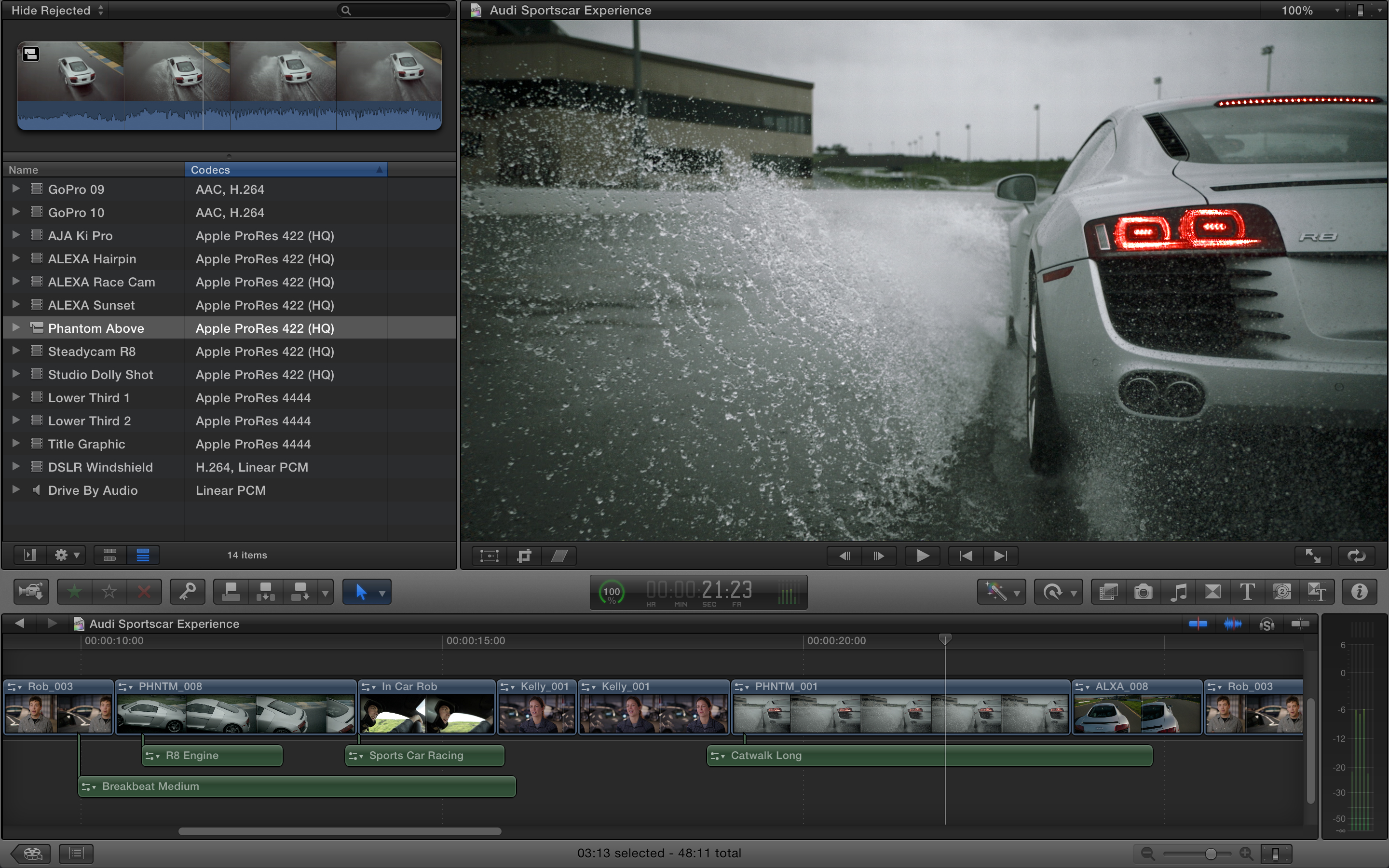
Final Cut Pro: Final Cut Pro received a small update today that included enhancements for the MacBook Pro’s Retina display and improvements to overall stability. Version 10.0.5 of Final Cut Pro is available from the Mac App Store now.

iPhoto: Version 9.3 of iPhoto was released on the Mac App Store today with a number of new features and improvements, including: iPhoto libraries are now accessible in Aperture 3.3, support for AVCHD video, and new Export options that auto-organize images into event subfolders.
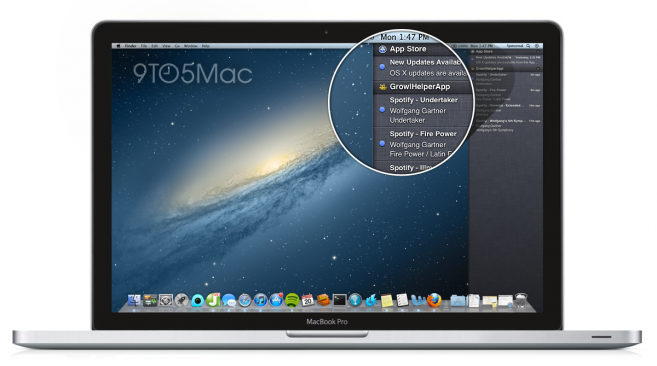
Aperture: The biggest update of all apps today is version 3.3 of Aperture. Other than being “fully optimized for the Retina display on the new MacBook Pro,” the update includes the following new features and fixes:

What’s New in Version 3.3

• New unified photo library for both iPhoto (v 9.3 or later) and Aperture; no import/export required; Faces, Places, slideshows, albums and web sharing work across both applications
•Support for AVCHD video has been added
• Aperture now lets you use camera-generated previews for faster browsing of RAW files immediately after import
• Highlights & Shadows tool has been updated to deliver higher-quality results and work with extended range data
• A new Auto Enhance button has been added to the Adjustments panel
• White Balance tool now includes Skin Tone and Natural Gray modes to simplify color balance
• Auto button has been added to the White Balance tool for one-click color balancing
• Set Desktop command has been added to Share menu so you can set a desktop background from within Aperture
• A new Manual option allows you to drag and drop projects to customize sort order in the Projects view
• New preference allows you to set the background brightness of the full screen browser
• Facebook, Flickr, and MobileMe albums are now displayed as thumbnails in the main window when accounts are selected in the source list
• Minor terminology changes, including “Original” instead of “Master” and “Info” instead of “Metadata”
• Source list includes a new “Recent” section, showing Last Import and recently-viewed projects
•Raw Fine Tuning is no longer displayed in the Adjustments panel by default
• Faces can now be named by dragging them from the Unnamed Faces browser to existing snapshots on the corkboard
• The Faces corkboard now includes a menu that allows you to set the order of face snapshots
• Newly designed monochrome source list and toolbar icons
• Addresses numerous issues related to overall performance and stability

After nearly two years without an update, Apple to finally revamp Mac Pro next week

Site default logo image

Yesterday, we reported that Apple has an incredible WWDC surprise: major updates to four of its Mac lines. We were able to affirm that three of these updates would cover the redesigned MacBook Pro with a Retina Display, refreshed 11-inch and 13-inch MacBook Airs, and new iMacs in two screen sizes. Besides those three Mac lines updates, we were unsure if the either the Mac mini or the Mac Pro would make it as the fourth update. We speculated that it could be the Mac mini due to the newly available Ivy Bridge processors, but now, reliable sources are reporting that Apple will, in fact, unveil a new Mac Pro at WWDC next week.

Sources have also been able to provide some part numbers and prices to prove this:

MD770LL/A – K5BPLUS,BETTER, BTR-USA

MD771LL/A – K5BPLUS,BEST,BTR-USA

MD772LL/A – K5BPLUS,ULTIMATE,BTR-USA

The pricing is similar to current Mac Pro models. What’s interesting here is that we’ve seen updates to every other line of Macs that Apple carries….except one…The Mac Mini.

Our sources are currently unsure of the feature-set coming with the new Mac Pro, but these sources say that there will likely now be three configurations. Two standard versions of the Mac Pro and a third version with OS X Server capabilities. In early 2011, we reported on some of the work that Apple engineers had been prototyping up for a future version of Apple’s Pro desktop line. For that report, sources said that Apple had been experimenting with a new Mac Pro design that is rackable and stackable. These prototype machines also included space for more storage drives, an important feature now that the Xserve has been long discontinued. With a year having passed since we heard about these prototype Mac Pros and the ability of Thunderbolt to offload a lot of the expandability, the final new Mac Pro designs could be different than the current designs but we haven’t yet heard definitively either way.

MacRumors reported that Apple has begun pulling Mac Pro stock from some of its retail stores. We’ve heard the same from tipsters, left.

With Apple adding the super-fast USB 3.0 technology to its next-generation MacBook Pro, and with Apple’s latest Macs including the even faster Thunderbolt I/O technology, Apple will likely add these faster connection ports to their latest Pro desktop. Since the Mac Pro is Apple’s most high-end machine for professional workers of all types, the most important features are the internals. Earlier this year, Intel released a series of Xeon E5 chips that would seem like a lock for a new Mac Pro. These new Mac Pros will likely also likely feature the latest graphics chips.

Apple last updated the Mac Pro in July 2010, making this upcoming update significant. It is unclear why Apple had left the Mac Pro in its 2010 form for so long, but a reader email from 2011 might explain that. According to the Apple executive who replied to a 9to5Mac reader inquiring about the Mac Pro’s status, Apple had been “investing heavily” in the professional desktop computer. We are unsure what investing heavily will mean for the final product, but it should surely be an incredible update over the nearly two year old model.

The Mac Pro’s demise: greatly exaggerated, indeed.
Expand
Expanding
Close

Decidedly un-exciting new 13-inch MacBook Pro spec sheet leaks?

Site default logo image

.

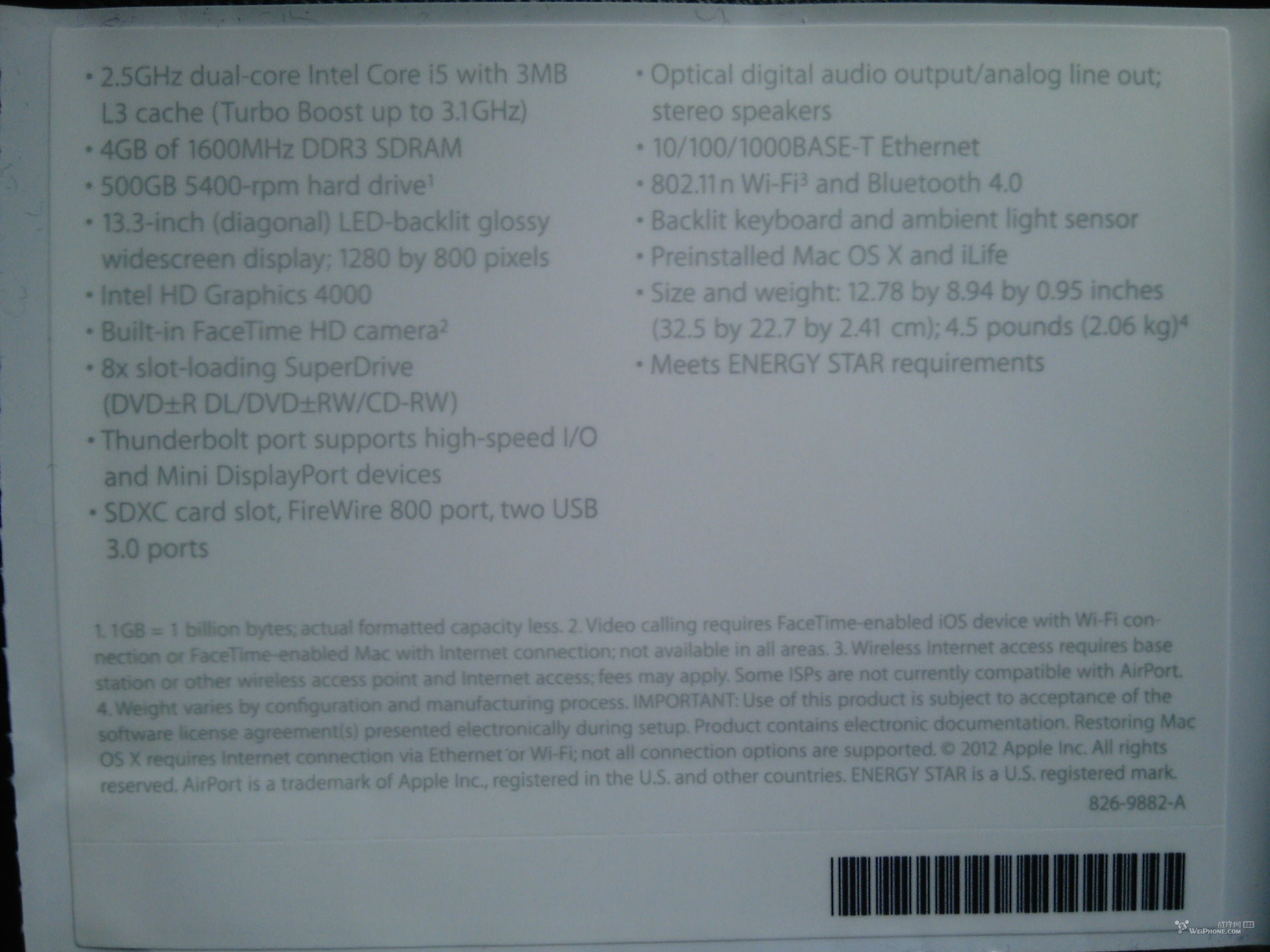
Weiphone forum member shows a purported new MacBook Pro spec sheet ripped right from a unit. The notables are Intel HD 4000 video, USB 3.0, and a faster 1600MHz DDR3 RAM.

Perhaps more notable is the same .95-inch thickness (in fact it has the exact same dimensions as the current 13-inch MacBook Pro), optical drive, and sad 1,280-by-800 display that is not even as dense as the 2010 13-inch MacBook Air’s display.

This base model (if this is indeed real) is not going to be on our shopping list. Do you know what is?

Update: If this is indeed true, this base model MBP would be running a Intel® Core™ i5-3210M Processor (3M Cache, up to 3.10 GHz),


Expand
Expanding
Close

Amazon Trade-In program conveniently now lists MacBook lineup, other laptops

Site default logo image

Amazon’s Trade-In program now accepts laptops and netbooks, which means Mac users are eligible to swap their MacBook Pro, MacBook Air, or MacBook before the upcoming refresh. How convenient—especially with the new MacBooks likely just weeks away from launch!

Starting today, those who are interested can visit www.amazon.com/tradein to search for electronics worth trading-in. After finding the item, click the Trade in button. After the trade-in submission is accepted, Amazon offers free shipping through UPS Ground or U.S. Postal Service to eliminate the headache and cost of the trade-in process. All items have to ship within seven days of submitting the transaction.

The online retailer deposits a Gift Card into the seller’s account after the deal finalizes. Unaccepted trade-ins either will receive a lower Gift Card amount or simply be returned. The return method adheres to the seller’s preference, which is selected upon completing the initial transaction online.

A quick glance through the MacBook price tags reveal an Apple MacBook Pro MD322LL/A 15.4-Inch Laptop (NEWEST VERSION) for a trade-in value up to $1,230, while an Apple MacBook MC516LL/A 13.3-Inch Laptop (OLD VERSION) fetches a trade-in value up to $360. An Apple MacBook Air MC966LL/A 13.3-Inch Laptop (NEWEST VERSION) earns a trade-in value up to $74o. The amount offered per trade-in varies depending on the model and condition.

9to5Mac first reported earlier this month that Apple is prepping a new 15-inch MacBook Pro for this summer that features an ultra-thin design, a “jaw-dropping” Retina Display, and super-fast USB 3. Our sources also indicated the MacBook Retina Display will début at the Worldwide Developers Conference next month, but it will not stay exclusive to Apple’s Pro notebook. The first-class, high-resolution display is also coming to the MacBook Air family.
Expand
Expanding
Close

Site default logo image

Gruber: TBA sessions on WWDC schedule could point to apps for Apple TV

In a post where he admittedly overanalyzed the recently released schedule for WWDC 2012, Daring Fireball’s John Gruber speculated that the high amount of “To Be Announced” sessions could indicate the launch of a new developer platform. His bet? Apps for Apple TV:

To me, this is what a preliminary WWDC conference schedule would look like if Apple were set to announce a new developer platform, like, say, apps for Apple TV. Apps for Apple TV is just a guess — I’ve heard not a single whisper about such a thing from any Cupertino area little birdies. (Cf. the aforementioned Tim Cook quote about Apple doubling down on secrecy.) But it’s one of the few things I can imagine would that would be big, new, and different enough to warrant that much attention at WWDC.

This tidbit follows reports from this morning that claimed Apple is set to introduce a new Apple TV OS and APIs, which could work with the unconfirmed Apple HDTV. We noted this morning that a new Apple TV OS raised questions, especially because Apple introduced a revamped Apple TV UI in March. We will have to wait a couple weeks to find out for sure, but we are expecting to see at least thinner, redesigned MacBook Pros, iOS 6, and Mountain Lion. Some of the TBA sessions could be for Retina Mac apps.

Apple will kick off WWDC with its keynote presentation at 10 a.m. PST on June 11.

Site default logo image

WSJ: Analysts now agree we’re going to see new Retina Macs in June

A newly redesigned 15-inch MacBook Pro was all but rumor until we reported earlier this month that Apple indeed has a slimmed down, all-new MacBook Pro sporting a Retina display, Ivy Bridge, and speedy USB 3. We followed that up with a report revealing Apple’s new MacBook Airs and iMacs will both likely include super-high resolution Retina displays. At the time, we reported Apple’s WWDC in June would be expected for at least the unveiling of the new slim MacBook Pro; although, a gradual roll out of Retina iMacs and Airs following the Pros would not be much of a surprise. Apple typically rolls out new Mac features such as higher-res displays gradually.

Following those reports, The Wall Street Journal published a story today quoting analysts who now all seem to agree that we will see upgraded Macs this summer. Ben Reitzes of Barclays Capital claimed the new Retina Mac lineup would debut at WWDC in June:

Reitzes said it is likely the Mac line will feature the retina-display technology used in the iPad, as well as the new Ivy Bridge quad-core processors from Intel Corp. (INTC) He also estimates that Apple’s new operating-system upgrade, called Mountain Lion, and the new MacBook Airs should be on the market before the first Ultrabook laptops with Microsoft Corp.’s (MSFT) Windows 8 operating system hit the shelves in the fall… “We believe recent data reflect a pause ahead of new products, which we believe will be released this quarter in June,” according to Reitzes, who has an overweight rating and $750 target price on Apple’s stock.

Report: Apple breaks records with production investments, but for what?

Site default logo image

A new report this morning detailed Apple’s investment in equipment and machinery during the most recent quarter as record-breaking, which indicates the company is certainly up to something.

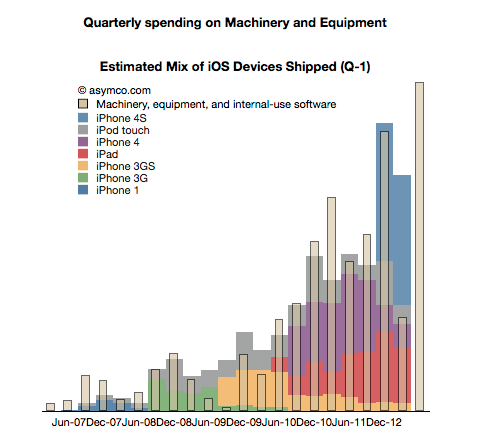
According to Asymco, Apple’s financial reports hint at even more future investments. The Cupertino, Calif.-based Company spent $1.3 billion in the last quarter, with another $2.5 billion needed over the next two quarters.

“Such numbers are hard to grasp. They are unprecedented not only for Apple but for almost any comparable company,” explained Asymco’s Horace Dediu.

The graph above illustrates the increase in quarterly spending for “machinery, equipment, and internal-use software.” So, what does Apple have in the works that requires so much machine-powered investments?

9to5Mac revealed today that the sixth-generation iPhone will have a 3.95-inch display at a 1,136-by-640-pixel resolution, and it will have a new dock connector. Of course, simply upgrading the iPhone does not explain Apple’s deep investment into production equipment.


Expand
Expanding
Close

New MacBook Pros will get Samsung’s fast 830 series SSD too

Site default logo image

In January, following a meeting with Samsung Storage solutions at CES 2012, we told you that Apple’s next-gen MacBook Air would likely make the switch to the speedier 830 series SSDs from Samsung alongside an update to Ivy Bridge. This was of course before we revealed some major changes coming to Apple’s new MacBook and iMac lineups. In addition to Retina displays for almost the entire new lineup, the new ultra-thin 15-inch MacBook Pro will be getting a complete redesign, losing the optical drive, and bringing it closer to to the thin design of current Airs. Like the new MacBook Airs, we have been told that at least some of Apple’s prototype MacBook Pros have used Samsung’s 830 series SSDs…

Expand
Expanding
Close

Report: Retina MacBook displays to cost Apple more, but will it affect the customer?

Site default logo image

9to5Mac first revealed that Apple is readying Retina displays for its computer lineup (MacBook Pros, MacBook Airs, and iMacs) that were previously only available to iOS devices, but new reports claim those high-resolution displays within the supply channel will debut on Apple’s notebooks at an increased cost.

According to DisplaySearch Senior Analyst Richard Shim (via CNET), the panels are becoming a “premium feature” that will cost the Cupertino, Calif.-based Company. The analyst further explained that including a 2,800-by-1,800-pixel display in the 15.4-inch MacBook pro would cost about $160. Apple currently spends $68 on its current models. Meanwhile, he said adding a 2,560-by-1,600-pixel display in the 13.3-inch model would cost $134, versus the current $69 expense.

According to CNET:

“What’s unclear is if consumers will end up paying more for the improvements. When Apple made the jump to Retina Displays in its iOS devices, the cost of the device stayed the same. The scale was a bit smaller though. For instance, according to a bill of materials from IHS iSuppli, the price of the third-generation iPad’s display was $87 versus the iPad 2’s $57, just a $30 difference.

As it stands, Apple already offers one such screen resolution upgrade on the 15-inch MacBook Pro, but customers need to pay for it. For $100 more, users can go from the 1440 by 900 pixel display to one that’s 1,680 by 1,050 pixels, or a 36 percent increase in the number of pixels.”

Whether or not the super-resolution displays cost more, it is highly unlikely that Apple will raise prices. As the publication noted above, adding Retina displays to the iPhone 4 and third-generation iPad, for example, did not increase Apple’s asking price.


Expand
Expanding
Close

‘Brydge’ MacBook-style iPad case with Apple quality aluminium (Update: Froaster!)

Site default logo image

We told you earlier this month about the “NoteBook Case” for iPad—a bluetooth keyboard case that does a good job of turning an iPad into a MacBook-looking netbook. That case is now available in the United States and Europe through CPeel, but today we look at another impressive keyboard case currently on Kickstarter called “Brydge.”

Like the NoteBook Case, the Brydge iPad case gets much of its design cues from the MacBook Pro line. The differences include aerospace-grade aluminium, optional built-in speakers, and a patent-pending “click-in” hinge providing close to 180 degrees of positioning freedom. The hinge is made of “metal alloys and magnets, with a thermoplastic elastomer shell.” By all accounts, at first glance, this appears to be one of the better made keyboard cases we have come across.

The Kickstarter project is currently at just $2,855 in pledges from 16 backers, but it still has 39 days to reach its $90,000 funding goal. A $150 donation will get you the model without speakers, while a $180 donation earns a model with speakers. If the project reaches its funding goal, the company plans to ship the first units by October. A full gallery of close-ups and the different models is after the break.


Expand
Expanding
Close

Ivy Bridge launching April 23 as next-gen Thunderbolt ships, likely to land in next Macs

Site default logo image

Today, we have two pieces of Intel-related news with reports claiming a solid April 23 launch date for the Ivy Bridge introduction, while others report Intel has begun shipping its next-generation Thunderbolt technology.

Late last month, we heard reports from CPU World, which claimed Ivy Bridge CPUs most-likely to land in future Macs would launch between April 22 and April 28 with availability by April 29. Today, we get a solid launch date with Cnet and various other sources reporting Intel will start its initial rollout April 23. As we detailed previously, many of the Ivy Bridge models included in the initial launch would be suitable for MacBook Pro-like devices and desktop offerings. However, Intel’s Ultra low-voltage U-Series Ivy Bridge processors most likely headed for MacBook Air-like designs are expected to launch in June.

Intel today said there would be over 100 Thunderbolt devices by year-end and another report coming from VR-Zone today claimed Intel started shipping its second-generation Thunderbolt controllers codenamed “Cactus Ridge,” which would align nicely if both these updates are headed to future Macs…

Expand
Expanding
Close