

Yesterday, iOS hackers Conrad and Chpwn exposed the upcoming panorama mode in the iOS camera app that we previously revealed. While you can enable it a little easier by using the jailbreak tweak available on Cydia, for those of us who don’t jailbreak, Funky Space Monkey shows us how to do it. We followed the steps, and it works just fine!
1. Download iBackupBot
2. Backup your iPhone/iPod in iTunes
3. Open iBackupBot and find the backup, then load it.
4. Find Library/Preferences/com.apple.mobileslideshow.plist and open the file. (if your software isn’t registered you’ll have to press cancel and then it will open)

Continue after the break:
5. Add in the following code: <key>EnableFirebreak</key><string>YES</string>
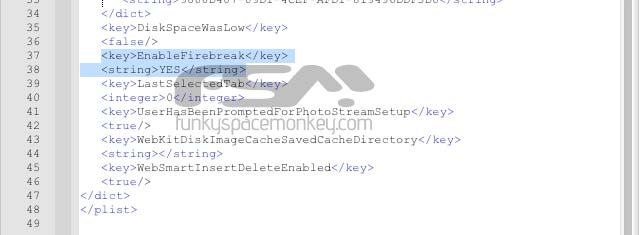
6. Save your modifications, and then restore from backup from within iBackupbot.
Enjoy!
Related articles
- The iPhone’s hidden panorama camera mode exposed: the interface and samples (9to5mac.com)
- FaceForward jailbreak tweak enables Facebook’s official iPad application (9to5mac.com)


FTC: We use income earning auto affiliate links. More.


Comments