9to5Mac Reviews
All the products that the 9to5Mac team has reviewed.

All the products that the 9to5Mac team has reviewed.
All the products that the 9to5Mac team has reviewed.
All the products that the 9to5Mac team has reviewed.


[youtube=http://youtu.be/Copuyw_qQdA]
With over 90% market share in Mac desktop virtualization software (according to NPD), Parallels is the clear leader in the industry. Now, Parallels has introduced Parallels Desktop 9 for Mac, bringing in new features, improving performance, and preparing for Mavericks and Windows 8.1. How does this version stack up? Is it worth the price? Read on to find out.
Performance

With the software at its ninth version, some may be content with their version of Parallels and think the upgrade isn’t worth the price. However, as a previous PD8 (and all the way back to PD3), allow me to be straight-forward: this upgrade gives the biggest noticeable performance boost ever. The company claims the updated software provides 40% better disk performance, 25% faster virtual machine shutdown times, 20% faster virtual machine suspend times, and 15% faster web browsing and 3D graphics.
Expand
Expanding
Close

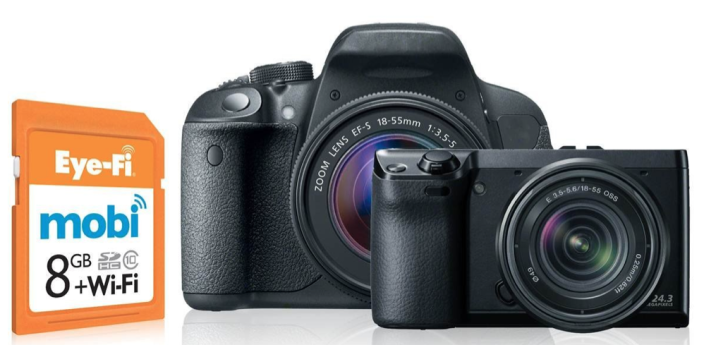
An increasing number of cameras these days have wifi built-in, allowing instant viewing of photos on your iPhone or iPad, and from there instant sharing on Facebook, Twitter, Flickr and so on. Which can leave those of us with less sociable cameras feeling a little left out in the cold.
Eye-Fi has offered solutions to this for some time, in the form of wifi-equipped cards that you can insert into your older or pro camera and transmit the images to a PC or Mac. This approach worked, after a fashion, but had two big problems. First, setup was far from easy, and second, transmission was via a wireless router. Fine at home, where you probably didn’t need it, not so fine when out & about, where you probably did.
This was the problem the Eye-Fi Mobi set out to solve: a $50 (8GB) or $80 (16GB) SD card that transmits photos direct to an iOS device running the free Eye-Fi app, with no router required. I decided to give it a try …
Expand
Expanding
Close


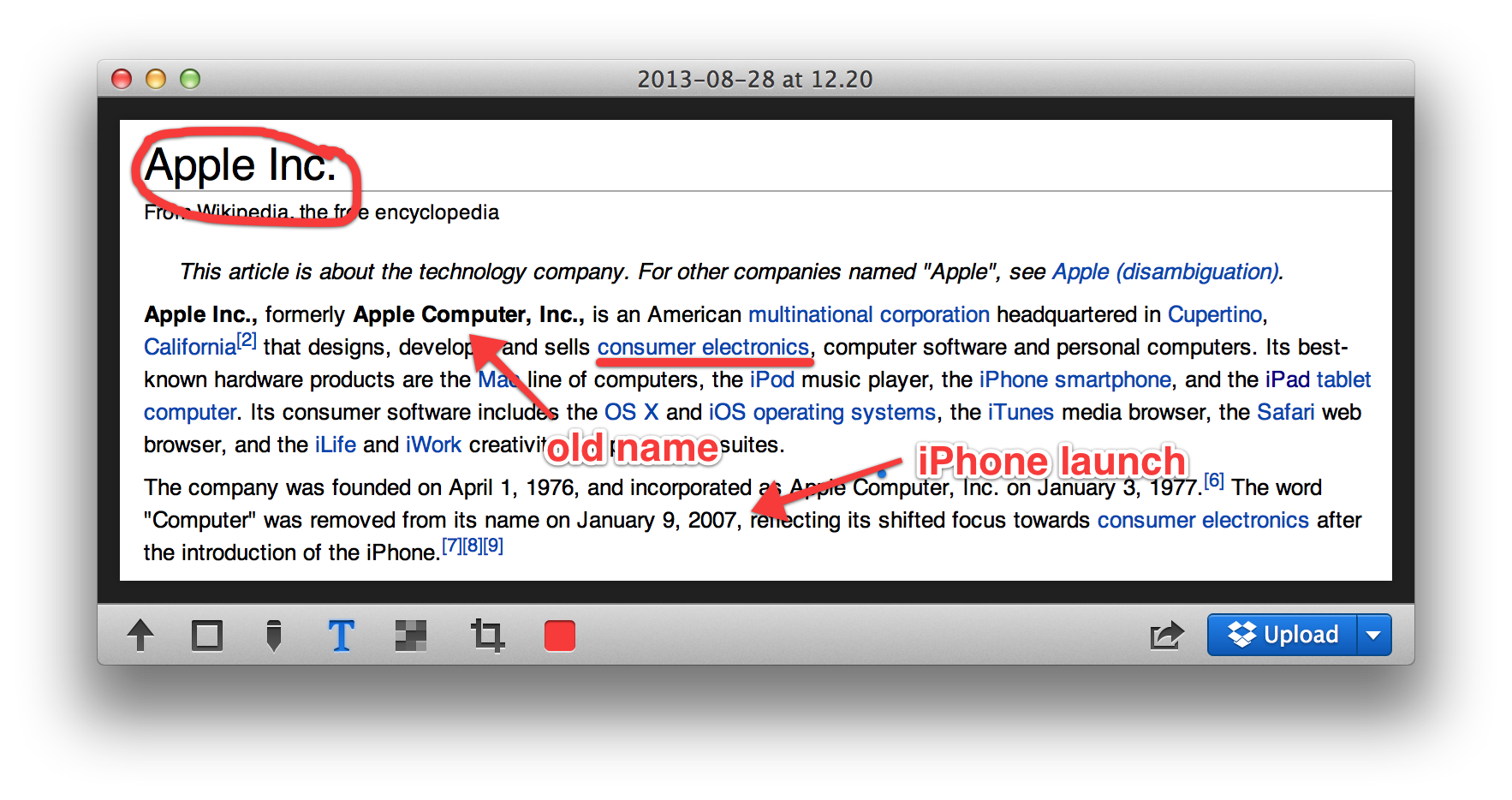
Put plainly, Glui is a screenshot and annotation tool; a utilitarian application. It does not evoke charm, but it doesn’t really need to. What Glui does need to offer is a functional yet efficient workflow and, on this front, it delivers. In use, I never feel like the app is getting in my way.
The activation shortcuts are bound to Shift+Cmd+5 and Shift+Cmd+6 by default to match OS X’s native screenshot shortcuts. These actions select either a rectangular screen region or one window, respectively. With the region mode, the screen cursor changes to a crosshair (which shows x,y pixel coordinates) and the region is chosen by dragging your mouse to create a rectangle. With the window mode, the cursor changes to a camera icon and you simply click on the window you wish to capture.
Although the process is very similar to how OS X’s built-in screenshot features work, it is not identical. For instance, in Glui, window screen grabs do not include the accompanying drop shadow as they do in OS X’s implementation.



From time to time, I find myself needing to send some files from my Mac to my iPhone, or from my phone to my computer. This is especially true with things like screenshots for reviews. In the past I have used Photo Streams or email to get the images from my phone to my Mac, but both of those are a little more annoying than they need to be.
Using a Photo Stream requires me to open iPhoto on my Mac, which means it will probably take forever just to grab a few images. For email I have to select all the images from my Camera Roll and either mail them five-at-a-time from the photos app, or copy them, switch to Mail, paste them into a message (which somehow bypasses the absurd five-image limit on in-line sharing in the Photos app) and then address the message to myself and wait for it to send, then wait for it to arrive on my computer.
There are also a ton of apps that allow you to connect to your phone through a web browser to transfer files, but those require the app to be running on your phone, and for the app to be in a specific mode to receive the files. It’s not seamless and it’s not as effective as it could be.
This is not a good workflow. That’s where DeskConnect comes in. DeskConnect is an pair of apps for iOS and Mac that avoids all of the unpleasantness of connecting the two devices and allows you to seamlessly send files from one to the other.

According to a new report from research firm Fiksu, which regularly tracks changes to App Store charts, Apple might be experimenting with new algorithms for iTunes and App Store rankings that incorporate user ratings. Apple previously only used the number of downloads and how fast an app was being downloaded in order to rank apps for its top charts, but Fisku thinks it has recently started incorporating user rankings:
In late July, we first began to notice apps unexpectedly shifting position without a corresponding increase or decrease in downloads. Upon closer inspection, we discovered these position changes correlated with the apps’ ratings. As evidenced by the graph below, apps with ratings of 4 or more stars received a rank boost in late July and have maintained that rank throughout August. Poorly rated apps with less than 3 stars received the opposite treatment about two weeks later, dropping off precipitously in rank and staying that way. Average rated apps, between 3 and 4 stars, suffered a slight degradation in rank but have generally been less affected.
The report also notes that, in recent weeks, Apple appears to be updating App Store charts every three hours opposed to the 15 minute intervals it was using previously. Fisku speculates that the increase could be to help prevent manipulation of the app charts, noting that “three hours allows enough time to identify anomalies and remove apps before they suddenly appear at the top of the rankings.”
Expand
Expanding
Close
ReadQuick, the speed-reading app for iPad, has been updated to version 1.5 today. The new version brings the app to the iPhone and iPod touch.
For those who aren’t familiar, ReadQuick is an app that presents a new way to read web articles. Rather than present you the entire article as one page, ReadQuick shows you the entire article one word at a time. That may sound inconvenient, but it turns out it’s actually much nicer than it sounds. Keep reading for our full review of the brand new iPhone version.


I’ll admit, when I first heard that Ashton Kutcher would be the star of a movie about Steve Jobs, I was less than thrilled. How could someone from That 70’s Show ever accurately portray one of the most influential figures in technology of all time? These negative thoughts in mind, I was pleasantly surprised with ‘Jobs’, which opened nationwide yesterday.

We’ve had a look at just about all of the best portable Bluetooth speakers on the market but Bose, a company known for high (prices and) quality speakers, has never made our ‘best of‘ lists. Its regular Soundlink and Soundlink II products at $300-$349 have sound and features that lower-priced competitors, especially Logitech UE, JBL Charge and even the Beats Pill were able to handily beat.
All of that ended the moment I got the $199 Bose Soundlink Mini, a product that shows that Bose is willing to think outside of its “hyper-premium price” box without sacrificing the quality of its product…
Expand
Expanding
Close

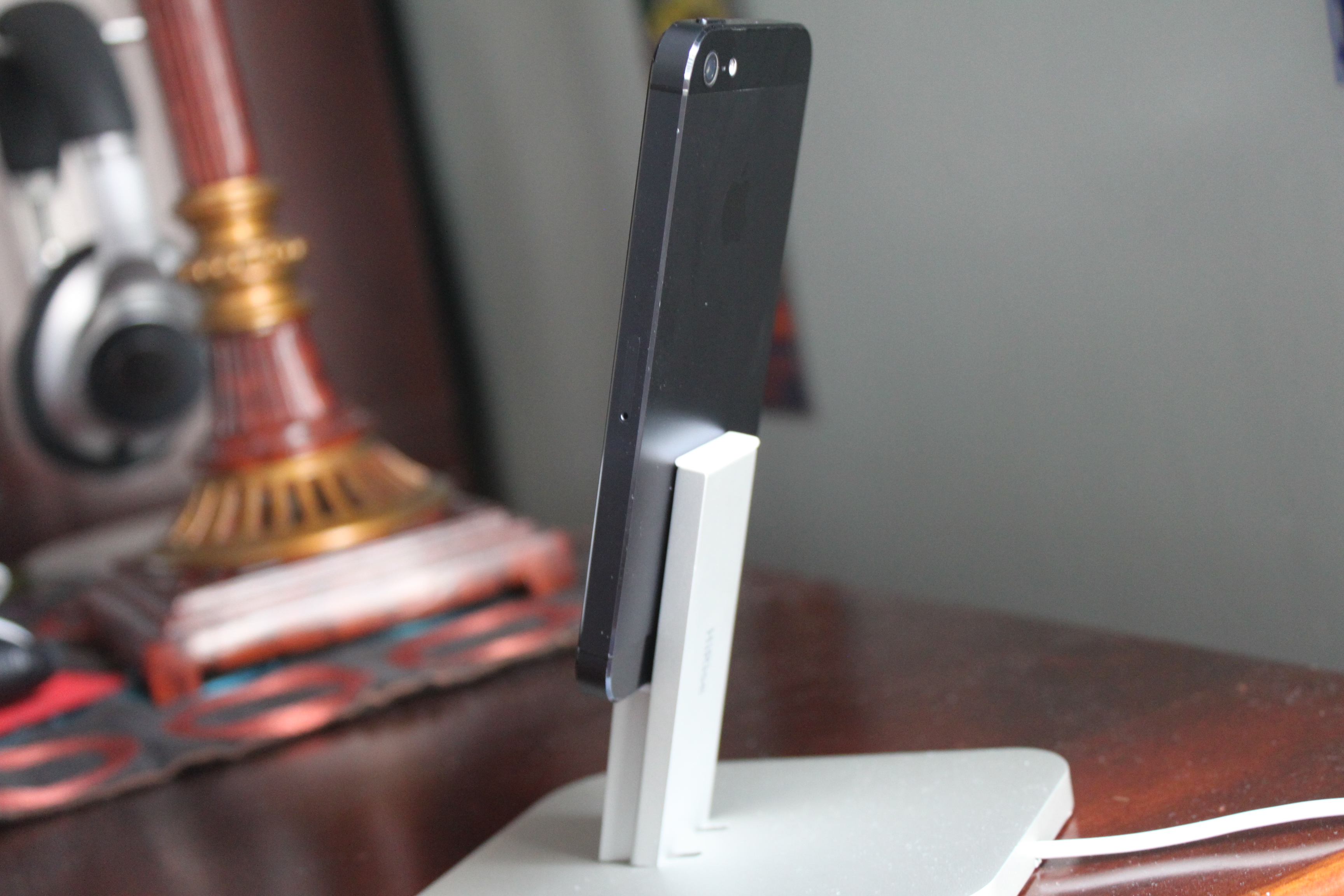
Product:
The Twelve South HiRise, which was announced last week, is an aluminum stand and docking/charging station for Apple devices that include a Lightning dock connector. The HiRise supports the iPhone 5, fifth-generation iPod touch, seventh-generation iPod nano, and the iPad mini (the 4th-generation iPad is too large). Unlike the typical iOS Device dock, the HiRise, as the product name implies, raises your device a few inches high in the air. Twelve South also ships versions of the HiRise for the MacBook (review) and iMac (review)…
Features/Performance:
[youtube=http://youtu.be/hrTJDW4d1X8]
Fitness bands and smart watches are all the rage right now – even Apple is expected to release the iWatch some time in the future. A new competitor is entering the market, but the science, technology and brand behind it are anything but new.
Salutron, founded in 1994, has been engineering and manufacturing heart rate monitoring solutions that you’ve probably interacted with many times – they own 70-80% of the market for the heart rate monitoring circuitry. If you’ve used gym equipment that allows you to see how fast your heart is beating, there’s a good chance Salutron was behind it. They also develop technology alongside NASA, which in itself proves their engineering-focused company culture.
LifeTrak, a brand of Salutron, builds sports watches and other accessories. We’ll be taking a look at their new Move C300, an app-connected fitness band with an on-device display.
Expand
Expanding
Close
Product: Today we’re taking a look at a brand-new word game for iOS called 4Snaps. The premise of the game is like a cross between charades and Draw Something. You’re given a choice of three words. You have to pick one of these and then take four photos (“snaps”) to help the other player guess the word. The object is to see how many turns you can take in a row before someone misses the word.
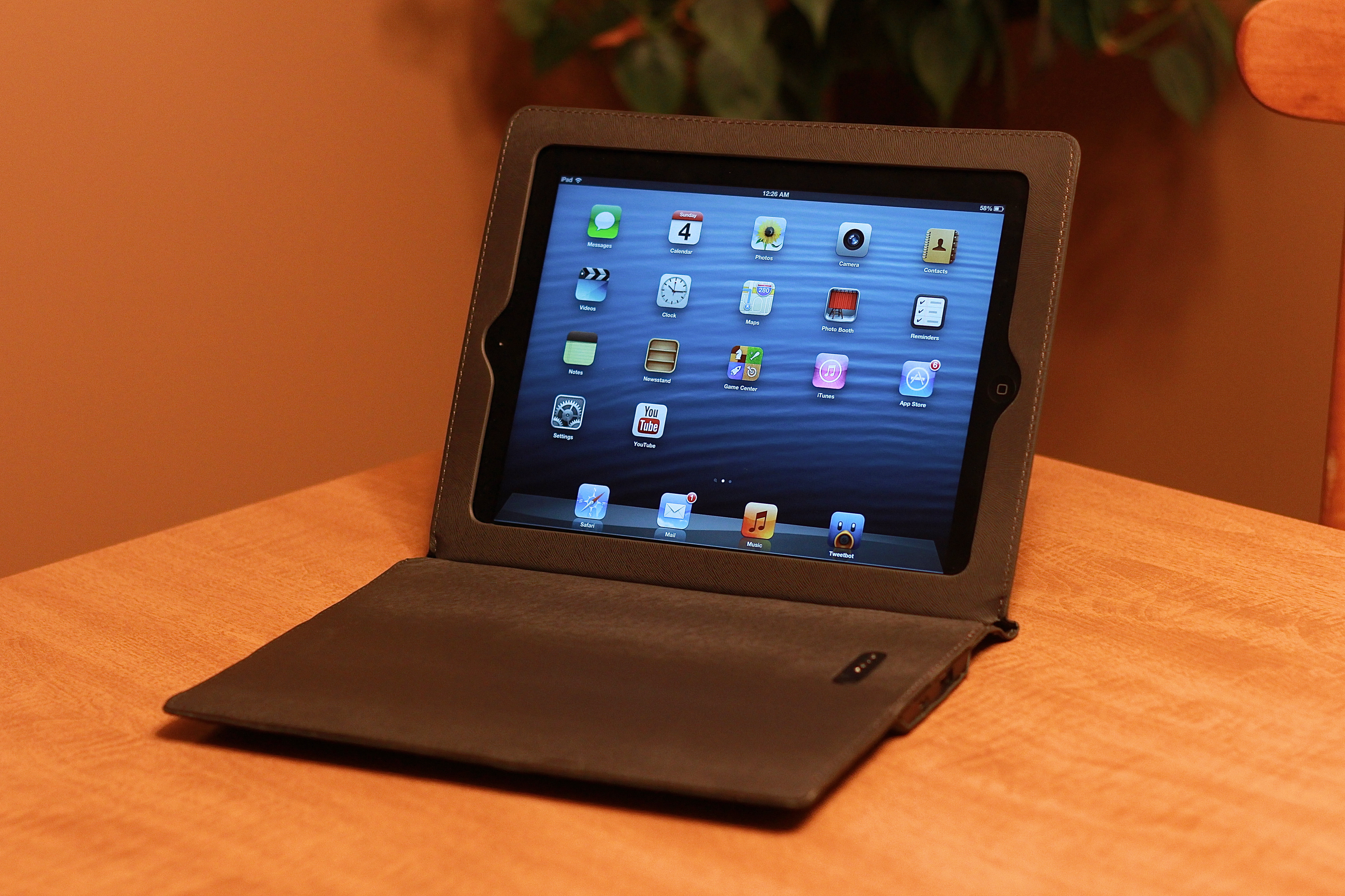
Product: For the past week I’ve been using the Justin Case (Ultra-Slim) Rechargeable Power Case for the iPad. Essentially, the case is a folio-style cover for the iPad 2, 3, or 4 that includes a massive 11,600 mAh battery built into the cover which you can use to charge your iPad, iPhone, iPod, or pretty much any other portable device. The case also functions as a stand for your iPad.
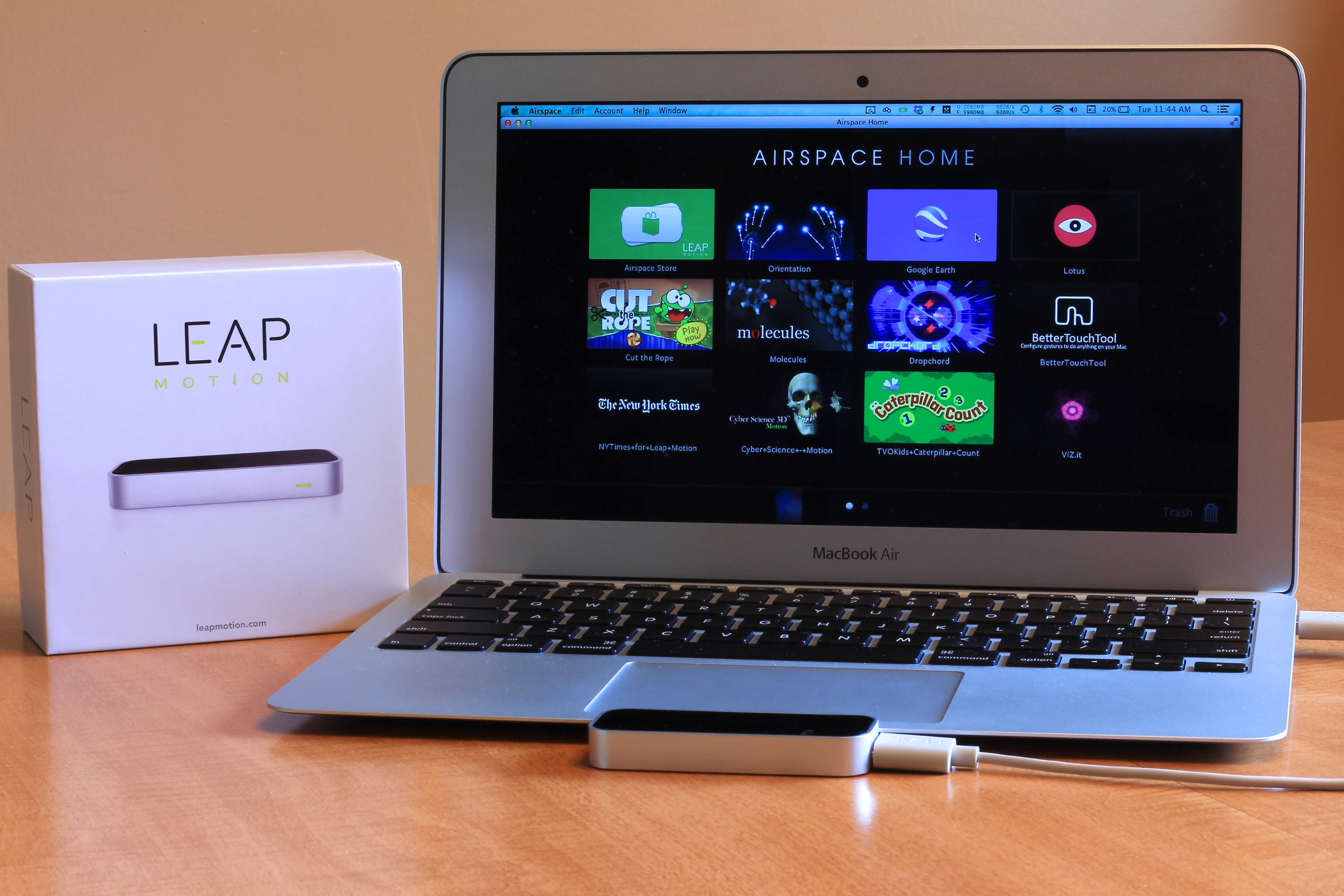
True new innovations in the technology space only come around every few years, and even rarer are the innovations that have the power to change our day-to-day interactions with our devices. That’s why I was excited when I first heard about the Leap Motion, a little motion control device that promised to alter how we think of using computers. One year since the initial preview, the device is in the hands of the public, and now it’s up to the people to decide if it can change the way we use our computers. Does it live up to its expectations? Read on to find out:
Product: I have been testing Duracell’s PowerMat system for my iPhone 5 along with the company’s PowerSnap kit. This set of accessories amounts to a wireless charging system that allows a user to drop a compatible device on a small mat and charge without the need to insert a cable into a device every time the user wants to charge. The PowerMat comes in versions that support either one, two, or three devices. I tested the 2 device model…
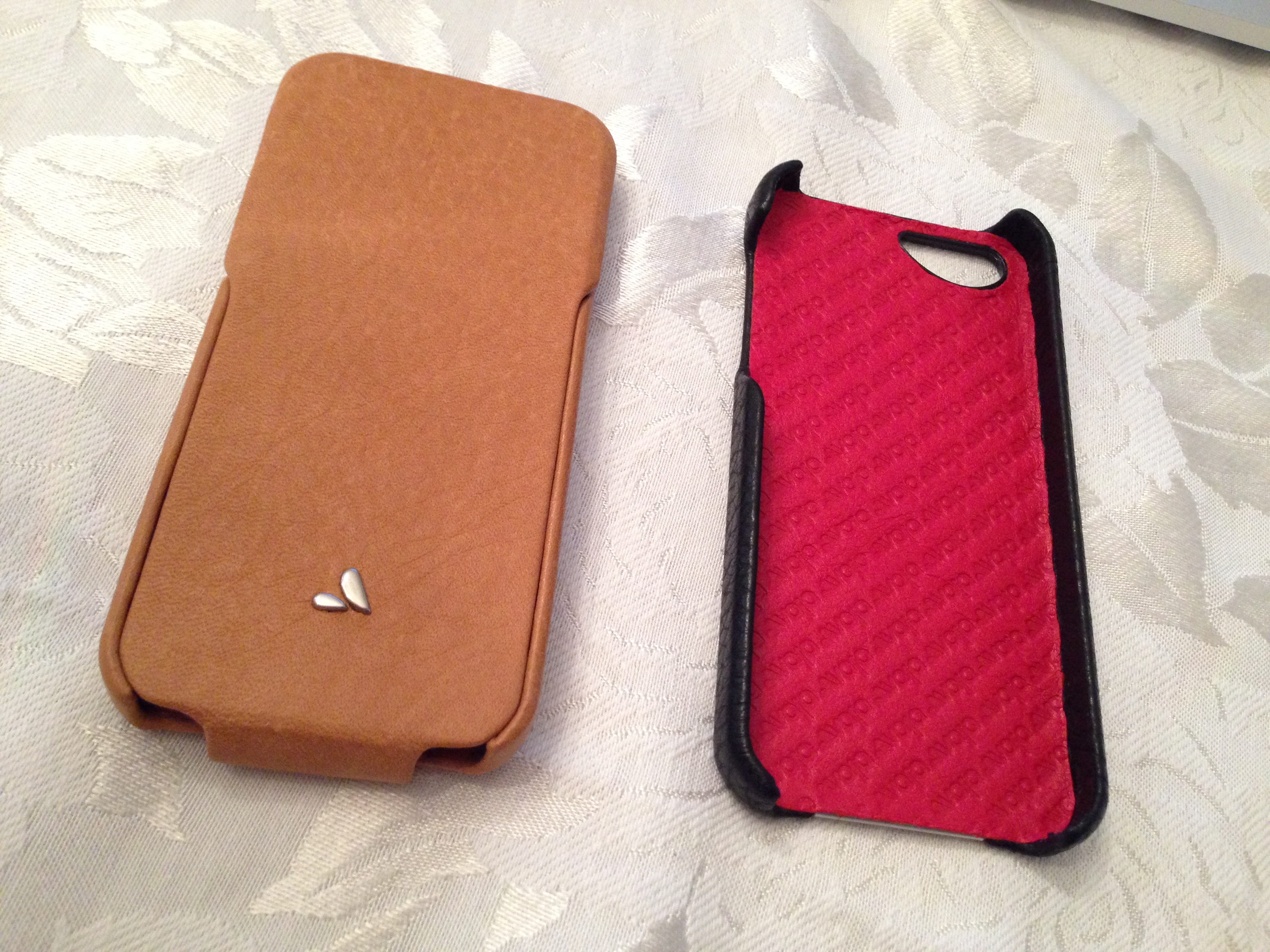
Product: For the past couple of weeks, I have been using Vaja’s premium leather Grip Hardshell Case and Executive Leather Flip Cover for the iPhone 5. These cases are built-to-order and handcrafted in Argentina. Vaja’s website allows customers to completely customize both the inside and outside designs of the cases. The process takes 20 days, according to the company. However, a series of in-stock, pre-chosen configurations are available.
Performance/Features: Both cases are very structurally sound, and compared to other cases that I have tested in the past, putting the iPhone 5 in and out of the cases is a simple task. In terms of leather case quality in general, I have usually found myself with a mixed bag of results. However, my past experience with Vaja’s leather quality has been outstanding. The leather iPhone 4/4S Vaja case that I reviewed all the way back in 2010 is still in use, and it is in good condition with only minor nicks and a lack of tears.
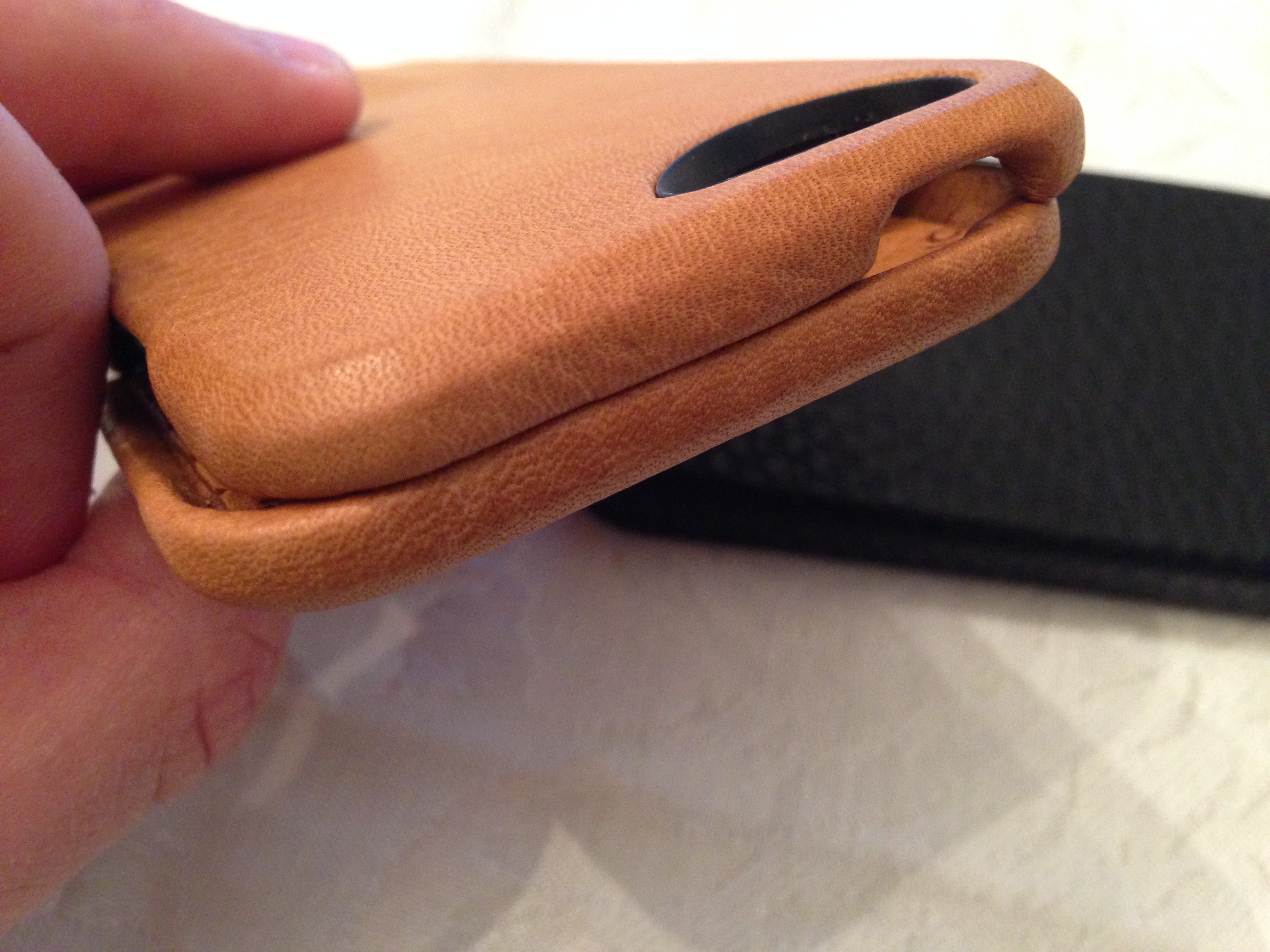
Both cases offer easy access to the iPhone 5’s camera, audio controls, Lightning connector, speakers, and sleep/wake/power button. The Grip case offers a completely open face for the iPhone 5’s display, while the Executive Leather case has a front flip that will keep your display covered while the iPhone is in a bag, pocket, or elsewhere. The flip case uses a magnet system so the flap stays intact.
In terms of protection/performance, both cases will do a solid job of preventing dents into the aluminum band surrounding the iPhone. If you drop the iPhone 5 on its rear, the camera/LED is seemingly protected as the cases are a bit higher than the flat camera face. Because of the front flap, the Executive case offers more protection than the Grip case.
Why: Vaja’s latest iPhone 5 cases are perfect for those who want to protect their iPhone 5 with some of the best quality leather cases materials for a phone. The handcrafted process adds a touch of elegance to your already high-profile device. However, Vaja is a brand that focuses on style and materials, so if you’re looking for a case that is built specifically to protect your phone, check out the Otterbox Defender (my full review).
Price: The base-model Grip case costs $70 and the base-model Executive Flip Cover case costs $90. Certain leather and color options can yield an extra $20 on top of those prices.
Hands-on image gallery:
Not a fan of Apple’s EarPods? Looking for something new to use with your iOS devices? We took the Nue Era in-ear headphones by Polk Audio for a spin this week. The Nue Eras are, as the name implies, a brand-new model that was just recently released. Are they worth checking out? Keep reading for our full review.

RHA designs and engineers their audio products in Britain and prides themselves on honing in on the small details of a product and making them great. Prior to testing their headphones, I had never heard of RHA (they’re a division of Reid Heath Ltd.), but the fact that Apple retail carries their products coupled with their sharp industrial design made me want to check them out.
As quick as Apple can give me new set of headphones with each iDevice, I somehow find a way to misplace, break, or water (OK, sweat) damage them. I am assuming many of you are just like me in that regard and, as such, prefer a pair of solid earbuds under the $50 mark. At first glance, it seemed that the RHA M350 noise-isolating aluminum headphones would the fit the bill, so I decided to give them a test drive.
Packaging/Design

The MA350 earphones come in a compact box broadcasting a few key features (dynamic speaker, fabric cable, etc) and even their 5 star score from What-HiFi. On the back, RHA continues with a full list of specs and features – nothing out of the ordinary here. The earbuds themselves are a different story. The first thing you will notice is the machined aluminum housing, which really stands out against the rest of the black body. Apple fans are sure to love how the MA350 ‘buds look next to a Mac or iDevice.
The next most striking element on these earphones is the fabric braided cable. It feels terrific in between your fingertips and more importantly it doesn’t easily tangle like rubber (Hello, Apple earbuds!). But this luxury comes at a cost – more on that later.
It may be a bit nitpicky, but the ‘L’ and ‘R’ signifiers on the buds are a bit tough to discern at a quick-glance. I would probably put a touch of nail polish or a quick Sharpie dot to make them more easily identifiable. Again, not a big deal but I thought it was worth mentioning.
Fit/Sound
Each pair of earphones includes three different sized silicone tips so you can find the perfect fit for your ears. I recommend taking your time when swapping out the tips. It took me a couple tries to fit a new tip on the ‘buds as they are super tight. Once I worked the opening of the tip a bit to loosen the silicon they slid on pretty easily. After finding the correct size tip, the MA350s fit well and were very comfortable.
Now on to how these stylish ‘buds sound. Keep in mind, sound quality is extremely subjective and is heavily influenced by the music you listen to. In my opinion, the RHA M350 earphones sound great. Especially when you consider that they retail for only $40. I tested them with several genres of music and found that they are extremely balanced. Don’t expect overbearing bass (Monster Beats) or overly high acoustics. They are a nice mix of both. I was impressed that I was actually able to decipher new sounds and instruments in songs I’ve been listening to for years. As mentioned above, the fabric braided cable proved to be a double-edged sword. It’s great aesthetically and for avoiding tangles, but creates some unexpected feedback (microphony) if jostled or rubbed during audio playback. Not a big deal, but something you should be aware of if you plan to use these for running or working out.
Wrap up and 20% discount code
The RHA M350 earphones look and sound great for a pair of $40 headphones. The only major feature I wish these headphones included is a remote and mic for better smartphone compatibility. Other than that, I think they are perfect for people looking to upgrade to better sounding earphones at a reasonable price. RHA even includes a 3-year warranty on every pair sold.
For the next week, 9to5Mac readers can take 20% off a pair of these headphones when purchased at Amazon (must select RHA as the seller) with coupon code 9TO5MAC2.
Apple’s new release of Logic Pro X marks the first time in nearly six years that the company has completely overhauled the app’s UI. It’s been a long time coming for pros like myself that rely on the application, and to make things even sweeter, Apple is promising more than just a fresh coat of paint this time around.
There’s no ignoring the backlash Apple experienced just two years ago with its redesign of Final Cut Pro X and the removal of pro features in return for an elegant, streamlined interface. The question is, does Logic’s slick new interface come with compromises for professionals? Or has Apple learned from its mistakes with FCPX?
Expand
Expanding
Close

[youtube=http://youtu.be/mSsXrPxJ2rc]
“How can we create high quality, easy-to-use software for both professional and novice DJs?”
That’s the question that inspired co-founders Karim and Christoph to make Algoriddim’s djay, the award-winning music production software. At the time, DJ software was extremely expensive and complex, but the pair were determined to create meaningful change in an industry they were both tremendously passionate about. While they both enjoyed the art of scratching, in between attending classes and studying for exams at college, the two had vastly different skill levels.
Karim was the expert. With ten years of experience under his belt, Karim had his fair share of knowledge about the industry and had used some of the most popular DJ software available. But with every gig he played, Karim found each solution clunky and downright confounding. He could manage, as digital software proved to have a superior functionality compared to his old analog favorites, but the situation wasn’t even close to ideal.
Christoph, on the other hand, had an extraordinary admiration for DJing, but didn’t have the experience or expertise of his buddy Karim. No matter what software he tried, Christoph was often puzzled as most professional software featured an overwhelming set of controls and required an insanely high level of manual skill, which made performing all the more difficult.
As such, the duo wanted to make something new; software that they and similar people could both use.
Expand
Expanding
Close

“Ember is your digital scrapbook of things that inspire you”
Realmac Software has been busy at work this year, releasing Analog Camera for iPhone, updates to Clear and Analog for Mac, and now releasing the next generation of its digital scrapbook LittleSnapper, now known as Ember for Mac.
Ember simplifies the management of screenshots and web clips into collections and features annotation functionality. Ember can even plug in to popular sites that feature beautiful imagery like Dribbble and National Geographic. In addition, integrated services like Messages, Twitter, Flickr, and CloudApp allow for easy image sharing.
[youtube=http://youtu.be/zc47UEmx5fs]
Screen recording directly on iOS devices has usually required the device to be jailbroken. Rather than recording sans-PC, the general solution is to hook up the iPhone/iPad to a computer and use some sort of a mirroring app then record the computer’s display. Now, the app xRec has made its way into the App Store. As you can see in the video above, you do have to deal with a red “xRec” bar at the top of all screens since it is taking advantage of iOS’ recording APIs. On the plus side, you can quickly record the entire operating system on-the-go without plugging into a computer.
Of note, the app currently does not work with iOS 7 and it seemed to crash multiple times on my current-gen iPod Touch. Even after a reboot, opening the Mail app or a game crashed the recording.
The developer assures me iOS 7 compatibility is on the way (after iPad compatibility is built), but stability of the current app would be more appreciated.
xRec is available in the App Store for $1.99.

As I was making my list of devices and chargers to bring on vacation last week, I realized that I was going to have to get something that could easily charge my iPhone 5 on the go. I’m a hardcore mobile Internet user and the battery life has never met my needs, especially on vacation, where it’s often my most used gadget. I started off by looking at standalone power packs like the Mophie Powerstation, which we’ve reviewed before. I was intrigued by those type of devices because they could charge more than one device, whereas a dedicated iPhone 5 battery case could solely charge the phone and nothing else. The standalone battery packs also offered a lot more power than a case, especially when you compare the prices of the two.
Battery cases, however, are much more convenient than power packs. Just put your phone in the case and anywhere you go, you have the ability to charge it. In the end, the ease of use and simplicity of battery cases was the deciding factor for me. After much research and reading our own reviews of the Mophie Juice Pack and Otterbox Defender cases, I ended up going with the Lenmar Meridian case for the iPhone 5.
Expand
Expanding
Close
Google Voice has had an interesting relationship with the iPhone. If you’re an avid user of the service, the tight integration found on Android devices is enviable. First downloadable in the App Store then taken down then available on Cydia in 2010, GV Mobile + has been the go-to app for many Google Voice users even with the launch of the official Google Voice iOS app.
Now, the app has matured into version three, a full-blown messaging and VoIP application contained within a sleek design.
New Design
GV Mobile + has always kept up-to-date with the latest design trends. In this third version, the app moves to a slick “flat” design. It’s not exactly in line with iOS 7 and makes use of the hamburger menu that has plagued many apps lately, but the design has a solid and complete feel to it.
Transitions between screens are also notable and appreciated. New pages fly up from the bottom or slide out from the top. When placing a call, the screen fades out and a new “in-call” screen fades in.
VoIP
While the option to make calls using your cellular minutes is still readily available, this is the first version that includes built-in VoIP. Even though I was extremely excited to use this feature since my data plan is still unlimited but I only have a few hundred minutes per month, I haven’t found this to be quite as reliable as I would hope. Even with a strong LTE connection, I usually receive complaints from the people I talk to and end up calling them back using my cell. In WiFi environments, it can be a viable choice and definitely saves you if you don’t have many minutes.
Ever since I placed my first FaceTime Audio call, every phone call sounds dull and mono, so any criticism of the sound quality from me is a bit skewed. VoIP in this application sounds like a regular phone call placed over the regular phone application.
In-App Notifications
Mirroring the same design as Facebook, this version also includes in-app notifications. This is definitely helpful if you’re having multiple SMS conversations.
The notifications are reliable and it’s definitely a great feature for power users of the app.
Roundup & Giveaway
A while back, GV Mobile + was updated with a nasty bug that made the app unusable. Although the developer, Sean Kovacs, pushed out an update very quickly, Apple was slow to push out the critical update. At that time, I tried using the free, official Google Voice app, but found it to be extremely lacking. To put it simply, it seems like Sean Kovacs cares more about Google Voice and the features in the iOS app more than the Google Voice employees do. Seeing that this is one of my most used applications on a day-to-day basis, I couldn’t live without it.
You can purchase GV Mobile + 3 in the App Store for just $2.99.
In addition, we’re giving away 5 promo codes for the app. Leave a comment below with your Twitter handle by the end of tomorrow (7/15 at 11:59 PM PST) and we’ll announce the winners on July 16th. Good luck!
Buying an iPhone isn’t just about the device. Instead, you are buying into the entire ecosystem of apps, accessories and add-ons available from third-party companies. In this review roundup, we’ll be looking at a small assortment of hardware accessories for iOS devices.
The marketplace is full of iPhone/iPod docks and speaker systems. Lately, it seems that the trend is moving towards portable Bluetooth speakers rather than plug-in dock (and hopefully we’ll continue to see a trend towards AirPlay – one can hope!). So why would we spend any time with a docking station that needs AC power? It’s an all-around system.
The Sound Step Lightning has many different inputs – Bluetooth, an auxilary jack, USB, and a dock connector. With the remote (or app which you’re prompted to download when you dock your device), you can switch sources at any time. Thus, the system could act as a small stereo system for your TV and a Bluetooth speaker for your device at the same time.
There’s still something special about a docking station. Not only does the lightning plug provide for a data connection for music playback, but it also charges your device. The lightning connector is strong enough to hold up even the iPad with Retina display.
The speakers themselves can get extremely loud and the bass is definitely strong. Even when the volume is on high, music is still clear and doesn’t become distorted. Make no mistake, this is a high-quality device with a sleek design and intelligent sound.
You can pick up the Soundfreaq Sound Step SFQ-02L on Amazon for $129.99.
Losing your keys is extremely inconvenient. For me, I never leave the house without my phone, wallet, and keys, so if I’m in a rush and the keys seemed to drift off somewhere, I’m stuck until they’re found.
Hone is BiteMyApple’s solution to this problem. Through the use of Bluetooth 4.0 and the Hone app, an arrow in the app lights up as you get closer and closer to your keys. What’s more useful is the “Find” button, which makes the Hone light up and beep from up to 150 feet away.
The device itself is a little bit on the large side – just about the size of a key fob. However, it’s only half an ounce and the battery should last you about six months.
This device started as a Kickstarter with 1,132 backers. Today you can buy the Hone for $59.99 on the BiteMyApple’s website.
In fact, BiteMyApple is a web store that exclusively sells devices that started out as Kickstarter projects and reached their funding goals.
The iPhone’s camera is incredibly powerful, and, as the saying goes, “the best camera is the one you have with you.” Since it’s so portable, taking pictures from an iPhone is extremely convenient. However, trying to take a steady video or a long-exposure photo (using a third-party app) doesn’t turn out so well when holding the phone.
Enter Glif. Like the Hone, the Glif is sold by BiteMyApple. It’s a sturdy accessory that works with any regular tripod or mount. Simply twist the Glif into place, fit your phone into the Glif, and you’re ready to start taking pictures or videos. I’ve actually used the Glif in some of my videos and found it to be extremely simple and useful. In addition, it has a good enough grip on your iPhone that you can tilt your tripod at a 90° angle toward the ground and it’ll still keep the phone in place. The Glif is approved and used by me.
The Glif is available on BiteMyApple’s website for $19.99.