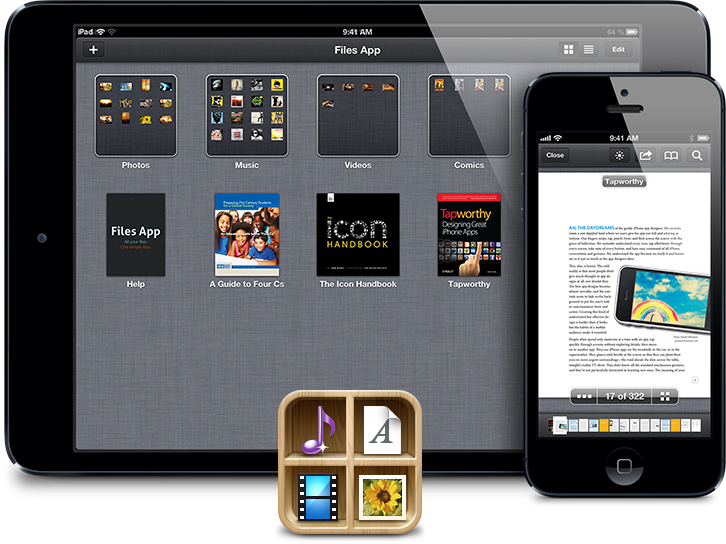
For years, iOS users have wanted a proper way to save, open, and store files on their devices. While Apple has given us a partial solution with “Open In…” sheets, the folks at SonicoMobile have taken it upon themselves to go a step further. Today, they have launched a new app called Files that aims to be the missing “Finder for iOS.”
Of course, we’ve seen similar apps before. What is it that makes Files different from the rest? Keep reading to find out.
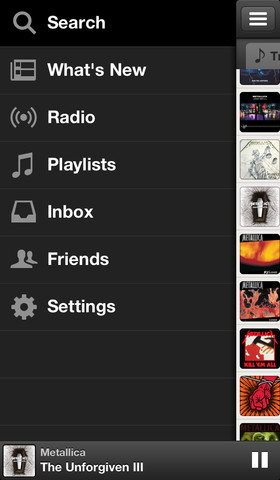
Spotify version 0.6.0: Perhaps the biggest update today goes to the Spotify iOS app which, on top of receiving a “shiny new interface” equipped with a sidebar, includes a “Now Playing” bar, a new Track menu, and a number of other new features and fixes:
• New: Shiny new interface. You can navigate around the app with a new sidebar. Check it out by swiping left-to-right, or by pressing the ≣ button in the top left of the app.
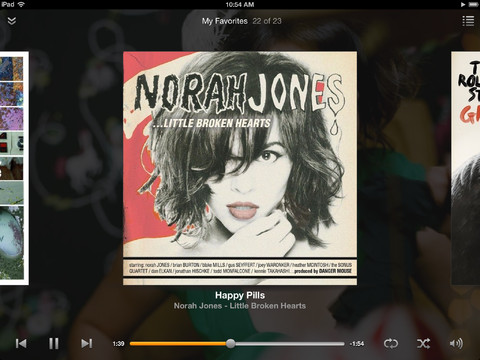
• New: Now Playing bar. You’ll always see what you’re listening to along the bottom of Spotify. To switch tracks, just swipe along it. Tap or drag to see more information about the current track. Tap the cover art in the extended view to use AirPlay, and disable/enable shuffle and repeat.
• New: Track menu. Tap the … button on any track to see a redesigned context menu.
• Fixed: “Track only available online” issues. This would sometimes appear after start-up, or when you’d been offline for a little while. Not any more.
• Fixed: Lock screen will now always display the correct track.
• Fixed: Shuffle now switches off after you’ve used “Shuffle Play” on an album or playlist.
Waze version 3.6:Waze, one of Apple’s Maps partners and an app CEO Tim Cook recommended as an alternative during the iOS 6 Maps controversy, gets some nice new features today. Among the new features is real-time road closure reporting and routing, a refined map with only relevant road names, and much more:
✓ Report road closures in real time. Waze will close off the road and route others around it
✓ Report pins tilted on map to better indicate direction of event
✓ Reduced map clutter by showing only relevant road names
✓ New moods!
✓ New inbox with multiple message selection
✓ Update gas prices popup: When in gas station users prompted to update price (Europe only)
✓ Optimized performance and multiple bug fixes
PanoPerfect for iPad: We’ve told you about the PanoPerfect app before– an Instagram type experience designed specifically for sharing panorama shots. Today the developers have released its first iPad version of the app and also revamped the iPhone app.
PanoPerfect is a free, fun, and simple way to share beautiful panoramic photos on your iPhone. Find, follow, and share gorgeous panoramic photos with friends. Panorama’s go into a stream where you can comment and like your favorite ones.
Bad Piggies version 1.2.0:Rovio’s popular Bad Piggies franchise gets updated today with 30 new “Flight in the Night levels,” 6 Road Hogs levels, new achievements and much more. The free apps and HD iPad versions receive the same update today.
Amazon made its Cloud Player app available to the iPad and iPad mini today.
Version 2.0 of Amazon’s music-streaming app hit the App Store on Wednesday, and the update notably included—aside from optimization—an updated look and a new setting to manage cache size.
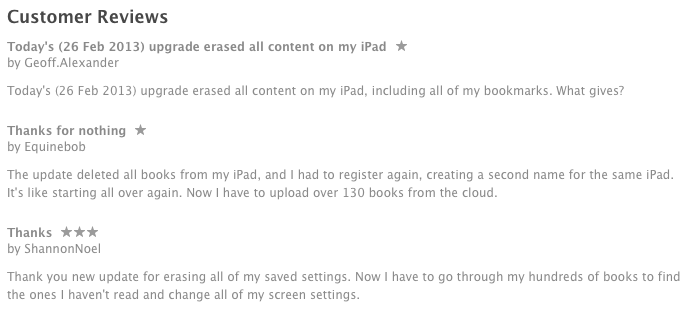
Amazon also released a debacle-of-an-update for its eBook-viewing Kindle iOS app yesterday that intended to fix bugs and the registration process but instead deleted entire digital book libraries, login credentials, account data, and saved settings. Check out a few of the reviews on iTunes:
The online retailer now warns users with the following “do not install” notice in the Kindle app’s change log: “Note: There is a known issue with this update. If you are an existing Kindle for iOS user, we recommend you do not install this update at this time.”
Get more details about the Cloud Player app update in the press release below.
Runtastic version 2.10.1: Personal fitness tracking app Runtastic gets a nice update today that brings more Sport types, improved Facebook integration, and number of other bug fixes and performance enhancements.
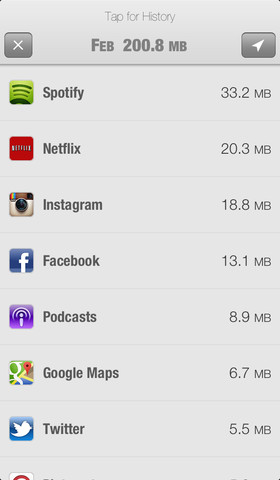
DataMan Pro version 6.3: After some trouble getting by Apple review guidelines with its last update, DataMan Pro is back on the App Store today and is 50% off for a limited time to celebrate. The app has also been completely redesigned:
The resurrected DataMan Pro has been completely reinvented to feature a stunning new interface, an intelligent real-time data usage forecast, and most advanced app tracking… The powerful App Watch technology that users love is also back. You can see the usage statistics for all apps. This amazing capability empowers you to root out data-hungry apps… The new DataMan Pro includes Smart Forecast and the beautiful interface that were recently introduced in DataMan Next. Combined with precise real-time tracking, you can say goodbye to overage.
Orbitz Flights, Hotels, Cars 3.0:Yesterday Orbitz launched its first “fully native, in-app search and book experience” for the iPad with an update to its Orbitz Flights, Hotels, Cars app that brings support for the larger screen and new iPad-specific features:
Our award-winning app (App Store Editors’ Choice & Hall of Fame inductee) is now also optimized for iPad and iPad mini! iPad users enjoy *all* the same app features as iPhone users, plus iPad-exclusives like a dual list/map view of hotels and the ability to compare details of multiple flights, rental cars, or hotels from a single screen.
Adobe Muse:Adobe announced today that it is updating Adobe Muse with some highly requested new features: Expand Expanding Close
Facebook has updated its official iPhone, iPad, and iPod touch application with a number of enhancements. Notably, version 5.5 of the app includes a new button design that makes Liking, commenting, and sharing stories easier. Additionally, Facebook has brought the free calling to friends feature from the Messenger app (as seen in the above screenshot) right into the standard Facebook app.
9to5Mac has once again scoured the App Store for all the latest app launches, price drops, noteworthy news, and updates, and we have compiled everything in a roundup below. Check it out, but keep coming back as we continually refresh the list throughout the day.
Updates
1. Animation Studio | 99 cents Version 3.3 of this animated movie creator hit the App Store today with support for Retina and iPhone 5. The update also boasts a new user interface and improved drawing performance, playback quality, and video exporting. Additional changes include “on-canvas frequently used tools,” as well as various enhancements and bug fixes.
MLB’s At Bat 13 app will get a Spring Training update today for iPhone, iPad, Android, and Kindle Fire devices.
The update is not yet live but will include multi-platform live audio access for At Bat 13 subscribers with account portability for listening to live games on Macs and PCs. It also offers universal iOS and Android support for At Bat 13 subscribers with full feature accessibility across all supported smartphones and tablets.
The app’s new key features will range per device: sortable batting, pitching, and fielding statistics and favorite team enhancements is for iPad and Android tablets, for instance, while re-designed individual team pages, an updated news section interface, and expanded video highlight integration is for iPhone and Android phones.
New features for all devices include a classic games video library archive, re-architected app navigation, and searchable video highlight library expansion to include access to complete video archives. The iPhone version will specifically get additional push notification options.
“MLB.TV Premium subscribers again may upgrade to At Bat 13 for free, unlocking all premium features,” explained MLB’s press release. “Fans also may subscribe to MLB.com At Bat 13 for the one-time annual fee of $19.99, covering the entire season through the World Series. iOS users may pay $2.99/month with the recurring billing offering.”
MLB also said the Opening Day update will come soon and At Bat will debut on the new BlackBerry 10 by Opening Day. The press release and screenshots are available below for more information.
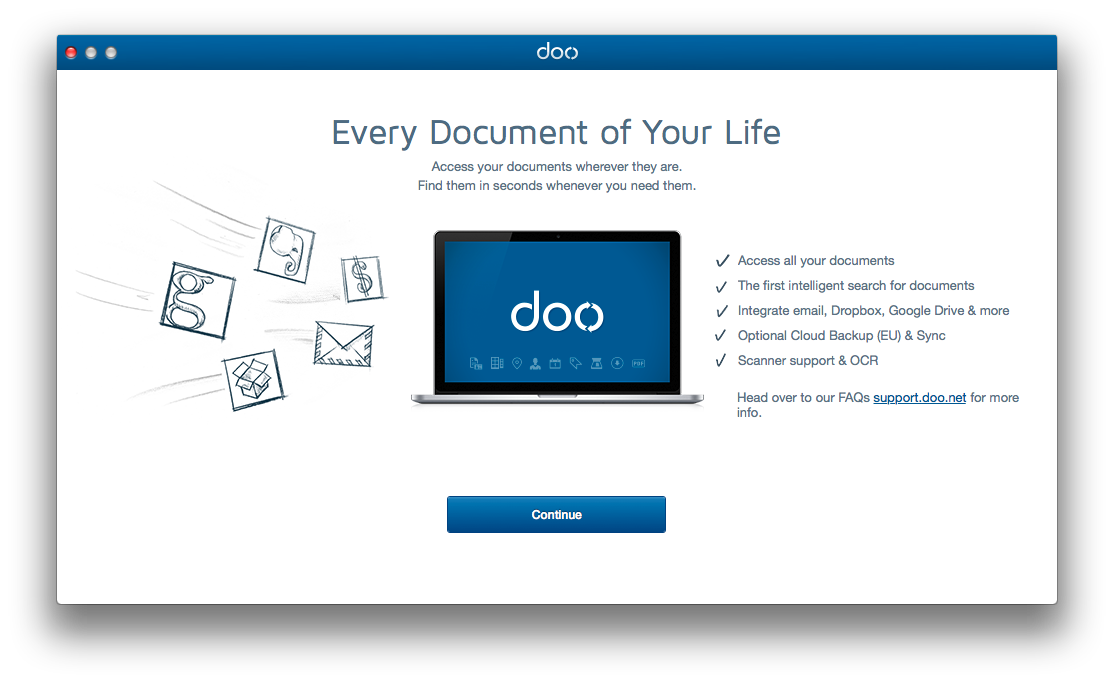
There are a lot of places you can store your files these days. There’s the Documents folder on your Mac, of course, but there’s also Google Drive, Dropbox, Microsoft’s Skydrive and more. And, of course, everyone has their favorite storage service. Some people prefer one over the other, and it’s up to you to make sure you can keep them all straight.
Well, now you don’t have to. Doo is a brand new Mac app that aims to bring all of these services under one roof, and it does not disappoint. Keep reading to see how Doo can help you finally make sense of your cloud storage, and get a 9to5Mac-exclusive first look at the upcoming iPhone companion app.
As always, we’ll be updating the list below with more apps and updates as they continue to hit the App Store today:
Traktor DJ: Native Instruments, the company behind the massively popular Traktor DJ software and other well-known audio production tools, today released an iPad app dubbed Traktor DJ. For those familiar with the Traktor 2 Mac app, the iPad app provides you with a scaled back UI that offers two decks, 8 built-in effects, and the ability to record and share mixes. While you won’t get onscreen platters with this app like many other DJ apps, NI allows users to pinch and swipe the waveform on the deck itself “for simple looping and ultra-tight scratching.” A full list of features below:
– Revolutionary DJ app by Native Instruments – makers of the leading pro DJ software
– Touch the groove using familiar iPad gestures like swiping and pinching
– Direct access to your iTunes music library from TRAKTOR DJ
– Stylish waveform display allows for simple looping and ultra-tight scratching
– Intelligent browser recommends songs based on compatible tempo and key
– Automatic tempo and key detection plus BPM sync for super-smooth mixing
– Innovative Notification Center gives you in-app access to essential tips and undiscovered techniques
– 8 built-in pro DJ effects, including Reverb, Delay and dramatic glitch effects like BeatMasher
– Familiar DJ mixer layout with crossfader plus line faders, 3-band EQ and filter on each channel
– Prepare tracks on the road – all meta data (tempo, beatgrids, cue points etc.) in TRAKTOR DJ syncs with TRAKTOR PRO DJ software*
– Record your mixes live in high-quality on the iPad and share with your friends
Flickr version 2.1.0.803: The Flickr iOS app was gets an update this morning that brings faster uploading, the ability to quickly save images from Photostream to camera roll, and much more:
– Faster uploading
– Easily save photos from your Photostream to your camera roll
– Automatically saves your original, pre-filter photos to your camera roll
– Quickly tag your contacts in photo comments and description by simply typing @screename
– Get notified when your contacts mention you
– Higher resolution photo display in lightbox view so your photos look even more stunning
– Take photos in a snap using your iPhone’s volume up button
Netflix version 3.0: Netflix received an update today to version 3.0 and with it came an enhanced playback experience including the ability to view the title from the iPad player UI, the return of the zoom icon for fullscreen playback, and “better placement of play/pause and Back-10 buttons so you can easily control your experience.”
We enhanced the player UI for a better playback experience.
1. See the Title in the iPad player UI – Touch the player UI screen to see the title of movie/TV show you are watching
2. Zoom icon is back – so you can now control when you watch full screen mode
3. Note better placement of play/pause and Back-10 buttons so you can easily control your experience
Twitterrific 5, the popular new version of The Iconfactory’s Twitter client, has updated to version 5.1. The update introduces several new features and fixes. One of the new features, which you see in the video above, is the ability to mute, or “muffle,” hashtags, users, and even URL domain names. The full change log is lengthy and hints at push notifications coming in the next update:
9to5Mac has once again scoured the App Store for all the latest app launches, price drops, noteworthy news, and updates, and we have compiled everything in a roundup below. Check it out, but keep coming back as we continually refresh the list throughout the day. Expand Expanding Close
Sunrise Calendar: Launched today by former Foursquare designers, the free Sunrise calendar app is getting a lot of attention for its simplistic approach to combining calendars, Facebook events and birthdays, and weather forecasts based on your current location. The app initially only supports Google Calendar, includes Timezone support (a feature missing from many popular calendar apps), and integration with LinkedIn to “see faces of people you are meeting.”
Features:
☆ 100% free calendar app with a gorgeous design.
☆ Compatible only with Google Calendar for now.
☆ A completely redesigned calendar experience for your iPhone.
☆ Synchronization that just works, in real-time.
☆ Quick Add Event just by typing “Lunch tomorrow at 9pm” (long-press on the +).
☆ Reminders.
☆ Timezone Support. No more headache when travelling!
☆ Facebook Events and Birthdays included.
☆ See faces of people you are meeting with using LinkedIn.
☆ Weather forecast based on your location.
☆ Smart icons.
☆ Tag location to events.
☆ Use Google Maps for Directions.
☆ Connect multiple Google Calendars.
IMDb version 3.1: IMDb announced a nice update to its IMDb Movies & TV iOS app that brings a number of new features including links to titles available on Amazon Prime for users that have the Amazon Instant Video app installed on their iPhone or iPad. The update also includes a Special Oscars section with a “list of nominees and photos from the red carpet and ceremony and live winners,” a new Recommendations feature, and a few improvements:
– Award information for celebrities and titles (iPad/iPhone)
– Titles available on Amazon Prime feature a link to watch if the Amazon Instant Video app is also installed (iPhone/iPad)
– Special Oscars® section: list of nominees and photos from the red carpet and ceremony and live winners on iPhone and iPad during the ceremony
– Recommendations: tap on the “i” in the corner of the poster to see why it’s recommended for you, rate the title if you’ve seen it, or indicate “not interested” (iPad)
– Improved accessibility for TV episode navigation (iPad)
– Updates to side navigation (iPad)
– Bug fixes include episode picker in VoiceOver (iPad)
Finish version 1.0.2:Improvements and new features for productivity app Finish:
1. There’s now an option in settings to start the week on Monday.
2. Smoother gestures!
3. Some small interface improvements
4. Good ol’ VARIOUS BUG FIXES!
iA Writer version 1.8: Popular text editor iOS app iA Writer gets a big update today that includes a new iCloud engine and UI, overall new look and feel for the entire app, and a ton of features and improvements: Expand Expanding Close
Dropbox | Free
Version 2.1 of this cloud storage app features an all-new PDF view, as well as the ability to sort files by date modified and receive a push notification when someone shares a folder.
Pageonce | Free
Version 5.8 of this bill management app allows iPhone users to pay local bills to anyone, and the update includes a new calendar view of bills, improved payment account setup, and bug fixes.
War of Words | Free
Version 4.1.1 of this action word game added 21 new boards, as well as the ability to expand game slots from 30 to 60, remind opponents to play, and options for selecting tile colors. It also includes unspecified bug fixes.
Twitter | Free
Version 5.3.2 includes fixes for bugs, crashes, and incorrect Arabic text in Connect and Discover.
Kickstarter:Today Kickstarter announced that it is finally launching an official app for iPhone and iPod touch. The app provides users with the majority of features accessible through the website including the ability to find, filter, and back projects, watch project videos, follow and keep up with projects in an always up-to-date Activity tab, and receive notifications when someone backs or launches a project. The app also includes creator tools such as a feature to “take pictures and videos with their iPhone camera and post them as project updates straight from the app.”
DIE HARD: Fox Digital Entertainment today released the official DIE HARD iOS game in support of the upcoming “A GOOD DAY TO DIE HARD” feature film. You play as Jack McClane as you “blast your way out of Moscow’s mean streets and travel to the radioactive wasteland of Chernobyl.” The developer called the game an “endless shooter”– a combination of “the “endless runner” and “first-person shooter” genres. It’s available now for 99 cents.
With DIE HARD, the mission was to develop an app with the gameplay and attitude to match the groundbreaking nature of the DIE HARD franchise, its longtime hero John McClane and new protagonist Jack McClane. In a twist on the endless runner genre, where the player runs from danger, DIE HARD equips the player to face the action head on, running towards foes and confronting them from a first-person perspective.
Skype 6.2 for Mac: Skype was updated with a few new features and improvements. Users can now send Skype credit as a gift through an eGifting feature, as well as send “one-way SMS without verifying your mobile number. ”
QuickBooks Online for iPad: Intuit announced today a new iPad app for QuickBooks Online. It’s free for subscribers, but the app also provides a 30 day free trail and monthly and annual subscriptions for $13 and $125. Full list of features below: Expand Expanding Close
1. Jingu Friends | Free
Version 1.4.0 of this people-finding client for WhatsApp, Kik Messenger, Hookt & LiveProfile just hit the App Store with the ability to “slap people with stickers and earn cool badges.” Additional updates include emojis in messages, as well as options to follow and get followed, post longer messages, and share links.
Screenshots are above.
2. Slacker Radio | Free
Version 4.0.119 of this music service launched today with the following update summary in the change log:
This version of Slacker Radio is all-new for iPhone and iPod, featuring a new visual interface and the debut of the Slacker “Music Guide”. Slacker listeners will discover more music, news, talk and sports than ever before. Look for the visual tile layout to view station, artist, album and song pages and enjoy improved functionality and overall stability as you experience the most complete music service available.
Calendars. Contacts. Maps. Emails. Text messages. Facebook. LinkedIn.
There are a lot of things you can do with the iPhone. Each of those things is scattered across the phone in it’s own separate app, however. Sure, there’s some integration of those services, but most of the time you’re going to have to switch apps to get from one function to the other. It’s easy to get annoyed or overwhelmed trying to manage your time while everyone up-to-date on the things that matter.
Tempo is a new app from SRI (the company that originally developed Siri) that aims to bring all of those functions together—at least as far as the concern your schedule—into a cohesive system for managing your life. But how well do all of these different services coexist in the same application?
Note: Not all the animations in this video made it into the final product.
Cloudier is a great new CloudApp management client. While we’ve seen some of the design concepts in this app before, Cloudier adds new design features like a grid view for photos and a zip viewer for peeking inside file archives.
Cloudier boasts a much lighter interface than I’m used to in Cloud clients, and I actually like it a lot. Rather than focusing on fitting a ton of features into the app, the developers focused on fitting in only the features you’ll actually need and making them work beautifully. It’s fast, looks great, and does exactly what you need.
Cloudier is available now on the App Store for $2.99. If you’re looking for an app to manage your CloudApp files, I highly recommend it.
1. Winston | Free
Winston, a Siri-like app that only speaks and doesn’t accept commands, launched in a private beta last summer, and now the digital assistant app is redesigned and live in the App Store. A few of the fresh features include new and customizable channels, newscasts, AirPlay support, web view, and an expanded vocabulary. Check out the promo video above.
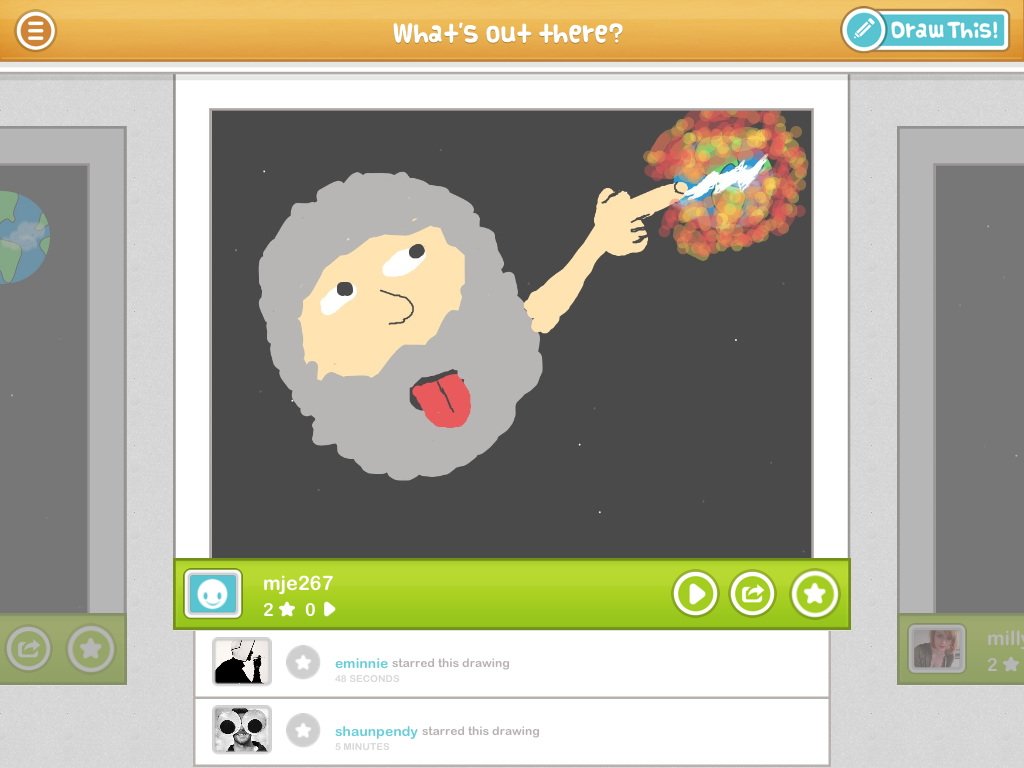
1. DrawQuest | Free
4Chan founder Chris Poole, a.k.a. “moot”, has launched DrawQuest under his remix website, Canvas. The iPad app basically serves up daily drawing challenges, called “quests,” to inspire creativity. Other features include:
Apple has released AirPort Utility version 6.2. The new update adds the ability to extend guest networks if you have multiple AirPort routers. Additionally, Apple has added improved international support and the ability to add WPS printers to your AirPort WiFi networks.
Update: It appears that Apple has also released firmware version 7.6.3 for some AirPort devices.
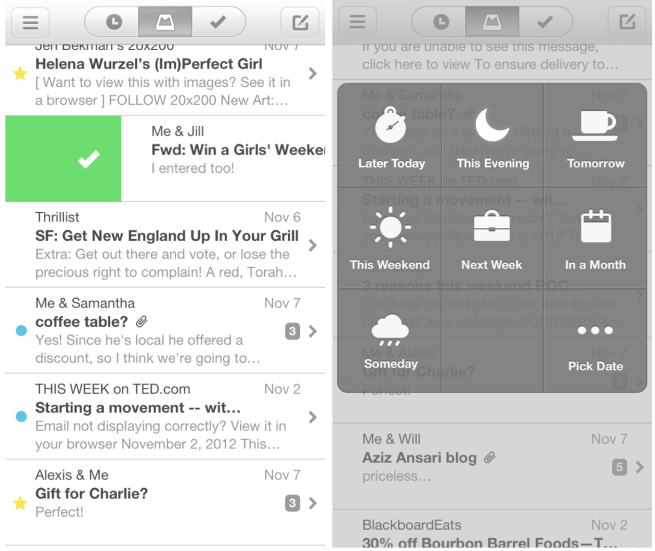
Swipes make checking mail from your phone a delight.
Snoozes let you put off an email until later and remind you when the time has come.
Mailbox makes getting to inbox zero, and staying there, a breeze.
The app is free, but you’ll need a reservation code to use it today. These codes were given out on a first-come, first-served basis a few weeks ago to anyone who signed up for the app in advance. This system was put in place to prevent the company’s servers from being overwhelmed, as there is substantial demand for the free app.
Rabbit: Launching today in closed beta, Rabbit is a new video chat and content sharing app– initially available exclusively for Mac– that has been getting a lot of attention. The app lets you chat with an unlimited number of people, create and customize chats, as well as watch movies, listen to music, and share content in chats in real-time. If you are a pre-teen who hasn’t heard of Google Hangouts, you might want to check this out.
Rabbit is kind of like a virtual living room. It runs in the background on your computer just like Skype, so you can always find your friends online and invite them to watch a movie or listen to music at any time. You can share this content directly from your computer, or you can use the Rabbit “SharePad” of integrated content sites to instantly launch TV shows, videos and music you want to watch and listen to with your friends.
Foursquare version 5.4.3:Foursquare gets an update today that brings improvements to check-in notification settings including an “Always” option to get notifications for all check-ins, as well as new “Nearby” and “Off” settings to apply to specific users.
✓ Choose “ALWAYS” for close friends and family you always want to keep up with. You’ll get notifications for all their check-ins, no matter where they are in the world.
✓ Choose “NEARBY” for friends you’d like to hear about from time to time. We’ll only notify you when they’re close by.
✓ Choose “OFF” for those acquaintances you don’t really want updates from. And that bike messenger friend who checks in at every spot on his route.
TomTom version 1.13: TomTom updated the majority of its iOS navigation apps today. On top of the most up to date map data, users can also now backup and restore settings and stored destinations from iCloud. With today’s update TomTom is also providing a free 30 day trial to its HD traffic subscription. In addition, the app now includes compatibility for iPad mini.
Twitter announced a few updates to its mobile apps in a blog post today. Among the improvements is an updated search feature that is available from anywhere in the app and presents search results for people and terms all at once. The Discover tab is also reorganized, and the setting for switching between interactions and mentions in the Connect tab has been moved into the app.
One other very welcome change is the ability to tap links directly in the timeline now. Tapping a link would previously open the tweet’s detail view, where you would have to tap the link again to view it. Now you can just tap the link and go straight to the content.
[hulu id=_cdivytk6g8qt3ggv4rw0a width=704 start_time=206 end_time=325] Vine version 1.0.5: Twitter’s new short video sharing app Vine ran into a bit of controversy when pornography found its way into the Editor’s Picks section due to human error. The developers have since addressed the issues and today’s update not only brings new Twitter and Facebook sharing features, but also the ability to block and report profiles. As noted by The Verge, the 1.0.5 update also increased the rating of the app from 12+ to 17+.
• Share to Twitter or Facebook after posting. Find the post you want to share, then tap the “…” button in the bottom right.
• Report or block a profile. Go to the profile, then tap the newly added “…” button in the top right.
• Fixed an issue that caused a black screen to appear and uploads to fail after creating a video on certain devices
• Miscellaneous bug fixes
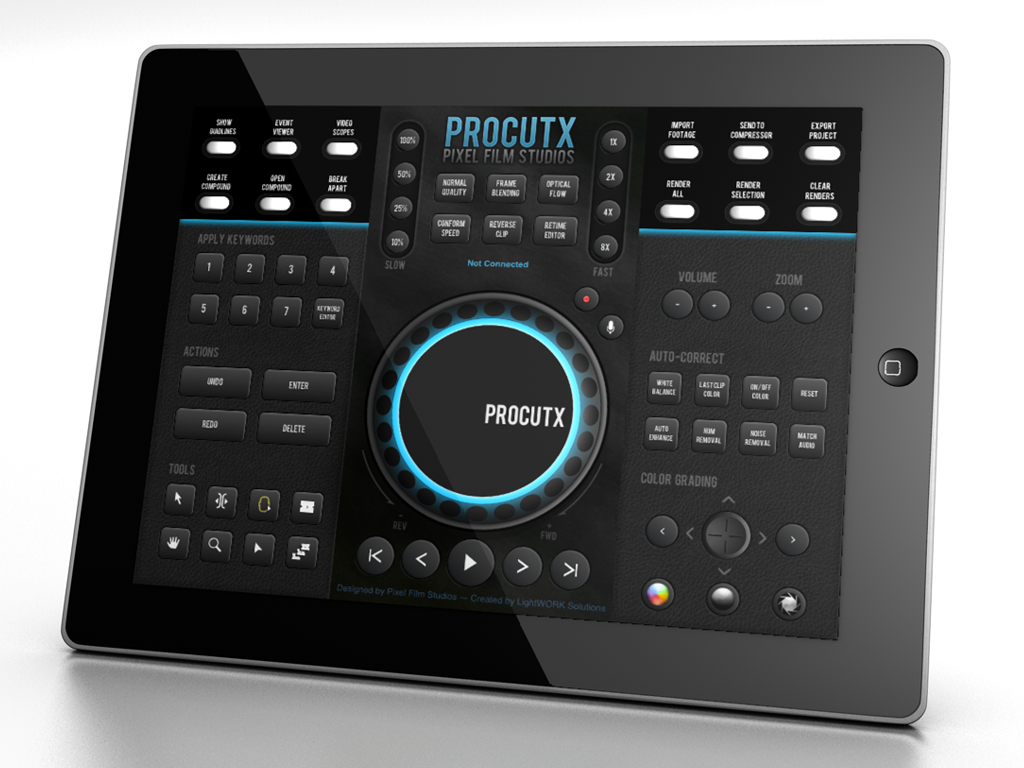
ProCutX for Final Cut Pro X: Final Cut plug-in maker & production company Pixel Film Studios is out today with a new app that allows iPad users to control a FCPX session running on their Mac. At first glance the app appears to provide a pretty slick UI and the developers said it offers access to all of the software’s editing tools to “control every step of the FCPX editing process.”
• Precision Timeline Scrubbing
• Quick Retiming
• Auto-Correct Color
• Color Grading
• Compound Clip Editing
• Import, Export, and Rendering shortcuts
• Quick Keywording
• Fast access to Tools
• System Volume Control
• Timeline Zooming
• Audio Enhancements
• Record Voiceovers
Tango version 2.6.36915:The popular text, voice, and video chat app Tango was updated today with a new central gallery for pictures and videos and a number of enhancements:
✔ New! Find all your pictures and videos in a central gallery.
✔ New! Improved call handling makes connect faster.






 DataMan Pro version 6.3:


 Flickr version 2.1.0.803:

 IMDb version 3.1:
 DIE HARD: