MacBook

See All Stories

Light. Years ahead.

Check out our top stories on MacBook:

Originally released April 10, 2015 and last refreshed April 19, 2016, the all-new MacBook ($1,299 and up from the Apple Store) is the thinnest and lightest Mac laptop ever made. It’s also the first MacBook to be offered in four color options: classic silver, space gray, gold and rose gold.

Currently offered only with a 12″ screen, it represents the future of Apple laptops. Following a refresh in April 2016, it now includes a 2304×1440 (226ppi) Retina display, 8GB of RAM and up to 512GB of SSD storage, coupled with ultra-low-power Intel Core M processors. The base model includes a 1.1GHz dual-core Intel Core M chip with an Intel HD Graphics 515 GPU; and upgraded models offer to 1.2GHz dual-core Intel Core m5 or 1.3GHz dual-core Intel Core m7 processor with Turbo Boost up to 3.1GHz.

With a redesigned chassis that’s only slightly wider than the keyboard, the new MacBook’s 0.14″–0.52″ thickness was achieved in part by dropping all external connectivity ports save for a 3.5mm headphone port and a new reversible USB-C port, which can be used for power, data connectivity, and video output. Most of the MacBook’s connectivity is handled wirelessly with 802.11ac and Bluetooth 4 support. It promises 9-10 hours of battery life depending on how the computer is being used.

A redesigned Force Touch trackpad now can sense multiple levels of pressure rather than just one, using four pressure sensors and a haptic feedback pad to replicate the clickiness of a traditional trackpad. Additionally, the keyboard has been completely redesigned to retain the expected clicks, precision, and travel of conventional keys, while cutting their depth and width to fit the chassis. An ultra-thin top lid has only enough depth for a 640×480 FaceTime camera, a compromise for the smaller size.

Just like the first-generation MacBook Air, the new MacBook is aimed at users whose computing needs don’t demand incredible horsepower, yet benefit from a slim, light chassis with a really nice screen. Though you’ll do better in raw dollar terms and power by buying a comparably priced 13″ Retina MacBook Pro, you’ll have nearly twice the weight to carry around (2.03 pounds versus 3.48 pounds) and a larger footprint to manage. The choice of which is best for your needs will be highly personal.

Current Lineup:

  • MacBook (12-inch, Early 2016)

Related Guides:


More 13-inch Retina MacBook Pro pictures surface: 2 Thunderbolt ports, HDMI, 2560×1600 resolution

Site default logo image


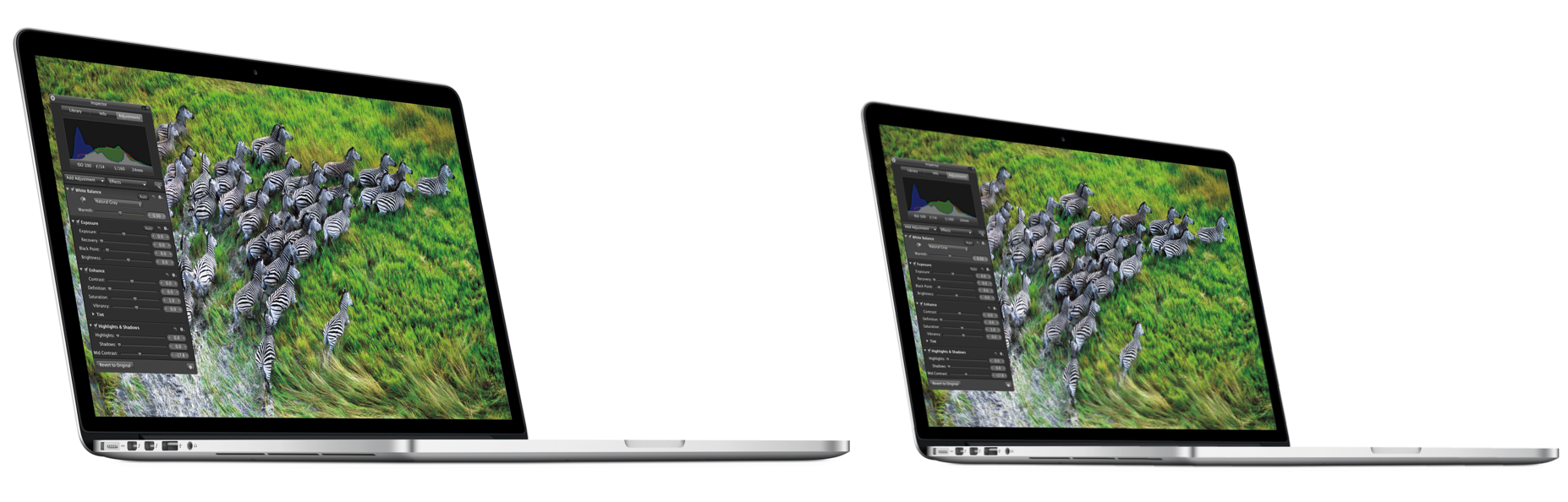
15″ Retina MacBook Pro above, 13″ Retina MacBook Pro below (note no speaker and port/keyboard alignment):

.

Another visit to WeiPhone.com forum thread [Google translation] (via MacRumors) from last week yields some additional new pictures of the upcoming 13-inch MacBook Pro. You can see different placement of the side jacks as they relate to the keyboard and lack of speaker.

There’s nothing unexpected but it does seem to confirm a few things:

  • 2 Thunderbolt ports like 15-inch Retina and unlike 13-inch Pros
  • The Windows screens seem to confirm the 2560×1600 pixel display
  • HDMI port like Retina 15, unlike Pro 13.

We expect to see the 13-inch Retina MacBook Pro at the October 23rd event with a base price in the $1599-1699 area. More pictures below:


Expand
Expanding
Close

Estimated prices on 13-inch Retina MacBook Pros: Starts around U$1,699

Site default logo image

Alongside the new mini/iPads, Mac Minis, and iMacs, Apple will reveal a 13-inch MacBook Pro with Retina Display on Oct. 23. We have now received pricing information on the base model and the “best” model. We believe the entry model 13-inch Retina MacBook Pro will cost roughly $1,699 at launch, based on wholesale prices we received, while the higher spec model will cost $200 to $300 more.

The base model Retina MacBook Pro retails for $2,199 in the United States, so the 13-inch varieties would create a more inexpensive option for those who also prefer a smaller device. We expect these to be available shortly after launch, but we can probably expect some supply constraints as we saw with the 15-inch Retina MacBook Pro. We also expect initial supply constraints on some of the new iMacs.

It sounds like the 13-inch Retina MacBook Pro will have a 2,560-by-1,600-pixel display (the same as a 30-inch Cinema Display), with the effective area being the same as the 1,280-by-800 screens as the current MacBook Pros when used in pixel-doubled Retina mode. We do not yet have other specs on the Retina Pro configuration, but we will update as that information comes in.


Expand
Expanding
Close

Site default logo image

iFixit’s Kyle Wiens disputes EPEAT certification of Retina MacBook Pro

Apple was just given the EPEAT Gold certification for the Retina MacBook Pro after reversing its decision to withdraw its products from the green computer registry. Today, iFixit’s Kyle Wien has a few strong words about the MacBook Pro’s Gold certification. He claimed the decision “demonstrates that the EPEAT standard has been watered down to an alarming degree”:

With the Retina MacBook Pro, EPEAT felt there were three specific concerns about the product design that merited further investigation… On the surface, it seems that a product assembled with proprietary screws, glued-in hazardous batteries, non-upgradeable memory and storage, and several large, difficult-to-remove circuit boards would fail all three tests…But it’s not that simple…. 

Apple’s MacBook Pro with Retina display is not repairable, it’s not upgradeable, and it’s not easy to disassemble for recycling. Yet it is EPEAT Gold. The Product Verification Committee’s decision essentially greenwashes the Retina.

Go to iFixit to read Kyle’s full post about how the MacBook pro was able to get verified EPEAT Gold. (via Wired)
Expand
Expanding
Close

New iMacs hitting retail, ship dates may be weeks away for some

Site default logo image

Earlier, we posted new iPad SKUs showing Apple is likely launching 24 new models of the device. It is still to be determined whether the four variants in the SKUs include updated iPad 3 models with Lightning connectors or four iPad mini variants. Today, we also get a hint at what looks like updated 21-inch and 27-inch iMac models from the same SKUs.

Listed as “D7” and “D8” in the SKUs above, we see two refreshed models. They are presumably for the 21-inch and 27-inch variants that Apple currently sells. We have recently heard reports that Apple is planning to introduce new iMacs alongside what reports claimed were images of the refreshed iMacs’ internals.

There have also been rumors that Apple will begin selling the refreshed iMacs on Oct. 24—one day after the rumored date of the iPad mini launch event. We are not sure Apple will begin shipping any of the new models on Oct. 24, but we have heard at least some varieties will not ship at launch. However, the SKUs above are pretty good evidence that refreshed models are on the way. We will have more on that in the near future.
Expand
Expanding
Close

Why build a 13-inch Retina MacBook Pro and not a Retina MacBook Air?

Site default logo image

We were initially skeptical about reports of a 13-inch Retina MacBook Pro, but we are obviously believers now that we have received word from very reliable sources that they are due in just over a week. Why were we skeptical?

Apple already has an incredible form factor in the 13-inch MacBook Air. So, why not simply give it a Retina Display?
Expand
Expanding
Close

13-inch MacBook Pro with Retina display confirmed for Apple event

Site default logo image

Alongside the smaller iPad, Apple will debut a 13-inch MacBook Pro with Retina Display, according to a consistently reliable source at a high-profile U.S. retailer.

This new 13-inch MacBook Pro with a Retina Display is said to pick up the thinner and lighter enclosure of the 15-inch MacBook Pro with Retina display that was released in June.

The new 13-inch MacBook Pro will be sold in two configurations, with differing processors and storage, and will be available for purchase soon after introduction.

Like with the 15-inch MacBook Pro lines, the 13-inch MacBook Pro with Retina Display will be sold (at a higher price) in addition to the current non-Retina display model. That computer was updated with faster processors and USB 3.0 in June.

The current 15-inch MacBook Pro with Retina Display is codenamed D2, and its smaller sibling is in fact, as predicted this morning, dubbed D1 internally.


Expand
Expanding
Close

Redesigned 21-inch iMac with updated screen, 13-inch retina MBP spotted in China

Site default logo image

.

MacRumors points to a WeiPhone.com forum thread [Google translation] this morning that purports to show details of a new iMac. The poster’s brother-in-law apparently works in the factory that builds the new Macs, and he snapped the above picture on his cell phone. The design was verified by iFixit to be similar to the internals of a current iMac with the plastic radio-transparent circle on the rear.

On the iMac, the poster says:

  • It should be announced this month or next month (likely at the Oct. 23th announement)
  • The design is of”epoch-making significance”
  • From side to side you “almost cannot see the new iMac’s thickness” and it is compared to a drop of water and “tetragonal” elements. Still has iMac ‘chin’ below display
  • It appears that the display is a “very pretty special glass glued directly” (perhaps like Retina MBP) to the machine rather than a separate display assembly
  • The 21-inch might be ready before the 27-inch

The more expensive iMac and redesigned screen might hint at Retina. However, strangely, the poster does not mention anything related to this.

The 13-inch Retina MacBook Pro:

  • Codenamed D1 (Which fits with Product D2 for the 15-inch Retina MacBook Pro)
  • Is seeing delays due to thermal issues

Interestingly, the poster mentions the 15-inch Retina MacBook Pro, aside from being produced in Mexico, will see a silent update for screen blur and cooling improvements.

In another post, the poster talks about trouble with the glue and Foxconn.

 My uncle told me the newly launched products will have a lot of problem. This is because Tim Cook changed the way Steve Jobs used to do things which is having multiple suppliers. The problem with one sole supplier. Obvious example Foxconn!

Now a lot of more capable supplier is under Foxconn, other smaller supplier just can\’t cope with the demand. The new iMac is using a special \”glue\” to glue the display to the frame and is facing very strict quality control.

Products from Foxconn is having a lot of issues. In this case, after the glue dried, there will be minor air gaps. Apple had no choice but to use Foxconn because most of the capable manufacturer is now all under Foxconn. Therefore defects of the iPhone 5 is not that hard to understand(because Foxconn makes them all).

The full translated post is below (thanks, Tham!):
Expand
Expanding
Close

Site default logo image

Report: Apple to utilize TSMC’s 20nm quad-core chips for new products over next few years

Chinese Economic News Service (via MacRumors) is citing Citigroup Global Markets analyst J.T. Hsu today as claiming Apple will make the switch to TSMC’s 20nm process for quad-core processors over the next couple of years. The rumor is something we have heard several times in the past:

Citigroup Global Markets Inc. estimated Taiwan Semiconductor Manufacturing Co. (TSMC) to be the only supplier of 20nm process to Apple quad-core processors over the next one to two years, citing the company’s unmatched technological advance on 20nm process and Apple’s decision to adopt 20nm quad-core processors in its new products…Apple began verifying TSMC’s 20nm process in August this year and may begin risk production in November with the process. Volume production is expected to start in the fourth quarter of 2013, raising the possibility that TSMC will hike capital expenditure to US$11-12 billion in 2013 and 2014.

According to Hsu, Apple will utilize the processors in iPad, “iTV” (Apple TV?), and MacBooks, while iPhone’s will remain with duo-core chips:

Hsu estimated Apple to design quad-core processors into iPad, iTV and even Macbook. iPhones will be still powered by duo-core processors to highlight its low power consumption merit… Apple’s contracts have been widely criticized for low margin to contract suppliers, likely the reason why TSMC has been reluctant to compete for Apple contracts. But Hsu thinks otherwise, estimating Apple’s quad-core chip, cost at around US$15, could be 10% cheaper once it is made by Taiwan’s supply chains involving TSMC, Advanced Semiconductor Engineering Inc. (ASE), and Kinsus Interconnect Technology Corp.,

In August, Bloomberg reported both Apple and Qualcomm failed to obtain exclusive chip production rights from TSMC after putting up over $1 billion in bids. Samsung also recently made big investments in its new Austin, Texas plant manufacturing chips for iPhone, iPad, and other Apple products, indicating multi-year contracts are likely in place.

Site default logo image

Woot! has 2011 Dual-Core i5 MacBook Air – New in box (Update: $749)

From 9toToys.com:

.

Update: MacMall has it for $748.99 with free shipping and the current 4GB USB 3 version for $948.99

Today only, Woot! has the base model 2011 MacBook Air new in box for $759.99+$5 shipping and tax where applicable (Apple charges roughly the same for a refurbished unit). That’s the lowest price we’ve seen for this MacBook Air that was replaced at WWDC in June.

Bonus: Get this Transcend 64GB USB 2.0 Flash Drive for $29.99 with free shipping at Amazon.

Specs include:

  • Eligible for OS X Mountain Lion Up-to-Date Program
  • Originally released July 2011
  • 11.6-inch (diagonal) high-resolution LED-backlit glossy widescreen display
  • 2GB memory
  • 64GB flash storage
  • Thunderbolt port with support for up to 2560-by-1600 resolution
  • FaceTime camera
  • Intel HD Graphics 3000

Product Details

Processor 1.6 GHz dual-core Intel Core i5
L3 Cache 3MB shared
Memory 2GB of 1333MHz DDR3 SDRAM; supports up to 4GB
Hard drive 64GB flash storage1
Graphics Intel HD Graphics 3000 processor with 256MB of DDR3 SDRAM shared with main memory2
Ports Thunderbolt port, two USB 2.0 ports
Audio Stereo speakers, Omnidirectional microphone, headphone port, support for Apple Earphones with Remote and Mic
Wireless 802.11n Wi-Fi wireless networking; IEEE 802.11a/b/g compatible; Bluetooth 4.0 wireless technology3
Size and weight Height: 0.11-0.68 inch (0.3-1.7 cm)
Width: 11.8 inches (30 cm)
Depth: 7.59 inches (19.2 cm)
Weight: 2.38 pounds (1.08 kg)4

All-Flash Storage

“Wow, that was fast.” With MacBook Air, you’ll find yourself saying that a lot. Because flash storage is up to two times faster than a conventional hard drive,5 everything you do is more responsive and immediate — starting up, browsing a large photo library, launching applications, and opening files, for instance. When you combine the speed of flash storage with a fast dual-core processor and power-efficient graphics, your entire MacBook Air experience feels turbocharged. And flash storage doesn’t have any moving parts, which means it’s more reliable and quiet. Lightning fast, durable, silent — qualities that make sense in a notebook tasked with keeping up with you.

High-Speed Thunderbolt I/O

The breakthrough I/O technology pioneered on MacBook Pro and iMac now comes to MacBook Air, letting you connect multiple high-performance devices — such as external hard drives — through a single port. With two 10-Gbps data channels, Thunderbolt lets you transfer data at rates up to 12 times faster than FireWire 800 and up to 20 times faster than USB 2.0. Thunderbolt technology gives MacBook Air capabilities it’s never had before. Like attaching FireWire peripherals or connecting to Ethernet networks at gigabit speeds — two big gains from one tiny port.6

Long-lasting battery. Instant on. Even after a month off.

Since space-saving flash storage leaves room for a bigger battery, you can devote more time to the things you enjoy most. Things like browsing the web, editing photos, and watching videos. Get up to 5 hours of battery life on a single charge on the 11-inch model. Put MacBook Air to sleep, and it enters standby mode to conserve battery life for up to 30 days.7 When you come back to your MacBook Air and open it up, it’s on in an instant.

DVD or CD Sharing

With the Mac App Store, getting the apps you want on your Mac has never been easier. No more boxes, no more discs, no more time-consuming installation. Click once to download and install any app on your Mac. But if an app you need isn’t available from the Mac App Store, you can use DVD or CD Sharing. This convenient feature of OS X lets you wirelessly “borrow” the optical drive of a nearby Mac or PC. So you can install applications from a DVD or CD and have full access to an optical drive without having to carry one around.

Backlit keyboard

As incredibly compact as MacBook Air is, it still manages to fit a full-size keyboard that makes typing as natural as it is comfortable. And now the keyboard is backlit, so you can type with ease in even the dimmest light. A built-in ambient light sensor detects changes in lighting conditions and adjusts the display and keyboard brightness automatically. From a seat in a sunny café to a seat on a cross-country red-eye, you’ll always have the perfect lighting for any environment.

Site default logo image

Parallels 8 is a clear winner vs. VMware Fusion 5 in Ars shootout

.

Ars put Parallels 8 against VMware Fusion this week and found there is not much of a contest between the two virtualization powerhouses. Parallels 8 out-gunned VMware across the board (as previous benchmarks have shown) performance-wise and adds full support for Retina displays and dictation among other features.

Neither Parallels Desktop 8 or VMWare Fusion 5 are loaded to the gills with new features, so the PD8 update from version 7 is only a must-have if you are looking for Windows 8 or retina MacBook support in Windows 7 or 8. If you need retina support, this is your best option since Parallels did the extra work and made it a better retina experience than in VMWare Fusion 5. The Mountain Lion dictation and experimental DirectX 10 support show that, while Parallels tends to have more frequent paid updates and a higher price-tag, they try to earn the extra value with well thought out features and engineering. Apart from the bugs I saw in Mountain Lion 8, I think Parallels Desktop 8 earns that extra cost with its solid performance, far superior Linux OpenGL support, and existing feature set. But if your needs are more big-business-oriented, VMWare Fusion 5 Pro might be more your thing.

VMware Fusion might fit better into cross-platform installations or for folks with legacy VMware images.

Parallels 8 is available for download or trial here for $79. VMware starts at $49.
Expand
Expanding
Close

Site default logo image

Microsoft Office for Mac 2011 updated with support for Retina MacBook Pros

Following a ton of complaints from new Retina MacBook Pro users about the Microsoft Office 2011 experience in August, Microsoft finally updated the app to version 14.2.4 today to bring support for Retina displays and a number of other fixes.

We’re happy to announce that Office for Mac 2011 (version 14.2.4) now supports Retina display for Word, Excel, PowerPoint, and Outlook. Text everywhere is incredibly crisp and all key areas of the interface are now sharper than ever. We hope you enjoy this fantastic software experience!…As long as you have Microsoft AutoUpdate set to check for software updates automatically, you’ll be notified when this update is available.

(via MacRumors)

Site default logo image

Amazon gets new iPods as Best Buy throws a MacBook Sale

From 9to5Toys.com:

Amazon just launched pre-order pages for the new iPod Touch, Nanos and Shuffles. They will ship probably right after Apple starts with sales tax in only some states.

Meanwhile. Best Buy is having a MacBook Sale this weekend with up to $200 off MacBooks. The new Airs with 4GB of RAM start out at $949 and many 13″ Airs/Pros are $100 off, which are the lowest prices we could find.


Expand
Expanding
Close

Review: Logitech Solar Keyboard Folio for iPad

Site default logo image

We recently reviewed one of our favorite keyboard solutions for the iPad, Logitech’s Ultrathin iPad Keyboard Cover. However, we have seen a few new competitors since then. Most notably: ZAGG’s new KeysPRO line, which we were able to get our hands on at IFA last month. The ZAGGKeys PRO caught our eye with its backlit keys, rugged build quality and battery life of up to three weeks at eight hours a day. It has potential to become the go-to iPad keyboard when it goes on sale at the end of the month (full review on the way), but one keyboard recently released already has it beat, at the very least, on battery life…

Logitech’s new Solar Keyboard Folio for iPad 2 and 3 comes with one impressive claim: the ability to type for two hours a day for two years on a full charge…even in the dark. That claim combined with a solid Logitech keyboard similar to what we’re used to from the company’s past iPad products, we essentially get solar power and a folio-style case added to the Ultrathin Keyboard cover for an extra $30.

I have had long enough since its release to put it to the test and have a couple of thoughts:


Expand
Expanding
Close

Site default logo image

Price Drop: MacBook Airs at the Apple Store now start at $679

From 9to5Toys.com:

.

Apple quietly dropped the prices on refurbished MacBook Airs last night by up to $120. Notables above are 2010 releases of the 11.6″ MacBook Air model with options of 128GB SSD or 4GB of RAM. Apple refurbished items are virtually indistinguishable from new items and come with the same 1 year AppleCare warranty. All refurbished Macs purchased at Apple are also eligible for the OS X Mountain Lion Up-to-Date Program.

These typically run out of stock very quickly.

Update: All gone. You snooze, you lose.
Expand
Expanding
Close

Site default logo image

Awesome cartoon-like gadget bags now shipping, prices start at $79 [Gallery]

This is not a cartoon bag. Seriously.

JumpFromPaper (perfect name, eh?) offers a line of handbags, profile bags, carrying pouches, etc., which look colorful and two-dimensional, and will hold an iPad, MacBook or just about anything else.

So, where did the idea come from?:

JumpFromPaper™ is a playful and innovative line of bags created by Taipei-based design duo, Chay Su and Rika Lin.

One cozy afternoon, the two girls were chatting, when they got to sketching their dream designer bag. A surprising idea popped up – “How amazing it would be if a two-dimensional hand-drawn illustration could come to life as a real bag!” They explored every possibility, rendering fantasy handbags in perspective, and giving birth to JumpFromPaper™.

Each bag boasts a cartoon-like outline and vivid colors that are sure to mess with folks’ eyes. Prices range from $79 to $129, and the Tropical Fish bag (top), in particular, is a gadget-targeted carrier sporting a slim, striped design with polyester fabric for just $79:

Topical Fish is your new protector for your gadgets. This carry pouch perfectly holds your netbook, iPad/tablet, or whatever other accessories you need for a day in the office or fun in the sun. Are they real? Yes they’re real. Although slim in appearance, each JumpFromPaper™ bag has a roomy interior to accommodate an iPad/tablet, book, magazines, and your everyday accessories. A zipper bottom expands the bag for extra room.

Pre-ordered Tropical Fish bags began shipping Aug. 27, and we hope to get our hands on a review unit soon. Check out JumpFromPaper to see what else the brand offers.

The full press release is below.


Expand
Expanding
Close

Summer peripheral review and gift guide: All the..small things…

Site default logo image

[slideshow]

We often get review items that do not merit their own review for a variety of reasons. Some might have gotten to us late after we have already read reviews, while others might be smaller niche items or some bigger ticket items that might not have blown us away, but they are still interesting nonetheless. Still, we think these guys are all noteworthy…


Expand
Expanding
Close

Dallas newspaper identifies ‘Evil Genius’ Apple Store, corroborates Gizmodo story

Site default logo image

Yesterday, Gizmodo posted a harrowing piece about one of the most corrupt Apple Stores in the United States. The story profiled many unethical tactics done by the store managers and employees. In one instance, a regional manager actually gave away a free Apple product in exchange for a weight loss surgery, and also leant Apple products out for months at a time. In another case, Apple Store Geniuses would actually take iPhones at their leisure, often breaking them and replacing them. But perhaps the most disconcerting bit from the Gizmodo piece is what Geniuses did to customer’s products. In one instance, a Genius actually  “just erased people’s hard drives that are —holes.” Certainly shocking out of the company that’s already had 300 million visitors in its stores this year.

We weren’t sure how accurate the story was or if the sources had perhaps been embellishing at best and fabricating at worst.  However a separate second source has come forward with a separate but similar story and has named the store in question.
Expand
Expanding
Close

Site default logo image

Toys: Get $50 worth of InCase stuff for $25

From 9to5Toys.com:

StackSocial today offers $50 worth of InCase credit for $25 with free shipping on orders. The credit expires December 20 (deal ends August 18) so you can use the credit to buy products for upcoming iOS devices and/or gifts for the holidays.

Enhance The Design in Your Life With $50 Worth of Incase Accessories For Only $25.

Have you been searching for unique iPhone & iPad accessories that will get people looking?

Who are we kidding, you can never have enough Apple accessories that’s why we’ve worked day and night to bring you $50 worth of Incase accessories for ONLY $25! That includes shipping to contiguous USA customers only.

Who is Incase?

Incase creates products to protect and enhance the technology that is essential to our lives. Their designs meet the needs of individuals across all interests, professions, and passions – so there is a product for you.

As you browse around Incase’s online shop you’ll notice their products promote design simplicity and offer intuitive functionality keeping you connected and protected anywhere you go.

You can spend your $50 on InCase products which include: 

  • iPhone, iPad, MacBook, & iPod cases
  • Stylish bags for your everyday essentials
  • Sleek headphones
  • And much more

iFixit posts repair guide for Retina MacBook Pro, estimates battery replacement at $500

Site default logo image

You might remember a couple months ago when our friends at iFixit tore down the new Retina MacBook Pro. Unfortunately, the device received its lowest repairability score with the company calling it “the least repairable laptop”. While the new MacBooks provide possibly Apple’s least accessible and upgradeable design out of the box, iFixit updated its website today with its official 2012 MacBook Pro Retina repair guide to make it as easy as possible. Fifteen separate installation guides for the AirPort Board, battery, fans, logic board, speakers, SSD, trackpad, etc., are included in the repair guide with one maintenance guide for reapplying thermal paste to the CPU and GPU.

Many components within the laptop can be removed without much fuss, provided folks use the correct tools. Pentalobe screws hold the lower case in place and Torx screws secure everything else. Spudgers and plastic opening tools are absolutely necessary, as many of the components are designed with such tight tolerances that using fingertips is simply not an option.

Fair warning: working on the laptop is no easy task. Some repairs are simply infeasible. For example, there is no way to replace the trackpad without removing the battery. And while it’s possible to remove the battery, chances are high that it will be punctured in the process. Puncturing Lithium-polymer batteries releases noxious fumes and can cause fires. Additionally, removing the LCD glass from the aluminum frame will almost certainly break the glass. So components residing under the LCD — such as the FaceTime camera — will have to be replaced with the entire assembly… Finding replacements for the machine’s proprietary components is currently difficult. We’re working to source parts, but it may take some time.

iFixit also estimated that third-party battery replacements —if done correctly— could cost over $500:


Expand
Expanding
Close

LaCie announces re-engineered USB 3.0 products for new MacBooks including ruggedized USB stick

Site default logo image

[youtube=http://www.youtube.com/watch?v=ZC2YUZPxFOE]

LaCie introduced the RuggedKey this week. It is an IP-54 water and dust resistant USB 3.0 key that provides speeds up to 150 MB/s and a bumper that offers protection from “heat, cold, and 100-meter drops.” The RuggedKey is now available in Apple stores or from the company directly starting at $40 for 16 GB, but LaCie also announced today that it updated its entire USB 3.0 portfolio with optimizations specifically for Apple’s latest lineup of MacBooks. LaCie said it re-engineered its USB 3.0 products for Lion and Mountain Lion by taking advantage of USB-attached SCSI Protocol support in Ivy Bridge Macs:

Thanks to UAS (USB Attached SCSI Protocol), people with the latest Macbook Air, Macbook Pro and Macbook Pro with Retina Display will experience maximum USB 3.0 performance… Everything from cables and USB keys, to professional RAID storage solutions have been re-engineered for advanced performances. LaCie’s recently announced RuggedKey achieves top speeds up to 150MB/s in 32GB of flash memory – making it one of the fastest USB keys on the market. LaCie’s popular Rugged Triple, and Porsche Design P’9223 and P’9233 have also been optimized for Mac and are available in Apple retail.

On top of Apple stores, the redesigned lineup of LaCie USB 3.0 products is available through LaCie stores. The company’s full press release is below:

Expand
Expanding
Close

Report: Apple to sell 30-pin adapter for new iPhone’s smaller 19-pin dock connector

Site default logo image

According to a report from iMore’s Rene Ritchie, Apple plans to release an adapter alongside the new iPhone that will allow users to connect accessories using the old 30-pin dock connector to the device’s new 19-pin connector:

iMore reached out to the original sources that gave us the new Dock connector story way back in February just to make doubly sure — and yes, there will be an adapter for the iPhone 5’s smaller Dock connector that will let it work with many of the accessories designed for the old 30-pin Dock connector.

The report noted there is no word on whether Apple plans to include the adapter in the box with the new iPhone or make it a separate purchase. Earlier today, a report from Reuters backed up the rumors and earlier reports that Apple plans to include the smaller, 19-pin dock connector on the new iPhone expected to launch in October. iMore originally reported the new iPhone would include the smaller connector in February, and several reports since followed up with similar predictions.

In May, we posted images of the next-gen iPhone‘s metal back (above) that clearly show the smaller connector.


Expand
Expanding
Close

Reminder: Mountain Lion will be free for 30 days for new Mac owners

Site default logo image

Update 2: After a brief time online, Apple appears to have taken down the form to request a copy of Mountain Lion. You’ll still be able to request a copy at Apple’s original link following Mountain Lion’s official release.

Update: As noted by MacRumors, Apple’s form to request a free copy of Mountain Lion for new Mac owners is already live on the company’s website. After entering details about your purchase, personal details, and the serial numbers of your new Mac, Apple sends two emails —one with a password protected redemption code and another containing the password— to open it. The redemption code is not yet working in the Mac App Store.

Apple previously confirmed, when it unveiled the new Retina MacBook Pros and refreshed Mac lineups, that Mountain Lion would be available for free to those who purchased a Mac after June 11 through the Up-to-Date program. Since then, Apple has updated its website to confirm the free copy will be available to new Mac owners for 30 days from the release date, which will likely be sometime after tomorrow’s Q3 earnings call. Those who purchase a new Mac following Mountain Lion’s release will also have 30 days to claim their copy on Apple’s website.


Expand
Expanding
Close

Retina MacBook Pro shows up in EPEAT Registry

Site default logo image

[tweet https://twitter.com/mayoredlee/status/223853950112247808]

Apple’s products are back on the EPEAT’s registry with a Gold standard, but the Retina MacBook pro notably was at question.

The Cupertino, Calif.-based Company announced earlier this week that it planned to forgo the environmental rating system. The decision allegedly came after the EPEAT took up an issue with the new MacBook Pro’s Retina display and repairability factor, which iFixit detailed in a widely reported analysis last month.

After Apple dropped the EPEAT standard, the city of San Francisco said it planned to stop purchases of some Apple products, and then Politico revealed federal officials were also thinking twice before procuring Apple’s computers.

The hullabaloo apparently caused the folks in Cupertino to second guess their plan of action, as Senior Vice President of Hardware Bob Mansfield suddenly issued a statement on Apple’s environmental page today regarding the contention. He said the company made a mistake and would concede by returning to EPEAT.

Now, a few hours later, the EPEAT’s registry has 40 Apple products listed, including the Retina MacBook Pro. However, its IEEE 1680-2009 Criteria Category Summary (screenshot below) is a bit perplexing, especially considering the reasons reported as to why Apple pulled its products in the first place.


Expand
Expanding
Close

Parallels Desktop 7 for Mac and Parallels Mobile now support Retina Display [Video]

Site default logo image

[youtube=http://www.youtube.com/watch?v=LJnEguWBYUk&feature=player_embedded]

Parallels announced that its Parallels Desktop 7 for Mac and Parallels Mobile now support Apple’s Retina display.

“We are proud to announce that both Parallels Desktop 7 for Mac and Parallels Mobile have been updated to support Apple’s Retina display and its over 5 million megapixels on the newly released MacBooks and latest iPad,” explained the software firm, which delivers an integrated Windows-on-a-Mac experience, so users can reap the full advantages of Apple’s offering across all their devices.

Parallels Desktop 7 for Mac is able to run multiple operating systems, including Windows 8 Release Preview, Windows 7, Chrome, and Ubuntu, and it will soon provide support for the final versions of Mountain Lion and Windows 8 after their release, while Parallels Mobile allows users to remotely control a computer from an iOS device.


Expand
Expanding
Close