9to5Mac Reviews
All the products that the 9to5Mac team has reviewed.

All the products that the 9to5Mac team has reviewed.
All the products that the 9to5Mac team has reviewed.
All the products that the 9to5Mac team has reviewed.


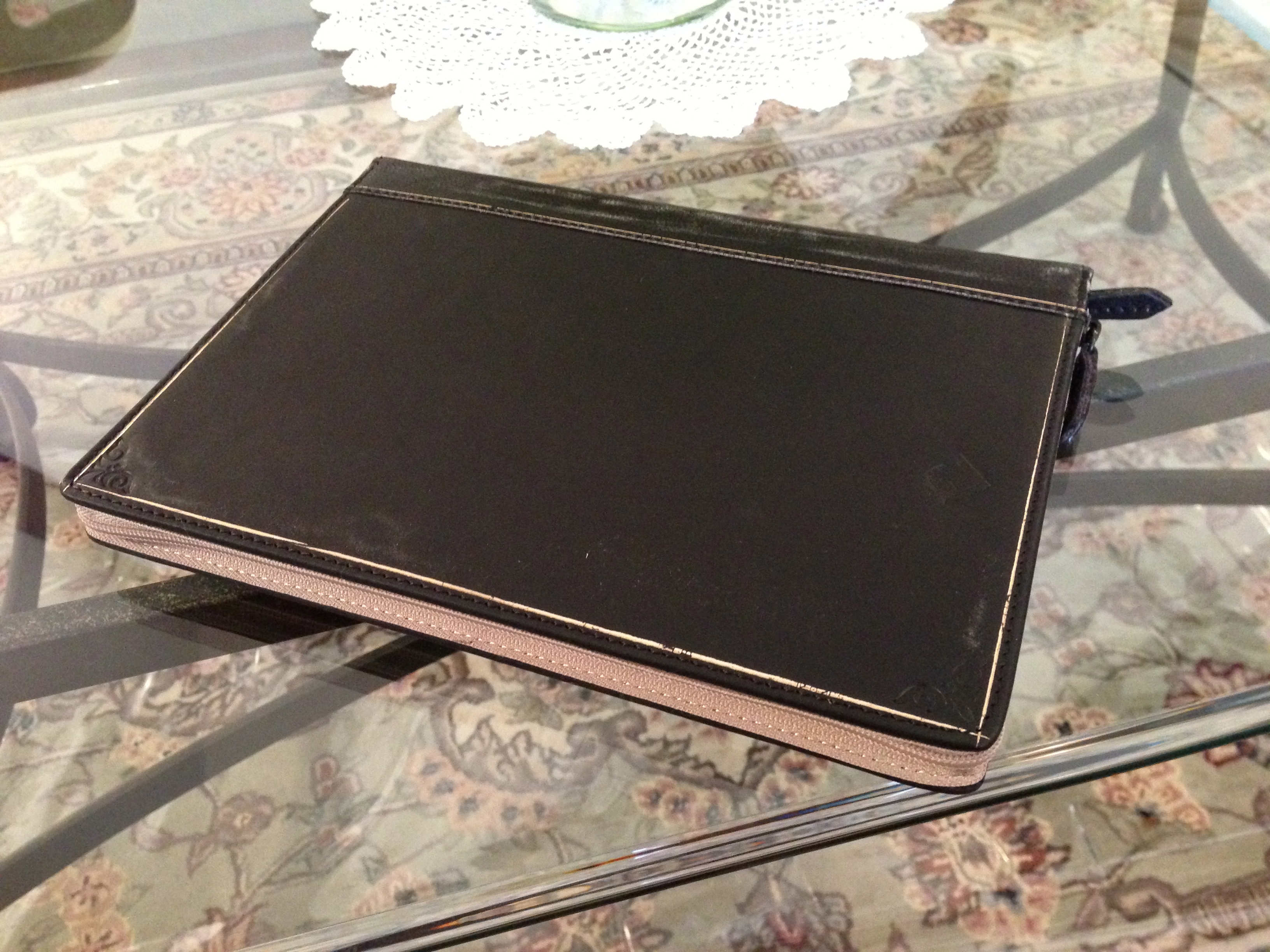
TwelveSouth recently released a version of its popular BookBook case for Apple’s latest iOS device, the iPad mini. We have previously reviewed the BookBook case for both the iPhone and second/third/fourth-generation iPad, and the iPad mini version is similar to the full-sized iPad version, but obviously smaller.
For those unfamiliar, the TwelveSouth BookBook case is a case that is designed to look like a vintage, hardcover book. Two high quality zippers allow the case user to easily open and close the case for access to their iPad mini. The iPad mini sits in a secure leather pouch that is secured into place with two metal buttons.
Full review and photo gallery:

 .
.
Need gifts quick? We got some great stuff we’ve been playing with that any Apple user would love…
Expand
Expanding
Close

You can never be too safe with your personal information on the internet. Passwords get cracked, databases get stolen, and web services sometimes ignore good security practices when storing your login information. Most people will tell you that you need to use a strong password on every website you use, and to use a different password on each site. Remembering all of those passwords and usernames can be a hassle though.
Up until September of 2011, I used the same password, or a variation of it, on nearly every website I used. One day I realized that was pretty stupid. After a service I used had been hacked and thousands of passwords had been stolen (thankfully mine was not included), I decided it was time to get smart with my passwords. I purchased 1Password at the recommendation of several users that I knew and have not looked back since.
I initially imagined it would be difficult to deal with a browser plugin and an iPhone app for storing all of my login info, but it proved to be much easier than I thought. In fact, it was so easy that I started recommending it to everyone I know.
Today, 1Password for iOS has received a complete overhaul. The update is pricey, but is it worth the money? Dive into the full review after the break to find out.

UPDATE: The giveaway is now closed.
Moleskin, a widely renowned high-end notebook manufacturer based out of Milan, teamed up with popular note-taking app Evernote to launch a series of smart app-enabled notebooks just before the new school year commenced.
I bought one of these notebooks right away for grad school, intended to use it religiously, and hoped it would transform the way I study. Of course, one week into the semester, I found myself using the Evernote app on my iPad more often than the smart notebook itself. However, I still found the notebook quite beautiful, well done, and interesting in concept. For that reason alone, I figured I’d write up a little review now that the semester is over and even giveaway two of the $29.95 large-ruled smart notebooks.
Check out the review, and then leave a comment below. We’ll contact the winners in 9to5Forums.
A gallery is below.
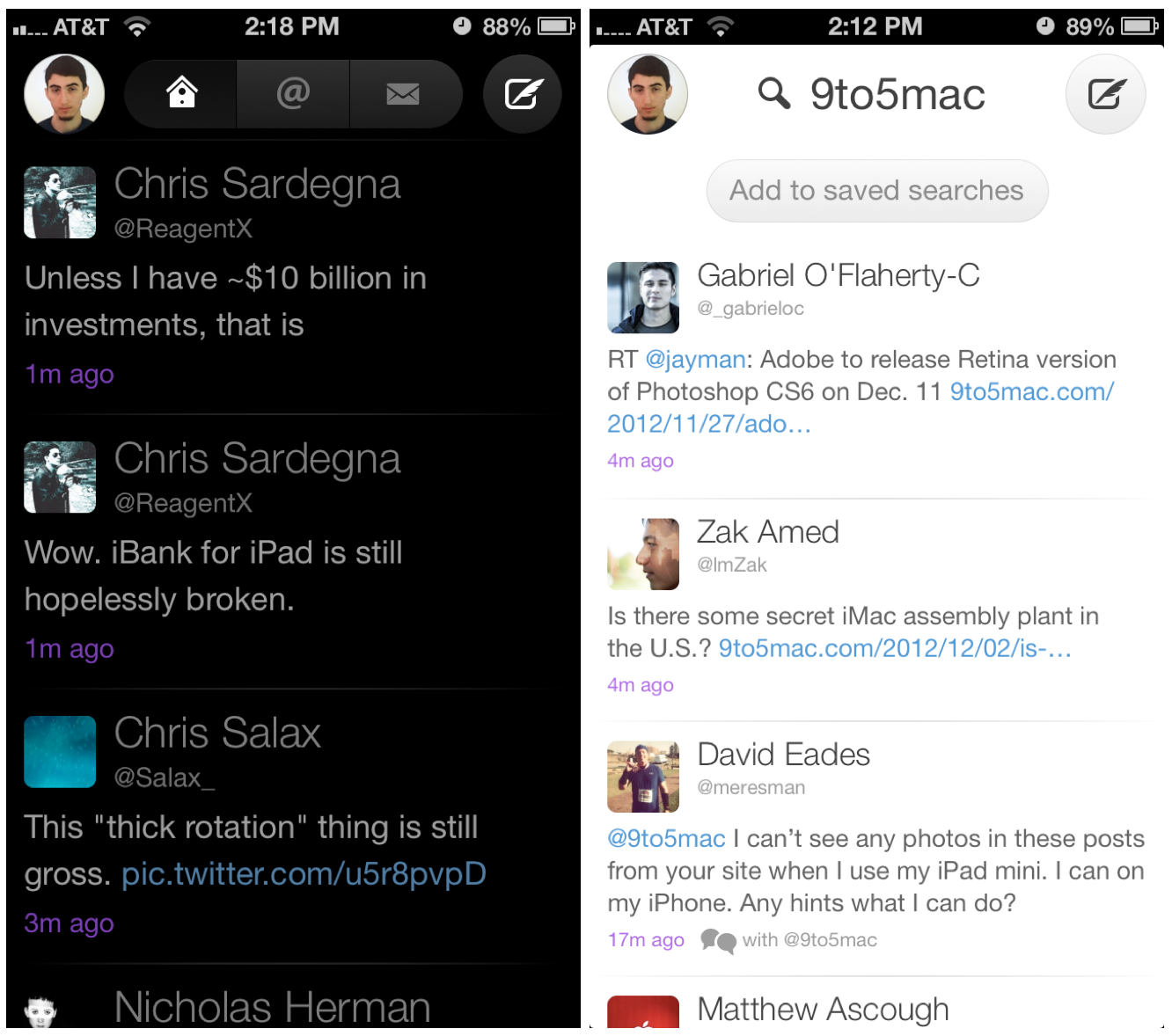
Back in the summer of 2008, when I first joined Twitter, there weren’t very many good Twitter apps around. I had a Mac and an iPod touch, and I wanted a way to keep up with the few people I was following on those devices.
The first app I used was Twinkle, by the makers of the Tap Tap Revenge games. I used it for a while, but it started to show its age as things started breaking and new “social” features required separate accounts on other networks. I decided it was time to move on.
That’s when I discovered Twitterrific, and I loved it. Between the Mac and iOS versions, I had an app for keeping up wherever I was. The iOS version was a power user’s dream come true. There were buttons, filters, and toggles that did everything I wanted.
I used Twitterrific for several versions until I eventually moved on again; this time to Echofon for its fancy timeline position syncing across devices. This was something no one had done at that time.
Twitterrific has always held a special place in my Twitter client list. It was easily my favorite app for several years, and even after I stopped using it, I wished for timeline syncing so that I could return to it.
When Twitterrific 4.0 launched, I was caught somewhat off guard. The app had been completely rewritten for simplicity. Most of the power features I had enjoyed were gone. The focus was now on reading and composing, and not much else. I had since moved to Tweetbot and couldn’t imagine using any other app. Tweetbot’s power features had me hooked.
Today, Twitterrific 5.0 is available. The app has once again been redesigned from the ground up, with new features and customizability. But is it enough to win back former fans who have been turned off by the lack of focus on power users? Keep reading to find out.

Xbox SmartGlass version 2.1: Microsoft’s app for controlling your Xbox with your iPhone or iPad officially gains iPhone 5 support:
• iPhone 5 Support
• Bug Fixes
Twitterrific 5 for Twitter: Iconfactory’s Twitterrific 5 for Twitter is now rolling out to App Stores around the world. Stay tuned to 9to5Mac for a full review of the completely redesigned app shortly.
DISH Remote Access for iPhone version 3.0.2: DISH network users get access to a redesigned UI that now provides access to the guide, DVR, and search while streaming content in the background. The update also includes customizable “favorite channels” in the guide, support for the iPhone 5 display, and improved performance:
-Improved the performance, stability, and reliability of the application
-Completely redesigned user interface
-You can now use your Guide/ DVR/ Search while streaming in the background
-Added ability to set and use favorite channels in guide
-Updated in app remote/ keypad functionality
-Took full advantage of the iPhone4s/5 high retina display to show high resolution images
-Added support for the larger iPhone5 screen
Plex version 3.0.1: A ton of changes and fixes following feedback to version 3.0 of the Plex iPhone and iPad app:
Expand
Expanding
Close
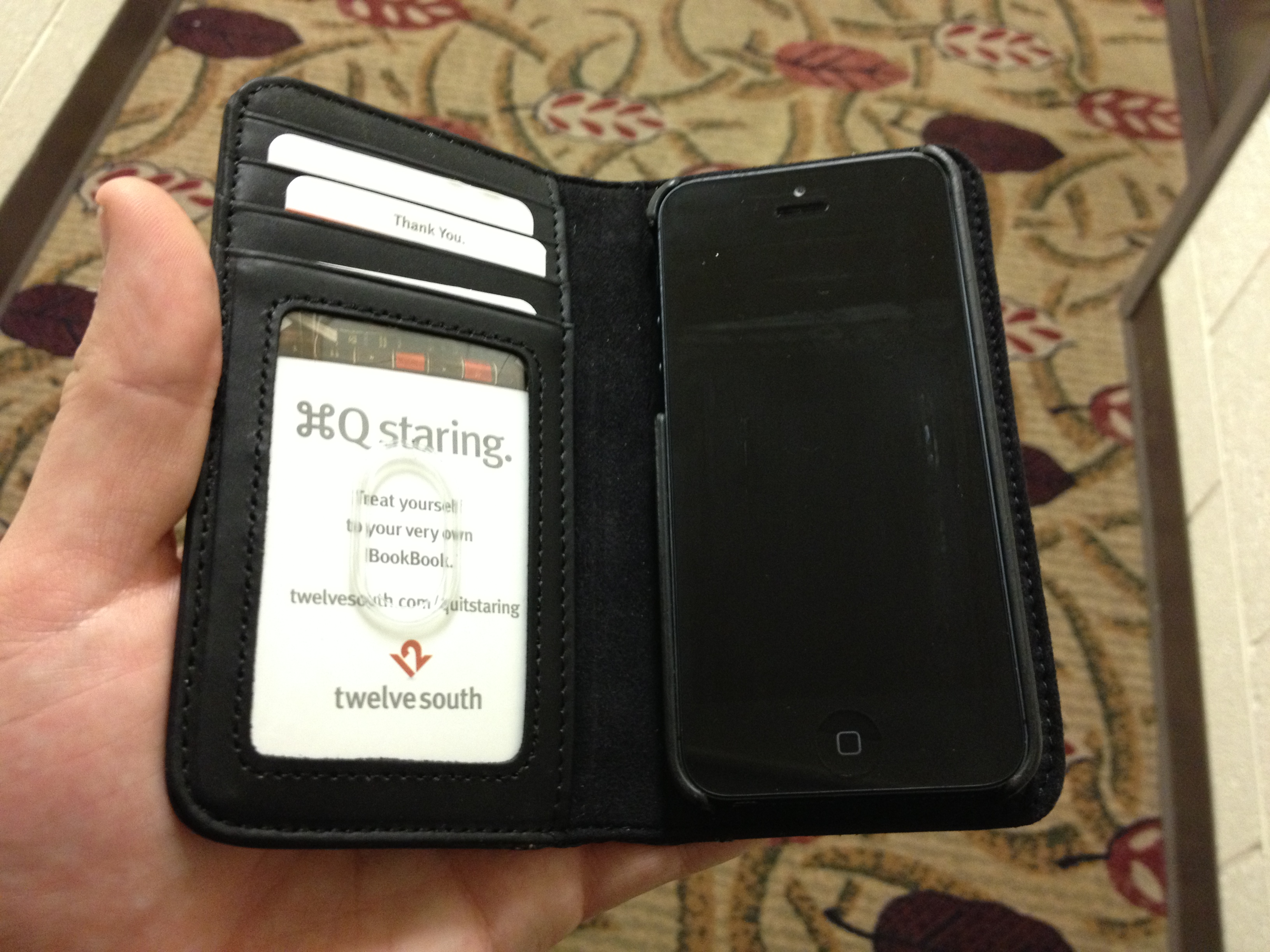
Following up its popular BookBook case for previous generations of the iPhone, Twelve South has released a new BookBook that is designed to fit the taller and thinner iPhone. The case, which we have been testing for approximately a week, not only is redesigned to fit Apple’s new iPhone design, but adds some new features as well. The TwelveSouth BookBook iPhone 5 case rolls two unique iPhone case ideas into one: an iPhone case that looks like a mini, vintage book cover, and an iPhone case that includes the functionality of a basic wallet.
Build quality and protection:
[slideshow]
Talk about good timing. A few days before Sandy hit our town, Hyper sent me its new MacBook + iOS charging external battery device, the Hyperjuice MBP2-100.
Hyper has made external MacBook/Air/Pro batteries for years, and if you’ve ever been to an Apple (or any big technology) keynote event, many of the live bloggers have their rigs hooked up to them. HyperJuice’s latest line, dubbed the “MBP2 series”, expands on the capabilities of the big power batteries…
Logitech announced its 720p HD Wi-Fi Broadcaster webcam that wirelessly transmits to any Mac, iPhone, or iPad just last month, and we at 9to5Mac were able to get our hands on a review unit and have been testing it thoroughly over the last few days.
The webcam is specifically geared toward “video professionals, bloggers and hobbyists,” as it allows instant live streaming with Ustream and gives users the ability to toggle between the device and their computer’s built-in camera for second-angle POV shooting. The webcam is further compatible with most popular Mac video applications, such as QuickTime, PhotoBooth, iMovie, FinalCut Pro, FaceTime, iChat, Skype, etc., and it transmits from up to 50 feet away. Oh, and it comes with a plastic carrying case that doubles as a stand.
For more than the basic spec rundown above, check out the video and hands-on review below. Then, when you’re done, pick one up at Amazon for $199—you will not be disappointed. The Broadcaster is an ideal Christmas gift for any loved one or friend who is heavy into vlogging, YouTubing, live streaming, or even podcasting with Google Hangouts.
[youtube=http://www.youtube.com/watch?v=urfeFnY7N78&feature=youtu.be]
The hands-on review and gallery are below.
Swivl and Lens Dial
As part of 9to5Mac’s ongoing iPhoneography gear series for the holiday season, we looked at a slew of iPhone 5-compatible accessories, but some of you may still own the iPhone 4S or older, so we got our hands on the Swivl for iPhone 5/4S/4 and the Lens Dial for iPhone 4S/4.
First of all: Yes, iPhoneography is an actual name (it even has a Wikipedia page). It essentially, as one might guess, involves shooting and processing with an iOS device. Photojojo.com offers an impressive, mouth-watering catalog of photography and videography gear for the iPhone 5 and older generations, so we decided to take some of the website’s hottest accessories for a spin. And, over the next few weeks, we will continue to test and review only what’s best for helping creative folks step up their iPhoneography game.
Check out a hands-on review of the Swivl and Lens Dial below:
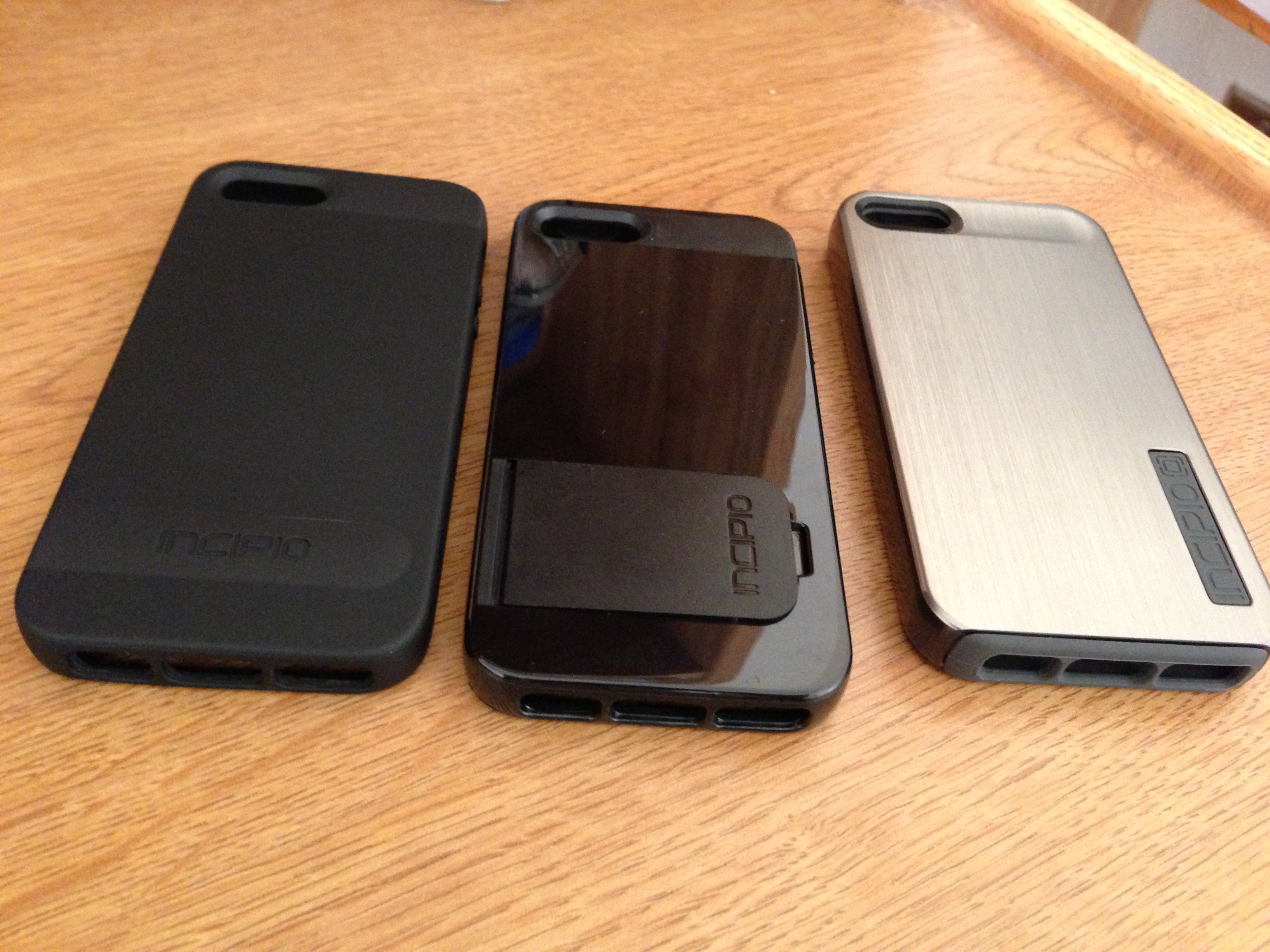 Left to right: OVRMLD, Kicksnap, DualPRO SHINE
A few weeks ago, Incipio sent us their new line of cases for Apple’s new iPhone 5. We’ve ben testing Incipio’s offerings over the past few weeks, and we’ve decided to share our detailed thoughts on the top three Incipio iPhone 5 cases that we recommend.
Incipio Kicksnap:

The Incipio Kicksnap is a very convenient iPhone 5 case as it offers a built-in kickstand. On the back of the case, there is a little area to open the flap for the kickstand.
The kickstand works very well for watching video on the large iPhone 5 display, and the stand is very reliable for that. Some kickstands that we’ve seen for other devices do not work so well, they either fall quickly or break easily. However, we’ve had neither of these problems. If you try pulling back on the flap, you’ll have a hard time breaking it, so it should provide some solid use for a while.
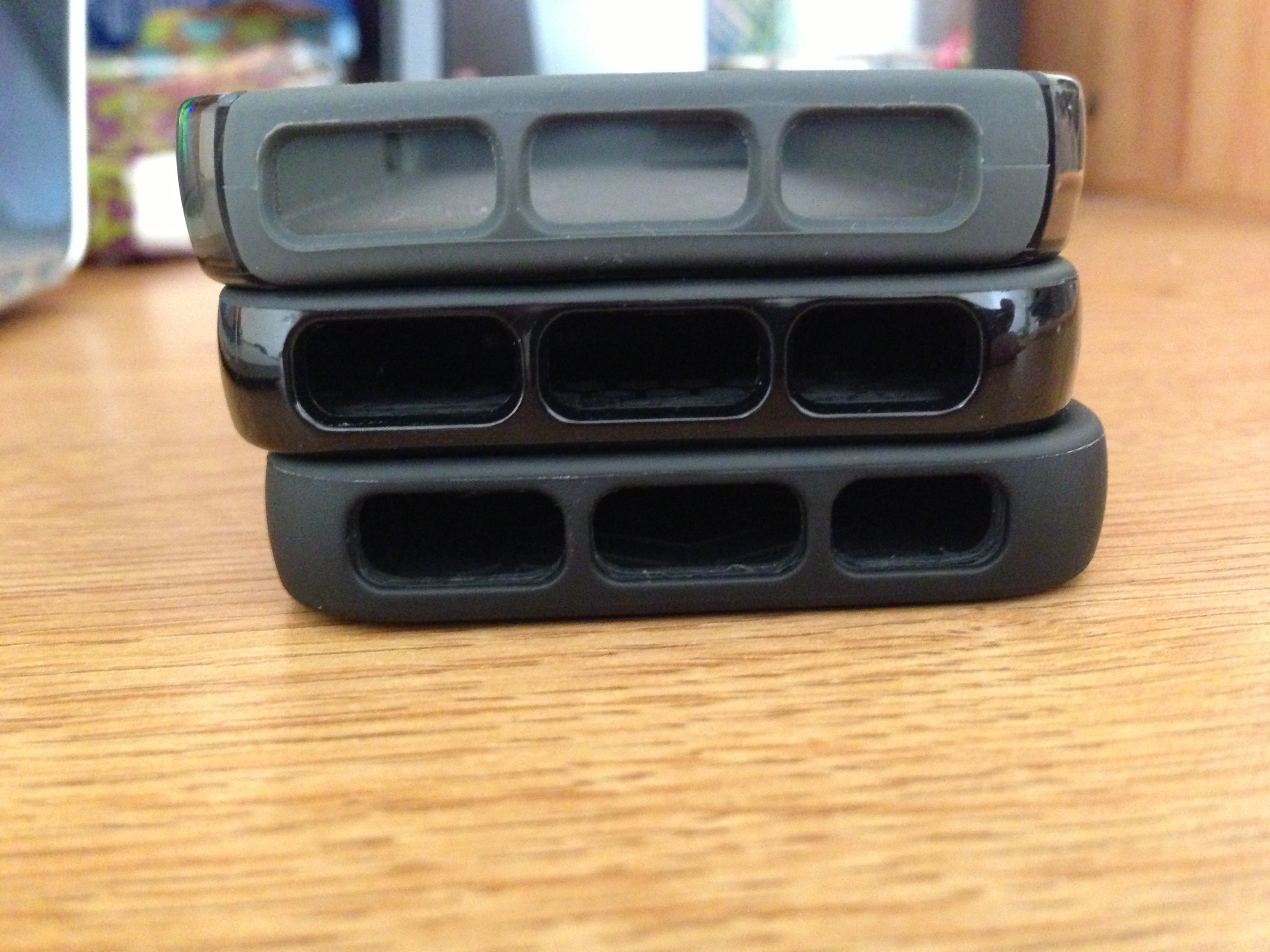
Besides having a stand, the case is very protective with its relatively-hard plastic back and sides. Cutouts are present for the camera system, audio controls, Lightning connector, and speakers. However, the front is not very protected, though the bezel of the case is raised so if you drop your iPhone on its front, it would not be directly impacted.
We recommend this Incipio Kicksnap case for those who want basic protection for the iPhone 5, but who also want a great and convenient kickstand feature. We tested the black version, but it comes in white as well.
As part of 9to5Mac’s ongoing iPhoneography gear series for the holiday season, we got our hands on three special effects lenses— wide and macro, fisheye, and telephoto— crafted from solid aluminum and equipped with sturdy, premium-definition glass to guarantee pro-like, optical perfection.
First of all: Yes, iPhoneography is an actual name (it even has a Wikipedia page). It essentially, as one might guess, involves shooting and processing with an iOS device. Photojojo.com offers an impressive, mouth-watering catalog of photography and videography gear for the iPhone 5 and older generations, so we decided to take some of the site’s hottest accessories for a spin. And, over the next two months, we will test and review only what’s best for helping creative folks step up their iPhoneography game.
Check our first review on the tiny, yet ever-so useful, Easy Macro Cell Lens Band.
(Left to right: Wide/Macro, Fisheye, and Telephoto)
Go below for a hands-on review of the $49 Photojojo Lens Series.
For a few years now PC manufacturers have been attempting to pack a touchscreen into their all-in-one iMac competitors. It’s a feature Steve Jobs made clear back in 2010 that Apple had spent significant time testing on Macs before determining touch was “ergonomically terrible” on a vertical display. Steve noted “you start to fatigue and after an extended period of time, your arm wants to fall off.” While that does not mean Apple will never do it (see iPad mini), for now Apple has made its bet on hand gestures staying horizontal on Macs– trackpads in its notebooks, and multi-touch gestures with Magic Mouse and Magic Trackpad for desktops.
Third-party touchscreen solutions for Mac do exist: Troll Touch will install a resistive touch panel on your Mac for no less than $800 and up. However, with that price on top of the cost of the iMac itself… for obvious reasons it has not been an extremely popular solution. We’ve been playing with what appears to be the only affordable product on the market bringing touchscreen like gestures to iMac, the $199 Zorro Macsk from Shenzhen based TMDtouch.
Early reviews of the Zorro Macsk should perhaps be updated, as we’ve been playing with the product following an update at the end of October that the company said vastly improved performance and fixed many of the issues reviewers were experiencing.
Expand
Expanding
Close
[youtube=http://www.youtube.com/watch?v=Dt1ZKiZaem8&feature=youtu.be&start=72]
Reviews are starting to hit the web for Google’s new Nexus 10 tablet, its first true 10-inch iPad competitor. Most reviewers are praising the device’s display—some even calling it equal to or better than the full-sized iPad’s Retina display. Hardware aside, it appears even the latest version of Android might be the biggest source of frustration as perfectly highlighted at 1:17 in The Verge’s hands-on review above.
Stay tuned for the 9to5Google review of the Nexus 10 this weekend.

Twelve South already has its HiRise stand for iMac that we recently went hands-on with, but that product is aimed at increasing the height of your iMac or Thunderbolt display to a comfortable viewing level. Twelve South is launching HiRise for MacBook today—aimed at users who pair their MacBook with a display and/or keyboard and mouse at home. The stand adjusts from 3.7 inches to 6 inches, allowing you to easily align your MacBook screen with a paired iMac or Thunderbolt display (as pictured above) for a dual monitor setup. We’ve been playing with the new HiRise for MacBook over the past couple days and have nothing but great first impressions.
You can adjust the $70 stand’s height easily by loosening a screw at the back and pushing down on the spring-loaded arms. The arms cushion your MacBook with a layer of soft silicone that also provides traction and keeps your Mac from slipping off. We didn’t have any problems with the MacBook sliding, even when adjusting and moving the stand around, but Twelve South does not recommend typing on the device’s keyboard when mounted on the stand.
The stand has thin Teflon rails on the bottom, allowing you to slide it or adjust left to right without scratching your desk, but it’s quite a solid chunk of brushed metal at 1.75 pounds. It also resembles an iMac stand, which makes it fit in nicely next to an iMac or Thunderbolt display. If aligned just right, the stand seems to disappear and leave your MacBook floating next to the display.
If you’ve been looking for a product like this, you won’t be disappointed dropping $69 for the HiRise.
You can order it on Amazon or through Twelve South’s website today.
[youtube http://www.youtube.com/watch?v=pL_zovUxT5k]
With most cellular carriers moving away from the beloved unlimited data plans of yore, many smartphone users now find themselves trying to cut back on data usage while still doing all of the things they want or need to get done on their phones. Unfortunately, that’s sometimes harder than it sounds. Some apps may seem simple enough, but could actually be downloading massive amounts of data in the background. Users could also be using an app much more than they realize, resulting in overages, fees, and a strong feeling of contempt for carriers.
Until now, there has been no way for iPhone users to track down which apps on their phones were using large chunks of their data plan without their knowledge. Fortunately, the good folks at Onavo have heard the cries of outraged users on limited data plans and come to our rescue.
The iPhone comes with a pretty decent weather app, but many people find it to be lacking. Aside from the fact that it only predicts up to seven days of weather, many find its forecasts—which are powered by Yahoo!—to be somewhat inaccurate.
That’s a void that WeatherSnitch 2 is eager to fill. WeatherSnitch’s interface is packed with all the weather-related information you could possibly want, but presented in a neat and orderly way that makes sense.
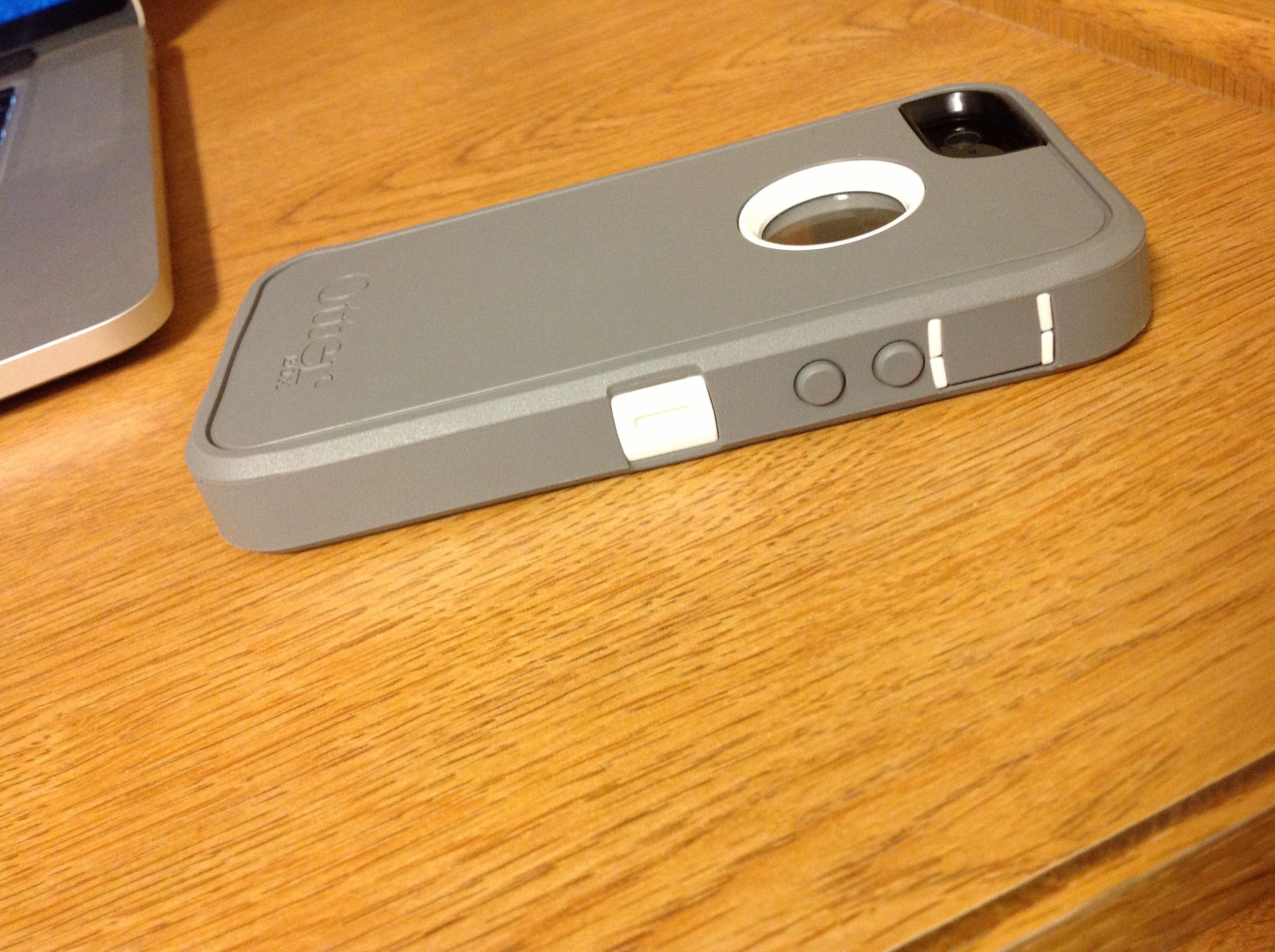
Otterbox, the renowned creator of some of the best mobile device protective accessories on the market, recently released a version of its popular Defender Series case for the new iPhone 5. Like its Defender products for other mobile phones and devices, the number one priority of the iPhone 5 Defender case is top-notch protection all around the device. We’ve been using the case for a couple of weeks, and we think that it lives up to the Defender name…
Today SonicoMobile, the creators of iTranslate Voice, released a brand new multi-language translation app for the iPhone. The aptly-named Languages provides translations between twelve different language combinations and sports an iBooks-like interface with a few adjustments for improved usability.
Pocket, the bookmarking service formerly know as Read It Later, just released a slick new Mac version of their iOS app. The new app sports most of the features you’ve come to enjoy if you’ve used the iPhone and iPad versions, and the design is similar enough to the mobile versions that you’ll feel right at home the second you start it.
Photo-editing apps have dominated the App Store ever since Apple’s iPhone launched in 2007, but they especially grabbed ahold of pop culture after famous photographers and photojournalists—such as Damin Winter’s prize-winning Hipstamatic Afghanistan war series and The New York Times’ Instagram summer series—advocated the iPhone as a premiere device for capturing special moments.
Here’s the thing, though: there are plenty of ways to beautifully snap an image or film a video with the iPhone that will contribute to the after-effects of apps. How so? iPhoneography gear.
Yes, iPhoneography is an actual name (it even has a Wikipedia page), and it essentially, as one might guess, involves shooting and processing with an iOS device. With that said, the iPhone 5 launched almost one-month ago, and it’s 8-megapixel camera, Sapphire lens, Panorama mode, and 1080p HD video are making tidal waves in the iPhoneography world.
Photojojo.com offers an impressive, mouth-watering catalog of photography and videography gear for the iPhone 5, so we at 9to5Mac decided to get our hands on some of the site’s hot accessories. And, over the next month, we will test and review only what’s best for helping creative folks step up their iPhoneography game. Hopefully, as the holiday season is practically here, the series will inspire a few gift ideas. The previous-generation iPhone, by the way, is on par with the iPhone 5, in terms of the camera, so we will look at iPhone 4S-specific accessories too.
Check out the first review below on the tiny, yet ever-so useful, Easy Macro Cell Lens Band.
It’s finally here. Tapbots unleashed a new member of their extremely popular Tweetbot family on the world today in the form of Tweetbot for Mac. The new bot has been eagerly awaited by Twitter users since it went into public alpha in the middle of July.
The OS X version of the popular iOS client boasts a similar feature-set, including timeline position syncing between devices via Tweet Marker, and even more syncing options through iCloud. Keep reading for all the details (and a ton of screenshots).
As usual, our friends at iFixit have once again taken apart Apple’s latest device. This time we get a look inside the new fifth-generation iPod touch that started shipping to customers this week, revealing all of its internal components including: 512MB of RAM from Hynix, Apple’s A5 processor, and NAND flash from Toshiba.
* A5 Processor
* Hynix H9TKNNN4KDBRCR 512 MB RAM
* Toshiba THGBX2G8D4JLA01 32 GB NAND flash
* Apple 3381064 dialog power management IC
* Murata 339S0171 Wi-Fi module
* Broadcom BCM 5976 touchscreen controller
* Apple 33831116
* STMicroelectronics AGD32229ESGEK low-power, three-axis gyroscope
* Texas Instruments 27AZ5R1 touchscreen SoC
While the iPhone 5 was able to grab an impressive repairability score in its teardown, iFixit unfortunately found the new iPod touch much harder to get inside. Due to lack of external screws and two “hard-to-manage ribbon cables” on the logic board, the device gets a low 3 out of 10 repairability score. That’s in comparison to the 7 out of 10 awarded to the iPhone 5. iFixit said, “repair is not impossible, but it’s certainly going to be difficult and expensive if one component breaks.” The teardown also found the iPod touch Home button has a “weaker, rubber-membrane design” when compared to the iPhone 5.
Here are some of the highlights:
Anyone who has ever misplaced an iPad and felt a sudden urge of panic —or better yet, anyone who has ever watched an iPad’s battery drain without access to power while on a long trip— can now rejoice, as there is a solution to both problems in one, nifty case.
Wireless NRG developed a renewable charging resource for the iPad by simply converting the sun’s rays, indoor lights, and practically any other luminescent substance into a perpetual stream of free energy. The high-end, portable charging case, dubbed “KudoCase,” launched earlier this summer for $199.95 with a slew of innovative accessories. But that’s not all…it responds to whistling. If your iPad is ever lost at a friend’s house, just whistle. The KudoCase will set off an alarm. Yeah, I know—awesome.
Anyway, enough jibber-jabber—check out the hands-on review below.
(The 1080p version is processing; coming soon.)
[youtube=http://www.youtube.com/watch?v=HojGMzJQBC4&feature=youtu.be]