App Store

See All Stories
Site default logo image

Following acquisition, Pulse iOS news app updated with sharing to LinkedIn

The free Pulse news-reading app for iPad, iPhone, and iPod touch has been updated with support for sharing articles to social network LinkedIn. Of course, this update should come as little surprise as Linkedin acquired Pulse last month for $90 million. Additionally, the new update includes sharing to the Evernote service.


Expand
Expanding
Close

Site default logo image

App.net launches ‘Passport’ app for iPhone to manage accounts, find browsing clients, sign up for free

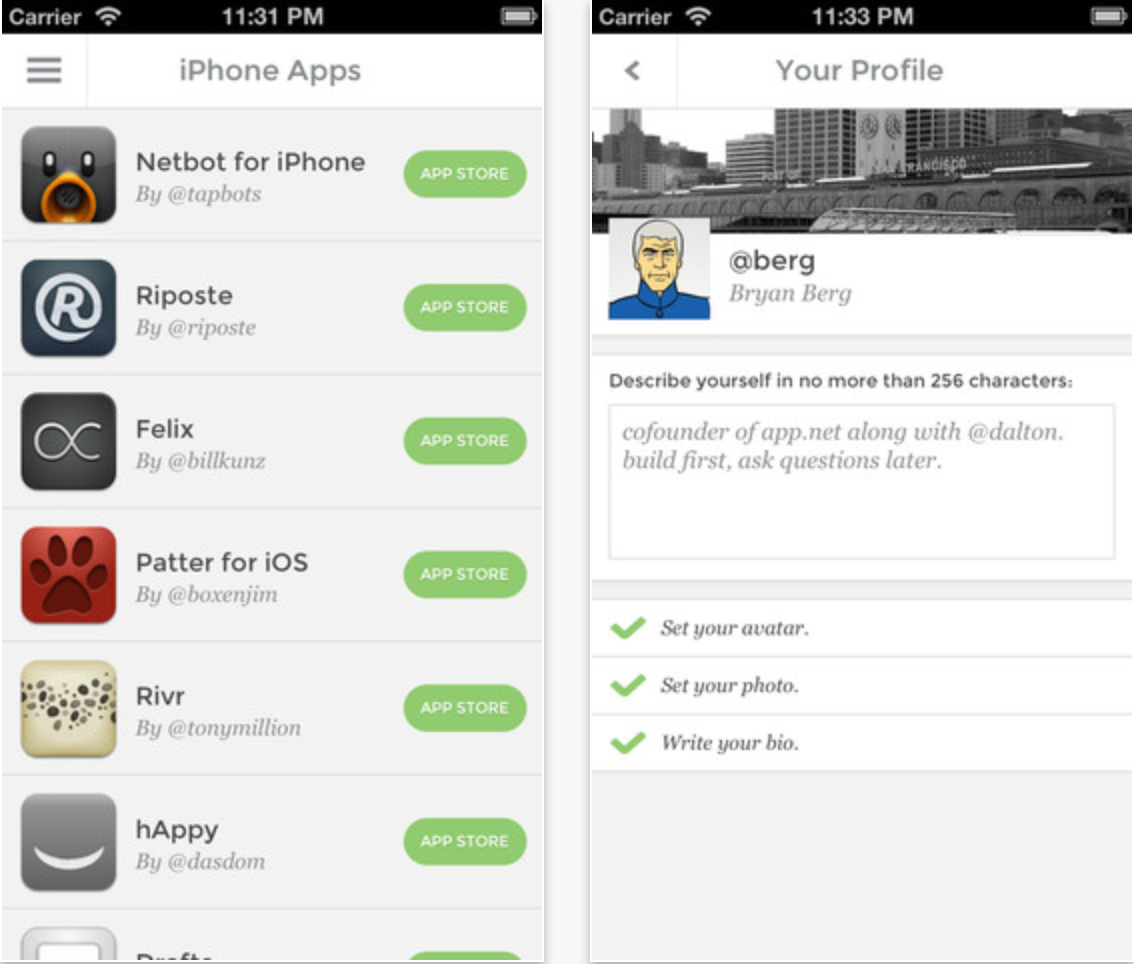
New Twitter-like social network App.net has launched an iPhone and iPod touch app called “Passport.” The application serves as a simple way to manage App.net accounts, edit your profile, and find and follow other App.net users. Importantly, the “Passport” app does not serve as a browsing client for an App.net feed, but rather as an app primarily focused on finding third-party App.net clients.

Notably, the app allows you to create a free account. Previously, to get a free account, users needed to have been invited by an existing user.

The app is available for free on the App Store. We previously posted a guide to our favorite App.net clients. You can follow us and our staff on App.net.


Expand
Expanding
Close

Site default logo image

Bad Piggies for iOS updated with 15 new levels, ability to record & share in-game tricks

Rovio has updated its popular Bad Piggies title for iPhone today with a ton of new content including 15 new levels, a new feature that lets users record and share tricks, an all-new sandbox, and a selection of new in-game gadgets. 

The app, however, is yet to receive Rovio’s just announced ‘Account’ feature that lets users save game progress in the cloud and resume playing on any device.

The HD iPad version of the app receives the same update.

What’s New in Version 1.3.0

Rise and swine! It’s a beautiful morning, but the Bad Piggies have just one thing on their mind: FOOD! Use two ALL NEW gadgets in these 15 NEW LEVELS to track down some elusive chocolate cake!

15 new sun-drenched levels!

Record your best tricks in-game and share through your favorite social networks!

Climb walls with the new suction cup gadget!

Punch your way to victory with the new spring-loaded Boxing Glove!

Fill your need for speed in a new Road Hog challenge!

Go crazy in an all-new sandbox!

Google denies reports of Google Now battery drain issues on iOS

Site default logo image

In the days following the launch of Google’s predictive ‘Now’ feature now baked into its Google Search iOS app, some users complained of experiencing noticeable battery drain due the app’s process of accessing location data. Today, Google has weighed in with an official response to LifeHacker calling reports of battery drain “incorrect”:

Reports that Google Now drains battery life are incorrect. We understand people’s concern about seeing the Location Services icon stay on when they use Google Now. Many apps that keep the icon on actually do drain the phone’s battery because they require very accurate location. (For example a navigation app has to run your GPS all the time to keep you from missing your turn.)

Google explained that Now is “built very differently” than other apps that utilize Location Services by using “cell towers and wifi hot spots for much lower battery impact.” 

Google’s response continues by noting it didn’t receive any reports of battery drain during its extensive month of testing the feature on iOS and encouraged users to contact them if they continue to see a problem:
Expand
Expanding
Close

Site default logo image

StubHub iOS app gets price alerts, improved search & more interactive venue maps

The StubHub iOS app was updated today to version 4.3.0 and added more interactive venue maps (now over 1000), price alerts to get notifications for your favorite events, easier account sign up, improved search, and more.

The updated StubHub app is available for free on the App Store.

What’s New in Version 4.3.0

Finding the tickets you want is even easier with Price Alerts, easy account sign-up, improved search, and more interactive venue maps (1,000+ and counting!).

• Set Price Alerts for your favorite events and get notifications on your device when we find tickets that match what you’re looking for.
• Don’t have a StubHub account yet? Now you can sign up without leaving the StubHub app – and it’s super quick.
• If we don’t find events with tickets in your location, we’ll automatically show you results in all locations.

Site default logo image

YouTube Capture iOS app adds HD enhancement previews, Wi-Fi only uploads, more

YouTube’s Capture app for filming and sharing video to YouTube was updated today to version 1.3 bringing a few new features alongside performance enhancements. The updated app now includes high definition previews of enhancements, an option to “Only upload on Wi-Fi”, and more:

What’s New:
✓ HD preview of enhancements
✓ “Only upload on Wi-Fi” option
✓ Upload shows time remaining
✓ Faster launch speed

Things We Fixed:
☂ Misbehaving when low on storage space
☂ Misbehaving while uploading

Site default logo image

Blockbuster On Demand app finally launches on iPhone & iPad

Earlier this year Blockbuster relaunched its digital video rental service dubbed “Blockbuster on Demand” by releasing apps for Android, Roku, Samsung Smart TVs, PC & Mac and introducing new features such as 1080p HD streaming and 5.1-channel surround sound. The service hasn’t picked up much steam since relaunching in January, but today it appears Dish is pushing ahead by finally releasing an app for iPhone and iPad. 

Available as free download on the App Store now the app offers single title rental options that can be streamed instantly or saved for later viewing on any supported device. Users initially complained of no HD video support on mobile devices but, according to the app’s iTunes page, the iOS app does indeed support “stunning HD and full Surround Sound.”

•Thousands of hit movies and new releases – rent and watch instantly or save to your Watchlist and view later
•Tons of movies you love – hand-selected titles with the highest ratings from Rotten Tomatoes®
•Stream Instantly — phone, tablet, laptop, Samsung Smart TV, Roku, and more
•Amazing sound and video – stunning HD movies in full Surround Sound
•Easy shopping and viewing – prime movie watching experience
•No subscription or late fees – pay only for what you watch

Site default logo image

Twitter for iOS updated with location-based trends, improved Vine playback, more

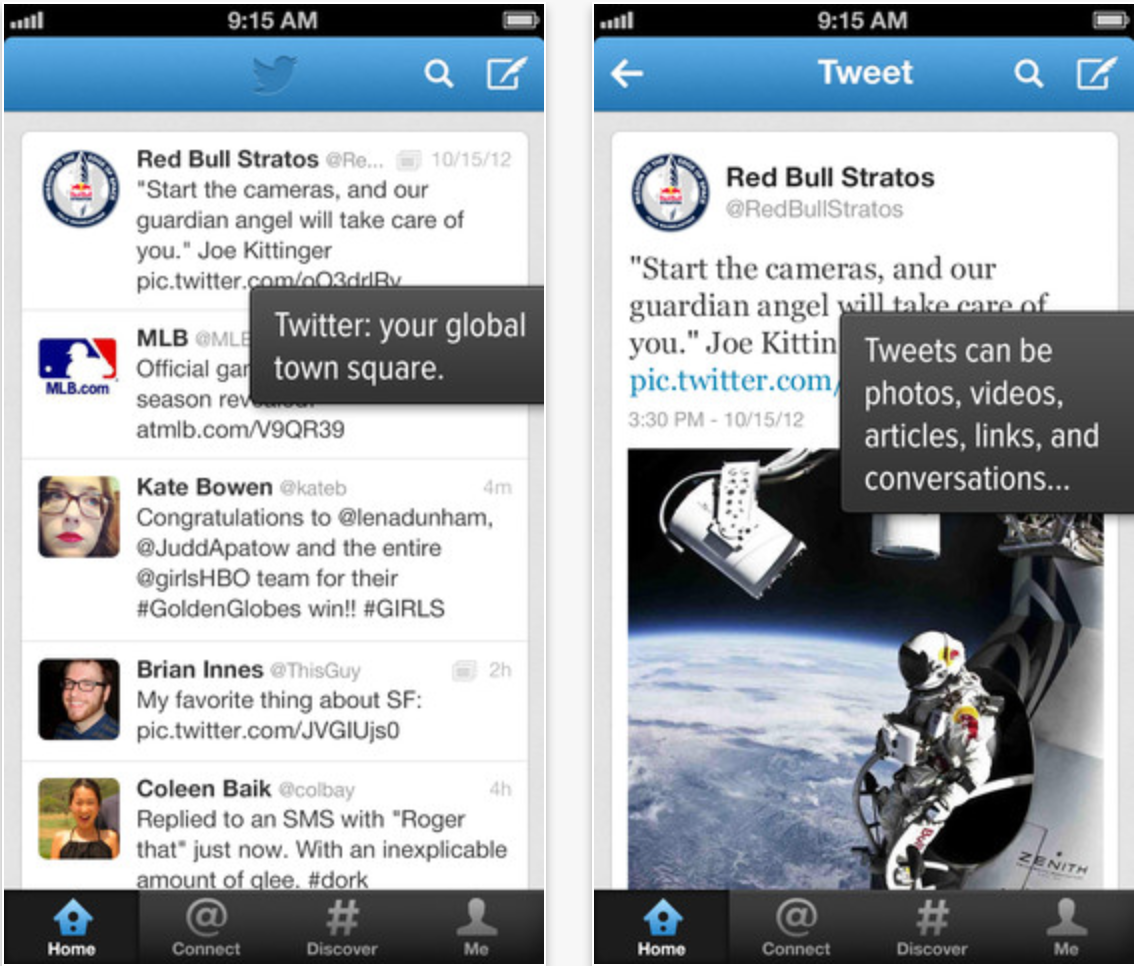
Twitter for iOS received an update today that brings location-based trends to your iPhone or iPad, first reported by AllThingsD.

See what’s happening near you or around the world by viewing Trends in hundreds of locations.

Also:
• Invite friends to join Twitter from within the app
• Improved playback of Vine videos
• Replies to retweeted Tweets now include both the author and person who retweeted the Tweet
• Enjoy a smoother experience due to bug fixes and other improvements.

The update is available now in the App Store.


Expand
Expanding
Close

Site default logo image

AT&T U-Verse customers now have access to WatchESPN and FOX NOW iOS apps

AT&T U-Verse customers will be pleased to learn that today they have access to new content on their iPhone and iPad. The WatchESPN app was previously available to most that subscribe to an ESPN package, but up until today AT&T U-Verse subscribers were not included. With update to version 1.6.6 today, U-Verse customers can now access live streaming feeds from ESPN, ESPN2, ESPN3 and ESPNU directly from within the universal iOS app for iPhone and iPad.

More great TV content is available on iOS devices today for AT&T U-Verse subscribers. The FOX Now iPhone and iPad app, which provides access to latest episodes from popular FOX shows like Family Guy, American Dad, and Hell’s Kitchen, was updated today providing access to both AT&T U-Verse and Suddenlink subscribers. The app also gets a bunch of new features including automatic full screen for videos, a streamlined universal navigation drawer, filters, and much more.

Google Now launches for iOS, available as update to existing Search app

Site default logo image

After a few months of waiting, Google has just released its Google Now service for iOS users. The feature is available via an update to Google’s existing Search app for iOS.

What’s New in Version 3.0.0

Get just the right information at just the right time with Google Now.
• weather and traffic conditions before you start your day
• updates on your favorite sports teams and breaking news stories as they happen
Find out more about all other ways Google Now can help at http://www.google.com/now

Google is also working to bring some voice functionality to its desktop website. While Google Now has a voice component that has been compared to Apple’s Siri on many occasions, the essence of the feature is truly to provide timely, location based information.

The update is available for free for iPhone, iPad, and iPod touch via the App Store.
Expand
Expanding
Close

Site default logo image

Square Register gets kitchen tickets & barcode scanning on iPad + new UI, custom tipping, more on iPhone

The Square Register app was updated today with a number of new features for merchants on top of a redesigned UI for the iPhone app. Merchants running the Square Register POS app on their iPad will now have access to barcode scanning with the ability to sync a Bluetooth barcode scanner, new easy order modifiers, as well as customizable kitchen tickets.

iPhone users of the Square Register app are greeted today with an all new design that adds new features such as custom tipping, smarter payments with multiple custom amounts, and a customizable item library.

Square just posted the video above to coincide with the update showing off how owners of Piada in Midtown Manhattan are taking advantage of the Square Register solution.

A full list of of what’s new in version 3.0 of Square Register is below:

What’s New in Version 3.0

New on iPhone:
– Item library: Add items to a sale with a tap. Build your item library to simplify and speed up checkout. Customize items with photos, names, and prices.
– Smarter payment pad: Add multiple custom amounts to a sale, add notes to each amount, and view or edit all amounts in one place before charging.
– Custom Tipping: Allow customers to enter custom tip amounts.
– New look: Ring up customers and edit settings more easily than ever with an all-new design.

New on iPad:
– Easy order modifiers: Customize orders at the counter and send them to your kitchen while your line keeps moving.
– Customizable kitchen tickets: Include a custom name or number on each kitchen ticket.
– Barcode scanning: Sync your Bluetooth barcode scanner with Square Register to speed up your checkout.

Site default logo image

New “Learn More About In-App Purchases” section helps protect consumers from apps like this [video]

In March Apple decided to add “offers in-app purchases” warnings in iTunes and on the App Store following a class action lawsuit brought on by parents arguing the iOS freemium model, i.e. in-app purchases, allowed children to easily rack up thousands of dollars. Today, as noted by AppAdvice, Apple has now added a new “Learn More About In-App Purchases” section on the App Store detailing how in-app purchases work and how parents can manage they preferences through Parental Controls (pictured below). On a related note, in the video above IGN shows off how kids could easily spend thousands of dollars in apps that aggressively push ridiculously expensive in-app purchases to games clearly aimed at children.

Site default logo image

Apple is offering WWDC tickets to some developers who didn’t get a chance to purchase

Apple is apparently contacting some developers who didn’t get a chance to purchase tickets, offering them a second chance.

https://twitter.com/jordanekay/status/327543987449761792

Red Sweater Software’s Daniel Jalkut speculates that tickets are being offered to those who had the item in their cart, but were unable to purchase due to the record 180 second sellout.

Site default logo image

Wunderlist ‘Pro’ arrives today with new team collaboration features for $4.99/month

6 Wunderkinder, the developers behind the ‘Wunderlist’ to-do app that’s currently home to over 4 million users, today announced a new “Pro” version of the cross platform productivity app. Launching today on iPhone, iPad, Mac, and on the web, the new pro version comes with the introduction of the developer’s first premium model that will see users pay $4.99 a month (or $49.99 a year) to get access to new team oriented collaboration features:

• Assigning – now you can add an extra level of accountability and assign tasks to your colleagues

and friends.
• Unlimited subtasks – sometimes the task on hand is so big that you need to break it down into

small manageable subtasks. Now you can add as little or as many needed to get the job done.
• Backgrounds – Wunderlist Pro subscribers will have access to eight new backgrounds – from a minimal dark wood and soothing sands to vibrant florals and the Paris cityscape, plus a whole lot more!

6 Wunderkinder plans to keep adding additional features for pro users, including the ability to attach and share files through tasks:

Files will be the next feature to be added to Wunderlist Pro. With the support of Files you will be able to attach files to a task and share with your colleagues, for improved collaboration outside of just the to-dos.

The Pro upgrade for Wunderlist is available now as an in-app purchase in the Wunderlist iPhone & iPad app as well as the Mac App Store app and on the web.

Those that plan on sticking with the free version of Wunderlist will also be greeted today with new features in update 2.1.0 of the app. Among them is a new Action Bar and other UI improvements such as the ability to “Get a quick overview as to who created and completed a task with the Detail View.”

Site default logo image

Iron Man 3 – The Official Game now available on App Store ahead of upcoming movie

From 9to5Toys.com:

Ahead of the official May 3rd launch of the Iron Man 3 feature film, today Gameloft has released the iOS app tie-in taking place after the events of the movie. According to the game’s iTunes page, Iron Man 3 sees the player take up the role of peacekeeper playing as Tony Stark in an “additive, endless 3D runner”.

Iron Man 3 – The Official Game is available on the App Store now for free.

Included in the game is 3 different locations with “endless, self-generating levels”, 18 suits from the various Iron Man movies, and much more:

THE OFFICIAL GAME OF THE MOST ANTICIPATED SUPERHERO MOVIE OF 2013!

– Fight around the world against rising A.I.M. forces

– Discover 3 different locations offering endless, self-generating levels: Malibu Shores, New York City, and China 

– Confront 4 epic villains from the Iron Man comics: Crimson Dynamo, Ezekiel Stane, Living Laser, and the mighty M.O.D.O.K.

– Complete various missions in fast-paced flying battles, and in epic one-on-one confrontations

– Unleash Iron Man’s power with amazingly responsive swipe controls

– Enjoy an outstanding 3D world with cutting-edge graphics and animations

– Research and develop up to 18 suits from the different movies (Mark II, Mark 42, Silver Centurion, etc.)

– Upgrade your armors and powers in the research lab to wipe out your enemies

Site default logo image

Fandango iOS app gets faster ticket purchasing & special offers for Visa Signature users, improved Facebook sharing, and more

Fandango, the movie ticket service that is currently integrated into Siri, today announced an update to its iOS app for iPhone and iPad. On top of enhancements that lets iPad users scroll through photos & videos and view in full screen mode, the app also now features the ability for Visa Signature account holders to purchase tickets faster and receive special offers by saving their card. The feature is only available on the iPhone initially and comes alongside better Facebook sharing options by creating and signing into a Fandango account.

A full list of what’s new below:

What’s New in Version 5.6

• iPad users – now scroll through photos & videos and view in full screen
• Feeling social? Sign into your Fandango account to manage Facebook sharing
• Visa Signature account holders – save your card for faster ticket purchasing & access to special offers with TIXPRESS™! (iPhone only)
• General bug fixes & usability enhancements

Review: Currency, a streamlined conversion app for your iPhone that may be a tad too simple

Conversion apps feel like a design playground, with so much potential for uniqueness and variety in their interfaces. The trend has been towards multifunction, multi-purpose Swiss-army knife apps that attempt to cover a whole range of disparate measurements. In my experience, as a result of racing to add one more ratio to their feature list, the simplicity of these apps suffer.

Currency sidesteps this battleground entirely and, as the name implies, focuses solely on converting amounts of money. The app touts support for over 160 currencies from around the world, which was more than enough to satisfy my needs. The app surfaces a handful of common currencies at first launch, each accompanied with a beautiful representation of its respective country’s flag.


Expand
Expanding
Close

Site default logo image

Tumblr updates iOS app with new sharing features, save later with Pocket, animated GIFs, & more… now with ads

On top of the recent announcement that it will be bringing sponsored posts, aka advertisements, to its mobile apps, Tumblr today released an updated iOS app that includes new sharing features, the ability to save content for later reading, new templates for sharing posts through email, and much more.

Other enhancements include animated GIFs while scrolling, an alphabetized and searchable Following list, and support for sharing directly to Twitter and Facebook. A full list of what’s new in version 3.3.1 of the universal iOS app is below:

What’s New in Version 3.3.1

Now you can do more than just reblog when you find something you love.

– Share posts via Twitter, Facebook, and more
– Save stuff for later using Instapaper and Pocket
– Email an entire post with our beautiful new template
– Fling a photo up or down to close it!
– GIFs animate while you scroll*
– Following list is now alphabetized and searchable

*iPad 2, 3 and 4, iPad Mini, iPod Touch 5th Generation, iPhone 4S and 5 only