9to5Mac Reviews
All the products that the 9to5Mac team has reviewed.

All the products that the 9to5Mac team has reviewed.
All the products that the 9to5Mac team has reviewed.
All the products that the 9to5Mac team has reviewed.



Analog Camera for iPhone and iPod touch
As promised, Analog Camera for iPhone and iPod touch has hit the App Store to fulfill your filtered photo taking needs. I had a chance to spend some time with the app over the Memorial Day weekend and quickly decided it’s a keeper.
Analog Camera is a seriously fun and fast camera app with personality, as we would expect from the makers of Clear for iPhone and Mac (and soon iPad), that features eight different photo filters and all the social network sharing you could ever need.
Analog Camera’s easy sharing features allow you to open photos you shoot or edit within the app in other apps including Instagram. This feature is especially cool if you’re feeling spunky and want to experiment with double filters or blurring features offered with Instagram.
Capture and process an image in Analog Camera, then jump right over to Instagram or similar apps to share.

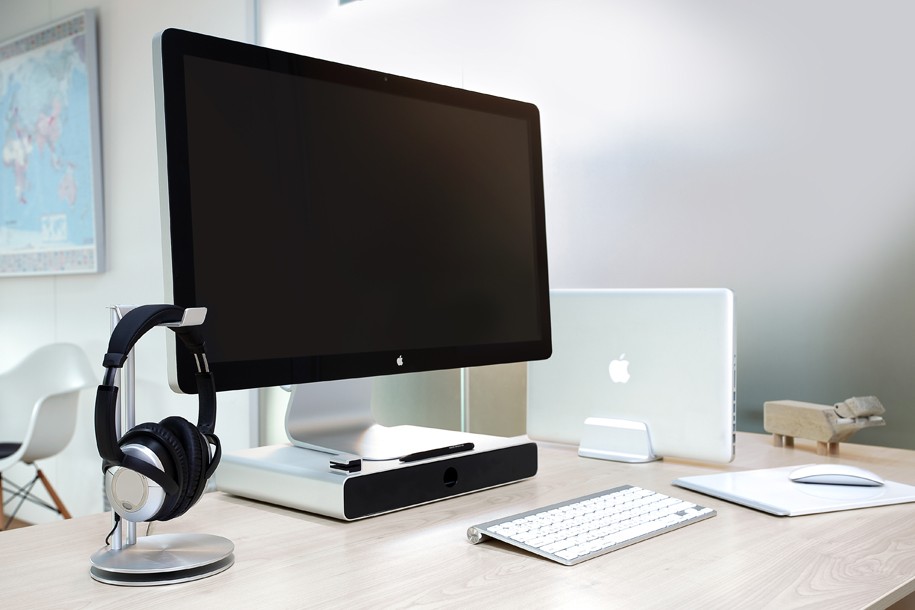
As we previously noted, Just Mobile sells a series of accessories, mainly for Apple products, made out of carefully crafted aluminum designs. These designs and materials are akin to what Apple builds for its own products, therefore Just Mobile accessories are at the top of the wish lists for many Apple product design fans. For the past few weeks, we have been testing out Just Mobile’s latest accessories. Find our reviews below:

Zagg, a company that makes high quality keyboard cases for iPads that we’ve reviewed in the past, today introduced two brand new keyboard cover and folio designs for iPad mini. Zagg says both products are ultra-thin Bluetooth keyboards that take advantage of “a unique, patent-pending hinge system that enhances the iPad mini user experience with a full range of viewing angles up to 135 degrees.” Get full details on both new products below:
Expand
Expanding
Close


Funny Or Die, creators of the awful iSteve film we recently reviewed, released a new trailer for their terrible movie today. The trailer features quotes from various reviews of the horrible waste of time, including a choice tidbit from your friends here at 9to5Mac: “Do not watch this movie.”
With its Retina display, unmatched ecosystem of HD video content, and AirPlay streaming capabilities, the iPad is undeniably one of the best experiences for watching video on a mobile device. The one glaring omission from Apple’s recipe for the perfect mobile video experience, however, is the absence of quality, front-facing speakers. The result is a sound experience that doesn’t quite live up to HD content on the iPad’s best in class Retina display. With several newer devices (see: Galaxy Tab 2, HTC One) adding front-facing, stereo speakers, audio performance is clearly one area Apple is falling behind, and its competitors have certainly taken note.
At CES we first got a look at Belkin’s solution to the problem: A $199 iPad case with integrated front-facing ported speakers that aims to offer a home theatre-like experience right in your hands. Belkin is about to release a new Lightning version of the ‘Belkin Thunderstorm Handheld Home Theater’, so we thought the time was right to give you the full run down on how the product performs…
Expand
Expanding
Close

I’ve been using the $99 LandingZone 2.0 LITE 13″ Secure Docking Station for the past couple weeks to dock my MacBook Air when I use it at my desk. Until now, when I got to my desk, I would manually plug in MagSafe power, USB hub and sometimes audio jacks – which isn’t a huge pain, but it did add time time and clutter to my workflow.
LandingZone, which started as a Kickstarter project but is now in full production, has a complete solution in a white plastic/steel dock that allows you to secure your MacBook Air, and within seconds, have Ethernet, a 4 port USB hub, power and MiniDisplay Port outs ready for use.
Expand
Expanding
Close

As more and more consumers switch to using iOS devices to enjoy media, the need is becoming apparent for a more full featured and well-rounded video player. While Apple’s Videos app provides basic and simple functionality for viewing movies, when it comes to storing, organizing, and viewing your entire library of videos and movies, Apple’s stock app falls flat.
FireCore, the group behind the popular aTV Flash software for jailbroken Apple TVs have released a new app called Infuse, which promises to fix all of that, offering you a versatile way to view and organize videos in a variety of different formats. Let’s check out how it worked.

Google Reader is dead. We know this for certain as Google announced earlier in March that it plans to pull the plug on its RSS service on July 1, 2013.
Google’s announcement caught the good people of the Internet by surprise and left us wondering, “What next?”
David Smith, developer of Check the Weather and My Recipe Book, believes his new app Feed Wrangler for iOS has answered that question in a way that fixes the problem that led to Reader’s demise.
JBL’s $99 Flip, $99 OnBeat Lightning Dock and $149 Charge
When we did our Best Bluetooth speaker mega-review (TL;DR: Overall Winner, Best Value, Best Sound, Best Portable/Sound, Apps/Updates, more) a few weeks ago, we neglected to test JBL’s very capable ($99 Flip) and $149 Charge; something our commenters immediately questioned. Not even a day after the review went up, JBL sent us a box full of their new speakers to test against our recommendations (sometimes this is a great job!). JBL also sent us the $100 OnBeat Micro Lightning Dock to compare against so it might also be worth asking the question: Should you get a Bluetooth speaker or a Lightning dock speaker?
Expand
Expanding
Close


Conversion apps feel like a design playground, with so much potential for uniqueness and variety in their interfaces. The trend has been towards multifunction, multi-purpose Swiss-army knife apps that attempt to cover a whole range of disparate measurements. In my experience, as a result of racing to add one more ratio to their feature list, the simplicity of these apps suffer.
Currency sidesteps this battleground entirely and, as the name implies, focuses solely on converting amounts of money. The app touts support for over 160 currencies from around the world, which was more than enough to satisfy my needs. The app surfaces a handful of common currencies at first launch, each accompanied with a beautiful representation of its respective country’s flag.
The iPhone lockscreen hasn’t changed much in the past six versions of iOS, with the exception of the addition of a camera slider. Atom is a new jailbreak tweak that seeks to completely redesign the lockscreen and add new functionality, and it does not disappoint.
Keep reading to find out how Atom can make your lockscreen even more useful.
When Apple introduced Notification Center in iOS 5, they changed the way most people manage notification on their iOS devices. For the most part, they were right. Unfortunately, Notification Center introduced its own deficiencies and now people are looking for changes once again.
Today, change has finally come in the form of a jailbreak tweak called Abstergo, and we’ve got five free copies for our readers. Keep reading for a full breakdown of the tweak and more information about how you can win a copy.
Back in late 2010, Google brought Google Goggles (not to be confused with Google Glass) to the Google Search app for iPhone. At the time, it seemed like a great feature. You could take a photo of anything with your iPhone, and Google would instantly identify the object in the frame, returning relevant data about the photo.
That was 2010. You’d probably think that in the years following, Google would’ve continually updated Goggles, making the recognition more accurate and expanding its features. Well, you’d be wrong. In fact, Goggles functions entirely the same as it did in 2010, another fine example of Google’s continued dedication to their products.
Image Searcher, the developers behind a new app called CamFind, have seemingly stepped in where Google failed, creating a image-based search service that they claim is “four times more accurate than Google Goggles.” Let’s take a look at how it really performed.

Twitter launched its new music discovery app Twitter #music for iPhone today.
Twitter #music takes a step toward filling the void created when everyone migrated from MySpace, which was one of the most effective music discovery tools for me until it was largely vacated.
Twitter promises to “change the way people find music, based on Twitter,” per the social network’s blog, which I believe will be widely appreciated.

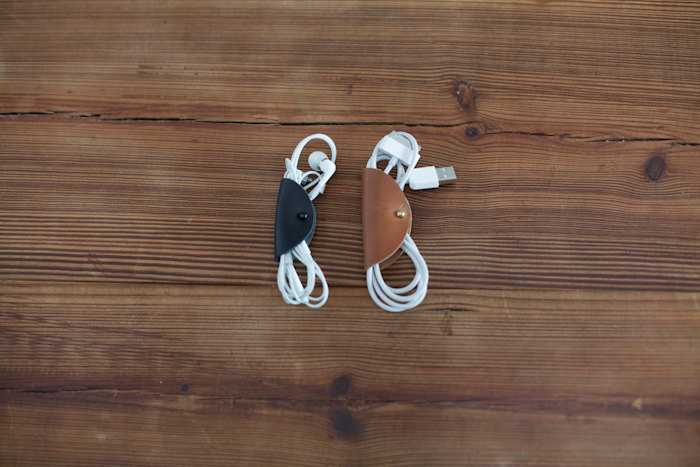
Every now and again, someone comes up with an idea which is deliciously simple yet rather useful. Meet Cord Tacos: a folded piece of leather with a rivet through it.
Yep, that’s it. The rivet acts as a kind of button, so you can unfold the leather, insert your cable and then clip it in place. No more cables getting tangled at the bottom of your bag, and much more elegant than the rubber bands we OCD types use to keep things tidy.
The review bit: they work. The cables are held securely, and the rivets don’t come undone.
My only complaint is that the standard 5-pack comprises two large (suitable for USB leads and the like) and three small. The small ones are really only useful for earphones, and who carries more than one set around? Which gets you three usable Tacos for $30 with shipping. A little steep, but a lot prettier than an elastic band. Available on Etsy.

Welcome to 9to5Mac’s Smackdown series, where we compare the top hardware and software accessories for your Apple products.
App.net (or “ADN,” as many users have come to call it) was launched last year as an alternative to other microblogging platforms that had become more hostile to developers in recent months. The idea wasn’t so much about ripping off Twitter as it was about giving developers a friendly place to build cool apps and services. Rather than being funded by venture capitalists or advertisments, ADN was funded solely by the people using the platform. Users and app developers paid a yearly fee to get into the network or build on its API.
In the time since it was opened to the public, ADN has lowered their annual fee, introduced feature-limited, invitation-only free accounts, a cloud storage service, and more. Thanks to the developer-friendly atmosphere, many amazing iPhone clients have been released. In today’s smackdown, we’re going to put three of the most popular, fully-featured apps head-to-head to determine which one is the best.
If you want to give these apps a try, you’ll need either a free or paid ADN account. The free accounts are only available by invitation, but lucky for you we happen to have 400 invitations to hand out. Want to claim one? Just click this link and sign up. Once you get there, be sure to follow us.
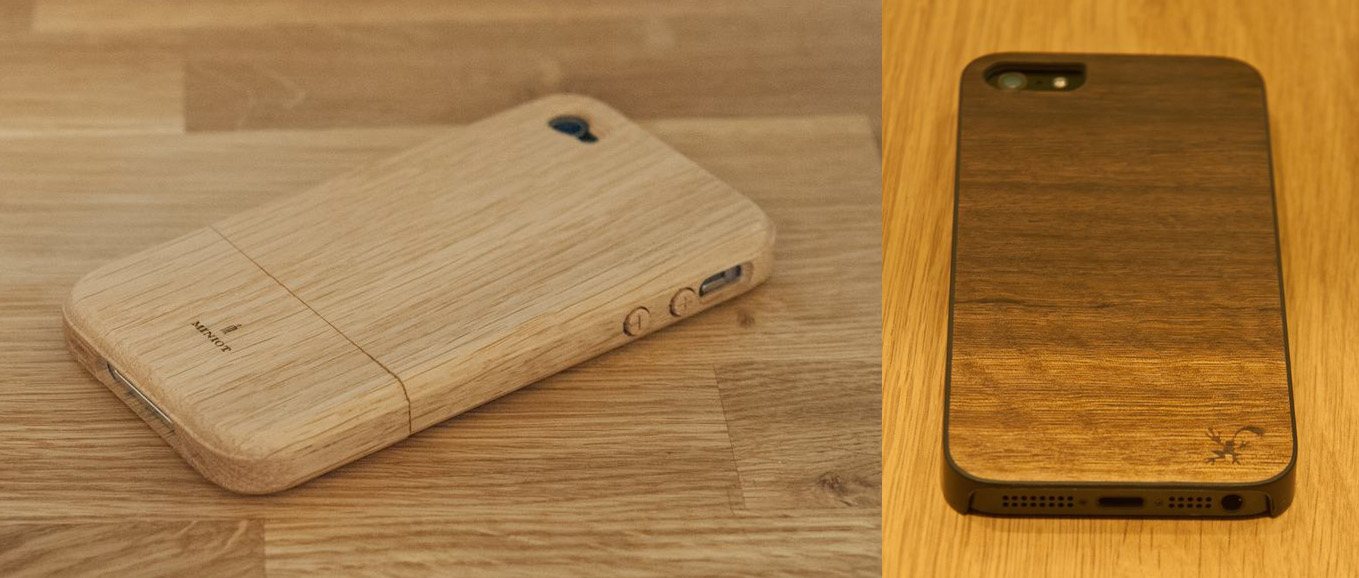
I’ve never been greatly enamoured of the concept of phone cases. You pay all that money for a beautiful design that Jony Ive and his team sweated over for months, then hide it in some butt-ugly plastic case.
I’ve always just used a matte screen-protector (as much to remove reflections as protect the screen from damage) and a Zagg stick-on leather cover for the rear, leaving the phone reasonably well-protected from scratches but without making it look like something bought from Toys-R-Us.
But I was intrigued when I saw that a couple of companies had brought out iPhone cases made from real wood. I love wood as a material, so decided to give the cases a try. On test here are the Zagg ifrogz Natural Wood Case for iPhone 5 and the Miniot iWood for iPhone 3/4/5 …
Expand
Expanding
Close
Readdle has finally brought their popular Documents iPad app to the iPhone and iPod touch with the latest update. The iPhone version has all of the features you would expect in a file management app and a few extras.
The main file manager window displays all of your files in a grid or list sorted by name, date, or size. You can create folders, zip and unzip archives, and view a variety of file types from this view. PDFs, plaintext files, audio, pictures, and more can be added to your collection. The audio player works when the app is in the background so you can continue listening to your music.
Your most recently used files will accumulate in a special folder automatically so you can find them again easily. A search feature on the main page allows you to search any file by name, but you can also enable an indexing feature lets the app search the contents of your documents as well.

The team over at Panic Inc. have been teasing their new iPad app on their blog and Twitter all week, and today the app known as Status Board hits the App Store.
The Oregon-based software company is largely known for their OS X FTP client Transmit, but entered the iOS space in April 2011 with the launch of Prompt, their SSH client for iPhone and iPad, followed by their affectionately named web editor Diet Coda this past May. This marks the third year in a row that Panic has released an entirely new app on the iOS platform.
Let’s jump right on board:
Expand Expanding Close
Updated for 2015! The Best Bluetooth Speakers review has now moved here!
TL;DR: Overall winner (updated), Best Value, Best sound, Best Portable/Sound, Charger too, Apps/Updates, more
Spring is finally here and it is time to bring our music and speakerphones outside. There’s no better way to enjoy sound outside than with a portable bluetooth speaker. But as Jordan noted to me during our CES coverage, there must be 100,000 Bluetooth speakers to choose from including a growing horde of no name brands OEM’ed from fly-by-night Chinese companies.
We’re here to help you pick the right speaker with the right features on the right budget. (Update: We’ve since reviewed the JBL Charge and Bose Soundlink Mini, both of which merit attention.)
Expand
Expanding
Close

We’ve reviewed and enjoyed a number of TwelveSouth products over the years. We were intrigued by the hollowed out book idea with the company’s original BookBook case for the MacBook Air and since it has brought out similar hand distressed leather BookBook cases for other Apple devices, like the iPhone and iPad mini. While maybe not the ideal option for Apple’s anti-skeuomorphic cheerleaders, I found the stark contrast to Apple’s sometimes cold industrial design a nice juxtaposition.
I tend to not use any skins, covers or cases when using my MacBook on a day to day basis. I slide my MacBook into a laptop pouch built-into my backpack or use a standard laptop case when on the go, and rarely do I actually leave the MacBook in the case when in use. A case was necessary for protection when traveling, but for me the average soft or hard plastic laptop case never quite does the pricey, Jony Ive designed Apple hardware inside justice. BookBook is different…
Expand
Expanding
Close
iPad keyboards helped kickstart the move from content consumption on an iPad to creation. First there was the iPad dock which you could use in conjunction with a Bluetooth keyboard to get some serious writing done. But docks aren’t very portable.
Next came keyboard attachments – two of my favorites are from Logitech and Zagg – but they don’t offer much protection if you drop your iPad (in fact you may notice a slight crack at the top right of my screen there *ahem).
This week, both Belkin (Ultimate Keyboard Case. $99) and Logitech (Keyboard Folio $99) began selling keyboard cases that actually offer up some protection from falls.
I had a chance to put the two up against each other to find out which was the best and found out that it just isn’t that simple…
Expand
Expanding
Close
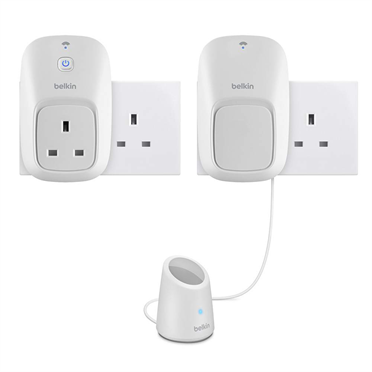
Anyone who grew up reading Sci-Fi will know that by now we’re all supposed to be driving hover-cars and living in fully-automated homes, with Star Trek-style swishy doors and cookers we can talk to.
Home automation hasn’t really happened, unless you are either very wealthy, very geeky or both. What Belkin has set out to do with its Wemo products is provide at least a touch of home automation for the rest of us: something affordable, and easy to use …
Expand
Expanding
Close
As someone with years of experience of pushing the battery-life of laptops to the limit, the iPad was something of a revelation. If we ignore the time I stupidly left the Smartcover auto on/off engaged while it was in a bicycle pannier on a London to Paris cycle ride, I’ve literally never run out of power.
However, since I was reviewing the Digital Treasures Powerflask, I thought I would look at the company’s Props Power Case at the same time. The concept is a simple one: a protective case with a built-in battery. Plug your iPad into the case, and the case provides the power…