Mac App Store

See All Stories

Apps & updates: Things 2.0, Foursquare, Pixelmator, Pomodorable, PDF Expert, more


Site default logo image

[slideshow]

On top of a few great game deals, including savings on Shift 2 Unleashed for iPad and the Mass Effect Infiltrator iOS app, there are  a number of noteworthy apps and updates hitting the App Store today. We will update the list, as always, throughout the day.

Things 2.0: One of the leading iOS and Mac productivity apps was updated today to version 2.0 with a ton of new features. Included in the update is “Things Cloud”. It is a cloud service that syncs your to-dos across Macs and the iOS client. A new Daily Review feature makes important to-dos appear when you need them, and a “revolutionary scrolling Date Picker makes selecting dates more natural than ever.” The UI has also been updated along with a new engine that provides “blazingly fast Things Cloud performance.” These and other new features and improvements are included in the Things for iPad app.

Things 2.0 (Mac App Store): In addition to free updates to the iOS versions of Things, the Mac App Store client was updated today to version 2.0. The update includes the “Things Cloud” service mentioned above, allowing you to sync across platforms, while other new features include a “Daily Review” that presents important to-dos for the day, full Mountain Lion support, Retina graphics, full-screen mode, a number of other enhancements.

Pixelmator version 2.1: Popular image editor Pixelmator was updated on the Mac App Store today with a much needed Retina-ready UI and image-editing engine, iCloud support to keep projects up to date on multiple machines, as well as a new effects browser containing “new Vintage, Miniaturize, Black and White, Rain, and Snow effects.” Also included in the update is full OS X Mountain Lion support and alignment guides to “quickly position, align, and evenly distribute objects in your Pixelmator compositions with pinpoint accuracy.”

Tweetdeck version 1.5.3: Today’s massive update to the popular Mac Twitter client brings a slew of user-interface enhancements such as the ability to use the Columns button to quickly jump to any position. Users can also navigate the arrow buttons to scroll left and right several columns at a time, use swipe gestures on the trackpad to scroll, access key user and Tweet actions from the new actions menu, and fit more columns on screen by enabling Narrow Columns in Settings. The update also boasts improved animations for tweets and column management, performance improvements, and many bug fixes.

Pomodorable version 1.0: Released on the Mac App Store today, Pomodorable is a task management app that its developers said takes a “fresh approach to managing to do lists” by taking full advantage of Notification Center, Notes, Reminders, and other Mountain Lion features. While at first glance it might appear to compete with Things, the app actually includes support for Things and OmniFocus. It allows you to view tasks from those apps within the Pomodorable, and the app is 50 percent off for a limited time following today’s launch.

PDF Expert version 4.2: Readdle’s PDF Expert app was updated recently with a new “Presentation Mode” that allows you to connect an iPad to a projector ” and make interactive non-linear presentations” with content from PDFs, videos, and images. The update also includes live annotation tools, new annotation colours, and a number of other improvements.

Expand
Expanding
Close

Apple brings PowerNap to Retina MacBook Pro with firmware update

Site default logo image

Just like it did earlier this week for the 2011 and 2012 MacBook Airs, Apple, today, has released a new firmware update for the 15-inch MacBook Pro with Retina display to enable the PowerNap feature. PowerNap allows your Mac to update iCloud files, emails, software updates and more while in sleep mode. Users can get the update via the Mac App Store software update section.

After updating users will see the following option in System Preferences:

Full PowerNap info below:
Expand
Expanding
Close

Site default logo image

Over half of you already updated to Mountain Lion!?


(so far today)

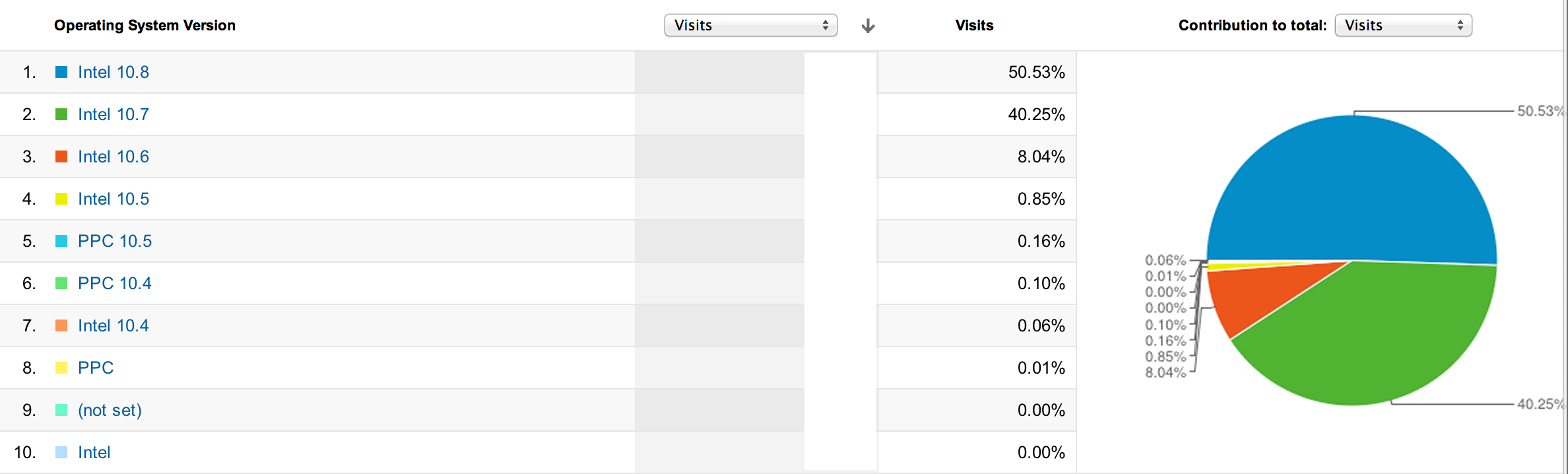
Just 24 hours after Apple released Mountain Lion, over half of our readers are already on the slightly smaller, big cat. That is an impressive feat for a desktop OS, and it is one made easier by the Mac App Store. We had a bit of a head start with 10 percent grabbing the developer download over the past weeks, and obviously the general Mac populations is probably a bit behind.

Still, nice work, especially considering a lot of you are still waiting for correct Up-to-Date codes.

[tweet https://twitter.com/jameswoodcock/status/228555039864651776]

[tweet https://twitter.com/tonezorz/status/228555638102441985]

[tweet https://twitter.com/chrisoteri/status/228556464342585345]

[tweet https://twitter.com/evet965/status/228556992682262529]

[tweet https://twitter.com/enzoamata/status/228558950398840832]

[tweet https://twitter.com/andrew12222/status/228562583425277953]

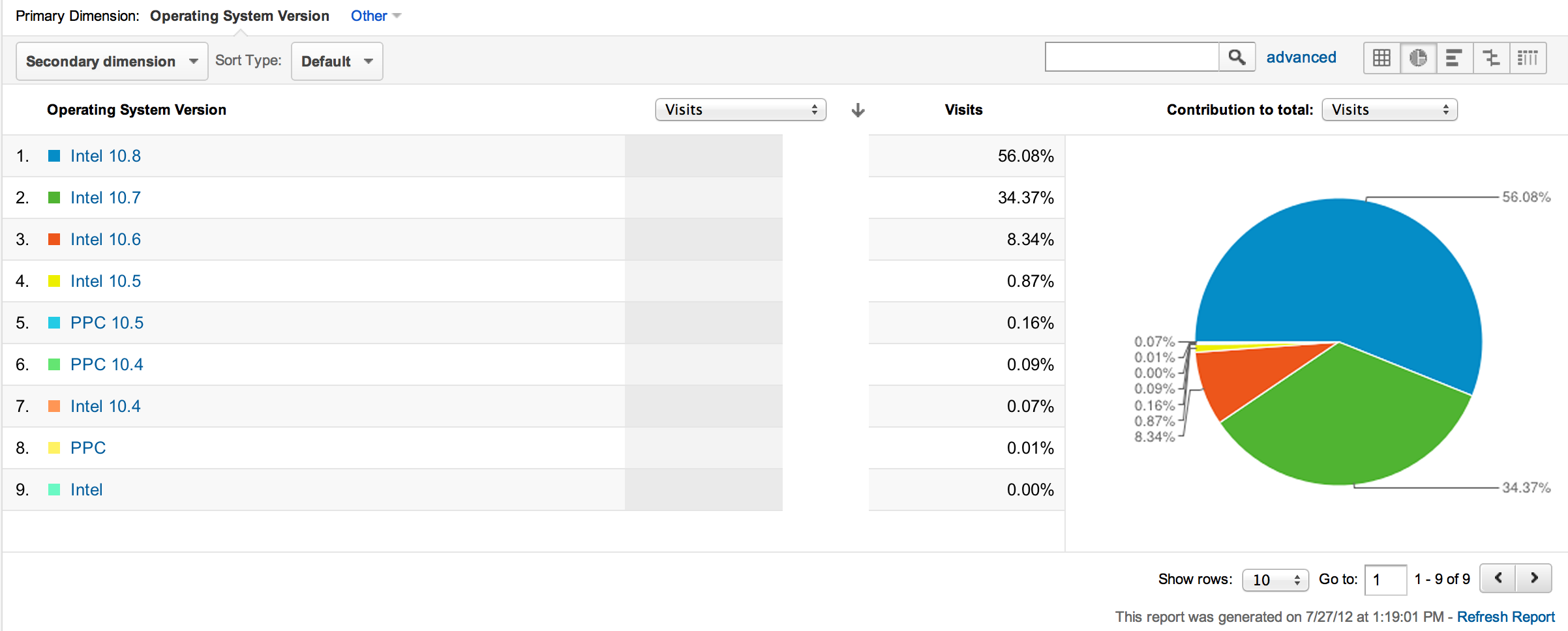
Update: July 27th. Now 56% of you Mac Users are now on Mountain Lion:


Expand
Expanding
Close

OS X Game Center launches with few, yet notable, game titles

Site default logo image

One of the big new features in OS X Mountain Lion is the Game Center. This Game Center is cross platform between OS X and iOS. Unfortunately, only a few compatible titles have made their way into Mac App Store for today’s launch. However, some of them are very notable. Some of our favorites include Real Racing 2, Sky Gamblers, and Cut the Rope.

Oh, and don’t forget about… Chess!


Expand
Expanding
Close

Want to make a Mountain Lion USB stick or SD Card Installer? Here’s how

Site default logo image

Apple will not offer a USB or Optical Disk external installer to Mountain Lion (as far as we have heard). That does not mean you cannot sneaker net the install around your home, office or lab like Apple Store employees do (sometimes). Lion Diskmaker has been updated to allow you to make a bootable USB or SD Card installer on a 8GB piece of media.

The process is straightforward:


Expand
Expanding
Close

Site default logo image

Apple releases OS X Mountain Lion Server for $19.99 on Mac App Store

Following this morning’s launch of 10.8 Mountain Lion on the Mac App Store, Apple just launched a separate app as an OS X Server for Mountain Lion. It allows users to add sever functionality to the OS for $20. It is definitely a significant price drop from the $49 Lion server and the $500 or so it cost to add the functionality before that.

OS X Server is the next generation of Apple’s award winning server software. Designed for OS X and iOS devices, OS X Server makes it easy to share files, schedule meetings, synchronize contacts, host your own website, publish wikis, configure Macs, iPhones and iPads, remotely access your network, and more.

Server is now an application you can add to Mountain Lion right from the Mac App Store. Anyone can quickly and easily turn a Mac running Mountain Lion into a server that’s perfect for home offices, businesses, schools, and hobbyists alike.

Mountain Lion is live at the Mac App Store for $19.99

As Apple previously announced during its Q3 2012 earnings call yesterday, Mountain Lion is officially available for download in the Mac App Store for $19.99. The download is exclusive to the Mac App Store this year, as we mentioned before, because Apple will not sell the OS via USB sticks or optical discs. The $20 price tag is a $10 drop from Lion, however, and the single purchase will is good for up to five macs via the Mac App Stores purchased apps feature.

[youtube http://www.youtube.com/watch?v=hnJrkai6Eek]

Unfortunately, for those planning to try Mountain Lion in an Apple retail store before upgrading, we reported last night that some Apple Stores had issues getting the OS on in-store demo Macs. There are also many users reporting error messages when trying to download from Apple’s servers. Before you make the switch to 10.8, you might want to check out the list of compatible Mountain Lion apps to make sure you will not run into any problems.

Apple’s full press release is below:


Expand
Expanding
Close

RoaringApps tells you what apps are compatible with OS X Mountain Lion, just in time for tomorrow’s launch

Site default logo image

Tomorrow, after much excitement, Apple will officially launch OS X 10.8 Mountain Lion for $19.99 to the public on the App Store. A new operating system certainly brings a ton of new features. However, there is always the lingering possibility that your favorite app may not be compatible. Just before the launch of Lion last year, we told you about a website called RoaringApps. As Mountain Lion is unleashed from its cage tomorrow, here is a little reminder on exactly why RoaringApps is so useful.

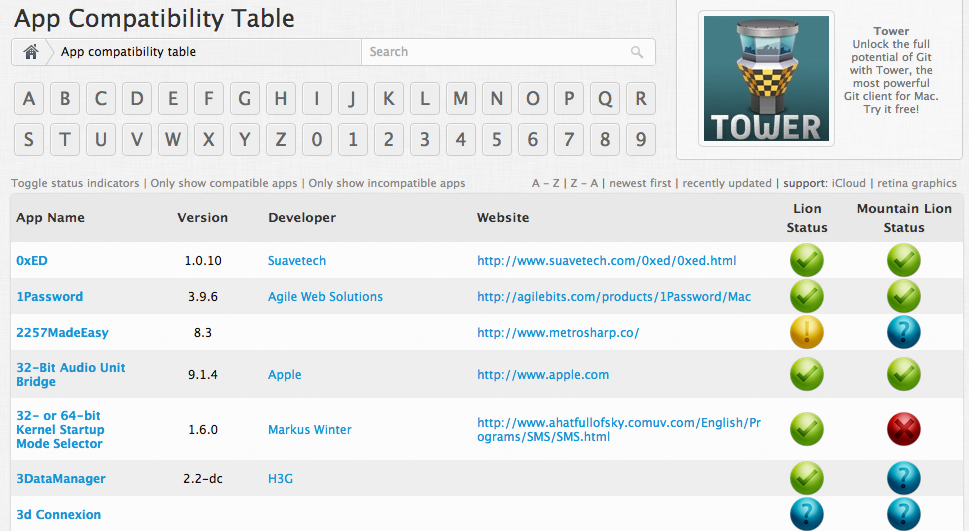
RoaringApps is a free website that allows you to check the compatibility of your apps with Mountain Lion. The website provides a long table of apps (it is a ton) that displays what apps are supported on the new OS X and whether the app is available on the App Store. If you are planning to upgrade to Mountain Lion tomorrow, this is definitely a website worth checking. The website organizes apps by name, and it has a search function to make things easy. [RoaringApps]

On a related note, how many of you plan to purchase Mountain Lion tomorrow? Is anyone holding off?


Expand
Expanding
Close

Reminder: Mountain Lion will be free for 30 days for new Mac owners

Site default logo image

Update 2: After a brief time online, Apple appears to have taken down the form to request a copy of Mountain Lion. You’ll still be able to request a copy at Apple’s original link following Mountain Lion’s official release.

Update: As noted by MacRumors, Apple’s form to request a free copy of Mountain Lion for new Mac owners is already live on the company’s website. After entering details about your purchase, personal details, and the serial numbers of your new Mac, Apple sends two emails —one with a password protected redemption code and another containing the password— to open it. The redemption code is not yet working in the Mac App Store.

Apple previously confirmed, when it unveiled the new Retina MacBook Pros and refreshed Mac lineups, that Mountain Lion would be available for free to those who purchased a Mac after June 11 through the Up-to-Date program. Since then, Apple has updated its website to confirm the free copy will be available to new Mac owners for 30 days from the release date, which will likely be sometime after tomorrow’s Q3 earnings call. Those who purchase a new Mac following Mountain Lion’s release will also have 30 days to claim their copy on Apple’s website.


Expand
Expanding
Close

Site default logo image

Russian hacker is doing Mac apps too

After Apple rolled out temporary fixes, and promised a permanent fix for the in-app purchase hack in iOS 6 earlier today, it looks like the same Russian hacker now offers a similar hack for in-app purchases in the Mac App Store. The Next Web has the full story

Site default logo image

Twitter updates TweetDeck to be more ‘swift’ [Video]

[youtube=http://www.youtube.com/watch?v=NZuGdsjo44k&feature=player_embedded]

Twitter is keeping busy this summer with a slew of updates to its line of products, and now the microblogging service is tidying up TweetDeck.

The desktop application updated today with a new layout for “swifter navigation,” featuring refreshed columns, expanded actions for tweets, and even a revamped Twitter bird icon.

TweetDeck explained:

  • Today you can more easily discover and react to the information you care about with new navigation features in TweetDeck. You have given us some really useful feedback after using these features on web.tweetdeck.com, and now you can use this swifter TweetDeck on other platforms too.
  • This swifter version of TweetDeck is available now at tweetdeck.com, where you can download TweetDeck for Windows, access the Chrome app or sign in to web.tweetdeck.com. The updated TweetDeck for Mac will be available in the Mac App Store shortly.

Go to the TweetDeck Posterous page for a full breakdown on the latest version, or just check out the video above.

TweetDeck is free at the Mac App Store.


Expand
Expanding
Close

Apple Store overnights happening July 24. Mountain Lion launch the next day?

Site default logo image

We’ve heard a few whispers (3 and counting) that Apple Stores both in the United States and overseas have planned overnights for Tuesday, July 24th. With OS X Mountain Lion launching “in July”, according to Apple, we believe that it is sensible to speculate that this overnight may point to a public launch the following day.

This purported launch would be July 25th, a date that we speculated when Apple announced that its Q3 2012 earnings would be announced on the 24th. For OS X Lion’s launch last year, Apple announced the July 20th release at its July 19th Q3 2011 earnings announcement. It appears that Apple may follow that same pattern this year.

This year, Mountain Lion isn’t being launched alongside hardware (last year new Minis and Airs launched with Lion) so there is less setup required and accordingly, we’re hearing that the overnights will be smaller.  One employee tells us that it is basically just a few guys running around with the master image installing it on every Mac.  Notably, some stores we’ve spoken to haven’t heard of any overnight…yet.

On the other hand, Apple often holds Tuesday overnights, so this July 24th overnight may simply be a coincidence, and Apple may not launch OS X Mountain Lion on the 25th. But, there is already under two weeks left in July, and with last year’s launch pattern prime for repetition (launch announcement during the upcoming earnings call), we’d say a July 25th launch is increasingly likely.

OS X 10.8 Mountain Lion will be a $19.99 upgrade which will hit the Mac App Store on launch day.  Developers already have what is likely the Golden Master – build number is 12A269, a 4.34 GB Mac App Store download.


Expand
Expanding
Close

Quick Review: Tweetbot for Mac finally arrives in public alpha, download now!

We reported late last month that Tweetbot for Mac, a desktop version of the popular third-party iOS Twitter client, would likely come soon after the company’s graphic designer, Mark Jardine, tweeted an image of the client running on a MacBook. Today, Tweetbot developers decided to make things official with the release of a public alpha, and we recently got a chance to play around with it. (Blog post here.)

The Tweetbot alpha, which at this point runs on 10.7+ and 10.8 Mountain Lion, has a lot going for it despite warnings of “Bugs! Lots of them.” According to Tapbots, the main goal of the alpha was to replicate the core functionality of the iOS client. Like tapping a tweet in the iPad app, hovering over a tweet in the Mac client provides you with the same Reply, Retweet, Favorite, Share, and Actions button to get access to details, conversations, retweets, and etc.

In addition, like the iPad app, you will find a button to quickly switch lists in the upper right, while a Lists button on the left sidebar will let you manage and edit your lists within the app. The app also bakes in the familiar “Mute Filters” for your main timeline. However, only the ability to mute “Clients” appears to be an option now—with the option for muting keywords greyed out. You will also get Twitter, bit.ly, CloudApp, and Droplr URL shortening options, and all the same image and video-uploading options as on iOS, including: CloudApp, Droplr, img.ly, Lockerz, Mobypicture, Pikchur, Posterous, Twitgoo, TwitPic/TwitVid, and yfrog. Syncing options only feature Tweet Marker currently (iCloud coming soon), while all the Read Later services are present such as bitly, Instapaper, Pinboard, Pocket, and Readability.

We have had a lot to say about the Twitter experience on the new Retina MacBook Pros. The official Twitter for Mac app is unfortunately not Retina-ready and almost unusable on the new Retina displays. Fortunately, we have a Retina update to Twitterific to tie us over, but the Alpha Tweetbot release today is also built for the new Retina display. We have no complaints. It looks great, but Tapbots said further improvements are coming…


Expand
Expanding
Close

Apple has fixed the corrupted DRM App issue according to a statement

Site default logo image

Apple just released the following statement on the App corruption issue we reported earlier today:

“We had a temporary issue that began yesterday with a server that generated DRM code for some apps being downloaded. It affected only a small number of users.

“The issue has been rectified and we don’t expect it to occur again,” Apple said. Those who have an affected app can re-download it from the App Store.

The “small number of users” seems to run counter to what Instapaper developer Marco Arment found as he publicized his issues with Apple (along with Good Reader) today.

Apple: This is a serious problem. It’s not isolated. Please fix this.

Sources told Macworld that Apple will be removing one-star app reviews developers earned unfairly because of the company’s server issue.

Site default logo image

Good Deals: Pixelmator is $15 today, $49.99 Parallels (11 Mac app) bundle ends in a few hours

From 9to5toys.com  (Twitter, Feed) today:

2011 Apple Design award winning image editor Pixelmator is only $15 today at the Mac App Store.  That’s half off and the lowest price we’ve ever seen.

Also, if you are going to put Parallels on your new Mac, MacUpdate has a pretty incredible 11 app bundle for $49.99 (Details). You only have a few hours to hit this one before it expires.

Site default logo image

Apple updates Final Cut Pro, Aperture, and iPhoto with enhancements for Retina MacBooks

Click image for Retina display resolution

Several of Apple’s popular Mac apps received updates today after the opening keynote at the Worldwide Developers Conference. Many of the updates help apps take full advantage of the new 15-inch Retina MacBook Pro’s display. The details for Final Cut Pro, Aperture, and iPhoto are below.

Final Cut Pro: Final Cut Pro received a small update today that included enhancements for the MacBook Pro’s Retina display and improvements to overall stability. Version 10.0.5 of Final Cut Pro is available from the Mac App Store now.

iPhoto: Version 9.3 of iPhoto was released on the Mac App Store today with a number of new features and improvements, including: iPhoto libraries are now accessible in Aperture 3.3, support for AVCHD video, and new Export options that auto-organize images into event subfolders.

Aperture: The biggest update of all apps today is version 3.3 of Aperture. Other than being “fully optimized for the Retina display on the new MacBook Pro,” the update includes the following new features and fixes:

What’s New in Version 3.3

• New unified photo library for both iPhoto (v 9.3 or later) and Aperture; no import/export required; Faces, Places, slideshows, albums and web sharing work across both applications
•Support for AVCHD video has been added
• Aperture now lets you use camera-generated previews for faster browsing of RAW files immediately after import
• Highlights & Shadows tool has been updated to deliver higher-quality results and work with extended range data
• A new Auto Enhance button has been added to the Adjustments panel
• White Balance tool now includes Skin Tone and Natural Gray modes to simplify color balance
• Auto button has been added to the White Balance tool for one-click color balancing
• Set Desktop command has been added to Share menu so you can set a desktop background from within Aperture
• A new Manual option allows you to drag and drop projects to customize sort order in the Projects view
• New preference allows you to set the background brightness of the full screen browser
• Facebook, Flickr, and MobileMe albums are now displayed as thumbnails in the main window when accounts are selected in the source list
• Minor terminology changes, including “Original” instead of “Master” and “Info” instead of “Metadata”
• Source list includes a new “Recent” section, showing Last Import and recently-viewed projects
•Raw Fine Tuning is no longer displayed in the Adjustments panel by default
• Faces can now be named by dragging them from the Unnamed Faces browser to existing snapshots on the corkboard
• The Faces corkboard now includes a menu that allows you to set the order of face snapshots
• Newly designed monochrome source list and toolbar icons
• Addresses numerous issues related to overall performance and stability

Site default logo image

Apps & updates: Adobe Photoshop Express, Growl, SketchBook Express, Angry Birds Space, and more

Below is our usual list of newly released apps and updates that landed in the App Store today. Some of the more notable apps on the list include updates to iOS apps Adobe Photoshop Express, and SketchBook Express, and Mac App Store apps Growl and Angry Birds Space. We will keep the list updated as more apps and updates are released throughout the day.

Adobe Photoshop Express Version 2.5: The free universal iPhone and iPad app was updated to include the Adobe Effects Pack of “45- eye-catching effects” and the Enhanced Adobe Border Pack with 18 new borders as in-app purchases. The update also includes improvements to borders, effects, and editing, as well as Tumblr and Twitter sharing options, improvements to Facebook and Flickr sharing, and support for the iPad’s Retina display.

SketchBook Express Version 2.5: The free version of Autodesk’s SketchBook Pro app was updated today with a few new features including palm rest, a random color option in Color Editor, and other enhancements and bug fixes.

Voice Answer Version 1.3: We told you about the Voice Answer app before when Apple rejected it for being too much like Siri. Today, Apple has finally allowed an update to the app that turns the app’s AI— named Eve—into a “a fully animated 3D robot.” The update also includes voice messaging, email, and calling, and it now supports 54 languages for translations.

Growl Version 1.4:  Popular Mac notification app Growl received an update on the Mac App Store today with dozens of enhancements and tweaks to the service. The app’s release notes mentioned: “Major improvements to networking,” “Applications Tab Redesign,” and a long list of other improvements.

Angry Birds Space Version 1.2.0: The same as the iOS apps the other day, the Mac App Store version of Angry Birds Space now includes the “delicious food planet of Utopia,” which features 10 new levels for the title that recently reached 100 million downloads.

Retina Mac apps begin appearing in App Store ahead of Apple’s WWDC unveiling

Site default logo image

As noted by The Next Web, at least one developer has updated its Mac App Store app to include high-resolution “Retina graphics” for the new lineup of Retina display Macs that we revealed last month (here and here).

The Mac App Store app is Folderwatch. It was updated today with several new features, one of which is “Retina graphics.” We are not ready to speculate that the developers know something we do not, but Apple obviously allowed the update. It is likely we will begin to see Mac Apps updated with high-resolution artwork leading up to Apple’s introduction of Retina Macs at the Worldwide Developers Conference next week.

Some have pointed to the unusually high number of to-be-announced sessions on the WWDC schedule as proof of the introduction of a new app platform, but we noted that many of these sessions could relate to Retina Mac apps.


Expand
Expanding
Close

Site default logo image

Nuance releases Dragon Express Mac app in 7 additional countries, 3 new languages

Nuance announced it is releasing the Dragon Express Mac App Store app today to seven new countries in three new languages. Originally released last year, the app is now available in the following countries for around $50:

Dragon Express 1.1 now supports the French language in Canada, France, Belgium, Luxembourg and Switzerland, the German language in Austria, Germany and Switzerland, and the Italian language in Italy.

AustriaBelgiumFranceGermanyItalyLuxembourgSwitzerland (French)Switzerland (German)

According to iPhonehellas [translated], Nuance also held a press event today in Greece to announce the availability of Dragon Dictation for June 6.

The full press release from Nuance is below:

Nuance’s Dragon Express for Mac OS App Store Now Available in French, German and Italian Languages

BURLINGTON, Mass., – May 31, 2012 – Nuance Communications, Inc., (NASDAQ: NUAN) today announced that its Dragon Express App, an introductory voice recognition app for Mac OS X Lion, has debuted in seven additional countries, supporting three additional languages. Dragon Express 1.1 now supports the French language in Canada, France, Belgium, Luxembourg and Switzerland, the German language in Austria, Germany and Switzerland, and the Italian language in Italy. Available exclusively for download from Apple’s Mac App Store, Dragon Express is an easy and fun way to put words to work without the hassle of typing, allowing users to do more in less time.

Released in late 2011, Dragon Express quickly rose to the top of the charts in the Mac App Store. It’s a fast, hands-free way to quickly turn speech into text, whether sending email, surfing the Web or posting an update to Facebook and Twitter. Dragon Express is priced to provide people with an opportunity to experience the power and performance of speech recognition.

“The excitement for Dragon Express has been overwhelming, and we’ve heard our customers’ requests for additional language support,” said Peter Mahoney, chief marketing officer, senior vice president and general manager, Dragon, Nuance Communications. “We know that people around the world are embracing speech as a useful and fun interface, and we’re excited to bring the Dragon Express app to a broader worldwide audience.”

Dragon Express can be conveniently accessed from the menu bar at any time and doesn’t require a network connection. Users dictate directly into the Dragon Express window, using the internal Mac microphone or a USB headset microphone (which can be purchased via http://www.nuance.com), and the text instantly appears in the Dragon Express window. When finished, Dragon Express places the transcribed text into the application of choice. The download comes with a short enrollment so that the app can better recognize a user’s unique voice.

Dragon Dictate, the most full-featured and advanced speech recognition software for Mac OS, was recently updated to version 2.5. Dragon Dictate 2.5 includes many features beyond those in Dragon Express. These features include the ability to dictate directly into applications, edit, format and correct recognition errors by voice, open and close applications by voice, control the mouse by voice, create custom voice commands and support for the Dragon Remote Mic app for iPhone.

Apple to reject Mac App Store apps using hotkeys starting June 1? (update: no?)

Site default logo image

Update: Macworld and The Verge report that Apple will actually not begin rejecting apps that utilize hotkeys. 

According to a report from TUAW, Apple will soon begin rejecting OS X apps submitted to the Mac App Store that utilize hotkey functionality. The report does not cite a specific source, and app developers we have talked to seem to be unaware of the change. TUAW claimed Apple will only allow existing “hotkey apps”, and those released before June 1, to issue future bug fixes. New apps and existing apps that are releasing updates with new features will apparently not be permitted to use hotkeys:

TUAW has been told that Apple will be rejecting all apps with hotkey functionality starting June 1, regardless of whether the new features are hotkey related or not. Basically, if you’re developing one of those apps, an app that assumes you can still add hotkeys, don’t bother submitting it to the Mac App Store.

The June 1 deadline lines up with the latest deadline Apple set for sandboxing Mac App Store apps, which is a new requirement that limits an app’s access to certain areas of the operating system. Apple is pushing sandboxing as “a great way to protect systems and users by limiting the resources apps can access and making it more difficult for malicious software to compromise users’ systems.” It appears it will also prevent apps from using hotkeys.


Expand
Expanding
Close

Apple readies revamped 15-inch MacBook Pro: Retina Display, ultra-thin design, and super-fast USB 3

Site default logo image

Mockup: New, thinner MacBook Pro on the left. Current model on the right. 

Apple is putting the finishing touches on an entirely new 15-inch MacBook Pro that is the outcome of years of research and development in ultra-thin mobile computing and super-high-resolution displays. According to trusted sources in Apple’s supply chain, who have handled prototype components and casings for the new Apple notebook, the computer is currently undergoing test production rounds. The new 15-inch MacBook Pro is coming this summer, and it features an ultra-thin design, a “jaw-dropping” Retina Display, and super-fast USB 3.

Read on for all of the details
Expand
Expanding
Close

Site default logo image

Apps: Quake 4, Plants vs Zombies, Plex, Sketch Nation Studio…

A number of notable apps received updates today in addition to Aspyr Media announcing the release of “Quake 4” for Mac as a digital download through the Mac App Store for $20. Another new release today is “Sketch Nation Studio” from Engineous Games, which is “an amazing free app where users create and play their own games or download games from other users.” You can even potentially sell your games through the App Store and make money.

Below is a list of some of our favorite apps that received updates today:

Plex: The Plex media server iOS companion app received tons of fixes today and localizations for dozens of countries.

NEW: Allowed selecting an additional video quality for cellular connections in addition to the required 64Kbps stream (requires Plex Media Server 0.9.6.1 or later).

VLC Remote for iPad: While a full re-design of the app is on the way to match the design of the iPhone counterpart, version 5.80 of VLC remote for iPad is available now with Retina graphics for the new third-genration iPad.

Dragon Dictation: Localization updates in version 2.0.20

Plants vs Zombies: All of the Plants vs Zombies iOS apps received huge updates today to version 1.9.2. The biggest is for the HD iPad version. Here’s what you will get:

New fun-dead action on iPad! Zen Garden, Vasebreaker, new mini-games and much more to munch on:

-ZEN GARDEN: Relax and start a plant collection in your Zen Garden. Find new plants in the game, or get Marigolds and Mystery Sprouts from Crazy Dave. Treat your plants well, and they’ll reward you nicely.

-VASEBREAKER ENDLESS: It’s not just a mini-game anymore! Try to survive all 9 unique levels as you battle zombies hiding in vases. It’s smashing fun!

-I, ZOMBIE ENDLESS: Change sides for a while and give your fun-dead friends a hand through this 9-level game mode. Help zombies get past the plants to their brainy rewards.

-FOUR NEW MINI-GAMES: Try your hand at Slot Machine, Zombiquarium, Portal Combat, and Beghouled Twist — a fun new set of mini-game challenges!

More awesome fun:

-28 NEW ACHIEVEMENTS: Earn even more ways to prove your zombie-zapping prowess.

-LEADERBOARDS: Check out the 5 unique Game Center leaderboards and see where you rank.

-COIN PACKS: Want great new stuff? Check out the brand-new coin packs for purchase on the Main Menu.

And now, the zombies are speaking your language! We’ve added language support for French, Italian, German and Spanish!

Site default logo image

Apple releases version 1.0.1 of Configurator Mac app

Apple released an updated version of its “Apple Configurator” Mac app for deploying multiple iOS devices in a school or business environment. Version 1.0.1 of the tool includes a number of stability and performance enhancements. It also includes fixes for .ipa files, redemption codes, and bookmarks for iTunes U and iBooks, and more.

You can grab the free updated Configurator app from the Mac App Store now. The full list of changes is below:

What’s New in Version 1.0.1

This update improves overall stability and performance and addresses a number of issues, including the following:

  • Enterprise apps packaged as .ipa files are imported and installed correctly.
  • Redemption codes for apps that contain a comma in their title can now be imported.
  • A redemption code may be reused to install an app on another device if the original device is unsupervised and erased by Apple Configurator, or if the app’s installation did not complete on the original device.
  • The redemption code used to purchase an app in iTunes may also be used to install the app on one device with Apple Configurator.
  • The number of redemption codes remaining for an app is now displayed correctly.
  • Notes and bookmarks entered into iBooks and iTunes U are deleted when a backup is restored to a supervised device.
  • The WPA2 password is saved when editing a Wi-Fi profile payload.
  • The name of a stored backup is saved when edited.
  • The storage capacity of an 8 GB iPod touch is now displayed correctly.
  • The “Erase all contents and settings” checkbox on the Prepare pane has been relabeled “Erase before installing”.
Site default logo image

NYC Apple Stores will host free events for Tribeca Film Festival

Apple just announced that its retail stores at West 14th Street and SoHo in Manhattan are participating in the 2012 Tribeca Film Festival by showcasing Hollywood’s top artists as guest speakers.

“To celebrate the spirit of independent filmmaking, we’re hosting free events and workshops from April 20 through April 28. And everyone’s invited to attend,” explained Apple on its website and in a circular email.

There is an official “Tribeca Film Festival” app for free at the App Store that details all the workshops taking place.


Expand
Expanding
Close