Spotify provided some updates at the Global Business Summit on Creative Content in London today. TNW reported that Spotify exec Ken Parks announced the service now has 4 million paying subscribers and 15 million active users worldwide. That is up from the 2.5 million paying subscribers that the company officially announced in November 2011, and Spotify previously claimed “more than 10 million active users” with around 3 million paying subscribers as of last month.
As pointed out byiMore, the Facebook iOS app added functionality allowing you to save posts to a new “Saved” folder. Others are not notified when you save posts, and posts must be unsaved to be removed from the folder. The new feature does not require an update from the App Store (it is also rolling out on Facebook.com), but Facebook will notify you in the timeline.
To access your Saved folder, you must first scroll to the bottom of the sidebar menu and tap on Edit Favorites. Next, tap the + sign and select Saved from your list of Apps. Then tap Done. Now, you should see your Saved folder in the Favorites section of your sidebar menu!
Today’s noteworthy apps and updates list kicks off with the recently released iPad version of iTranslate Voice. As always, we will update the list throughout the day as more apps hit the store…
iTranslate Voice HD: iTranslate Voice is a great new iPad app, as it is one of the most unique pieces of word translation software on the market. Instead of typing words into an app, you talk in your language, and then the app will respond in the language of your choice. The entire thing is powered by Nuance—the same company that powers Apple’s Dictation on the iPhone 4S, new iPad, and Mountain Lion computers. So you know it is reliable. We have used the app for a while, and it is super helpful and easy to use. For those who are not a fan of voice, text-based translations are available. Thirty-one languages work in the app in addition to word defining. Sharing is also present. We highly recommend this iPad app. An iPhone version has also been available for some time, and it recently received a big update with new gestures and languages.
It looks like the biggest app update might go to the Google Earth iOS app due to reports that claim the new 3D maps feature Google demoed last month will roll out sometime today. Until then, below is our list of other apps and updates hitting the App Store:
Walking Dead: The Game: While Telltale has been teasing the iOS game for the hit TV series The Walking Dead, today we finally get our hands on the first “A New Day” episode available in the App Store for $4.99. The game requires iPad 2/iPhone 4 or later, and it will release episodes No. 2 through No. 5 via in-app purchases in the near future.
Angry Birds Space version 1.2.2: Both the iPhone and HD iPad versions of Rovio’s Angry Birds Space title were updated today with “the second half of Utopia.” It includes two new characters, 20 new levels, a “never-before-seen space egg,” and a “GIGANTIC” new boss fight.
SafePay version 1.2: Recently released on the App Store, SafePay is getting a lot of attention for its app designed to protect “cardholders and retailers against online payment fraud.” SafePay’s technology allows users to monitor transactions in real-time and verify purchases to protect against fraud—right from their iPhone. The company explained how the technology works:
Update: Apple has now updated its Podcasts app with the expected bug fixes. Release notes below:
What’s New in Version 1.0.1
Podcasts 1.0.1 provides a number of improvements, including:
• Significant improvements to performance and stability
• Podcasts in your library now show the number of unplayed episodes
• Top Stations now show the podcast title if artwork is missing
• Playback speed is now remembered when playing the next episode
• Fix for a problem where the Subscribe button is inactive
• Resolution of an issue where Top Stations artwork may not appear
Podcasts:If you have experienced issues with Apple’s Podcasts iOS app that released last month, as many have, you will be happy to know Apple plans to release an update today that brings a number of fixes to common bugs. According to a report from AllThingsD, “Apple has been hard at work tweaking the app to fix the problems that currently plague it” and the update expected today should “vastly improve it.”
AutoCAD WS version 1.5: Autodesk’s app for viewing, editing, and sharing AutoCAD drawings on iOS devices was updated today with two new “powerful collaboration tools that transform design creation, review, and approval into a social experience.” The two features include: Expand Expanding Close
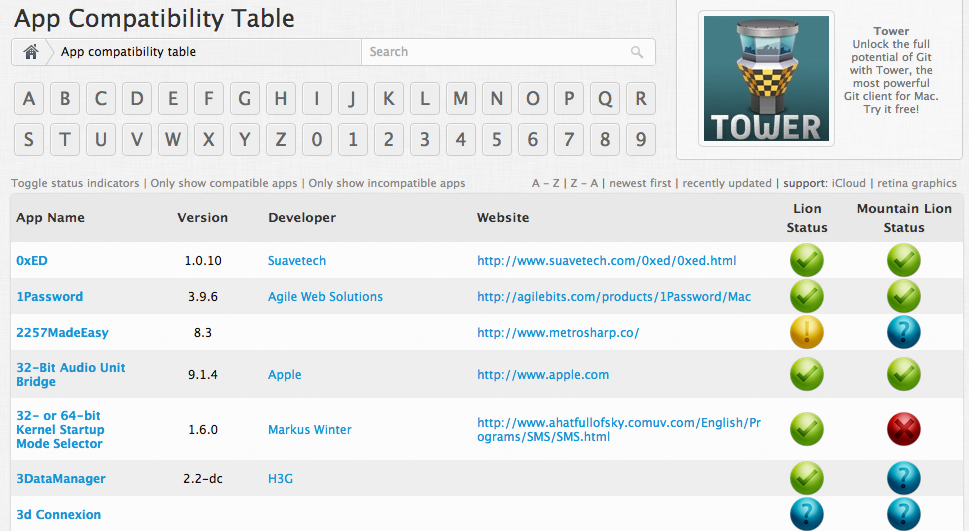
Tomorrow, after much excitement, Apple will officially launch OS X 10.8 Mountain Lion for $19.99 to the public on the App Store. A new operating system certainly brings a ton of new features. However, there is always the lingering possibility that your favorite app may not be compatible. Just before the launch of Lion last year, we told you about a website called RoaringApps. As Mountain Lion is unleashed from its cage tomorrow, here is a little reminder on exactly why RoaringApps is so useful.
RoaringApps is a free website that allows you to check the compatibility of your apps with Mountain Lion. The website provides a long table of apps (it is a ton) that displays what apps are supported on the new OS X and whether the app is available on the App Store. If you are planning to upgrade to Mountain Lion tomorrow, this is definitely a website worth checking. The website organizes apps by name, and it has a search function to make things easy. [RoaringApps]
On a related note, how many of you plan to purchase Mountain Lion tomorrow? Is anyone holding off?
There are more than a few apps and updates today worth mentioning, starting with the latest update for the recently launched Tweetbot for Mac Alpha:
Tweetbot Alpha 3: After rolling out a huge update a couple of days ago for notifications, keyboard shortcuts and other performance enhancements, Tweetbot Alpha 3 is officially available for download/update today. It brings the ability to switch usernames/accounts from within the New Tweet compose window. Clicking a small profile image within the “new tweet” pop-up lets you switch between accounts on the fly. The update also included a hashtag popover fix.
IM+ Pro version 7.0: Perhaps the biggest new feature included in today’s update to one of the most popular iOS IM clients is “Metacontacts,” which is the ability to “merge multiple accounts of one contact into a metacontact” and reduce clutter while increasing efficiency for multiple account users. Another big new feature is iCloud support for syncing IM+ settings across multiple iOS devices, as well as support for additional IM services like Gadu-Gadu and MeinVZ. Unfortunately, version 7.0 will also drop support for iOS 3.x, and it now only works on iOS 4 and up.
Viber version 2.2.0:A huge update today goes to the iOS client for the 90 million-strong Viber service, which allows users worldwide to make free calls and send texts and photos without advertising. Included in the update is a completely refreshed UI that brings group messaging, custom backgrounds for any conversation, profile photos in the Contacts list, and a time stamp for every message. In addition, you will now be able to view recently joined users from the Contacts screen. Viber also promises better sound quality and a new voice engine.
Sky News International for iPad: Released today on the App Store to join the already available for iPhone version, Sky News now has a dedicated iPad app for its international edition with breaking news, top stories, and live streaming of Sky News TV in full screen.
Plesk Manager version 1.2.0:Parallels’ app for monitoring and controlling servers running Parallels Plesk Panel 10.4.4 and Plesk Panel Power Pack was updated today with push notifications, a logs viewer, a new skin, an embedded panel view for iPad, an “improved user experience for VPS owners,” and a troubleshooting section.
Sparrow version 1.3.1:A small update for Sparrow’s iPhone app today includes several bug fixes.
By far the biggest app news today is the announcement that popular Mac and iOS email client Sparrow has been acquired by Google, but below is our usual list of all the notable apps and updates hitting the App Store:
djay for iPad version 1.5.1:djay for iPad received a significant updated today that brings support for Numark’s upcoming iDJ Pro controller for iPad arriving in September. The update also improves “turntable behavior for fast spinning,” slider accuracy, and some bug fixes including one for distortion issues with Split Output.
Turntable.fm version 2.1.1:Turtable.fm’s iPhone app received a small update today that allows users to log in with their turntable account instead of Facebook or Twitter. The update also added more avatars.
Tweetbot for iPad version 2.4.2:A small update for the extremely popular Tweetbot for Twitter client for iPad brings a number of bug fixes.
Netflix version 2.2.1: Another small update today goes to the Netflix iOS app with version 2.2.1 bringing much-needed stability improvements.
Bolt!: The free game, featuring the World’s Fastest Man and Jamaican track star Usain Bolt, was released by Rock Live a couple of days ago, but it is getting a ton of attention for its addictive gameplay. You might notice a few celebs playing this one (as you can see in the tweets above), and Mike Tyson is even accepting challenges. An iPad version is coming soon.
PDF Expert version 4.1:The iPad version of Readdle’s PDF Expert app was updated today to version 4.1 with a number of new features including:
– Faster PDF rendering
– AutoSync for Dropbox and other storages
– Support for Microsoft SkyDrive
– Recording audio notes into PDFs
– Ability to move opened notes
– Network connectivity fixes (FTP, SFTP, Dropbox)
Vyclone:Released as a free iPhone app on the App Store today, Vyclone takes video shots on several iPhones and stitches it together into the perfect video clip with multiple viewing angles. You can also take all the raw footage and make your own cuts.
Tango Video Calls:The Tango Video Calls app received a decent update today, including the ability to send and receive free text messages to Tango contacts, share videos in text conversations, and more.
Call of Duty: Black Ops Zombies: Activision’s Black Ops Zombies app received a huge update today brining the “dark and ice-covered isles of Siberia” as Call of Dead: Director’s Cut content. The updated also includes new V-R11 and Semtex mine weapons, new achievements, and a new perk called “Deadshot Daquiri”.
NBC just unveiled two Adobe-powered mobile apps for its 2012 London Olympics coverage.
The NBC Olympics Live Companion app will act as a second display for stats and other details so users have a full bevy of data to compliment their television-watching experience. Meanwhile, the NBC Olympics Live Extra app will pipe live-streaming video to on-the-go users. It can handle multiple camera angles, social features, and the ability to seamlessly switch between both Olympics apps.
The free apps will launch on both Apple’s App Store for iOS devices and the Google Play Store for Android smartphone and tablets. They will also support “TV Everywhere” authentication with cable providers for unlimited access to all the premium content. Users simply need to login to their pay-TV subscription to tap into 3,500 hours of Olympic events.
“To make it as easy as possible, you only need to go through the sign-in once and won’t have to “re-authenticate” every time you want to watch a live event,” explained Adobe on its Digital Media Blog. “For the first time in Olympics history, mobile apps will give you the opportunity to view live broadcasts of all Olympic events in the palm of your hand.”
NBC Olympics is also using Adobe technologies to serve ads, measure and monetize content, and provide digital analytics in both apps.
IMDb, the unofficial resume for everyone and everything Hollywood, just announced its iOS and Android apps have experienced more than 40 million total downloads. The iOS counterpart claimed half of those downloads, and IMDb is celebrating with today’s launch of “highly anticipated discovery, personalization and social features.”
Version 2.7 now includes:
– Movies & TV shows: check in and share what you are watching to Facebook and Twitter
– Message Boards: access general boards, or dive into discussions about your favorite people, movies, and shows
– Filming Locations & Soundtracks: find even more IMDb data to satisfy your curiosity
– More Like This: discover new movies and shows while you browse
– Watchlist: tap the plus sign on posters to build your Watchlist
– TV shows: easily dive into each season, and tap ‘previous’ and ‘next’ to browse through episodes
– Your History: long-press on the Back button from any page to access pages you’ve recently viewed
– Various bug fixes and performance improvements
The IMDb Movies & TV app is a free app at the App Store. It rates 4 stars, based on more than 112,000 reviews, as of press time.
Parallels announced that its Parallels Desktop 7 for Mac and Parallels Mobile now support Apple’s Retina display.
“We are proud to announce that both Parallels Desktop 7 for Mac and Parallels Mobile have been updated to support Apple’s Retina display and its over 5 million megapixels on the newly released MacBooks and latest iPad,” explained the software firm, which delivers an integrated Windows-on-a-Mac experience, so users can reap the full advantages of Apple’s offering across all their devices.
Parallels Desktop 7 for Mac is able to run multiple operating systems, including Windows 8 Release Preview, Windows 7, Chrome, and Ubuntu, and it will soon provide support for the final versions of Mountain Lion and Windows 8 after their release, while Parallels Mobile allows users to remotely control a computer from an iOS device.
We reported late last month that Tweetbot for Mac, a desktop version of the popular third-party iOS Twitter client, would likely come soon after the company’s graphic designer, Mark Jardine, tweeted an image of the client running on a MacBook. Today, Tweetbot developers decided to make things official with the release of a public alpha, and we recently got a chance to play around with it. (Blog post here.)
The Tweetbot alpha, which at this point runs on 10.7+ and 10.8 Mountain Lion, has a lot going for it despite warnings of “Bugs! Lots of them.” According to Tapbots, the main goal of the alpha was to replicate the core functionality of the iOS client. Like tapping a tweet in the iPad app, hovering over a tweet in the Mac client provides you with the same Reply, Retweet, Favorite, Share, and Actions button to get access to details, conversations, retweets, and etc.
In addition, like the iPad app, you will find a button to quickly switch lists in the upper right, while a Lists button on the left sidebar will let you manage and edit your lists within the app. The app also bakes in the familiar “Mute Filters” for your main timeline. However, only the ability to mute “Clients” appears to be an option now—with the option for muting keywords greyed out. You will also get Twitter, bit.ly, CloudApp, and Droplr URL shortening options, and all the same image and video-uploading options as on iOS, including: CloudApp, Droplr, img.ly, Lockerz, Mobypicture, Pikchur, Posterous, Twitgoo, TwitPic/TwitVid, and yfrog. Syncing options only feature Tweet Marker currently (iCloud coming soon), while all the Read Later services are present such as bitly, Instapaper, Pinboard, Pocket, and Readability.
We have had a lot to say about the Twitter experience on the new Retina MacBook Pros. The official Twitter for Mac app is unfortunately not Retina-ready and almost unusable on the new Retina displays. Fortunately, we have a Retina update to Twitterific to tie us over, but the Alpha Tweetbot release today is also built for the new Retina display. We have no complaints. It looks great, but Tapbots said further improvements are coming…
Amazing Alex: (iPhone $.99/iPad $2.99)We recently got a little teaser for Rovio’s new game, but today we get the official launch trailer for Amazing Alex that now has a solid July 12 release date for iOS devices. Also included in today’s list of apps and updates is a refreshed Weather Channel iPad app, and updates to CloudOn and the VLC Remote app.
Weather Channel for iPad v3.3.0:The popular Weather Channel app for iPad was updated today with a number of notable new features and enhancements. Included in the update are improved radar maps, HD backgrounds for the iPad’s Retina display, and improvements to crashes experienced by first-gen iPad users. You can now also refresh data by tapping the Weather Channel logo within the app.
CloudOn v2.0.55: CloudOn allows you to access Microsoft Office on the iPad with DropBox and Google Drive integration, and today’s update brings even more functionality, including: the ability to open password protected Office files, an improved experience for Retina iPad users, and more.
VLC Remote v6.02: The app that controls the VLC Media Player on Macs and PCs received a minor updated today that fixes issues with YouTube browsing and translations in several languages.
Tweetbot v2.4.1: A small updated to the Tweetbot iPhone and iPad client today brings the ability to “toggle smart quotes in the compose view (tap in the text input area)” and various fixes including one related to crashes for Droplr uploads.
A few apps and updates hit the App Store today, unfortunately some are still reporting issues with apps not launching after updates. Let us know if you run into any issues in the comments.
eBay version 2.6.0: ebay’s main iPhone app received an update today alongside a small update to the eBay for iPad app. Unfortunately, eBay has now posted warning on at least the eBay for iPad release notes that some have reported the app is not working. As for the iPhone app, version 2.6.0 includes the following features and fixes:
• Improved selling flow
• Landscape support for easy typing of eBay item descriptions
• Faster bidding experience
• Check auto parts for compatibility before you buy
• Ability to search for items in My eBay
• Add and remove your Favorite Sellers
• Filter Feedback for buyers and sellers
• Payment support for Singapore and Malaysia
• More UI, stability and performance improvements
TED Books:TED, the people behind the TED conferences that are later made available online as TED Talks, released a free app today, which offers paid subscriptions to “Ted Books.” The books are produced every two weeks and “are typically under 20,000 words. They also consist of audio, video, and built-in social features. Subscriptions cost $15 for three months or $2.99 per book for non-subscribers.
InstaTalks:Recently released on the App Store, InstaTalks is a third-party messenger built for Instagram that allows you to exchange private messages and photos with Instagram users. There is no registration required (just an Instagram account), and the app is available for free now.
NBA Summer League: NBA Digital just dropped the official Summer League app, while the NBA Game Time app has also been updated with live video and scoring content for Summer League games.
A slew of popular iOS and Mac apps updated, launched, or went on-sale recently, and 9to5Mac gathered the most noteworthy ones in our usual round up below. Today’s crop includes the iOS Kindle app expanding its offering for children, iAnnotate PDF for iPad beefing sync options, dJay and Gemini for Mac slashing their price tags by half, Sparrow for Mac going Retina, and more.
Avid is best known for its Pro Tools software, the music industry’s leading DAW used by pros worldwide, and it is the biggest competitor to Apple’s Logic Pro, but perhaps just as popular among Mac musicians is Avid’s consumer M-Audio brand. It offers midi controllers, keyboards, audio interfaces, speakers, and DJ gear.
Today, Avid announced that it will sell off its consumer audio and video product lines to focus on “Media Enterprise and Post & Professional customers and to drive improved operating performance.”
Avid will sell M-Audio to inMusic, the parent company of well-known gear makers Akai, Alesis, and Numark. Its video editing apps, such as the recently launched Avid Studio for iPad, will be sold to Corel Corporation: Expand Expanding Close
The mobile browser went live for iPhone and iPad owners yesterday, and now it holds the top spot for both device categories. The app notably allows users to view open tabs, bookmarks, and other browser particulars running on other computers and devices. Users can even send pages from Chrome on a computer to their iPhone, iPod touch, or iPad with “one click and read them on the go, even if you’re offline.”
Chrome for iOS already touts 4.5-stars based on over 3,500 reviews as of press time. Despite the glowing accolades, some folks are noticing its lack of Apple-given attention:
A slew of popular apps either updated or launched on the App Store recently, and 9to5Mac gathered the most noteworthy ones in our usual round-up below. Today’s crop includes Splashtop 2 going Retina, iBank launching on iPad, Square Card Reader adding more payment collection options, and much more.
Scott Forstall showed Yelp on Apple’s new Maps app during the opening keynote at the Worldwide Developers Conference last week, but he neglected to mention Yelp check-ins
Those using iOS 6 probably noticed this feature in the Maps app when clicking a location.
According to Bloomberg, the Apple developer kit, which the Cupertino, Calif.-based Company distributed to software developers earlier this month,visually depicts how the upcoming Apple Maps essentially lets users alert friends of their location through Yelp without leaving maps or launching a new app.
Bloomberg added:
Mobile check-ins use the GPS capability in smartphones to let users share what local businesses or events they’re visiting. The feature can show how many other people have checked in at a location, whether those individuals are friends, and can publish users’ whereabouts through social-networking services such as those operated by Facebook and Twitter Inc.
Yelp is ramping efforts to attract local advertising, which made up 70 percent of revenue in 2011. Check-ins are used by 18 percent of adult smartphone owners, the Pew Research Center found earlier this year.
It is no secret that Apple’s search results within its App Store for both the iOS and Mac do not always turn up the best results. In return, many hoped that Apple’s recent acquisition of app search engine Chomp, which revealed in February, would start leading to better results. That time may now be here.
TechCrunchreported earlier this afternoon that developers of popular, high quality apps with good ratings have seen better search results for their apps. This certainly makes it sound as if Chomp is behind the technical change. Chomp’s technology has been described to search for what apps can do, and not keywords and other buzzwords in an app’s description. Users are then able to get better search results with listings for high-quality, useful apps. You know—the good stuff.
It is certainly a hard thing to judge now, because search results are different from region-to-region. TechCrunch pointed out that the developer of the Best Parking app found his app jumped to the top of results recently, which is a place it has never been before (historically overshadowed by lower quality apps). For example, an app including “best parking” certainly does not look like it would be the top of an “sf parking” search. You would rather think an app that has “sf parking” in its title would be selected, but things seem to be changing for the better. The App Store now looks to be recognizing apps with more downloads and user reviews—like Best Parking (see screenshot below).
A slew of popular apps updated, launched, or cut their price tags on the App Store today, and 9to5Mac gathered the most noteworthy ones in our usual round-up below. Today’s crop includes FIFA Soccer 12 getting optimized for the new iPad, Disney Film Pulse bringing interactive gaming to cinemas, Modern Combat 3 dropping to 99 cents, details on Gabi—the new Facebook-integrated service, and much more.
So, you want to manage a project and need the perfect app to aid the process. First decide whether you are a professional manager, or an amateur just seeking a better scheduling app, before jumping into this hands-on. If you are the latter, OmniPlan for iPad is definitely not the productivity app for you. With that said, this review is a little ironic for me. I am probably the most unorganized person alive. Anyway, let’s delve into the nitty gritty on this whopping $49.99 app available at the App Store.
Below is our usual list of the most notable app-related news from today, including, among others: new web radio features for Spotify, the release of Bento 4 for iPad, and updates to both the Square Register and Pay With Square iOS apps.
Spotify Version 0.5.2:First, we have an update to the Spotify iOS app that brings a new radio experience to the service. A report from AllThingsD detailed the new web radio service and described it as “more or less mirrors Pandora’s core radio service.” The service would include advertising and offers users the ability to listen free on mobile devices, and it would initially launch for iPad and iPhone with an Android version in development. The iTunes page explained users could now start radio stations based on genres, artists, playlists, and albums, as well as customize their stations “by voting tracks up or down.”
Square Register & Pay with Square: Square updated two of its main iOS app today with new features. The Square Register app now allows merchants to offer reward cards including punch cards for repeat customers and “Visit specials” to attract new customers. On the customer’s side of things, the Pay with Square app was updated with an interface to view and manage the rewards, specials, and punch cards. FastCompany has a nice breakdown of all the new features.
Bento 4 for iPad: Filemaker released Bento 4 for iPad today for the introductory price of $4.99 (goes up to $10 on July 31). It also included a ton of new features, such as: new drag and drop tools, 40 new themes, “Direct Access to the Bento Template Exchange,” and “Form view, Table view, Split view and Full Screen view.” As noted by The Loop, Apple posted Bento 4 as a new app on the App Store, which means owners of previous Bento apps will have to pay for the upgrade.