MacBook Pro: The biggest and baddest Mac laptops

See All Stories

Apple's premium laptop comes in 13- and 16-inch screen sizes. Each model includes 2-4 USB-C ports for charging, accessories, and data transfer. Higher-end models also include the Touch Bar.

2021 MacBook Pro

MacBook Pro has been the product name for Apple’s high-end laptop since early 2006 when the transition to Intel processors began. Now, that Pro naming has carried forth as Apple has moved to its own silicon. The latest fourth and fifth-generation Pro Apple notebooks bring dramatically more power with lower heat generation and better battery life thanks to the ARM-based Apple silicon. Keep reading for a brief history of the line and a breakdown of the current lineup.

MacBook Pro history

The first generation MacBook Pro followed in the style of the PowerBook G4 that came before it, but used Intel processors rather than PowerPC chips.

The second generation of the MacBook Pro was the first to really separate itself from the products before, with a unibody enclosure. The third-generation MacBook Pro introduced the retina display as well as MagSafe 2.

Perhaps the most controversial version of the MacBook Pro is the fourth generation. While the third generation received some backlash for the removal of ethernet and the optical drive, the fourth generation was a complete rethinking of the device peripherals. No more MagSafe, no more USB-A ports, and only the 13-inch model kept the function keys. Instead, this redesigned MacBook Pro opted for all Thunderbolt 3 ports and headphone jack. In place of function keys, the MacBook Pro gained an OLED Touch Bar. In late-2020, Apple introduced the M1 chip and updated the 13-inch MacBook Pro. The ARM-based processor brought down power consumption and increased performance.

In October of 2021, Apple introduced the fifth-generation MacBook Pro with not one but two updated versions of the M1 chip, the M1 Pro and M1 Max. The move walked back some of the decisions from the previous generation, adding back an HDMI Port, MagSafe charger, and SD card reader while removing the Touch Bar.

The 2020 13-Inch MacBook Pro

In late 2020, Apple introduced the 13-inch M1 MacBook Pro as the latest update to the fourth-generation MacBook. The MacBook features the same look as previous MacBooks, but like the MacBook Air and Mac Mini, switched to Apple silicon.

Apple’s M1 chip brought ARM architecture to the MacBook line, and this was the first MacBook without an Intel processor.

The M1 chip is a unified design with an 8-core CPU and an 8-core CPU. The processor integrated memory on board, limiting the device to either 8GB or 16GB of unified memory. The 13-inch M1 MacBook Pro is configurable with between 256GB and 2TB of storage and features a Magic Keyboard, rather than the problematic butterfly keyboard.

13-inch MacBook Pro specs

Base Configuration$1,299.00

  • Apple M1 chip with 8‑core CPU, 8‑core GPU, and 16‑core Neural Engine
  • 8GB unified memory
  • 256GB SSD storage
  • 13-inch Retina display with True Tone
  • Backlit Magic Keyboard – US English
  • Touch Bar and Touch ID
  • Two Thunderbolt / USB 4 ports

Max Configuration$2,299.00

  • Apple M1 chip with 8‑core CPU, 8‑core GPU, and 16‑core Neural Engine
  • 16GB unified memory
  • 2TB SSD storage
  • 13-inch Retina display with True Tone
  • Backlit Magic Keyboard – US English
  • Touch Bar and Touch ID
  • Two Thunderbolt / USB 4 ports

13-inch MacBook Pro pricing

The price for the 13-inch M1 MacBook Pro starts at $1,299. Upgrading this base configuration to 16GB of memory adds $200 to the price. Likewise, each step above 256GB of storage – 512GB, 1TB, and 2TB – will add $200 to the price. A fully specced out 13-inch MacBook Pro will run you $2,299.

You can configure your own 13-inch MacBook Pro on Apple’s website.

Current 14-inch and 16-inch MacBook Pro

In October 2021, Apple brought a brand new design to the MacBook Pro line. Apple increased the screen size on the 13-inch, making it a 14-inch, and shrunk the bezels on the 16-inch. This fifth-generation notebook addressed many complaints of the last generation. MagSafe returned, in the form of an improved MagSafe 3, while the MacBook also regained an HDMI port and an SD-card slot.

Also gone is the Touch Bar. Instead, the standard row of function keys return. The latest MacBooks also bring a ProMotion display that was first introduced on the iPad Pro, with a variable refresh rate and mini-LED backlight.

The 2021 MacBooks aren’t without a controversial feature, as while the display has been made larger there is now a large notch for the 1080P FaceTime camera. While FaceID would have been a nice addition in exchange for this small chunk of the screen, there are some reasons this is not totally practical.

14-inch MacBook Pro specs

Base Configuration$1,999.00

  • Apple M1 Pro with 8-core CPU, 14-core GPU, 16-core Neural Engine
  • 16GB unified memory
  • 512GB SSD storage
  • 67W USB-C Power Adapter
  • 14-inch Liquid Retina XDR display
  • Three Thunderbolt 4 ports, HDMI port, SDXC card slot, MagSafe 3 port
  • Backlit Magic Keyboard with Touch ID – US English

Maximum Configuration$5,899.00

  • Apple M1 Max with 10-core CPU, 32-core GPU, 16-core Neural Engine
  • 64GB unified memory
  • 8TB SSD storage
  • 96W USB-C Power Adapter
  • 14-inch Liquid Retina XDR display
  • Three Thunderbolt 4 ports, HDMI port, SDXC card slot, MagSafe 3 port
  • Backlit Magic Keyboard with Touch ID – US English

14-inch MacBook Pro pricing

The 14-inch MacBook Pro starts at $1,999. The base model includes 16GB of memory, 512GB of storage, and an M1 Pro processor with an 8-core CPU and 14-core GPU. There are multiple versions of the M1 Pro processor available, while jumping to an M1 Max processor will cost $500 more, and requires you to jump up to 32GB of memory – a $400 upgrade. Going with the M1 Max processor means you can configure up to the full 64GB of memory, an $800 upgrade.

You can configure up to 8TB of storage in the 2021 14-inch MacBook Pro. Upgrade costs are as follows:

  • 1TB SSD Storage – $200
  • 2TB SSD Storage – $600
  • 4TB SSD Storage – $1,200
  • 8TB SSD Storage – $2,400

You can configure your own 14-inch MacBook Pro on Apple’s website.

16-inch MacBook Pro specs

Base Configuration$2,499.00

  • Apple M1 Pro with 10-core CPU, 16-core GPU, 16-core Neural Engine
  • 16GB unified memory
  • 512GB SSD storage
  • 16-inch Liquid Retina XDR display
  • Three Thunderbolt 4 ports, HDMI port, SDXC card slot, MagSafe 3 port
  • 140W USB-C Power Adapter
  • Backlit Magic Keyboard with Touch ID – US English

Maximum Configuration$6,099.00

  • Apple M1 Max with 10-core CPU, 32-core GPU, 16-core Neural Engine
  • 64GB unified memory
  • 8TB SSD storage
  • 16-inch Liquid Retina XDR display
  • Three Thunderbolt 4 ports, HDMI port, SDXC card slot, MagSafe 3 port
  • 140W USB-C Power Adapter
  • Backlit Magic Keyboard with Touch ID – US English

16-inch MacBook Pro pricing

The 16-inch MacBook Pro starts at $2,499. There is only one M1 Pro processor available on the 16-inch MacBook, and that’s the highest version 10-core CPU, 16-core GPU version of the M1 Pro processor that is a $300 upgrade on the 14-inch MacBook Pro. Of course, you can also step up to the M1 Max processor with either a 24-core or 32-core GPU, a $200 and $400 upgrade respectively (which also requires the $400 upgrade to 32GB of memory). The memory and storage options are all the same as the 14-inch MacBook Pro.

You can configure your own 16-inch MacBook Pro on Apple’s website.

Differences between 13-inch,14-inch, and 16-inch models

The 2021 MacBook Pro lineup is a refreshing change. The return of ports and physical keys make the laptops more versatile, while additions like an XDR display and hardware acceleration for ProRes improves the experience but is harder to quantify for the average user.

13-inch14-inch16-inch
ProcessorM1M1 Pro / M1 MaxM1 Pro / M1 Max
Memory8GB / 16GB16GB / 32GB / 64GB16GB / 32GB / 64GB
Storage512GB, 1TB, 2TB512GB, 1TB, 2TB, 4TB, 8TB512GB, 1TB, 2TB, 4TB, 8TB
Screen2560×1600 pixels 3024×1964 pixels; ProMotion3456×2234 pixels; ProMotion
Weight3.0 pounds (1.4 kg)3.5 pounds (1.6 kg)M1 Pro: 4.7 pounds (2.1 kg)
M1 Max: 4.8 pounds (2.2 kg)
Size (Width x Depth)11.97 x 8.36 inches (30.41 x 21.24 cm)12.31 x 8.71 inches (31.26 x 22.12 cm)14.01 x 9.77 inches (35.57 x 24.81 cm)
Height0.61 inch (1.56 cm)0.61 inch (1.55 cm)0.66 inch (1.68 cm)
Base Price$1,299.00$1,999.00$2,499.00

The $1,999 starting price for Apple latest computer is a harder pill to swallow than the $1,300 13-inch Pro from last year. For an average user, the superb M1 MacBook Air will likely suffice (and that sub-$1,000 price is hard to pass up).

But the 2021 14-inch and 16-inch MacBook Pro are exactly what they need to be, a return to function-over-form that will truly meet the needs of professional users.


Like iPad 3, new iPad mini could be technically thicker to fit Retina Display

Site default logo image

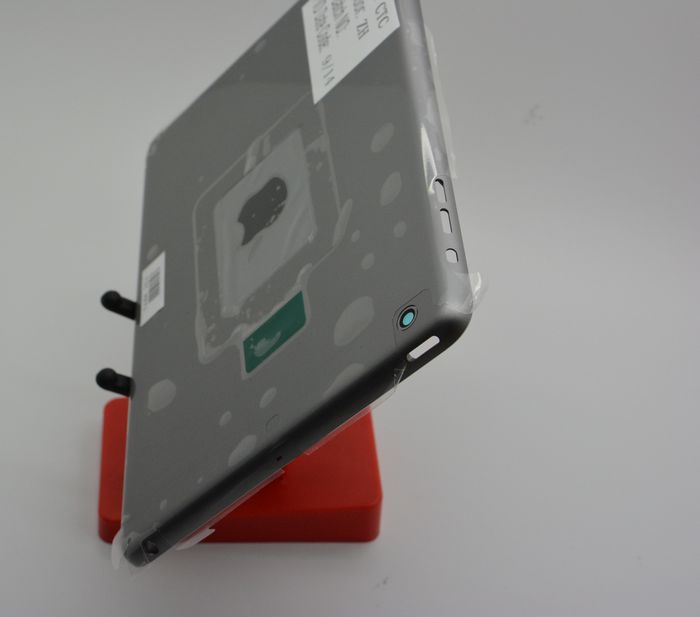
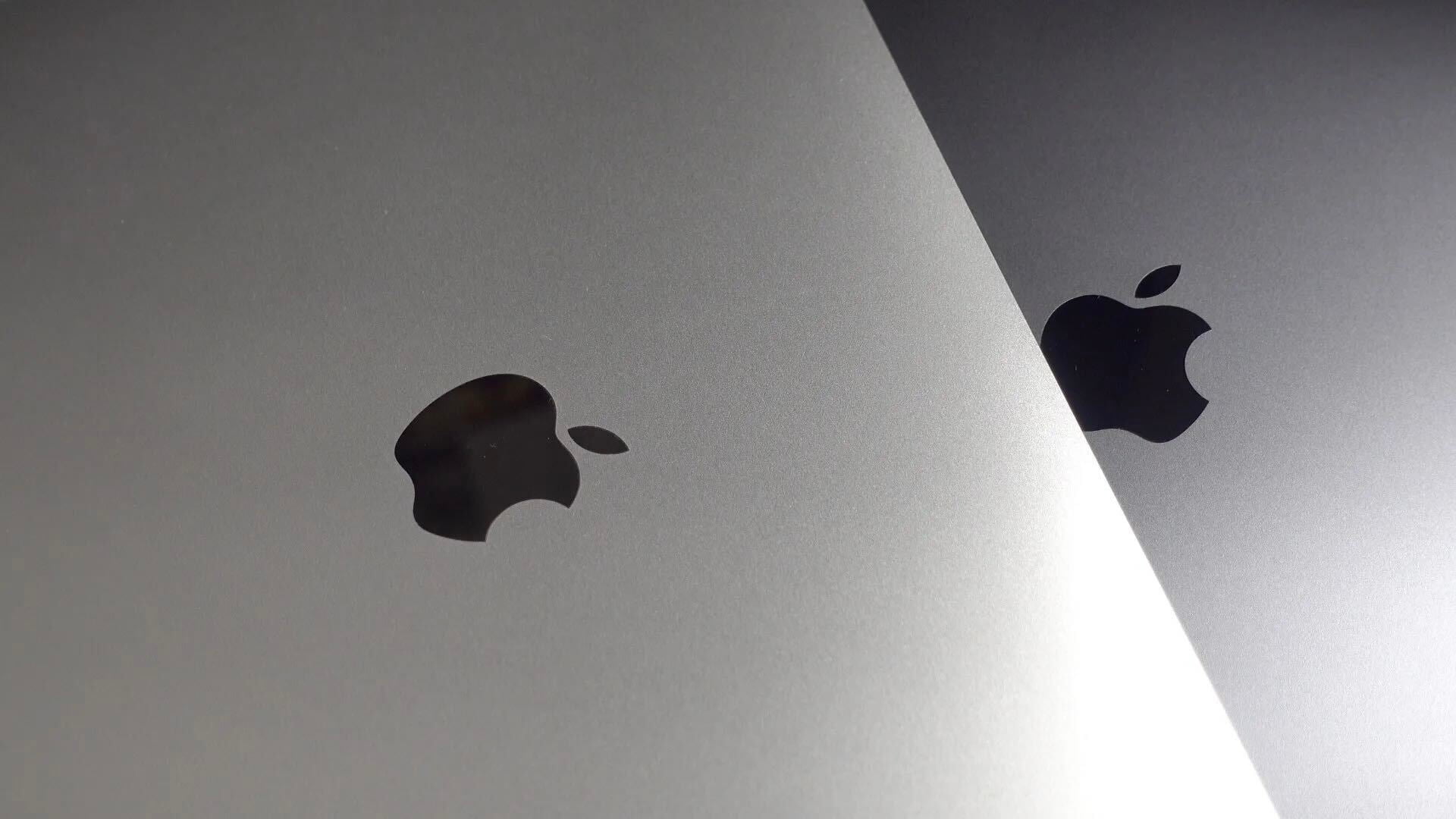
Space Gray iPad mini 2 casing (via <a href="http://sonnydickson.com/2013/09/27/hands-on-with-the-ipad-mini-2-in-space-gray/">Sonny Dickson</a>)

One of the most exciting new features of the upcoming iPad mini successor is perhaps the long-rumored Retina display. Apple has been developing a Retina-version (Apple’s term for the crisper display found on iPhones, the larger iPads, and some MacBook Pros), but the company has been reluctant to ship it due to cost, hardware size, and battery-life concerns. Though for October 22nd, it sounds like Apple has an iPad mini with Retina display ready to go.

But, it could potentially have a very minor trade-off: some extra thickness and width that will likely not be noticeable to the human eye. Just like the the full-sized iPad went thicker (and heavier in that case) to accommodate the much higher-resolution Retina display, the iPad mini could slightly bulk up to fit the new display, according to Macotakara. At a conference in China, the website went hands-on with some purported cases for the next-generation iPad mini. These cases fit a device with a thickness of 7.5mm and width of of about 0.2mm wider than the current iPad mini…


Expand
Expanding
Close

How-to: Mark up and caption images using Preview on OS X

Site default logo image

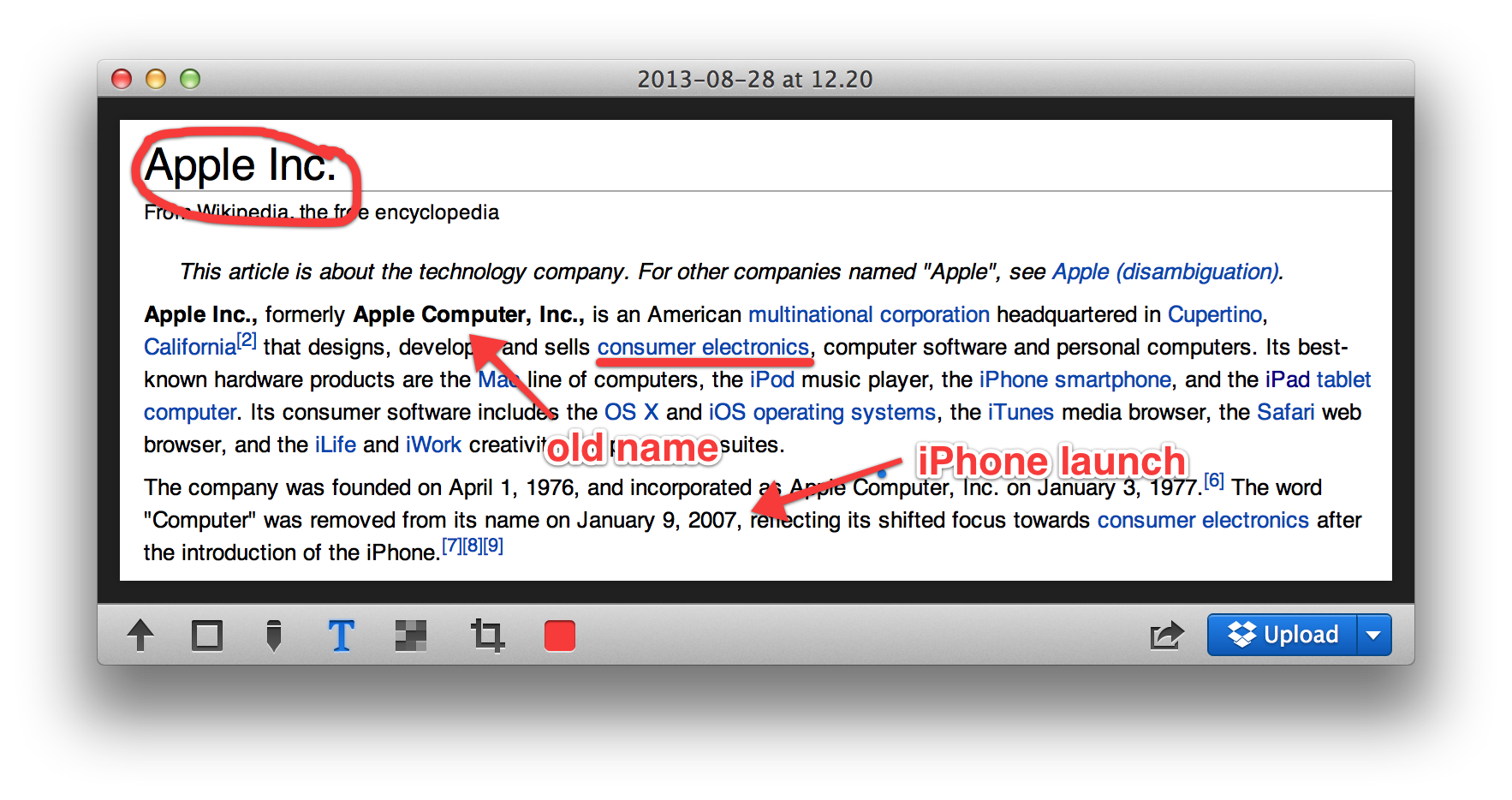
Preview is a built-in Mac application that has many features that doesn’t get a lot of press. One of them is the ability to place a caption inside the body of the image. Another is to mark up images to remove confidential information. If you double click on an image outside of a photo editor like iPhoto or Aperture, it opens in Preview and can be edited.


Expand
Expanding
Close

Apple to hold fiscal Q4 earnings conference call on Monday, October 28th

Update: Live webcast will be at www.apple.com/quicktime/qtv/earningsq413

Apple will hold its quarterly earnings call to announce results on October 28th, as noted on Apple’s investor website. Typically, Apple’s CEO Tim Cook and CFO Peter Oppenheimer will read prepared statements about the company’s performance, before opening the call to a question and answer session for analysts. The call will begin at 2PM Pacific / 5PM Eastern time. Apple will publish a press release reporting their results about half an hour before the call is due to begin.


Expand
Expanding
Close

Major update to VLC for Mac adds 4K support, improved MKV support, interface improvements and more

VideoLAN has released version 2.1 of its popular open source video player, VLC. The update — codenamed “Ricewind” — brings new audio processing to the app, to improve both processing performance and audio fidelity. There is full support for surround sound outputs in addition to new effects and many new supported metadata formats for audio.

On the video side, the app has ported the OpenGL output to OpenGL ES, making ports to iOS and Android much easier. Notably, VideoLAN says that VLC is now ready for Ultra-HD content (otherwise known as 4K). The app update has also focused heavily on improving MKV compatibility, including better seek performance and subtitle metadata support.


Expand
Expanding
Close

Pixelmator pushes 2.2.1 update, modernizes file format for significant performance gains

Pixelmator has pushed a point update to the Mac App Store. Despite its minor bump in version number, the update brings a lot of helpful changes. The timing is ‘intriguing’, as it coincides with Adobe’s announcement of a new version of Photoshop Elements from this morning.

Pixelmator quotes a 2x performance improvement when saving documents, as a result of a move to a new file format. For instance, when saving to iCloud, Pixelmator can now push small deltas of what has changed between saves, rather than saving the entire image every time. This speed up is noticeable in use, with projects saving nearly instantaneously on a Retina Macbook Pro.


Expand
Expanding
Close

Site default logo image

9to5Toys Last Call: Save up to $300 on a new Retina MacBook Pro, $50 off iPad 2 / iPad 4, external power banks, games/apps, more

From 9to5Toys.com:

A large majority of the deals we cover each day come from a variety of ‘Daily Deal’ websites or are so popular that they don’t even last 24 hours. We know you can’t be at your computer every second, so we’re going to round up the best deals each day to make sure you have a fair shot at the deals you want. Be sure to follow 9to5Toys.com so you never miss a deal... Twitter, RSS Feed, Facebook, Google+.

Apple Deals:

External Power Bank Deals: RAVPower 7800mAH pack + USB car charger $27, Vaas 5200mAh pack $18more

Other great deals we love:

Freebies:

Glui review: Screenshotting for OS X made a delight, not a chore

Put plainly, Glui is a screenshot and annotation tool; a utilitarian application. It does not evoke charm, but it doesn’t really need to. What Glui does need to offer is a functional yet efficient workflow and, on this front, it delivers. In use, I never feel like the app is getting in my way.

The activation shortcuts are bound to Shift+Cmd+5 and Shift+Cmd+6 by default to match OS X’s native screenshot shortcuts. These actions select either a rectangular screen region or one window, respectively. With the region mode, the screen cursor changes to a crosshair (which shows x,y pixel coordinates) and the region is chosen by dragging your mouse to create a rectangle. With the window mode, the cursor changes to a camera icon and you simply click on the window you wish to capture.

Although the process is very similar to how OS X’s built-in screenshot features work, it is not identical. For instance, in Glui, window screen grabs do not include the accompanying drop shadow as they do in OS X’s implementation.


Expand
Expanding
Close

Site default logo image

9to5Toys Last Call: Save up to $400 off 15″ Retina MacBook Pro + Free Apple TV, app deals galore, Hulu Plus / Amazon Prime free trial offers, more

From 9to5Toys.com:

A large majority of the deals we cover each day come from a variety of ‘Daily Deal’ websites or are so popular that they don’t even last 24 hours. We know you can’t be at your computer every second, so we’re going to round up the best deals each day to make sure you have a fair shot at the deals you want. Be sure to follow 9to5Toys.com so you never miss a deal... Twitter, RSS Feed, Facebook, Google+.

Also check out the latest 9to5Mac Happy Hour to hear the latest 9to5Toys segment. During the show, there’s a mention of $50 video conversion software currently available for free and the VPN service proXPN.com available at a 20% discount.

Today’s Featured deals:

Save up to $400 off 15″ Retina MacBook Pros + Free Apple TV at Best Buy

iOS App Deals:

Bad Piggies: FREE, XCOM Enemy Unknown: $15, freebies, more

Readdle iOS Apps up to 70% off: Calendars+: $2, PDF Expert: $5, Printer Pro: $2, more

Trial Offers:

Free 2 month
Hulu Plus trial for new customers

Get a free $10 gift card when you sign-up for an Amazon Prime membership

Other great deals we love:

Site default logo image

Want more battery-life from your MacBook? Close some tabs

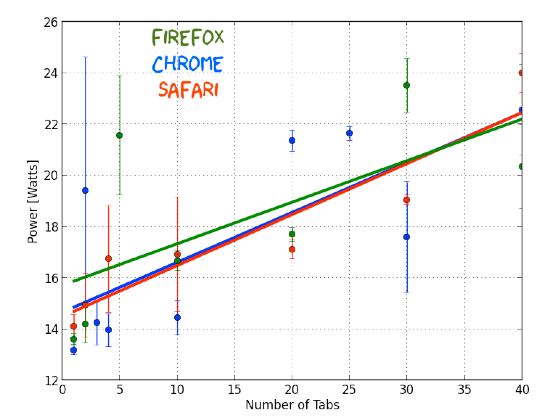
Gizmodo pointed us to some research carried out by someone who must be the poster child for having too much time on your hands: he decided to measure the amount of power a MacBook Pro uses for each tab open in a browser. The answer, in case you were curious, is 0.19 watts per tab in Safari or Chrome.

There is some point to it, though: the experiment showed that having 100 tabs open reduces battery-life by around an hour. While I doubt that many of us have quite that many tabs open at any one time, it does suggest that when you’re trying to eke out as much usage as you can from a battery, closing unnecessary tabs will buy you at least a little more time.

Best Buy slashes new Mac prices w/extra savings for students; Haswell Airs start at $849

Site default logo image

From 9to5toys.com:

Best Buy is having a significant College Student sale this week on MacBook Airs, Retina/Pros and iMacs and Students or anyone with a .edu email address get another $100 off the sale prices signing up here. For instance, the entry level Haswell MacBook Air is now $949 and another $100 drops it down to $849, the lowest price we’ve seen by $100.

Haswell MacBook Air prices:

  • MacBook Air – 11.6″ Display/4GB Memory/128GB Flash Storage:$949.99-$100 students=$849.99 ($150 off)
  • MacBook Air – 11.6″ Display/4GB Memory/256GB Flash Storage:$1139.99-$100 students=$1039.99 ($170 off)
  • MacBook Air – 13.3″ Display/4GB Memory/128GB Flash Storage:$1,044.99-$100 students=$944.99 ($155 off)
  • MacBook Air – 13.3″ Display/4GB Memory/256GB Flash Storage:$1,234.99-$100 students=$1134.99 ($165 off)

Retina MacBook Pro prices:

iMac Prices save $100 across the board and another $100 for students = $200 savings starting at $1100

The MacBook Student $100 off promotion starts today, and will end July 27.
Expand
Expanding
Close

Site default logo image

9to5Toys Last Call: Free Klipsch Earbuds (After rebate), Budget Office Toys, $60 Toshiba 1TB USB 3.0 Portable HD

From 9to5Toys.com:

A large majority of the deals we cover each day come from a variety of ‘Daily Deal’ websites or are so popular that they don’t even last 24 hours. We know you can’t be at your computer every second, so we’re going to roundup the best deals each day to make sure you have a fair shot at the deals you want. Be sure to follow 9to5Toys.com so you never miss a deal... Twitter, RSS Feed, Facebook

Today’s Featured deals:

Klipsch E1 In-Ear Headphones: FREE after $25 rebate

Budget office ‘productivity-killing’ gadgets:

Toshiba Canvio 1TB USB 3.0 Portable Hard Drive $60 Shipped (Reg. $120)


Other great deals we love:

Review: 29-inch 21:9 Philips Brilliance 298P4QJEB LCD monitor creates new MacBook/Desktop opportunities

Site default logo image

I’ve been curious about the 21:9 display format since it started to creep into mainstream displays last year. Originally developed to display cinema grade movies natively, computer users are now snapping these up to give themselves a sort of wide ‘Bloomberg terminal’ without the break (and the swivel between displays).

I received the Philips 298P4 29-inch 21:9 display a few weeks ago and have set it up as my display at my desk.  It has an unusual 2560×1080 pixel display which is the same amount of pixels across as traditional 30 inch 16:10 displays or 27-inch 16:9 displays (like Apple’s 27-inch iMac or Thunderbolt Display). The 1080 pixels high however matches up with a typical 1080P display. I didn’t use it like a traditional desktop computer or with a laptop off to the side.

For me, I saw an opportunity to add a display on top of my Retina MacBook Pro whose keyboard/trackpad layout I find more usable than anything else out there including Apple’s Wireless Keyboard/Trackpad combo. The Philips’ stand (and this is the key part) allows the display to grow over the top of even the 15’inch Retina MacBook Pro so that I can continue to use the MBP keyboard and display even while looking up (for much improved posture) at the Philips display. It is also great for watching movies while working :D, unless productivity is a priority.

For this it was great, but how was the quality of the display?


Expand
Expanding
Close

Apple Store down ahead of WWDC, new hardware on the way

Site default logo image

In what gets as close as possible to confirmation that Apple is announcing new hardware at WWDC today, the Apple Store is down for updates.

We’re expecting new Haswell-based MacBook Airs, and perhaps new MacBook Pros and a new Airport Extreme and Time Capsule supporting the faster 802.11 ac standard … 
Expand
Expanding
Close

MacBook Air refresh looks set for WWDC, potentially with faster Wi-Fi

Site default logo image

Apple appears set to release new versions of its MacBook Air notebook computer at next week’s Worldwide Developers Conference, according to information provided by a source. Earlier this week, we reported that Apple is planning to release four new Mac models at WWDC, and we narrowed this down to either new MacBook Pro with Retina display models or MacBook Air models.

Today, we have received specific pricing for the aforementioned SKUs, and the price-points correspond to Apple’s current pricing for the 11-inch and 13-inch MacBook Air models. We have yet to receive pricing information that points to the imminent availability of new MacBook Pros (as some had hoped), but perhaps the next refresh to Apple’s Pro portables will arrive in the coming months. Supply constraints to the Retina MacBook Pro line seems to imply that…


Expand
Expanding
Close

The good news and bad news on that ASUS 31.5-inch 4k monitor for Mac users

Site default logo image

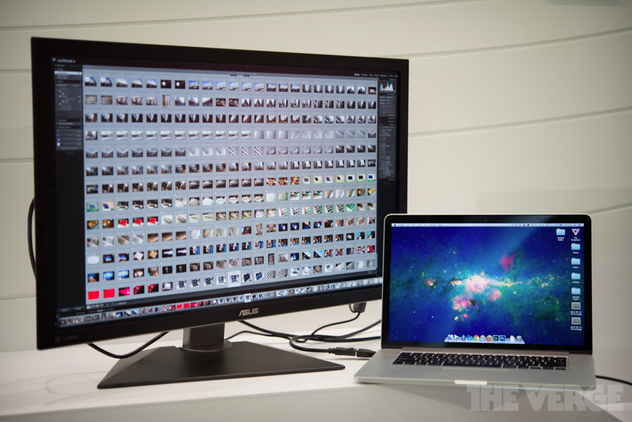
We told you a few days ago about ASUS launching a 31.5-inch 4k monitor, and predicted that today’s Macs would struggle to drive it. The Verge has now confirmed this, by briefly hooking it up to a 15-inch MacBook Pro with Retina display.

Tangible lag was introduced when working in more demanding applications like Adobe’s Lightroom, while the mouse cursor also exhibited a troublingly low refresh rate …

Expand
Expanding
Close

Sharp’s bringing ‘highest pixel density’ IGZO displays yet, could end up in next round of Retina MacBooks

Site default logo image

Sharp, one of Apple’s display suppliers that is rumored to have just begun production on next-gen iPhone displays, this week announced it will soon begin producing notebook displays with the highest pixel density in the biz. With displays ranging from 11.6 inches to 15.6 inches, it’s entirely a possibility that one could end up in a next generation MacBook with Retina display.

IGZO technology enables smaller thin-film transistors and increased light transmittance. As a result, fine text can be rendered crisply and clearly, and images can be displayed with impressive realism. For example, the 14-inch panel boasts a pixel density of 262 ppi, which represents 1.67 times the number of pixels of full high definition*3. Increased light transmittance also means lower rates of energy consumption, with IGZO technology reducing the amount of power required to drive liquid crystals during the display of still images. These factors lead to greater energy efficiency and longer battery life on notebook PCs. IGZO technology is also compatible with stylus-input touchscreen functionality.

Sharp will start producing the displays, which boast a resolution up to 3,200 x 1,800 and pixel density of 262 ppi, in June and already has a 13.3-inch model being mass produced.
Expand
Expanding
Close

Site default logo image

Gear up for new Macs, D-Link releases four next generation ultra-fast 11AC WiFi routers


From 9to5Toys.com:

Last month we were tipped to some clues in the latest OS X 10.8.4 beta which indicated that Apple is ramping up to release new Macs and accessories sporting the next generation wireless technology, 802.11ac. It’s entirely possible that we could see these Macs introduced as early as next month at Apple’s WWDC. If you’re planning to upgrade your Mac, you’re going to need an AC compatible router to take advantage of this new wireless technology. Below are four new options for you to consider when making the switch.

D-Link announced the immediate availability of four new 11AC wireless routers, starting at just $80.  The next generation wireless technology, 11AC delivers more coverage and up to 3 times the speed of the current wireless standard “N.” The proliferation of mobile devices and streaming content has necessitated the move towards AC wireless as a faster, more reliable wireless connection for home and businesses users.

The new D-Link wireless router lineup consists of the AC750 (DIR-810L), AC1000 (DIR-820L), AC1200 (DIR-860L) and AC1750 (DIR-868L), ranging from $80 up to $170. These cloud routers offer remote network management via the free D-Link Lite iOS app, which “enables users to see what websites are being visited, block unwanted connections, and set up automatic email alerts when unauthorized connections are made.”  The top of the line AC1750 and AC1200 feature four ultra fast Gigabit Ethernet ports.

Even though most devices we have aren’t AC compatible yet, if you’re currently in the market for a new router it may make sense to go AC in an effort to future proof your network.

All four of these routers are now available for order from D-Link or major retailers like Amazon.

Review: LandingZone’s Secure MacBook Air dock – adds Kensington Lock, Ethernet, USB ports in seconds

Site default logo image

I’ve been using the $99 LandingZone 2.0 LITE 13″ Secure Docking Station for the past couple weeks to dock my MacBook Air when I use it at my desk. Until now, when I got to my desk, I would manually plug in MagSafe power, USB hub and sometimes audio jacks – which isn’t a huge pain, but it did add time time and clutter to my workflow.

LandingZone, which started as a Kickstarter project but is now in full production, has a complete solution in a white plastic/steel dock that allows you to secure your MacBook Air, and within seconds, have Ethernet, a 4 port USB hub, power and MiniDisplay Port outs ready for use.
Expand
Expanding
Close

Haswell graphics performance makes Retina MBA a possibility – but not a certainty

Site default logo image

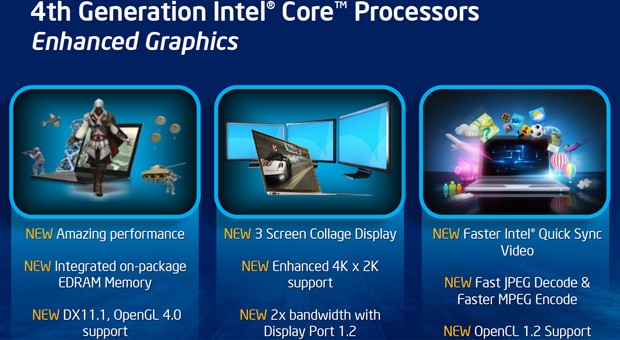
The next generation Intel CPUs, named Haswell, offer support for 4k displays even in the lowest-power version likely to be used in the MacBook Air – making a Retina MBA a feasible option for the first time.

Intel has announced that its Haswell processors will offer a choice of three different levels of integrated graphics, one aimed at long battery-life, the other two aimed at performance (via AnandTech).

If terms like ‘integrated graphics’ leave you scratching your head, let’s start with some background …
Expand
Expanding
Close

Site default logo image

Tim Cook talks product pipeline, 5-inch iPhone, growth in China, supply chain, and more

Apple CEO Tim Cook is currently answering questions from the press following the company’s live Q2 2013 earnings call.  Here are some of the highlights:

Cook on growth in China:

We had our best quarter ever in greater China. Revenue came in at 8.8B. That’s up 11 percent y-o-y. It’s the same as Apple’s growing… iPads grew 138% y-o-y… set new records for sell through for iPhone…

Added about 8000 iPhone point of sales, plan to add more and further grow our distribution. Innovating with our online store there and adding different functionality to the store. China has an usually large number of potential first time smartphone buyers… We’ve seen a significant interest in iPhone 4 there and recently made it even more affordable to make it even more attractive to first time buyers.

Cook on competition:

“In the beginning RIM was the strongest player. Of course today our top competitor from a hardware point of view would be Samsung, and married to Google on the software side. They’re obviously tough competitors but we feel we have the best products by far… continue to feel very confident about our product pipeline. We have the best ecosystem by far. We’re going to keep augmenting it and making it better and better. I feel very good about our competitive position.”

On new product pipeline:

“I’m just saying we’ve got really great stuff coming in the fall, and across all of 2014.”

Cook on confidence level in supply chain and moving to new vendors:

“I have incredible confidence. We exited the March quarter with no shortages. The December quarter you’re referring to is the largest for Apple.. The reality is the work we do to create truly innovate products is hard… I would assure you we are working very closely with our manufacturing partners for what we feel is a very exciting roadmap.”

On a larger screen iPhone:

My view continues to be that iPhone 5 has the absolute best display in the industry. We always strive to create the very best display for our customers. Some customers value large screen sizes. Others value other factors such as resolution, white balance, color, portability, clarity, compatibility with apps… Our competitors have made some significant trade offs in many areas in order to ship a larger display. We will not ship a larger display iPhone while these trade offs exist.

On Mac market:

The reason we were down last quarter, we were down 2%, is because the market is incredibly weak. It’s the largest decline I remember from being in this industry for a long time. It’s certainly true that some iPads cannabalized some Macs. I don’t think it was a huge number but i do think it was some… That said, i don’t think this market is a dead market or a bad market by any means… We’re going to continue to innovate in it… if anything the huge growth in tablets might end up benefiting the Mac… People may be more willing to buy a Mac… We’re going to continue making the best personal computers. Our strategy is no changing. we delivered some incredible innovation last year with the Retina Display MacBook Pro.

OS X 10.8.4 code confirms new Macs incoming with super-fast 802.11ac Gigabit wireless support

Site default logo image

Apple is preparing to soon release new Mac computers that support super-fast 802.11ac Gigabit wireless, according to code-findings inside of Apple’s latest OS X Mountain Lion 10.8.4 beta seed to developers. The code was located by a tipster inside of the operating system’s WiFi-frameworks folder. As you can see in the image directly below, the 802.11ac code is not found in OS X 10.8.3, which is the latest public release of Apple’s Mac operating system.

Previous reports have claimed that Apple is working with wireless chipmaker Broadcom to produce 802.11ac chips for future Macs. Now, it appears, Apple’s software is ready to support the new wireless technology as well. More details below…


Expand
Expanding
Close

NVIDIA introduces GeForce 700M Series GPU, prime fits for the next high end iMacs/MacBooks

Site default logo image

NVIDIA announced a new series of notebook GPU’s today branded as the 700M series. Introduced today are five new graphics cards in total, and NVIDIA said they would be available in a long list of laptops over the next few months. The five new graphics cards include two options aimed at the “mainstream segment”, the 720M and the 735M, while the remaining three, the 740M, 745M, and 750M, will be “for the performance segment” of the market.

The graphics cards are being touted by NVIDIA to “maximize performance and experience,” but they also more power efficient than their predecessors. Because the 700M Series is notebook-only, expect these to be less powerful than a desktop version of the 700 Series that may be announced sometime in the future.

Helping our new 700M chips reach such lofty levels of performance is GPU Boost 2.0, a GPU innovation that extracts every ounce of available computing power from the graphics processor. Before GPU Boost, GPUs were held back by synthetic benchmarks that pushed chips and power usage to the limit, far beyond the levels typically seen when playing games. This ‘worst case scenario’ forced us to throttle GPUs, leaving spare performance on the table when playing games.GPU Boost resolves this problem by monitoring power usage and temperatures, enabling the GPU to use every last ounce of performance without exceeding safety or comfort limits.

While the press release from NVIDIA said the new GPUs will be available in nearly every notebook maker other than Apple, it is possible these GPUs will be seen in the next-gen MacBook Pro with Retina Display. The current 15-inch MacBook Pro with Retina Display sports a NVIDIA 650M GPU, as does the high-end 21-inch iMac model, so an upgrade to the 700M series only makes sense.

The full press release is available below.

New NVIDIA GeForce 700M GPUs Squeeze Every Drop Of Performance Out Of Notebooks, Automatically

Monday, April 1, 2013

NVIDIA today announced five new notebook GPUs which deliver a trifecta of technologies that seamlessly and automatically maximize a consumer’s notebook performance and experience.

With no effort or input from the notebook user, the technologies work in the background to save battery life, enhance performance and enrich the visual experience — providing the best notebook experience the GPU can deliver. They include:

New NVIDIA GPU Boost™ 2.0 technology, which intelligently adjusts GPU clock speed to maximize graphics performance.

NVIDIA® Optimus™ technology, which enables extra-long battery life by switching the GPU on and off so it runs only when needed.

GeForce® Experience™ software, which adjusts in-game settings for the best performance and visual quality specific to a user’s notebook and keeps GeForce drivers up to date.

“There is an elegant simplicity to NVIDIA’s GeForce 700M notebook technologies,” said Rene Haas, vice president and general manager of the notebook business unit at NVIDIA. “You use your notebook how you want, and GeForce makes your experience awesome.”

Incorporating all three of these technologies, the new lineup of NVIDIA GeForce 700M GPUs includes GeForce GT 750M, GeForce GT 745M, and GeForce GT 740M GPUs for the performance segment, as a well as GeForce GT 735M and GeForce GT 720M GPUs for the mainstream segment.

NVIDIA GeForce 700M GPUs are available today. Every leading notebook manufacturer will be introducing notebooks with GPU Boost 2.0 technology, including Acer, Asus, Dell, HP, Lenovo, MSI, Samsung, Sony and Toshiba.

More information about the GeForce 700M family of notebook GPUs is available at www.GeForce.com.

Review: TwelveSouth’s BookBook case for the 15-inch Retina MacBook Pro

Site default logo image

We’ve reviewed and enjoyed a number of TwelveSouth products over the years. We were intrigued by the hollowed out book idea with the company’s original BookBook case for the MacBook Air and since it has brought out similar hand distressed leather BookBook cases for other Apple devices, like the iPhone and iPad mini. While maybe not the ideal option for Apple’s anti-skeuomorphic cheerleaders, I found the stark contrast to Apple’s sometimes cold industrial design a nice juxtaposition.

I tend to not use any skins, covers or cases when using my MacBook on a day to day basis. I slide my MacBook into a laptop pouch built-into my backpack or use a standard laptop case when on the go, and rarely do I actually leave the MacBook in the case when in use. A case was necessary for protection when traveling, but for me the average soft or hard plastic laptop case never quite does the pricey, Jony Ive designed Apple hardware inside justice. BookBook is different…
Expand
Expanding
Close

Retina MacBook Pro hits new $1299 low at MacConnection shipped ($200 off)

Site default logo image

From 9to5Toys.com:

MacConnection quietly updated their price on the 13-inch Retina MAcBook Pro to $1299 with free shipping last night. That’s $200 off Apple’s price and the lowest we’ve ever seen for a Retina Display MacBook Pro. This is the base model with 2.5GHz Core i5, 8GB RAM and 128GB SSD.

A quick look at our Retina MacBook Pro Product page shows that this is easily the best deal out there:
Expand
Expanding
Close