Latest

Site default logo image

Snapguide updated for iOS 7 with improvements to search, browsing, and notifications

Snapguide released an update today that brings iOS 7’s new interface design to the guide-building app, along with enhancements to many of the app’s main features. For those who are unfamiliar, Snapguide is an app that lets you create and view step-by-step photographic guides from your iOS device. You can share these guides with your friends and find guides for topics you’re interested in. If a guide you want doesn’t exist, you can post a request for someone who knows about that subject to create one.

Today’s update brings not only a brand-new visual style, but enhancements to most of Snapguide’s core features. The browser, which lets you find guides created by other users, has been updated with larger images, faster loading times, and an “explore” section to help you track down your desired guides more quickly.

Search has also been improved, and now allows you to search between users, guides, and requests for new guides all at once. Enhancements have been made to the notification system in the iPhone version, and iPhone users can now copy a list of supplies needed to carry out the directions of any guide.

The updated Snapguide is available to all users for free on the iOS App Store.

Site default logo image

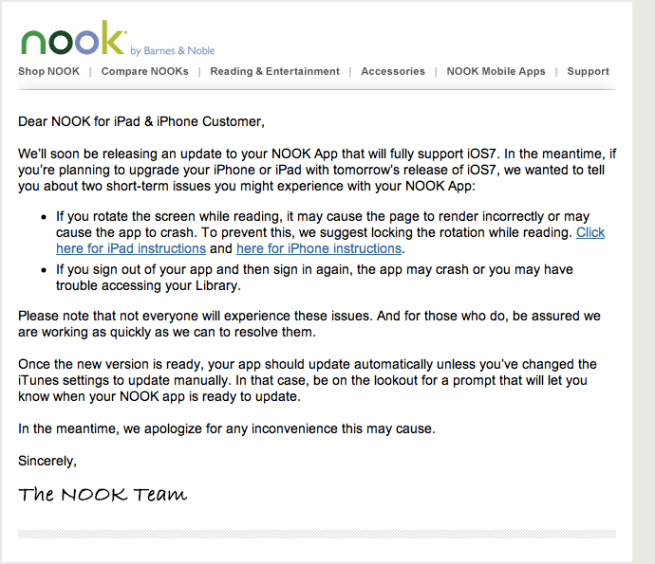
Barnes & Noble warns of potential Nook app incompatibilities with iOS 7

Screen Shot 2013-09-17 at 9.52.42 PM

Less than a day until the launch of Apple’s iOS 7, Barnes and Noble has warned users of its Nook for iOS application of some potential incompatibilities with the new operating system. The potential issues can be seen in the copy of the email above. Barnes and Noble will prompt users when there is an update available to fix and address these issues. The company also warns that not all users will have incompatibility problems, and it is unclear which users will be the ones seeing the issues.


Expand
Expanding
Close

Site default logo image

Facebook speeds up Messenger for iPhone, adds new languages

Facebook-Messenger-emoji

Facebook has issued a notable update to its iPhone and iPod touch Messenger app, speeding the app up, improving general performance, and adding new languages:

– It’s now faster to open the app and switch between messages
– Available in more languages: Croatian, Hungarian and Slovakian
– Plus, improved scrolling and overall performance
– Bug fixes

The update is free in iTunes.


Expand
Expanding
Close

Site default logo image

Google Play Books for iOS updated with Single Sign-On support

Google-Play-Books-iconGoogle has been adding Single Sign-On support to lots of its iOS apps in recent months, making it easier to sign into Google apps on their iPhone or iPad. With Single Sign-On, users can sign in once in any Google app supporting the feature and will automatically be signed into all the other apps. The idea is to eliminate having to sign-in multiple times to the same Google account for different apps. The latest app to get the update is Google Play Books, which was updated today to version 1.6.1 with support for Single Sign-On and copying selected text.

Google also recently added Single Sign-On support for its Chrome, YouTube, and AdSense iOS apps.

What’s New in Version 1.6.1

Added support for Google Single Sign-On, so that you only need to sign in once to access all of the Google apps on your device.
Added support for copying selected text, if copyright allows.
Stability improvements.

Site default logo image

Grand Theft Auto V ‘iFruit’ companion app lets you customize in-game cars, train Chop the dog

Rockstar has released an official iOS companion app today for the highly anticipated Grand Theft Auto V console title set for release tomorrow. The app, called Grand Theft Auto: iFruit, will let users stay up to date on the latest GTA news, launch other Rockstar Games apps, and sign in to the Rockstar Games Social Club. However, perhaps the most notable feature of the app is the ability to customize vehicles that will be used in the game:

Also choose from paint jobs, window tints, smoke colors, wheels, hoods and spoilers. Upgrade your engine, brakes, exhaust, suspension, and accessorize with new lights, horns, tires and body armor. Place your order on-the-go and find it waiting for you in the garage the next time you play Grand Theft Auto V, or send your order in while playing and get a call from your local mechanic to swing by. You can even create and reserve custom license plates for both Grand Theft Auto V and Grand Theft Auto Online – order your personalized plates before they’re gone!

GTA-iFruit-03The app also includes “Chop the Dog”, a virtual pet game that can change the way Chop acts towards the character Franklin in the full console title:

Looking after Chop successfully is reflected in his behavior in Grand Theft Auto V in a number of ways:

•He will be more helpful and responsive to Franklin
•He will perform tricks such as sitting, begging and giving paw if properly trained through the app
•He will sniff out the nearest hidden items when the player takes him for a walk
•Earn enough credits through walks and proper caretaking and exchange them for new collars for Chop

The free Grand Theft Auto: iFruit app is available on the App Store now. If you’re wondering about the name, ‘iFruit’ is what Rockstar calls iPhones in the GTA game world.

Site default logo image

Feedie: an app that shares food pictorially and literally

A lot of people use the iPhone, to take pictures of their food, and share the pictures on Twitter and Facebook. Sharing photos of your meals online has become a phenomenon and you probably have several friends who participate in this trend. But what if you can actually make a difference for a great cause by taking pictures of your food? That’s exactly what a new app Feedie does. The pictures you take with Feedie can be posted and shared on Facebook, Twitter, Google + and Foursquare.

Because you took a picture at a Feedie restaurant, the restaurant donates to The Lunchbox Fund. Chef Mario Batali is one of the spokesmen for Feedie and The Lunchbox Fund. The Lunchbox Fund is a non-profit organization that provides daily meals for orphaned children in South Africa. The organization works with several schools and have annually provided 240,000 meals since its inception in 2005. Feedie has provided 645 meals, since its launch in the end of April. This app is also now iOS 7 ready:


Expand
Expanding
Close

Site default logo image

Chrome for iOS adds faster search results, data cost savings features & voice search pronoun support

Image (1) chrome-a_512.png for post 72530Google is rolling out an updated version of its iOS app for iPhone and iPad today that brings a few new features including faster search results. Google says after clicking back in Chrome to return to a search results page results will now “instantly appear, ready for you to choose the next one.”

The update also adds data cost savings features, rolling out to all users shortly, that provides a view of data savings in Bandwidth Management settings. Also new is voice search pronounce support:

Try queries like: “Who is the president of the United States?” followed by “Who is his wife?”

The updated version of Chrome for iOS also includes improvements to Single Sign On for other Google Apps, bug fixes, and other performance and security improvements.

Site default logo image

TeeVee 2.2 introduces unwatched episode tracking, iCloud sync, and more

The popular TV guide app TeeVee was updated late last night to version 2.2. The update brings a new design to the app’s main page, along with other tweaks to the iconography and typography throughout the app. Other notable new features include iCloud syncing of saved shows and unwatched episodes across devices, and an episode tracking feature that displays how many episodes of a show you have missed on the main page.

As with previous versions, you can view schedules for your favorite shows, schedule notifications before or after a new episode of any given show airs, get a summary of any episode, watch iTunes previews of most shows, and more.

TeeVee 2.2 is a free update for existing users and a $.99 purchase for new downloads.

Review: Grades 3 is a great way to track your classes and projects

Site default logo image

Earlier this year, at long last, I took my final exam and finished college. While I was in school, I tried a bunch of apps to keep track of my assignments and projects. I also spent a lot of time calculating how many projects I could ignore completely as well as the lowest possible grade I could get on the ones I actually did in order to maintain my GPA and scholarships.

Most of the time the apps didn’t help much and I just gave up and hoped for the best. This scared the heck out of my parents, who then proceeded to bother me about school even more.

When I saw the promo video for Grades 3, I’ll admit I got a little upset. I spent four years in college, and as soon as I get out, the app I always wanted finally exists. While I would never really wish to be back in school all over again, if I had to, Grades 3 would be the first app I put on my phone. Let’s dive in and see what this app can do for you.


Expand
Expanding
Close

Site default logo image

Readdle releases ‘Calendars 5’ w/ new design for iOS 7, natural language input & much more

Developer Readdle has officially released the latest version of its popular Calendars app, which appears to be replacing the paid Calendars+ app that it rolled out back in May. Calendars 5 for iPhone and iPad introduces a new interface that focuses on upcoming events and a new look and feel designed specifically for iOS 7. It also adds new features including additional view modes, full offline support, natural language input for quickly creating events (much like Fantastical), and a new powerful task manager that syncs with iOS reminders.

Calendars 5 is available now on the App Store for an introductory price of $4.99 and Readdle’s free Calendar app also remains available.

A full list of what’s new in Calendars 5 is below:

What’s new:

1. Natural language event processing.

It’s the most natural way to enter an event. Everybody can understand and use it. But you can create events in Day view by tapping and holding, some might find that faster and more natural. Just try it yourself since we support it as well.

2. Clean UI focused on YOUR events.

There are no colorful bars or buttons in the elements of Calendars+5. The only elements in color on the screen are your events or buttons that need your attention. iOS 7 design philosophy is in its essence.

3. All complexity is hidden.

When you create an event in iOS calendar you see a 12-fields-dialog that confuses and disorients you. In Calendars+5 you have a single field to start with. The rest will unfold as you need it.

4. No compromises, you have ‘Day, Week, Month and List’ views of your events.

Depending on the situation you might need to see a different perspective of your schedule. We designed the best possible representation of your Day, Week and Month for the small iPhone screen.

5. Integrated task manager – syncs with iOS reminders.

Tasks and events should live in the same application while you may want to see all your tasks in your calendar when needed. At the same time a task manager should be first-class product and support everything you might ever need to successfully control your undertakings. I think we’ve done just that. And yes, you can sync your iOS reminders with the task manager in Calendars

6. Great for power users.

I know that till now I’ve been advocating for a perfect calendar for an ordinary person. But I hate compromises and I wanted to provide a remarkable tool for power users too, especially since our CEO is exactly this kind of person. Appointments, locations, notes and calendars with 10 000 events are something that you can easily manage with Calendars+ 5.

Moreover, you can create and events like “Do something every second month of the year on weekdays of the 1st, 2nd and last week”. Calendars+ 5 is the only iOS application that allows you to create custom recurring events.

7. First-class iPad app.

Calendars+ 5 is the first smart calendar for the iPad, since all other great calendar applications are for the iPhone only. I don’t get it because the iPad’s large screen is great for viewing your Weekly or Monthly schedule and enables richer interaction with events.

8. Transparent information sync between iPhone and iPad.

Your tasks and events are synced seamlessly in the background between all your devices. It just works, period.

Site default logo image

Adobe Revel cloud service gets updated iOS app with support for video

AAdobe-Reveldobe has updated its Adobe Revel app today, which allows users to store and access photos and videos in the cloud and sync across Mac, PC, and iOS devices. Previously only available for photos, Adobe has updated its iPhone and iPad apps today to include support for uploading, watching, and sharing videos with the service.

The Adobe Revel service provides unlimited uploads for the first 30 days for free, and 50 photos every month after that. Adobe didn’t specify if the same limits will apply to videos,  but upgrading to Revel Premium for $5.99/month will provide unlimited photo and video imports.

In other app news, Apple appears to have started accepting apps compiled with the iOS 7 SDK. We noticed one of the first– Local Cloud Pro— has been updated today with full iOS 7 support including iOS 7’s Dynamic Type and other new features.

Site default logo image

Yahoo! Screen app for iOS brings TV-like remote experience for Yahoo! content

Yahoo today announced the release of a new app called ‘Yahoo! Screen’ for iOS devices that it created to a be a TV-like remote control or channel guide experience for content from Yahoo!. The app, which is available starting today for iPhone, iPod touch, and iPad, will allow users to browse trending content, search for shows, and even switch between channels like a traditional TV experience by swiping up and down. Users will also be able to switch between episodes for the show they are currently viewing by swiping right and left.

As for content, Yahoo! has made new deals with Viacom that will bring new content from Comedy Central and elsewhere:

To get you going, we’re proud to announce a brand new deal with Viacom to bring you clips from some of Comedy Central’s best shows, including The Daily Show with Jon Stewart and The Colbert Report. Together with the exclusive digital clip archive of Saturday Night Live, Yahoo Screen now offers you access to some of the most storied franchises in comedy history, on any device. In addition, the Fall 2013 Comedy Lineup is now live. Whether you want to get lost in the best clips of Saturday Night Live or get hooked on new shows featuring stars like Jack Black in Ghost Ghirls, John Stamos in Losing It With John Stamos, you’ll have over 1,000 hours of comedy to watch.

Yahoo! Screen is available for free on the App Store now. 

Microsoft releases Xbox Music for iOS with ad-free music streaming and cross-platform syncing

Site default logo image

Microsoft released a brand-new Xbox Music app for iOS this evening. The app features ad-free streaming from Microsoft’s massive song catalog, with custom stations built around specific artists, songs, or albums. These playlists can be synced to your other Xbox Music-capable devices, such as an Xbox 360.

The app requires an Xbox Music Pass to work, which comes in both free or paid varieties. The app description doesn’t state that a paid subscription is needed, but free accounts are limited to only ten hours per month after the first six months of use.

The iOS app is available now for free on the App Store.


Expand
Expanding
Close

Site default logo image

Amazon issues “required” iOS Kindle app update to install prior to iOS 7

Amazon’s Kindle for iOS app got an update today to prepare for iOS 7’s upcoming release. According to the change log, the update is required before users update to iOS 7. Failure to install the new version of the app prior to updating to iOS 7 could cause users to have to login again and re-download their books.

While this issue isn’t as signficant as losing all of your Google Authenticator tokens, it could be a bit of an annoyance for users to have to re-download their reading material.

The Kindle update is available on the App Store now.

Site default logo image

VLC for iOS updated with improved international support, FTP server discovery

screen568x568

VideoLAN’s VLC application for the iPad, iPhone, and iPod touch has been updated with some significant enhancements. Notably, the version 2.1 release includes improved international support. This includes subtitle options for non-western languages, and localization to the following languages: Bosnian, Catalan, Galician, Greek, Marathi, Portuguese, Slovenian.

Improvements are present for subtitles, VoiceOver, Accessibility, video output, and password locking.

In terms of new features, audio-only playback is now supported. Additionally, FTP server discovery for streaming and downloading, UPNP network compatibility, and improved Bonjour featured are present in the update.

VideoLAN tells us that the launch version had 2.5 million downloads during the first week of availability. The update is available for free on the App Store.


Expand
Expanding
Close

Site default logo image

Google Drive revamped for iOS with improved previewing, file sorting, searching

Screen Shot 2013-09-05 at 12.05.29 PM

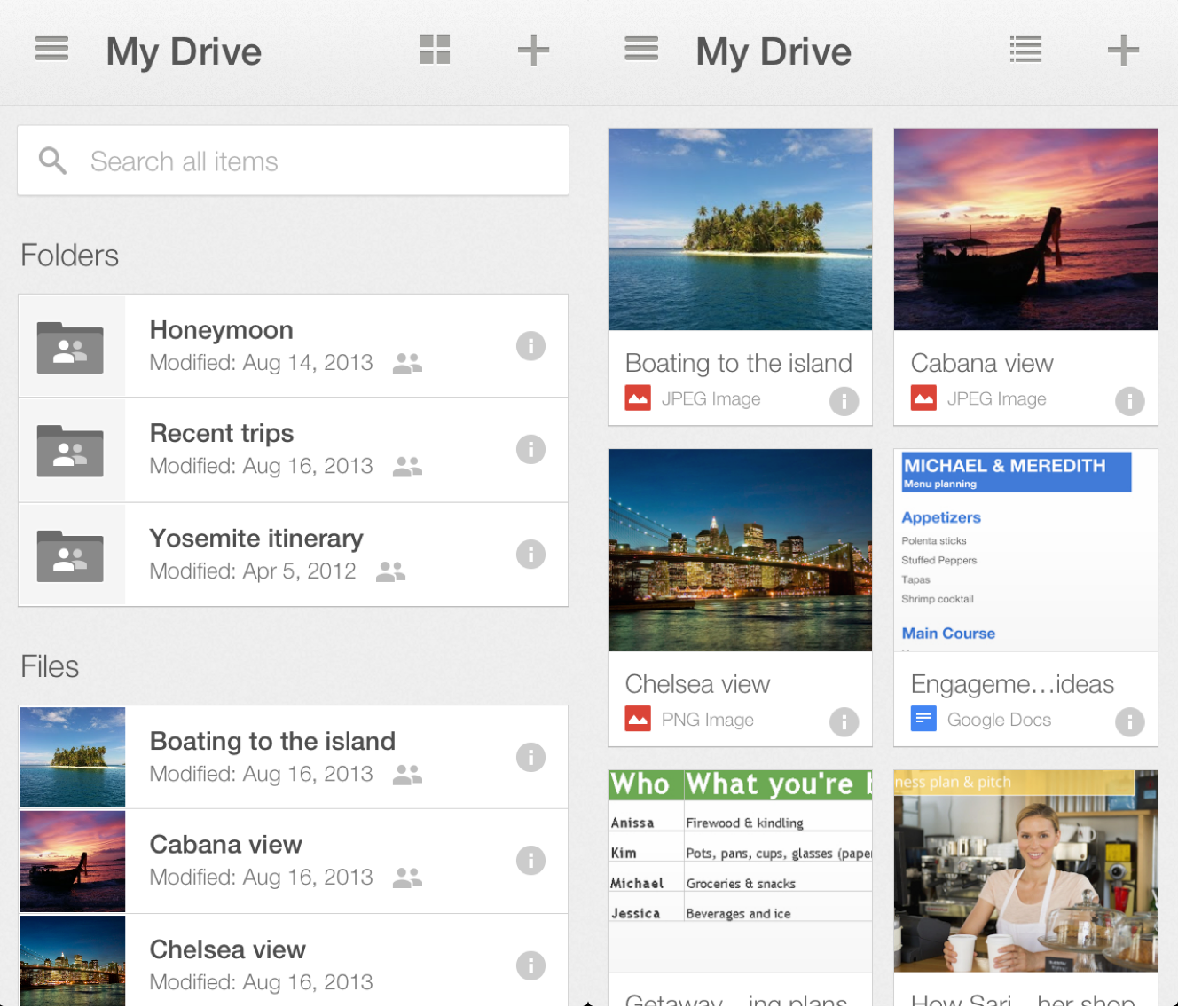
Google has redesigned its Google Drive application for iPad, and iPhone, and iPod touch to appear more in-line with the designs of the company’s other apps on iOS. The new design focuses on improved previewing of files, and it also includes improved management and sorting of files.

Also new is improved landscape editing support, copying links to files, and the overall sharing of files with other people.

The update also brings an enhanced focus on searching through files:

And last, we brought search to the forefront of the app so you can find the exact file you’re looking for, whether you’re on a small iPhone or a larger iPad. And remember, Drive search recognizes objects in your images and text in scanned documents. So the next time you’re looking for photos of that trip to the Statue of Liberty, just enter the phrase “Statue of Liberty” and your photos will appear – voilà!

The update is available for free on the App Store.


Expand
Expanding
Close

Site default logo image

PayPal for iPhone redesigned, adds ability to pay at local shops

http://www.youtube.com/watch?v=qRdRwyFceJY

Today, PayPal has announced a significant update to its iPhone app. Ahead of iOS 7, the application has been completely redesigned with a simpler, flatter user-interface.

Feature-wise, the app update focuses around mobile payments. With a new “Shop” tab, users of the new PayPal app can find restaurants, shops, and venues that support paying with PayPal. On top of that, some of these shops even support purchasing and paying for food or another item before walking into the store.

As explained to TechCrunch, some of these shops even support coupons. Ordering ahead includes the nice benefit of skipping the line. Another feature that goes nice with the “Shop” feature is the ability to pay a restaurant bill via the app.

A bill-me-later option has also been added. The new update for iPhone is expected to arrive on the App Store today.


Expand
Expanding
Close

Site default logo image

“2K Drive” iOS exclusive lands on the App Store for $6.99

[youtube=http://www.youtube.com/watch?v=nOeno8XsIY8]

2K has been teasing its upcoming “2K Drive” title developed by Lucid Games in recent weeks, and tonight the game is officially landing in the App Store. The iOS exclusive won’t be going the popular freemium model route, as 2K has informed us it will be selling the iPhone/iPad game for $6.99. The game features a number of real world vehicles, 100+ unique events, 25+ tracks, and a “RaceFace” feature that will let users put their own face on their character in the game. Licensed vehicles include Dodge, Fiat, Ford, GM, Icon, Local Motors, Mazda, McLaren, Nissan and So-Cal. The game’s official launch trailer is above and full details are in the press release below.

 2K Drive Now Available Worldwide for iPhone, iPad and iPod Touch

Immerse yourself in a new dynamic automotive experience for your mobile deviceJoin the conversation on Twitter using the hash tag #2KDrive

New York, NY – September 5, 2013 – 2K and Lucid Games, a boutique studio founded by creators of the Blur and Project Gotham Racing series, announced today that 2K Drive is now available for download from the App Store for iPhone, iPad and iPod touch for $6.99. 2K Drive is a cutting-edge racing simulator that brings the depth and richness of console-based driving mechanics to gamers on the go. Featuring high-quality licensed and original cars, iconic locations, precision controls, and an integrated feed for the latest automotive news, 2K Drive brings the fast-paced world of automotive racing culture right to gamers’ fingertips.

With a wide variety of racing modes for both single and multiplayer, 2K Drive promises a dynamic gaming experience for motorsports enthusiasts of all interest levels. Offering more than 100+ unique events on 25+ tracks in five environments, 2K Drive provides mobile gamers with the chance to get behind the wheel of more than 25 licensed cars, from manufacturers including Dodge, Fiat, Ford, GM, Icon, Local Motors, Mazda, McLaren, Nissan and So-Cal. And by using the “RaceFace” function, players can put their own face on their driver’s, as well as see their friends behind the wheels of their cars when playing in asynchronous multiplayer.

“2K Drive was designed to offer the most comprehensive driving simulation experience in today’s mobile market,” said Christoph Hartmann, president of 2K. “The game successfully combines the appeal of a premier console racing game with some of the leading automotive editorial content available on the Web, to create an all-inclusive entertainment hub for auto-enthusiasts.”

Through the game’s live newsfeed and multiplayer options, 2K Drive also offers players the opportunity to build a strong, authentic connection with car enthusiasts and automotive communities. Gamers will have the opportunity to view video and photo galleries, as well as read, “like” and “share” the latest news from popular automotive blogs and outlets, such as Car & Driver, Road & Track, Autoblog,Between The White Lines (BTWL), CaniBeat, Cars X Hype, Distraction Control, DUB Magazine, eGarage, Electric Cars Report, Fatlace,The Lowdown, Hemmings Motor News, Hooniverse, My Life @ Speed, and My Ride Is Me.

“Lucid has been thrilled to work with 2K in creating a rich and authentic mobile gaming experience that transcends traditional racing games on the platform,” added Pete Wallace, studio head at Lucid Games. “2K Drive immerses players in a vast expanse of dynamic content that allows each user to tailor their individual experience to better suit their own interest and level of engagement with the auto genre.”

2K Drive is available for $6.99 from the App Store on iPhone, iPad and iPod touch or at www.AppStore.com/2KDrive.

For the latest breaking news surrounding the game, look for updates on the 2K Drive Facebook and Twitter pages.

2K is a division of 2K, a publishing label of Take-Two Interactive Software, Inc. (NASDAQ: TTWO).

About 2K

Founded in 2005, 2K develops and publishes interactive entertainment globally for console systems, handheld gaming systems and personal computers, including smartphones and tablets, which are delivered through physical retail, digital download, online platforms and cloud streaming services. 2K publishes titles in today’s most popular gaming genres, including shooters, action, role-playing, strategy, sports, casual, and family entertainment. The 2K label has some of the most talented development studios in the world today, including Firaxis Games, Visual Concepts, Irrational Games, 2K Marin, 2K Australia, 2K Czech, Cat Daddy Games and 2K China. 2K’s stable of high quality titles includes the critically acclaimed BioShock®, Borderlands™ and XCOM® franchises, the beloved Sid Meier’sCivilization series, the popular WWE 2K franchise and NBA 2K, the #1 rated and #1 selling basketball franchise*. 2K is headquartered in Novato, California and is a wholly owned label of Take-Two Interactive Software, Inc. (NASDAQ: TTWO). For more information, please visit www.2K.com.

*According to 2008 – 2013 Metacritic.com and The NPD Group estimates of U.S. retail video game sales through July 2013.

Site default logo image

Google Authenticator for iPhone redesigned, supports iPhone 5 & Retina

Update: As was pointed out by 9to5Mac readers in the comments below, the update was zapping account data. Google says that it is aware of the issue and has removed the app from the App Store.

The Google Authenticator app for iPhone was updated this evening with an entirely new design. Version 2.0 introduces a host of visual changes, including the long-awaited addition of Retina graphics (which have been missing from the app since the iPhone 4 launched) and support for the iPhone 5. Even after the long wait for what seems like a relatively minor update, the app still does not natively support the iPad.

The app’s new look is based on the “cards” motif seen in other Google app releases recently. Most of the functionality seems unchanged.

Google Authenticator is Google’s two-factor authentication app, which is used similarly to the Find My iPhone app (or an SMS message) in Apple’s 2-step verification process.

The update is available for free now on the iOS App Store.

Site default logo image

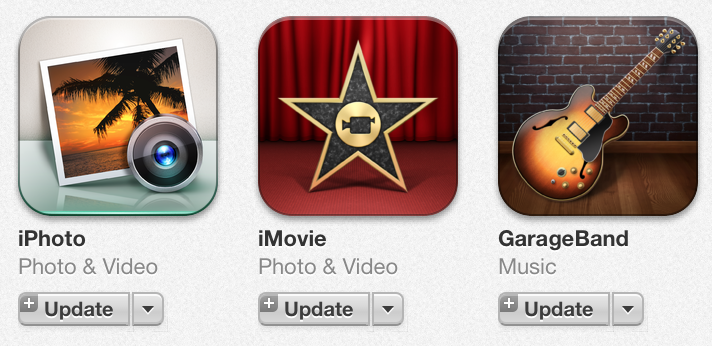
Apple updates iLife for iOS (iPhoto, iMovie, Garageband) with compatibility fixes

Screen Shot 2013-09-03 at 4.35.46 PM

Apple has updated its iLife suite of iOS apps, which includes iPhoto, iMovie and Garageband, with fixes related to compatibility and stability. With iOS 7’s launch right around the corner, perhaps these updates include improved compatibility with the revamped operating system. Apple has released compatibility updates for its App Store apps ahead of major iOS updates in the past. Thanks @preshit!


Expand
Expanding
Close

Site default logo image

Apple updates iTunes Festival app w/ video streaming ahead of event kickoff this weekend

Ahead of this Sunday’s kickoff of Apple’s iTunes Festival concerts, Apple has updated its iTunes Festival iOS app with the ability to conduct video streaming. It is plausible that this video streaming feature will allow customers who are not attending the concerts to watch the events live. The Festival is also available to watch via Apple TV and iTunes. Yesterday, Apple started offering free songs from the Festival via its Apple Store iOS app. 


Expand
Expanding
Close

Site default logo image

Apple offering free iTunes Festival songs in Apple Store app as part of sales push

Continuing with its new push to offer free content to users through its Apple Store app, Apple today started offering users a selection of free songs under a new banner promoting the upcoming iTunes Festival. The new section promoting the iTunes Festival is currently offering six free songs with the offer set to expire on October 31. You can access the free content by navigating to a specific store location within the app, but the free content is currently only available to those in the US.

The song downloads follow Apple offering free apps such as Color Zen and free iBook titles through the Apple Store iOS app as part of a new sales push that we reported first back in July. The new initiative offers free content downloads through the Apple Store app as a way to boost content sales and awareness about the company’s App Stores, iTunes content, and iBooks. Apple Store employees are also being encouraged to install the Apple Store app on iOS devices sold in the store.

Apple iTunes Festival is scheduled to take place during the month of September in London, and the events will be streamed to iOS devices, iTunes, and even an app on the Apple TV.

Review: DeskConnect beats Apple to AirDrop-like file sharing between iOS and Mac

Site default logo image

From time to time, I find myself needing to send some files from my Mac to my iPhone, or from my phone to my computer. This is especially true with things like screenshots for reviews. In the past I have used Photo Streams or email to get the images from my phone to my Mac, but both of those are a little more annoying than they need to be.

Using a Photo Stream requires me to open iPhoto on my Mac, which means it will probably take forever just to grab a few images. For email I have to select all the images from my Camera Roll and either mail them five-at-a-time from the photos app, or copy them, switch to Mail, paste them into a message (which somehow bypasses the absurd five-image limit on in-line sharing in the Photos app) and then address the message to myself and wait for it to send, then wait for it to arrive on my computer.

There are also a ton of apps that allow you to connect to your phone through a web browser to transfer files, but those require the app to be running on your phone, and for the app to be in a specific mode to receive the files. It’s not seamless and it’s not as effective as it could be.

This is not a good workflow. That’s where DeskConnect comes in. DeskConnect is an pair of apps for iOS and Mac that avoids all of the unpleasantness of connecting the two devices and allows you to seamlessly send files from one to the other.


Expand
Expanding
Close