BlackBerry revealed via the official BBM Twitter account that in the first eight hours since launching BBM for iPhone and Android, the app has been downloaded over by over 5 million customers across both platforms. The app is also now the #1 free app on the iTunes App Store.
That number could actually be much higher, as the 5 million applies only to the number of users whose accounts have been activated for use. BlackBerry did not specify how many more users were still waiting to be activated, if any.
Facebook for iOS received an update today bringing the ability to edit posts and comments directly from your iPhone, iPad, or iPod touch. Previously, this feature was only available from the desktop version of the website. The update also brings another desktop feature: the ability to add photos to comments. All in all, version 6.6 appears to bring the app closer to feature parity with the desktop, but a few of these features like status and comment editing appear to be absent from the iPad app for now. Read the full change log and see examples below: Expand Expanding Close
Update: Several readers report that games were previously held up by a dispute with the Films and Publications Board responsible for approving movies, games, and other content before going on sale in the country. No word on the resolution with Apple, but it appears they are now allowing Apple to sell games to iOS users in South Africa.
Apple has flicked the switch on the ability for developers to offer their games in the iTunes App Store in South Africa. It is unclear why Games have been unavailable in the country until now. A look at the South Africa App Store shows that the Games category is now active. Apple informed developers of the new ability to sell games, and the company tells the creators that games will automatically appear in the South African store.
We’re pleased to announce that games are now available on the South African App Store. All apps in the Games category that are cleared for sale in South Africa will be automatically available on the South African App Store. No additional action is required on your part. If you need to make changes to the territories where your apps are available, visit the Rights and Pricing section of the Manage Your Apps module on iTunes Connect.
Apple is celebrating the addition with a large Games banner at the top of the App Store in South Africa (shown above).
Ahead of its October 22nd event where the company is expected to unveil new iPads alongside other product announcements, Apple today asked developers to begin submitting apps optimized for OS X Mavericks.
Apple seeded the final Golden Master release of OS X Mavericks to developers along with the Xcode 5.0.1 GM seed earlier this month and today urged developers to download the latest builds to test and submit OS X Mavericks apps to the Mac App Store. The move is likely in preparation of public release and pricing details expected to be announced during Apple’s event on the 22nd.
Submit your OS X Mavericks apps today.
Make sure your app takes advantage of the great new features in OS X Mavericks when the world’s most advanced desktop operating system becomes available to millions of customers later this fall. Download OS X Mavericks GM seed and Xcode 5.0.1 GM seed, now available on the Mac Dev Center. Build your apps with these latest seeds, then test and submit them to the Mac App Store.
Apple first showed off and announced OS X Mavericks earlier this year during its WWDC developer conference, but next week’s event will likely be the perfect venue to announce official pricing and release date info for the public.
A new app called Seene popped up on the App Store last night that lets you create interactive 3D photos. If you’ve used Vine before, you’re already familiar with most of Seene’s interface. The apps are laid out mostly the same, even down to the location of the sharing options during seene creation, but the process for taking photos is a little more complicated. The resulting effect is worth a little extra effort though.
Ever since the iPhone 5c launched along with a specially-designed case, people have compared the case’s design to a the game Connect Four. Now a new app has arrived on the App Store that takes that observation and turns it into a real game. The app is called Flipcase, and the idea is pretty simple: you put your iPhone 5c case on backwards, so that the holes on the back are on top of the screen, and then take turns tapping the columns to try to connect four colored dots.
The app’s description says it’s compatible with other iPhone models, including the iPhone 5 and 5s, though it’s designed specifically with the 5c in mind. Flipcase is available for free on the App Store.
According to typically-reliable analyst Ming-Chi Kuo of KGI Securities, Apple has a slew of new products in the works for 2014. The analyst has summarized his expectations for these new products in a new research note, and has also reaffirmed some of his previous claims for products in Apple’s pipeline for the rest of Fall 2013…
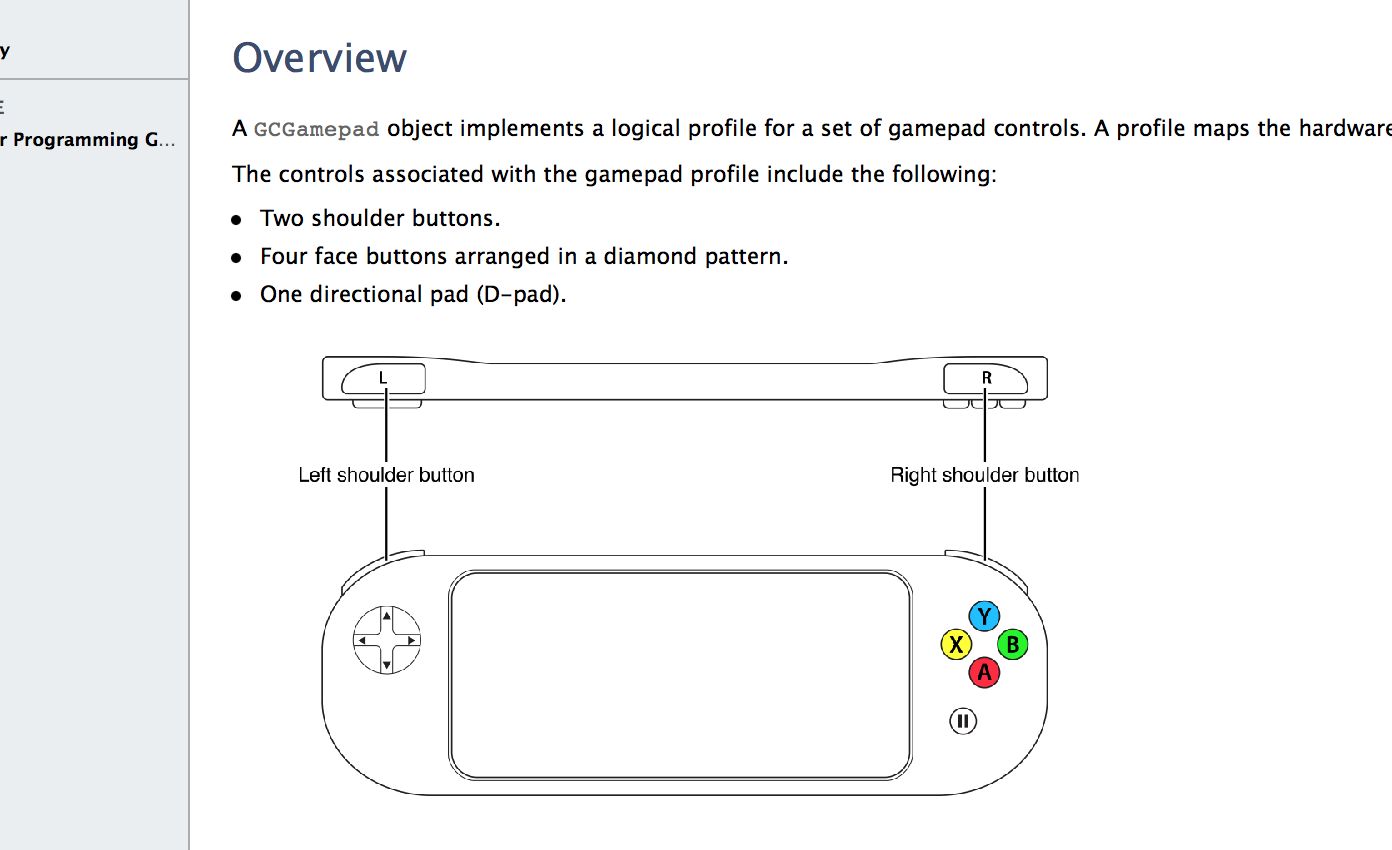
Alongside iOS 7 came support for a new third-party accessory: game controllers. To use this feature, you need to both own an Apple-approved gamepad accessory and a compatible game from the App Store. We have seen leaks of MFI hardware from Logitech and other manufacturers, but nothing has yet hit the market.
As such, uptake for the new Game Controller APIs by developers has been slow as customers cannot yet take advantage of the feature. Today, the Unity framework announced on its blog that the newest version of its game engine surfaces inputs from these controllers natively in the SDK. Basically, Unity is offering a wrapper between Apple’s Objective-C API and Unity’s own game logic code.
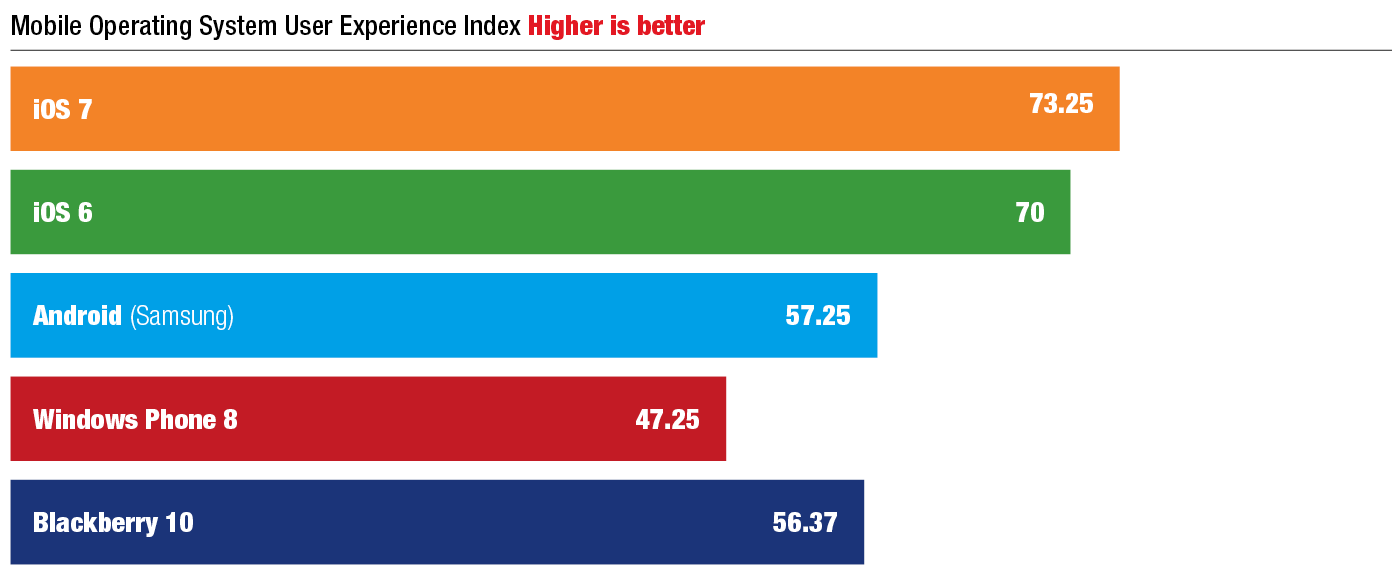
iOS 7 has taken top billing in Pfeiffer Consulting’s annual Mobile OS User Experience Benchmarks, scoring just over 73 percent against 57 percent for Android and 47 percent for Windows Phone.
The study attempts to calculate an objective rating for the usability of a mobile OS by a typical, non-technical user by measuring four elements:
Alongside the launch of the 5s and 5c, Apple has adjusted its marketing guidelines for App Store developers in response to the wider color palette of iPhones now on sale. Apple now officially allows developers to include iPhone models other than black in their marketing.
Up to now, developers were only supposed to use black iPhones although it is well known that Apple never really enforced these requirements. As such, many developers have used white iPhones in PR images over the years regardless of the regulations. Now though. developers are free to use gold or white colored devices in their marketing at will.
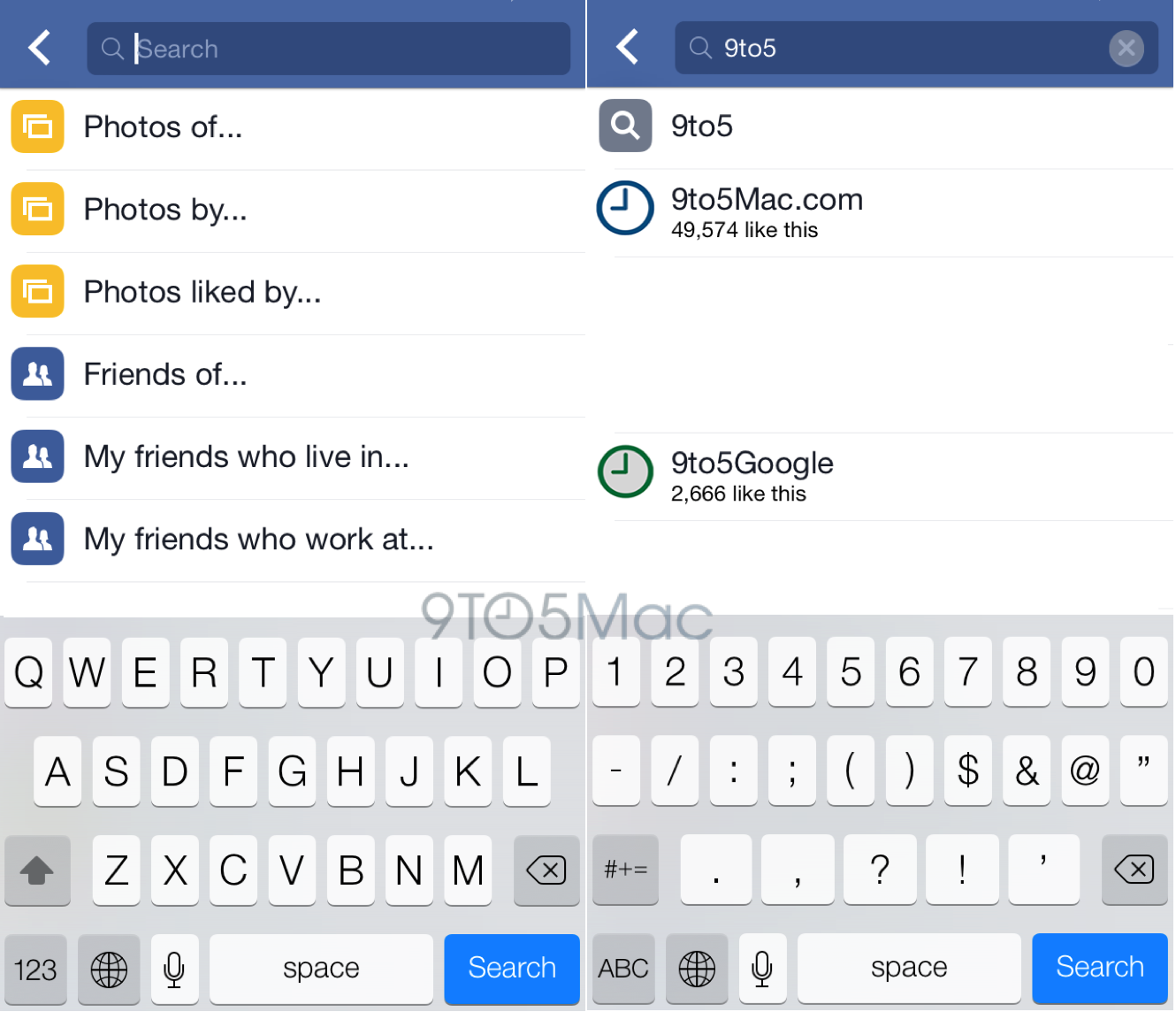
Screenshots of upcoming Facebook Graph Search for iPhone update
Facebook is preparing a pair of major updates for its most popular iPhone applications, according to a source familiar with the apps. Facebook is testing an updated version of its main iPhone, iPad, and iPod touch client that integrates the social network’s powerful Graph Search tool. Graph Search is a feature that allows Facebook users to locate fellow users that have similar interests. For example, a Graph Search user can search for all friends who “Like” a certain Facebook page, musician, or movie. The upcoming app update incorporates Graph Search into the Facebook app’s main search bar.
In addition to the aforementioned update to the main Facebook for iOS application, Facebook is preparing a redesign of its Messenger app. Facebook is said to be internally testing two new versions of Messenger. The first version is said to look largely similar to the Messages application bundled into iOS. That version includes green interface elements. The second version in testing, which the source says is more likely to ship to end-users, is heavy on white space and very fitting for iOS 7’s design. It is not filled with blue interface elements like the new Facebook app. The new app has tabs for active/recent chats, contacts, and settings across the bottom…
Don’t count BlackBerry out just yet. In spite of their buyoutaddition to their buyout offer from Fairfax Capital for $4.7 billion late last month, the telecommunications company today announced plans at the Gartner Symposium in Orlando, Florida, to launch a new cloud-based system for managing users and applications across BlackBerry, Android, and iOS.
The cloud service ambitiously plans to address the ‘bring your own device’ movement while addressing privacy and tech support at ‘less than a cup of coffee a month,’ according to BlackBerry.
Simple and fast deployment. No server hardware or software to install, just register and go.
Administrators can easily manage and secure smartphones and tablets. The simple Web-based admin console will provide easy activation and deployment of BlackBerry, iOS and Android™ smartphones, app management, security policy configuration and compliance monitoring.
Administrators can secure, deploy and manage apps. Administrators will be able to build a catalog of public apps from the App StoreSM, Google Play and the BlackBerry World storefront, and then view app distribution and usage for all users and devices.
End-users can manage their own devices through the self-service console. End-users will be able to easily perform common management tasks such as setting up or changing device passwords and remote wipe and lock without relying on an administrator, giving them independence and saving on helpdesk calls.
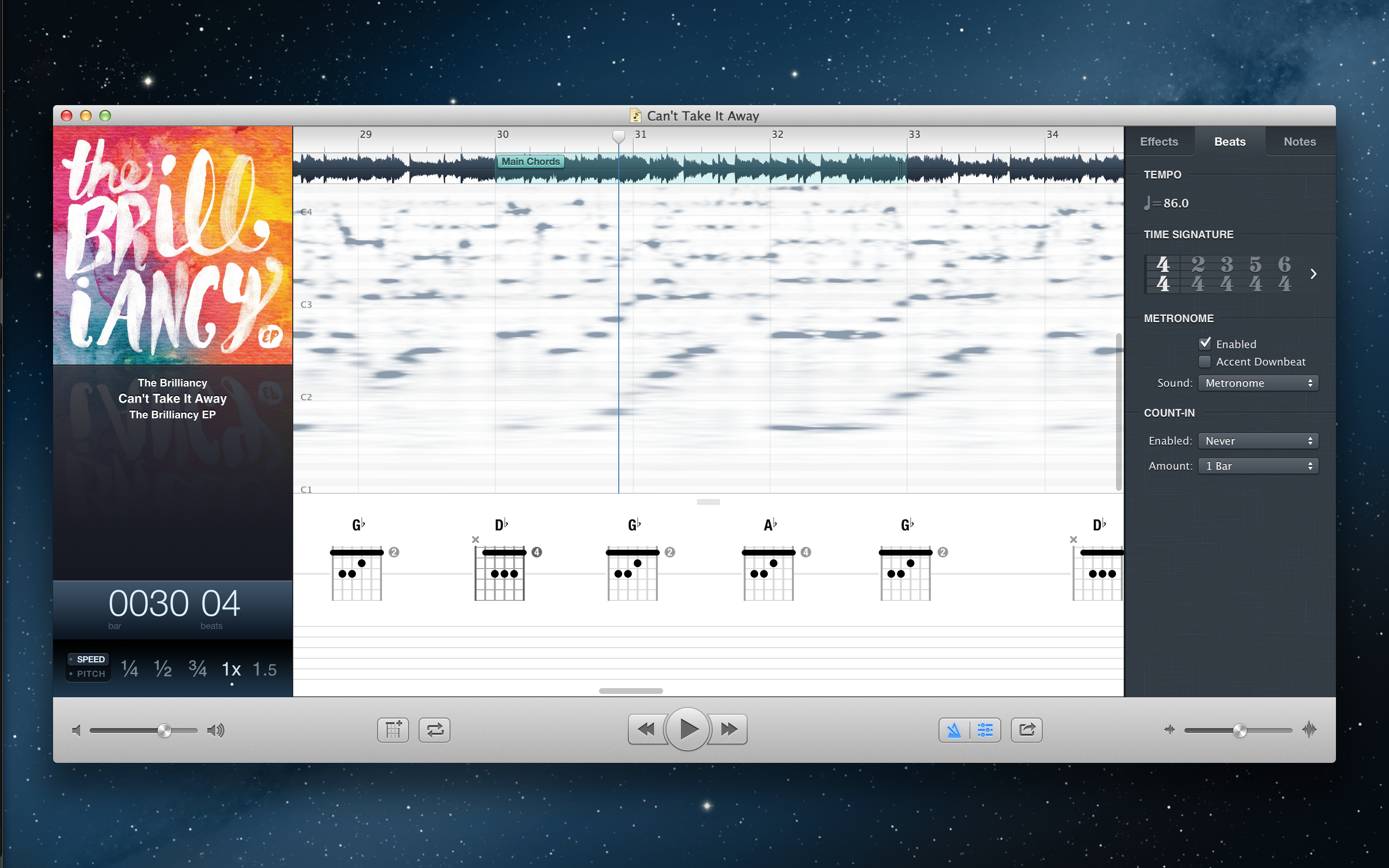
As a sequel to their popular Capo 2 music learning software, SuperMegaUltraGroovy today has launched Capo 3 for Mac, a new version of Capo with several feature improvements and enhancements. Let’s take a look at what’s changed.
The official NFL Mobile app has been updated today to version 8.6 and with it comes the ability to access live content from the NFL.com/Live website. The feature, which is only available to premium subscribers, will provide the live content previously only streamed on the NFL website in addition to the LIVE NFL games on Thursday, Sunday and Monday nights for both preseason and regular season games offered as Premium features.
Premium features of the app are currently only available to Verizon customers and also offer live streams of NFL RedZone on Sunday afternoons and NFL Network 24/7. Unfortunately, it looks like the app still doesn’t include support for AirPlay.
– Added Fantasy Lineup Reminder alert
– Access to NFL.com/Live content for premium subscribers
– Fixed Fantasy login retention bug
– Performance enhancements and general bug fixes
Since first announcing its Google Play Music ‘All Access’ streaming service earlier this year on Android, Google has been delaying the release of an official Google Play Music app for iOS for unknown reasons. Android chief Sundar Pichai originally said the app would be out in “the next few weeks” in May, but four months later we’ve yet to get an iOS app or access to the $9.99 month streaming service on iOS. Today, Engadget reports that Google is continuing to test the app internally and will launch it later this month:
Sources aware of Google’s plans have let slip to Engadget that not only is the company currently testing a native Google Music iOS app internally, but that it’ll launch later this month. We’re told that while employees have been invited to test the app, Google still needs to fix a few bugs before it’s ready for release… The company had previously closed the door on iOS users because Flash was needed to enforce DRM restrictions set by music labels. Now, Google appears to have overcome that issue and is nearly ready to launch.
Apple has hired Toronto Blue Jays assistant GM Jay Sartori to manage a sports section of the App Store, according to a number of reports dating back three days (via MG Siegler). Sartori a numbers guy who can effortlessly crunch statistics according to a bio from 2011, but he also has some experience in software development. He previously created some stats software for the MLB commissioner and has a background in finance and management information systems…
Google is celebrating its 15 birthday and today announced a number of improvements to search on mobile devices including an incoming Google Search app update for iPhone and iPad that will enable notifications for reminders & more across platforms:
With this update, you can get notifications across your devices. So if you tell your Nexus 7, “OK Google. Remind me to buy olive oil at Safeway,” when you walk into the store with your iPhone, you’ll get a reminder. We’ll also show you Google Now notifications so you’re not late to your cooking class.
You’ll start noticing many new improvements to search on Android and iOS today, but Google says the cross platform notifications will arrive within a couple weeks through an update to the Google Search iPhone and iPad app.
More on all of Google’s new features for search on mobile on 9to5Google.
Version 4.2 of the app will also include larger photos and videos that bring an increased resolution and allows content to stretch right to either side of your display while browsing your feed. Instagram noted a few other design tweaks on its blog:
In grid view, we streamlined things so that your content will also appear larger. We led our redesign with a focus on clarity to keep the feel of Instagram clean, simple and grounded in the photos and videos you discover and share.
The updated app also includes circular profile pictures, but notably does not yet directly support the slow-mo video feature that Apple introduced with the iOS 7 camera on the iPhone 5s.
Yesterday a story popped up Giant Bomb claiming that EA executive Frank Gibeau said Apple had paid the company a “truckload of money” to launch PopCap’s much anticipated Plants vs Zombies 2 title as an iOS exclusive. Apple quickly denied the comments in a brief statement following the story and said that no money was exchanged with the publisher. As if that wasn’t enough, EA representatives today issued an official statement on the matter saying that the comment was taken out of context (via PocketGamer):
“A comment from an internal meeting taken out of context has created an unfortunate misunderstanding,” says EA’s statement.
“Reports of a paid relationship between Apple and EA are factually inaccurate, and we apologise for any confusion.”
Gibeau’s comments were clearly taken out of context, and we tend to believe that Apple didn’t offer up any cash in exchange for Plants vs Zombies 2 landing on iOS before Android. But what did he really mean with his “truckload of money” comment? Perhaps EA knew it would receive favorable placement in the App Store as a much hyped iOS exclusive?
Last month a report from Fiksu noted changes in how Apple ranks apps and seems to be incorporating user ratings and other new metrics, but this is the first we’ve heard of Apple possibly working with developers to have apps launch exclusively on iOS.
Last time Apple checked in during its Q3 2013 earnings report it announced the App Store was home to 900,000 apps and over 375K designed specifically for iPad. Today, the App Store has now reached 950,000 apps and quickly approaches 1 million with Apple accepting 50K new apps in the last two months alone. The news comes from app discovery service Appsfire, which regularly tracks new and updated apps added to the App Store.
Apple often celebrates milestones for its App Store with some type of giveaway or contest for users. Earlier this year it made a number of premium apps available for free to celebrate the 5th anniversary of the App Store and also gave away a $10,000 App Store gift card to announce the 50 billionth app download. We wouldn’t be surprised to see Apple do something similar for the 1 millionth app on the App Store.
Apple has likely seen an increase in new app submissions in recent weeks, as a long list of developers update and release new apps to accompany last week’s launch of iOS 7 and the new iPhones. At the current rate, it will take Apple just another couple of months to hit the 1 million mark. Expand Expanding Close
iTunes gift cards are a great gift for iOS Device users. They can be used to purchase content from the iTunes Store, App Store, and iBookstore. However, entering in the string of characters to redeem the gift card balance has typically been a pain with the touch keyboards on iPads, iPhone, and iPod touches. Like iTunes 11 on the Mac, iOS 7 moves to solve this problem. You can now use your device’s camera to scan in the code.
Go to the main/featured page in whichever store you choose and to get to the redemption screen, scroll all the way down, and press on redeem:
In earlier versions of iOS, the system would notify users of available App Store updates with a badge on the icon (seen above).
You had to open up the App Store, press the Update button, then press Update All. It was rather annoying to keep up with all the apps that needed updating. Sometimes by the time you finished updating, more apps would need updating.
Now with iOS 7, the apps will now automatically update. To make sure that the apps are set to automatically update, go into Settings and scroll until you see iTunes and App Store.
Google has updated its Google Translate app for iPhone and iPad today with a few new features that were previously only available to Android users. The app also receives a brand new UI that makes it fit more in with iOS 7 and the rest of Google’s apps.
Version 2.0.0 of Google Translate includes support for handwriting input, allowing users to write words using their finger for 49 different languages. The app also adds translations for seven additional languages, including: Bosnian, Cebuano, Hmong, Javanese, Khmer, Lao, Marathi.
• Translation is now available for 7 new languages: Bosnian, Cebuano, Hmong, Javanese, Khmer, Lao, Marathi
• A sleek and modern user interface
• Handwriting input – write words with your finger to enter text for 49 languages
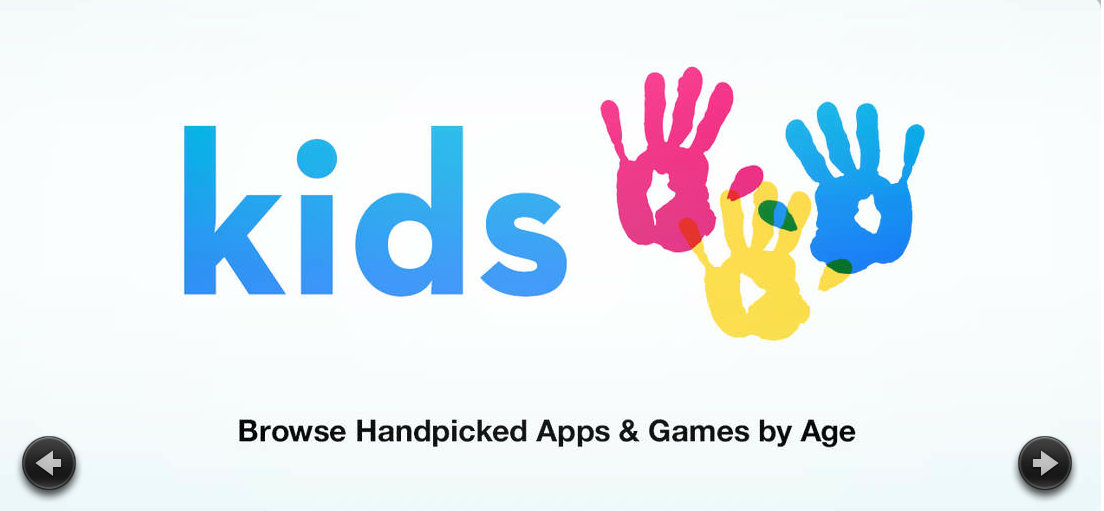
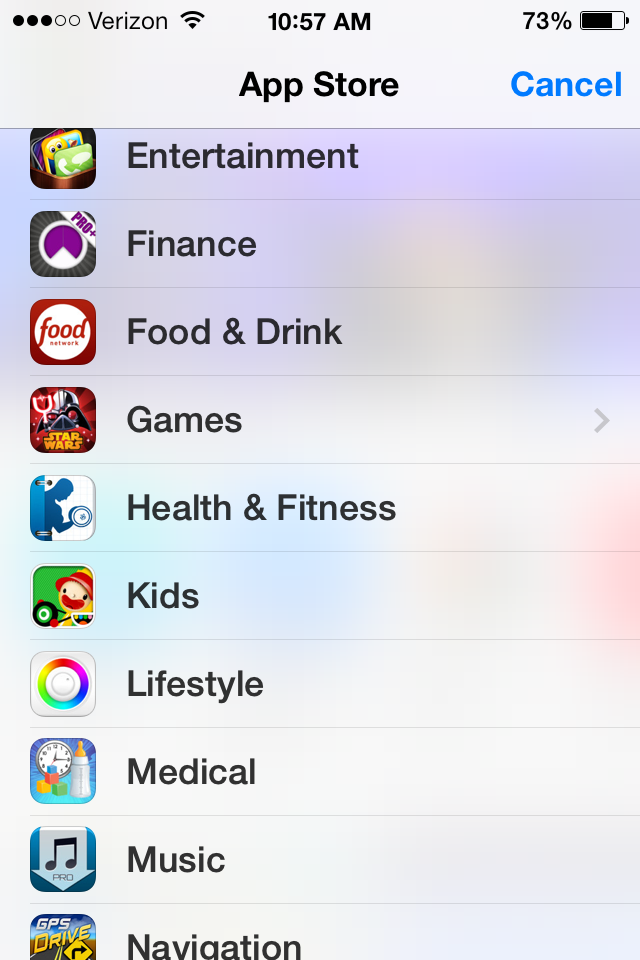
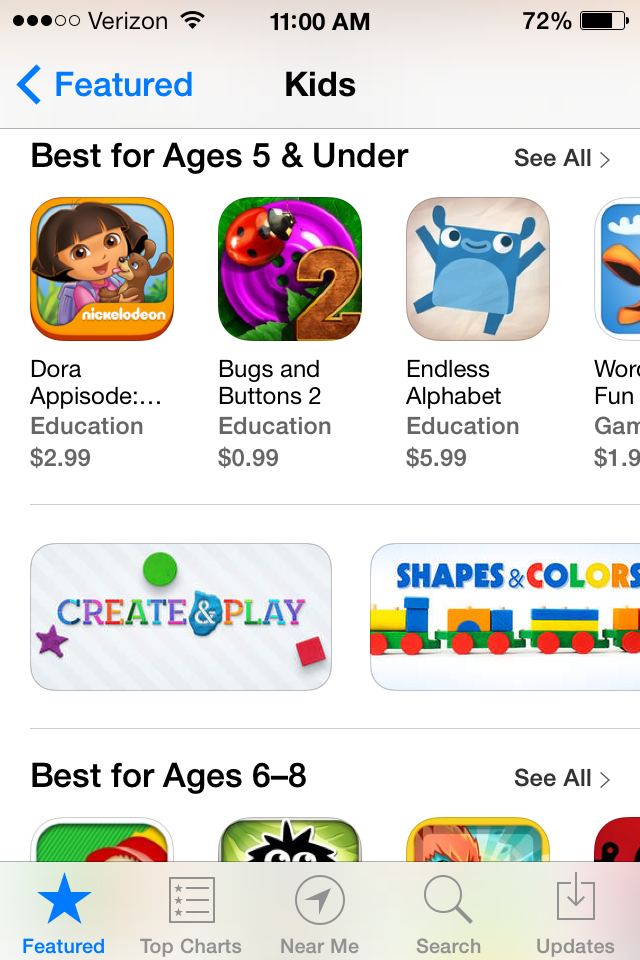
In iOS 7, Apple has made it easier for parents to find great age-appropriate, kid-friendly educational apps by gathering them all in one location. It’s currently being featured on the Featured page. Also you can find it by pressing on the blue word Categories in the upper left hand corner of the screen and then scroll down until you see Kids or click here. (ages 5 & under, ages 6-8 and ages 9-11).
By pressing on the Kids category the apps are split up based off the kids age. They have sections for ages 5 & under, ages 6-8 and ages 9-11.
There are even categories that cover key learning concepts like creating, shapes, colors, discovering the world, reading, music, and interactive books. To see them all, just swipe right to left on the boxes to view them all.
So parents, the next time you give your device to your children, you can now have them play with apps that are truly developed with them in mind and that are educational!