Latest

Comedy Central debuts new iPhone & iPad app featuring full episodes for free

Site default logo image

Rather than having a dozen, show-specific iOS apps to follow your favorite Comedy Central shows, the network has finally bundled the content into a single app featuring full episodes (listen up, cable cutters) for free. Much like Hulu and on-demand services through cable providers, the Comedy Central app will feature the latest episode of several shows from the network the day after it airs… no cable subscription required, no joke.

The list of free shows includes The Daily Show with Jon Stewart, The Colbert Report, South Park, @midnight, and original digital shorts. For cable subscribers, there’s even more content available including full seasons of new shows like Tosh.0 and archived seasons of shows like Chappelle’s Show and RENO 911.
Expand
Expanding
Close
Site default logo image

Rdio, Crackle, & Vudu updated with Chromecast streaming support

chromecast

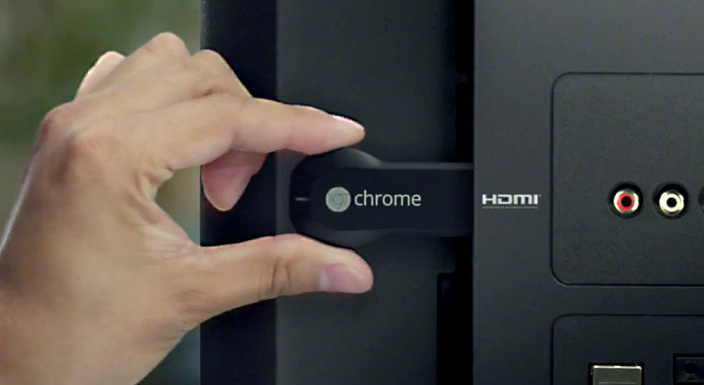
Adding to the catalog of Chromecast-supported content, Rdio and Crackle are both adding the ability to play more content from your smartphone, tablet, or browser to your TV today.

Crackle has refreshed its Android and iOS apps with support for Chromecast streaming. The Sony-backed content provider serves up a number of movies and TV shows for free including comedian Jerry Seinfield’s “Comedians in Cars Getting Coffee” original.

Video streaming service Vudu has also added Chromecast support in the latest versions of its Android and iOS apps. The Walmart-owned service includes HD movies and TV shows with no subscription.
Expand
Expanding
Close

MLB At Bat app updated for 2014 season w/ new expanded instant replay feature

Site default logo image

MLB-At-Bat-replay

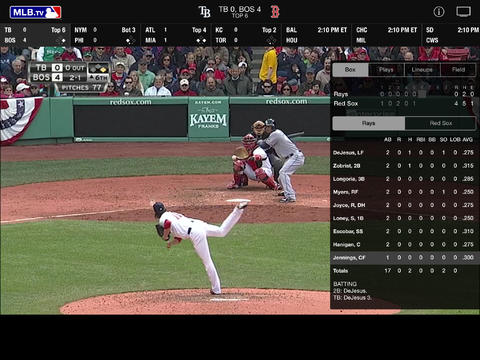
This season will be the first that Major League Baseball uses a new expanded instant replay system that it first announced back in January. Now, the MLB At Bat app for iOS devices has been updated with support for the 2014 season and the new replay system. That means that users of the app will be able to view “every decisive instant replay video clip and review explanation,” the same footage the umpires review, through the app’s Gameday feature. 

A little more on the new replay system from the MLB’s announcement:
Expand
Expanding
Close

Review: Dragon Dictate 4.0 for Mac – The best speech recognition app gets even better

Site default logo image

Dragon-Dictate-4-01

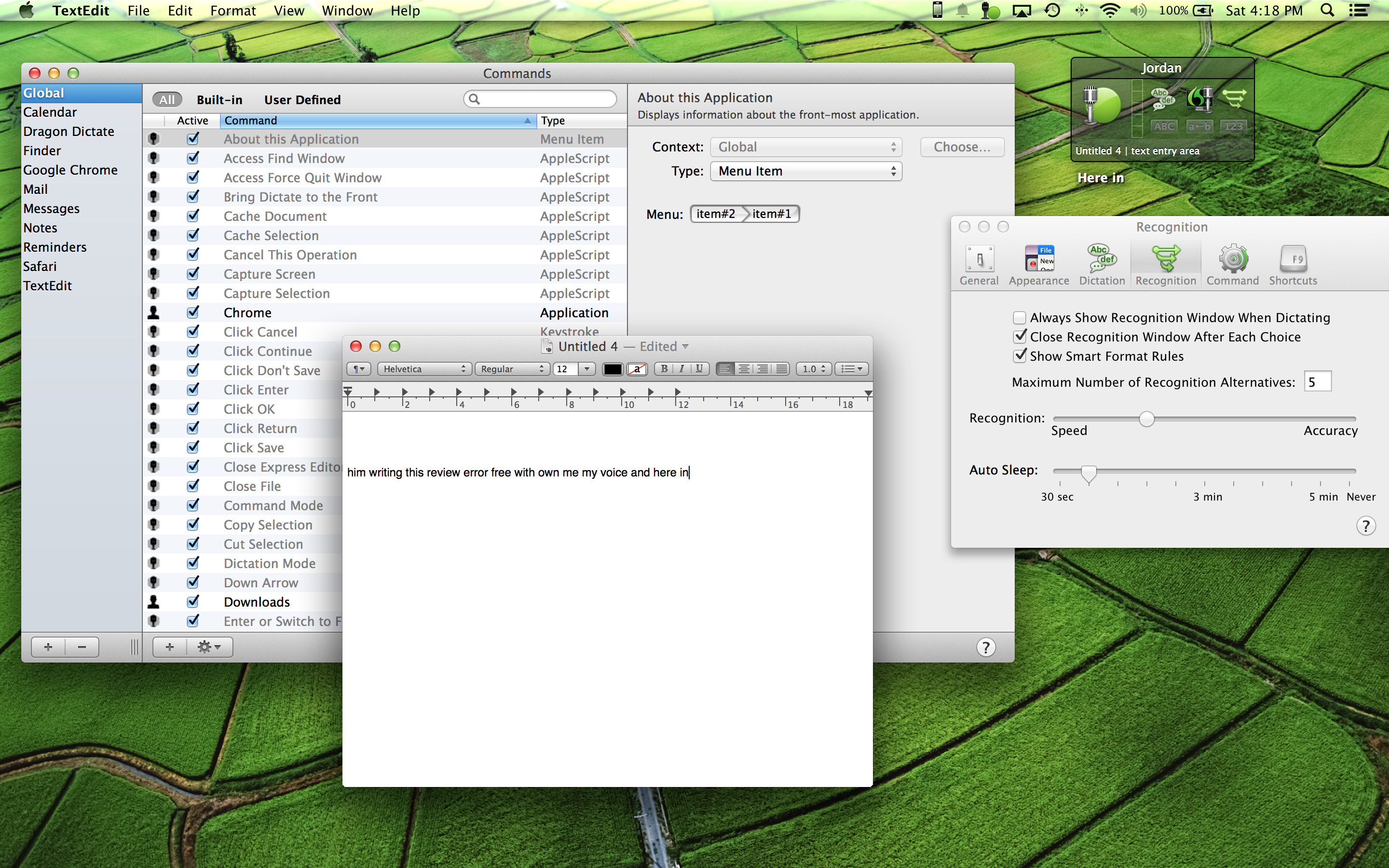
Using our voice to control computers has never really taken off. For many of us, using voice recognition technology wasn’t even a consideration until features like dictation and Siri arrived on our iPhones and iPads. There’s good reason too: the voice recognition features built into our devices have always had the reputation of being half-baked. They simply aren’t accurate and consistent enough to replace our tried and trusted mouse and keyboard or touchscreen. While half decent dictation features come with every Mac (and are powered by Nuance’s technology), the voice recognition features you get with latest version of Nuance’s Dragon Dictate for Mac go well beyond simply dictating speech to text. 
Expand
Expanding
Close

BeHere app uses iBeacons to automatically take attendance as students enter the classroom

Site default logo image

BeHere-app

A new app called BeHere aimed at teachers uses Apple’s new Bluetooth LE iBeacon technology to recognize students and automatically take attendance as they enter a classroom.

With the BeHere app installed, the teacher’s iPad acts as an iBeacon and students entering the classroom with an iPhone, iPad, or iPod touch will automatically appear in the app with a profile picture and name. Students will have to install the app on their device too, but thanks to recent iBeacon improvements in iOS 7.1, they won’t have to even open the app or take the device out of their pocket to be recognized as they walk in. 
Expand
Expanding
Close

Microsoft to hand out free Office 365 subscriptions to iPad owners in retail stores tomorrow

Site default logo image


Screen Shot 2014-03-27 at 9.51.21 PM

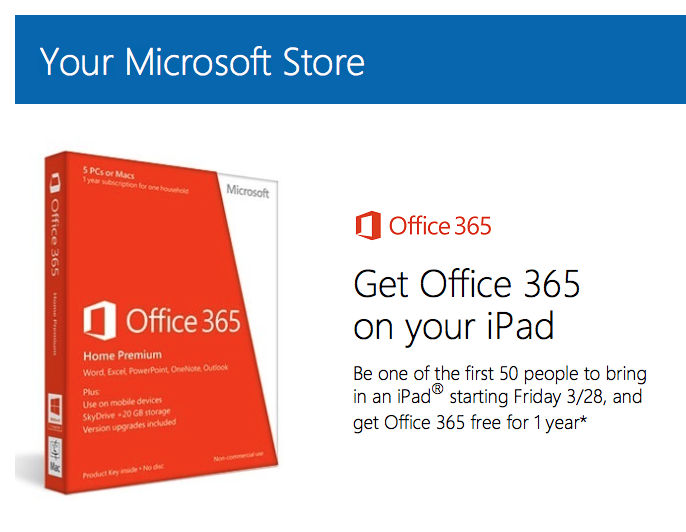
Microsoft finally took the wraps off of its long-awaited Office for iPad suite this morning, only to reveal that most of its functions require a $99 subscription to the Office 365 service. Even though you can get a discounted subscription through Amazon, $70 may seem pretty steep. Rest assured, Microsoft is planning to offer free one-year subscriptions to the service tomorrow.

All you have to do to get your free subscription is show up at one of Microsoft’s retail stores with your iPad in hand. The first 50 people to do so will get the sub completely free of charge. Microsoft announced the promotion in a tweet earlier today:
Expand
Expanding
Close

Site default logo image

Facebook Messenger updated to version 4.0 with groups and message forwarding

Facebook has updated its Messenger app for iPhone to version 4.0. The new update introduces the ability to create and manage groups of contacts within the app. You can find all of your groups in a new tab and quickly select one to send a message to everyone at once.

Also new in this update is the ability to select a message to forward to a new recipient, much like you can do with an iMessage in the native Messages application. The usual general bug fixes and improvements round out the 4.0 update.

You can grab the app for free on the iPhone App Store. The full change log is below:

What’s New in Version 4.0
Groups: Now you can create groups for the people you message most. Name them, set group photos and keep them all in one place

Forwarding: Want to send a message or photo to someone who isn’t in the conversation? Just tap to forward it

Plus, continued improvements to make the app faster and more reliable

Site default logo image

Yes, Apple is taking 30% of every Office 365 subscription purchased through Office for iPad

Office-iPad-PP-03

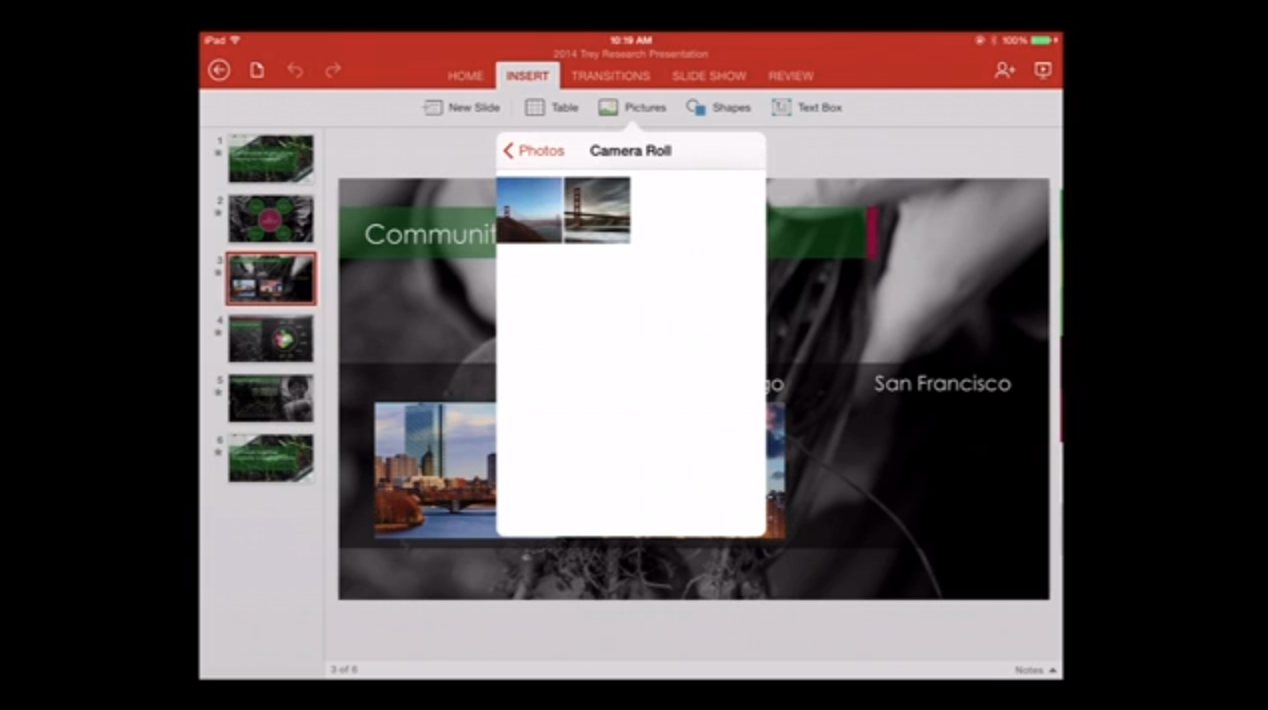
When Microsoft announced its Office for iPad apps earlier today, it confirmed that the software will require a subscription to Microsoft’s $99/year Office 365 service for most functions. If you don’t have one already, you can get a subscription directly through the Office apps for the regular price of $99.

As you may recall, Apple and Microsoft went toe-to-toe last April on the issue of whether or not Apple should get a 30% cut for SkyDrive storage space purchased through the SkyDrive app. Apple has always maintained the position that any goods or services sold through iOS apps should use the in-app purchase system created by Apple—allowing the Cupertino company to take its regular 30% cut of the price.

In the case of the SkyDrive dispute, Apple’s decision remained unchanged, which prompted Microsoft to simply remove the option to purchase additional storage space through the SkyDrive app altogether. In the case of today’s Office launch, however, the two companies seem to be on much better terms.

Apple has confirmed to Re/code that the company is taking its full 30% share of all Office 365 purchases made through the iPad software. This apparent agreement, along with friendly tweets between the CEOs of both companies, could be the first signs of a much less combative Microsoft under the leadership of new CEO Satya Nadella, who replaced Steve Ballmer in the role this year.

Perhaps in the future we’ll see even more collaboration between the two companies.

Site default logo image

Want the new Microsoft Office apps for iPad? Get 33% off 1yr Office 365 Home Premium subscriptions: $67

In case you missed it, Microsoft finally released its suite of Office apps for iPad today with the introduction of standalone Word, PowerPoint, & Excel apps in the App Store. The Office app for iPhone remains the same apart from dropping the requirement of a 365 subscription (it’s now free for all!), but the new iPad versions of the Office apps WILL require an Office 365 subscription to create or edit documents. So, if you plan on using the Office apps on your iPad in the future, you’ll want to take advantage of a big discount on 365 subscriptions currently on Amazon.

Normally $99/year or $10/month, you can grab a 1 year Office 365 Home Premium subscription for $67.15 with free shipping. That’s a savings of $32.84 (33%) and gets to an access code for 5 Macs or PCs with access to all Office 365 app and services. That includes 20GB OneDrive storage for each for up to 4 household member, 60 minutes of Skype calls per month and all the apps: Word, Excel, PowerPoint, Outlook, OneNote, Publisher, and Access.

1 year Office 365 Home Premium subscription for $67.15

WordPowerPoint, and Excel are now available on the App Store.
Expand
Expanding
Close

Site default logo image

Office Mobile for iPhone goes free for all users

Office-Mobile-iPhoneWhile Microsoft’s biggest news of the day might have been the debut of its Office productivity app suite for iPad, there was also news on the iPhone side as well.
Microsoft didn’t make dedicated apps for Word, PowerPoint, and Excel, but the company did make Office Mobile for iPhone free for all users. Previously, Office Mobile for iPhone required an active subscription to Office 365.

Just like Office Mobile for Windows Phone, we are making Office Mobile for iPhone and Android phones free for everyone. With Office Mobile, you have the ability to view and edit your Office content on the go. Office Mobile is available in the App Store and Google Play.

Now that Microsoft has moved that requirement to its dedicated iPad apps, Android and iPhone users can now enjoy Office Mobile’s full feature set without any limitations and not subscribe to the membership.

Office Mobile for iPhone is available for free on the App Store.

PencilCase reimagines HyperCard to let non-developers create native iOS apps

Site default logo image

[youtube=https://www.youtube.com/watch?v=ViKORN8URAQ]

Robots & Pencils, a company that has up until now been making mobile apps for others, is launching a new platform for Mac that it says reimagines Apple’s HyperCard and allows non-developers to create & publish native iOS apps. Dubbed ‘PencilCase,’ users can create native apps with a drag and drop interface for adding UI elements, 3D models, programmed animations, and physics with no code required. There’s also a full built-in Javascript engine for those that might want to add some code.

We’ve seen a few similar build-your-own app platforms aimed at non-developers, but Robots & Pencils CEO Michael Sikorsky told us a little bit about why PencilCase is different:
Expand
Expanding
Close

UpTo calendar app relaunches with a renewed, balanced focus on what matters

Site default logo image

[youtube https://www.youtube.com/watch?v=HXELeBT8L2o]

When UpTo originally launched, it focused on being what it described as “half-social, half-calendar.” Unfortunately, that didn’t work out so well as the social side and the calendar side fought for dominance, resulting in an app that felt like it didn’t know what it wanted to be when it grew up.

Today the company behind UpTo is re-launching the app with a new design and a new focus: rather than trying to turn calendars into a social network, the app is now focused entirely on being the best calendar app it can be. That being said, the new version of the app is not entirely devoid of social features.

Keep reading to find out how the developers finally figured out how to balance these two sides to the software.


Expand
Expanding
Close

Twitter announces photo tagging, multiple photo uploads per tweet rolling out to iPhone users

Site default logo image

MultiUpload_FINAL_1

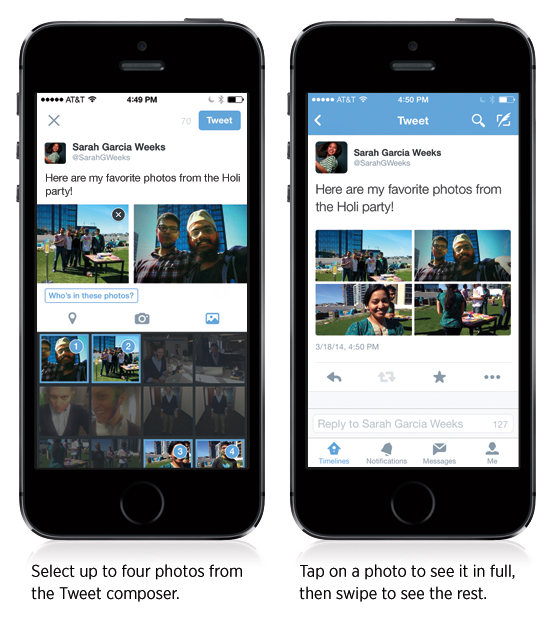
Twitter has announced a few new features for its iPhone app today. Users with the latest update to the Twitter for iPhone app will soon see the ability to select up to four photos at a time to upload when composing a tweet. These photos will be displayed as a collage on the tweet’s detail screen.

Along with the multi-photo support, users are also now able to tag other people in their photos. A new “who’s in these photos?” button allows you to add the username of other people in the picture. Photo tags won’t take up any characters in the body of the tweet, so the full character count will be available for composing a message.


Expand
Expanding
Close

Site default logo image

HBO’s Game of Thrones Ascent game comes to iPad ahead of Season 4 debut

Ahead of the return of HBO’s massively popular Game of Thrones series with Season 4 on April 6, today the official Game of Thrones Ascent game has made its way to iPad.

The game already has around 2,500,000 players on Facebook and the web, and now is available as a free download in the App Store with new art, optimized imagery for Retina displays, and Game Center leaderboards. Here’s the gameplay description from the press release:

With Game of Thrones Ascent, fans can immerse themselves beyond the books and show and actually live the life of a noble during a time of upheaval within Westeros. Taking part in thousands of story-driven quests, players delve deeply into the lore and develop their own lands and reputation among the Great Houses. Players explore an expansive world filled with deep political and social play involving diplomatic agreements, pacts, marriages, and betrothals. Through Alliance challenges, players work with hundreds of others to accomplish great tasks and rise to the top of the Power Rankings.

The app will be continually updated with new story lines and content from the show on each Monday following new episodes airing on TV:

Frequent updates with content matching new episodes on HBO! As each episode airs, see new quests each week and explore the show like never before! Create your story through Seasons One, Two, and Three, and create your own history in our unique Volume You!

Game of Thrones Ascent is available on the App Store now.

Site default logo image

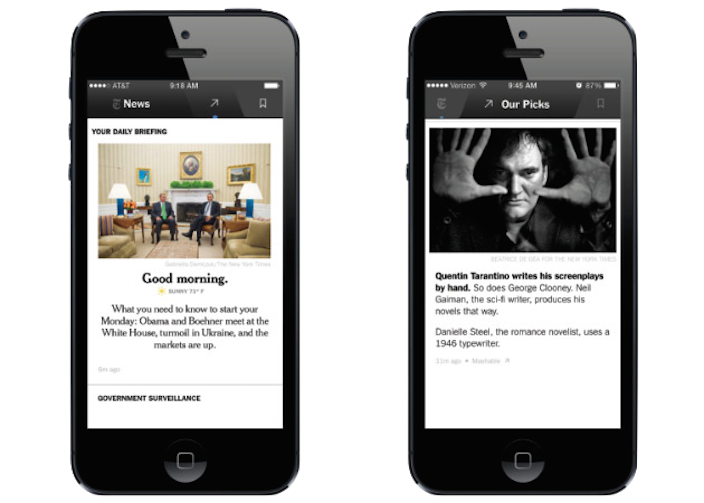
New York Times launching a staff curated version of its iPhone app called ‘NYT Now’ on April 2nd

nytnow

Debuting next week, The New York Times is taking the iPhone-only route with its new NYT Now app.

The idea is simple enough. For $8 a month, iPhone users will have access to stories from The New York Times and other sources in a streamlined user interface and will include news summaries each morning and evening.

NYT Now will be managed by a staff of 10 editors handpicking content to present.


Expand
Expanding
Close

Realmac teases upcoming Reminders feature in popular ‘Clear’ task app

Site default logo image

reminders

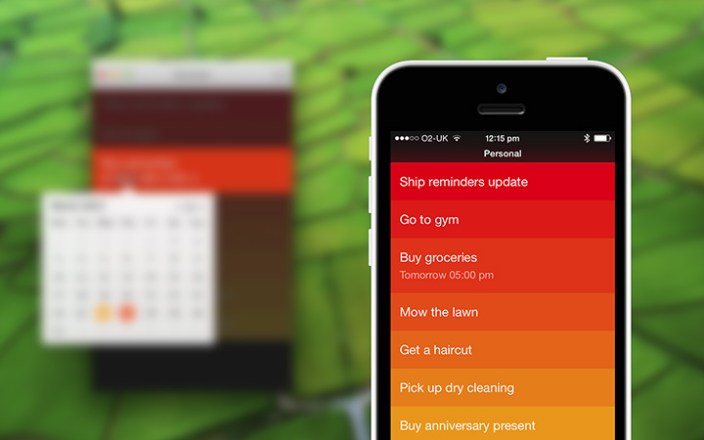
Fantastical isn’t the only app with a new version on the way. Realmac Software, makers of the popular to-do list app Clear, have been hyping the addition of Reminders functionality since late last year and expected to ship the update around this time. Realmac says its still fine tuning the Reminders experience in Clear and expects to release the update early next month. This marks the first time we’ve seen a shot of how the Reminders function will look in Clear (seen above) as well as a blurred teaser for the Mac version as well (notice the calendar date picker).


Expand
Expanding
Close

Site default logo image

Synology adds support for Chromecast streaming in latest DiskStation updates

DiskStation-Chromecast

If you’re unfamiliar with Synology’s DiskStation network-attached storage (NAS) hardware and software, I recently wrote a full review on the latest update. The company’s DiskStation products come with slick apps for Mac and iOS that let you stream all of your content stored in your own private cloud to just about any device you could think of, and today the company has added yet another with official support for Google’s Chromecast HDMI stick.

Much like you can send video and audio stored on your DiskStation to your Apple TV over AirPlay, or to your TV or PlayStation using DiskStation’s built-in DLNA media servers and iOS apps, you can now stream content to any TV connected to Google’s $35 Chromecast. As the company’s blog post points out, “if you’re at your friend’s place, you can connect to your DiskStation back at home, and stream your movie/music collection directly to his Chromecast.” 

The Chromecast support requires the latest DSM 5.0 update and updated versions of the DS Audio and DS Video apps for streaming from iOS devices.

You can check out our full review of the Synology hardware and latest DSM 5.0 update here.

Apple updates Trailers app with push notifications, better Rotten Tomatoes integration, and more

Site default logo image

Apple has updated its iTunes Movie Trailers app with several new features and upgrades. The biggest new feature is the ability to get push notifications when movies marked as favorites hit theaters or iTunes. The in-app movie reviews have also been tweaked. Where previously you could only see a movies overall Rotten Tomatoes rating, you can now read full reviews right from within the app.

A few smaller features are also included in the update. You can now share links to movie trailers via AirDrop to other iOS devices, and a few bugs have been squashed. You can grab the app for free on the iTunes App Store. The full change log is below:


Expand
Expanding
Close

Twitterrific goes free with version 5.7, optional IAPs to remove ads, enable push notifications


twitterrific iconWith the latest update, The Iconfactory has changed their business model for Twitterrific rather dramatically. Up to now, Twitterrific has been available for iPhone and iPad for $2.99.
However, Twitterrific has now changed to a freemium business model. This means anyone can download the app for free as an ad-supported application. There is also a selection of unlockable features available as in-app purchases.


Expand
Expanding
Close

Site default logo image

Roku iPhone app gets redesign w/ new search feature & more

The companion iPhone app for Roku hardware was updated today with a complete visual overhaul that gives the app a brand new look on top of a few new features. In addition to the redesign pictured above, the updated Roku app will also now let you access Roku’s search feature to search for content across apps by movie, show, actor, or director right from an iPhone. 

Version 3.0 of the Roku app also includes a number of other fixes and enhancements, but the overall navigation of the app remains the same. The new search feature for now is only supported “on US-based Roku players firmware 5.4 or later” and on all hardware except the Roku 2450x or 2500x. Roku says “Roku Search feature on mobile is not yet available. It will be debuting on the Roku Streaming Stick and will be available to other players over time.” Its blog post is here.

The Roku app for iPhone is available on the App Store now.

Google’s new Photowall app turns your Chromecast-connected TV into an interactive photo frame

Site default logo image

Adding to the capabilities of the Chromecast HDMI streaming stick, Google is out with a new app for iPhone, iPad, and iPod touch users called Photowall that lets you turn your Chromecast-connected TV into a live, interactive photo frame.

Google’s Photowall app allows you alone or a group of Photowall users to beam not just one photo, but an entire collage of images to your TV through your Chromecast. The app includes the ability to doodle or annotate images before beaming to your big display as well.


Expand
Expanding
Close

Warriors become first NBA team to rollout iBeacons, push seat upgrade offers to nosebleeds

Site default logo image

MLB is already using them with plans to roll out at all stadiums, and now Bloomberg reports that the Golden State Warriors have become the first NBA team to take advantage of Apple’s iBeacon bluetooth technology. Just as the MLB, retailers, and other events have used the beacons to send context sensitive notifications and offers to customers and fans in proximity, the Warriors will do the same and in the process offer fans in cheap seats the chance to upgrade:
Expand
Expanding
Close

Site default logo image

Tweetbot for Mac updated with larger in-line image previews, bug fixes

Screen Shot 2014-03-20 at 9.45.27 PM

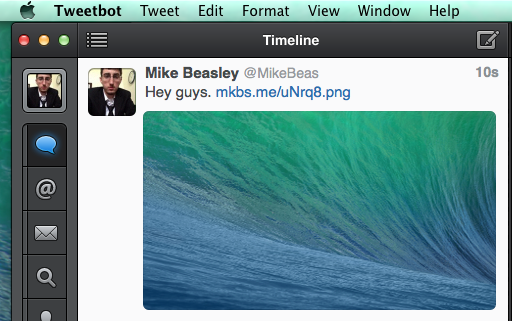
Tweetbot for Mac, the desktop counter to the incredibly popular iOS Twitter client, was updated to version 1.5 today. The new update brings a few bug fixes and a big visual change that was first introduced in the most recent update to the iPhone version. This change brings large image previews to the feed, much like those found in the official Twitter for iPhone app.

For those who don’t like the new look, there’s a setting in the app’s preferences to get the smaller previews back or disable image previews completely. The smaller previews have also been tweaked to be a bit bigger and no longer have a border. Other issues addressed by the update include bugs with context menus, tweet detail layouts, and swipe gestures.

Tweetbot for Mac 1.5 is available on the Mac App Store. It’s a free update for existing users and a $19.99 purchase for new users. The full change log is below:

What’s New in Version 1.5

– Large image thumbnail option (as well as an option for no thumbnail) in the display settings.
– Refreshed design of image thumbnails
– Three finger left/right swipes in your timeline function if trackpad settings are configured that way.
– Fixed the issue where some context menus had the first option highlighted by default
– Fixed layout issues when viewing tweet details