Latest

Site default logo image

Feedly launches new cloud backend & web interface, hits 12M users ahead of Google Reader demise

happy-retirement-gr

From 9to5Google:

Following Google’s announcement that its RSS Reader product would be retired on July 1st, apps like Feedly that relied on the Google Reader backend announced big plans to help itself and other apps through the transition. Feedly has been preparing its move to its own “feedly cloud” back end since the announcement, and earlier this month transitioned its own iOS client to the platform. Today, Feedly is officially launching the new back end and API, as well as a brand new web interface and the first apps to integrate the feedly cloud platform:

As of today, feedly cloud is now live, providing a fast and scalable infrastructure that serves as the backbone to feedly, as well as a number of connected applications. Feedly cloud is open today to all users visiting http://feedly.com, providing a simple one-click migration path from Google Reader.  And thanks to the great developer community that has gathered around it, providing multiple safe and sound alternatives to Google Reader.  With the release of feedly cloud, feedly today transitions from a product to a platform. We are also today delivering a new, completely stand-alone Web version of feedly.

On top of the new API and feedly cloud back end, the company is also delivering on one of the most requested features for the service: a standalone new web interface that doesn’t require any plugins or browser extensions.

While there are many others trying to provide an alternative for Google Reader, Feedly tells us it’s had significant traction since Google’s announcement and hit 12 million users at the end of May. That’s up 8 million from the 4 million users it had before Google announced Reader would be retired back in March. It’s also currently processing around 25 million feeds a day.

feedly-cloud-appsAs part of its ‘Normandy’ project, Feedly has been building its own backend and API for third-party RSS apps and readers that also previously relied on the Google Reader API. It isn’t the only one: Earlier this week Digg teased images of its Google Reader replacement coming to the web and mobile devices on June 26th. It too is planning to offer an alternative API for third-party devs.

Today Feedly is announcing the first apps to integrate with its new backend but promises more will be added in the coming weeks as more than 200 developer have shown interest:

-IFTTT
-Sprout Social for iOS/Android
-Nextgen Reader for Win 8 and Win Phone
-gNewsReader for BlackBerry 10/Symbian/MeeGo
-gReader for Android
-Press for Android
-Newsify for iPhone/iPad
-Pure News Widget for Android
-Menere for Windows

Developers and users interested in learning more about the new and improved Feedly can do so here.

Feedly offers one-click migration from Reader to its service to ensure an easy transition and reminds us just 10 days remain before Google Reader officially shuts down.

XCOM: Enemy Unknown for iPhone & iPad now available on the App Store

Site default logo image

We told you that XCOM: Enemy Unknown, a critically acclaimed game of the year on PC and consoles from 2K Games, would be arriving in the App Store starting tomorrow on June 20. However, today the game has already started hitting App Stores around the world at the expected price of $20 USD. The game of course features enhanced controls specifically suited for the touch screen, but otherwise aims to bring the full XCOM: EU experience to iOS devices:
Expand
Expanding
Close

Site default logo image

Simple banking app updated with Goals

IMG_1198Trying to save up for a vacation? Or working tirelessly to pay off that pesky loan? Simple’s new app update will help.

Simple is an online bank replacement that has been in the App Store since January 2012. With no monthly fees, mobile check deposits and free ATM locations (through their banking partners), it’s definitely a great alternative to other banking solutions out there. Personally, I made the jump last month by canceling all of my other bank accounts and moving everything to Simple.

With the 1.6 update that came out today, their Goals section is now accessible with the app. Once you set a name, amount, and pay-off date, Simple will siphon off the necessary “daily contribution” from your Safe-to-Spend amount and put the contribution toward your goal. If need be, you can pause the automatic siphoning or change the payoff date, all within the app.

The new version is available right now in the App Store.

Site default logo image

Facebook iOS app updated with emotions for status updates, better control over sharing

Facebook updated its iPhone and iPad app today with a couple new features. Users can now attach a number of different emoticons to status updates organized into several categories based on emotion, content, and location. For example, the “Feeling” category will allow users to attach an emoticon next to a message like “Im feeling happy,” while the “Watching” and “Listening to” sections let users link to Facebook profiles associated with content they want to share.

You can also now start a conversation with photos you’ve received in messages and Facebook says the updated app includes the ability to “Easily change who can see something you’ve shared.”

What’s New in Version 6.2

• Add icons to status updates to show what you’re feeling, reading, watching and more (English only)
• Easily change who can see something you’ve shared
• Start a new conversation with photos you receive in messages
• Bug fixes

Rockstar releasing ‘Max Payne 3’ for Mac on June 20

Site default logo image

Originally released back in 2012 for PlayStation 3, Xbox 360, and later Windows, Rockstar announced today that it’s bringing Max Payne 3 to the Mac later this week through the Mac App Store. We don’t get any details on pricing, but Rockstar notes that the Mac version includes a “number of advanced graphics options, scalable high-resolution textures and character models, DirectX11 features, multi-monitor support and 3D.”


Expand
Expanding
Close

Review: Is Chatology the solution for Messages search?

Site default logo image

screenshot-1

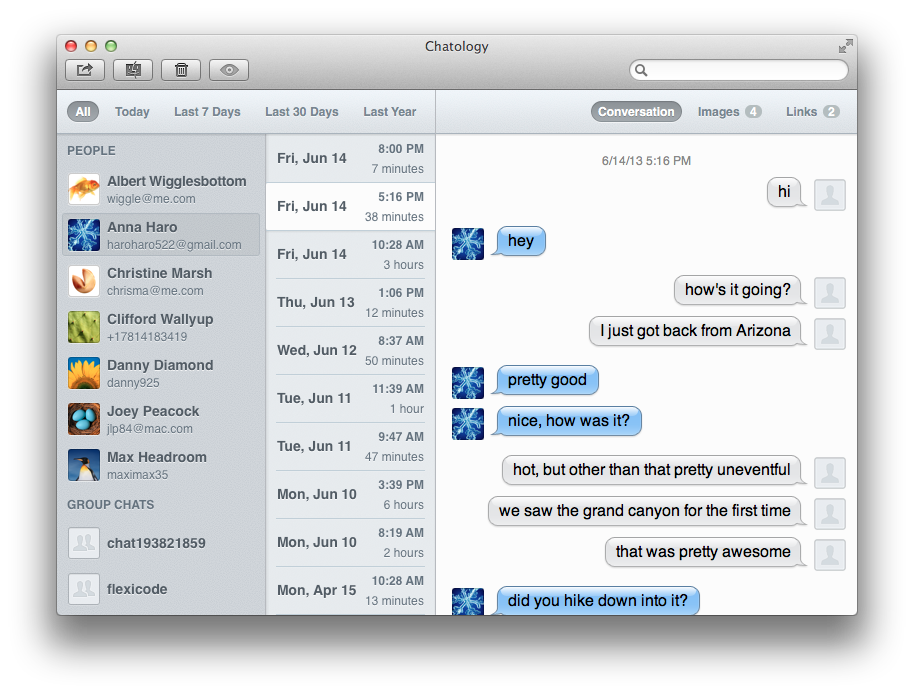
Messages for Mac is buggy. There’s no denying that fact. At some point, all of us have tried to search for a specific message in the app only to be confronted by everyone’s favorite multi-colored symbol of despair.

Several weeks ago, Flexibits, developers of Fantastical for Mac and iPhone, announced a new project called Chatology that would finally solve this issue once and for all. Today, they unveiled the app to the world. So what exactly is Chatology? Does it solve the problem it sets out to solve? Keep reading to get answers to those questions and more.


Expand
Expanding
Close

Site default logo image

Air France Mobile app updated with Passbook support for boarding passes

Air-France-iconFollowing British Airways earlier this month, Air France has just updated its iPhone app with support for storing digital boarding passes in Passbook. The feature of course requires iOS 6 and up, and will also require an update to version 4.5.1 of the Air France Mobile app.

New for Passbook and the camera app developers in iOS 7: the ability to scan barcodes.

What’s New in Version 4.5.1

Passbook is now available to store your boarding pass on your iPhone!
This feature requires iOS 6 operating system.

Adobe’s new Creative Cloud ‘CC’ apps now available to all

Site default logo image

Back in May, we told you all about Adobe’s brand new Creative Cloud suite and its decision to end support for CS6 following its presentation at the MAX 2013 Creativity Conference in LA. Adobe introduced big updates and new features to just about every app in the CC suite, including updates to its design apps like Illustrator, a new Kuler iPhone app, revamped web tools such as Dreamweaver and Edge Animate, and updates to just about every other app it makes. Today, Adobe is finally making the massive Creative Cloud update available to all users and is also offering a number of promotional discounts to celebrate. Head below for details.
Expand
Expanding
Close

Site default logo image

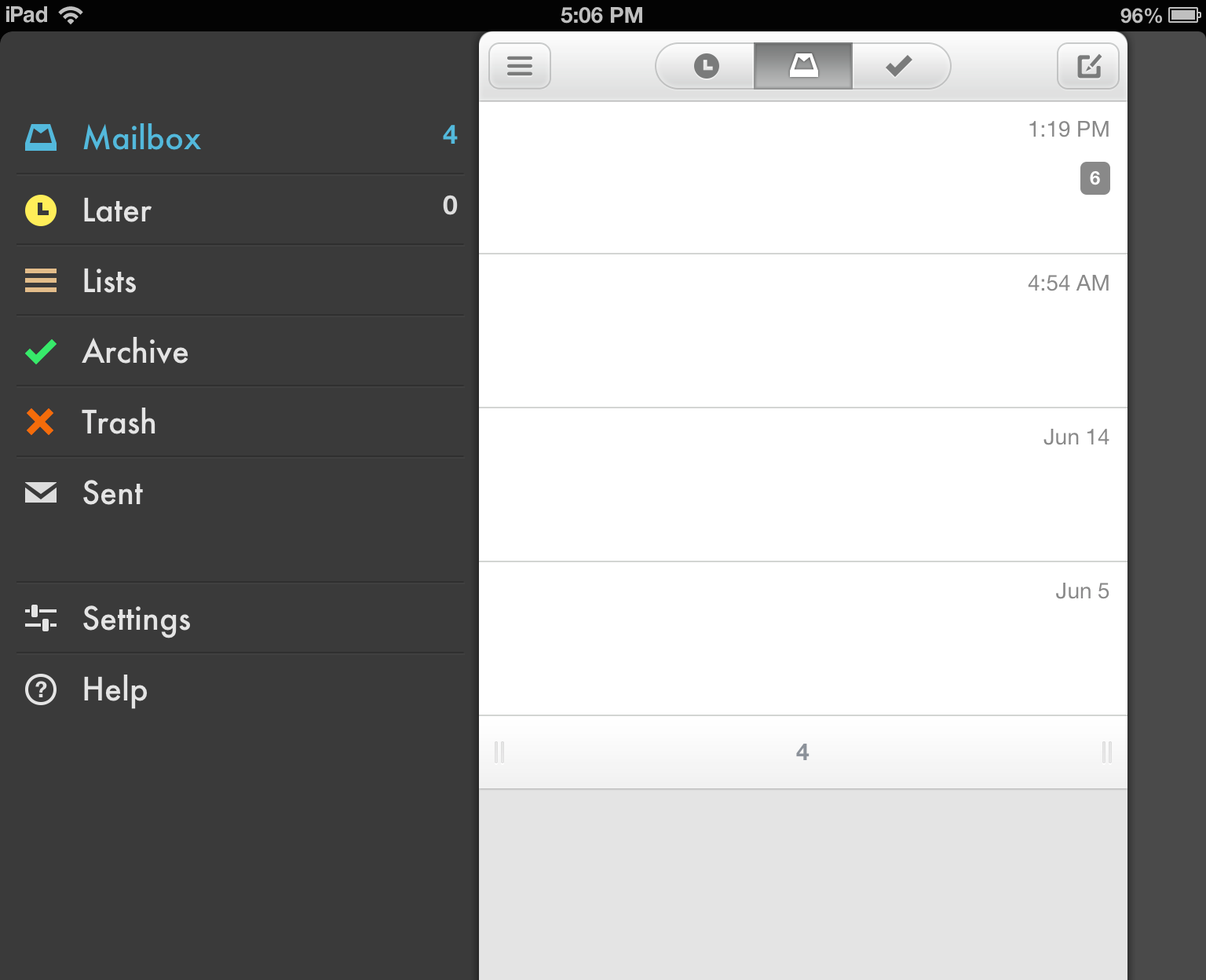
Mailbox for iPad gains support for portrait orientation, bug fixes

photo

Today, Mailbox for iPad has been updated with support for the iPad’s portrait orientation. In previous versions of the iPad app, email viewing, composing, and other functions were exclusive to landscape mode. Additionally, today’s 1.3.1 update brings unspecified bug fixes. Mailbox for iPad launched last month following the app’s March acquisition by Dropbox.


Expand
Expanding
Close

Site default logo image

XCOM: Enemy Unknown for iOS lands June 20 for $20

Following the release of XCOM: Enemy Unknown Elite Edition for Mac in April, Firaxis and 2K Games announced today that the game will finally be arriving on iOS devices on June 20. The highly anticipated iPhone and iPad port of the game was already announced back in March, but today we learn the game will be landing on the App Store for $20 and support iPad 2, iPad 3, iPad 4, iPad mini, iPhone 4S, iPhone 5, and iPod Touch 5th Generation.

Leader designer on the game Jake Solomon gives us a break down of what to expect in the iOS version in the above.

(via GameSpot)

Site default logo image

Official ‘Man of Steel’ iOS game now available on App Store for $2.99

We got our first look at the official game of Warner Bros upcoming ‘Man of Steel’ Superman movie earlier this month, and today the game has now made its way to the App Store for $2.99. The game, available as separate downloads for iPhone and iPad, appears to be somewhat of an on-rails experience, but lets hope its a little better than the typical Hollywood movie tie-in.

Man of Steel is available now for iPhone and iPad on the App Store.

RELIVE THE EVENTS OF THE MAN OF STEEL MOVIE!
-Attack, dodge, block, and utilize various super powers including flight, super speed, and heat vision to defeat Zod and his evil forces.
-Play through an in-depth Story Mode or set a personal high score in the intense Survival Mode.
-Battle a challenging cast of mini-bosses and technologically advanced foes featured in the film.

BECOME SUPERMAN LIKE NEVER BEFORE
-Unlock and purchase up to 6 different suits from the Man of Steel movie.
-Upgrade your suits to become a truly unstoppable force!
-Customize your experience by upgrading the specific abilities YOU want to use.
-Embrace the true strength of Superman with bone-crunching combos, all with the swipe of a finger.

AMAZING GRAPHICS
-Delivers next-gen graphics on your phone or tablet with beautifully detailed animations and cinematic sequences.
-Fight in a variety of detailed

MTV revamps iOS app with full episodes, on-demand video, & second screen experience

Site default logo image

MTV is rolling out a huge update to its iOS app today that brings a ton of new content to both the iPhone and iPad. The previous MTV WatchWith app appears to be rebranded to simply “MTV” and now offers a ton of full episodes from the network’s most popular series, on-demand video, & a brand new second screen experience.

As for full episodes, MTV has signed up nine cable providers so far: AT&T U-verse, Bright House Networks, Cablevision (Optimum), DIRECTV, Hawaiian Telecom, RCN, Suddenlink, Time Warner Cable and Verizon FiOS. Subscribing to one of these cable providers will be necessary to access the full episodes, but MTV notes it is “working hard to get all TV providers to participate.”

Other content, such as on-demand video, won’t require you to sign in. Available through on-demand is sneak peeks, after shows, bonus clips and exclusive, original content for MTV series, but also great content from MTV News, MTV Style, MTV Geek, HTV Hive, HTV Other, and live coverage of the MTV Video Music Awards and MTV Video Awards:
Expand
Expanding
Close

Site default logo image

Apple updates WWDC app with uninterrupted videos and more ahead of Monday’s event

WWDC-app-iconAhead of Apple’s big keynote address to kick off its WWDC 2013 developer conference next week on Monday, Apple today updated its WWDC app for iPhone and iPad with a number of tweaks and fixes.

The most notable updates include videos that “now continue to play over AirPlay when the device locks or after interruptions” such as phone call, as well as a tweak so the audio ringer switch doesn’t mute audio in videos.

You can check out everything we expect to see at WWDC next week in our roundups here and here.

Other improvements included in version 1.0.1 of the WWDC app below:

What’s New in Version 1.0.1

Thanks for all the great feedback. This release includes numerous bug fixes:

• Videos now continue to play over AirPlay when the device locks or after interruptions, e.g., a phone call
• When playing videos, the audio ringer switch no longer mutes audio
• Favorites in Events go all the way to 11 PM
• Duplicate section headers in the videos list no longer appear
• The navigation bar in Events no longer disappears
• Blurry text in session details has been corrected
• Version information has been added to augment future bug reports or feedback

To get the most out of the WWDC app, make sure you sign in with your Registered Apple Developer account. If you’re not a Registered Apple Developer, you can still use the app — just tap Cancel when you’re prompted to sign in.

Site default logo image

American Airlines iOS app adds departures, gate & seat changes on lock screen for Passbook boarding passes, more

American-Airlines-app-iconAmerican Airlines updated its app for iPhone and iPad today bringing an enhanced Passbook experience for digital boarding passes, improvements for AAdvantage account holders, and the ability to chat with the airline’s Twitter team.

Perhaps the most notable update, and something British Airways announced it will be adding soon to its recently announced Passbook support, is the ability to view updates about departure times, gate and seat changes directly from your iOS device’s lock screen. The updates will appear after you’ve added your boarding pass to Passbook.

Also included in today’s update is the ability to “Send a direct message to the AA Twitter Team for assistance with flights, highlight exceptional service or general inquiries.”

More enhancements in version 2.4.0 of the American Airlines app below:

What’s New in Version 2.4.0

• You can now login with the e-mail address associated with your AAdvantage account.
• The TSA precheck logo will now appear on your boarding pass in passbook, if applicable
• Now Executive Platinum AAdvantage members can Give Feedback via Twitter
• Send a direct message to the AA Twitter Team for assistance with flights, highlight exceptional service or general inquiries
• You will now receive updates about departure times, gate and seat changes on your lock screen after you’ve added your mobile boarding pass to passbook

Site default logo image

Hulu Plus for iOS updated with all new interface for iPad, content recommendations, more

Before/After (via Zach Kahn)

Before/After (via <a href="http://9to5mac.com/author/zkahn94/" target="_blank">Zach Kahn</a>)

Hulu Plus for iOS received a major update today including an overhauled user-interface on the iPad, editor’s choice collections of content to view, and the ability to watch previews of content inline without going full-screen.

The update is available for free on the App Store.
Expand
Expanding
Close

Site default logo image

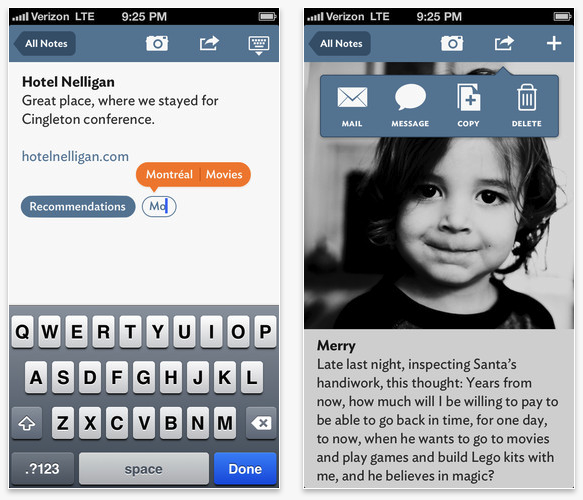
Daring Fireball’s John Gruber and friends launch Vesper note capture app

John Gruber wants you to collect your thoughts.

That’s the goal of his new note capturing app called Vesper that he launched today with fellow Mule Radio podcaster Dave Wiskus as well as developer Brent Simmons. Gruber and friends launched their development company today called Q Branch and Vesper for iPhone is their first app… and boy is it flat!

You can drive Vesper for iPhone starting today for $4.99 on the App Store.

Update: Rene Ritchie of iMore has an interview with the team on this week’s Debug podcast.

Review: Moment is a huge improvement on Facebook sharing for OS X

Site default logo image

When Mountain Lion launched last year, Apple introduced some basic Facebook sharing options to OS X. You can post a status update from Notification Center or upload a photo from Finder, Preview, iPhoto, or other Mac applications. While those functions are useful, Apple has yet to really embrace all of Facebook’s features. For example, you can’t tag a friend in a status update or create a new photo album, and the notification integration, while nice, is a bit unreliable.

Today, Tapmates released Moment, a new app that bridges the gap between OS X’s Facebook integration and the features you’re already used to on the Facebook website. Keep reading for our full review.

Site default logo image

Gameloft releases first trailer for upcoming Modern Combat 5 title [Video]

With each instalment of the popular FPS Modern Combat series on iOS and Android, Gameloft seems to be getting a little closer to matching the quality of gameplay we expect from the top of the line console games in the genre such as Call of Duty.  While it’s no secret the Modern Combat series has borrowed a lot from COD (as have many other FPS games), the latest trailer for the upcoming Modern Combat 5 title looks to be the closet thing to an immersive, action-packed COD-like shooter that we’ll have on mobile devices. Note: On top of the gameplay, the logo towards the end of the video (including the animations) is little too close to the Call of Duty Modern Warfare series for my liking. Gameloft has been accused several times of knocking off games from big developers in the console world, most notably with its Gangstar (aka GTA clone) and NOVA (aka HALO clone) series.

We don’t learn a whole lot from the trailer itself, but it does appear much of the action will be taking place in Venice, Italy this time around. Despite the shameless similarities to other big franchises, those excited for the upcoming Modern Combat 5 will seemingly have to wait until E3 to hear more about when and for how much it will be coming to iPhone, iPad, and Android.

Site default logo image

Experimental Dropbox build introduces easy screenshot sharing and more

Screen Shot 2013-06-05 at 9.00.07 PM

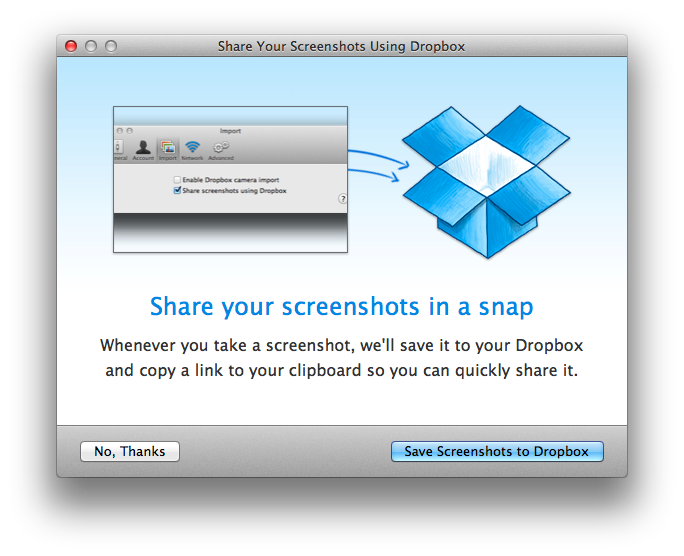
Dropbox released version 2.3.12 as an “experiemental” build today, adding a few interesting new features that will hopefully make it through the beta process into the shipping version of the app. The new features, as noted by MacStories, include the option to have screenshots automatically added to your dropbox with the link copied to your clipboard for easy sharing, much like the automatic sharing features found in CloudApp and Droplr.

New in 2.3.12

  • Screenshot to Dropbox
  • Move to Dropbox
  • Import from iPhoto
  • Much faster upload/download speeds for large files
Site default logo image

Snapchat releases v5 ‘Banquo’ with updated GUI, new ways to snap and more snappiness™

Snapchat 5.0 [Free, iTunes] just hit the App Store with some fresh new features and a totally redesigned interface. Version 5, codenamed Banquo, adds snap navigation, doubletap to reply, new ways to add friends, in-app profiles and the ability to send snaps directly from your address book. As with all updates, this one includes the requisite speed enhancements and design improvements…making it, dare we say, snappier™?

Site default logo image

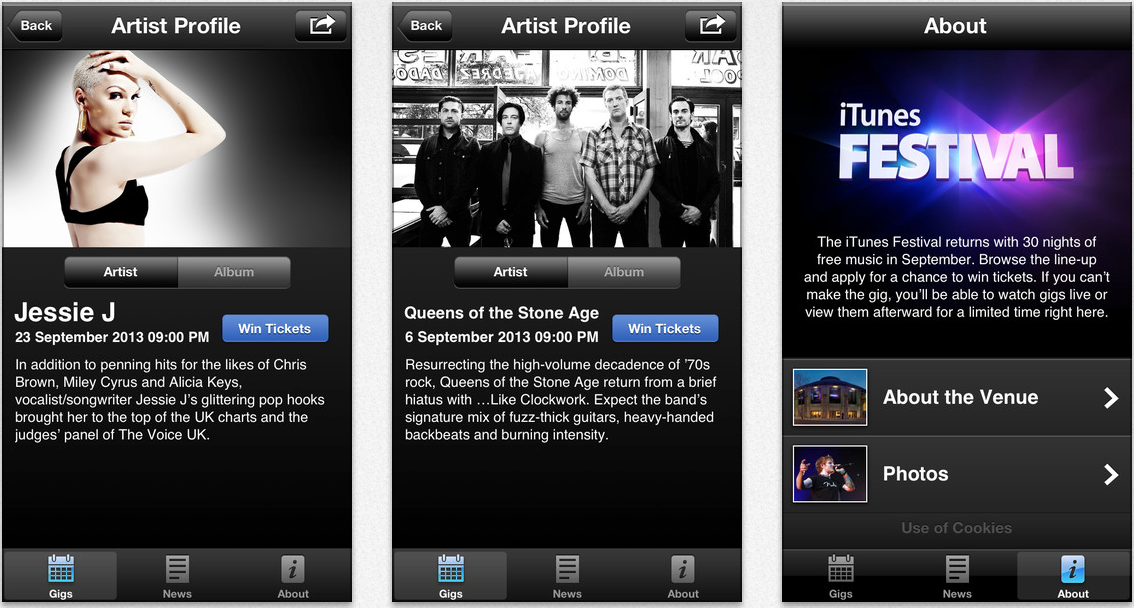
Apple adds Passbook support to its iTunes Festival London 2013 iPhone app

Screen Shot 2013-06-05 at 11.01.28 AM

Apple has added Passbook functionality to its app for the iTunes Festival London 2013 app. Additionally, today’s update brings support for image viewing in an iOS device’s landscape orientation. The app was updated late last month to list the line-up of artists for the September Apple-run music festival. Apple announced this year’s festival last week, noting that artists such as Jack Johnson, Justin Timberlake, and Thirty Seconds to Mars would highlight the events. The app is currently not available in the United States iTunes Store. 


Expand
Expanding
Close

Site default logo image

Kindle for iOS adds line spacing, multipage highlights, accessibility improvements, more

Amazon-Kindle-iOS-app-01-line-spacing

Line Spacing

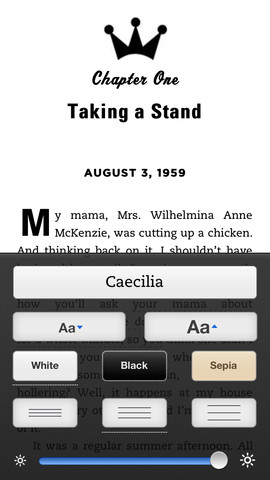
Amazon updated its Kindle iOS app today with a number of notable improvements. Included in version 3.8 of the app is the ability to adjust line spacing to loose, normal or tight, and multipage highlights allowing you to “highlight long passages that span multiple pages for added convenience.”

Amazon also noted that it added accessibility improvements in today’s update including the ability to set a higher maximum font size.

What’s New in Version 3.8

• Line Spacing – loose, normal, and tight line spacing options change the page layout to suit your reading preference
• Multipage Highlights – highlight long passages that span multiple pages for added convenience
• Accessibility Improvements – select a higher maximum font size, bug fixes
• Bug Fixes/Stability Improvements

Site default logo image

British Airways adds Passbook support for digital boarding passes to iPhone app

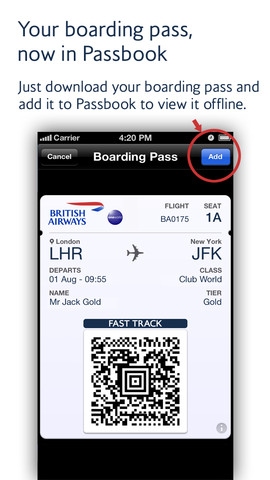
British-Airways-PassbookWe knew from a previous announcement last year that British Airways has been working on integrating Passbook integration for its digital boarding passes, much like American Airlines and a long list of other major airlines have done already. Today the airline has officially rolled out an update to its iPhone app that adds the ability to add digital boarding passes to Passbook.

It also confirmed that it will be enhancing the feature further my mid-June with direct links to the Passbook boarding passes on the iPhone’s lock screen:

By mid June we’ll be enhancing Passbook boarding passes by adding direct links to them from your iPhone’s lock screen as you’re ready to fly. This will make it even easier for you to access your boarding pass on the move. We’ll send you a message via the app as soon as these are enabled.

On top of the convenience of having your BA boarding pass alongside your other Passbook passes and cards, Passbook also allows users to sync boarding passes across devices via iCloud and receive time and location-based reminders that display the boarding pass at the time of your flight or upon arriving at the terminal.

BA notes that, “From now on, all new boarding passes will be presented in Passbook.”

The updated British Airways app with Passbook support is available from the App Store now.