Apps

See All Stories

Learn about the latest news for iOS, Mac, Apple Watch, and Apple TV apps

Apps for iOS, macOS, tvOS, and watchOS power our modern world. 9to5Mac will update you on the latest news, review, and updates for all types of apps. “There’s an App for that”.

The term came became part of our vocabulary when Steve Jobs announced The App Store as part of the iPhone 2.0 software update in 2008.

Over the years, the term has become as common as kleenex for describing applications on all of our devices. Apple’s platforms have apps for just about anything from finance, banking, sports, social media, podcasting, music, and more. We have a guide for helping you discover the best ones as well. Apps are now on everything from our TV, to our smartphones, on our laptops, and all the way down to our wrists.

As new ones are released or existing ones have major updates, the team here at 9to5Mac will bring you the latest news and reviews. If you want to follow along with video footage, be sure to follow 9to5Mac on YouTube. Scroll down below our latest updates on all things relating to applications on iPhone, iPad, Mac, Apple TV, and Apple Watch.


France calls Apple’s decision to remove AppGratis ‘extremely brutal and unilateral’, will ask EU for tighter regulation

Site default logo image

Following a controversy in which Apple removed app discovery service AppGratis from its App Store for breaking Apple’s guidelines, Reuters reports today that regulators in France are planning to ask the European Commission and EU member states for better regulation of technology companies. The statement was made by French junior minister for digital economy Fleur Pellerin on a recent trip to AppGratis publisher iMediapp. Fleur described Apple’s decision to pull AppGratis as “extremely brutal and unilateral”:

“This behaviour is not worthy of a company of this size,” Pellerin said. She added that certain Internet companies were guilty of “repeated abusive behaviour” and said she would ask the European Commission and EU member states to better regulate digital platforms, search engines and social media.

The decision comes as Apple is drawing some heat for its broad App Store guidelines that have allowed it to remove some apps that promote App Store content but not others. Apple originally said that AppGratis was removed for breaking a guideline that warns against “Apps that display Apps other than your own for purchase or promotion in a manner similar to or confusing with the App Store.” Apple also said AppGratis was in violation of guideline 5.6 that says “apps cannot use Push Notifications to send advertising, promotions, or direct marketing of any kind.

AllThingsD reported that sources have indicated Apple’s removal of AppGratis is part of a broader crackdown on app discovery applications, but a grey area still remains regarding how Apple decides which apps are approved and which are removed.

Apple told Retuers today that it had discussions with AppGratis prior to the removal and that the developers had “disregarded its technical specifications.”
Expand
Expanding
Close

Site default logo image

Bump for iPhone loses the ability to share iTunes tracks between devices

The popular peer-to-peer file sharing app Bump was updated to version 3.5.8 today, and according to the change notes one of the features has been removed. Apparently at Apple’s request, the developers have disabled the ability to share music from your iTunes library to another Bump user or your computer.

New in 3.5.8:
+ Bug fixes and performance improvements.
+ We’re sorry, but we are no longer permitted access to iTunes audio files on the device. Removing access to iTunes audio files in the file sharing section.

If you want to keep this feature, be sure to save a copy of the old version of the app in case you accidentally update. You can just drag the Bump icon out of the Apps section of your iTunes library and drop it in a folder to keep it there. If you ever accidentally update to the new version, you can just delete the app from your phone and iTunes library, then drag the old version into iTunes and reinstall it on your device from there.

If you’re jailbroken and want to avoid an accidental update, the free tweak Update Hider can hide the update from the App Store entirely.

Site default logo image

Showtime Anytime iOS app updated with support for Comcast XFINITY subscribers, iPhone 5 & iOS 6

The app that provides access to full-length TV shows for Showtime subscribers was initially only available to AT&T U-verse and Verizon FiOS customers. Showtime Networks later added support for DIRECTV and Optimum subscribers, but today updated its universal iPhone/iPad app to provide support for Comcast XFINITY.

Also included in version 1.4 of the app is support for iPhone 5, optimized video playback for iOS 6 and a few welcomed performance enhancements:

What’s New in Version 1.4

– Available to Showtime subscribers with AT&T U-verse, Comcast XFINITY, DIRECTV, Optimum and Verizon FiOS!
– Support for iPhone 5
– Optimized video playback for iOS 6
– Improved tap targets for controls in video player
– Improved performance and stability
– Minor bug fixes

Site default logo image

Real Racing 3 iOS app updated with vehicles from Chevy, 100+ new events, cloud save, much more

While the highly anticipated Real Racing 3 from EA received a lot of press when it first launched back in February, much of it was negative attention due to developer Firemonkey’s decision opt for an in-app purchase, freemium model. Despite that, Real Racing 3 is considered one of the top racing games for iOS devices, and today it receives a massive update bringing new vehicles, events, and game modes to the title.

Version 1.1.0 of Real Racing 3 includes the return of vehicles from Chevrolet such as the Chevrolet Cobalt SS and the Camaro ZL1, 100+ new events bringing the total up to over 1,000, and the ability to save to the cloud and transfer saves between devices. The update also brings a new event type called “Hunter!”:

What’s New in Version 1.1.0

Ladies and gentlemen, start your engines. American fan favorite Chevrolet makes its return to Real Racing! This update features the Chevrolet Cobalt SS and the Camaro ZL1, an all-new Hunter mode, Cloud Save functionality, and 100+ new events! Plus, compare and compete using the new friends leaderboard.

• New manufacturer – Chevrolet! The Cobalt SS and the Camaro ZL1 join the lineup
• New event type – Hunter! Chase down the hunted car and overtake within one lap
• 100+ new events! Total number of events now exceeds 1,000!
• Cloud Save functionality! Transfer your save data between devices
• New social features! See who is online and compare how your friends are doing with the statistics leaderboard
• Check your TSM mailbox for the latest friend notifications
• Improved tutorial and main menu
• Numerous additional improvements, fixes, and performance optimizations

Site default logo image

Comixology, not Apple, responsible for not publishing controversial comic

via paperblog.com

Comixology CEO Dan Steinberge addressed the company’s customers today clarifying that Apple was not responsible for withholding its comic Saga #12 from the Comixology iOS app.

In the last 24 hours there has been a lot of chatter about Apple banning Saga #12 from our Comics App on the Apple App Store due to depictions of gay sex. This is simply not true, and we’d like to clarify.

As a partner of Apple, we have an obligation to respect its policies for apps and the books offered in apps. Based on our understanding of those policies, we believed that Saga #12 could not be made available in our app, and so we did not release it today.

In the last 24 hours there has been a lot of chatter about Apple banning Saga #12 from our Comics App on the Apple App Store due to depictions of gay sex. This is simply not true, and we’d like to clarify.

As a partner of Apple, we have an obligation to respect its policies for apps and the books offered in apps. Based on our understanding of those policies, we believed that Saga #12 could not be made available in our app, and so we did not release it today.

We did not interpret the content in question as involving any particular sexual orientation, and frankly that would have been a completely irrelevant consideration under any circumstance.

Given this, it should be clear that Apple did not reject Saga #12.

Steinberger went on to say that its decision to not publish Saga #12 was based on a more conservative interpretation of Apple’s guidelines.

After hearing from Apple this morning, we can say that our interpretation of its policies was mistaken. You’ll be glad to know that Saga #12 will be available on our App Store app soon.

Comixology’s apology wraps up what became a public contention against Apple and it’s App Store policies.

Report claims Microsoft roadmap has iOS/Android support scheduled for fall 2014

Site default logo image

Since we first heard rumors that Microsoft was working on Office for iOS as far back as 2011 and got a look at alleged leaked images of an iPad app that Microsoft later denied were real, every couple of months we’ve seen reports that say the app is coming soon. First it was November 2012, then early 2013, and others claimed “sometime after” March 2013. The latest rumor: Microsoft has Office for iPhone and Android is scheduled for fall 2014.

ZDNet claims to have got its hands on Microsoft roadmap for next year and says on it is “iOS/Android support for Office”:
Expand
Expanding
Close

EA announces SimCity for Mac lands on June 11 with cross-platform support

Site default logo image

EA confirmed today on its website that the latest SimCity instalment will be headed to Mac this summer with an official release scheduled for June 11. The title will be available exclusively through EA’s Origin platform (in addition to “other online retailers”), but those who have already purchased the PC version of the game will be able to grab the Mac download for free on Origin:

“SimCity is coming to Mac on June 11 and one purchase will give you both the Mac and PC versions. You only need to buy SimCity once to play together across the same servers, regardless of which version you’re playing,” said Lucy Bradshaw, Senior Vice President and General Manager of EA’s Maxis Label. “We didn’t want to make any compromises when it came to the Mac so we created a native version that is optimised for the hardware and OSX.”

Good news if you plan on picking up the Mac version this summer: right now you can get SimCity for the lowest price we’ve seen ever, $32 on 9to5Toys, and then download the Mac version free in June.

EA made a point of noting that the game is not your average port but rather runs natively on OS X with “its entire software renderer was rewritten for OpenGL, ensuring the best performance for the platform.” SimCity will allow players to play online across platforms on the same servers as PC users when it launches and Origin account holders will be able to use the same account on both copies. The game originally got off to a bit of a rough start, with players experiencing major server issues that eventually lead to EA offering refunds and free games to disgruntled users.
Expand
Expanding
Close

Site default logo image

‘Burner – Disposable Phone Numbers’ iPhone app goes free, gets referral program, improved call history, custom voicemail, more

We’ve told you about the Burner iOS app from Ad Hoc Labs in the past, an iOS app that received a lot of attention for its ability to provide temporary numbers for receiving SMS and calls on the iPhone. Today the developers are announcing a major update to the app that introduces a number of new features such a referral program and custom voicemail messages. While temporary Burner numbers aren’t free, Ad Hoc Labs is also dropping the $1.99 price tag and making Burner available as a free download starting today.

Not only can you download the app now for free, Burner is also providing a “Sample Burner” to get you started:

Once a user downloads the free iOS or Android app, he or she can create a “Sample Burner” for free. Additional numbers can be purchased via credit packages starting at $1.99. There are also extension options available for purchase.

Among the major new features for the app is a referral program that will allow users to earn credits by recommending other users to the app, the ability to reactive disabled numbers, improved notifications, and much more:

What’s New in Version 1.6.5

Burner 1.6.5 includes additional features and polishes on 1.6. Enjoy!

1.6 is a significant update with major new features and enhancements including:

★ REFERRAL PROGRAM to award credits to you and your friends for sharing Burner

★ NO PREMATURE BURNING. If you run out of minutes/messages, your number will be disabled but can be reloaded to reactivate (until the expiration date)

★ BETTER NOTIFICATIONS that deep link to texts, missed calls, and voicemails, and include the name of your caller if you’ve edited the number to include a name

★ CALL HISTORY MANAGEMENT. Star, rename, or archive conversations.

★ CUSTOM VOICEMAIL GREETINGS

And much more!

Site default logo image

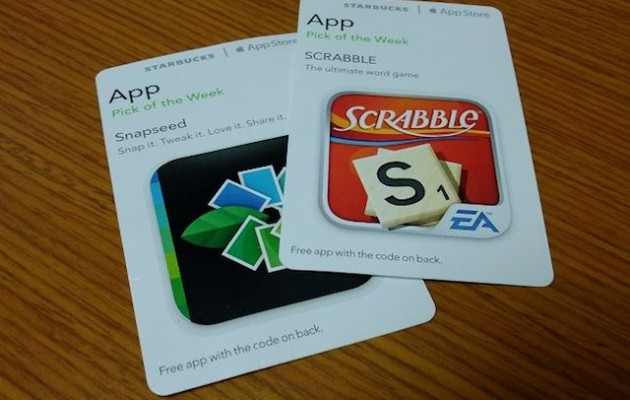
Starbucks launches digital in-app Pick of the Week cards

via macgasm.net

Starbucks today launched the next iteration of its iconic Pick of the Week promotion.

Previously, customers could pick up a physical card featuring a promo code to redeem the Pick of the Week app, but starting today customers have the additional option to make a free Starbucks account and redeem the app directly from the free Starbucks for iPhone app, circumventing a trip to a physical location.

The promotion showcases and gives away a paid app from the App Store, much like Apple’s own App of the Week campaign.

Check out 9to5Toys for the latest App of the Week, Angry Birds Star Wars.

Foursquare’s updated iPhone app brings Explore recommendations to the front page

Site default logo image

Foursquare for iPhone was updated version 6.0 today. The update brings the Explore functionality to the forefront of the app. Explore is Foursquare’s recommendation engine, which suggests attactions that users may find interesting based on their previous check-ins.

The new update brings the Explore search box to the top of the navigation bar, enabling quick access to the feature, which now serves up results faster than ever.

With the new Foursquare 6.0, we’ve crunched our billions of check-ins to instantly show you the most interesting things nearby. They’re insights that only Foursquare can deliver, the moment you open up the app. We also put search front-and-center, so you can find whatever you’re craving fast.

✓ Instantly see the best of what’s nearby. In Paris for the first time? We’ll show you the top sights and attractions, approved by local check-ins. In a familiar neighborhood? We can tell you about an up and coming restaurant that just opened up a few blocks away. Whether you’re near familiar stomping grounds or a tourist fresh off the plane, we show you the most interesting things nearby when you open Foursquare.

✓ Search is front-and-center! You can search Explore from the top of the app as soon as you open it up, so you can find what you’re craving even faster. Type what you’re looking for (like “dessert” or “park”), browse a type of place (like “Nightlife”), or tap “Best Nearby” to see our top picks in the area.

The update is avaiable for free on the App Store.

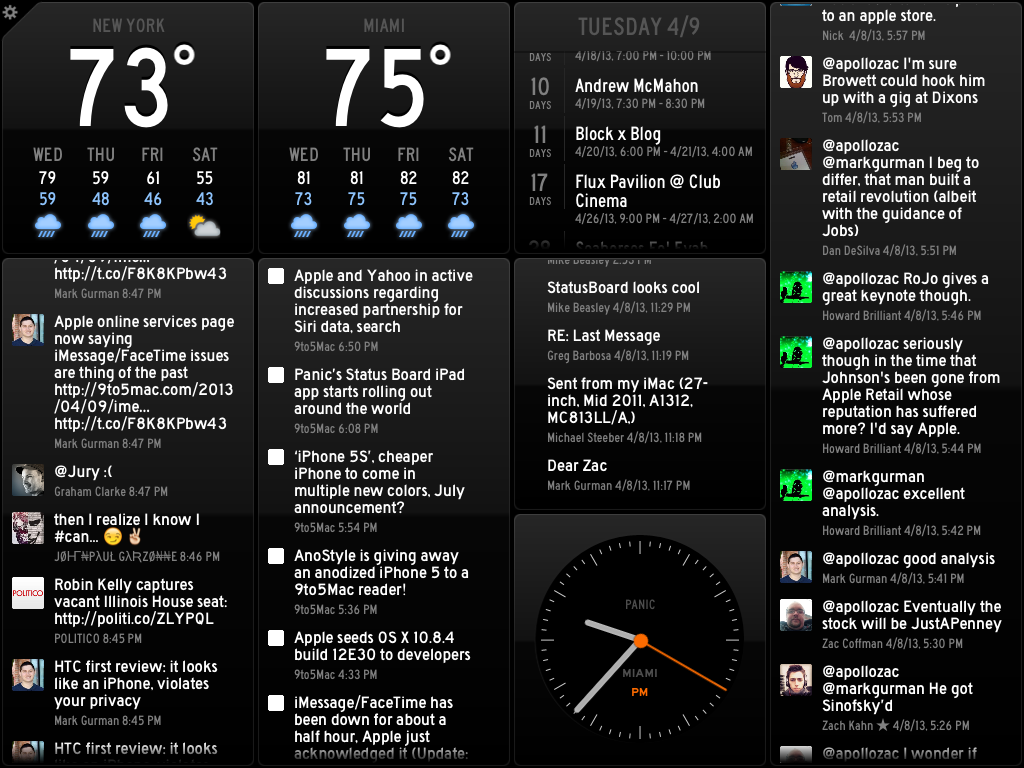
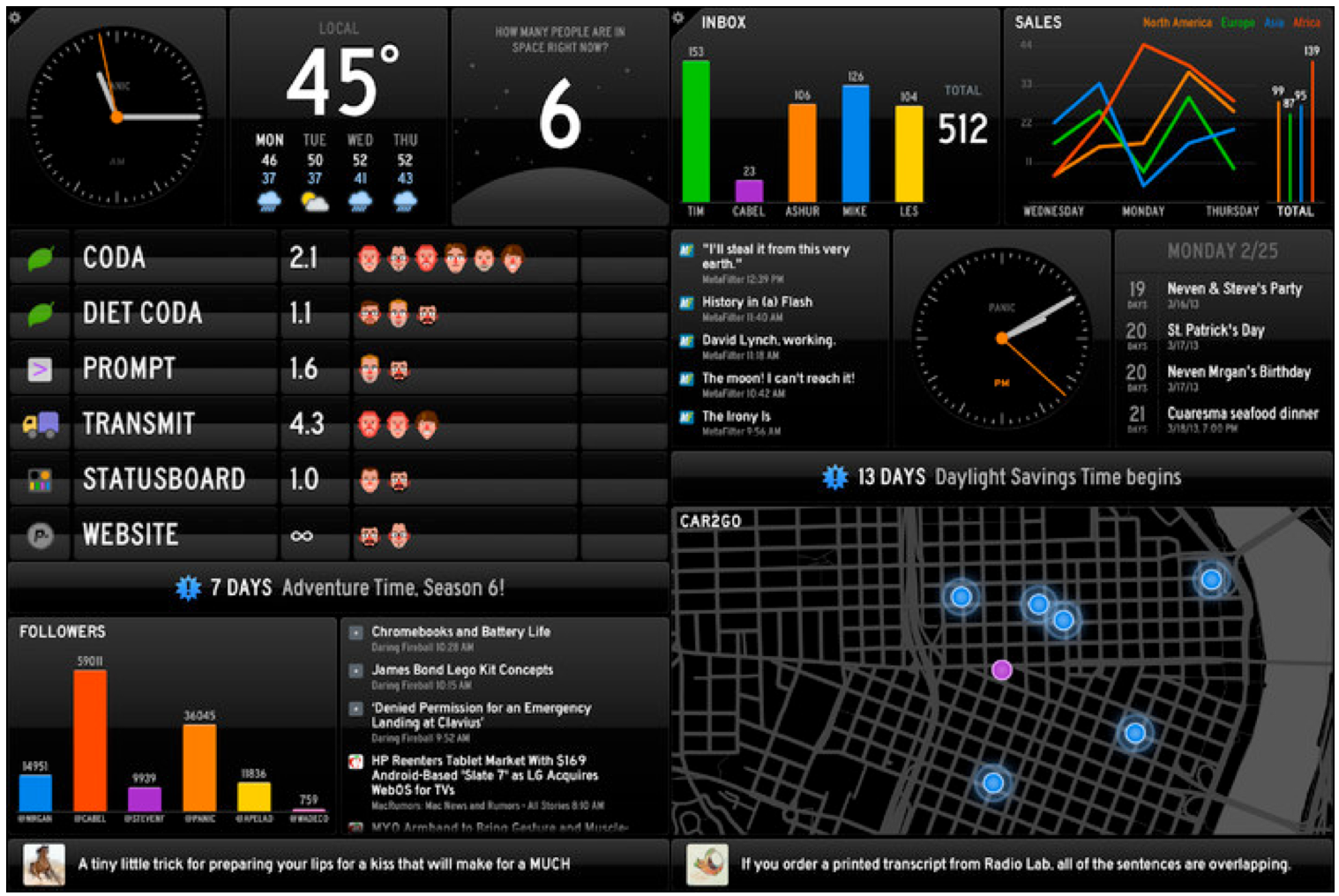
Review: Panic’s Status Board – the ultimate information dashboard for your iPad

The team over at Panic Inc. have been teasing their new iPad app on their blog and Twitter all week, and today the app known as Status Board hits the App Store.

The Oregon-based software company is largely known for their OS X FTP client Transmit, but entered the iOS space in April 2011 with the launch of Prompt, their SSH client for iPhone and iPad, followed by their affectionately named web editor Diet Coda this past May. This marks the third year in a row that Panic has released an entirely new app on the iOS platform.

Let’s jump right on board:

Expand Expanding Close
Site default logo image

Panic’s Status Board iPad app starts rolling out around the world

Popular app developer Panic’s new Status Board application for iPad has begun rolling out around the world. We’ve spotted it in the Australia iTunes Store and in some other regions. Update: Now available in the U.S. Store. 

Use the easy built-in panels to automatically see data about your life: calendar, tweets, e-mail, weather, news, and more. Or, use the pro panels, Graph and Table, with your own customized data sources, to see relevant data about your business or organization.

Based on the App Store description and screenshots, it appears that this application is sort of like a “dashboard” for your iPad’s display.

The app allows you to add clocks, weather, your calendar, new emails, Twitter updates, and feed headlines, according to the App Store description.

In Australia, the app is priced at $10.49. This translates to $9.99 in the U.S. store.

We will have a full review up when the application is available in the U.S. iTunes Store.

Update: The app is out, here’s our full review. 


Expand
Expanding
Close

Site default logo image

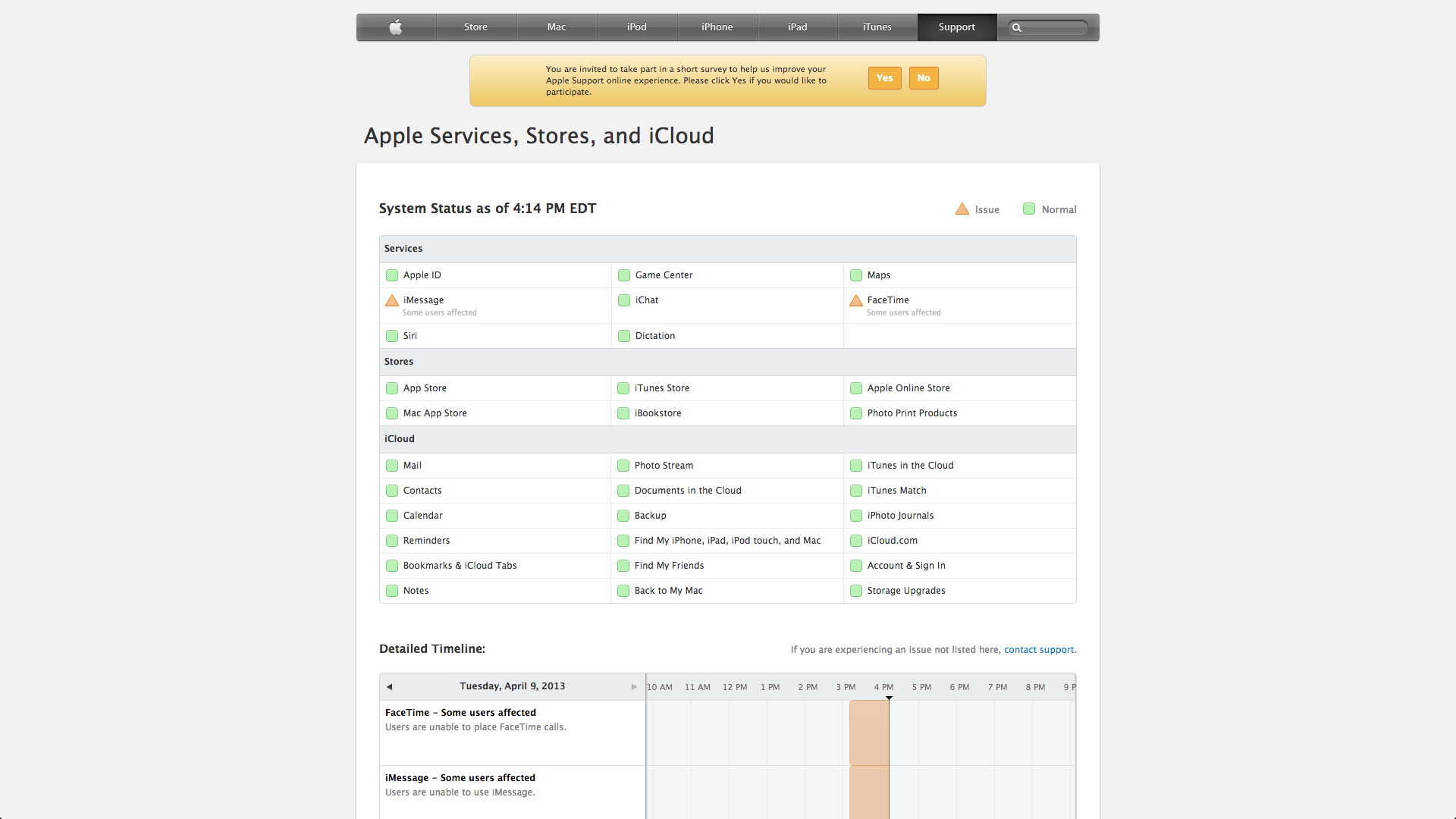
iMessage/FaceTime has been down for about a half hour, Apple just acknowledged it (Update: Fixed)

Update: 8PM ET – Just 4 short hours after we first started hearing issues, iMessage and FaceTime are back

Update: 8:45PM ET – Apple’s status website also saying the issues are resolved

As many have reported on Twitter, iMessage and FaceTime have been down for the past half hour, but Apple just updated its Services Status page. Meanwhile, Apple is aptly offering the opportunity to complete a survey regarding its online Apple Support quality.

AppGratis CEO explains App Store removal, says Apple is destroying value in its ecosystem

Site default logo image

After receiving some clarification from Apple last night over the removal of discovery app AppGratis, CEO Simon Dawalt is weighing in today with a statement posted on the AppGratis website explaining that the situation has been “absolutely crazy” to deal with:

And that is pretty much where we stand, still stunned that Apple took the decision to destroy so much value within their own ecosystem, but more than ever convinced that what we’re doing is good, and accomplishing a much needed mission in a broken App Discovery world.

While explaining that App Gratis has gone through a number of rejections for breaking App Store guidelines in situations that were later resolved with Apple, Dawalt shed some light on what happened on Apple’s side:
Expand
Expanding
Close

Site default logo image

Chrome for iOS gets updated scroll, AirPrint/Cloud Print and save PDF to Google Drive options

Google updated its iOS browser today with a number of fixes and feature improvements. Notable changes include the ability to save webpages as PDFs in your Google Drive account or print web pages to either Google Cloud Print or AirPrint printers.

iPhone and iPod touch users can now go full screen in Chrome giving you access to more of the web page. Perhaps most interesting is a new scroll feature that lets you scroll the toolbar off the page and then scroll back to get the Omnibar again.

Also Google says it has done some  stability / security improvements and bug fixes.
Expand
Expanding
Close

Site default logo image

Google’s interaction designer talks revamping Google Search on iOS (Video)

http://www.youtube.com/watch?v=5fpggknHC2c

In a recent “Life at Google” video (above), Interaction Designer on Google’s search team Noah Levin walks us through his work building the latest version of the Google Search app on iOS:

After just three months at Google, Interaction Designer Noah Levin helped change the way our users interact with Google Search on the iPhone and iPad. Learn how he takes a complex system and makes it a simple user experience for our most well-known product: Search.

Site default logo image

HBO Go iOS app updated with AirPlay multitasking & new interactive features for Game of Thrones

HBO has pushed out an update to its HBO Go app in at least the US today. Version 2.1 brings AirPlay multitasking support, allowing videos from the HBO Go app to continue playing while users navigate to other apps. Also included in this release is enhancements to the interactive features experience for the network’s popular Game of Thrones series and the usual performance enhancements:

– Includes AirPlay multitasking capability — other apps can be used while video continues to stream via AirPlay.
– Enhancements to the interactive features experience for Game of Thrones
– General performance enhancements

HBO Go version 2.1 for iPhone and iPad is available from the App Store now.

Site default logo image

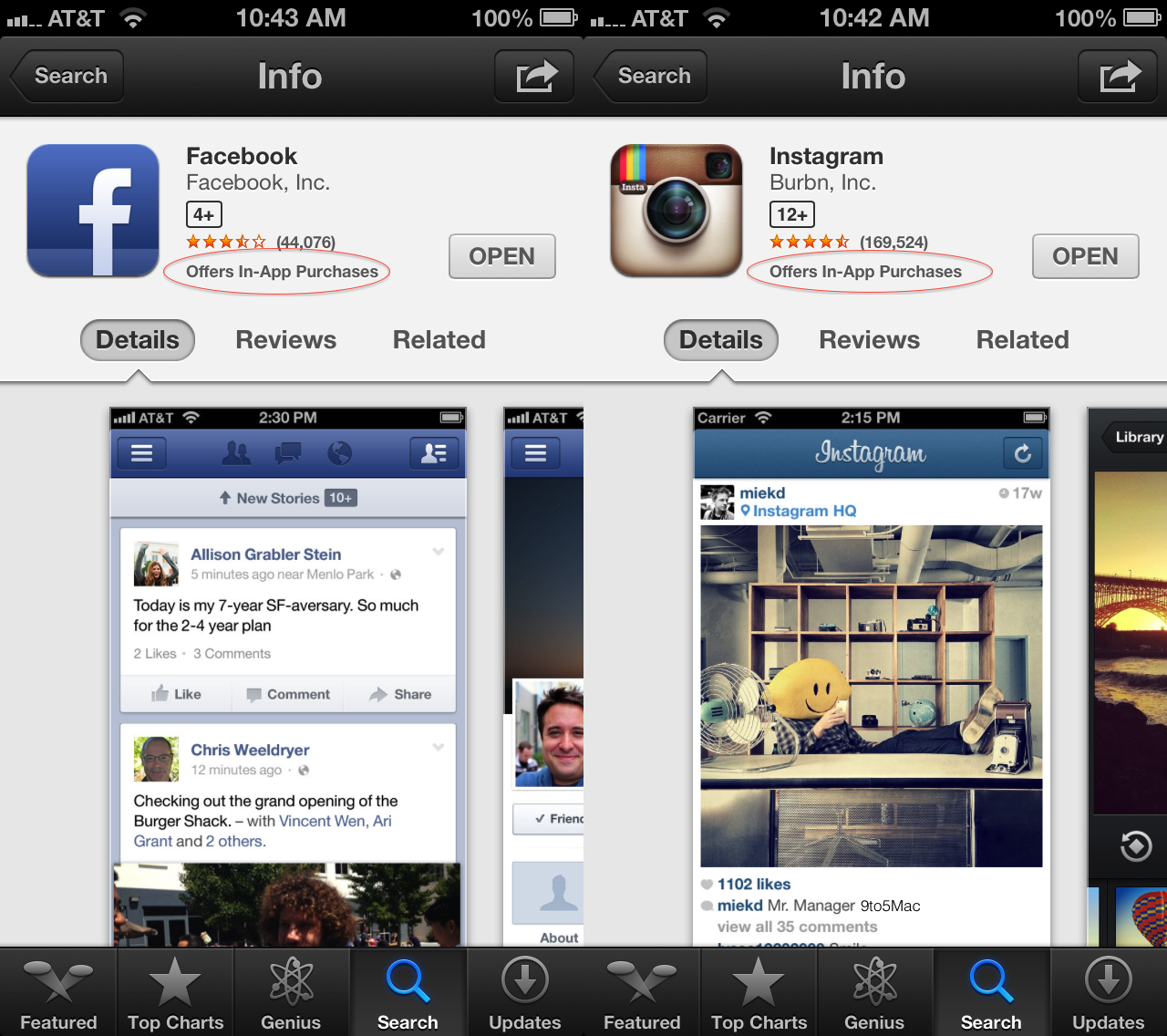
Apple App Store bug incorrectly claims Facebook, Instagram, other apps offer in-app-purchases (Update: Fixed)

In-App Purchases bug affects Facebook, Instagram

The iTunes App Store is incorrectly featuring the “Offers In-App Purchases” badge on select apps that do not include In-App Purchases, as David Smith noted today on Twitter.

Facebook and Instagram, which are both free and offer no In-App Purchases, are the most prominent apps to feature this bug. The bug can be seen on both the iOS variant of the App Store and via the iTunes application on computers.

The warning is problematic in that it could deter customers from downloading a free app that does not actually include in-app purchases.

It is possible the bug is related to changes made last week to the App Store that make age ratings more prominent and features an “Offers In-App Purchases” warning that satisfies a class-action lawsuit.

UPDATE: Apple appears to have resolved the In-App Purchases bug in its App Store.

Avid announces Pro Tools 11 & new creative tools alongside first iOS-compatible interfaces

Site default logo image

With NAB kicking into full gear today, Avid has announced the latest version of its industry standard digital audio workstation with the launch of Pro Tools 11 alongside its first iOS compatible portable audio interfaces and much more.

Perhaps the biggest Apple related announcement for Avid today is the launch of its first two audio interfaces with direct support for iOS devices. There are many audio interfaces for iPad and iPhone (we’ve reviewed some), but this is the first time Avid is including a USB port and direct support for iPad with its high-quality I/O and Pro Tools software…
Expand
Expanding
Close

Site default logo image

Adobe reverses decision to collect App Store royalty on Director 12 iOS apps

Users of Adobe’s just launched Director 12, which introduced the ability to publish iOS games, weren’t too happy in January about the company’s decision to collect a 10 percent royalty on earnings above an initial 20K for paid iOS apps. Following the feedback from users, Adobe has now reversed its decision and will no longer require any royalty fees or registration for iOS titles published with the platform.

Adobe provided us with the following comment:

Since launching Director 12 in February, Adobe conducted detailed conversations with members of the community to understand concerns with the licensing model. After analyzing all viewpoints, we decided to allow users to publish to iOS without registration or royalty fees on earned income.

Adobe is yet to update its end-user license agreement for Director 12 that states users are required to report revenue and (sic) “PAY ADOBE 10% OF THE REVENUE PAID BY APPLE INC. AND / OR ITS AFFILIATE(S) TO CUSTOMER IN RELATION TO SUCH PAID IOS APP IN A QUARTER.” Adobe’s Director 12 site still claims “*Additional Fees Apply,” linking to the end-user agreement, but Adobe will likely update the site soon to reflect its decision.

Site default logo image

Twitter iOS app updated with ability to install and launch apps from tweets, performance enhancements

Twitter has updated its iOS app today with new features that allow users to “discover, install and launch” apps from within tweets. The feature won’t support all apps at first, but Twitter explained in a blog post how developers could implement the feature using its newly unveiled “Twitter Cards” app linking features. So, eventually, you’ll likely see more apps offering the ability to install or launch (depending on if you’ve install the app already) directly from a tweet:

One of the most important features in the new Cards is the ability to allow users to download your app (if the user doesn’t already have it installed), or deep-link into your own app (if the app is already installed on the user’s mobile device). The ability to enable app installs and deep-linking is globally available across all Twitter Card types – you’ll just need to add a new set of markup tags as detailed below.

Quicker launch times, performance enhancements, and the ability to tap “Retweeted by” within Tweet details are also included in version 5.5 of the iPhone and iPad app. The updated app even added bug fixes:

What’s New in Version 5.5

Twitter for iPhone now helps you discover, install and launch your favorite apps from Tweets. This update also includes the following improvements:
• Faster launch times and general performance upgrades
• “Retweeted by” in Tweet detail is now tappable
• Fix for reply-to-self in conversations
• Fix for bug that prevented undoing retweets in some cases