iOS

See All Stories

The world’s most advanced mobile operating system

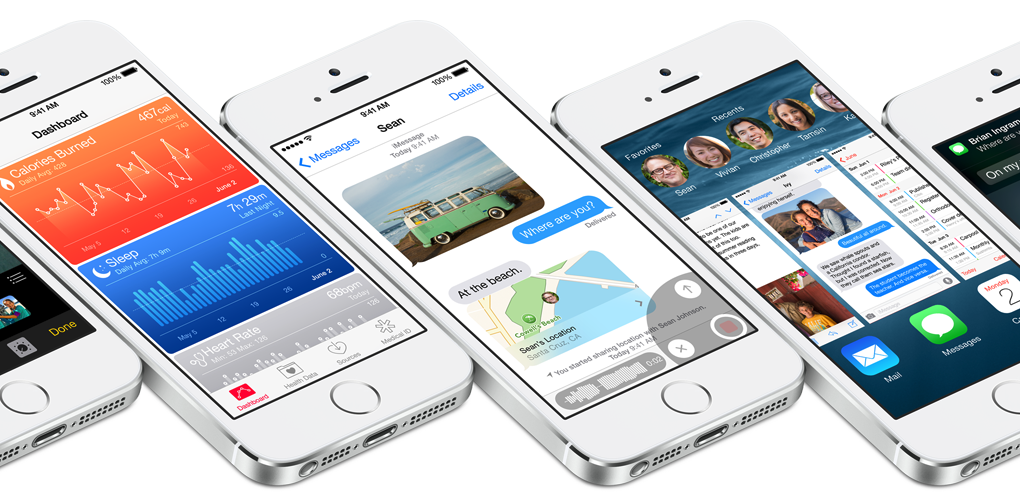
iOS is Apple’s mobile operating system that runs on iPhone, iPad, and iPod touch. Historically, Apple releases a new iOS version once a year, the current version is iOS 13.

In 2007, Steve Jobs introduced the iPhone and iPhone OS. During the event, Jobs referred to the operating system as OS X because it shared a similar Unix core compared to the Mac. When Apple launched the iPhone SDK a year later, they officially changed the name to iPhone OS.

In the summer of 2008, Apple added the App Store to iPhone OS with version 2.0, and this set the stage for the “app economy” that we still enjoy to this day.

Version 3.0 was released in 2009, and it included copy/paste, MMS support, Spotlight, mobile tethering, and push notifications for 3rd party apps.

In version 4, Apple finally renamed iPhone OS to iOS (with the iPad sharing the same software). The major features were multitasking and FaceTime.

iOS 5.0 introduced Notification Center, iMessage, Siri, and iCloud.

iOS 6.0 removes Google Maps in favor of Apple Maps and added the Passbook app (now known as Wallet).

Version 7.0 brought a dramatic redesign of iOS with a new font, flatter icons, a and new Photos app. The redesign was led by Jony Ive.

Version iOS 8.0, Apple finally allowed third-party keyboards and the ability to share files from different apps.

Version 9.0 included Apple Maps, an overhauled Notes app, and multitasking for iPad.

Version 10.0 included an SDK for Siri, Maps, and iMessages.

Version 11.0 included a new iPad Dock, Customizable Control center, drag and drop on iPad, and the Files app with third-party integration.

Version 12.0 added Screen Time features for managing your time on devices, the Shortcuts app, ARKit 2.0, and Memoji.

iOS 13 added Dark Mode, swipe-style typing, a redesigned share sheet, made app downloads 50% smaller, 2x faster app launch speed, Memoji Stickers and Memoji Makeup, HomeKit-enabled routers and HomeKit Secure Video, a new “Sign in with Apple” option for logging into third-party services, all-new Apple Maps, and much more.

Compatible Devices with iOS 13

  • iPhone 11
  • iPhone 11 Pro
  • iPhone 11 Pro Max
  • iPhone XS
  • iPhone XS Max
  • iPhone XR
  • iPhone X
  • iPhone 8
  • iPhone 8 Plus
  • iPhone 7
  • iPhone 7 Plus
  • iPhone 6s
  • iPhone 6s Plus
  • iPhone SE
  • iPod touch (7th generation)

Site default logo image

Apple officially launches revamped iTunes Connect demoed during WWDC

Ahead of next week’s iPhone 6 announcement, Apple has finally debuted the new design for its iTunes Connect web app that was initially shown off during the WWDC Platforms State of the Union. The new design features a more iOS-like look, similar to that of iCloud.com, and now gives developers even more information about their apps. Analytics feature have also been added for helping users track App Store page views and more.

The new iTunes Connect features will automatically be enabled in iOS apps with no necessary input from developers, as Apple noted during the original announcement. You can take the revamped system for a spin over on the iTunes Connect website.


Expand
Expanding
Close

Apple Store app redesigned, gains upcoming events feature, synchronized shopping

Site default logo image

Ahead of its major media event next week, Apple has issued a significant update to its Apple Store shopping iOS app. The first addition is a complete redesign for the iPhone and iPod touch application’s interface. The new design is more in-line with the recently released iPad variant. Speaking of the iPad version, the tablet-optimized layout is now a universal bundle (single download) with the iPhone/iPod touch version, and it has also gained support for making Apple Store One to One reservations. The app also has a new Stores section to search for upcoming events at local Apple Stores. There is also a new icon. Perhaps the most significant new feature is support for synchronizing shopping between iOS devices and desktop computers. For example, you can start shopping on your Mac and continue via the app on your iPhone. Apple (rightfully so) doesn’t want to a miss a single iPhone 6 or iWatch/iBand sale.


Expand
Expanding
Close

NYT: iWatch to feature flexible display panel, wireless charging, iPhone 6 to have ‘one handed mode’

Site default logo image

The New York Times is weighing in on Apple’s imminent iPhone event, corroborating past information as well as adding some new tidbits about Apple’s newest iPhones (the ‘iPhone 6’) and its brand new wearable (dubbed ‘iWatch’).

Most interestingly, it says that the iWatch will feature a flexible display. Assumedly, this will allow the product to morph to fit comfortably on user’s arms. KGI’s Ming-Chi Kuo predicted Apple’s use of a flexible panel in July. The screen is protected by sapphire glass. As 9to5Mac has reported countless times, the device will feature health and fitness tracking capabilities, for things like footsteps and heart rate. The report claims Apple has “put an enormous amount of time and money” to make the sensors track “much more accurately than existing fitness devices”.

In terms of software, the device will rely on HealthKit for health tracking and Handoff, one of Apple’s iOS 8 continuity features, to seamlessly share content between devices. Handoff could be used for sharing SMS texts between the phone and the watch, for instance. 9to5Mac discussed how Handoff might interact with Apple’s wearable a couple of months ago.


Expand
Expanding
Close

Withings’ new HomeKit-integrated video monitoring & environmental sensor device detects crying

Site default logo image

Withings, a company well-known for its line of iPhone-connected health and fitness tracking accessories, today announced a new video monitoring device with environmental sensors called  Home. While Home is a video monitoring solution that can be used for security, the company is also including some pretty unique features that it hopes will make your home both a healthier and safer environment.
Expand
Expanding
Close

KGI on iWatch: 8 GB storage, 512 MB RAM, 1.3 and 1.5 inch screen, gold option

Site default logo image

A new report from KGI’s Ming-Chi Kuo sheds some interesting light on the iWatch specifications. Kuo believes the iWatch will feature 8 GB of internal storage, with 512 MB of RAM. Naturally, these stats are lower than current iOS devices (which have upwards of 16 GB of storage and 1 GB of RAM), but still seems high for a wearable smartwatch. This may suggest the device can act more independently from an iPhone than most assume. 8 GB of storage space is quite a lot and could be used for things like caching maps, or perhaps enable offline voice recognition.

KGI also believes the iWatch will come in two sizes, with a 1.3 inch and a 1.5 inch screen. This reflects longstanding rumours that Apple is targeting two sizes, to make it appeal to both gender’s fashion preferences. Kuo seems less sure on what materials will make up the product, but ‘guesses’ aluminium based on Apple’s tendencies to use the metal across its products. There is also mention of a gold color option, which would match with the iPhone 5s and iPhone 6’s gold varieties.


Expand
Expanding
Close

Ginger Keyboard brings customizable themes to iOS 8’s keyboard

Site default logo image

More developers are stepping forward with early looks at upcoming third-party keyboards for iOS 8. Today, Ginger Keyboard is going public with a keyboard that focuses on customization. The actual keyboard itself while used across iOS 8 does not add much new functionality, but many users will likely enjoy being able to completely customize the design of their keyboard.


Expand
Expanding
Close

Drones-eye-view of Flint Center highlights the mysterious structure Apple is building next to theater venue

Site default logo image

Update: Video after the break!

With Apple’s iPhone event only a few days away, speculation is still mounting as to what exactly will be announced. The Flint Center building is of particular interest. Sachin Patel used a drone to get a full aerial shot of the complex, and helps clear up what exactly Apple is building. Apple has constructed a gigantic secondary building in front of the Flint Center, seemingly taller than the theatre itself.

The development has a gap at the front to leave the fountain intact. Unfortunately, as Apple has covered the entire structure in a white veil, the purpose of the site is still unknown. The initial pictures of the construction were a bit misleading, as they seemed to show Apple was merely extending the Flint Center. This aerial photo in combination with a Flyover screenshot (below) clarify that is in fact a distinct, separate building.


Expand
Expanding
Close

Site default logo image

Expedia redesigns its iPad app with combined flight and hotel search

Travel booking website Expedia has revamped its iPad application with a new, tablet-optimized look and improved search. Expedia says that its app is faster at helping you book travel than apps from the competition because of its combined search feature.

You just enter your destination and the app will provide results for both hotels and flights in one panel. The app has a handful of other helpful features, according to Expedia:

  • Single Search Box: To eliminate hefty search interfaces, the new tablet app offers a single search box to do the lifting. When a traveler enters a city] name, landmark, or airport code, the app will surface hotels and flights relevant to that query – no dates or specific details are required at the start.
  • First-Ever Combined Hotel & Flight Travel Search:For the first time in the industry, combined search has arrived for the travel market. Rather than searching for trips in a rigid, linear progression of flights then hotels, or hotels then flights, Expedia is introducing one combined search that provides both hotel and flight results simultaneously, available all in one glance.
  • Collections:Expedia presents various themed travel destinations to spark interest in future journeys. Collections offer customers the opportunity to explore vacation destinations they may not have otherwise considered. Beautiful locations come to life in a particularly compelling way on tablet devices. Collections offer a rich combination of design, mobility and travel research. Content is catered to various regions and will be updated based on traveler feedback.
  • Integrated Trip Planning, Booking, & Data, Shared Across Devices:Earlier this year, Expedia introduced Scratchpad in certain markets around the globe. Scratchpad is an easy way to keep track of your travel searches. When a traveler is signed into an Expedia app, trips researched on a tablet device will appear on the desktop or mobile Scratchpad. This allows travelers to begin their travel planning from where they left off – on any device.

A new version for Android tablets is also available. Expedia also has an iPhone version , and both apps are a free universal download on the App Store.


Expand
Expanding
Close

Site default logo image

What if the iWatch’s design is based on the iPhone 6? (Gallery)

We now know that “Switzerland is in trouble” thanks to Apple design head Jony Ive, but what exactly will the Apple wearable look like? Nobody has been able to provide a good feel (yet) of the appearance, but a new concept by designer Martin Hajek points us into a potentially solid direction: a wearable device that is a bit of a mix between the iPhone 6’s design and the Nike FuelBand. Take a look at the concept shots below, and let us know what you think in the comments. I personally think this looks pretty cool, but we’ll know for sure if Apple has something better up its sleeves early next week.


Expand
Expanding
Close

Site default logo image

Logitech’s new Bluetooth Multi-Device keyboard doubles as iPhone/iPad stand

[youtube=https://www.youtube.com/watch?v=MceLc7-w1lQ]

Logitech today announced a new Bluetooth Multi-Device Keyboard (K480) that doesn’t just make switching between devices easy, it also doubles as a stand for your iPhone or iPad. While Logitech has made similar keyboards previously that let you switch between connected devices, the new keyboard adds a “Easy-Switch dial” that makes it super easy to switch between three devices on the fly:

Now you can type a report on your computer and, with the flick of the Easy-Switch™ dial, respond to a message on your smartphone and type a tweet on your tablet. The universal keyboard can connect to three different Bluetooth wireless devices at once, whether you are using a Windows®, Mac® or Chrome OS™ computer, or an Android™ or iOS tablet or smartphone.

The keyboard is available now in the US and Europe for $50 in two color schemes (white & black). You can images of the two colors below and see more specs and order the keyboard now on Logitech’s site.

Technical Specifications

  • Available in white and black.
  • Bluetooth range: up to 10 m (30 feet)*
  • Battery life: 2 years**
  • On/Off power switch
  • Battery life indicator light

Digitimes says iPad Air 2 will be ‘thinner’ and have ‘improved fingerprint recognition’

Site default logo image


Says Digitimes:

Touch panel makers TPK and GIS are among some of the makers receiving orders from Apple for full-lamination units. Sources said the new model will remain unchanged in terms of size and resolution, but that it will be thinner, equipped with an enhanced processor, and contain improved fingerprint recognition features.

Two problems there (at least).

1) The current batch of physical mockups/leaks indicate that the new iPad Air will look mostly the same as the current version, and that it will be roughly the same thinness. You can tell in the image above that the new model (on the top) is only very slightly skinner.

2) How can the fingerprint sensor be “improved” if it never existed in the first place? Nonetheless, we’re hearing the new model does include a Touch ID sensor, like the iPhone.


Expand
Expanding
Close

Metadata analysis of leaked photos suggest complete iPhone backups obtained

Site default logo image

A forensics consult and security researcher who analyzed metadata from leaked photos of Kate Upton said that the photos appear to have been obtained using software intended for use by law enforcement officials, reports Wired. The software, Elcomsoft Phone Password Breaker (EPPB), allows users to download a complete backup of all data on an iPhone once the iCloud ID and password have been obtained.

If a hacker can obtain a user’s iCloud username and password with iBrute, he or she can log in to the victim’s iCloud.com account to steal photos. But if attackers instead impersonate the user’s device with Elcomsoft’s tool, the desktop application allows them to download the entire iPhone or iPad backup as a single folder, says Jonathan Zdziarski, a forensics consult and security researcher. That gives the intruders access to far more data, he says, including videos, application data, contacts, and text messages …


Expand
Expanding
Close

Site default logo image

Helpful shift scheduler for Apple Store employees turning into App Store app for all

A couple of years ago, Australia-based former Apple Retail Store employee Josh Hunt realized that he (and his colleagues) had a major problem: even with Apple’s cloud technologies, viewing his Apple Store work schedule was a pain. Apple’s internal network allows Apple Store employees to view their hours each day, but this information is not easily accessible from the Calendar application on the iPhone, iPad, or Mac. Hunt created a tool called Roster Genius that is a web extension to convert Apple’s internal calendaring system into a file that is compatible with the iOS and Mac calendar applications.

Roster Genius was a hit inside the Apple Retail world, and Hunt tells us that the service amassed 8,000 users in 14 countries. But Hunt shut down Roster Genius in favor of building something, alongside co-founder Sam Elliott, with larger implications: an App Store app with similar shift management functionality that could be used by all sorts of users, not just Apple Retail Store employees. The new app, launching in the coming months, is called Shifts, and as the developers tell us, “it is a calendar app, but made specifically for casual/part-time employees – that is, people who work different shifts every day.”

The application can connect to the schedules of others so that “you’ll be able to see when your days off align with your friends, and share your roster with a group of friends and coordinate for things to do on days off, organize the carpool or plan after-work drinks,” according to the developers. The interface for the app is very slick, and it boldly does not use the date picker as it instead relies on the numbered keypad for quickly entering in work times. As for the Apple Retail Store-optimized version, that’s coming back too.


Expand
Expanding
Close

Apple sets developer rules for HealthKit, HomeKit, TestFlight, and Extensions ahead of iOS 8 launch

Site default logo image

Today, Apple has updated its official App Store developers Review Guidelines to outline the requirements for iOS 8 applications that will make use of the new HealthKit, HomeKit, TestFlight, and Extensions services. Today’s update indicates that Apple is nearing the release of iOS 8, the next-generation mobile operating system for the iPhone, iPad, and iPod touch ahead of the September 9th Apple media event. Apple will provide developers with a golden master seed of iOS 8 on the day of the event, according to sources with knowledge of the plans. The review guidelines are a “living document” that list reasons that App Store apps could be rejected. Below are the full lists for HealthKit, HomeKit, TestFlight, and Extensions, but here are some of the more significant points:

  • “Apps using the HealthKit framework that store users’ health information in iCloud will be rejected.” This point should reduce fears of intruders being able to access a user’s health data, especially after the scandal surrounding the leak of celebrity photos potentially stored in iCloud.
  • “Apps that share user data acquired via the HealthKit API with third parties without user consent will be rejected.”
  • “Apps that provide diagnoses, treatment advice, or control hardware designed to diagnose or treat medical conditions that do not provide written regulatory approval upon request will be rejected.” This point is crucial in that these fine print allows Apple to work around the FDA’s regulatory guidelines for mobile health applications.
  • “Apps using the HealthKit framework must provide a privacy policy or they will be rejected.”
  • “Apps must not use data gathered from the HomeKit APIs for advertising or other use-based data mining.” Same deal with HealthKit, as we noted earlier this week.
  • There are also a number of third party keyboard guidelines that will be critical for developers to follow.

In addition to those four new sections, Apple has also updated the guidelines to say that “if your app is plain creepy, it may not be accepted.” You can read all of the new bullet points below:


Expand
Expanding
Close

Site default logo image

Future patent battles could be fun as Apple patents Samsung Air Command style menus …

Future patent battles between Apple and Samsung could take an entertaining turn as Apple has been granted a patent on radial menus for touchscreen devices – using an illustration that bears a notable resemblance to the Air Command menu used by Samsung on the Galaxy Note 3.

Lest anyone accuse Apple of copying Samsung, Apple first patented the menu approach back in 2012 – a year before Samsung adopted it. The reason for the second patent granted today is that Apple seemingly had in mind OS X rather than iOS when it first came up with the idea, illustrating it in a desktop environment.

The second patent specifically references using the menu based on “input from a touchscreen.”

As ever, the fact that Apple has patented something provides no evidence at all that it will ever see the light of day in an Apple product – OS X or iOS. Apple plays around with all kinds of ideas and patents thousands of them, only a tiny minority of which are ever used.

With Apple possessing a patent for a particular menu approach used by Samsung, but patenting touchscreen application of the approach after Samsung launched it in a tablet, the legal arguments could get interesting should the matter ever end up in court …

Via GigaOM

Site default logo image

Microsoft mocks Siri again in new commercial for Cortana & HTC One M8 (Video)

[youtube=https://www.youtube.com/watch?v=nRV76VbTq-8]

Microsoft, like Samsung, has been no stranger to directly going after Apple products in its latest TV commercials and online ads. Today, Microsoft has released yet another Siri-bashing ad comparing it to Windows own Cortana voice assistant feature on the HTC One M8.

Earlier this summer during its developer conference, Microsoft released its first ad going after Siri and comparing its functionality to the new Cortana personal assistant feature for Windows mobile devices. The previous commercial focused on the latest Nokia Lumia, while today’s ad highlights the recently announced Windows version of the HTC One M8.

Microsoft also taken on other Apple products in its recent ads including side-by-side comparisons of the MacBook Air and its Surface tablet in a commercial currently airing on TV.

Here’s to hoping Apple has some big Siri improvements up its sleeve that will come alongside the new iPhones later this month and possibly be at the heart of its wearable product also expected to be unveiled at its September 9 event.

Site default logo image

Digitimes says iWatch likely to launch in 2015, yet to reach PVT stage

via <a href="http://twitter.com/EA_Roa">@EA_Roa</a>

Mirroring comments by Re/code last week, Digitimes adds some additional insight to the state of the iWatch production process. The report says that components of the mysterious device are ‘entering production’, but the unit as a whole is still at the engineer verification test stage. The EVT state still allows for late-in-the-cycle changes to design and functionality. Once the iWatch hits PVT (the production verification test stage), parts are finalised and its usually only a couple of months before the device can enter mass production and be released publicly.


Expand
Expanding
Close

Elgato announces Eve home automation integrated with Apple’s HomeKit, Avea smart LED lights and Smart Power batteries

Site default logo image


Everything has pretty much stopped in North America for Labor Day (except for perv hackers), but IFA 2014 is ramping up in Germany and Elgato is using this event to debut a new lineup of smart accessories. The announcement encompasses three major new products: Eve, Avea, and Smart Power.

Elgato Eve is easily the most compelling new product in this lineup. Through the use of several sensors, Avea monitors your home’s “air quality, temperature, humidity, air pressure, energy and water consumption.” These Bluetooth connected sensors report back to your iPhone or iPad via the Elgato Eve app. And here’s the best part, it will be fully compatible with Apple HomeKit…

Expand
Expanding
Close

Apple ‘actively investigating’ alleged iCloud hacking that caused celebrity nude photo leak

Site default logo image

Re/code has received a statement from Apple about the alleged hacking incidents. Natalie Kerris says:

“We take user privacy very seriously and are actively investigating this report,” said Apple spokeswoman Natalie Kerris.

As is the norm with Apple’s public facing commentary, the company has not said much about the situation. Somehow, compromising personal pictures of several celebrities have leaked online and many are blaming iCloud as the root cause. The events are muddled by the fact that some of the reported claims have transpired to be fake Photoshopped images, although some — like the images of Jennifer Lawrence — have been confirmed to be legitimate.


Expand
Expanding
Close

Plácido Domingo to close iTunes Festival on September 30, show kicking off today with deadmau5

Site default logo image

Placido Domingo has been announced as the final closing act for Apple’s iTunes Festival London. Apple has also added a few more acts than what had been previously announced, to round out the lineup. This includes The Mirror Trap, Friend Within and the London Electronic Orchestra.

The month-long festival starts today at 9 PM UK time (1 PM PST), with ‘Deadmau5’ headlining Monday’s show. A full schedule can be found online at http://itunesfestival.com.


Expand
Expanding
Close

Site default logo image

Analyst says not to expect reversible USB Lightning connector to ship with iPhone 6

In a new report, KGI Securities analyst Ming-Chi Kuo has said not to expect the redesigned Lightning connector or power adaptor to feature as part of the iPhone 6’s package, quoting cost reasons. The new Lightning connector was intriguing in that it was reversible on both ends, including a specially-designed USB connector so that it could be inserted both ways up.


Expand
Expanding
Close

Apple highlighting top ten reasons apps get rejected on new developer page

Site default logo image

As noticed by Apfelpage, Apple has published a new page to be more open about why it rejects apps. A chart at the bottom of the page shows the top ten reasons for app rejection in the last seven days; such as lack of information, crashes or bugs encountered, complicated user interfaces. Around 60% of rejections come from violation of just ten guidelines of the App Store rules. Some of these, like the existence of placeholder text in applications, seem rather trivial issues and it’s interesting that it arises so frequently as a cause of rejection.

The page goes into more detail on some of these points. In one instance, Apple highlights what it deems to be a ‘substandard user interface’, which apparently is responsible for 6% of all rejections. In the example, Apple advises use of a tableview to cleanly lay out information.


Expand
Expanding
Close

Support for 3x image assets found in latest iOS 8 beta ahead of larger display iPhone 6

Site default logo image

Developer James Thompson has found an interesting behavior in the latest iOS 8 beta, giving even more weight to the reports that indicate the iPhone 6 will feature a new resolution, featuring a new ‘pixel-tripling’ scaling factor of 3. In May, 9to5Mac first broke news of Apple testing a new screen resolution for an upcoming iPhone, which used a 3x screen scale for content.

https://twitter.com/jamesthomson/status/505371301272645632

The behavior is inconsistent, as iOS 8 beta 5 does not always load these 3x assets. However, it reliably chooses the 3x image on 2x devices using the ‘initWithContentsOfFile’ method. After seeing Thompson’s discovery, 9to5Mac has independently confirmed that this is indeed the case.


Expand
Expanding
Close

Someone assembled their own iPhone 6 using leaked parts (Video)

Following photos that surfaced this morning showing much more subtle antenna breaks on the back of a supposed production model iPhone 6, a video of a device based on the upcoming flagship has surfaced thanks to Feld & Volk, an association of designers and engineers who create luxury custom versions of Apple’s most popular handsets. But what’s interesting about this device is that it seems to actually be built from working parts, and can be seen booting and asking the user to connect to iTunes.


Expand
Expanding
Close