Latest

Site default logo image

Mailbox updated to version 1.5 with cloud searching, per-account signatures, and more

Mailbox, the iOS email app recently acquired by Dropbox, was updated with a few new features today. Among the new additions is Gmail cloud search which allows you to search messages stored on the server but not downloaded to your phone. The ability to set an individual signature for each account—a much-requested feature—was also added, along with an option to open links in Google Chrome.

The update is available now to all users for free.

What’s New in Version 1.5.0

– Cloud Search (now search every message in your Gmail account)
– Account-specific signatures
– Open links in Chrome
– Performance improvements and bug fixes

Site default logo image

Twitter for iOS updated: new conversation view in timeline, notification enhancements

Screen Shot 2013-08-28 at 2.36.19 PM

Twitter has updated its iPhone, iPad, and iPod touch application with a redesigned timeline and conversation view. The new conversation view inputs a blue line to indicate a conversation between people on Twitter that you follow.

Conversations have a new look! They’re easier to find and fun to join.

• A blue line indicates a conversation between people you follow
• The first Tweet in the conversation now appears above the most recent reply
• Tap to see all of the replies

This release also includes various other improvements:
• New notification settings
• Bug fixes for direct messages, login verification and mor

User can also now more easily tap to see replies to a tweet and instantly Reply, Retweet, or Favorite a Tweet. The Twitter website and Android apps are seeing a complementing update:

https://www.youtube.com/watch?v=BnRmayAuB4M

Twitter also says that improved notifications and bug fixes are included in the update. The update is version 5.10 and it is available for free on the App Store. 


Expand
Expanding
Close

Site default logo image

Google Maps for iOS adds ability to share locations to Google+

Google updated its Google Maps app today for iPhone and iPad with one new feature on top of the usual bug fixes. With version 2.2.0, users can now share their locations directly to Google+ from within the Google Maps iOS app. Tapping the the share button will now provide a “Google +” option and users can also select specific circles to share with before posting. Previously users could only mail, message, or copy a location to the clipboard.

What’s New in Version 2.2.0

● Share your favorite places with friends via Google+
● Bug fixes

Site default logo image

Ebay updates ‘Fashion’ & ‘Motors’ apps w/ iPad support, adds interactive maps to StubHub

Ebay has updated some of its mobile apps today with new features and support for additional devices. Its Motors and Fashion apps, which provide dedicated experiences for browsing vehicles and fashion products on eBay, today get support for iPad. The Motors app also gets a redesign for iPad, improved search, and updated layouts on both iPhone and iPad.

Ebay also updated its StubHub iOS apps today with new interactive maps for the upcoming pro and college football and basketball seasons. You can now “filter listings by section on 1,800+ maps and see the view from your section on more than 400 maps.”

The updated StubHub, eBay Motors, and eBay Fashion apps are available for free on the App Store now.

Site default logo image

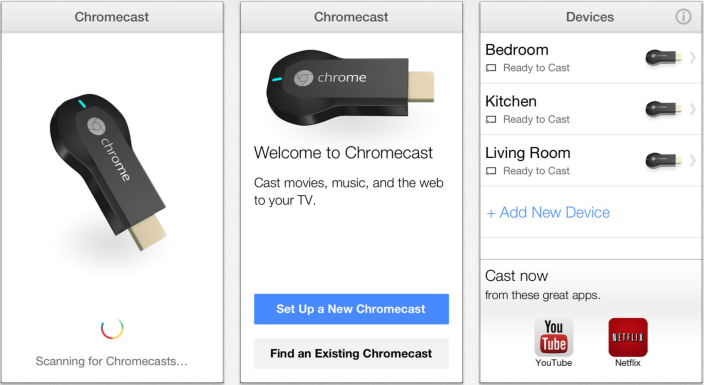
Google launches app for iOS to set up Chromecast, manage settings

Screen Shot 2013-08-27 at 9.26.10 AM

Google has released a new application for the iPhone, iPad, and iPod touch to make it easier for users to setup and manage the Chromecast TV device.

• Set up your Chromecast to work with your Wi-Fi network
• Manage your Chromecast settings (such as changing your device name, Wi-Fi password, etc.)

The application is free on the App Store. The Google Chromecast is a device that plugs into a TV set via an HDMI port and allows users to stream content, such as YouTube and Netflix, from devices like computers, tablets, and smartphones.

Update: Chromecast is currently available at Best Buy for $35 including the 3 months of Netflix (value $27)


Expand
Expanding
Close

Review: ReadQuick 1.5 brings speed-reading to the iPhone

Site default logo image

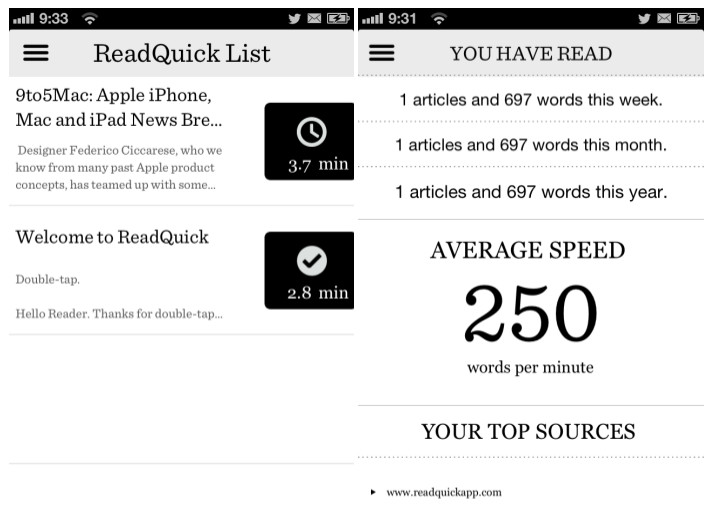
ReadQuick, the speed-reading app for iPad, has been updated to version 1.5 today. The new version brings the app to the iPhone and iPod touch.

For those who aren’t familiar, ReadQuick is an app that presents a new way to read web articles. Rather than present you the entire article as one page, ReadQuick shows you the entire article one word at a time. That may sound inconvenient, but it turns out it’s actually much nicer than it sounds. Keep reading for our full review of the brand new iPhone version.


Expand
Expanding
Close

Site default logo image

Real Racing 3 iOS app adds classic Dodge and Shelby muscle cars, new events, difficulty tuning & more

Real-Racing-3-muscle-cars-Shelby

EA has pushed out an update to its Real Racing 3 app for iPhone and iPad today that brings a number of new vehicles in addition to new events and performance tweaks.

Among the new vehicles is a collection of V8 muscles cars from Dodge and Shelby that EA says include improved visual physics “with realistic pitch and bodyroll.” The update also adds improved cameras, difficulty tuning, and new events that feature a “Series featuring a field of muscle cars hailing from Detroit.”

A full list of what’s new below:

What’s New in Version 1.3.0

An iconic generation of cars joins Real Racing 3’s diverse garage, with the introduction of timeless classics from Dodge and Shelby.

• New cars – Dodge and Shelby add a collection of big V8 muscle cars to Real Racing 3
• New events – compete in multiple challenging Series featuring a field of muscle cars hailing from Detroit
• Difficulty tuning – faster and more accurate skill adjustment for even tighter competition
• Visual physics enhancements – classic muscle cars come to life with realistic pitch and bodyroll
• Improved cameras – enhanced sense of speed and motion yields a more authentic racing experience
• Additional social networking options for enhanced Time Shifted Multiplayer and Cloud Save functionality

Site default logo image

Google brings unified account sign-in to YouTube & AdSense iOS apps

Following an update to version 2.0 for the YouTube iOS app yesterday, users have noticed that Google appears to have turned on shared account logins for at least YouTube and the recently released AdSense app. That means logging into one app will automatically log you into the other without having to re-enter your account and password. Although the majority of Google’s iOS apps require users to sign into a single Google account used across its services, up until now each app required users to enter their account info when when launching for the first time.

Google didn’t list the new feature when it updated the YouTube app or in the release notes for the new AdSense app, but the support page for YouTube does note, “If you’ve signed in with another Google app on your iOS device, you may see this account listed.” Removing an account in either the AdSense or YouTube app will also remove it from the other app if installed on your device, but Google doesn’t offer users any control over the feature as of yet. Google doesn’t mention support for any specific apps, but we’d imagine this is likely a feature that will make its way to other Google iOS apps in the near future.

Site default logo image

YouTube for iOS gains video playback while searching, improved ChromeCast integration

http://www.youtube.com/watch?v=ir1xdtIb-g0&feature=player_embedded

Google has announced an update for its YouTube for iPhone, iPad, and iPod touch application that brings multiple new features. Notably, the app will now allow users to watch a video in the corner of the display while browsing and searching for other videos.

The app also gains support for viewing playlists and more content on mobile. Also new is deep integration with the ChromeCast:

The Cast button on YouTube already lets you send YouTube videos from your phone or tablet to your connected TV, like on Chromecast, Google TV, Playstation 3 and other TVs. To make it easier to choose what to watch next, you’ll see a preview screen when your devices are connected and you select a video, with options to play the video to queue it up to watch next.

The app update is available now on iTunes for iOS and is also available for Android.


Expand
Expanding
Close

Site default logo image

Barnes & Nobles releases ‘Nook Video’ app for iOS

Barnes & Noble announced today that it’s launching new apps on iOS (and Android and Roku) for its Nook Video service. The service offers a catalogue of HD movies and TV shows available to purchase or rent, and also lets users view their previously purchased Nook and UltraViolet-enabled movies and TV shows. The launch of the apps on new platforms comes following the company’s announcement in June that it was moving to cut its losses with its Nook tablet line and focus only on its e-readers.

NOOK Video delivers a growing and diverse catalog of favorite HD movies and TV shows from all the major studios, as well as many leading edge independent studios. Titles can be easily purchased or rented from the NOOK Store®with no subscription required. Customers can shop and add new releases, blockbuster movies, popular television shows, classics films and more to their NOOK Library, then instantly stream or download their purchases on NOOK tablet devices or through a NOOK Video App. Additionally, customers can easily shift their viewing experience across their connected devices by starting a movie or TV show on one device and then picking up exactly where they left off on another device linked to their account.

The free Nook Video app is available to download on iPhone and iPad now.

Site default logo image

Google+ for iOS adds Google Drive photos integration & Apps domain support, removes Messenger

After updating its Android app for Google+ earlier this week, Google has today updated the iOS app with the same features including Google Drive integration and improved support for Google Apps customers.

Users will now be able to view, edit and share photos that are stored in their Google Drive account, while Google Apps domain customers get “domain icons to identify members” and the ability to “restrict posts to the domain, domain icons to identify members.”

Version 4.5.0 also removes the Messenger from the Google+ iOS app as Google makes way for its unified Hangouts messaging app.

What’s New in Version 4.5.0

– View, edit, and share photos stored in Google Drive
– Google Apps domain support: restrict posts to the domain, domain icons to identify members
– Hangouts app replaces Messenger for messaging and video calls. Visit Google Takeout to download your Messenger data.

Finish for iPhone 2.0 introduces Kiip integration, more notifications, task times, and more

Site default logo image

Finish, the Apple Design Award-winning task management app created by a duo of high school students, received a substantial upgrade to version 2.0 today. The new version brings many visual tweaks and bug fixes throughout the app, but the biggest changes are the addition of several new, highly-requested features.


Expand
Expanding
Close

Site default logo image

WatchESPN app updated for iOS 7, adds ‘Live Toolbar’ that lets you stream two videos at once

ESPN has updated its WatchESPN app for iOS today with a new feature called “Live Toolbar” that allows users to multitask while continuing to watch live programming. Rather than having to leave the live stream of whatever event you’re watching at the time, the new live toolbar will allow you to keep up with scores, browse upcoming events, and even watch video highlights or a second video stream. Perhaps the most notable new feature is the ability to watch a second video next to live programming when rotating the device into landscape mode:

Top Videos: Watch multiple things at once! Keep up with the latest news and highlights right alongside the live ESPN programming you’re watching. Rotate your device while watching two videos.

The new live toolbar feature is only rolling out to users on iPad and iPad mini, and will also let users “switch to additional ESPN programming without exiting the video” and follow scores of additional games while watching live programming.

Version 1.7 of the WatchESPN app also includes iOS 7 support, more events from “ESPN on ABC”, and ESPN3 access for users connecting from a college or military network.

Apple just recently added the watch ESPN service, alongside HBOGo and a handful of others, to the AppleTV.

What’s New in Version 1.7

Introducing the WatchESPN Live Toolbar on iPad! Now you can keep up with news, scores and on-demand video from your favorite sporting events while watching live programming on ESPN.

The live toolbar includes:
– Live TV Lineup: See what’s on ESPN’s networks and switch to additional ESPN programming without exiting the video.
– Scores: Follow additional games while watching your game on ESPN. Launch video highlights at the conclusion of an event (where available).
– Top Videos: Watch multiple things at once! Keep up with the latest news and highlights right alongside the live ESPN programming you’re watching. Rotate your device while watching two videos.

*The Live Toolbar is available on iPad and iPad Mini only.

Also new in 1.7:
– Users connecting from a college or military network now get access to ESPN3 events automatically!
– WatchESPN is now compatible with iOS7.
– “ESPN on ABC” events will now appear in the WatchESPN app. Selecting these events will bring you into the WatchABC app.

*WatchESPN 1.7 requires iOS 6 or above.

Site default logo image

VEVO and VEVO HD receive full AirPlay support ahead of rumored Apple TV app

appleTV

Music video service VEVO just pushed out an update to its apps for iPhone and iPad that allows users to stream both audio and video from an AirPlay-enabled device to an Apple TV. Previously the app only supported AirPlay audio. It’s an interesting move considering the rumors that VEVO is building its own app for Apple TV set to launch sometime later this month.

According to a recent report by Advertising Age, VEVO’s Apple TV app is supposed to feature a “lean-back” version of VEVO, with programmed channels, but will also feature on-demand programming. The app will allow users to watch VEVO TV, which the company describes as “a 24/7 channel of music videos, live performances, and original shows from VEVO’s massive library – made by music lovers for music lovers, no algorithms allowed.” VEVO already has apps on a variety of competing devices, including the Xbox 360 and Roku Web TV box.

For what it’s worth, HBO GO received an update allowing audio and video AirPlay mirroring just two months before the app made its debut on Apple TV.

VEVO (iPhone) and VEVO HD (iPad) are available free of charge.

Site default logo image

Facebook update brings restaurant reservations and TV listings to mobile apps; Path adds 13 API partners

851583_163001980557169_1649402099_n

As announced on the Facebook for Business news blog, the social network has added new features in an update to their mobile applications today.

Taking advantage of the OpenTable service, visiting a restaurant’s page now shows available times and reservations and everything can be completed right inside the Facebook app.

Using their mobile devices, will be able to book tables via Facebook Pages for restaurants. The update represents a new way for people to discover and book great dining experiences, all within the Facebook mobile app. There’s no need to visit a separate mobile site or open a separate app.
The new feature will be available on the Facebook mobile Pages for more than 20,000 OpenTable restaurant customers across North America.

In addition, the update brings listings to the pages of primetime TV shows and movies:

Finding shows and movies on TV is getting easier as well. For people that use iOS, Facebook will display TV listing information on US primetime TV and movie Pages. Listings will be based on your current time zone and include the channel name, air time and a description of the show or movie playing, meaning that the listings that exist in cable box guides, magazines and newspapers are now conveniently located on the Facebook Pages of peoples’ favorite shows.

The update has also brought hashtag search to iOS.

What’s New in Version 6.4

• Search for hashtags or tap them in posts to see what other people are saying about a topic
• Make restaurant reservations directly on participating Pages in the US
• Faster loading and a cleaner design for timelines on iPad
• Fixed a bug that was causing some people to see red notification badges when there weren’t any new notifications
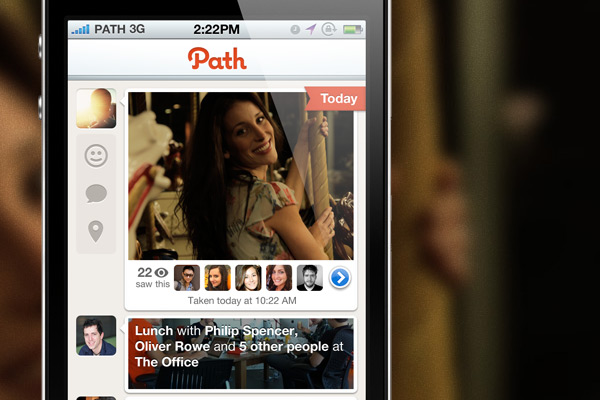
path-appSmaller, private social network Path has announced the addition of 13 new API partners, including Pic Stitch, WordPress, Viddy, Over and several other notable apps. The company notes that the API will come to more applications over time, but they are starting out with partners of applications they love and find to be related to the philosophies of the app.

To start, we have hand-selected developers we admire for their innovation and quality, as well as a few that have been most requested by our users. From more workout moments, to photo moments, to thought moments, we have worked closely with these developers to ensure that sharing to Path is a seamless and beautiful experience.

Moving forward, we will continue to work with developers with whom we share values. In addition, we’ll continue to work closely with each developer to guarantee an integration that truly delights the user. Our current list of developers that will be able to share to Path are:

Photos & Video

  • Over
  • Viddy
  • PicMix
  • PicFrame
  • Pic Stitch
  • Pic Collage
  • papelook
  • Manga-Camera
  • Otaku Camera
  • Miil

Thoughts

  • WordPress
  • Holy Bible

Workouts

  • Strava Cycling
  • Nike+ Running
  • Nike+ FuelBand

Some of these are available today, others in the coming weeks. We invite you to download them and start sharing to Path!

Site default logo image

Skype for iPad & iPhone updated with HD video calls, improved call quality

Skype-iPad-video-calls

Update: The iPhone version of Skype just received the same update with HD video calling support on iPhone 5.

Today Skype updated its iPad app with the ability to make HD quality video calls in addition to several other performance improvements. It’s a feature that’s been available on other platforms for quite sometime, including the Mac client, but today the higher quality video calls finally make their way to the latest iPad. Earlier this year Skype rolled out HD video calling to Windows Phone device’s and noted it would include “720P HD on higher-end devices.” We’d imagine that’s also the case with today’s iPad update but, as always, the quality of video will also depend on the quality and bandwidth of your internet connection.

The HD video calling feature is only available on iPad 4, and version 4.10 also brings enhancements to call quality and stability. It also includes “a redesigned country code picker on the dial pad.”

What’s New in Version 4.10

Call quality improvements
– Make HD quality video calls from your iPad 4.
– General improvements to call quality and stability.

General fixes and improvements
– A redesigned country code picker on the dial pad.

Site default logo image

CBS Sports iOS app gets full iPad support including live video

CBS has updated it’s ‘CBS Sports’ iOS app today with full support for tablet users, allowing iPad users on iOS 6.0 and up to access all of the on-demand and live content that the app previously only offered to iPhone users. The updated app doesn’t just bring a native iPad design with support for the larger screen as pictured above, but it will also now allow users to access live video. On top of on-demand content from CBS, the app offers live streams for a number of sporting events, including: NCAA basketball (January-April), PGA TOUR (May-August), and SEC football games (Sept-Dec). It also brings access to special events including “NCAA March Madness, The Masters, NFL Draft Day, PGA TOUR and more.”

The updated CBS Sports iOS app is available for free on the App Store now.

What’s New in Version 6.0

v6.0
* Tablet Ready! Follow all the action on your iPad, including watching Live Video.

Site default logo image

Twitter #music app gets new ways to discover artists, scans iPhone library for personalized recommendations

Twitter-Music-iconTwitter updated its Twitter #music iPhone app today with several new ways to discover new artists in addition to personalized recommendations based on the content in your iPhone’s music library.

Version 1.2 of the app now allows users to “listen to artist’s top tracks, similar artists, and the artists that your favorite artist follows on Twitter.” However, another interesting new feature will scan the device’s music library in order to serve up relevant recommendations based on your past listening habits.

Twitter is also making it easier to find artists that you like by making it easy to quickly access the artists that you’ve tweeted about in the past.

Personal recommendations based on previous listening habits is becoming a prerequisite for just about any music app ahead of Apple’s iTunes Radio launch. Apple’s upcoming service will rely heavily on its personalization features similar to iTunes Genius, and Rdio and others have been adding similar features that focus more on stations custom tailored to the user’s listening preferences.

Lastly, the app gets support for a number of new languages:

What’s New in Version 1.2

We’ve added a bunch of new ways of discovering music. Listen to artist’s top tracks, similar artists, and the artists that your favorite artist follows on Twitter.

We also scan your iPhone’s music library now to suggest more relevant artists to you. And we show you the artists that you’ve Tweeted about so you can always get back to them.

Finally, we’ve localized #music into all of your favorite languages. If you’re one of those good looking people living in Belgium, Denmark, Finland, France, Germany, Italy, the Netherlands, Norway, Portugal, Spain, Sweden, or Switzerland then we’ve got you covered!

Site default logo image

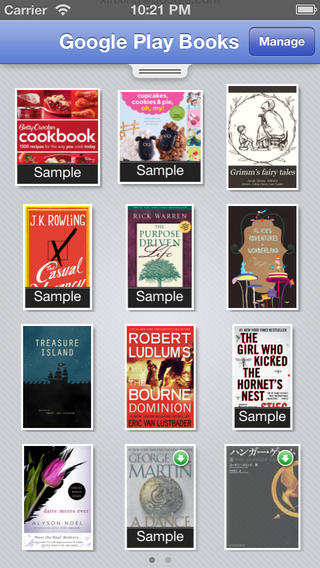
Textbooks rolling out to Google Play Books iOS app

screen568x568Google announced back in July during its Google I/O keynote that it would be rolling out textbooks to Google Play Books sometime in August, and today the listings for textbooks have finally arrived in the store via an update to the iOS app. The textbooks get their own section in the Google Play Books store, and are currently only available to users in the US.

Google’s new textbooks are available to purchase, but some titles will offer a rental option that allows users to rent the book for a lower-cost over a six month period. Google is also providing free samples for the new textbooks. The service is currently available through the Google Play Books apps on Android, iOS, and on the web.

Google is also piloting a new Google Play for Education service and accepting app submissions ahead of a full roll out.

What’s New in Version 1.6.0

Highlighting and note-taking are now supported in scanned pages books.
Added support for rental books.
Added sepia reading mode.
Stability and performance improvements.

Site default logo image

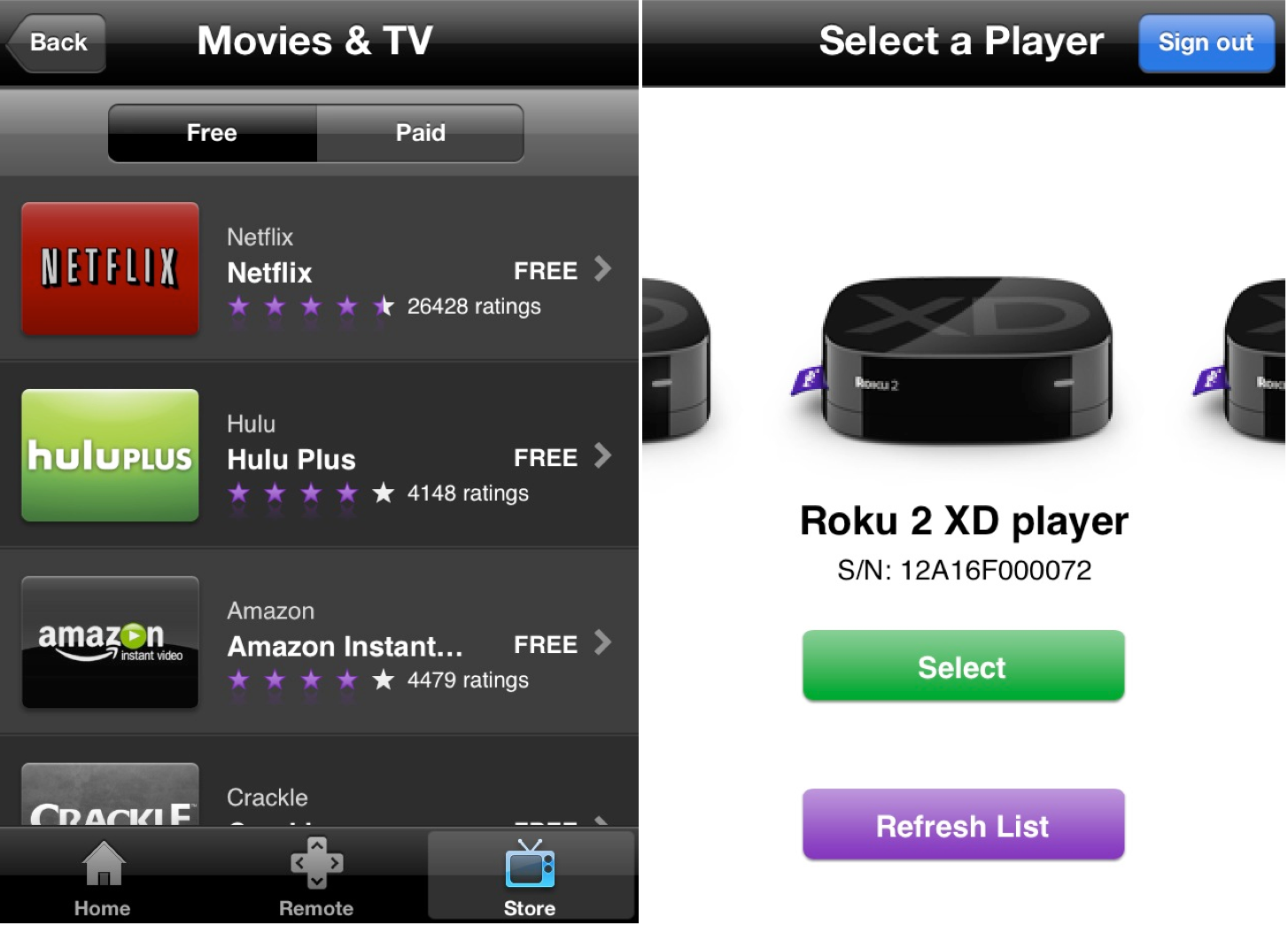
Roku’s iPhone app updated with ability to stream video to your TV

Screen Shot 2013-08-08 at 3.42.46 PM

In an effort to further compete with the Apple TV, Roku has just updated its iOS app with a new AirPlay-like feature. Last fall, the app was updated with a new “Play on Roku” feature that let you beam music and photos to your TV, and now that feature has been further expanded upon to support videos.

The process for videos works just as it does for music and photos. Within the app, tap the Play on Roku button and then the video menu to select something to play.

The biggest downside to this feature, however, is that it only works with content you’ve shot with your iOS device, not videos/movies/TV stored in the actual Videos app like Apple’s AirPlay functionality.

The feature is supported on the Roku 2, Roku 3, Roku LT, Roku HD, and Streaming Stick and the update is available now in the App Store. In addition to the ability to beam videos, the update also includes “minor bug fixes.”
Expand
Expanding
Close

Site default logo image

Rdio apps get revamped Stations with personalized “You FM” feature

Subscription music service Rdio announced today that it’s completely overhauling how stations work through the service.  While stations and the player get a refresh with new endless station types to pick from, the big new feature is something Rdio calls “You FM”:

You FM — A brand new, personalized, adjustable station that leverages Taste Profiling technology from The Echo Nest and incorporates all your listening history, track voting, Facebook likes, Twitter follows, and more to create a truly unique and individualized listening experience. As your tastes grow and evolve, so does You FM.

The new player will let users “vote on individual songs, tune stations towards familiar or adventurous sounds, and pivot stations based on favorite tracks” in order to fine tune stations. You’ll even be able to listen to others’ You FM stations. An endless station that’s automatically customized to the user’s listening habits seems like a must have feature for apps competing with Pandora and Spotify, and it’s something that Apple’s upcoming iTunes Radio app will take advantage of heavily.

The Rdio iOS app has already received the update and the new features are available on Android and the web app as well.

Site default logo image

1Password 4 for iOS goes on sale ahead of Dropbox API changes

AgileBits, the development team behind 1Password for iOS and Mac, announced today that due to an upcoming change in Dropbox’s API, Dropbox syncing in version 3 of the 1Password iOS client will no longer work as of September 1st. Because the old version of 1Password has been discontinued, it will not be updated to work with the new Dropbox API.

Instead, AgileBits is offering the new and improved 1Password 4 at $7.99 the lowest price to date. The sale will last until Friday, August 16th. Since 1Password 4 requires iOS 6, some customers may not be able to update to the latest version. If that’s the case, those users will be glad to know that 1Password 3 will still support Wi-Fi syncing with computers on the same network.

AgileBits has also published a new FAQ document to explain the changes and possible solutions.

Site default logo image

YouTube co-founders launch MixBit video editing app for iOS

Available starting today, YouTube co-founders Chad Hurley and Steve Chen have launched a new app called “MixBit” that appears to be a Vine-like approach to video editing on the go. Unlike Vine, and Instagram’s new video feature, MixBit will allow videos much longer than the rather short, up to 15 second long videos offered through competing services. You’ll also find the majority of videos uploaded to the service are much longer than those on Vine and Instagram, making the experience of browsing and watching videos feel much more like YouTube than Vine. MixBit will allow users to record video clips up to 16 seconds in length and stitch up to 256 clips together into a single video that plays back seamlessly. Videos on MixBit can be up to an hour in length.

It also differs from the other guys in that clips are stored separately even after stitching them together and uploading a video. That means you’ll be able to pull from individual clips from your own or other’s videos at any time to create another video in the future. Some basic editing functions for rearranging clips exist, but the app doesn’t go much beyond that yet. For now the app is only available on iOS, but an Android version is on the way.