app

See All Stories
Site default logo image

$25 million “Leap Fund” announced for Leap Motion app developers

One of the investors backing Leap Motion, the company behind the 3D gesture control hardware coming out on July 22, today announced a new $25 million fund to support the development of third-party apps for the platform (via CNET):

The Leap Fund was designed so that HCP can invest in promising technologies and companies utilizing Leap Motion’s technology. Given that that technology has obvious applications across a wide range of industries, from gaming to medical to architecture and beyond, it’s easy to imagine any number of potential investments for the fund. Highland also plans on offering mentorship and other advice to those receiving money through the Leap Fund, and Leap Motion and Highland together plan to be involved in “joint community activities to help foster innovation and entrepreneurship around Leap Motion’s technology platform,” they said in a release.

As a reminder, we went hands on with the Leap Motion controller a couple times already and enjoyed the experience.

http://www.youtube.com/watch?v=xKZcn1sLD3o

Site default logo image

A look at the changes to Apple’s new Camera app in iOS 7 [Video]

Just like the rest of iOS 7, Apple completely redesigned the camera app that it ships on all devices. Moving away from metaphors that resemble a real camera, Apple has reworked the interface and added new features, such as camera filters and a new square photo option.

Also noteworthy is the removal of shutter animation, which has been replaced by a stark fade animation when you snap a photo. Rather then describe it any further, take a look at the video above to get an idea of what you’ll see this fall when iOS 7 is released to the public.

gMusic app unofficially brings Google’s new “All Access” subscription music service to iOS

Site default logo image

When Google unveiled its brand new $9.99/month “All Access” Google Play music streaming service earlier this month at its I/O keynote, we quickly learned that the service would not be coming to iOS initially. Google didn’t get into why, but today developers of the popular gMusic iOS app has unofficially brought support for the service to iPhone and iPad.

The app previously acted as client for songs stored in your Google Music library, but with an update to version 6.0 today the All Access subscription service is now officially available to iOS users. The changelog on iTunes also lists the ability to “Create/play Radio Stations” and “Search, listen, and add music to your library from inside the app.”

As for why Google didn’t make it’s own All Access app for iOS, we’ve heard from sources close to the situation that Google wants to submit an app but is currently in a holding pattern with Apple regarding what they will accept.

gMusic: Google Music Player is available on the App Store now for $1.99. The updated app will require users to have a Google Play All Access subscription to access the new features. 
Expand
Expanding
Close

Site default logo image

UPS finally releases iPad app for tracking & scheduling deliveries

UPS announced today that it is finally rolling out a native iPad app that brings the ability to track and schedule deliveries as well as access to features of UPS My Choice® and enhanced mapping features. These features were previously available to users in the free UPS Mobile app for iPhone, but today they come to iPads through the UPS for iPad app available on the App Store now. 

Some of the features below will require enrollment in the UPS My Choice program:

Without logging in, you can: 
– Track packages and freight shipments
– Save up to 5 tracking numbers in your tracking list
– See the current location of your package on a map
– Find UPS service locations via GPS

When you log in, you can also: 
– Sync your recent tracks from ups.com
– Nickname tracked shipments
– Enroll in UPS My Choice
– Use UPS My Choice to take action on your incoming deliveries
– Set your delivery preferences

BlackBerry announces BBM coming to iOS and Android later this summer

Site default logo image

Although BlackBerry has been rumored to bring its BBM messaging platform to iOS and other devices before, today the company has made things official announcing at its event that support for both iOS and Android will be arriving in the coming months. The service, which BlackBerry says currently has about  60 million monthly active users, will come to devices running iOS 6 and Android 4.0 or above when it’s launched as a free app sometime this summer in the App Store and Google Play.

The company said that it would be bringing messaging and groups functionality to new platforms first but also has plans to introduce voice features, screen sharing, and its just announced “social engagement platform” dubbed ‘Channels’ in future releases. BlackBerry CEO Thorsten Heins said the company is “committed to making the BBM experience on other platforms as fully featured” as possible.
Expand
Expanding
Close

Site default logo image

Philips updates ‘Hue’ app with geofencing, recurring schedules & visual cues for weather, email, social media, more

https://www.youtube.com/watch?feature=player_embedded&v=FdvqZNJP6oA

Philips today launched a big update to the Hue app that provides users with control over their network connected Philips Hue lighting system which the company began selling exclusively through Apple Stores last year. Version 1.1 of the app adds a ton of new features including Geofencing to trigger scenes when you leave or return home, recurring schedules for functions such as alarms, a new synchronous scenes, and much more.

One of the big announcements accompanying the launch of the updated app is a new IFTTT (If This Then That) channel for Hue. IFTTT is a service that allows online applications to talk to one another by letting users set up actions for one app that are triggered by another. For example, with the Hue channel, users can have “access to any application programming interface (API) on the Internet, allowing Hue smart bulbs to act as informational gateways and visual cues for updates on weather, stock quotes, sports scores, email, social media and more.” Imagine getting a notification through Hue related to a weather forecast or update on a social network.

The Philips Hue starter kit is available now for $199 with 3 bulbs and additional bulbs are available to purchase for $59 each.

A full list of what’s new in the update Philips Hue app is below:

What’s New in Version 1.1.0

– Geofencing feature: Scenes can now automatically turn on when coming home and turn off when leaving home
– Scenes can now be switched on or off using a timer between 1 and 59 minutes
– Alarms can now be set to recur in a weekly schedule and with a random offset for the start and end time
– Fades of alarms now start at the set time instead of ending at the set time
– Increased reliability of alarms
– Improved vibrant colors for LivingColors and hue lights and added support for LivingWhites
– When activating a scene the lights change at the same time synchronously
– Compatible lights can now be added to the system using their serial number

Amazon announces standalone Cloud Player desktop app, Mac version coming soon

Site default logo image

Amazon today announced that it is launching a standalone desktop app for its Cloud Player cloud music service that was previously only available through a web app and mobile apps. The desktop app brings offline support and, like the service on other platforms, will offer its usual unlimited storage of songs purchased through Amazon plus 250 imported songs for free. Unfortunately, today’s roll out only includes an app for PC with Amazon promising Mac users “we’re working on a version just for you.” 
Expand
Expanding
Close

T-Mobile launches subscription based ‘T-Mobile TV’ app for iPhone

Site default logo image

T-Mobile has offered its TV service through an Android app since 2010, but today the carrier has finally released an iPhone version of the app that offers subscription based packages of popular TV shows, sports, and Live or On Demand programming (via TmoNews).

T-Mobile is currently offering 30 days free access to a number of networks including FOX news and Associated Press, Saturday Morning TV, Campus Insiders & ACC Digital Network, but $12.99 a month will get you access to the following:

• Live and On Demand sports from ESPN Mobile TV, NBC Sports, and CBS Sports.
• Kids programming including the Disney Channel, Nickelodeon, Discovery and Animal Planet.
• Streaming news from ABC News Now, Bloomberg, FOX News and FOX Business.
• On Demand Primetime and Reality shows from ABC, CBS, FOX, and NBC and more.
• Includes programming from ABC Family, MTV, Spike TV, Comedy Central, E! and VH1.

T-Mobile is also offering additional discounts on the packages when purchasing 90 or 180 day subscriptions and you’ll be able to subscribe to additional premium packs of content ranging from $5.99 to $7.99 per month that include: Crackle Movies, E!, TLC, The Style Network, Lifetime, PBS Kids, Nick JR, Discovery for Families, and more:
Expand
Expanding
Close

Site default logo image

YouTube Capture iOS app adds HD enhancement previews, Wi-Fi only uploads, more

YouTube’s Capture app for filming and sharing video to YouTube was updated today to version 1.3 bringing a few new features alongside performance enhancements. The updated app now includes high definition previews of enhancements, an option to “Only upload on Wi-Fi”, and more:

What’s New:
✓ HD preview of enhancements
✓ “Only upload on Wi-Fi” option
✓ Upload shows time remaining
✓ Faster launch speed

Things We Fixed:
☂ Misbehaving when low on storage space
☂ Misbehaving while uploading

Site default logo image

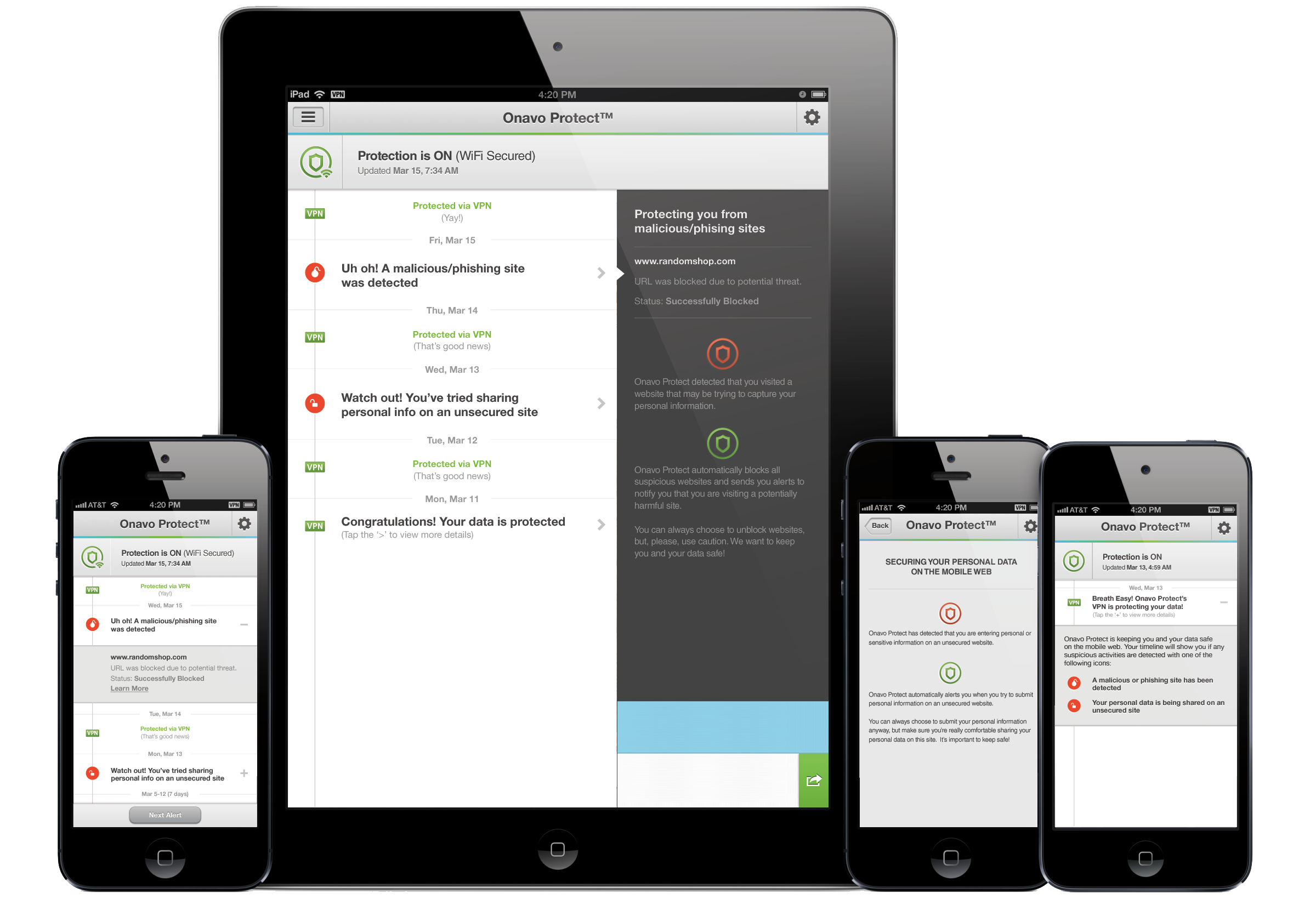
Onavo Protect helps secure your data while on open and public Wi-Fi networks

Released today in the App Store, Onavo Protect promises to protect you while browsing the web on your iPhone. The app allows you to set up an always-on VPN connection, adding an extra layer of security to your browsing experience when you’re on public Wi-Fi networks. Unsecured wireless networks open up the possibility of your personal data being intercepted, and Onavo Protect is intended to keep you safe from those with malicious intent. Additionally, the app warns users when the site they are using is attempting to send a password in an insecure manner, and automatically blocks known phishing sites.


Expand
Expanding
Close

Site default logo image

Blockbuster On Demand app finally launches on iPhone & iPad

Earlier this year Blockbuster relaunched its digital video rental service dubbed “Blockbuster on Demand” by releasing apps for Android, Roku, Samsung Smart TVs, PC & Mac and introducing new features such as 1080p HD streaming and 5.1-channel surround sound. The service hasn’t picked up much steam since relaunching in January, but today it appears Dish is pushing ahead by finally releasing an app for iPhone and iPad. 

Available as free download on the App Store now the app offers single title rental options that can be streamed instantly or saved for later viewing on any supported device. Users initially complained of no HD video support on mobile devices but, according to the app’s iTunes page, the iOS app does indeed support “stunning HD and full Surround Sound.”

•Thousands of hit movies and new releases – rent and watch instantly or save to your Watchlist and view later
•Tons of movies you love – hand-selected titles with the highest ratings from Rotten Tomatoes®
•Stream Instantly — phone, tablet, laptop, Samsung Smart TV, Roku, and more
•Amazing sound and video – stunning HD movies in full Surround Sound
•Easy shopping and viewing – prime movie watching experience
•No subscription or late fees – pay only for what you watch

Review: Infuse by FireCore is a versatile way to watch videos on your iOS device

Site default logo image

As more and more consumers switch to using iOS devices to enjoy media, the need is becoming apparent for a more full featured and well-rounded video player. While Apple’s Videos app provides basic and simple functionality for viewing movies, when it comes to storing, organizing, and viewing your entire library of videos and movies, Apple’s stock app falls flat.

FireCore, the group behind the popular aTV Flash software for jailbroken Apple TVs have released a new app called Infuse, which promises to fix all of that, offering you a versatile way to view and organize videos in a variety of different formats. Let’s check out how it worked.


Expand
Expanding
Close

Site default logo image

Jawbone launches new ‘UP Platform’ to integrate other health tracking services with iPhone app

Jawbone, the company behind the Jawbone Up fitness tracking wristband and companion app, today is announcing some big news including a new API to allow other apps to access its fitness tracking data and the acquisition of competitor BodyMedia. The new API  dubbed the “Up Platform” will see the company create its own app ecosystem of sorts, allowing other developers to access Jawbone UP data and integrate their apps to “complement your UP experience.”

To go along with the new API, Jawbone has already updated its UP iOS app with a new side menu that allows users to share their data with integrated apps and the ability to “to seamlessly integrate new data into your feed, lifeline, and trends.”

Initially Jawbone has partnered with a number of fitness related apps including: IFTTT, LoseIt!, Maxwell Health, MapMyFitness, MyFitnessPal, Notch, RunKeeper, Sleepio, Wello and Withings. Here are a few examples of how Jawbone UP integration works with these third-party services:

-Log a run or bike ride with RunKeeper or MapMyFitness, and view your workout data in UP, including maps of your route, to see how last night’s sleep may have impacted your speed or distance.
-Step on your Withings Smart Body Analyzer and automatically import your weight into UP to track it in the context of how you sleep, eat and move, and get support from your UP teammates as you work toward your goal.
-Create IFTTT Recipes to receive nudges based on your UP activity, like texting you to go for a run if the weather is sunny, or tweeting at your workout partner when you reach 15,000 steps.
-Complete a workout with a live personal trainer in your home or hotel room using Wello, and log the workout directly into UP.

Devs can reach out to Jawbone here if they are interested in integrating their service with UP.

Site default logo image

Wunderlist ‘Pro’ arrives today with new team collaboration features for $4.99/month

6 Wunderkinder, the developers behind the ‘Wunderlist’ to-do app that’s currently home to over 4 million users, today announced a new “Pro” version of the cross platform productivity app. Launching today on iPhone, iPad, Mac, and on the web, the new pro version comes with the introduction of the developer’s first premium model that will see users pay $4.99 a month (or $49.99 a year) to get access to new team oriented collaboration features:

Assigning – now you can add an extra level of accountability and assign tasks to your colleagues

and friends.
Unlimited subtasks – sometimes the task on hand is so big that you need to break it down into

small manageable subtasks. Now you can add as little or as many needed to get the job done.
Backgrounds – Wunderlist Pro subscribers will have access to eight new backgrounds – from a minimal dark wood and soothing sands to vibrant florals and the Paris cityscape, plus a whole lot more!

6 Wunderkinder plans to keep adding additional features for pro users, including the ability to attach and share files through tasks:

Files will be the next feature to be added to Wunderlist Pro. With the support of Files you will be able to attach files to a task and share with your colleagues, for improved collaboration outside of just the to-dos.

The Pro upgrade for Wunderlist is available now as an in-app purchase in the Wunderlist iPhone & iPad app as well as the Mac App Store app and on the web.

Those that plan on sticking with the free version of Wunderlist will also be greeted today with new features in update 2.1.0 of the app. Among them is a new Action Bar and other UI improvements such as the ability to “Get a quick overview as to who created and completed a task with the Detail View.”

Site default logo image

LinkedIn launches revamped “Contacts” feature alongside new standalone iPhone app

As part of its new revamped Contacts section coming soon for select users on the desktop, LinkedIn today is also launching a standalone Contacts app for iPhone that allows users to manage address books, emails, and calendars by contact and access all content related to specific contacts from one easy to access location. The Contacts app will also provide alerts for changes to jobs and birthdays, and allow you to access meetings and past conversations directly from an individual’s Contacts profile:

LinkedIn Contacts brings together all your address books, emails, and calendars, and keeps them up to date in one place. From these sources, we’ll automatically pull in the details of your past conversations and meetings, and bring these details directly onto your contact’s profile.

The new Contacts service is apparently rolling out over the coming weeks with invitations being sent out to select individuals within the United States. You can already sign up for the wait list through LinkedIn’s new Contacts website here, and the free standalone iOS app is available for download on the App Store now.

Last month LinkedIn launched a redesigned iOS app with a revamped UI and new features.

A full list of features for the new iPhone app below:

• All your contacts in one place – We bring together all of your address books, emails, and calendars, and keep them up to date so you don’t have to

• Never miss an opportunity to stay in touch – Get alerted on job changes and birthdays in your network, a perfect opportunity to say hello

• See where you left off the conversation – Review your most recent correspondence with a contact before picking up the phone

• Discover more about who you’re meeting with – Prepare for your day with details on each person you’re meeting

• Find the right person for the task at hand – Sort contacts by recent conversation and filter by company or location

Review: Currency, a streamlined conversion app for your iPhone that may be a tad too simple

Conversion apps feel like a design playground, with so much potential for uniqueness and variety in their interfaces. The trend has been towards multifunction, multi-purpose Swiss-army knife apps that attempt to cover a whole range of disparate measurements. In my experience, as a result of racing to add one more ratio to their feature list, the simplicity of these apps suffer.

Currency sidesteps this battleground entirely and, as the name implies, focuses solely on converting amounts of money. The app touts support for over 160 currencies from around the world, which was more than enough to satisfy my needs. The app surfaces a handful of common currencies at first launch, each accompanied with a beautiful representation of its respective country’s flag.


Expand
Expanding
Close

Site default logo image

Tumblr updates iOS app with new sharing features, save later with Pocket, animated GIFs, & more… now with ads

On top of the recent announcement that it will be bringing sponsored posts, aka advertisements, to its mobile apps, Tumblr today released an updated iOS app that includes new sharing features, the ability to save content for later reading, new templates for sharing posts through email, and much more.

Other enhancements include animated GIFs while scrolling, an alphabetized and searchable Following list, and support for sharing directly to Twitter and Facebook. A full list of what’s new in version 3.3.1 of the universal iOS app is below:

What’s New in Version 3.3.1

Now you can do more than just reblog when you find something you love.

– Share posts via Twitter, Facebook, and more
– Save stuff for later using Instapaper and Pocket
– Email an entire post with our beautiful new template
– Fling a photo up or down to close it!
– GIFs animate while you scroll*
– Following list is now alphabetized and searchable

*iPad 2, 3 and 4, iPad Mini, iPod Touch 5th Generation, iPhone 4S and 5 only

Site default logo image

Vu news app for iPhone has unique interface, recommends content

We’ve been testing a new, free iPhone news app called Vu that presents content based on what you have previously read/viewed within the app via an easy to use, fast interface. The app recently gained article saving and improved article sharing features, and we think it is worth taking a look at. Like other news apps, you can sync content between your iPhone, iPad, and your computer. You can access content you have saved for later via a web browser on non-iPhone devices.

Site default logo image

LinkedIn iPhone app updated with simpler, more personalized interface

LinkedIn has updated its iPhone and iPod touch application with a redesigned, simpler user-interface that is more personalized. Additionally, the update allows for more actions from the Updates Stream. The iPad app does not appear to have picked up the new interface yet, but the tablet-optimized version did receive bug fixes and performance improvements. Release notes:


Expand
Expanding
Close

Site default logo image

Things for Mac, iPad, and iPhone gets a speed boost, improved time zone support

The Things to-do management app for Mac OS X, iPad, iPhone, and iPod touch has been updated today with speed improvements for both the actual application and for downloading and syncing with the Things Cloud service.

We’ve identified the resource hogs and improved performance in key areas that were troublesome in the past. Below are some measurements we took before and after these improvements. Overall, the app now feels much more responsive, especially when you perform an action on multiple items at once.

Additionally, the application’s time zone support has been improved.

For this release we’ve been through and carefully adjusted all the date-related functionality in Things. It’s been a considerable amount of work, but these improvements – which affect scheduled dates, due dates, repeating tasks, local notifications, and the Daily Review – are a good and necessary foundation going forward.

I’ve been testing out the app updates for a couple of months now, and the improvements seem to live up to Cultured Code’s (the developer) claims.

Things is meant for users with many to-dos that need to sort their work into projects. With that in mind, the suite is a bit pricier than applications in the same category: Things for Mac (49.99), Things for iPad ($19.99), Things for iPhone/iPod touch($9.99). The three apps sync with a free Things Cloud system.

Release notes below:


Expand
Expanding
Close

Site default logo image

Amazon reportedly acquires Evi, the Siri-like iPhone/Android voice assistant app

[youtube http://www.youtube.com/watch?v=cMBD4dymDRg?rel=0]

According to TechCrunch, Amazon has acquired Evi, a Siri-like voice assistant application currently available for both iOS and Android. While the application remains available on both platforms, the report seems to have significant evidence to back up its acquisition claims:

At UK Companies House all the Evi Technologies Ltd directors have been replaced by Amazon’s UK legal representative, and this is confirmed by the Octopus Ventures annual report. The annualreports of all Octopus Ventuers’ funds allrefer to the disposing of their shares in Evi Technologies.

Companies House records show all directors at Evi have beed replaced and loans paid off, while a small loss of £19,000 was recognised.

The new Company Secretary for Evi Technologies is also Amazon’s: Mitre Secretaries Ltd are the corporate secretary for Amazon.co.uk (and Amazon’s London software development company).

As seen in the video above, Consumer reports created a video showing the differences between Apple’s Siri and Evi. In early 2012, Apple threatened to remove Evi from the App Store because of similarities to Siri, but the application seems to have stayed inside of the App Store’s bounds since then.

Cross posted on 9to5Google.com


Expand
Expanding
Close

Site default logo image

Here’s how to enable Chat Heads and Stickers in the new Facebook app right now

When Facebook released their brand-new iOS application today, some were disappointed to find that the highlight features of Chat Heads (from Facebook Home) and Stickers were not present. Facebook says that the two features, like many other of Facebook’s recently released products, will be released via a staggered rollout.

For those who truly want to enable Chat Heads and Stickers before Facebook wants it on your iOS device, iMore‘s Nick Arnott has put together a thorough tutorial on how to enable the features. Follow the steps, grab an app called PhoneView (no jailbreak required), and a Plist editor (like the one included in Xcode), and you should be good to go. We’ve tested the Chat Heads trick, and it works well.


Expand
Expanding
Close

Facebook for iOS gains ‘ChatHeads’, iPad app redesigned, Brichter working on Home

Site default logo image

Facebook has released an updated version of its Facebook application for iOS today, bringing the iPad application more in line with the website’s recently announced redesign and adding some features from the Android-based Facebook Home software. The Verge took a hands-on look at the updated app.

The iPad application now has a more streamlined, simplified user-interface that focuses more on content such as photos…


Expand
Expanding
Close

Review: Readdle brings Documents to the small screen

Site default logo image

Readdle has finally brought their popular Documents iPad app to the iPhone and iPod touch with the latest update. The iPhone version has all of the features you would expect in a file management app and a few extras.

The main file manager window displays all of your files in a grid or list sorted by name, date, or size. You can create folders, zip and unzip archives, and view a variety of file types from this view. PDFs, plaintext files, audio, pictures, and more can be added to your collection. The audio player works when the app is in the background so you can continue listening to your music.

Your most recently used files will accumulate in a special folder automatically so you can find them again easily. A search feature on the main page allows you to search any file by name, but you can also enable an indexing feature lets the app search the contents of your documents as well.


Expand
Expanding
Close