app

See All Stories
Site default logo image

‘LookAway Player’ brings Samsung’s Smart Pause-inspired feature to iPhone

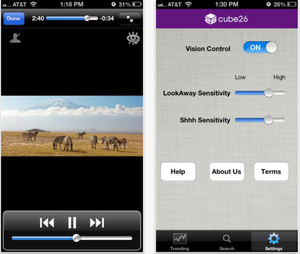
Sensitivity and Settings menu of LookAway Player

Samsung’s new eye-tracking features on its Samsung Galaxy S IV are arguably some of its coolest yet.

One of them, Smart Pause, is built right into the video player on the device and recognizes when you are watching a video. If you look away from the screen while it is playing, the GS4 automatically pauses the video for you and starts playing it again when you look back.

Many are wondering when or if a similar feature will launch on iOS. While Apple may never implement such a feature, iOS users can try out the feature.

LookAway Player for iOS is a YouTube player that includes the same look-away-pause, look-back-play features found on the Galaxy S IV. LookAway uses a technology developed by Cube26, which utilizes the front-facing camera to track eye movement.

While it is not yet clear how well the player actually works, it is available to try out yourself on the App Store.


Foursquare’s updated iPhone app brings Explore recommendations to the front page

Site default logo image

Foursquare for iPhone was updated version 6.0 today. The update brings the Explore functionality to the forefront of the app. Explore is Foursquare’s recommendation engine, which suggests attactions that users may find interesting based on their previous check-ins.

The new update brings the Explore search box to the top of the navigation bar, enabling quick access to the feature, which now serves up results faster than ever.

With the new Foursquare 6.0, we’ve crunched our billions of check-ins to instantly show you the most interesting things nearby. They’re insights that only Foursquare can deliver, the moment you open up the app. We also put search front-and-center, so you can find whatever you’re craving fast.

✓ Instantly see the best of what’s nearby. In Paris for the first time? We’ll show you the top sights and attractions, approved by local check-ins. In a familiar neighborhood? We can tell you about an up and coming restaurant that just opened up a few blocks away. Whether you’re near familiar stomping grounds or a tourist fresh off the plane, we show you the most interesting things nearby when you open Foursquare.

✓ Search is front-and-center! You can search Explore from the top of the app as soon as you open it up, so you can find what you’re craving even faster. Type what you’re looking for (like “dessert” or “park”), browse a type of place (like “Nightlife”), or tap “Best Nearby” to see our top picks in the area.

The update is avaiable for free on the App Store.

Review: Panic’s Status Board – the ultimate information dashboard for your iPad

The team over at Panic Inc. have been teasing their new iPad app on their blog and Twitter all week, and today the app known as Status Board hits the App Store.

The Oregon-based software company is largely known for their OS X FTP client Transmit, but entered the iOS space in April 2011 with the launch of Prompt, their SSH client for iPhone and iPad, followed by their affectionately named web editor Diet Coda this past May. This marks the third year in a row that Panic has released an entirely new app on the iOS platform.

Let’s jump right on board:

Expand Expanding Close
Site default logo image

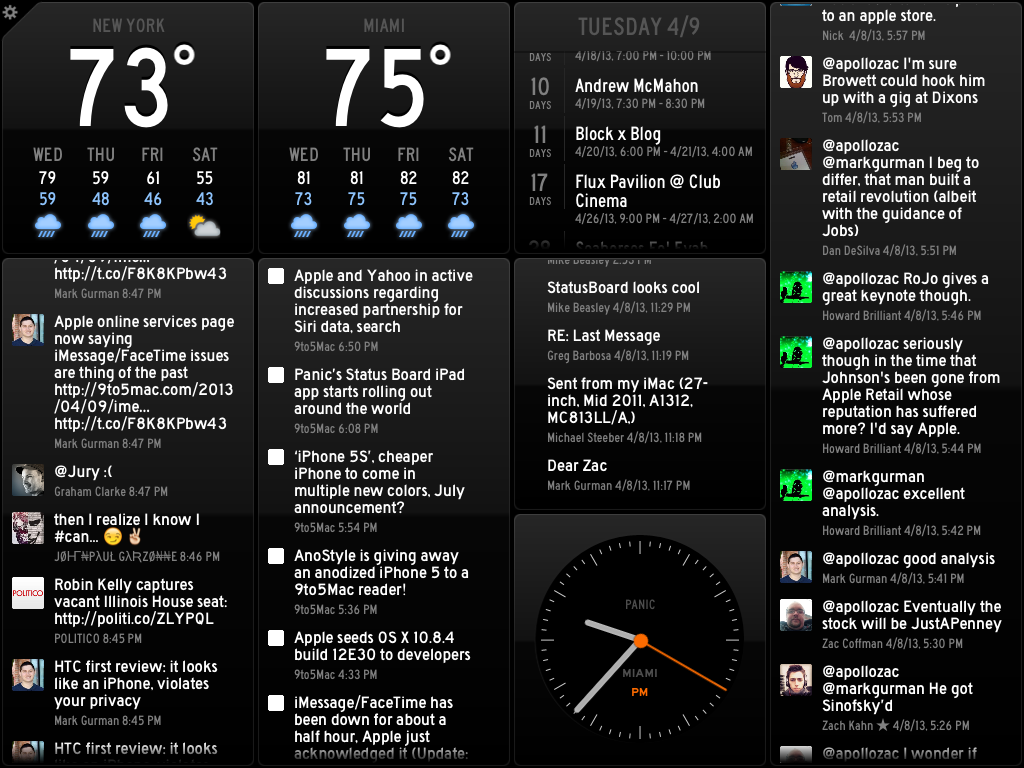
Panic’s Status Board iPad app starts rolling out around the world

Popular app developer Panic’s new Status Board application for iPad has begun rolling out around the world. We’ve spotted it in the Australia iTunes Store and in some other regions. Update: Now available in the U.S. Store. 

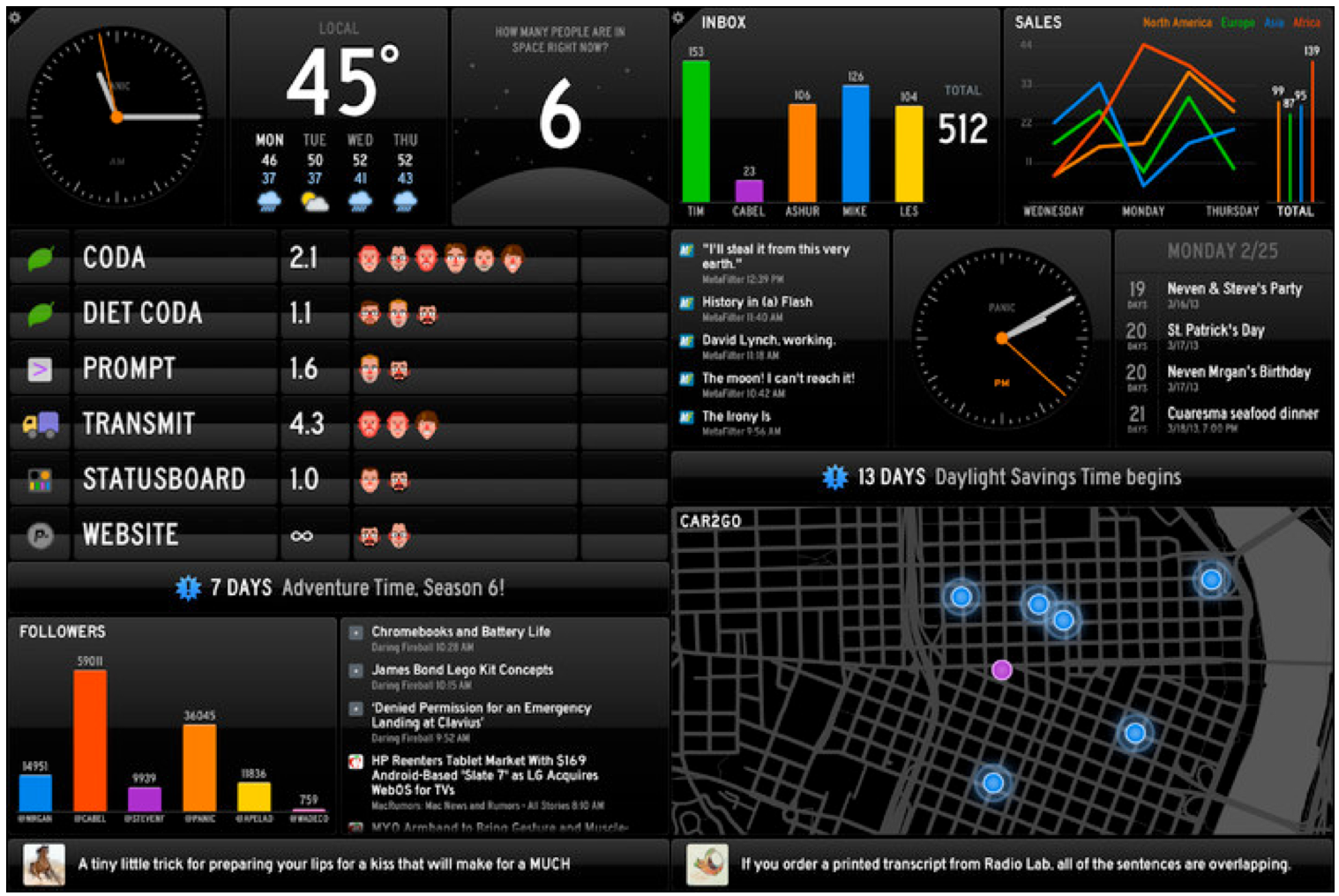
Use the easy built-in panels to automatically see data about your life: calendar, tweets, e-mail, weather, news, and more. Or, use the pro panels, Graph and Table, with your own customized data sources, to see relevant data about your business or organization.

Based on the App Store description and screenshots, it appears that this application is sort of like a “dashboard” for your iPad’s display.

The app allows you to add clocks, weather, your calendar, new emails, Twitter updates, and feed headlines, according to the App Store description.

In Australia, the app is priced at $10.49. This translates to $9.99 in the U.S. store.

We will have a full review up when the application is available in the U.S. iTunes Store.

Update: The app is out, here’s our full review. 


Expand
Expanding
Close

Site default logo image

Amtrak for iOS updates with iPhone 5 support and Train Status redesign

Amtrak revamped its official app today with support for iPhone 5.

The support—like timing for its trains— is a few months late, but the latest version makes up for the wait with a complete redesign of the Train Status feature. Amtrak said the tweaked UI better presents information, but the national railroad corporation also recommended users update to iOS 6.1 before using the latest version of its app.

Check it out:

Version 1.5 also reduces Facebook alerts for Amtrak eTickets and removes the 24-hour-wait limit for creating a new account or changing an existing account. Moreover, new accounts are available immediately. Amtrak said changes will launch when the app starts, and it included numerous, unspecified big fixes to improve performance.


Expand
Expanding
Close

Site default logo image

TweetDeck for Mac updated with column & content filters, advanced search, wide columns, much more

Twitter today released a big update to its popular TweetDeck Mac App Store app, bringing a long list of highly requested features like enhancements to filters, columns, fonts, and key commands.

Version 2.7.1 of TweetDeck for Mac introduces new column filters, the ability to filter columns by content type, Users filters on columns, and a new ‘wide column setting’. Also included in today’s update is a new “powerful advanced search”.

When it comes to Content filters, you can now filter by “media, RTs, including and excluding terms.” Meanwhile, the new Users filters will let you view “verified users, members of a list and more.”

Other new features in today’s release include new font size settings, the ability close windows using CMD+W, verified badges when searching lists, and an option to enable infinite scroll in temporary columns. The release notes pointed out that Spacebar would also now trigger a page down event.

A full list of what’s new is below:

What’s New in Version 2.7.1

➤ Introduced column filters and powerful advanced search
➤ Added Content filters to columns and search including ability to filter by media, RTs, including and excluding terms
➤ Added Users filters to columns and search including ability to filter by verified users, members of a list and more
➤ Added wide column setting
➤ Added new font sizes to settings
➤ Spacebar now triggers page down event
➤ Cmd+W closes windows
➤ Social proof for favorites & RTs in detail view
➤ Added verified badge to list searches
➤ Enabled infinite scroll in temporary columns

Site default logo image

Automatic Link brings your car’s on-board diagnostics to the iPhone, available for pre-order now

http://www.youtube.com/watch?feature=player_embedded&v=_AyXNeRbpRk

Automatic Link is a new hardware dongle for your car that is launching today and will allow you to monitor on-board diagnostics directly on your iPhone. On top of monitoring on-board diagnostics, such as braking, speeding, and rapid acceleration by connecting the Automatic Link to your car’s data port, the app will also include a feature that automatically reports crashes, the ability to locate your vehicle, check engine health, and provide “subtle audio cues when you do things that waste gas.”

The Automatic Link talks to your car’s onboard computer and uses your smartphone’s GPS and data plan to upgrade your car’s capabilities. It works with just about any car sold in the United States since 1996…The Automatic Link includes a built-in accelerometer that can detect many types of crashes. Automatic uses your phone’s data connection to immediately report the crash to 911* with your name, location, and vehicle description.

The Automatic Link is now available for pre-order from the company’s website for $70, with shipments and the companion app expected to land sometime in May. You can also check the make and model of your vehicle on the pre-order page to find out if your car is compatible.

  • Your Drive Score: Automatic gives you personalized feedback on your driving with your weekly drive score on a scale from 0-100. The drive score is based on metrics shown to increase fuel efficiency and safety, like braking and accelerating smoothly. A high score could save you hundreds on gas every year.
  • Your Trips in a Timeline: The Automatic app displays detailed information about where you go and how much gas it cost to get there. It shows you the actual MPGs you achieve for all your trips, even for older cars that don’t display fuel efficiency on the dashboard.
  • Parking Reminders: Automatic always knows where you parked your car, helping you find it again easily.
  • Crash Alert: If you’re ever in a crash, Automatic alerts emergency services with your location. It can even contact your loved ones to let them know what happened and that help is on the way.
  • Keep Your Engine Healthy: Automatic connects with your car’s computer whenever you drive and can tell you why that “check engine” light came on. It can decode the problem and in many cases offer a solution. The app even lets you clear the light yourself and save a trip to the mechanic.

Down-to-the-wire holiday gift guide: app-enabled accessories (and Swingbyte giveaway!)

Site default logo image

.

It’s Thursday and you have four days to get the perfect Christmas gift, but have no fear…9to5Mac is here. O.K., enough with the cheese, let’s talk app-enabled accessories. Oh, man, I need to stop.

But, seriously, app-enabled accessories are the perfect gifts: they come in a variety of price ranges and work with a variety of iOS apps. So, we looked at a few popular, unknown, pricey, and not-so pricey ones and rounded them up below. Hopefully, this guide will give you a few ideas and inspire you to go shopping A.S.A.P.

Note: If you buy through Amazon, and are an Amazon Prime member, you could get many of these products shipped overnight for just $3.99 each.

Scroll to the bottom for details on the giveaway.

1. Ion All Star Guitar | Amazon sale: $93.15 (reg. $129.99)

Ion launched this nifty toy in the fall, and it is really, really cool. Think Guitar Hero…but for jammers and free-stylers. Like Ion’s popular iCade line, it charges with AA batteries. So, no wires and no fuss. It also fits any iOS device. A padded storage compartment adjusts to fit the iPad, iPhone, or iPod Touch, and there is room to plug in a Lightening adapter (not included).

The built-in speakers pump out great volume, but there is also a headphone output for silent practice, and it has electric, acoustic, and bass guitar effects. The guitar, which is useable by both left-handed and right-handed folks, works best with the All-Star Guitar app that comes with 10 free songs pre-loaded, with access to additional songs for download, but it also works well with Garage Band and WI Guitar.

It’s packed with features, feels sturdy, and is definitely a cool gift for the musically inclined. Oh, and it seems like a neat way to learn guitar.

www.ionaudio.com

More accessories are below.


Expand
Expanding
Close

Site default logo image

Google makes Quickoffice iPad app free to Google Apps for Business customers

Google made some announcements today regarding its work with the Quickoffice team since acquiring the company in June. On top of noting work to take advantage of Quickoffice conversion technology in Google Docs, Google launched a free version of the QuickOffice iPad app exclusively for Google Apps for Business customers today. There are also free iPhone and Android versions of the app for creating and editing Word, Excel, and PowerPoint files coming to Apps customers in the near future:

Converting old files to Google Docs, Sheets and Slides is the easiest way to share and work together, but perhaps not everyone you work with has gone Google yet. To complement what you can do with Google documents, we’re also making it easier for you to make quick edits to Microsoft Word, Excel and Powerpoint files without conversion. Starting today, the Quickoffice iPad app is available for free to all Apps for Business customers, and iPhone and Android versions are on the way.

Vice President of Google Enterprise Amit Singh welcomed the announcement on his Twitter account: “Customers can now get Quickoffice for free. No need to license microsoft for your ipad.”

[tweet https://twitter.com/aksingh77/status/281531037249581056]

Site default logo image

Facebook joins the local discovery and sharing game with updated Nearby feature (video)

[youtube=http://www.youtube.com/watch?v=FqocJOQMVwQ&feature=youtu.be]

Facebook just announced an update to Facebook for iOS and Android that helps users discover new places their friends like.

The latest version of the popular app features a refreshed Nearby tab, which, according to a post on the Facebook Newsroom website, now shows recommendations from friends:

From the app menu, open the tab to find local spots your friends have recommended, checked into, or liked. If you’re looking for a place to eat, choose a category like Restaurants to see what’s nearby. When you find a place that looks interesting, tap to see info like friends who’ve been there and business hours.

The new Facebook for Android and iOS further allows users to share their own opinions by rating or recommending places. Facebook warned the update is an early release, however, and “there’s lots more to do.” So, results will improve the more people use Nearby.

“We also plan to add places info from third party services in the near future,” Facebook explained.


Expand
Expanding
Close

Site default logo image

Four years on, almost 1M apps have been built for iOS

As we arrive on four years of the iOS App Store being made available, Apps Fire (via The Next Web) pointed out this morning that the thriving app marketplace will reach 1 million total apps approved for iOS. Apps Fire tweeted that the milestone will be reached later today; however, The Next Web said it confirmed that Apple reached 1 million total apps, already.

[tweet https://twitter.com/appsfire/statuses/270437631664476160]

According to AppShopper, another app discovery service that tracks the App Store, the current number of approved apps by Apple sits at 995,382. As for the number of apps actually available for download on the iOS App Store, there are 714,883. At any rate, it’s clear that Apple has/will reach the milestone—even if publicly announced or not.

During the iPhone 5 launch event in late-September, Apple announced that its average customer now uses over 100 apps. Chief Executive Officer Tim Cook said, “It’s been an absolute revolution. It’s phenomenal. Together with the incredible products, these have helped us achieve an incredible milestone.”


Expand
Expanding
Close

Site default logo image

Facebook iOS app adds ‘save it for later’ feature

As pointed out by iMore, the Facebook iOS app added functionality allowing you to save posts to a new “Saved” folder. Others are not notified when you save posts, and posts must be unsaved to be removed from the folder. The new feature does not require an update from the App Store (it is also rolling out on Facebook.com), but Facebook will notify you in the timeline.

To access your Saved folder, you must first scroll to the bottom of the sidebar menu and tap on Edit Favorites. Next, tap the + sign and select Saved from your list of Apps. Then tap Done. Now, you should see your Saved folder in the Favorites section of your sidebar menu!

Site default logo image

Amazon’s Kindle app now supports 1000 titles for children’s books, graphic novels, and comics

Amazon just bulked its Kindle app for iOS, Android, and its Cloud Reader by adding children’s books, comics, and graphic novels that were previously exclusive to Kindle Fire owners.

The apps now offer over 1,000 titles for children with features like Text Pop-Up, which help to improve and simplify the reading experience, and Kindle Panel View for comics and graphics to allow panel-by-panel viewing. A few of the literary additions include Brown Bear, Curious George, Batman, and Superman.

The iOS version also touts a new Search option to locate content by title or author. Meanwhile, Android tablet owners, or those with Cloud Reader on a widescreen display, will notice the ability to customize their reading experience with new margin and line spacing controls and side-by-side viewing of two pages in landscape mode.

The Kindle for iOS app is free on the App Store and boasts a 3.5-star rating based on over 165,000 reviews as of press time.

This article is cross-posted on 9to5Google.


Expand
Expanding
Close

Site default logo image

Tweetbot 2.3 adds new Gestures and Storify integration

Tweetbot, the Twitter app that everyone seems to be raving about, was given a hefty update this morning with a slew of new features. The app now features integration with the story curation service Storify, a new tweet detail view, support for the file sharing service Droplr, high-resolution image uploads when on Wi-Fi, a load of new gestures, and more. At this rate, it seems the Tapbots team is releasing an update for Tweetbot every few weeks. The last update added iCloud timeline sync and DM read statuses.

All of these updates are great, but I think what we are really waiting for is Tweetbot for Mac. The Tapbots team is rumored to be working on such an application, and with all the success that the iOS app has seen, we can predict the same for the Mac app. Let’s hope it lands in the near future.

You can check out the rest of the new features for version 2.3 after the break. Tweetbot is available on the App Store for $2.99.


[tweet https://twitter.com/tweetbot/status/196984712777056256]


Expand
Expanding
Close

Khan Academy launches iPad app with complete library of over 2,700 educational videos

Site default logo image

Although there are a few unofficial apps in the App Store that allow you to access content from the Khan Academy, the online education portal just launched an official iPad app. Available free in the App Store now, the app provides access to the organization’s 2,700-and up educational videos. The videos cover a range of subjects from K-12 math and science to history and finance. The biggest difference between the new official app and those from third-party devs is that you can now log in to your Khan Academy account; get credit for watching videos, and track goals and achievements from within the app. The app also provides fully subtitled videos with the ability to browse by subtitle, an enhanced video scrubber, and lets you download videos and playlists for offline viewing.

Spend an afternoon brushing up on Statistics. Discover how the Krebs cycle works. Learn about the fundamentals of Computer Science. Prepare for that upcoming SAT. Or, if you’re feeling particularly adventurous, learn how fire stick farming changed the landscape of Australia.

The app does not currently include actual exercises offered through KhanAcademy.org to go with the videos, but the service promises they are “coming soon.” According to FastCompany, there is also a feature to sync progress between devices. You can grab the free Khan Academy app here.
Expand
Expanding
Close

Marvel Comics comes to iBooks: ‘New Avengers Vol. 1: Breakout’ is free for a limited time

Site default logo image

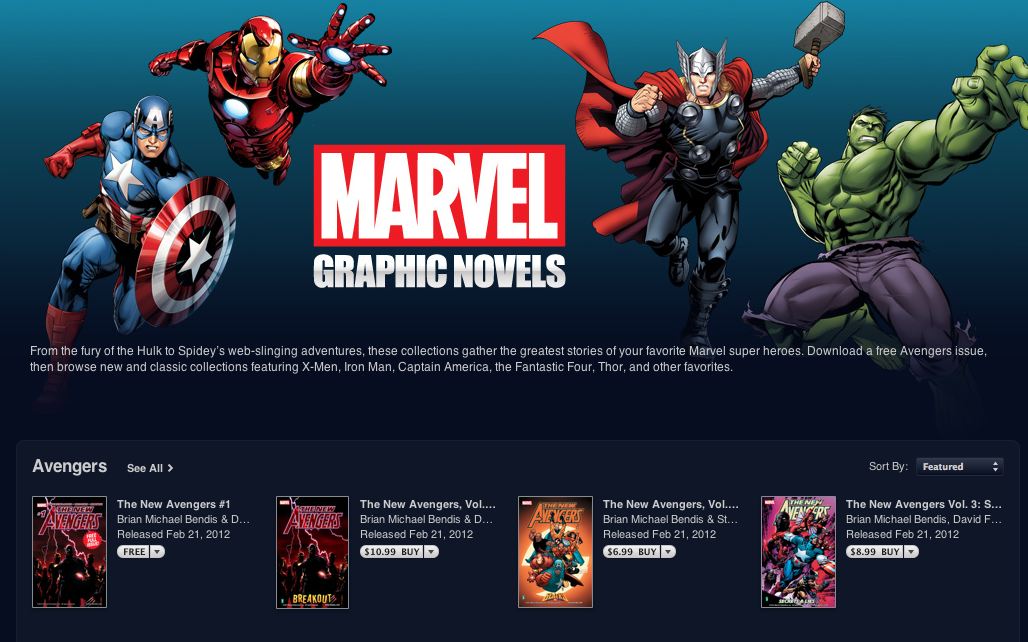
Marvel announced today that comic fans around the globe could now launch the iBooks app and buy its classic graphic novels.

The publisher said it “entered a bold new era in digital comics” with the release of iconic Marvel stories and characters on the free iOS e-book application:

“With an iPad, iPhone, or iPod touch, Marvel fans across the world can now purchase over 80 graphic novels with fan-favorite characters like Thor, Captain America, Iron Man, Hulk, Wolverine, Spider-Man and more by launching the iBooks app,” wrote the company on the Marvel Comic News website.

Fanatics can visit the Marvel Graphic Novels section on the iTunes Store to start downloading the graphic novels today. Prices currently range from free to $24.99.

The publisher promises to add more titles to the choice each week for a “truly digital comic book reading experience that customers will never forget.”

Moreover, “New Avengers Vol. 1: Breakout” is available free of charge for a limited time. As of press time, the e-book had a 4.5-star rating. There are also literary-adapted graphic novels available for children (“Wonderful Wizard of Oz“) and adults (“Pride & Prejudice“) alike, including a pre-order option for “Marvels.

It is worth noting that the Walt Disney Company bought Marvel Entertainment in 2009 for over $4 billion. Apple’s late cofounder and CEO Steve Jobs was a Disney shareholder and served on its board of directors until August 2011.

A complete list of Marvel’s iBooks offerings is available below.


Expand
Expanding
Close

Sprint launches official ‘Sprint Zone Mobile’ iPhone app

Site default logo image

Since the iPhone 4S landed on Sprint in October, users have not had access to an official Sprint iOS app to manage their account similar to what other iPhone carriers provide. Now the carrier has launched its new “Sprint Mobile Zone” app (via SprintFeed) that allows users to manage their online accounts, access promotions and Sprint news, and more. Despite account access seemingly just serving websites from the carrier’s existing browser experience, in contrast to the un-installable carrier apps on Android, this is how all carrier apps should be.

In addition to the features mentioned above for Sprint customers, both Sprint and non-Sprint iPhone users will be able to access “Device Info” with the usual battery statistics, data connections information, and available resources. There is also an Apple and Sprint store locator and quick links to Sprint support and Apple Care. Get the free app now for iOS devices running iOS 5.0 and up (iTunes link).


Expand
Expanding
Close

Google rolls out updated Gmail iOS app with custom signatures, vacation responders, Scribbles, more

Site default logo image

Google has just started rolling out an update to the Gmail app for iPhone, iPad, and iPod touch with a few new welcomed features. First off, users now have the ability to set a custom signature for messages as well as a vacation responder. Both of those new features will be available via the gear icon at the top of the app’s new menu. The update also includes support for nested labels and the usual “bug fixes and UI improvements”.

A new Scribbles feature allows you to open a canvas, draw a picture or sketch with multiple colors, brush sizes and line elements, and attach it to a message within Gmail. Scribbles is available now in both the Gmail iOS app and Gmail mobile web app. Another notable and highly requested change is a new notification sound on iOS 5, making it easier to tell when you’ve received an email

Google also mentioned in their blog post that they are continuing to work on some of the most requested features from users including multiple login support, banner notifications, and a “send as” feature to send mail from multiple accounts within the app.

Expand
Expanding
Close

BBC iPlayer app lands on iPhone and iPod touch with 3G streaming

Site default logo image

We heard at the beginning of the month that BBC’s iPlayer iPad app would be getting an iPhone and iPod touch version in the coming weeks and today the app has officially landed for UK users. To accompany the release, the app will also be able to stream content over all 3G networks and now officially supports AirPlay on iOS 5.

The company’s blog post notes a ‘Live Channels’ feature will allow you to quickly switch between BBC channels just like on radio and TV, and all BBC national radio stations support background audio for multitasking. They have also made improvements to streaming by introducing HTTP Live Streaming using adaptive bitrate technologies, allowing the app to adjust your streaming quality based on your connection speed. The web version of the app accessible at bbc.co.uk/iplayer will also soon get 3G streaming capabilities.  
Expand
Expanding
Close

OnLive brings cloud gaming service to mobile with iPad and iPhone app

Site default logo image

OnLive has just announced (via TechCrunch) a new iPad app capable of accessing their cloud game streaming service previously only available to PC, Mac, and OnLive console owners. Launching in the US and UK first, 25 console titles have been ported to the smaller screen with touchscreen controls, and almost all 200 of the service’s library of console quality titles will be playable via the $50 OnLive wireless controller.

The OnLive service allows streaming of console quality games like Assassins Creed, L.A. Noire, and other titles typically reserved for consoles like the PS3, directly from the company’s servers. The service has received mixed reviews, mostly due to inconsistencies in performance. The same appears to be true for the mobile version, with an early hands-on by TechCrunch highlighting the same performance issues common on PCs. These are “console-class” games, but not always a console quality experience. It’s playable, but really laggy.

The free app should be launching in the App Store any second now, and will still of course require that you purchase or rent the games. Fortunately, any purchased or rented content is instantly playable through any compatible device. You can check out a full list of titles that have been ported with touch controls here. IGN already got their hands on the app for iPad (video below), and they seem to have better first impressions than TechCrunch:

Expand
Expanding
Close

Facebook iPad app to be announced at upcoming Apple event?

Site default logo image

Mashable is reporting that Facebook’s long-awaited iPad app will be announced at Apple’s upcoming event, which will most likely occur on October 4th. In addition to the iPad app, Facebook will reportedly be launching a revamped iPhone app and new HTML 5 version of the mobile site.

You may remember that the iPad app was leaked earlier this year, but was subsequently removed from within the iPhone app. According to a post from former Facebook engineer Jeff Verkoeyen the app is ready, and Facebook is waiting to release it. An event alongside Apple seems somewhat logical, though the companies don’t have the greatest history with each other.

Perhaps most importantly, Apple is said to be integrating Facebook into its iOS 5 the way Twitter is now integrated. Facebook was integrated into prototype versions of iOS 4 but a falling out between Zuckerberg and Apple got them kicked off (screenshot below).

.

Though Facebook wants to move to HTML 5 as their main platform, they will also be releasing a revamped iPhone app with speed improvements according to the report. If true, October 4th is sure to be a big day with the unveiling of the next iPhone, iOS 5, and now the Facebook iPad app.

A few more screenshots after the break:


Expand
Expanding
Close

Explore the history of nearby locations with the Historypin iPhone app

Site default logo image

[youtube=http://www.youtube.com/watch?v=FdT3eKdto4w&feature=player_embedded]

Historypin, a user-generated map displaying historical data of nearby locations, is now available as an iOS app for iPhone, iPad, and iPod touch. Created in partnership with Google by not-for-profit We Are What We Do, the app allows users to add their own historical photos by pinning them to a map, capturing historic moments as they happen, and creating replicas of historical images. The images are then shared with users requesting data for a specific location….

Historypin uses Google Maps and Street View technology to reveal the user-generated photos and data related to historical events that happened close to your current location. It does this by “overlaying them onto the live camera view”…essentially aiming to give you a live snapshot of what your surroundings looked like in the past.

Simply holding your phone up in the street will provide you with relevant nearby images. Selecting one of the images allows it to be overlaid onto the iPhone’s camera view. You can then fade between the image and your live shot for comparison, as well as pull up stories and data related to the image and your current location.

Full list of features and some shots of the app in action after the break…

Expand
Expanding
Close

LinkedIn introduces updated iPhone and Android apps, releases HTML 5 mobile site

Site default logo image

[youtube=”http://www.youtube.com/watch?v=Q-VARh15ZJE&feature=player_embedded”]

LinkedIn has announced a new HTML 5 optimized page for mobile browsers and updated iPhone and Android apps with 2-10X speed increases.

The new app is now focused around four key areas: Updates, Inbox, You, and Groups & More.

The Inbox will allow you to view your messages and invitations in one centralized location. The You area presents your profile, connections, and to share updates. Lastly, LinkedIn is now introducing their most requested feature Groups, into the app.

Interestingly, LinkedIn also announced their mobile platform is growing 400 percent year-over-year. Check it out in your mobile browser, or hit the download links below:

Download iPhone Download Android
Expand
Expanding
Close